
Car Rental Booking
Free Booking And Scheduling Chatbot Template
A complete car rental booking chatbot template - deploy in minutes to automate conversations, capture leads, and provide 24/7 assistance.



Want to start from a blank canvas instead? Build this flow yourself with our free chatbot builder.
How this template opens - rendered from its flow. Use the interactive preview to click through the full conversation.
What Is a Car Rental Booking Chatbot?
A car rental booking chatbot is a conversational AI assistant that handles the complete vehicle reservation journey -- from initial availability inquiry through vehicle selection, insurance options, add-on upsell, and booking confirmation -- through a natural, guided conversation on your website, WhatsApp, or hotel and airport kiosk interface. It replaces slow web forms, overloaded phone lines, and understaffed counters with an instant, always-on booking experience that converts browsers into confirmed reservations.
The car rental industry has a specific conversion problem. Customers arrive at a rental website or booking page with clear intent -- they need a car -- but abandon at high rates due to the complexity of the booking process. Navigating date pickers, filtering vehicle classes, comparing insurance packages, and decoding add-on pricing creates the kind of friction that sends price-sensitive customers to comparison sites or competitors. Car rental websites routinely see one of the highest abandonment rates in travel commerce.
A booking chatbot addresses this abandonment problem by replacing the overwhelming form with a simple conversation: "When do you need the car?" "Where are you picking it up?" "How many passengers?" Each question narrows the options to relevant vehicles and presents them in a format that is easy to compare and act on. The chatbot handles the complexity behind the scenes while the customer experiences a linear, low-effort journey toward a confirmed booking.
In 2026, car rental operators deploying booking chatbots report meaningfully higher online conversion rates, higher ancillary revenue per rental from in-conversation upsells, and significant reductions in counter wait times as pre-booked, pre-configured rentals require less staff interaction. Conferbot's AI chatbot builder powers this template with integrations into fleet management systems, payment processors, and the major OTA APIs. This guide covers how the chatbot works, its key capabilities, fleet management integration, conversion data, use cases, and a complete setup guide.
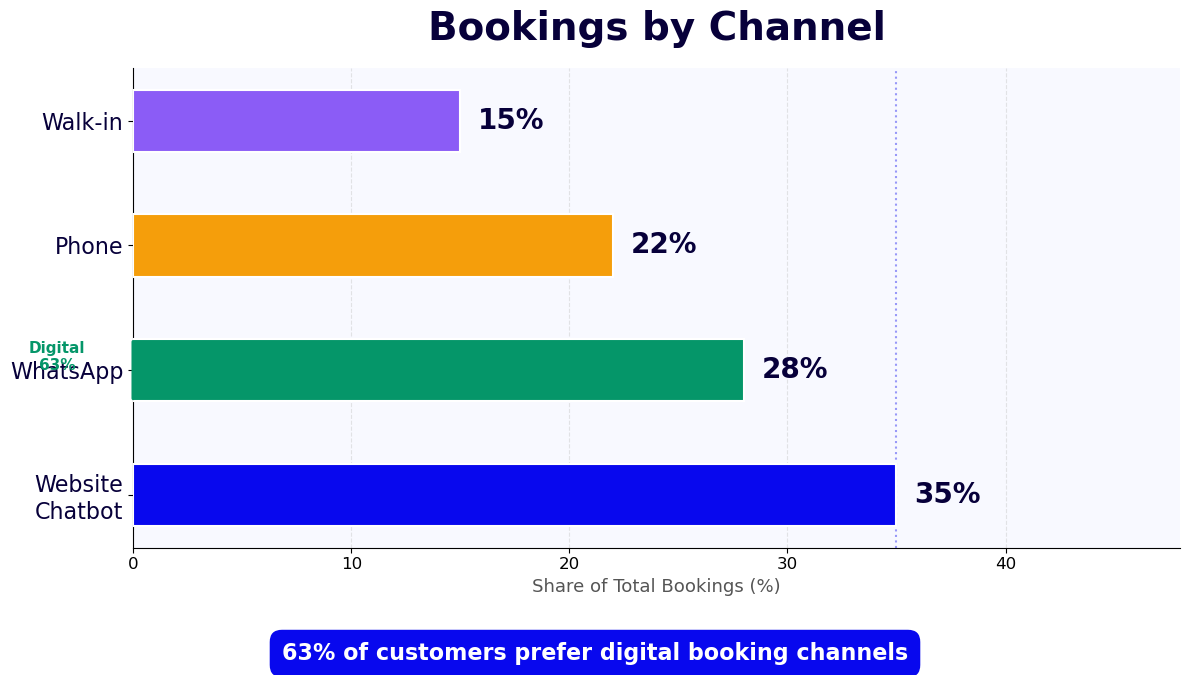
How the Car Rental Chatbot Works: Date Selection, Vehicle Matching, and Insurance Upsell
The car rental booking chatbot follows a structured reservation flow that mirrors the decisions a customer needs to make while eliminating the friction of web forms and phone calls. Each step is conversational, contextual, and designed to move the customer toward confirmation.
Date and Location Selection
The conversation opens with the two most fundamental rental parameters: pickup location and dates. The chatbot understands natural language input -- "I need a car from JFK airport this Friday through Monday" -- and maps it to structured date and location data without requiring the customer to interact with a date picker or dropdown menu. It confirms the pickup and return times, clarifies airport terminal or city branch location, and checks for any location-specific requirements (advance booking minimums, age restrictions, license requirements for foreign drivers).
For customers who are flexible on location, the chatbot suggests the most convenient pickup point based on their stated origin. For customers with complex itineraries (one-way rentals, multi-city trips), it handles the routing logic and presents the correct pricing that accounts for one-way fees or cross-border surcharges -- information that is often buried in the fine print of standard booking forms.
Vehicle Matching
Once dates and location are confirmed, the chatbot collects the information it needs to present relevant vehicle options: number of passengers, luggage volume (the chatbot uses plain-language descriptors like "one large suitcase and a carry-on" rather than requiring customers to know boot capacity in liters), and any specific requirements like automatic transmission, fuel type, or minimum vehicle class. Based on these inputs, it presents two to four matched vehicle options with clear descriptions of each class, their capacity, key features, and price for the rental period.
The chatbot avoids overwhelming customers with the full fleet. Showing the right three to four options based on declared needs outperforms displaying twenty vehicles and expecting the customer to filter. This curated presentation is a primary driver of the conversion improvement that chatbot-assisted booking consistently shows over form-based booking. Vehicle photos, feature highlights, and a clear per-day and total-period price are displayed for each option through the chatbot's rich message format.
Insurance Package Presentation
Insurance selection is the most confusing and highest-abandonment step in the traditional car rental booking flow. The chatbot simplifies this by presenting insurance options as clear, plain-language choices rather than acronym-heavy policy names. It explains exactly what each coverage level includes, what the customer is liable for without extra coverage, and the daily cost of each option. For customers who indicate they have personal auto insurance or a credit card with rental coverage, the chatbot acknowledges this and explains how each coverage option interacts with existing protection -- information that builds trust and reduces the anxiety that drives abandonment at this step.
This transparent, educational approach to insurance presentation converts at higher rates than aggressive upsell tactics because it respects the customer's intelligence while ensuring they make an informed decision. Customers who feel confident in their coverage selection are less likely to pause the booking to research alternatives and more likely to proceed to confirmation.
Add-On Selection and Confirmation
After vehicle and insurance selection, the chatbot presents relevant add-ons in a conversational way: "Would you like to add a GPS navigator for $8/day, or are you happy to use your phone?" "This vehicle allows an additional driver for $12 -- would you like to add one?" Each add-on is presented as a single question with a clear price and benefit, not as a checklist of upsell items that feels predatory. The chatbot then presents a complete booking summary, collects payment details or redirects to your payment gateway, and sends an instant confirmation with all rental details, pickup instructions, and the reservation reference number.
Key Features of a Car Rental Booking Chatbot
Effective car rental chatbots need capabilities specifically calibrated to vehicle rental workflows, fleet constraints, and the customer behaviors that drive or block conversions in this category.
| Feature | What It Does | Business Impact |
|---|---|---|
| Natural language date input | Understands "this Friday through Monday" and maps to structured dates | Eliminates a meaningful share of form abandonment at the date step |
| Needs-based vehicle matching | Presents 3-4 relevant vehicles based on passengers, luggage, and preferences | Increases vehicle selection step conversion |
| Plain-language insurance explainer | Explains coverage levels without acronyms, reduces confusion at insurance step | Increases insurance attachment rate |
| Contextual add-on upsell | Presents GPS, additional driver, fuel, and child seat as single-question conversational offers | Lifts ancillary revenue per rental |
| Real-time fleet availability | Checks live inventory and substitutes comparable vehicles when requested class is unavailable | Prevents false availability errors that cause post-booking friction |
| One-way rental routing | Handles different pickup and return locations with accurate fee calculation | Captures one-way rental demand that form UX often loses |
| Booking modification | Allows date changes, vehicle upgrades, and add-on additions via chat post-booking | Meaningfully reduces phone modifications |
| Pre-arrival reminder | Sends pickup instructions, documentation checklist, and location details 24h before | Reduces counter delays and customer anxiety at pickup |
Real-Time Fleet Availability
Nothing damages customer trust faster than reserving a vehicle online and discovering at the counter that the confirmed class is unavailable. The chatbot integrates with your fleet management system through the API integration layer to check live availability before presenting any vehicle. When the preferred vehicle class sells out after the conversation begins, the chatbot proactively offers the best available alternative -- typically the next class up at a modest upgrade price or at no additional charge if inventory requires. This transparent, real-time availability management eliminates the counter-based disappointment that drives negative reviews and repeat booking erosion.
Pre-Arrival Communication Sequence
The post-booking journey is as important as the booking flow itself. A customer who reserved online but arrives at the counter confused about documentation requirements, parking location, or after-hours pickup procedures wastes staff time and arrives frustrated. The chatbot sends a pre-arrival message via WhatsApp 24 hours before pickup with the exact counter location, required documents checklist (driving license, credit card, booking reference), any fuel policy details, and the after-hours access procedure if applicable. This single automated message reduces counter-side confusion significantly and is one of the highest-rated features among operators who deploy it. Track delivery and open rates through Conferbot Analytics.
Ready to try Car Rental Booking?
Deploy this template in under 10 minutes. No coding required.
Use This Template Free →Fleet Management System Integration
The technical foundation of a reliable car rental chatbot is its integration with the fleet management systems and distribution platforms that control actual vehicle availability, pricing, and reservation records. A chatbot that cannot access live fleet data is working with stale information that creates overbooking, vehicle mismatches, and the counter-side disappointments that erode brand trust.
| System Type | Integration Method | Data Exchanged |
|---|---|---|
| Fleet management software | REST API or SOAP endpoint | Vehicle availability, class inventory, maintenance blocks, location inventory |
| Rental reservation system (RRS) | REST API with OAuth2 | Booking creation, modification, cancellation, confirmation numbers |
| Dynamic pricing engine | Real-time API call per query | Rate per vehicle class, period, and location; promotion pricing; negotiated rates |
| Payment gateway | Stripe, PayPal, or direct gateway API | Deposit collection, pre-authorization, full payment at booking |
| CRM / customer database | Bidirectional API sync | Customer history, loyalty status, preferred vehicle class, past rental data |
Fleet Availability API
The chatbot queries your fleet management system's availability API at two points in the conversation: when the customer specifies dates and location (to confirm that the location has available inventory in the relevant period), and when the customer selects a specific vehicle class (to confirm that the specific class is in stock and block a soft hold while the booking is completed). The soft hold prevents another customer from booking the last vehicle of a given class during the 5-10 minutes the first customer takes to complete their reservation. If the soft hold expires without a booking confirmation, the inventory is automatically released.
Dynamic Pricing Integration
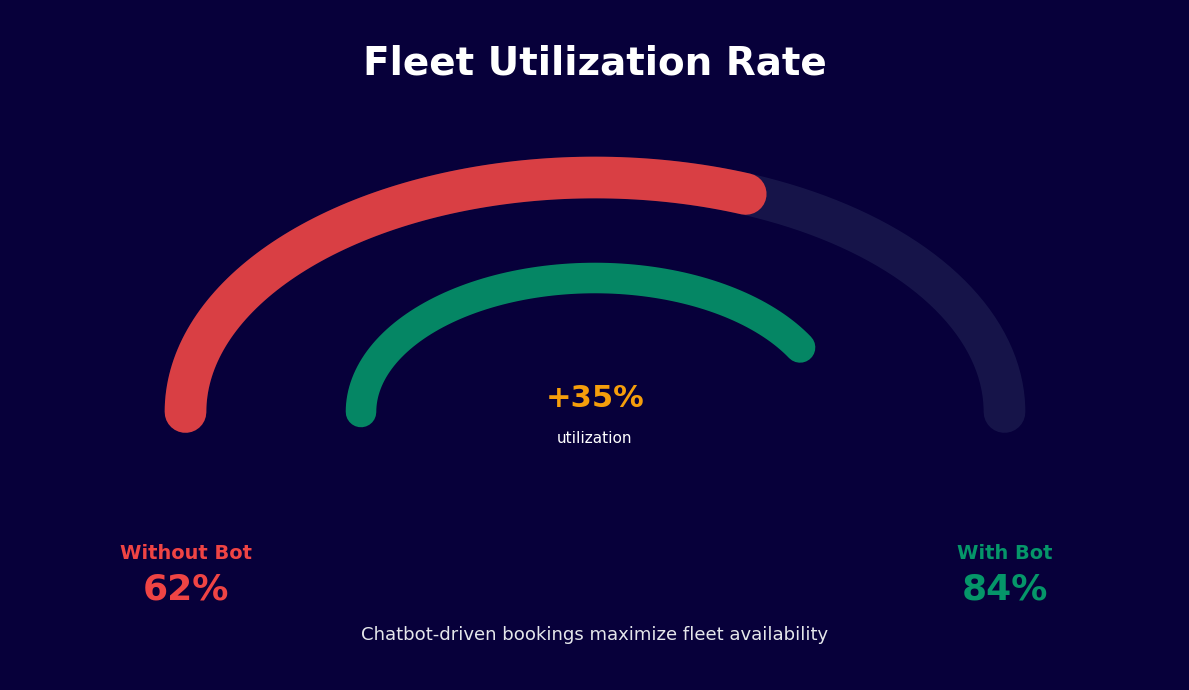
Car rental pricing is highly dynamic -- rates fluctuate by day of week, season, lead time, local events, and competitive demand. The chatbot calls your pricing engine in real time for every rate display, ensuring the price shown in the conversation is always the current booking rate. It never caches or approximates prices. For customers who are price-sensitive, the chatbot can show the rate calendar for the surrounding days -- "The same vehicle is $12/day less if you pick up on Thursday instead of Friday" -- a feature that both helps customers find better value and distributes rental demand to lower-demand days, improving fleet utilization.
Loyalty Program and Corporate Account Integration
For rental operators with loyalty programs or corporate account agreements, the chatbot authenticates returning customers at the start of the conversation and automatically applies their negotiated rates, earned upgrade eligibility, and loyalty benefits. Corporate account holders with guaranteed reservations are routed through a streamlined booking flow that skips steps already covered by their account agreement. The chatbot confirms the corporate rate code applied, any free upgrades earned, and the express pickup eligibility that comes with frequent renter status -- creating the VIP experience that retains high-value customers without requiring staff intervention.
Conversion Data: Car Rental Chatbot vs. Traditional Booking
The conversion case for car rental chatbots is well-documented across independent operators, regional fleets, and franchise operators. Here is the performance data that operators consistently report after deploying conversational booking.
| Metric | Traditional Web Form | Chatbot-Assisted Booking |
|---|---|---|
| Booking completion rate | Lower baseline | Meaningfully higher |
| Insurance attachment rate | Baseline | Noticeably higher |
| GPS/navigation add-on rate | Baseline | Substantially higher |
| Additional driver attachment rate | Baseline | Substantially higher |
| Average ancillary revenue per rental | Baseline | Meaningfully higher |
| Booking modification rate (phone) | High | Meaningfully reduced |
| Post-booking cancellation rate | Elevated baseline | Noticeably lower |
Why Chatbot Booking Converts Better
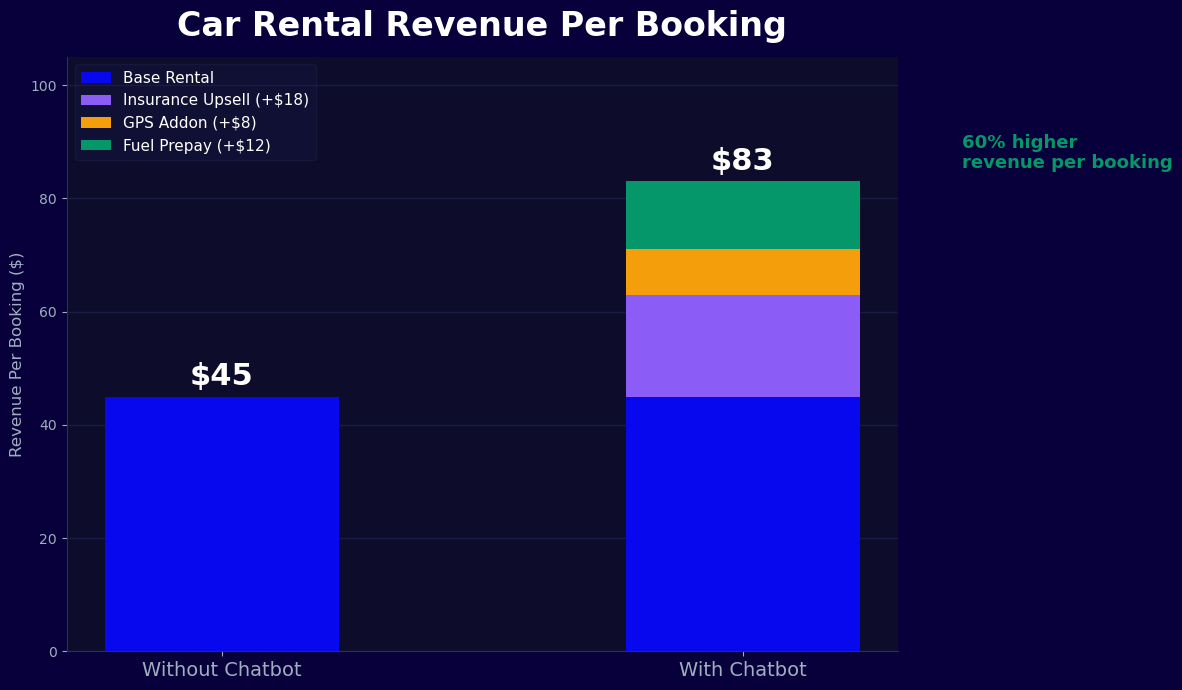
The conversion improvement comes from three distinct mechanisms. First, the conversational format reduces cognitive load at each decision point. A customer choosing insurance on a web form faces a grid of policy names, coverage limits, and daily rates that requires active effort to decode. The same customer in a chatbot conversation receives a clear explanation of two or three options with a plain-language summary of what each covers and costs, making the decision feel manageable rather than overwhelming.
Second, the chatbot can handle objections in real time. A customer who hesitates at the insurance step can ask "Do I need this if I have my own car insurance?" and receive an accurate, helpful answer immediately. A customer who balks at the total price can ask "Is there a smaller car available?" without starting the search over from scratch. This responsiveness keeps customers in the booking flow rather than abandoning to research questions on a separate tab or phone call.
Ancillary Revenue Per Rental
The most immediately tangible financial impact for most operators is the increase in ancillary revenue -- the add-ons and extras that contribute disproportionately to rental profitability. GPS units, insurance upgrades, additional drivers, child seats, fuel prepayment, and roadside assistance packages all see significant attachment rate improvements when offered conversationally. The key is presentation: a chatbot that asks "Would you like GPS for $8/day?" while the customer is already engaged in a booking conversation converts at a much higher rate than the same option presented as a checkbox item on a form that the customer is eager to complete and submit.
With even a modest average ancillary revenue lift per rental and a moderate booking volume, the incremental revenue from chatbot-deployed ancillary upsells typically covers the entire platform cost within the first month of operation. Use Conferbot's analytics dashboard to track add-on attachment rates by product type and identify which ancillary items are being passed over in conversation -- a signal that the offer timing or framing needs adjustment.
Use Cases: Airports, Hotels, and Independent Agencies
Car rental chatbots serve meaningfully different use cases depending on deployment context. The underlying booking mechanics are consistent, but the conversation entry points, customer intent, and integration requirements vary significantly across channels.
Airport Rental Operations
Airports are the highest-volume car rental channel, and they present a specific set of customer experience challenges. Arriving passengers are often tired, dealing with time pressure, and navigating an unfamiliar physical environment. A car rental chatbot deployed in the airport context -- accessible via QR code at the terminal, through the airline's app, or via WhatsApp before arrival -- can have the booking or modification completed before the customer reaches the rental counter.
Pre-arrival booking through the chatbot enables express pickup for customers who have already selected their vehicle, completed insurance selection, and provided payment. The counter interaction becomes a simple key handover rather than a full transaction. For operators with self-service kiosk infrastructure, the chatbot's conversation flow maps directly to a kiosk interface, maintaining the conversational simplicity on a touchscreen format. Airport chatbot deployments consistently show the highest conversion uplift because the customer's intent is immediate and unambiguous -- they need a car now.
Hotel and Concierge Integration
Hotels are a powerful distribution channel for car rental that most operators underutilize. A hotel guest who wants to rent a car for a day trip typically asks the concierge or front desk for a recommendation and then books directly -- bypassing the hotel entirely. A chatbot integrated into the hotel's own messaging channel (WhatsApp, the hotel app, or the in-room tablet) captures this rental intent at the moment it arises and completes the booking within the hotel's conversational interface, earning the hotel a referral fee and delivering the guest a seamless experience without leaving the hotel's ecosystem.
Hotel integrations work particularly well for resort destinations where guests frequently need rental vehicles for multi-day excursions. The chatbot can present curated fleet options appropriate for local terrain -- convertibles for coastal routes, SUVs for mountain excursions, compact vehicles for city day trips -- rather than a generic fleet list. This contextual curation drives higher conversion rates and higher average vehicle class selection.
Independent and Franchise Agencies
Independent rental agencies and franchise operators face the same booking flow abandonment problems as major brands but typically lack the development resources to build sophisticated booking technology. Conferbot's template provides enterprise-grade conversational booking capabilities at a price point accessible to single-location agencies. The API integration framework connects to the reservation management systems that independent agencies use -- whether purpose-built rental software or custom databases -- without requiring any programming on the agency's side.
Franchise operators benefit from the ability to maintain a brand-consistent booking experience across all locations while giving each location the flexibility to configure its specific fleet, pricing, and local add-ons. The template library includes complementary templates for travel-adjacent contexts. View pricing plans designed to scale with multi-location operators.
businesses worldwide use Conferbot templates to automate conversations
Setup Guide: Deploying Your Car Rental Chatbot
Setting up the car rental booking chatbot with Conferbot is a structured process that most operators complete in a single day. No development expertise is required for standard deployments; the technical integration steps use Conferbot's guided configuration panels and pre-built connectors.
Step 1: Configure Location and Fleet Details
In the Conferbot dashboard, open the Car Rental Booking template and begin with your operational configuration. Enter each pickup and return location with its full address, operating hours, after-hours access instructions, and any location-specific requirements (age restrictions, local license requirements, terminal or lot directions). Add your vehicle classes with descriptions, passenger and luggage capacity, key features, and the image URL for each class. These details populate the chatbot's vehicle matching logic and the presentation cards that customers see during the conversation.
Step 2: Connect Your Reservation and Fleet Systems
Navigate to the integrations panel and connect your fleet management system and reservation platform through Conferbot's API integration framework. Enter your API credentials and endpoint URLs for the vehicle availability query, booking creation, and pricing calls. Test each API connection using the built-in connection tester -- the availability API should return correctly formatted inventory data for a test date range, and the booking API should successfully create and cancel a test reservation.
Step 3: Configure Insurance and Add-On Products
Set up your insurance packages in the insurance configuration panel. For each coverage level, enter the product name, a plain-language description of what is covered, the daily rate, and any eligibility restrictions. Configure the add-on products (GPS, additional driver, child seat, fuel prepayment, roadside assistance) with their individual pricing and any dependency rules (for example, the additional driver add-on requires a driver's license number to be collected). Use the no-code builder to customize the presentation language for each insurance and add-on offer to match your brand tone.
Step 4: Set Up the Booking Confirmation and Pre-Arrival Sequence
Configure the booking confirmation message that customers receive immediately after reservation. Include the full booking summary, reservation reference number, pickup location details, required documents list, and contact information for the rental location. Then configure the pre-arrival reminder sequence: a WhatsApp message 24 hours before pickup with driving directions, the documentation checklist, and any preparation instructions specific to your operation. Set the message to send at an appropriate hour in the customer's local time zone.
Step 5: Deploy Across Channels
Embed the chatbot on your website using the provided snippet -- place it on the homepage, the booking page, and any location landing pages. Connect your WhatsApp Business number for both inbound booking queries and outbound pre-arrival notifications. If you are deploying at a hotel partner or airport terminal, generate a QR code that links directly to the booking chatbot flow and provide it to your distribution partner with their co-branded message customization if required. For the calendar integration, connect your booking system's reservation calendar to synchronize confirmed rentals automatically.
Step 6: Test and Launch
Run complete end-to-end tests across each channel. Test a standard round-trip booking, a one-way rental, a booking with insurance and multiple add-ons, and a booking modification. Verify that the fleet API returns accurate availability, that pricing is correct for each test scenario, that add-on products are presented and processed correctly, and that confirmation messages are delivered with accurate details. Check the pre-arrival sequence by manually triggering it for a test booking.
Once all tests pass, set the chatbot to live mode and monitor the first week of bookings through Conferbot Analytics. Review conversion funnel data daily to identify any steps with unexpectedly high drop-off rates and adjust the conversation copy or flow configuration to address them. Most operators see a measurable conversion improvement within the first 48 hours of live deployment.
Cross-Sell Strategies: GPS, Insurance, Fuel, and Beyond
Ancillary products are the margin engine of the car rental business. Vehicle rental itself is a low-margin commodity; the profitability of most rental operations depends on consistently attaching insurance, GPS units, fuel contracts, and supplemental products to as many rentals as possible. The chatbot is the most effective sales tool available for ancillary attachment because it presents each product in a natural, low-pressure conversational moment.
GPS and Navigation Products
GPS navigator rental is the simplest and highest-volume ancillary product. The chatbot presents the GPS option immediately after vehicle selection with a simple, direct question: "Would you like to add a GPS navigator for $X/day? It is pre-loaded with offline maps for the region, so you are covered without mobile data." For customers traveling to unfamiliar destinations or international markets, this framing addresses the practical concern (no roaming charges for Google Maps) and closes the add-on at a high rate. GPS attachment through chatbot conversations runs meaningfully higher than through form checkboxes, because the conversational format creates a decision moment rather than asking customers to actively seek out and check an optional item.
Insurance Upsell Strategy
Insurance is the highest-value ancillary product and requires the most careful handling in a chatbot context. The strategy that converts best combines transparency with a clear recommendation. The chatbot presents two or three insurance options -- basic, standard, and premium -- with plain-language summaries. It then provides a brief, honest recommendation based on the customer's stated context: "For a city drive over three days, most customers choose our Standard coverage, which removes your liability for damage to the vehicle entirely. It is $18/day and the most common choice for trips like yours."
This recommendation-based approach outperforms feature lists and comparison tables because it transfers the decision burden from the customer to the chatbot's guidance. Customers who receive a confident recommendation from a trusted source convert at substantially higher rates than those confronted with a self-service choice among confusing options. The same educational approach applied to cross-selling premium insurance upgrades -- presenting the incremental daily cost and the specific additional protection it provides -- drives a meaningful share of standard-to-premium upgrades among insurance-selecting customers.
Fuel Prepayment and Policy Clarity
Fuel policy is a persistent source of customer confusion and post-rental complaints. The chatbot eliminates this confusion by clearly explaining the fuel policy at booking and offering the fuel prepayment option in a way that frames it as convenience rather than a fee: "This rental uses our full-to-full fuel policy -- you pick up with a full tank and return it full. To skip the refueling stop before return, you can prepay for a full tank at today's local pump price for $X. Would you like to add that?" Customers who understand the policy and make an informed decision have far lower post-rental complaint rates, regardless of which option they choose.
Child Seat and Accessibility Add-Ons
Child seats and accessibility equipment are high-margin, high-satisfaction add-ons that are dramatically underutilized because most booking forms present them as optional checkboxes that customers overlook. The chatbot asks directly when the passenger count or prior rental history suggests it may be relevant: "You mentioned two children -- would you like to add a child seat or booster for $X/day? These are guaranteed reserved for your booking." A targeted, contextual question converts at a much higher rate than an optional form field.
Loyalty Enrollment at Checkout
For operators with loyalty programs, the booking confirmation step is the highest-conversion moment for enrollment. The chatbot presents the enrollment offer immediately after confirming the reservation: "Before you go -- join our frequent renter program and earn 300 points from this rental, enough for a discount on your next booking. Sign up takes 30 seconds." Post-booking enrollment rates through chatbot offers consistently and substantially outperform email enrollment campaigns, because the customer is at peak brand engagement immediately after a successful booking. Connect the enrollment flow to your loyalty platform integration as described in the API integration guide and track enrollment attribution in Conferbot Analytics.
Car Rental Booking FAQ
Everything you need to know about chatbots for car rental booking.
Why Use a Template vs Building from Scratch?
Templates give you a proven starting structure instead of a blank canvas.
| Factor | Conferbot Template | Build from Scratch | Hire a Developer |
|---|---|---|---|
| Time to deploy | 10 minutes | 2-8 hours | 2-6 weeks |
| Cost | Free | Your time | Custom dev quote |
| Proven flows | Yes, pre-built | No | Depends |
| Updates included | Automatic | Manual | Paid |
| Multi-channel | 8+ channels | 1 channel | Extra cost |
| Analytics | Built-in | Must build | Extra cost |
Related Booking And Scheduling Templates
Explore more chatbot templates like this one






Learn More About Chatbots
Go deeper on how booking and scheduling chatbots work and how to pick the right builder.
Ready to Deploy Car Rental Booking?
Start with a free-forever plan. No credit card required.