
Personalized Product Configurator
Free B2B Services Chatbot Template
A complete personalized product configurator chatbot template - deploy in minutes to automate conversations, capture leads, and provide 24/7 assistance.


How this template opens - rendered from its flow. Use the interactive preview to click through the full conversation.
What Is a Personalized Product Configurator Chatbot?
A personalized product configurator chatbot is an AI-powered conversational assistant that guides customers through the process of customizing complex products -- selecting options, verifying compatibility between components, calculating real-time pricing, and generating instant quotes -- all through a natural conversation rather than an overwhelming dropdown-filled configurator interface. For e-commerce brands, manufacturers, and custom product businesses in 2026, this chatbot transforms the product selection process from an intimidating technical exercise into a guided, consultative experience that mirrors working with an expert sales representative.
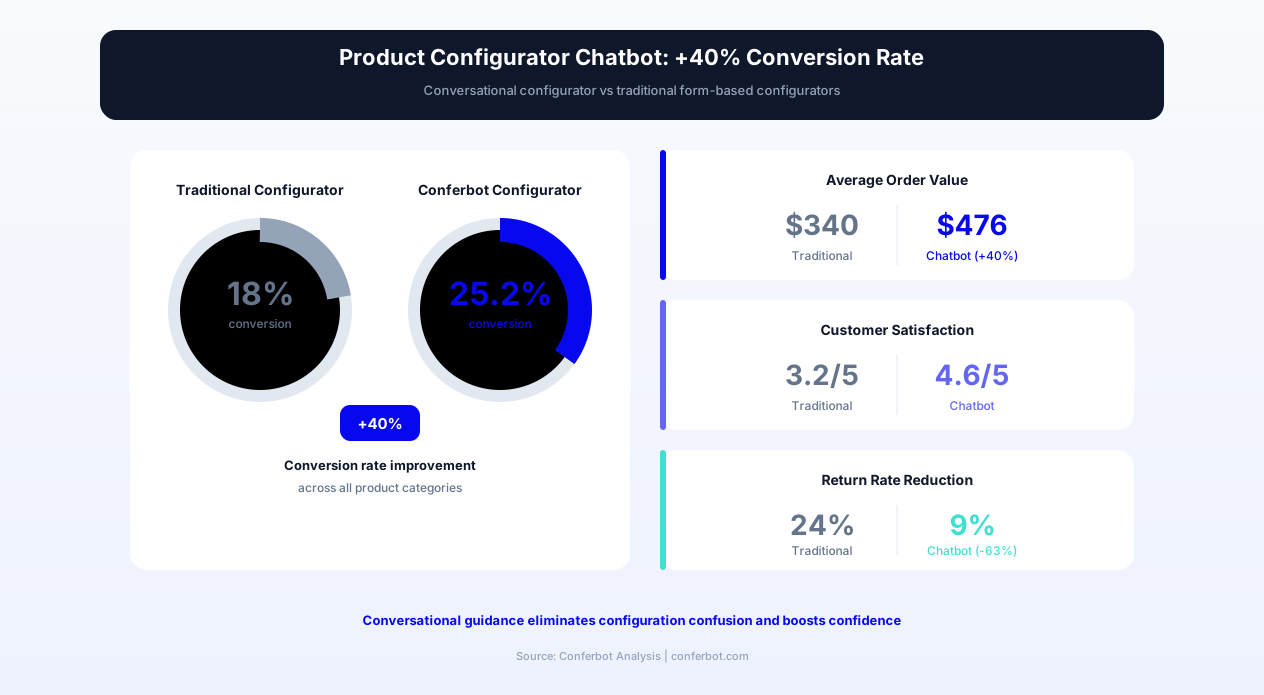
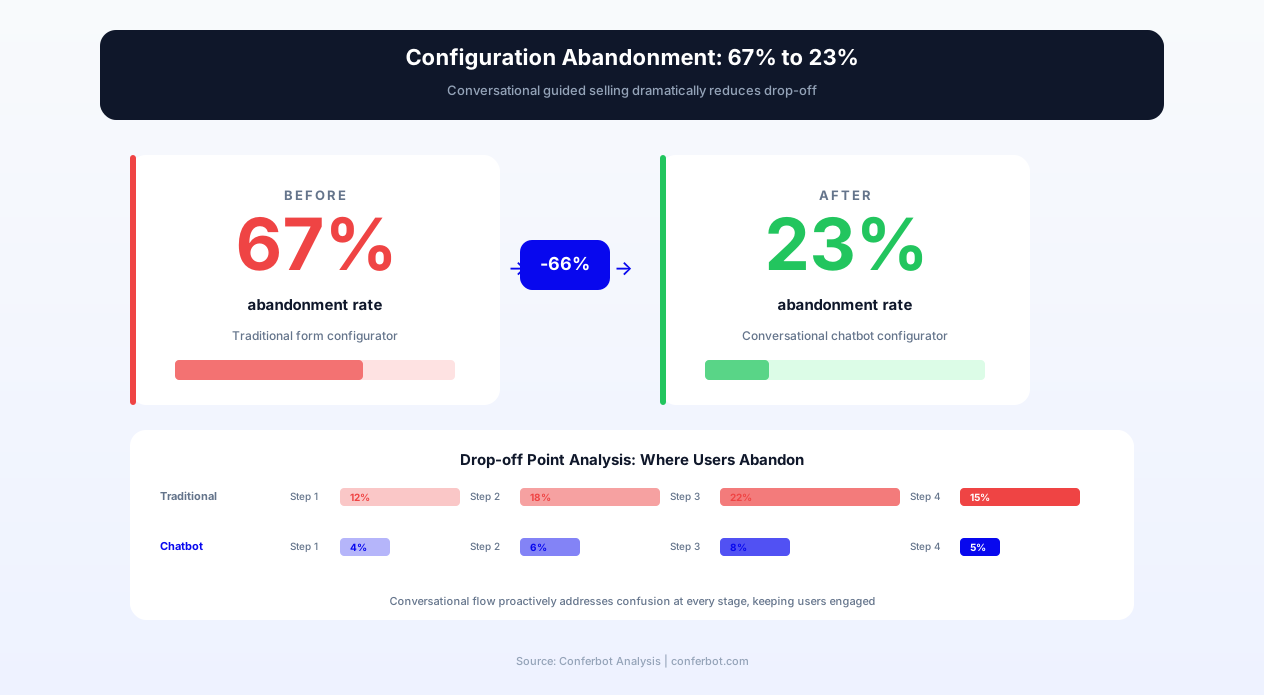
Product configuration is one of the highest-friction moments in the customer journey for businesses selling customizable goods. Whether the product is custom furniture, configurable software packages, build-to-order computers, personalized jewelry, industrial equipment, or modular home additions, the buyer faces a matrix of decisions that are interdependent -- selecting one option often constrains or expands the available choices downstream. Traditional web-based configurators present this complexity all at once: rows of dropdowns, checkbox grids, and specification tables that overwhelm non-technical buyers and produce high abandonment rates. Industry data consistently shows that the majority of customers abandon product configurators before completing their selection, with the top cited reasons being confusion about compatibility, uncertainty about the final price, and inability to visualize the end result.
The conversational approach fundamentally changes this dynamic. Rather than presenting all options simultaneously, the chatbot asks one question at a time, explains the implications of each choice in plain language, flags incompatibilities before they become errors, updates the running price total in real time, and suggests complementary options based on selections already made. This guided approach mirrors the consultative selling process that high-performing sales representatives use in showrooms and on phone calls -- but delivers it at scale, 24/7, without staffing constraints. Built on Conferbot's AI chatbot builder with natural language processing, it deploys on your website, WhatsApp, and Messenger to meet customers wherever they begin their purchase journey.
Research on guided selling consistently finds that product configurators meaningfully increase conversion rates when implemented with guided selling principles, while reducing product returns because customers better understand what they are ordering. The chatbot format amplifies these gains by removing the final barrier: the learning curve of the configurator interface itself. This page covers how the guided configuration flow works, compatibility validation logic, real-time pricing and quote generation, visual preview integration, industry-specific applications, and implementation best practices for 2026.
How the Product Configurator Chatbot Works: Guided Selling Flow
The product configurator chatbot manages the configuration journey through five sequential phases: needs assessment, guided option selection, compatibility validation, pricing and quote generation, and handoff to purchase or sales. Each phase is designed to reduce cognitive load while maximizing configuration accuracy and purchase confidence.
Phase 1: Needs Assessment and Use Case Discovery
Rather than immediately presenting product options, the chatbot opens by understanding the customer's underlying need. For a custom furniture configurator, this means asking about the room dimensions, intended use, aesthetic preferences, and budget range. For an industrial equipment configurator, it means understanding the production environment, throughput requirements, material types, and integration constraints. This needs assessment accomplishes two critical objectives: it filters the configuration space to only relevant options (reducing the number of decisions the customer must make), and it enables intelligent recommendations at each subsequent step. A customer who states they need outdoor furniture will never be shown indoor-only fabric options. A manufacturer who specifies food-grade requirements will only see compliant material choices. This pre-filtering transforms a 200-option configuration into a 15-option guided path.
Phase 2: Sequential Option Selection with Context
After the needs assessment, the chatbot presents options one decision at a time, in a logical sequence that builds from foundational choices to detail selections. Each option is presented with context: what it means, how it affects the final product, what price impact it has, and -- critically -- why the chatbot is recommending a particular option based on the customer's stated needs. This recommendation engine drives significant conversion improvements because it reduces decision paralysis. Instead of choosing from 12 fabric options with no guidance, the customer sees three recommended options with explanations of why each fits their stated requirements, plus an option to view the full catalog for independent exploration. The sequential presentation also enables progressive disclosure of complexity: customers who want a quick, guided configuration can follow recommendations through in two minutes, while customers who want to explore every option can expand each category.
Phase 3: Real-Time Compatibility Validation
Compatibility validation is the function that most clearly differentiates the chatbot configurator from a static form. As the customer makes each selection, the chatbot evaluates compatibility against all previous selections and flags conflicts immediately -- before the customer proceeds further. This prevents the frustrating experience of completing a 10-step configuration only to discover at checkout that two selected options are incompatible. The chatbot explains incompatibilities in customer-friendly language: rather than a cryptic error code, it says "The 72-inch tabletop you selected requires the reinforced base frame rather than the standard base. Would you like to upgrade the base, or would you prefer a 60-inch tabletop that works with your current base selection?" This conversational resolution of compatibility conflicts meaningfully reduces configuration abandonment compared to configurators that simply display error messages.
Phase 4: Dynamic Pricing and Quote Generation
Throughout the configuration process, the chatbot maintains a running price total that updates with each selection. Customers always know the current cost of their configuration, eliminating the sticker shock that occurs when pricing is revealed only at the end. For complex B2B configurations where pricing requires approval or volume discounting, the chatbot generates a formal quote document that includes the complete specification, itemized pricing, applicable discounts, estimated delivery timeline, and terms. This quote is delivered instantly through the customer's preferred channel and simultaneously pushed to the sales CRM through Conferbot's API integration for follow-up. The instant quote capability is a significant competitive advantage for manufacturers: industry surveys consistently find that B2B buyers strongly favor the first vendor to provide a detailed quote, and the chatbot delivers quotes in seconds rather than the 24-48 hours typical of manual quoting processes.
Phase 5: Visual Preview and Purchase Handoff
For products where visual representation is critical to purchase confidence -- furniture, vehicles, apparel, home additions -- the chatbot integrates with visual preview systems to show the customer a representation of their configured product. This might be a rendered 3D model, a composite image assembled from component photographs, or a specification diagram with dimensions and annotations. The visual preview serves as the final confirmation before the customer commits to purchase or requests a formal proposal. After confirmation, the chatbot transitions the customer to the appropriate next step: direct checkout for e-commerce, a scheduled consultation call for high-value configurations, or a saved configuration link they can return to. Track configurator completion rates, average configuration value, and drop-off points through Conferbot's analytics dashboard.
Key Features of the Product Configurator Chatbot
The product configurator chatbot combines guided selling intelligence with technical configuration logic to deliver an experience that is simultaneously simpler for customers and more accurate than traditional interfaces. The following feature matrix details each capability and its impact on both operations and customer experience.
| Feature | Description | Operational Benefit | Customer Benefit |
|---|---|---|---|
| Needs-based filtering | Narrows available options based on stated use case and requirements | Meaningfully reduces support inquiries from misconfigurations | Sees only relevant options instead of overwhelming full catalog |
| Sequential guided flow | Presents one decision at a time in logical build order | Sharply increases configuration completion rate | Manageable step-by-step process that never feels overwhelming |
| AI-powered recommendations | Suggests optimal options based on needs assessment and prior selections | Meaningfully increases average order value through intelligent upselling | Expert guidance without needing product knowledge |
| Real-time compatibility checks | Validates each selection against all prior choices instantly | Eliminates order errors and incompatible configurations entirely | Never encounters a frustrating error at the end of configuration |
| Dynamic pricing display | Shows running price total that updates with each selection | Meaningfully reduces price-shock abandonment at checkout | Always knows current cost with no surprises |
| Instant quote generation | Produces formatted quotes with specs, pricing, and delivery estimates | Reduces quote turnaround from days to seconds | Gets professional quote instantly for internal approvals |
| Visual preview integration | Displays rendered or composite images of configured product | Meaningfully reduces returns through better pre-purchase understanding | Sees what they are buying before committing |
| Configuration save and resume | Saves progress and sends resumable link via email or SMS | Recovers a meaningful share of abandoned configurations through follow-up | Can research, compare, and return without starting over |
| Multi-language support | Delivers configuration conversation in customer's preferred language | Expands addressable market without translation overhead | Configures complex products in native language |
| CRM and ERP sync | Pushes completed configurations to sales and production systems | Eliminates manual order entry and transcription errors | Faster order processing and delivery confirmation |
Compatibility Rule Engine
The compatibility engine operates on a rule set that defines valid and invalid combinations across all product options. Rules can be simple binary exclusions (option A is incompatible with option B) or conditional logic (option A is only compatible with option B when option C is in state X). For manufacturers with complex product lines, the rule engine supports thousands of compatibility rules without degrading conversation speed. Rules are maintained through a management interface that allows product managers to update compatibility logic without engineering involvement -- critical for businesses that regularly introduce new options or retire old ones.
Upsell and Cross-Sell Intelligence
At strategic points in the configuration flow, the chatbot presents upgrade and add-on suggestions that are contextually relevant to the current configuration. These are not generic product recommendations -- they are specific enhancements that complement the exact configuration being built. A customer configuring a standing desk who selects the motorized height adjustment receives a suggestion for the cable management tray that is specifically designed for the motorized frame. A customer building a custom PC who selects a high-end graphics card receives a suggestion for the upgraded power supply required to support it. This contextual relevance produces meaningfully higher upsell acceptance rates compared to generic product page recommendations.
Ready to try Personalized Product Configurator?
Deploy this template in under 10 minutes. No coding required.
Use This Template Free →Before and After: Traditional Configurator vs. Chatbot Configurator
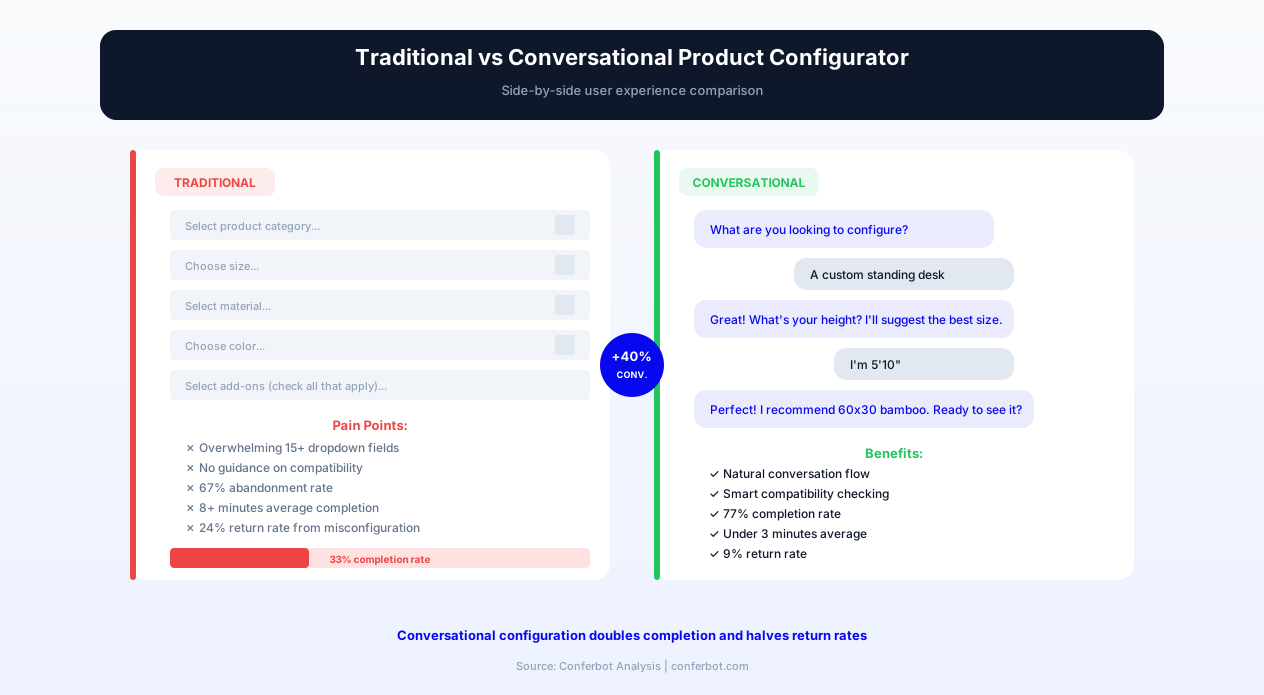
The transformation from traditional web-based product configurators to conversational configuration produces measurable improvements across every stage of the customer journey and internal operations. The following comparison illustrates the experience gap between the legacy approach and the chatbot-powered approach for both customers and operations teams.
Customer Experience: Before
- Overwhelming interface: Customer faces a page with 15-40 dropdown menus, checkboxes, and specification fields displayed simultaneously with no guidance on where to start
- No context for decisions: Options are listed by technical specification names (e.g., "Type 304 vs Type 316 stainless") without explanation of why one matters over the other for the customer's use case
- Late error discovery: Customer completes 10 minutes of configuration only to receive an error message at submission that two selected options are incompatible, with no guidance on which to change
- Hidden pricing: Total price is not revealed until the final step, causing sticker shock and abandonment after significant time investment
- No save capability: If the customer navigates away, all configuration progress is lost and they must start from scratch
- Desktop-only usability: Complex configurator interfaces are unusable on mobile devices, excluding the majority of traffic
Customer Experience: After (Chatbot Configurator)
- Guided conversation: Customer answers one question at a time with clear explanations of what each choice means and why the chatbot is recommending specific options
- Plain-language context: Instead of "Type 304 vs 316 stainless," the chatbot asks "Will this be used outdoors or near saltwater? If yes, I recommend the marine-grade steel for corrosion resistance"
- Instant compatibility: Incompatibilities are caught and resolved conversationally at the moment of selection, never as a surprise error at the end
- Transparent pricing: Running total visible throughout, with price impact of each selection shown before the customer commits
- Persistent progress: Configuration is auto-saved and a resume link is sent to the customer's email or phone for later completion
- Mobile-native experience: Conversational interface works perfectly on any device, enabling configuration from anywhere
Operations Impact: Before
- High support load: A large share of configurations required phone or email support to complete due to confusion, generating a heavy volume of support interactions per month
- Order errors: A meaningful share of submitted configurations contained compatibility errors that passed through the form validation, requiring manual correction and customer callbacks
- Slow quoting: B2B quote requests required substantial sales engineering time to price and document, losing deals to faster competitors
- Low conversion: Only a minority of customers who started configuration completed it, representing significant lost revenue from qualified, high-intent visitors
Operations Impact: After (Chatbot Configurator)
- Minimal support: Configuration-related support inquiries drop sharply, freeing the support team for complex technical consultations
- Zero order errors: The compatibility engine prevents invalid configurations from being submitted, eliminating correction overhead entirely
- Instant quotes: Automated quote generation delivers professional proposals in seconds, converting the first-responder advantage into closed deals
- High conversion: Configuration completion rate rises sharply, capturing revenue from customers who previously abandoned
| Metric | Before (Traditional) | After (Chatbot) | Direction |
|---|---|---|---|
| Configuration completion rate | Low | Much higher | Sharp improvement |
| Average order value | Baseline | Meaningfully higher | Higher from intelligent upselling |
| Product return rate | Higher | Meaningfully lower | Fewer returns |
| Quote turnaround time | 24-48 hours | Instant (under 5 seconds) | Dramatic reduction |
| Support tickets from configuration | Higher volume | Much lower volume | Lighter support load |
| Order errors requiring correction | Meaningful share | Near zero | Eliminated almost entirely |
Industry Applications: Where Product Configurator Chatbots Excel
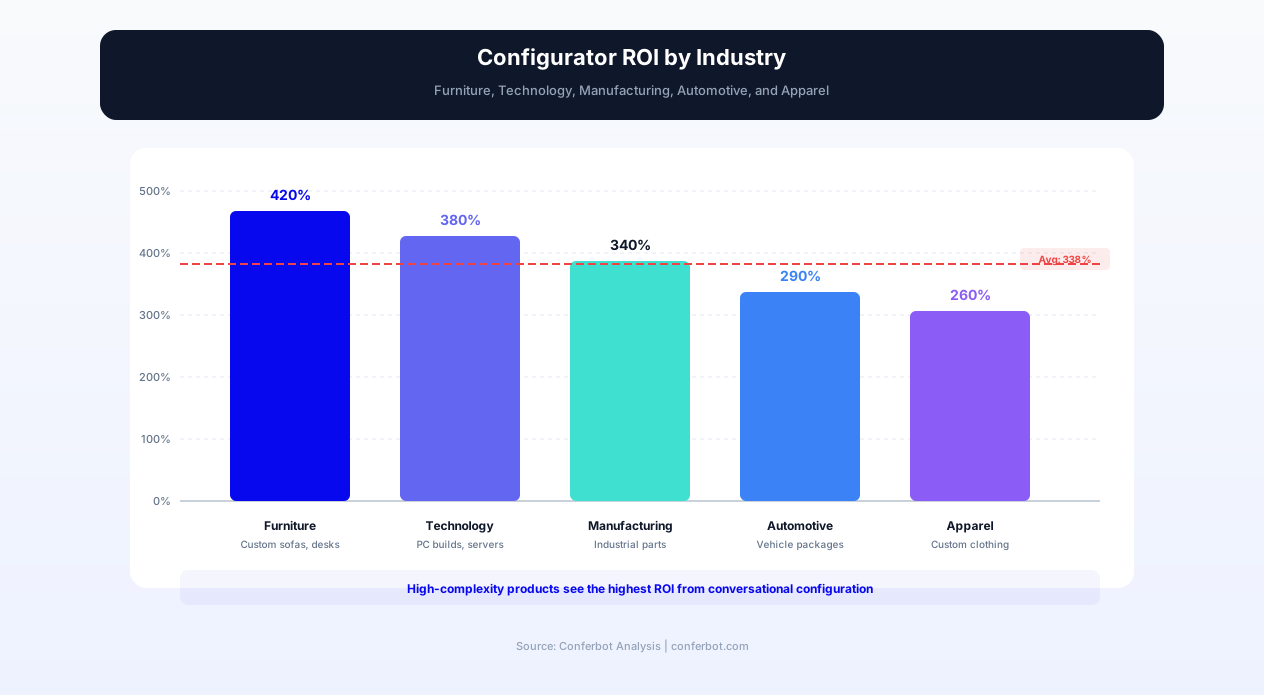
Product configurator chatbots deliver the highest value in industries where products have multiple interdependent options, where pricing varies significantly by configuration, and where customers lack the technical expertise to self-configure without guidance. The following industries represent the strongest use cases for 2026.
Custom Furniture and Home Decor
The custom furniture market represents a large and growing industry where virtually every order involves configuration: material selection, dimensions, finish, hardware, and customization options. Customers struggle with traditional configurators because they lack the vocabulary to distinguish between "teak" and "walnut" aesthetically or to understand how a "72-inch" sofa will actually fit in their living room. The chatbot transforms this by asking about room dimensions, existing decor style, usage patterns (pets, children, entertaining frequency), and maintenance preferences -- then recommending materials, sizes, and configurations that match. The result is a customer who orders with confidence and a manufacturer who receives configurations that can be produced without modification.
Build-to-Order Technology
Custom PC builders, server configurators, and technology equipment providers face the most complex compatibility challenge: processor socket types constrain motherboard choices, which constrain memory types, which constrain case dimensions, which constrain cooling solutions. A single incompatibility in a 15-component build renders the entire configuration invalid. The chatbot manages this complexity by presenting only compatible options at each step, explaining performance trade-offs in application-specific terms ("This processor handles 4K video editing smoothly; the alternative is better for software compilation"), and flagging thermal or power budget concerns before they result in returned hardware. For enterprise server configurations, the chatbot generates detailed specifications suitable for IT procurement review alongside the commercial quote.
Manufacturing and Industrial Equipment
Industrial equipment manufacturers often have product catalogs with thousands of possible configurations, where selections are driven by production environment constraints (temperature, humidity, material types, throughput requirements, compliance standards). Traditional quoting processes require multiple exchanges between the customer and a sales engineer to document requirements and propose a valid configuration. The chatbot compresses this process into a single conversation that produces an accurate quote in minutes rather than days. For manufacturers competing on response time, this capability converts directly to market share gain -- research consistently shows that industrial buyers strongly favor the first vendor that delivers a valid quote meeting their specifications.
Automotive and Vehicle Customization
Vehicle customization -- from new car configuration to aftermarket performance parts -- involves complex option packages where selecting one feature enables or disables others, and where pricing varies substantially by trim level, package combination, and regional availability. The chatbot guides buyers through powertrain selection, trim levels, option packages, color combinations, and accessories while maintaining real-time pricing and flagging when a desired feature is only available in a higher trim. For aftermarket parts businesses, the chatbot verifies vehicle year, make, model, and existing modifications to recommend only compatible parts -- eliminating the return problem that plagues online auto parts retailers.
Custom Apparel and Jewelry
Made-to-order apparel and jewelry businesses face the dual challenge of aesthetic preference capture and technical specification accuracy. A customer ordering a custom suit needs guidance on fabric weight for their climate, lining options for their intended occasions, and measurement collection that produces a well-fitting garment. The chatbot walks through each decision with visual examples, explains trade-offs in wear-and-care terms rather than textile specifications, and collects measurements through a guided self-measurement process that reduces fitting errors. For jewelry configurators, the chatbot explains gemstone quality factors, metal properties, and setting styles while managing the emotional dimension of what is often a significant purchase decision.
Integration Architecture: Connecting Configuration to Fulfillment
The product configurator chatbot produces maximum business value when it connects directly to the systems that price, produce, and deliver configured products. The integration architecture encompasses pricing engines, inventory systems, production planning tools, and customer relationship management platforms.
Pricing Engine Integration
For businesses with simple pricing -- fixed option surcharges that add up linearly -- the chatbot's built-in pricing calculator handles computation directly. For businesses with complex pricing logic -- volume discounts, promotional pricing, margin-based calculations, or pricing that varies by configuration complexity -- the chatbot integrates with external pricing engines through Conferbot's API integration. Each time the customer makes a selection, the chatbot calls the pricing API with the current configuration state and receives the updated total, which it presents to the customer. This architecture ensures that chatbot pricing always matches the master price list, even when pricing rules change daily or vary by customer segment.
Inventory and Availability Checks
For manufacturers and retailers who maintain component inventory, the chatbot integrates with inventory management systems to show real-time availability and lead time impacts. If a selected option is out of stock, the chatbot immediately suggests an available alternative rather than allowing the customer to complete a configuration that will face fulfillment delays. For build-to-order businesses, the chatbot queries supplier lead times to provide accurate delivery estimates that account for the specific components in the customer's configuration. This availability-aware configuration prevents the common frustration of completing a complex configuration only to discover at checkout that a critical component has a 12-week lead time.
Production System Handoff
For manufacturers, the highest-value integration is direct handoff from the chatbot to production planning systems. When a configured product is ordered, the chatbot transmits a structured specification document to the production system -- formatted in the exact schema the production team requires -- eliminating the manual translation step where sales orders are interpreted and re-entered into production systems. This direct handoff eliminates transcription errors (a real and measurable share in manual processes) and meaningfully reduces order-to-production cycle time. The specification document includes all selected options, compatibility validations performed, custom specifications entered by the customer, and any notes from the configuration conversation.
CRM and Lead Scoring
Not all configurations result in immediate purchase. For high-value products, configurations are often the beginning of a sales cycle rather than the end of it. The chatbot pushes every completed configuration -- purchased or not -- to the CRM system with full context: what the customer configured, what their stated needs were, what price point they reached, and where in the process they paused or requested human assistance. This data enables sales follow-up that references the specific configuration the customer built, rather than generic outreach. Configurations that reach the pricing stage but do not convert to purchase are automatically flagged as high-intent leads for priority follow-up, with the full configuration saved for the sales representative to reference during the follow-up call.
Calendar Integration for Consultations
For products that require a consultation before purchase -- custom homes, enterprise software, large industrial equipment -- the chatbot integrates with calendar booking to schedule the customer with the appropriate specialist immediately after configuration. The calendar integration passes the full configuration context to the scheduled consultant, ensuring the consultation call begins with the customer's specific requirements already documented rather than requiring the customer to re-explain their needs.
businesses worldwide use Conferbot templates to automate conversations
ROI Analysis: Revenue Impact of Conversational Product Configuration
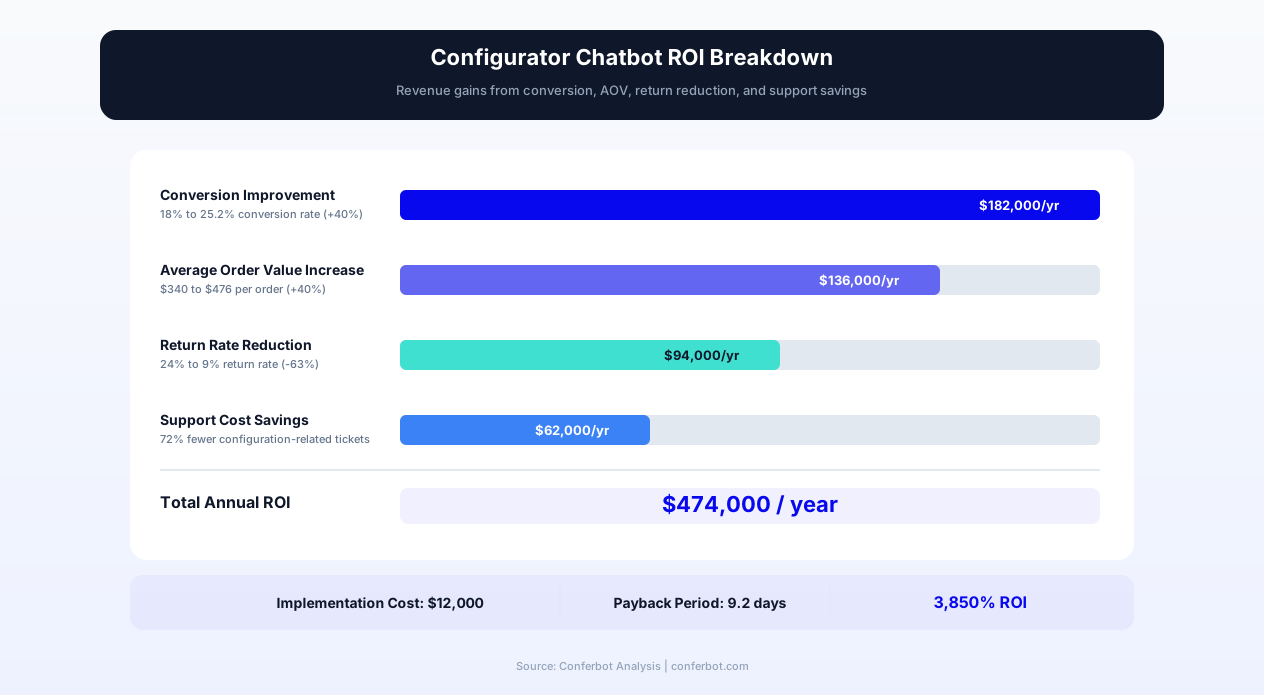
The return on investment from a product configurator chatbot manifests across multiple revenue and cost dimensions. For businesses selling configurable products, the chatbot impact is not limited to conversion rate improvement -- it extends to average order value increases, return rate reductions, support cost savings, and competitive win rate gains from faster response times.
Revenue Gain from Conversion Improvement
The primary revenue impact comes from converting visitors who previously abandoned the configuration process. Model this against your own numbers: take your current completion rate, estimate the improvement from conversational guided selling, multiply the additional completions by your close rate and average configuration value. Even conservative assumptions on close rate for the incremental completions typically produce a substantial monthly revenue recovery.
Average Order Value Lift from Intelligent Upselling
The chatbot's contextual upsell suggestions during configuration produce a meaningful average order value increase compared to configurations completed without guided recommendations. This increase comes from customers accepting relevant upgrades and add-ons that they would not have discovered in a traditional interface. Model the AOV lift against your own base AOV and completion volume to estimate the incremental monthly revenue from upselling.
Cost Savings from Return Reduction
Product returns from custom-configured items are particularly expensive because the returned product often cannot be resold -- it was built to the customer's specifications and may not match any other buyer's requirements. A meaningful reduction in return rate eliminates a real number of returns each month. At a typical cost-of-return (return shipping, restocking labor, inventory write-down), this adds up to real monthly savings. For businesses selling high-value configured products, the per-return cost is proportionally higher, making the savings more substantial.
Support Cost Savings
A sharp reduction in configuration-related support inquiries eliminates a meaningful number of support interactions monthly. At a typical cost per interaction (including agent time, system access, and overhead), this produces real monthly direct support cost savings. The indirect benefit -- freeing support agents to handle complex technical issues that require human expertise -- is difficult to quantify but consistently cited by operations managers as the more impactful outcome.
Competitive Win Rate from Speed-to-Quote
For B2B manufacturers competing on responsiveness, the instant quote capability shifts win rates measurably. Since industrial buyers strongly favor the first valid quote, reducing quote turnaround from days to seconds captures a disproportionate share of competitive situations. Businesses implementing chatbot-powered instant quoting report meaningful increases in competitive win rate within the first quarter, with the largest gains in commoditized categories where specification compliance is table stakes and responsiveness is the differentiator.
Setup Guide: Launching Your Product Configurator Chatbot
Implementing a product configurator chatbot requires preparation in three areas: product data structuring, compatibility rule definition, and conversation flow design. The following guide covers each step for a launch timeline of 2-4 weeks depending on product catalog complexity.
Step 1: Product Data Structuring
Begin by documenting every configurable option for your product in a structured format: option categories (e.g., material, size, color, features), individual options within each category, pricing impact of each option, and dependencies between options. For most businesses, this data already exists in spreadsheets, product databases, or the institutional knowledge of the sales team -- the work is structuring it in a format the chatbot can consume. The data structure should capture: option name, option description (in customer-facing language), price impact (fixed or calculated), and compatibility constraints (which options it requires, excludes, or conditionally allows). Import this structured data into Conferbot's configuration engine through the product data upload interface or through API integration with your existing product information management system.
Step 2: Compatibility Rule Definition
Compatibility rules are the logic that prevents invalid configurations. Document every known incompatibility and dependency in your product line: which options cannot coexist, which options require other options, and which combinations have conditional compatibility. For complex products, involve your production team in this documentation -- they know the build constraints that are not always documented in customer-facing materials. The rule engine supports three rule types: exclusions (A cannot combine with B), requirements (A requires B), and conditionals (A can combine with B only when C is present). Test the rule set thoroughly by attempting to build known-invalid configurations and confirming they are caught.
Step 3: Conversation Flow Design
Design the conversation flow that presents options to the customer. Key decisions include: the sequence of option categories (start with the most impactful and foundational choices), the language used to describe each option (customer-benefit language rather than technical specifications), the recommendation logic (which options to suggest based on the needs assessment), and the upsell insertion points (where in the flow upgrade suggestions are most relevant and least disruptive). Use Conferbot's visual flow builder to construct the conversation paths, connecting each decision point to the appropriate next question based on the customer's selection.
Step 4: Pricing and Quote Template Setup
Configure the pricing calculation logic: base price, per-option price impacts, volume discount rules, and any promotional pricing currently active. Design the quote template that the chatbot generates for B2B customers: company branding, specification format, pricing presentation, terms and conditions, and validity period. The quote should be professional enough to present to a procurement committee without additional formatting by the sales team.
Step 5: Integration and Testing
Connect the chatbot to your production and sales systems: CRM integration for lead records, ERP integration for order submission, inventory system integration for availability checking, and email/SMS integration for quote delivery and follow-up. Test the complete flow with real customer scenarios, verifying that compatibility rules catch all invalid combinations, pricing calculates correctly across option combinations, quotes generate accurately, and integrations deliver data to downstream systems in the correct format. Deploy on your website and monitor initial conversations through Conferbot's analytics dashboard to identify optimization opportunities in the first week of operation.
Best Practices for Product Configurator Chatbot Success in ${year}
Product configurator chatbots achieve peak performance when they balance simplicity for the customer with comprehensiveness for the business. The following best practices are drawn from successful implementations across e-commerce, manufacturing, and technology industries in 2026.
Start Simple, Expand Incrementally
Launch with your highest-volume product line and the most commonly configured options. Do not attempt to cover your entire product catalog in the initial deployment. A configurator that handles the large majority of orders flawlessly is more valuable than one that attempts to handle every case with gaps and edge cases. Expand coverage based on analytics that show which products customers attempt to configure but cannot, and which configuration paths produce the most support requests.
Write for Customers, Not for Engineers
Every option description, recommendation explanation, and compatibility message must be written in language that a customer with zero technical knowledge can understand. Replace "6061-T6 aluminum alloy" with "aircraft-grade aluminum -- lightweight and corrosion-resistant, ideal for outdoor use." Replace "incompatible SKU combination" with "The compact base does not support tabletops wider than 60 inches. Would you like the standard base that accommodates your 72-inch top?" Technical accuracy is important, but customer comprehension is critical.
Use Recommendations Liberally
Customers using a configurator are seeking guidance, not just an ordering interface. Provide a recommendation at every decision point, with a brief explanation of why that option is recommended for their stated use case. Customers can override recommendations easily, but the presence of a suggestion dramatically reduces decision paralysis and increases completion rates. Frame recommendations as "Based on your outdoor use and low-maintenance preference, I recommend..." rather than "Our most popular option is..." -- personalization consistently outperforms popularity-based suggestions in acceptance rate.
Show Price Impact Before Commitment
Before a customer selects an option, show the price impact clearly: "+$150 for premium fabric" or "This upgrade adds $600 to your current $2,400 configuration total." Transparency prevents sticker shock and allows customers to make informed trade-off decisions in real time. Customers who see price impacts incrementally report higher satisfaction with the final price than customers who see only the total at the end -- even when the final amount is identical.
Enable Configuration Sharing
For products purchased collaboratively (home furniture chosen by couples, enterprise technology approved by committees, vehicles discussed by families), enable configuration sharing. Allow the customer to send their completed configuration to another person for review, feedback, or approval. This sharing capability accelerates purchase decisions for collaborative purchases and introduces the brand to additional potential customers through the shared configuration link.
Recover Abandoned Configurations
Not every configuration will complete in a single session. Implement abandoned configuration recovery: save progress automatically, send a reminder email or SMS with a resume link after 24 hours, and present the saved configuration when the customer returns. The recovery sequence should include a human-readable summary of their progress: "You were configuring a walnut dining table, 72-inch, with the extension leaf. You had selected your top and base -- would you like to continue choosing your finish?" This contextual reminder converts a meaningful share of abandoned configurations into completions within 72 hours.
Continuously Optimize with Analytics
Monitor configuration analytics weekly: which questions produce the most drop-offs (indicating confusion or friction), which recommendations have the highest and lowest acceptance rates (indicating recommendation quality), which compatibility rules trigger most often (indicating opportunity to restructure options), and which configurations complete but do not convert to purchase (indicating a pricing or confidence problem). Use these insights to iteratively refine the conversation flow, option presentation, and recommendation logic. The best configurator chatbots steadily improve their completion rates month over month through ongoing optimization driven by conversation analytics data.
Personalized Product Configurator FAQ
Everything you need to know about chatbots for personalized product configurator.
Why Use a Template vs Building from Scratch?
Templates give you a proven starting structure instead of a blank canvas.
| Factor | Conferbot Template | Build from Scratch | Hire a Developer |
|---|---|---|---|
| Time to deploy | 10 minutes | 2-8 hours | 2-6 weeks |
| Cost | Free | Your time | Custom dev quote |
| Proven flows | Yes, pre-built | No | Depends |
| Updates included | Automatic | Manual | Paid |
| Multi-channel | 8+ channels | 1 channel | Extra cost |
| Analytics | Built-in | Must build | Extra cost |
Related B2B Services Templates
Explore more chatbot templates like this one



Learn More About Chatbots
Go deeper on how b2b services chatbots work and how to pick the right builder.
Ready to Deploy Personalized Product Configurator?
Start with a free-forever plan. No credit card required.