
AI Agent vs Chatbot: The Short Answer
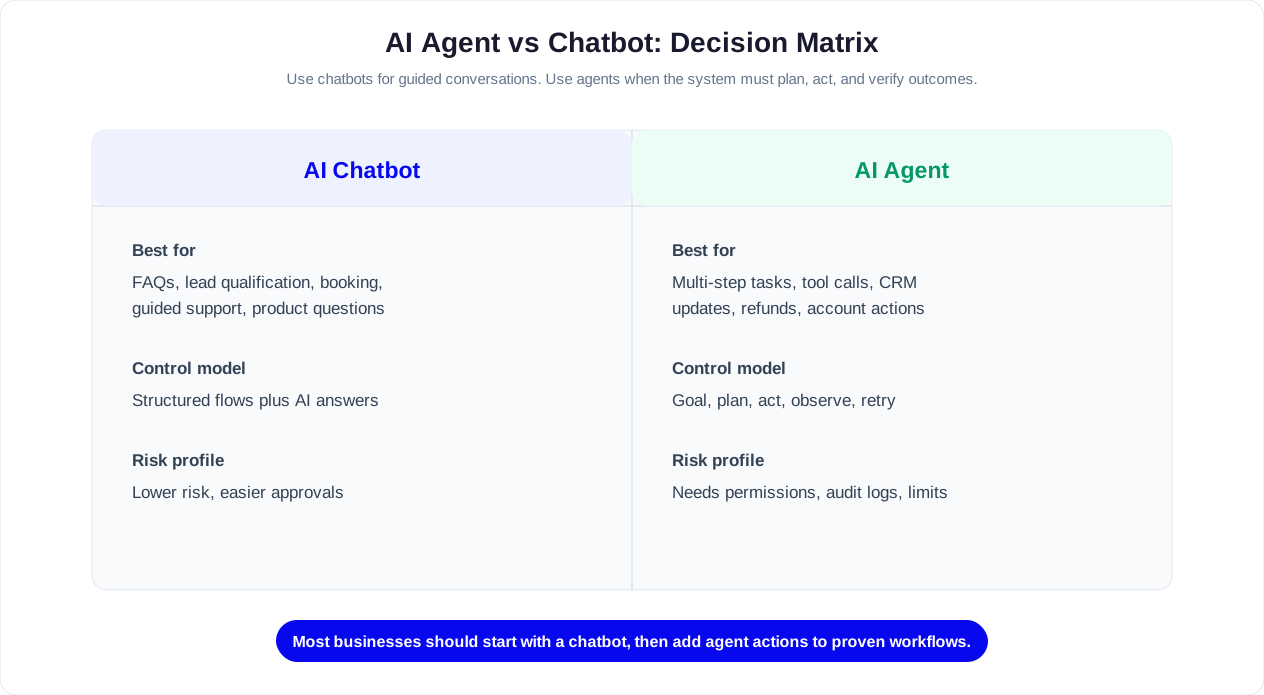
A chatbot is a conversational interface that answers questions, guides users through flows, collects information, and routes conversations. An AI agent is a goal-oriented system that can reason through a task, use tools, make decisions within approved boundaries, and take action across business systems.
The simplest way to separate them is this: a chatbot talks with a user; an AI agent can complete work for a user. A chatbot can answer, qualify, recommend, book, or hand off. An AI agent can plan the steps needed to resolve a request, call APIs, update records, create tickets, trigger workflows, and follow up until the goal is complete.
That does not make AI agents automatically better. Chatbots are often the right choice for high-volume, predictable conversations like FAQs, lead capture, appointment booking, product guidance, and support triage. AI agents are better when the business outcome requires multi-step execution, tool use, state tracking, and decisions that go beyond a single conversation turn.
For most companies in 2026, the best answer is not chatbot or AI agent in isolation. It is a hybrid automation layer: a chatbot interface for fast, familiar customer interaction, connected to agentic workflows for tasks that need real action. Platforms like Conferbot support this direction by combining AI chatbot building, knowledge base grounding, integrations, human handoff, and analytics in one customer-facing automation system.
Definitions: What Is a Chatbot and What Is an AI Agent?
The terms overlap because modern chatbots can use AI, and many AI agents include a chat interface. The difference is not whether the system uses a large language model. The difference is what the system is designed to do after it understands the user.
What Is a Chatbot?
A chatbot is software that simulates conversation through text, voice, buttons, menus, or rich media. It may be rule-based, AI-powered, or hybrid. A basic chatbot follows a decision tree. An AI chatbot uses natural language processing and a knowledge base to understand user intent and respond more flexibly.
Business chatbots are usually optimized for conversation management: answering common questions, qualifying leads, collecting structured data, recommending next steps, scheduling appointments, escalating to a human, and keeping support available outside business hours. If you are new to the category, start with what is a chatbot and the AI chatbot vs rule-based chatbot comparison.
What Is an AI Agent?
An AI agent is an AI system designed to pursue a goal by interpreting context, planning steps, using tools, and taking actions with limited supervision. In a business setting, tools can include CRM records, help desk systems, calendars, payment systems, product catalogs, order management platforms, knowledge bases, and internal databases. Anthropic's research on AI safety and agents explores how autonomous systems can be built with appropriate human oversight, a concern that grows as agents gain more tool access.
For example, a chatbot can tell a customer how to exchange an item. An AI agent can check the order, confirm eligibility, generate the return label, update the CRM, notify the warehouse, and send the customer a follow-up message. The user may experience both as a chat, but the operational depth is very different.
The Practical Difference
| Question | Chatbot | AI Agent |
|---|---|---|
| Primary job | Conversation and guidance | Task completion and workflow execution |
| Core output | Answer, route, collect, recommend | Decide, act, update, coordinate, follow up |
| Typical scope | One conversation or one defined flow | Multi-step goal across systems |
| Autonomy | Low to moderate | Moderate to high, depending on guardrails |
| Business risk | Lower if responses are controlled | Higher because actions can affect real records, money, or customers |
A useful rule: if the system only needs to explain, collect, or route, a chatbot is likely enough. If the system needs to complete a task across multiple tools, you are in AI agent territory.
Related: Chatbot vs FAQ Page: Which Actually Reduces Support Tickets?
How They Work: Architecture and Workflow Differences
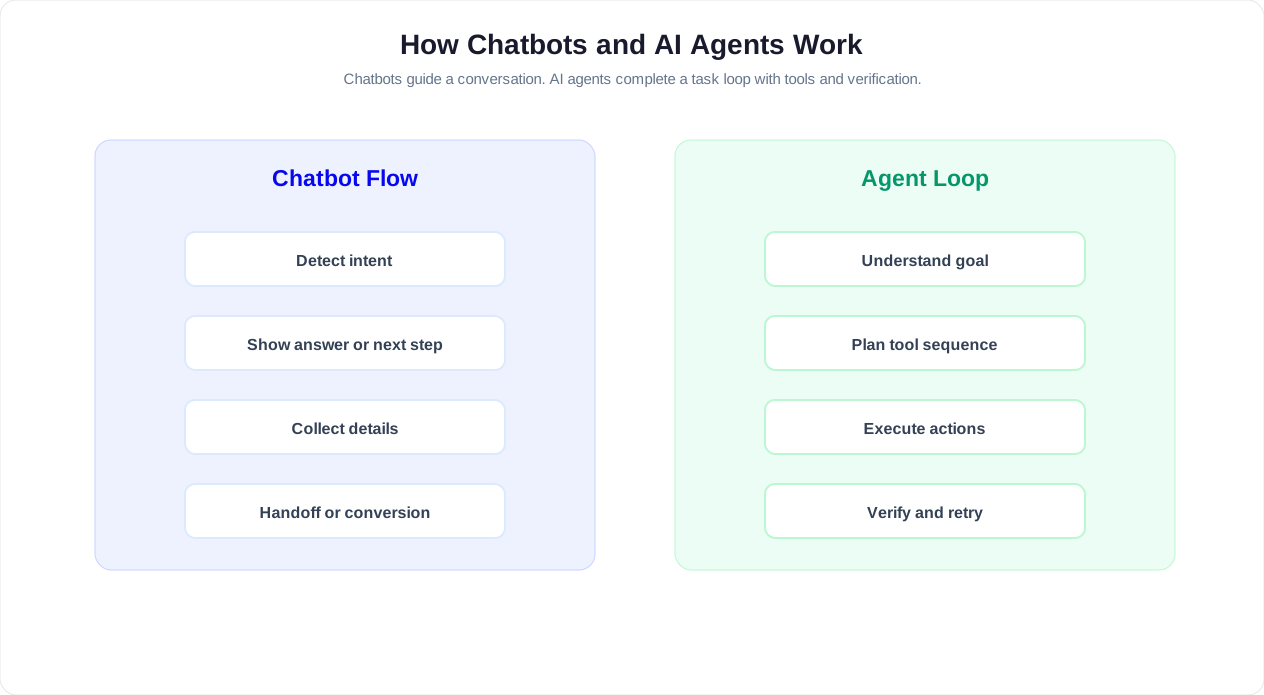
Chatbots and AI agents can both use large language models, retrieval-augmented generation, APIs, and integrations. The architectural difference is that a chatbot usually treats conversation as the product, while an AI agent treats conversation as one input into a larger task loop.
Typical Chatbot Architecture
- User input: The customer types, speaks, clicks a button, or selects an option.
- Intent detection: The bot identifies the user goal, such as pricing, refund policy, appointment booking, or support.
- Knowledge retrieval or flow routing: The bot finds the right answer or sends the user into a predefined flow.
- Response: The bot replies, asks a follow-up question, collects data, or hands off to a human.
- Analytics: The team reviews containment, drop-off, satisfaction, and unanswered questions through chatbot analytics.
This architecture is efficient for customer-facing conversations because it keeps the user experience fast and predictable. It is also easier to audit because most responses and paths are visible to the business team.
Typical AI Agent Architecture
- Goal interpretation: The agent determines what outcome the user or business is trying to achieve.
- Planning: The agent breaks the goal into steps, such as retrieve data, verify policy, choose an action, update a system, and notify a stakeholder.
- Tool use: The agent calls approved tools or APIs. This may include CRM, calendar, ticketing, inventory, billing, or order systems.
- Observation: The agent reads the result of each action and adjusts the plan if the first path fails.
- Execution with controls: The agent completes approved actions automatically or requests human approval for sensitive steps.
- Memory and follow-up: The agent stores task state, summarizes what happened, and may continue working after the chat session ends.
This loop makes agents powerful, but it also creates new design requirements: permissions, approval thresholds, audit logs, fallback behavior, and clear boundaries for what the AI can and cannot do. The OpenAI agents documentation provides a practical reference for how tool-calling and function execution work in modern LLM-based agent architectures.
Related: Chatbot to Human Handoff: Setup Guide, Best Practices, and Message Templates
AI Agent vs Chatbot: Side-by-Side Business Comparison
The difference becomes clearer when you compare the capabilities that affect deployment, cost, risk, and customer experience.
| Dimension | Chatbot | AI Agent |
|---|---|---|
| User experience | Conversational self-service through chat, buttons, forms, or voice | Conversational or background assistant that completes tasks |
| Best at | Answering, routing, qualifying, collecting, scheduling, escalating | Planning, executing workflows, using tools, updating systems, following up |
| Autonomy level | Usually bounded by flows, knowledge base, and escalation rules | Can choose steps within defined policies and permissions |
| Tool access | Optional integrations for specific actions | Core requirement for meaningful work |
| Predictability | High, especially with rule-based or hybrid flows | Depends on guardrails, tool design, and approval rules |
| Setup complexity | Low to moderate with a no-code chatbot builder | Moderate to high because systems, permissions, and edge cases matter |
| Maintenance | Update flows, FAQs, knowledge base, and analytics-driven gaps | Maintain prompts, tools, policies, integrations, logs, and exception handling |
| Risk profile | Incorrect answer, poor routing, bad customer experience | Incorrect action, data exposure, policy violation, workflow error |
| Ideal first use case | Website support, lead capture, FAQs, booking, WhatsApp automation | Ticket resolution, order changes, CRM updates, internal operations, account workflows |
| Human role | Handle escalations and improve content | Approve sensitive actions, supervise exceptions, audit outcomes |
In plain terms, a chatbot is usually easier to launch and safer to scale across customer conversations. An AI agent can deliver deeper automation, but only when the business has clear workflows, reliable data access, and strong operational controls.
Related: How to Train a Chatbot on Your Knowledge Base: Step-by-Step Guide for 2026
Which One Does Your Business Need?
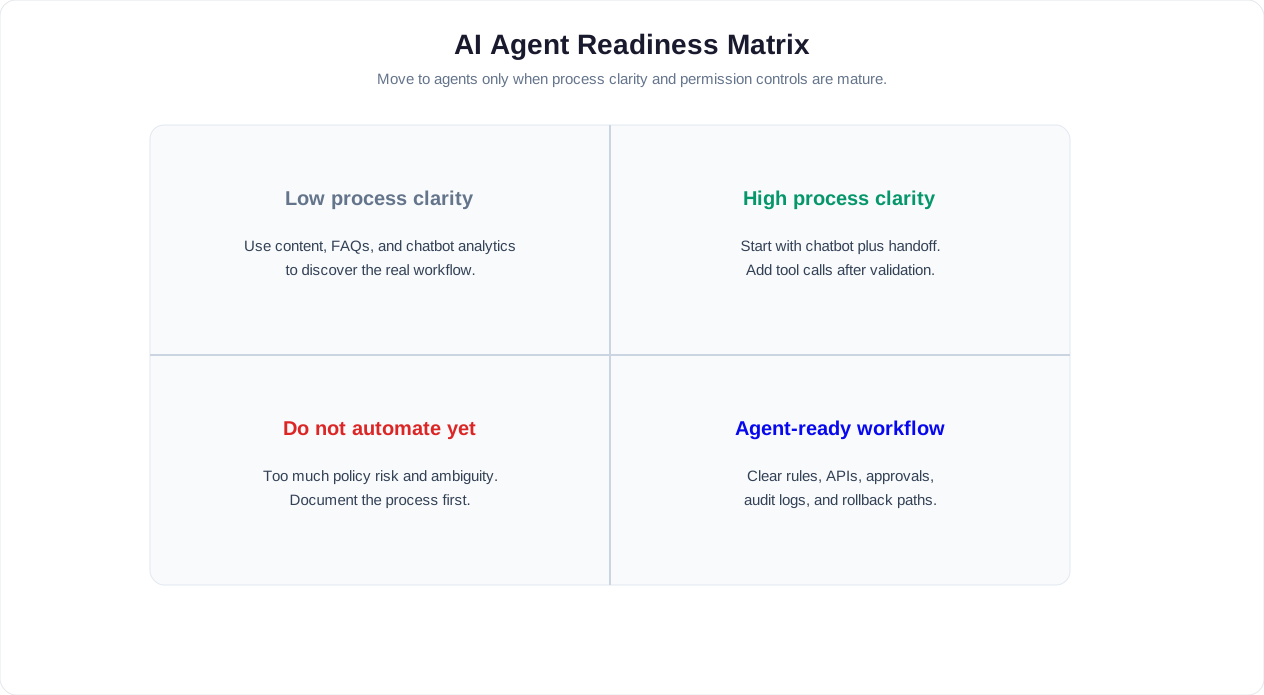
The right choice depends less on trend language and more on the job you need automated. Use the decision framework below before buying or building anything.
Choose a Chatbot When You Need Conversation Automation
A chatbot is the right starting point when your main pain is response volume, after-hours coverage, lead capture, repetitive questions, or simple workflow routing. Common examples include:
- Website lead generation: Engage visitors, ask qualifying questions, capture email or phone, and send leads to your CRM. See website chatbot deployment options.
- Customer support FAQs: Answer common questions from a knowledge base and escalate complex issues to live chat.
- Appointment scheduling: Collect service type, date, time, and contact details through structured flow and calendar booking.
- E-commerce guidance: Recommend categories, answer product questions, handle shipping policy questions, and support order tracking.
- WhatsApp or social messaging: Automate repetitive conversations on WhatsApp, Messenger, Instagram, and other high-volume channels.
Choose an AI Agent When You Need Work Completed Across Systems
An AI agent becomes valuable when the task requires more than a response. Look for these signals:
- The task has multiple steps and depends on changing information.
- The AI must call tools or APIs to complete the request.
- The task outcome changes a business record, ticket, order, subscription, appointment, or account.
- The AI needs to reason through exceptions instead of following one fixed path.
- The value comes from reducing back-office work, not just reducing chat volume.
Examples include updating a CRM after a qualified lead conversation, checking warranty eligibility and creating a service ticket, processing an account change after verification, summarizing a support conversation and drafting the right help desk resolution, or coordinating a booking change across calendar, payment, and notification tools.
Choose a Hybrid When You Need Both
Most customer-facing businesses should use a hybrid model. The chatbot handles the front door: greeting, routing, answering, collecting, and escalating. Agentic workflows handle the back end: checking systems, taking approved actions, creating records, and closing loops. This lets you automate deeper work without exposing every customer conversation to unnecessary autonomy.
Related: Chatbot Lead Qualification: Score, Route, and Convert Leads Automatically
Real Business Use Cases: Where Chatbots Win and Where AI Agents Win
Use cases reveal the practical boundary between the two technologies. The same business may need a chatbot for one workflow and an AI agent for another.
Customer Service
Best fit: Hybrid. A chatbot should answer common questions, collect context, suggest articles, and hand off with a clear summary. An AI agent can then help resolve repetitive tickets by checking order status, validating policy, drafting replies, creating tickets, and updating the help desk. The AI customer service guide covers this support model in more depth.
Sales and Lead Qualification
Best fit: Chatbot first, agent second. A chatbot is excellent for greeting visitors, qualifying intent, collecting budget and timeline, and booking demos. An AI agent can enrich the lead, update CRM fields, assign the owner, create a follow-up task, and draft a personalized outreach message. Keep the user-facing qualification flow structured so sales data stays clean.
Appointment Booking
Best fit: Chatbot for most businesses. Booking is structured: service, date, time, contact details, confirmation. A chatbot with calendar integration handles this well. An agent is useful only when rescheduling requires policy checks, deposits, staff availability, or multi-location coordination.
E-Commerce Operations
Best fit: Hybrid. The chatbot answers product, size, shipping, return, and promotion questions. An AI agent can check order status, determine return eligibility, create an exchange request, notify the warehouse, and update the customer. For product discovery, the chatbot experience should remain easy to scan with buttons, cards, and rich media through rich media.
Internal HR and IT
Best fit: AI agent for mature teams. Employees often need task completion, not just answers. An HR agent can check policy, create a leave request, route approval, and update the employee record. An IT agent can triage a request, run approved diagnostics, create a ticket, and escalate with a full summary. Start with a knowledge chatbot if your documentation is not ready. Move to agents once permissions and workflows are clean.
Healthcare, Finance, Legal, and Regulated Industries
Best fit: Controlled chatbot with limited agent actions. These industries benefit from automation, but the risk of incorrect advice or unauthorized action is high. Use approved flows, verified knowledge, strong disclaimers, human escalation, and action approvals. Agentic automation should be limited to administrative tasks such as scheduling, document collection, eligibility checks, and ticket creation unless your compliance team has approved broader use.
Cost and ROI: Chatbot Automation vs AI Agent Automation
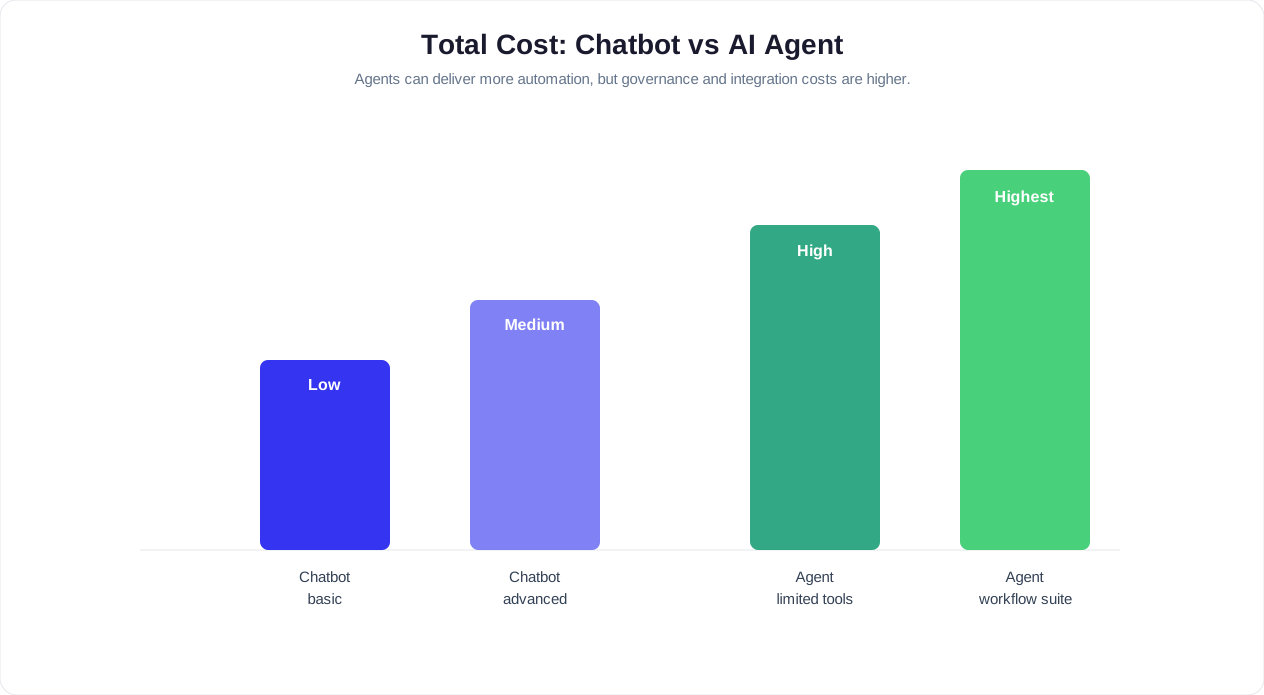
Chatbots and AI agents create ROI in different ways. Chatbots usually reduce the cost of conversations. AI agents reduce the cost of work that happens after or around those conversations.
Chatbot Cost Drivers
- Platform subscription: Based on features, channels, seats, conversations, or usage tier.
- Build time: Flow design, knowledge base setup, testing, and launch.
- Content maintenance: Updating FAQs, policies, offers, product details, and fallback responses.
- Analytics reviews: Regular optimization using unanswered questions, drop-off points, and escalation reasons.
Chatbot ROI usually appears as fewer repetitive tickets, faster response times, higher lead conversion, more booked appointments, and better after-hours coverage. For most businesses, this is the fastest automation win because the workflow is visible and bounded.
AI Agent Cost Drivers
- Integration work: Connecting the agent to CRM, help desk, calendar, billing, e-commerce, internal databases, or custom APIs.
- Tool design: Defining safe actions, required inputs, output formats, retries, and failure handling.
- Governance: Permissions, audit logs, approval rules, test cases, and exception handling.
- Usage costs: Model calls, retrieval, tool calls, monitoring, and orchestration overhead.
- Operational review: Ongoing review of completed actions, rejected actions, escalations, and policy failures.
AI agent ROI appears when the agent reduces manual back-office work: fewer CRM updates, faster ticket resolution, shorter order support cycles, cleaner handoffs, and less time spent on repetitive operational steps. The ROI can be larger than a chatbot, but it takes more design discipline.
Simple ROI Rule
Start with a chatbot if the expensive part of your process is talking to users. Consider an AI agent if the expensive part is doing follow-up work across systems. Use both when conversations and operational follow-through are tightly connected.
Risks, Guardrails, and Governance
The more autonomy a system has, the more carefully it must be governed. A chatbot that gives a weak answer can frustrate a customer. An AI agent that takes the wrong action can create refunds, account changes, bad records, privacy issues, or compliance exposure.
Chatbot Risks
- Wrong answer: The bot gives outdated or incomplete information.
- Poor routing: The bot sends the user to the wrong flow or department.
- Dead ends: The bot cannot handle an unexpected question and fails to escalate.
- Brand tone mismatch: The bot sounds generic, robotic, or inconsistent with your business.
These risks are managed with a strong AI knowledge base, scoped prompts, tested flows, visible human handoff, and regular analytics reviews.
AI Agent Risks
- Unauthorized action: The agent changes something it should not have permission to change.
- Bad tool call: The agent calls the wrong API or submits incomplete data.
- Policy violation: The agent grants an exception, refund, or approval outside business rules.
- Data leakage: The agent exposes sensitive information to the wrong user or system.
- Silent failure: The agent believes a task was completed when a downstream system failed.
Gartner defines AI agents as autonomous or semi-autonomous software entities that use AI to perform tasks, emphasizing the need for governance as these systems gain access to enterprise tools and data.
Controls Every AI Agent Needs
| Control | Why It Matters |
|---|---|
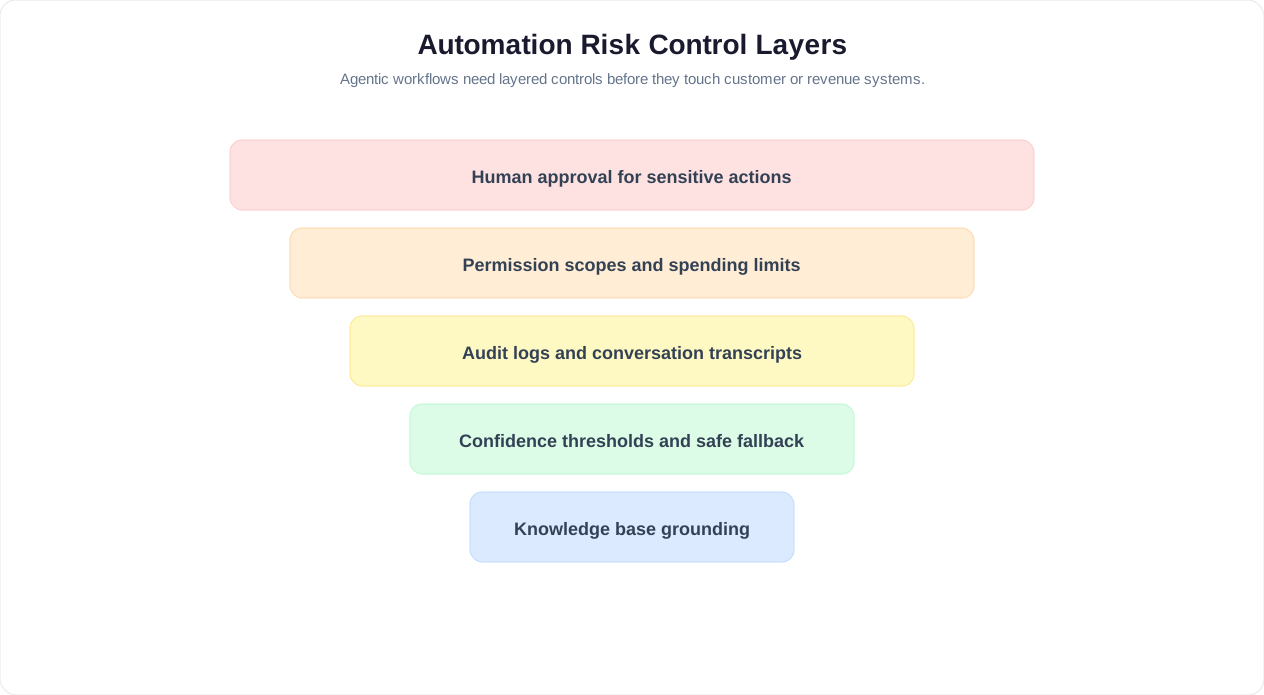
| Least-privilege permissions | The agent only accesses the systems and actions it truly needs |
| Human approval thresholds | Sensitive actions require review before execution |
| Audit logs | Every decision, tool call, and output can be reviewed |
| Policy-based guardrails | Business rules constrain what the agent can decide |
| Fallback and escalation | Uncertain cases move to a person instead of forcing automation |
| Testing with real scenarios | The agent is evaluated against edge cases before launch |
The best production systems are not fully autonomous everywhere. They use autonomy where the task is low-risk and repetitive, and they use approval workflows where the action affects money, legal commitments, health, safety, or customer trust.
Implementation Roadmap: From Chatbot to AI Agent
A practical implementation path reduces risk and creates value early. Do not start by giving an AI broad access to critical systems. Start with a high-volume conversation problem, measure performance, then add controlled actions.
Phase 1: Launch a Focused Chatbot
Pick one high-volume use case: FAQs, lead qualification, appointment booking, support triage, or order questions. Build the first version with a no-code chatbot builder, connect your knowledge base, and add human handoff. Deploy it to your highest-volume channel first, usually your website or WhatsApp.
Measure response time, engagement rate, completion rate, escalation rate, and unanswered questions. This gives you the conversation data needed to decide where agentic automation will help.
Phase 2: Connect Business Systems
Once the chatbot reliably understands the most common intents, connect limited integrations. Examples include CRM lead creation, calendar availability, help desk ticket creation, order lookup, or account verification. At this stage, the bot still follows structured paths, but it starts reducing manual work.
Phase 3: Add Agentic Workflows Behind Specific Intents
Choose one workflow where the steps are clear and the risk is manageable. Examples include creating a qualified lead record, drafting a support ticket summary, checking return eligibility, or preparing an appointment reschedule. Define the tools, permissions, success criteria, and fallback behavior before launch.
Phase 4: Introduce Approval-Based Autonomy
For sensitive workflows, let the AI prepare the action and ask a human to approve it. This is often the best intermediate step for refunds, account changes, contract updates, and regulated support. Over time, actions with low error rates can become automatic while higher-risk actions remain reviewed. The IBM guide to AI agents provides a useful enterprise perspective on designing approval-based autonomy and scaling agent deployments responsibly.
Phase 5: Optimize With Analytics
Use analytics to compare automated resolution, escalation quality, user satisfaction, and workflow completion. Review failed agent actions separately from failed conversations because they reveal different problems. Conversation failures usually mean knowledge or routing gaps. Agent failures usually mean tool, permission, policy, or data-quality issues.
For teams preparing their content and data, the guide to training a chatbot on business data is a strong starting point before expanding into agentic workflows.
Vendor Evaluation Checklist for 2026
Whether you buy a chatbot platform, an AI agent platform, or a hybrid conversational AI solution, evaluate it against the operational reality of your business.
Chatbot Platform Checklist
- Can non-technical users build and update flows?
- Does it support AI, rule-based, and hybrid conversations?
- Can you deploy to website, WhatsApp, Messenger, Instagram, Slack, or Teams from one workspace?
- Does it support knowledge base grounding and source-controlled answers?
- Can users reach a human through live chat without repeating themselves?
- Does analytics show unanswered questions, drop-offs, conversion, and handoff reasons?
- Can it integrate with the systems your team already uses?
AI Agent Checklist
- Can the agent use tools with explicit permissions and input validation?
- Can sensitive actions require human approval?
- Are tool calls, reasoning summaries, and action results logged for audit?
- Can the system retry safely, fail gracefully, and escalate when uncertain?
- Can you test workflows with realistic edge cases before production?
- Can business users update policies without engineering every change?
- Does the vendor clearly separate knowledge retrieval, model output, and action execution?
Questions to Ask Before Signing
- What happens when the AI is uncertain?
- Can we restrict which actions are automatic and which require approval?
- How are customer data, conversation history, and tool outputs protected?
- Can we export logs for compliance or quality review?
- How quickly can a business user update an answer, flow, or policy?
- Which integrations are native, and which require custom development?
- How does pricing change as conversation volume and AI usage grow?
Conferbot is a strong fit for businesses that want to start with practical customer-facing chatbot automation and expand into more advanced AI-assisted workflows over time. Review Conferbot features, integrations, and pricing when comparing options.
Final Recommendation: Start With the Interface, Then Automate the Work
The AI agent vs chatbot debate is easiest to solve when you separate interface from outcome. A chatbot is often the right interface because customers understand it, it is fast to deploy, and it handles common conversations well. An AI agent is the right execution layer when the business needs work completed across tools and records.
If your business has not deployed conversational automation yet, start with a chatbot. Use it to capture demand, map real user intents, improve your knowledge base, and reduce repetitive support or sales work. Our AI customer service guide covers the practical implementation steps for that starting point. Once you know which conversations consistently require follow-up actions, add agentic workflows behind those intents.
If your business already has a successful chatbot, look for the next manual step after each conversation. Do agents copy data into a CRM? Do support reps create the same tickets repeatedly? Do operations teams check the same policy and update the same records? Those are the best AI agent candidates.
In 2026, the winning approach is practical rather than flashy: use chatbots for reliable customer interaction, use AI agents for controlled task execution, and keep humans in the loop where judgment, empathy, compliance, or money is involved.
Implementation Priority Matrix
Use this matrix to determine where to invest first based on your current automation maturity and business needs:
| Current State | Recommended First Step | Expected Timeline | Expected Impact |
|---|---|---|---|
| No automation | Deploy an AI chatbot for FAQs, lead capture, and booking | 1-2 weeks | 40-60% reduction in repetitive inquiries |
| Basic chatbot deployed | Expand chatbot coverage with knowledge base training and multi-channel deployment | 2-4 weeks | 25-35% improvement in containment rate |
| Mature chatbot with high containment | Add agentic workflows for top 3 post-conversation manual tasks | 4-8 weeks | 50-70% reduction in agent post-conversation work |
| Multiple agents and chatbots | Unify under one platform with shared context, routing, and analytics | 2-3 months | 30% improvement in cross-system resolution speed |
The key principle is to automate conversations first, then automate the work behind those conversations. This sequence ensures that you have validated demand, mapped real intents, and collected enough data to design effective agentic workflows before investing in the more complex agent infrastructure.
Was this article helpful?
AI Agent vs Chatbot FAQ
Everything you need to know about chatbots for ai agent vs chatbot.
About the Author

Conferbot Team specializes in conversational AI, chatbot strategy, and customer engagement automation. With deep expertise in building AI-powered chatbots, they help businesses deliver exceptional customer experiences across every channel.
View all articles
