
What Is a Chatbot? A Clear Definition
A chatbot is a software program that simulates human conversation through text or voice. When you visit a website and a chat window pops up asking "How can I help you?" - that is a chatbot. When you message a business on WhatsApp and get an instant reply at 2 AM - that is a chatbot. When you ask Siri or Alexa a question - that is a chatbot too.
The Simple Explanation
Think of a chatbot as a virtual assistant that never sleeps. It reads your message, understands what you want (or follows a pre-set script), and responds with helpful information, completes a task, or connects you with a human when needed.
Chatbots exist on:
- Websites: The chat widget in the bottom-right corner of most business sites
- Messaging apps: WhatsApp, Facebook Messenger, Instagram DMs, Telegram
- Mobile apps: Built into Android and iOS applications
- Workplace tools: Slack, Microsoft Teams
- Voice assistants: Alexa, Google Assistant, Siri
Chatbots by the Numbers (2026)
Chatbots are not a future technology - they are mainstream today:
- 80% of businesses will use chatbots by 2027 (Gartner)
- 2.5 billion people use messaging apps that support chatbots (Statista)
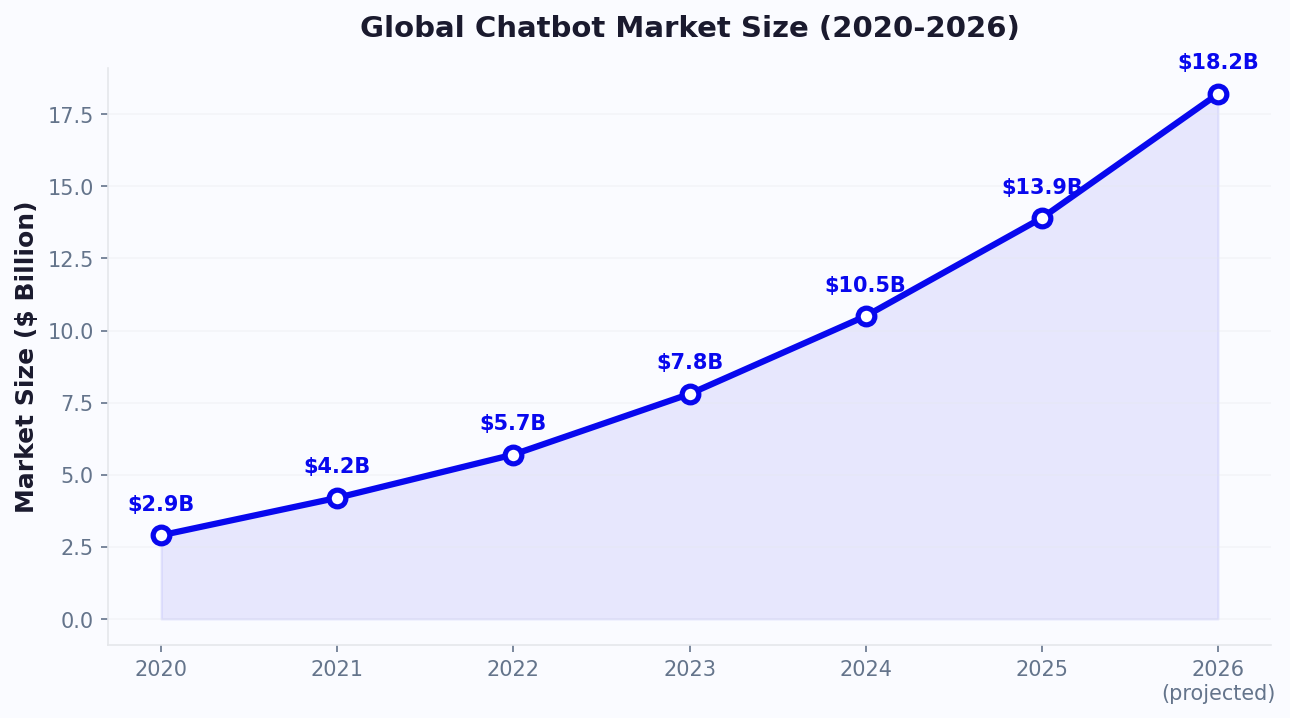
- The chatbot market is worth $12.9 billion in 2026, growing at 24% annually according to Grand View Research
- 67% of consumers worldwide used a chatbot in the past 12 months
- Chatbots handle 85% of customer interactions without human involvement at companies that deploy them
Whether you realize it or not, you almost certainly interact with chatbots every single day - when ordering food, checking a bank balance, tracking a package, or asking a store about product availability. For a complete breakdown of the measurable advantages, see our chatbot benefits guide.
How Do Chatbots Work? The Technology Explained Simply
Behind every chatbot conversation, there is a process happening in milliseconds. Here is how it works, explained without jargon:
Step 1: You Send a Message
You type "What are your business hours?" into a chat window. This message is sent to the chatbot's server.
Step 2: The Bot Understands Your Intent
The chatbot needs to figure out what you want. There are two ways this happens:
- Keyword matching (simple bots): The bot scans your message for keywords - "hours", "open", "close" - and matches them to a pre-written answer. Fast but limited.
- Natural Language Processing / AI (smart bots): The bot uses AI to understand the meaning of your message, even if you phrase it in unexpected ways. "When do you guys open?", "What time are you available?", and "Are you open on Sundays?" all trigger the same response, even though the words are different.
Step 3: The Bot Generates a Response
Based on the detected intent, the bot either:
- Returns a pre-written answer ("We're open Mon-Fri, 9 AM to 6 PM")
- Generates a new answer using AI (GPT-4-class models that compose natural responses)
- Takes an action - looks up your order, books an appointment, or processes a request
- Asks a follow-up question - "Which location are you asking about?"
Step 4: The Conversation Continues
Good chatbots maintain context. If you asked about hours and then say "What about weekends?" the bot knows you are still asking about business hours, not switching topics. This context awareness is what separates basic bots from smart ones.
The Tech Stack Behind Modern Chatbots
| Component | What It Does | Example |
|---|---|---|
| NLP Engine | Understands human language | GPT-4, Claude, custom models |
| Knowledge Base | Stores information the bot can reference | FAQs, product data, policies |
| Dialog Manager | Manages conversation flow and context | Tracks multi-turn conversations |
| Integration Layer | Connects to external systems | CRM, calendar, payment, database |
| Channel Connector | Deploys to different platforms | Website, WhatsApp, Messenger |
| Analytics Engine | Tracks performance and user behavior | Conversation logs, conversion rates |
You do not need to understand any of this to build a chatbot. Modern no-code chatbot builders handle all the technology. But knowing the basics helps you make informed choices about which type of chatbot is right for you.
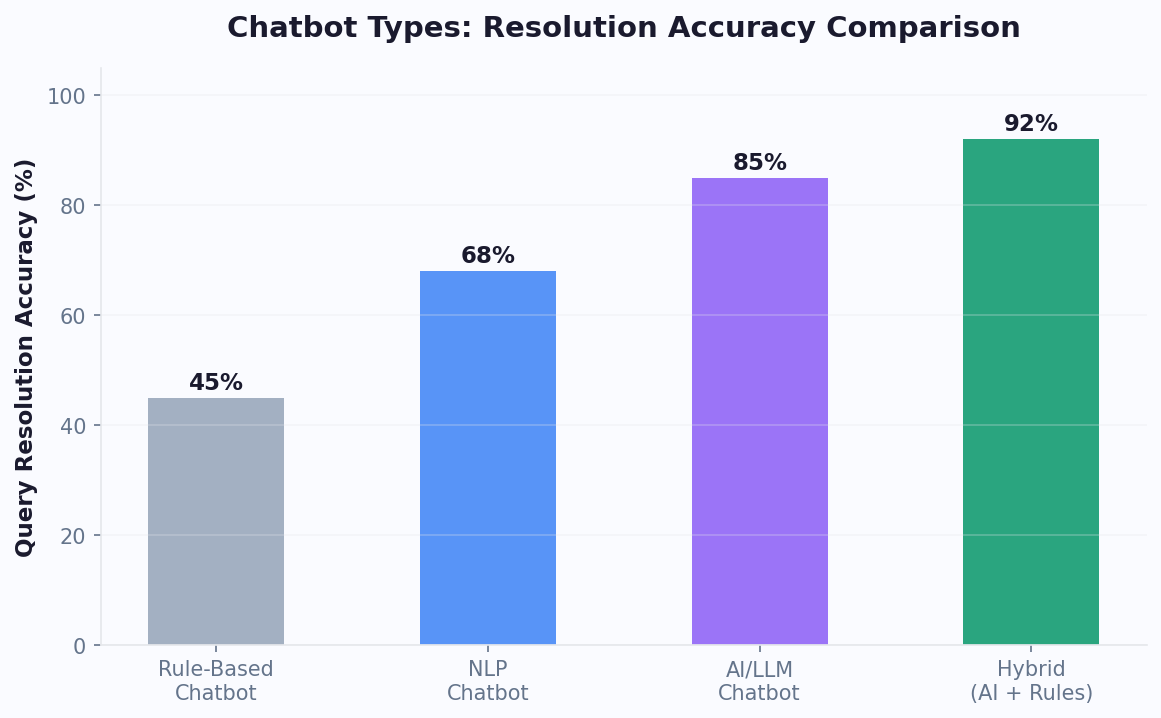
3 Types of Chatbots: Rule-Based vs AI vs Hybrid
Not all chatbots are created equal. There are three distinct types, each suited for different situations. Understanding the differences helps you choose the right approach for your business.
Type 1: Rule-Based Chatbots (Decision Trees)
Rule-based chatbots follow pre-defined scripts. Every possible conversation path is mapped out in advance, like a flowchart. The user clicks buttons or types keywords, and the bot follows the corresponding path.
How it works: "What do you need help with?" → [Order Status] [Returns] [Products] → User clicks [Order Status] → "Please enter your order number" → Bot looks up order → shows status.
Pros:
- 100% predictable - the bot never says something unexpected
- Easy to build with drag-and-drop tools
- Perfect for structured processes (order tracking, appointment booking, surveys)
- No AI costs - runs on simple logic
Cons:
- Cannot handle questions outside the script
- Feels robotic - users are limited to button clicks
- Requires manual updates for every new question type
- Breaks when users type free-form text that does not match a keyword
Best for: Simple, structured tasks like order tracking, lead capture forms, and appointment booking.
Type 2: AI-Powered Chatbots
AI chatbots use machine learning and natural language processing to understand and respond to any question - even ones they have never been explicitly programmed for. They learn from your business data and generate natural responses.
How it works: User types anything in natural language → AI understands intent → generates a contextual response from its knowledge base → maintains multi-turn conversation context.
Pros:
- Handles any question - no need to pre-program every answer
- Natural, human-like conversations
- Learns and improves from interactions
- Dramatically reduces the work required to maintain the bot
Cons:
- Occasionally generates incorrect responses ("hallucination") - though grounding techniques substantially reduce this risk
- Less predictable than rule-based bots
- Requires quality training data for best results
- Higher cost due to AI processing
Best for: Customer support, product recommendations, complex inquiries. For a deeper comparison, read our AI vs rule-based chatbot analysis. According to IBM's chatbot overview, AI chatbots powered by foundation models can now handle complex, multi-turn conversations that were impossible for earlier NLP systems.
Type 3: Hybrid Chatbots (Best of Both Worlds)
Hybrid chatbots combine rule-based flows for structured tasks with AI for open-ended questions. This is the most effective approach for most businesses.
How it works: Structured tasks (booking, orders) use reliable rule-based flows. Open-ended questions ("What's the best product for dry skin?") are handled by AI. If the AI is uncertain, it escalates to a human via live chat.
Best for: Any business that wants reliability for critical processes and flexibility for everything else. This is what most modern platforms like Conferbot offer.
10 Real Business Use Cases for Chatbots
Chatbots are not just for big tech companies. Here are 10 proven use cases across every industry:
1. Customer Support Automation
Answer FAQs, troubleshoot issues, and resolve tickets 24/7. Chatbots handle 60-80% of support queries without human involvement, saving $5-12 per ticket. Full customer support chatbot guide.
2. Lead Generation and Qualification
Capture visitor information through conversational forms that convert 3-5x better than static forms. The chatbot qualifies leads by asking budget, timeline, and need - then routes hot leads to sales instantly. Lead generation chatbot strategies.
3. Appointment Booking
Let customers book appointments through chat on your website, WhatsApp, or Messenger. The bot shows real-time availability, collects details, confirms, and sends reminders. Reduces no-shows by 40%. Appointment booking chatbot guide.
4. E-Commerce Sales
Product recommendations, size guidance, abandoned cart recovery, and order tracking. E-commerce chatbots increase conversion rates by 50-100% and recover 12-18% of abandoned carts. E-commerce chatbot strategies.
5. HR and Internal Support
Answer employee questions about policies, benefits, PTO balances, and payroll. HR chatbots deployed on Slack or Teams reduce HR ticket volume by 50-70%. HR chatbot guide.
6. Restaurant Orders and Reservations
Take online orders, manage reservations, and answer menu questions. Restaurant chatbots increase online order volume by 20-35%.
7. Real Estate Lead Capture
Qualify buyers, schedule viewings, and answer property questions 24/7. Real estate chatbots capture 3x more leads from listing pages.
8. Healthcare Patient Intake
Collect patient information, schedule appointments, send medication reminders, and triage symptoms. Healthcare chatbots reduce administrative workload by 45%.
9. Education Enrollment
Answer prospective student questions, guide applications, and handle enrollment. Education chatbots increase application completion rates by 30%.
10. Insurance Quotes and Claims
Generate instant quotes, guide claim submissions, and answer policy questions. Insurance chatbots reduce claim processing time by 60%.
Every industry has chatbot applications. The common thread: automating repetitive conversations so humans can focus on complex, high-value work.
Why Every Business Needs a Chatbot: 8 Proven Benefits
The business case for chatbots is backed by hard data across thousands of deployments:
1. Available 24/7/365
Customers do not wait for business hours. 42% of inquiries arrive outside 9-5. A chatbot answers every question, captures every lead, and books every appointment - at 2 AM on Christmas Day or during your busiest Monday morning. The 24/7 customer service chatbot never calls in sick.
2. Instant Response Time
The average chatbot responds in under 3 seconds. The average human response time for live chat is 2 minutes and 40 seconds, and for email it is 12 hours. Speed matters: 82% of consumers rate an "immediate" response as important when they have a question.
3. Reduce Support Costs by 60-80%
Each human-handled support ticket costs $5-12. A chatbot-handled conversation costs $0.10-0.25. When chatbots resolve 70% of inquiries, the math is transformative. A business handling 1,000 tickets/month saves $3,500-8,400/month. Learn more about how to reduce support tickets with chatbots.
4. Increase Conversions by 50-100%
Visitors who engage with a chatbot are 2.8x more likely to convert. The chatbot answers objections in real time, guides visitors to the right product or page, and captures leads through conversation instead of static forms.
5. Scale Without Hiring
A chatbot handles 1 conversation or 10,000 simultaneously - with the same response quality and speed. During traffic spikes (Black Friday, product launches, viral moments), the chatbot absorbs the surge without a hiring scramble.
6. Consistent Quality
Human agents have good days and bad days. A chatbot delivers the same accurate, on-brand response every single time. No miscommunication, no forgotten details, no inconsistent pricing quotes.
7. Data Collection and Insights
Every chatbot conversation generates data: what customers ask, what products interest them, where they get stuck, and what objections they raise. Chatbot analytics reveal patterns that transform your marketing, product, and support strategy.
8. Competitive Advantage
In most industries, fewer than 10% of businesses use chatbots effectively. Being among them sets you apart. Customers increasingly expect instant, digital-first communication. The businesses that deliver it win - the ones that force customers to call and wait, lose. See the true cost of not having a chatbot.
How to Build Your First Chatbot (No Coding Required)
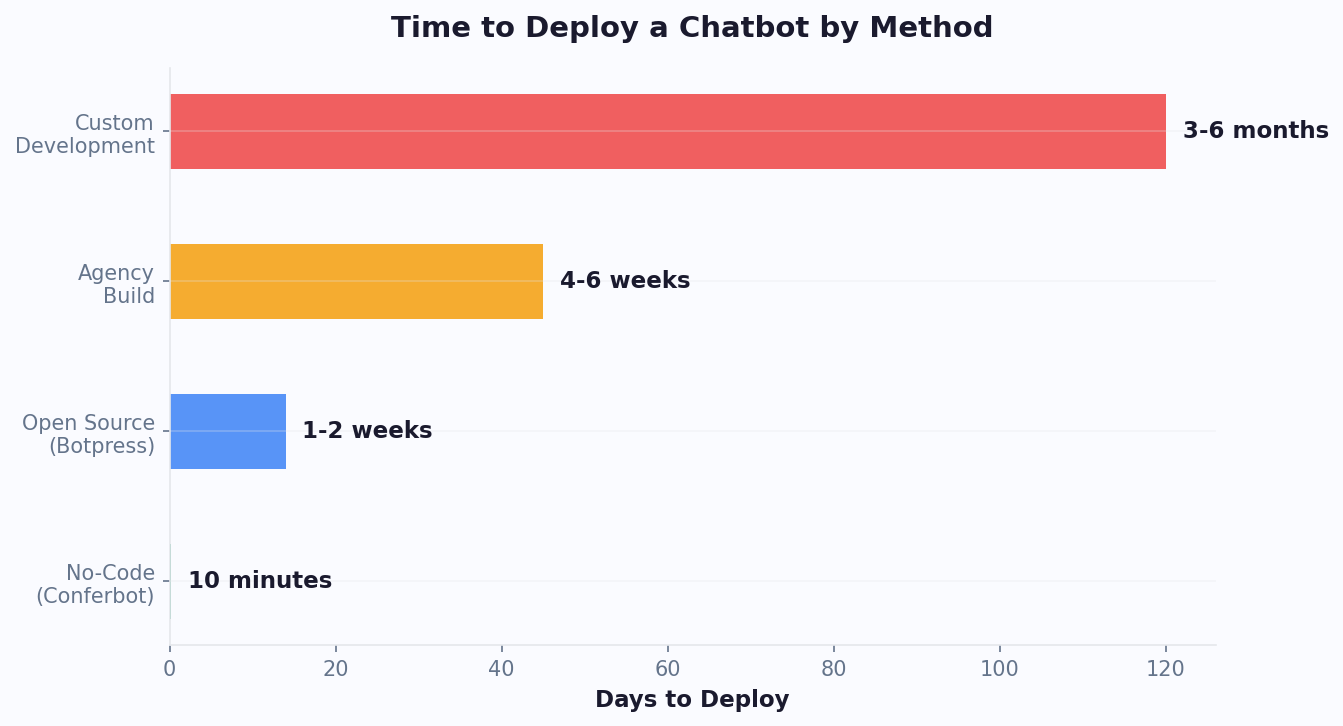
Building a chatbot used to require developers, months of work, and six-figure budgets. In 2026, you can launch a fully functional AI chatbot in under 10 minutes with zero code.
Option 1: Use a No-Code Chatbot Builder (Recommended)
The fastest path for most businesses:
- Sign up for a chatbot platform like Conferbot
- Choose a template from the template gallery that matches your use case (customer support, lead generation, booking, e-commerce)
- Customize - edit the welcome message, add your FAQs, upload your logo, match your brand colors
- Train the AI on your business data by pasting your website URL into the knowledge base - the AI reads your site and learns your business
- Deploy - add the embed code to your website, or connect to WhatsApp and Messenger
Total time: 10-15 minutes. Total code written: zero. Full no-code chatbot building guide.
Option 2: Use a Pre-Built Template
Even faster than building from scratch: select a pre-built chatbot template designed for your industry. Templates for e-commerce, healthcare, real estate, restaurants, salons, law firms, and dozens more are available and can be deployed in under 5 minutes.
Option 3: Build Custom (Developers)
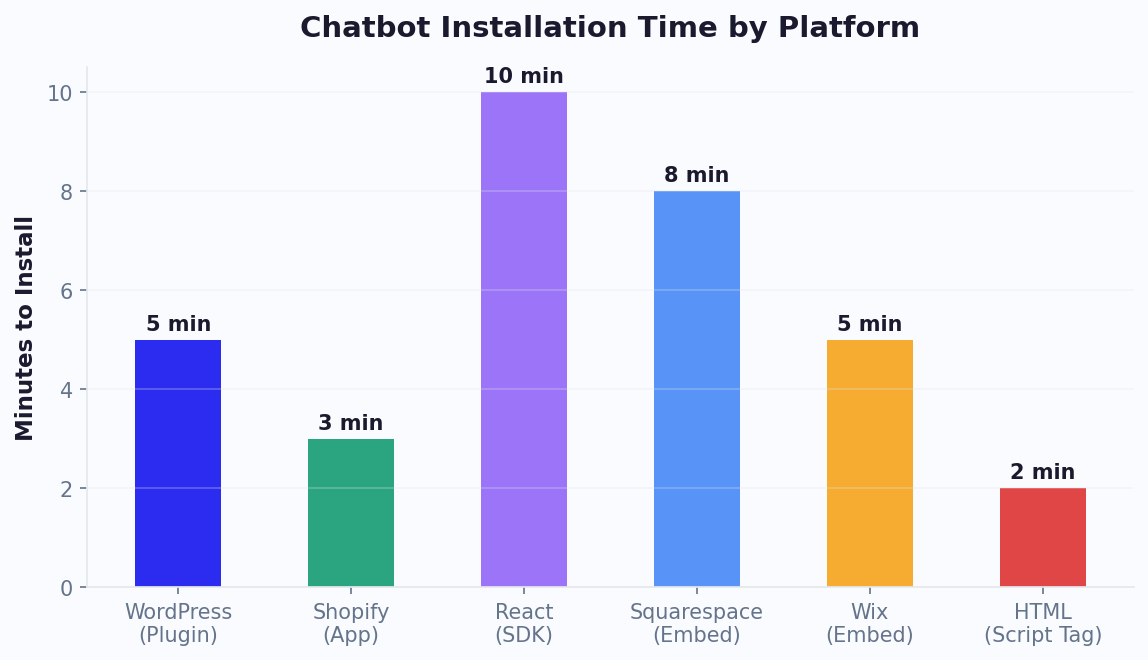
If you have specific technical requirements, you can build a chatbot using APIs and embed it on your platform. Conferbot offers embed guides for React, WordPress, Shopify, and other frameworks.
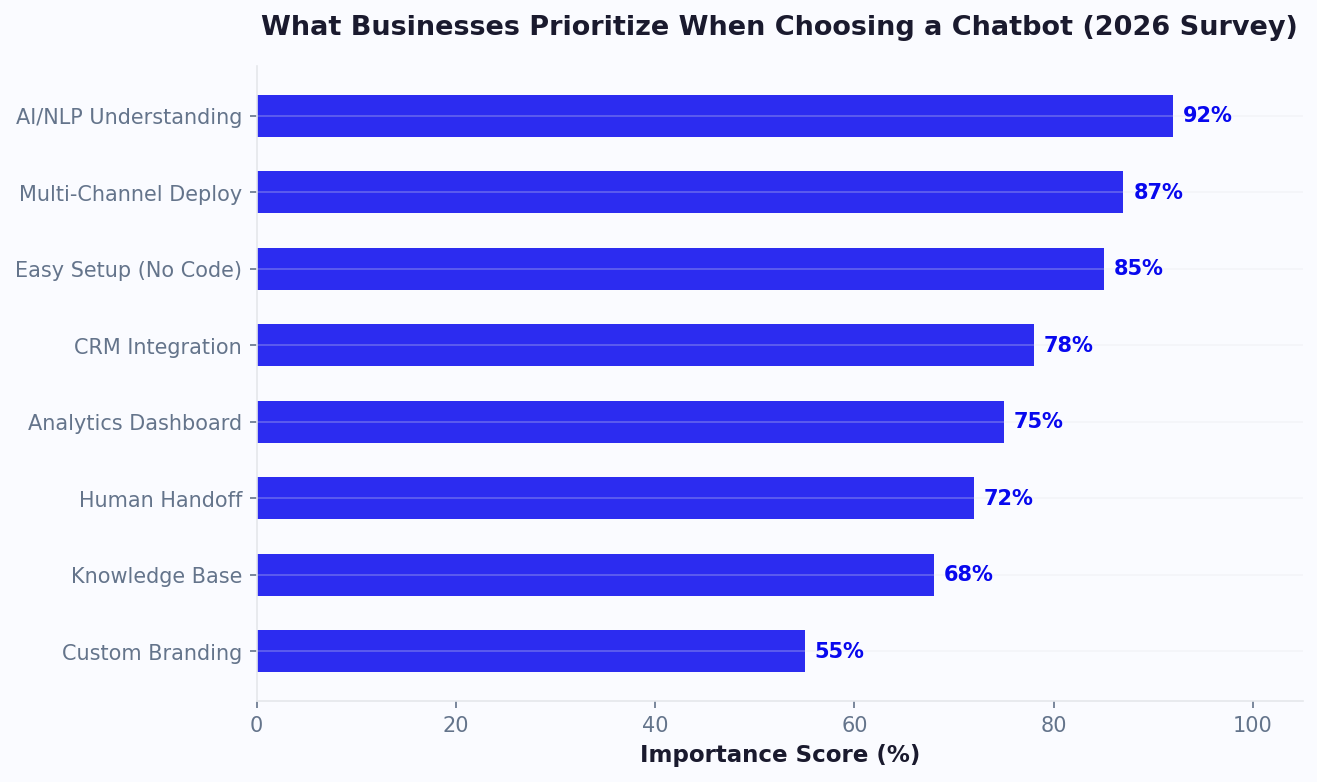
What to Configure First
Regardless of which approach you choose, prioritize these configurations:
| Priority | Configuration | Why It Matters |
|---|---|---|
| 1 | Welcome message | First impression - sets the tone for the entire conversation |
| 2 | Top 10 FAQs | Cover 80% of incoming questions immediately |
| 3 | Lead capture flow | Start collecting leads from day one |
| 4 | Human handoff | Ensure complex issues reach a human |
| 5 | Analytics setup | Track what is working and what needs improvement |
What to Expect in Week One
- Day 1: Deploy the chatbot, start handling basic questions
- Day 2-3: Review conversation logs, identify gaps in knowledge base
- Day 4-5: Add missing answers, refine flows based on real user behavior
- Day 7: Review analytics - conversations handled, leads captured, common questions
Most businesses see tangible results (leads captured, tickets deflected, bookings made) within the first 48 hours of deployment.
Chatbot vs Live Chat: Do You Need Both?
A common question: should you use a chatbot, live chat with human agents, or both? The answer for most businesses is both - but with the chatbot handling the lion's share of conversations.
When to Use a Chatbot
- Answering frequently asked questions (business hours, pricing, policies)
- Collecting lead information (name, email, phone, needs)
- Booking appointments and reservations
- Order tracking and status updates
- Product recommendations and guided selling
- After-hours coverage (nights, weekends, holidays)
- High-volume periods when human agents are overwhelmed
When to Use Live Chat (Human Agents)
- Complex complaints requiring empathy and judgment
- High-value sales negotiations
- Sensitive issues (billing disputes, account problems)
- Situations where the chatbot cannot find an answer
- VIP customer requests
The Ideal Setup: Chatbot-First With Human Handoff
The most effective approach: the chatbot handles every conversation first. It resolves 70-85% of inquiries automatically. For the 15-30% it cannot handle, it seamlessly transfers the conversation - with full context - to a human agent via live chat.
| Metric | Chatbot Only | Live Chat Only | Chatbot + Live Chat |
|---|---|---|---|
| Availability | 24/7 | Business hours only | 24/7 (bot) + business hours (human) |
| Response time | Under 3 seconds | 2-5 minutes | Under 3 seconds (bot) → instant handoff |
| Cost per conversation | $0.10-0.25 | $5-12 | $0.50-2.00 (blended) |
| Resolution rate | 70-85% | 95% | 95%+ (combined) |
| Customer satisfaction | 78% | 85% | 90%+ (best of both worlds) |
The chatbot handles volume and speed. Humans handle nuance and empathy. Together, they deliver better service than either alone. For a deep dive, read our chatbot vs live chat comparison.
The Future of Chatbots: What Is Coming in 2026 and Beyond
Chatbot technology is evolving rapidly. Here are the trends shaping the next generation of chatbots:
Trend 1: Agentic AI - Chatbots That Take Action
The biggest shift in 2026 is from chatbots that answer to chatbots that act. Instead of just telling you the return policy, the chatbot processes the return, generates the shipping label, issues the refund, and updates the inventory - all in one conversation. This "agentic" capability turns chatbots from information tools into workflow automation engines.
Trend 2: Voice-First Chatbots
Voice AI is reaching human-level fluency. Voice chatbots now handle phone calls with natural intonation, understand accents, and process multi-step requests. By 2027, an estimated 40% of chatbot interactions will be voice-based.
Trend 3: Omnichannel by Default
Customers expect to start a conversation on your website, continue on WhatsApp, and finish on Instagram - with full context preserved across channels. Omnichannel chatbot strategies are becoming table stakes, not a premium feature.
Trend 4: Proactive Chatbots
Instead of waiting for customers to initiate, chatbots are becoming proactive. They detect browsing patterns, predict questions, and offer help before the customer even asks. "I noticed you've been comparing these two laptops for 5 minutes - want me to break down the differences?"
Trend 5: Industry-Specific AI
Generic chatbots are giving way to industry-specialized AI trained on sector-specific data. A healthcare chatbot understands medical terminology and HIPAA requirements. A real estate chatbot knows mortgage calculations and zoning rules. Specialization delivers dramatically better accuracy.
What This Means for Your Business
The businesses that deploy chatbots today will have a significant advantage as these capabilities mature. Early adopters accumulate training data, build customer habits around chat-based interaction, and continuously improve their bot's knowledge base. Waiting means playing catch-up against competitors who started earlier.
Explore the latest developments in our AI chatbot trends 2026 report, or check current adoption statistics in our chatbot statistics roundup.
5 Common Chatbot Mistakes Beginners Make (and How to Avoid Them)
Understanding what a chatbot is and how it works is the first step. The next step is deploying one without falling into the traps that derail most first-time implementations. These mistakes are based on data from thousands of chatbot deployments across industries.
Mistake 1: Trying to Automate Everything on Day One
New chatbot builders often try to create a bot that handles every possible question and workflow at launch. This leads to a bloated, poorly-tested bot that frustrates users. The fix: Start with one primary use case - answering your top 10 FAQs, capturing leads, or booking appointments - and get it working flawlessly before expanding. Businesses that launch with a focused scope see 40% higher satisfaction scores in the first month compared to those that launch with a broad, shallow bot.
Mistake 2: Not Providing a Human Handoff Path
A chatbot without an escalation path is a dead end. When the bot cannot help and there is no way to reach a human, you lose the customer entirely. Always configure a clear path to live chat or a callback request so customers never feel stuck.
Mistake 3: Ignoring Analytics After Launch
Deploying a chatbot and never checking the data is like running ads without measuring results. Review your conversation analytics weekly to identify unanswered questions, drop-off points, and underperforming flows. The best chatbot operators add 3-5 new knowledge base answers every week based on real conversation data.
Mistake 4: Using Generic, Off-Brand Language
Default chatbot responses feel impersonal. If your brand voice is warm and friendly, your chatbot should sound the same. Write chatbot messages with the same care you give to your website copy. Consistent brand voice increases user trust and engagement by 20-35%.
Mistake 5: Forgetting Mobile Users
Over 65% of chatbot conversations happen on mobile devices. If your chat widget covers the entire mobile screen, loads slowly, or has tiny buttons, mobile users will not engage. Test on at least three different mobile devices before going live to ensure a smooth user experience across screen sizes. These best practices apply whether you are building a simple FAQ bot or a sophisticated no-code chatbot. For a deeper dive into measuring chatbot effectiveness once deployed, see our chatbot analytics metrics guide.
What Does a Chatbot Actually Cost? A Realistic Breakdown
One of the most common questions from businesses exploring chatbots for the first time is about cost. The answer depends on the approach you choose and the complexity of your needs.
No-Code Chatbot Platforms (Recommended for Most Businesses)
Platforms like Conferbot offer the fastest and most cost-effective path to a working chatbot. Pricing typically falls into these tiers:
| Tier | Monthly Cost | What You Get |
|---|---|---|
| Free | $0 | Basic chatbot, limited conversations, single channel |
| Starter | $19-49 | AI chatbot, multiple channels, basic analytics |
| Professional | $99-199 | Advanced AI, all channels, integrations, full analytics |
| Enterprise | $500+ | Custom solutions, dedicated support, SLA guarantees |
Custom Development
Building a chatbot from scratch with developers costs $15,000-$150,000+ depending on complexity, integration requirements, and the AI capabilities needed. Development timelines range from 3-6 months. This approach only makes sense for businesses with unique requirements that no platform can satisfy.
The Hidden Costs to Budget For
- Content creation: Writing chatbot scripts, FAQ answers, and knowledge base articles takes time. Budget 10-20 hours for initial setup.
- Integration setup: Connecting to CRM, calendar, or payment systems may require configuration time.
- Ongoing optimization: Plan for 2-3 hours per week reviewing analytics and improving the bot during the first three months.
ROI Timeline
Regardless of which path you choose, most businesses see positive ROI within the first 1-2 weeks of deployment. A chatbot handling just 20 conversations per day at $5 savings per conversation generates $3,000/month in value - far exceeding even the most premium platform costs. For small businesses, the economics are even more compelling because the chatbot effectively acts as a full-time employee that costs a fraction of minimum wage. See our detailed AI vs rule-based comparison to choose the right type for your budget.
Making the Investment Decision
When evaluating chatbot costs, frame the decision around opportunity cost rather than platform fees alone. Calculate what each unanswered customer question costs your business - in lost sales, delayed support resolutions, and customer churn. A business receiving 50 daily website inquiries with an average conversion value of $100 and a 10% chat-to-sale rate is generating $500/day in potential revenue from chat interactions. Without a chatbot handling after-hours traffic (40% of visits), roughly $200/day walks away unanswered. Over a month, that represents $6,000 in addressable revenue - making even a premium chatbot plan an obvious investment when compared to the alternative of hiring additional staff or accepting the revenue leakage as a cost of doing business. The most important step is starting - deploy a basic chatbot this week, measure results for 30 days, and let the data guide your decision on upgrading or expanding.
Was this article helpful?
Build and deploy in 10 minutes. No coding needed.
What Is a Chatbot? How They Work, Types & Why Every Business Needs One (2026) FAQ
Everything you need to know about chatbots for what is a chatbot? how they work, types & why every business needs one (2026).
About the Author
The Conferbot team writes about building, deploying, and improving AI chatbots.
View all articles
