
The Problem With Static FAQ Pages in 2026
FAQ pages have been the default self-service tool since the earliest days of the commercial internet. Every business has one. Most of them fail at the very thing they are supposed to do: prevent customers from contacting support. (source: Zendesk self-service benchmark data). (source: HubSpot State of Service Report). (source: Nielsen Norman Group on FAQ usability).
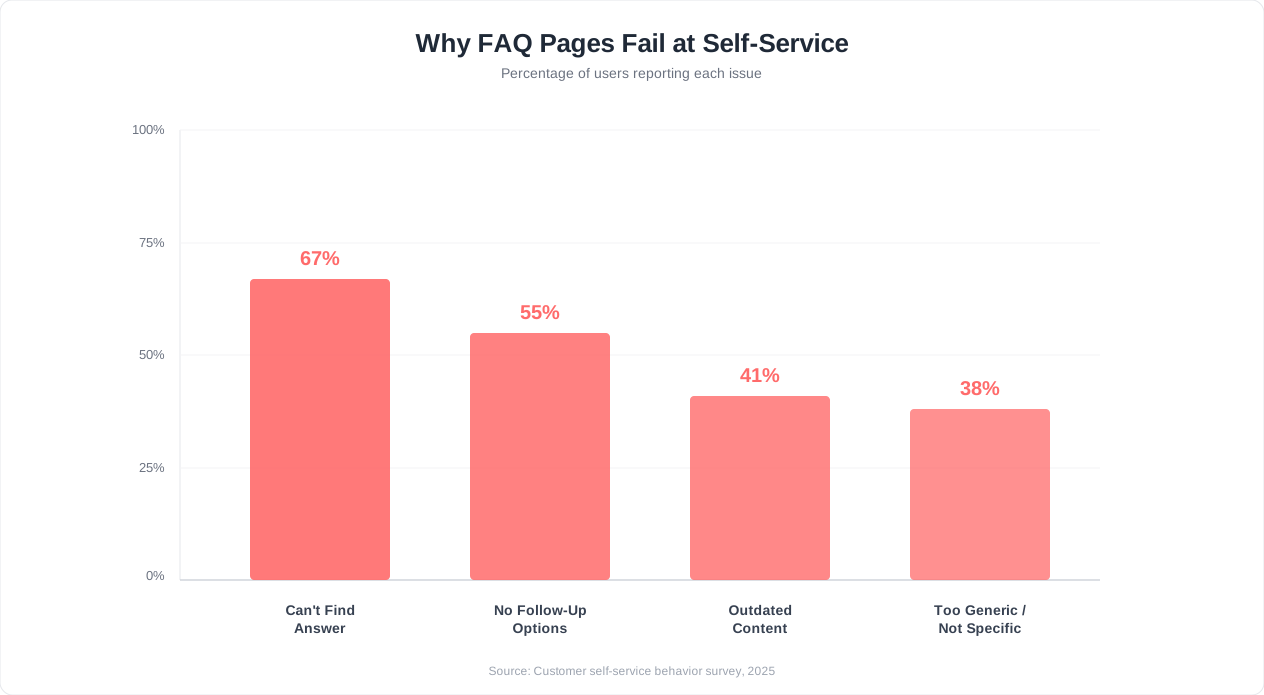
The numbers are stark. Static FAQ pages consistently under-perform as a self-service tool: most visitors who land on one still end up opening a ticket, sending an email, or giving up in silence rather than finding their answer.
Why does a tool specifically designed for self-service fail so badly? Three structural problems make traditional FAQ pages ineffective in 2026:
1. The Search Problem
Most FAQ pages rely on the customer to find the right answer. This requires the customer to know the exact terminology your team uses, scan through dozens or hundreds of questions, and match their specific situation to a generalized answer. Research from the Nielsen Norman Group shows that only 30% of users successfully navigate a list-based information architecture to find what they need. The other 70% give up, scroll past the relevant answer, or misidentify a related-but-wrong answer as the correct one.
Consider a customer who wants to know whether they can pause their subscription instead of canceling. They might search for "pause," "hold," "freeze," "suspend," or "temporary cancel." If your FAQ uses the word "suspend" and the customer searches "pause," they find nothing. A conversational AI chatbot understands all of these synonyms and surfaces the right answer regardless of phrasing.
2. The Context Problem
FAQ pages present the same static answers to every visitor. A first-time trial user and a three-year enterprise customer see identical content. The trial user needs onboarding help; the enterprise customer needs advanced configuration. A static page cannot differentiate between them. (source: Google Search Central documentation guidelines).
Worse, FAQ answers are written in isolation. But real customer questions have context: "I already tried clearing my cache and it did not work" or "I am on the Enterprise plan and this feature should be included." A static FAQ cannot adapt its answer based on what the customer has already tried or what plan they are on. An AI chatbot connected to your knowledge base can.
3. The Engagement Problem
Nobody wants to read a FAQ page. It is a wall of text organized by the company's internal logic, not the customer's mental model. Forrester's research on digital self-service found that 53% of customers abandon self-service attempts if they cannot find an answer within 3 minutes. On a FAQ page with 50+ questions, 3 minutes is barely enough time to scan the categories, let alone read multiple answers to find the right one.
The result is a vicious cycle: companies invest time writing FAQ content, customers do not use it effectively, support tickets keep flowing in, and the team concludes that "customers just do not want to self-serve." The reality is that customers desperately want to self-serve. They just need a better tool than a static web page.
The Real Cost of FAQ Page Failure
When a FAQ page fails, the cost is not abstract. Every unresolved self-service attempt becomes a support ticket. Industry benchmarks from Zendesk place the average cost of a single support ticket at $15-25 for email, $8-12 for chat, and $25-40 for phone. If your FAQ page receives 5,000 visitors per month and successfully deflects only 9%, that means 4,550 visitors potentially need human help. Even if only half of those visitors actually submit a ticket, you are looking at 2,275 tickets per month that better self-service could have prevented.
At an average cost of $15 per ticket, that is $34,125 per month in support costs that a more effective self-service tool could reduce. This is the financial gap between a static FAQ page and a conversational AI chatbot -- and it is why the comparison matters so much for support teams under pressure to do more with less.
How a Chatbot Handles FAQs Differently
An AI chatbot is not just a FAQ page with a chat interface. The conversational approach fundamentally changes how customers find and consume information, and that difference is why chatbots resolve meaningfully more self-service queries than static FAQ pages.
Conversational Understanding vs Keyword Matching
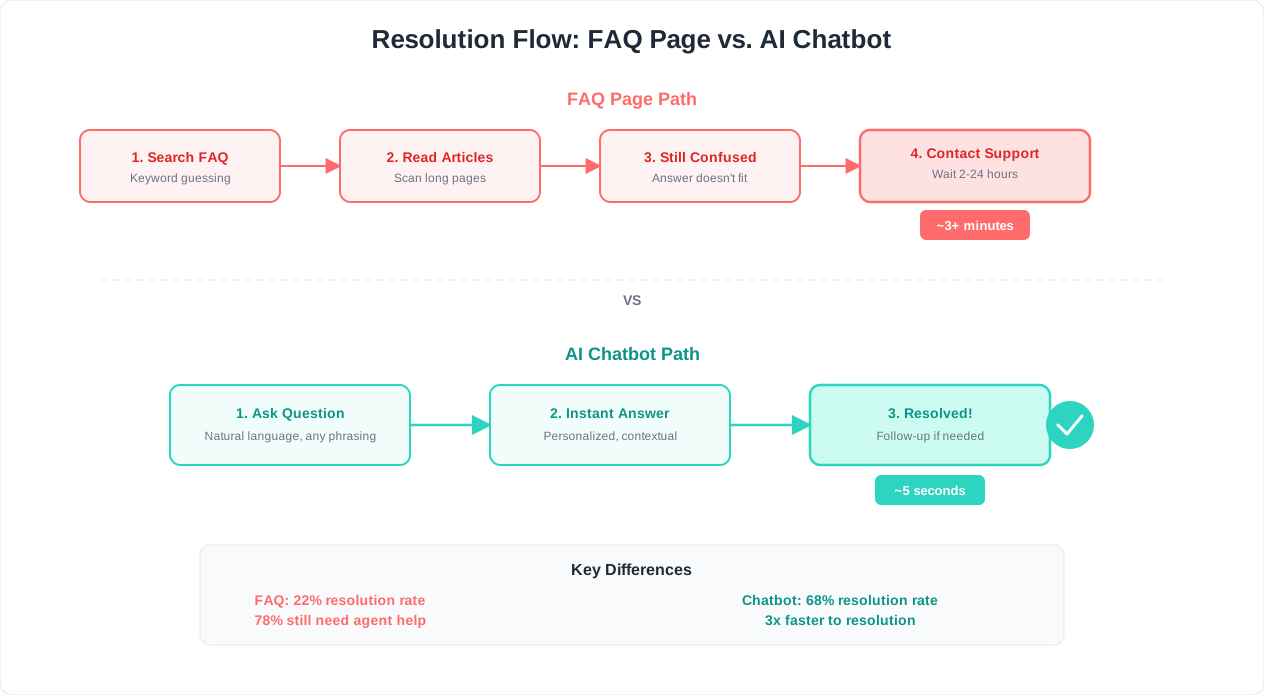
A FAQ page requires the customer to translate their problem into the exact language used in your documentation. An AI chatbot does the reverse: it takes whatever language the customer uses and maps it to the correct answer.
Here is what this looks like in practice:
| What the Customer Types | FAQ Page Result | AI Chatbot Result |
|---|---|---|
| "how do I stop getting charged" | No match (FAQ says "cancel subscription") | Guides through cancellation flow |
| "the thing is broken on my phone" | No match (too vague) | Asks clarifying questions, identifies mobile bug |
| "can I get my money back" | Partial match (refund policy page) | Checks eligibility, initiates refund process |
| "I already tried restarting" | Shows generic troubleshooting (restart is step 1) | Skips step 1, starts at step 2 |
| "do you integrate with Salesforce" | May or may not have a specific FAQ | Provides integration details and setup guide |
The chatbot succeeds where the FAQ page fails because it understands intent, not just keywords. Modern AI chatbots built on large language models parse natural language, handle misspellings and colloquialisms, and maintain context across multiple messages in a conversation.
Multi-Turn Problem Solving
Most customer issues cannot be resolved with a single answer. They require a diagnostic conversation: What product are you using? What happened? What have you already tried? What does the error message say?
A FAQ page gives you one static answer and hopes it covers your situation. A chatbot conducts a diagnostic conversation:
- Customer: "My payment is not going through."
- Chatbot: "I can help with that. Which payment method are you using -- credit card, PayPal, or bank transfer?"
- Customer: "Credit card."
- Chatbot: "Are you seeing a specific error message when you try to pay?"
- Customer: "It says card declined."
- Chatbot: "Card declined errors usually mean one of three things. Let me check your account... I see that the card on file expired last month. Would you like to update your payment method now? I can walk you through it."
This multi-turn interaction is impossible on a FAQ page. The static page would show a generic "Payment issues" answer listing 8 possible causes, leaving the customer to self-diagnose. The chatbot narrows down to the specific cause in 30 seconds.
Proactive Guidance vs Passive Information
FAQ pages are passive. They sit there and wait for the customer to find them. A chatbot deployed as a website widget is proactive. It can:
- Detect confusion: If a visitor spends 60 seconds on your pricing page without scrolling, the chatbot can offer to explain plan differences
- Anticipate questions: On the checkout page, preemptively address shipping time and return policy questions
- Follow up: After resolving an issue, ask "Did that solve your problem?" and offer additional help if needed
- Route intelligently: If the chatbot cannot resolve the issue, it hands off to live chat with full conversation context so the customer never repeats themselves
Learning and Improving Over Time
A FAQ page improves only when someone on your team manually adds or edits content. That happens quarterly at best, and the team is guessing about what content to add based on anecdotal feedback from support agents.
An AI chatbot improves continuously. Conversation analytics reveal exactly which questions the bot fails to answer, which answers receive negative feedback, and which topics generate the most escalations to human agents. This data creates a feedback loop: the chatbot identifies its own gaps, your team fills those gaps in the knowledge base, and deflection rates climb week over week.
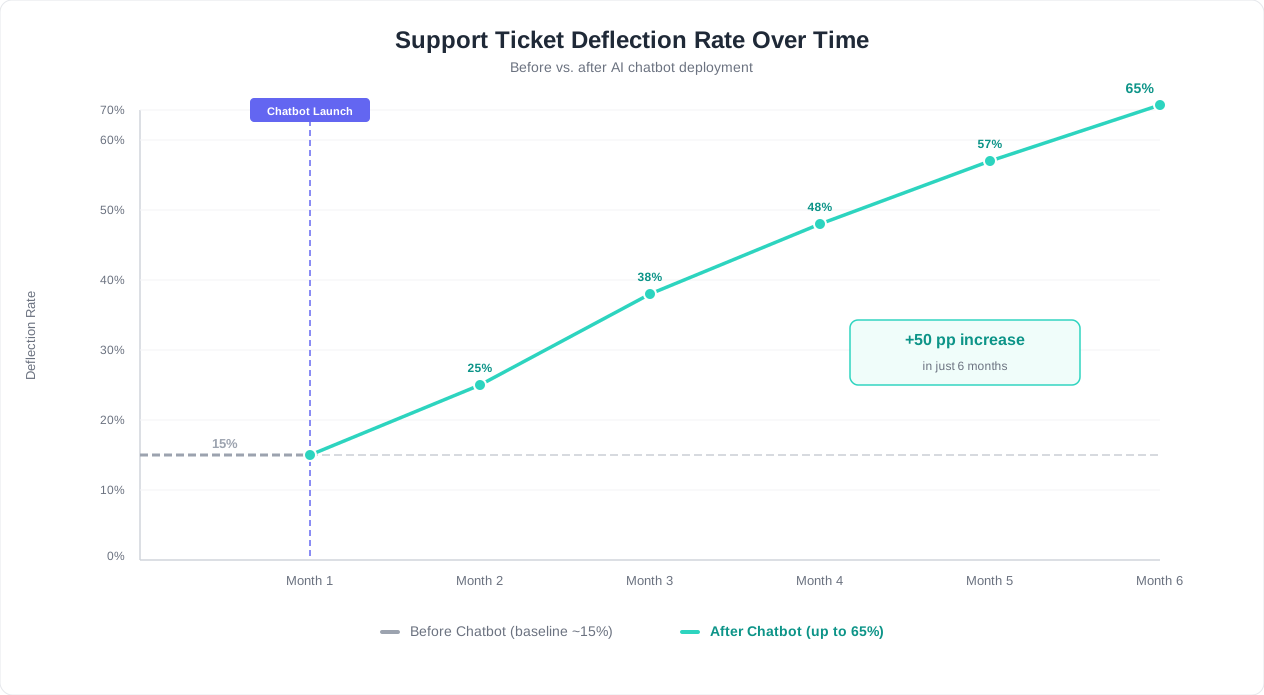
Businesses using Conferbot's analytics-driven improvement cycle typically see deflection rates increase from 40% in month one to 65%+ by month six as the knowledge base expands based on real conversation data rather than guesswork.
Related: Chatbot vs Email Support: Which Wins on Cost, Speed, and Satisfaction?
Side-by-Side Comparison: 10 Metrics That Matter
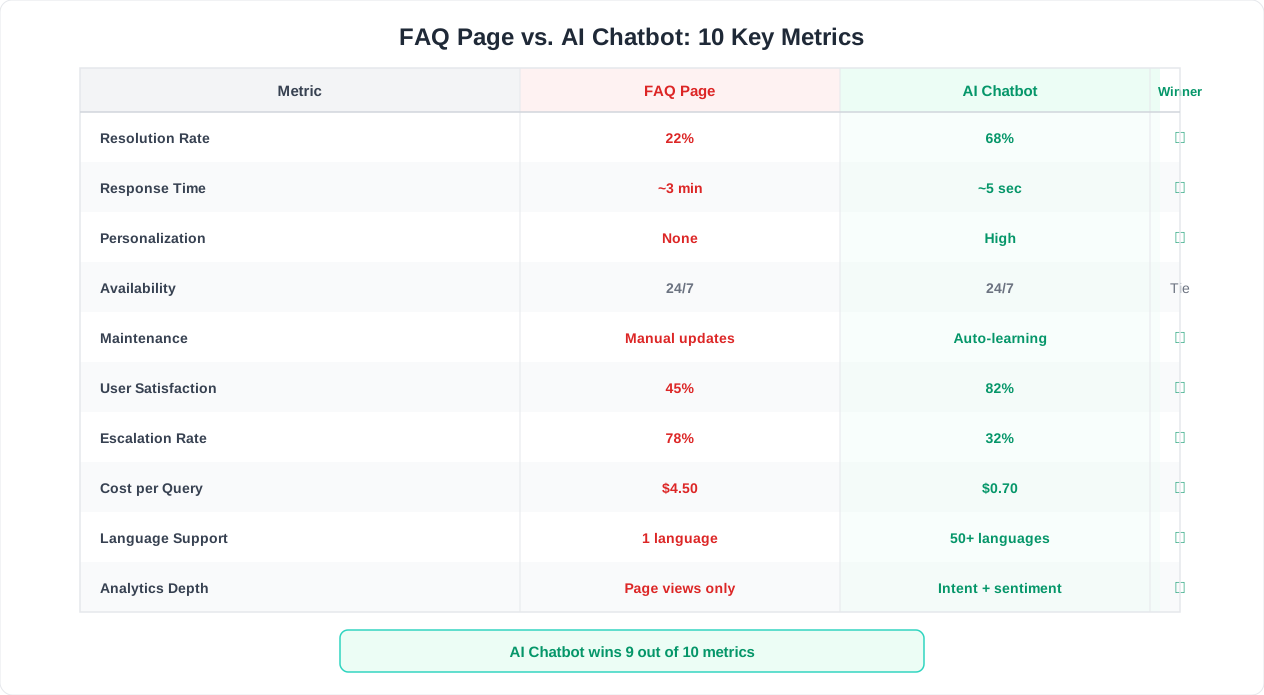
The chatbot vs FAQ page debate comes down to measurable outcomes. Here is a comprehensive comparison across every metric that matters for support teams evaluating their self-service strategy.
| Metric | Static FAQ Page | AI Chatbot | Winner |
|---|---|---|---|
| Self-service success rate | 9% average (Zendesk 2025) | 45-65% (industry average) | Chatbot (5-7x) |
| Ticket deflection rate | 5-12% of potential tickets | 40-60% of potential tickets | Chatbot (4-8x) |
| Average resolution time | 3-8 min (if user finds answer) | 45 seconds - 2 minutes | Chatbot (3-4x faster) |
| User satisfaction (CSAT) | 55-65% | 72-85% | Chatbot (+20-25 pts) |
| 24/7 availability | Available but static | Available and interactive | Chatbot |
| Handling ambiguous questions | Cannot (no clarification possible) | Asks follow-up questions | Chatbot |
| Personalized answers | No (same for all users) | Yes (account, plan, history) | Chatbot |
| SEO value | High (crawlable, indexable content) | Low (dynamic, not crawlable) | FAQ Page |
| Setup cost | $0-500 (one-time content creation) | $49-299/month (platform fee) | FAQ Page (cheaper upfront) |
| Maintenance effort | Manual updates (hours/month) | Semi-automated (analytics-driven) | Chatbot (more efficient) |
| Multilingual support | Requires translated pages per language | Automatic translation (95+ languages) | Chatbot |
| Accessibility | Depends on page design | Depends on widget design | Tie (both can be accessible) |
| Escalation path | None (user must find contact info) | Built-in handoff to live agent | Chatbot |
| Analytics depth | Page views, bounce rate | Per-question resolution, satisfaction, gaps | Chatbot |
| Cost per resolved issue | $0.50-1.00 (content amortized) | $0.10-0.50 (per conversation) | Chatbot (at scale) |
Sources: Zendesk CX Trends 2025, Forrester Digital Self-Service Research, Conferbot platform data 2025-2026
Breaking Down the Key Differentiators
Self-service success rate (9% vs 45-65%): This is the single most important metric. A 5-7x improvement means that for every 1,000 support-seeking visitors, a chatbot resolves 450-650 issues that would otherwise become tickets. At $15-25 per ticket, that is $6,750 to $16,250 in monthly savings per 1,000 visitors.
Ticket deflection rate (5-12% vs 40-60%): Deflection rate measures the percentage of potential support tickets that are prevented by self-service. This metric is harder to measure than self-service success rate because you have to estimate how many visitors would have submitted a ticket. Industry benchmarks from HubSpot's State of Service Report suggest that chatbots deflect 4-8x more tickets than FAQ pages when deployed on the same website.
SEO value (FAQ page wins): This is the one metric where FAQ pages have a clear, unambiguous advantage. Static HTML content is crawlable and indexable by search engines. A well-structured FAQ page with schema markup can appear in Google's featured snippets and "People Also Ask" boxes, driving organic traffic. A chatbot's conversational content is invisible to search engines. This is why the hybrid approach matters -- you need both.
Setup cost vs ongoing ROI: FAQ pages are cheaper to create but more expensive to maintain and far less effective at their core purpose. A chatbot has a monthly platform cost but generates measurable savings from the first week. For businesses handling more than 500 support conversations per month, a chatbot typically reaches positive ROI within 30 days. See our chatbot ROI calculator guide for modeling your specific numbers.
Related: How to Calculate Chatbot ROI: Formula, Benchmarks, and Free Calculator
When a FAQ Page Is Still the Right Choice
Despite the data overwhelmingly favoring chatbots for support ticket reduction, FAQ pages still serve legitimate purposes that a chatbot cannot fully replace. Dismissing them entirely would be a mistake.
1. SEO and Organic Traffic
This is the FAQ page's strongest argument. When someone searches "does [your company] offer free shipping" or "[your product] refund policy," a well-optimized FAQ page can rank in Google and capture that traffic. A chatbot cannot rank in search results.
FAQ pages with proper FAQ schema markup can appear in Google's rich results, occupying extra SERP real estate with expandable question-and-answer blocks. For businesses where organic search drives significant traffic, this visibility is too valuable to abandon.
The data supports this: FAQ pages optimized with schema markup can increase organic click-through rates by 15-25% for branded queries and help-intent searches. This traffic has near-zero acquisition cost and represents customers actively seeking your product information.
2. Legal and Compliance Documentation
Certain industries require static, accessible documentation of policies, terms, and procedures. A chatbot answer that paraphrases your refund policy is not a substitute for the actual written policy that customers and regulators can reference. Healthcare organizations need accessible patient rights documentation. Financial services firms must publish fee schedules. E-commerce businesses need clearly posted return policies.
In these cases, the FAQ page serves a legal function, not just a support function. The static, permanent, linkable nature of FAQ content is a feature, not a limitation.
3. Complex Reference Material
Some information is inherently better consumed in a static, scannable format. API documentation, technical specifications, multi-step setup guides with screenshots, and comparison tables are examples where a static page provides a better user experience than a conversation. Customers need to scroll back and forth, reference specific steps, and bookmark particular sections. A chat interface is not well suited for this type of content consumption.
4. Low-Volume Support Operations
If your business handles fewer than 100 support conversations per month, the ROI of a chatbot may not justify the monthly platform cost. A well-organized FAQ page with 20-30 answers covering your most common questions can serve a small customer base adequately. The tipping point is typically around 200-300 monthly support interactions, where the chatbot's deflection advantage starts generating meaningful savings.
5. Customer Segments That Prefer Self-Reading
Not all customers prefer conversational interfaces. Some prefer to read and scan. A HubSpot study found that 28% of customers actively prefer finding answers by reading documentation over interacting with any chat interface. For these users, a FAQ page is the ideal self-service tool.
The Bottom Line on FAQ Pages
FAQ pages are not obsolete. They are necessary but insufficient. They serve SEO, legal, reference, and certain user-preference needs that chatbots do not address. But relying on a FAQ page as your primary ticket deflection strategy is like relying on a paper map when GPS exists. The paper map is not wrong; it is just dramatically less effective for the primary purpose of getting you where you need to go.
The answer is not to choose one over the other. It is to use each for what it does best, which brings us to the hybrid approach.
Related: How to Train a Chatbot on Your Knowledge Base: Step-by-Step Guide for 2026
The Hybrid Approach: FAQ Page + Chatbot Together
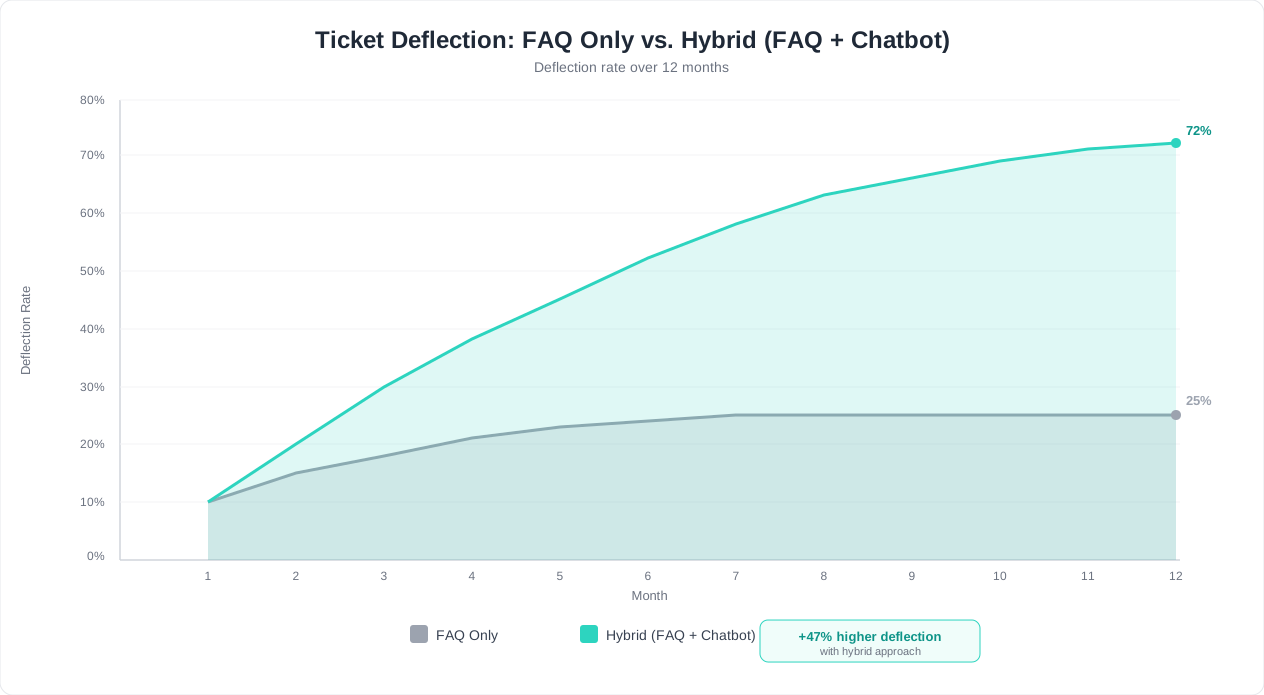
The highest-performing support teams do not choose between a FAQ page and a chatbot. They deploy both in a complementary strategy where each tool handles what it does best. This hybrid approach consistently produces the best results: 60-75% total deflection rates, higher organic traffic, and better customer satisfaction than either tool alone.
How the Hybrid Model Works
The architecture is straightforward:
- FAQ page handles SEO and reference. Your FAQ page continues to rank in Google, capture organic traffic, serve as a linkable reference for policies and documentation, and satisfy the 28% of users who prefer reading over chatting.
- Chatbot handles interactive resolution. A chatbot widget deployed site-wide (including on the FAQ page itself) handles conversational queries, ambiguous questions, multi-step troubleshooting, and anything that requires personalization or context.
- FAQ page feeds the chatbot. Your FAQ content becomes training material for the chatbot's knowledge base. Every answer you write for the FAQ page also makes the chatbot smarter. One content investment, two delivery channels.
- Chatbot analytics improve the FAQ page. The chatbot's conversation analytics reveal which questions customers ask most frequently, which answers fail, and which topics are missing entirely. This data tells you exactly which FAQ content to add, update, or rewrite.
Optimal Placement Strategy
| Page / Context | Primary Self-Service Tool | Why |
|---|---|---|
| Homepage | Chatbot widget | Visitors have varied intent; conversation identifies needs |
| Pricing page | Chatbot widget | High-intent visitors need personalized plan guidance |
| Help center / FAQ page | Both (FAQ content + chatbot widget) | FAQ for browsers, chatbot for searchers who cannot find answers |
| Product documentation | FAQ / docs (static) | Reference content needs to be scannable and bookmarkable |
| Checkout page | Chatbot widget | Reduce cart abandonment with instant answers to shipping and return questions |
| Blog posts | Chatbot widget | Capture engagement from content readers with follow-up questions |
| Contact page | Both (form + chatbot) | Chatbot deflects simple questions; form captures complex inquiries |
| Account / dashboard | Chatbot widget | Authenticated context enables personalized support |
The Data on Hybrid Performance
Businesses running a hybrid FAQ + chatbot strategy see measurable improvements across every self-service metric:
- Total deflection rate: 60-75% (vs 9% FAQ-only, vs 45-65% chatbot-only)
- Organic support traffic: Maintained or increased (FAQ pages preserve SEO value)
- Customer satisfaction: 82-90% (customers find answers through their preferred channel)
- Knowledge base coverage: Expands 2-3x faster (chatbot analytics identify gaps the FAQ page misses)
- Support team workload: Reduced by 50-65% within 90 days
Implementation Priority
If you currently have only a FAQ page, the highest-impact change is adding a chatbot widget that uses your existing FAQ content as its knowledge base. This can be done in a single afternoon with a platform like Conferbot:
- Upload your FAQ content to the AI knowledge base
- Deploy the chatbot widget on your website
- The chatbot immediately starts answering questions using your existing content, but in a conversational, personalized format
If you currently have only a chatbot, the second-priority investment is creating a static FAQ page optimized for SEO. Take the top 30-40 questions from your chatbot analytics, write clear static answers, add FAQ schema markup, and publish the page. This captures organic search traffic that the chatbot alone cannot reach.
The hybrid approach is not about doubling your workload. It is about using the same content through two complementary delivery mechanisms. One content set. Two channels. Maximum deflection.
Related: Chatbot Analytics: 10 Metrics You Must Track to Prove ROI in 2026
Deflection Rate Case Study: Static vs Conversational Self-Service
Abstract benchmarks are useful, but concrete case data illustrates the chatbot vs FAQ page difference more compellingly. Here is a composite case study based on aggregated data from mid-market SaaS companies using Conferbot's platform, representing the typical trajectory businesses experience when transitioning from FAQ-only to hybrid self-service.
Company Profile
- Industry: B2B SaaS (project management tool)
- Monthly active users: 12,000
- Monthly support tickets before chatbot: 1,850
- Support team: 4 agents
- Existing FAQ page: 65 questions across 8 categories
- Average ticket cost: $18
- Monthly support spend: $33,300 (tickets + team salaries)
Phase 1: FAQ Page Only (Baseline)
| Metric | Value |
|---|---|
| FAQ page monthly visitors | 3,200 |
| Self-service success rate | 11% |
| Tickets deflected by FAQ | ~352 |
| Tickets still submitted | 1,850 |
| Average first response time | 4.2 hours |
| Customer satisfaction (CSAT) | 68% |
The FAQ page performed above the typical range for self-service success, thanks to good content organization. But 1,850 monthly tickets still overwhelmed the 4-agent team, leading to slow response times and mediocre satisfaction scores.
Phase 2: Chatbot Added Alongside FAQ (Month 1-3)
The company deployed a Conferbot chatbot trained on their existing 65 FAQ answers plus product documentation, release notes, and internal troubleshooting guides. The FAQ page remained live for SEO purposes. The chatbot widget was added to every page of the product and marketing site.
| Metric | Month 1 | Month 2 | Month 3 |
|---|---|---|---|
| Chatbot conversations | 2,100 | 2,800 | 3,400 |
| Bot resolution rate | 38% | 49% | 58% |
| Tickets deflected (chatbot) | 798 | 1,372 | 1,972 |
| Tickets deflected (FAQ page) | 340 | 330 | 315 |
| Total tickets submitted | 1,410 | 1,120 | 890 |
| Ticket reduction vs baseline | -24% | -39% | -52% |
| CSAT | 73% | 78% | 83% |
The Improvement Curve
Notice the trajectory: deflection rate climbed from 38% to 58% over three months. This happened because:
- Month 1: The chatbot resolved straightforward questions well but struggled with edge cases. The team identified 22 topic gaps from chatbot analytics and added content to the knowledge base.
- Month 2: With expanded knowledge base content, the chatbot handled more complex questions. The team also added conditional flows for the 5 most common multi-step troubleshooting scenarios.
- Month 3: The chatbot's understanding matured. It handled follow-up questions, remembered context within conversations, and successfully resolved issues that required 3-4 exchange turns.
Financial Impact at Month 3
| Metric | Before (FAQ Only) | After (Hybrid) | Change |
|---|---|---|---|
| Monthly tickets | 1,850 | 890 | -52% |
| Ticket cost (at $18 each) | $33,300 | $16,020 | -$17,280/mo |
| Chatbot platform cost | $0 | $199/mo | +$199/mo |
| Net monthly savings | -- | -- | $17,081/mo |
| Annual projected savings | -- | -- | $204,972/yr |
| ROI on chatbot investment | -- | -- | 8,581% |
The chatbot paid for itself within the first 8 hours of operation. By month 3, it was saving over $17,000 per month -- enough to fund an additional product engineer or redirect budget to customer success initiatives that further reduce churn.
What About the FAQ Page?
The FAQ page's deflection contribution declined slightly (from 352 to 315 per month) because some visitors who previously would have found answers on the FAQ page now used the chatbot instead. But the FAQ page continued to drive 2,800+ monthly organic search visits, feeding the chatbot new visitors who might not have found the site otherwise. This is the hybrid model working as designed: the FAQ page acquires traffic through SEO, the chatbot converts that traffic into resolved issues.
How to Turn Your FAQ Page Into a Chatbot in 10 Minutes
If you already have a FAQ page, you have the hardest part done: the content. Turning that content into a conversational AI chatbot is a straightforward process that takes less than 10 minutes with the right platform. Here is a step-by-step guide using Conferbot.
Step 1: Export or Collect Your FAQ Content (2 Minutes)
Gather your existing FAQ content in one of these formats:
- URL: If your FAQ page is live, just copy the URL. Conferbot's AI knowledge base can crawl the page and extract all question-answer pairs automatically.
- Document: If your FAQs exist in a Google Doc, Word file, or PDF, export it. The AI ingestion engine handles all common document formats.
- Spreadsheet: If you maintain FAQs in a spreadsheet (question in column A, answer in column B), export as CSV.
You do not need to restructure or reformat your content. The AI handles messy formatting, inconsistent structures, and even content embedded in larger documents.
Step 2: Create a Chatbot and Upload Your Knowledge Base (3 Minutes)
- Sign up at Conferbot and create a new chatbot project
- Select a support template from the template library (the "Customer Support" or "Help Desk" template is ideal)
- Navigate to the Knowledge Base section
- Upload your FAQ content using any of the methods above -- paste a URL, drag a document, or import a CSV
- The AI processes your content in 30-60 seconds, extracting question-answer pairs and building a semantic understanding of your support knowledge
Step 3: Test and Refine (3 Minutes)
Use the built-in preview to test your chatbot:
- Ask 5-10 of your most common customer questions in natural language (not the exact FAQ phrasing)
- Verify that the answers are accurate and complete
- Test edge cases: misspellings, vague questions, questions that span multiple FAQ entries
- If any answers are wrong or missing, add supplementary content to the knowledge base
Common refinements at this stage:
- Add your product terminology and brand-specific language to improve matching
- Include your refund, shipping, and cancellation policies as separate knowledge base documents (these are the most frequently asked topics)
- Add conditional handoff rules: if the chatbot cannot resolve an issue in 3 exchanges, escalate to live chat
Step 4: Deploy the Widget (2 Minutes)
Install the chatbot on your website:
- Any website: Copy a single JavaScript snippet and paste it before the closing
</body>tag - WordPress: Use the Conferbot plugin (search "Conferbot" in the plugin directory)
- Shopify: Paste the snippet into your theme's
theme.liquidfile - Squarespace, Wix, Webflow: Add via the custom code injection feature in your platform's settings
The widget appears as a small chat icon in the bottom-right corner of your site. It loads asynchronously, so it does not affect page speed.
Step 5: Keep Your FAQ Page Live
Do not remove your existing FAQ page. It continues to serve three critical functions:
- SEO: It ranks in search engines and drives organic traffic to your site
- Reference: Some customers prefer to read static content
- Backup: If a customer has JavaScript disabled or uses an accessibility tool that does not render the chat widget, the FAQ page provides a fallback
Add a prominent link at the top of your FAQ page: "Need faster help? Chat with our AI assistant" that triggers the chatbot widget. This guides visitors from the passive FAQ experience to the interactive chatbot when they cannot find what they need.
After Deployment: The First 7 Days
In the first week, focus on monitoring rather than optimizing:
- Check your chatbot analytics dashboard daily
- Review the top 10 questions the chatbot receives
- Identify any questions where the bot gives incorrect or incomplete answers
- Add missing content to the knowledge base
- Track the number of escalations to human support -- this is your real-time deflection metric
By the end of week one, you will have a clear picture of how much ticket volume the chatbot is absorbing and which knowledge gaps need to be filled. Most businesses see a 25-35% reduction in support tickets within the first week, climbing to 40-60% over the first three months as the knowledge base expands.
Measuring What Actually Works: Tracking Self-Service Success
Deploying a chatbot alongside your FAQ page is only half the equation. Without proper measurement, you cannot optimize performance, justify the investment, or identify when the chatbot needs attention. Here is a complete analytics framework for tracking self-service effectiveness.
The 5 Metrics That Matter
Many analytics dashboards present dozens of metrics. For self-service evaluation, only five truly matter:
| Metric | Definition | Target | How to Measure |
|---|---|---|---|
| Deflection rate | % of potential tickets resolved by self-service | 45-65% | (Chatbot resolutions + FAQ exits without ticket) / (Total support-seeking visitors) |
| Resolution rate | % of chatbot conversations resolved without escalation | 60-80% | Conversations marked resolved / Total chatbot conversations |
| Escalation rate | % of chatbot conversations that require human handoff | 15-30% | Handoffs to live agent / Total chatbot conversations |
| Customer satisfaction | CSAT score for chatbot interactions | 75-85% | Post-conversation rating (thumbs up/down or 1-5 stars) |
| Time to resolution | Average time from first message to issue resolved | Under 2 min | Timestamp of first message to resolution confirmation |
Setting Up Your Analytics Dashboard
A proper self-service analytics setup tracks both the FAQ page and the chatbot in a unified view. Here is how to configure each:
FAQ Page Analytics (Google Analytics or equivalent):
- Track FAQ page visits and time on page
- Set up event tracking for FAQ accordion expansions (which questions do users click?)
- Monitor exit behavior: do users leave the FAQ page for the contact page (failed self-service) or return to the product (successful self-service)?
- Track search queries on the FAQ page (if you have a search function) to identify content gaps
Chatbot Analytics (Conferbot Analytics):
- Conversation volume: Total conversations per day/week/month, trending over time
- Resolution tracking: Percentage of conversations resolved by the bot vs escalated to human agents
- Topic clustering: Automatic grouping of conversations by topic to identify the most common questions and fastest-growing categories
- Knowledge gaps: Questions the bot could not answer, ranked by frequency -- this is your content creation priority list
- Satisfaction scores: Per-conversation CSAT from the end-of-conversation feedback prompt
- Handoff analysis: Why conversations escalate (bot failure, customer request, complex issue, sentiment trigger) to distinguish between necessary and preventable escalations
The Weekly Review Cadence
Set aside 30 minutes per week for self-service optimization. Use this checklist:
- Review deflection rate trend. Is it climbing, stable, or declining? Declining rates usually indicate a new product feature or policy change that the chatbot does not know about yet.
- Identify the top 5 unanswered questions. These are the highest-impact content additions you can make to your knowledge base. Write answers for all five and upload them.
- Check unnecessary escalations. Review 5-10 recent escalations and ask: could the chatbot have handled this with better knowledge base content? If yes, add that content.
- Monitor CSAT trends. A drop in satisfaction often precedes a drop in deflection. Investigate before it impacts ticket volume.
- Compare FAQ page vs chatbot performance. Are visitors using the FAQ page less over time? If so, the chatbot is absorbing that traffic -- which is fine as long as total deflection rate is improving.
Benchmarking Your Performance
Use these benchmarks to evaluate where you stand relative to industry standards:
| Performance Level | Deflection Rate | Resolution Rate | CSAT | Typical Scenario |
|---|---|---|---|---|
| Below average | Under 25% | Under 40% | Under 65% | Knowledge base is thin; bot handles only basic FAQs |
| Average | 25-45% | 40-60% | 65-75% | Solid FAQ content; bot handles common questions well |
| Good | 45-60% | 60-75% | 75-85% | Comprehensive knowledge base; multi-turn flows |
| Excellent | 60-75% | 75-85% | 85%+ | Mature bot with deep knowledge, integrations, and personalization |
Most businesses start in the "below average" or "average" range and reach "good" within 60-90 days of consistent optimization. Reaching "excellent" typically requires integrating the chatbot with your product's API for personalized, account-specific support -- such as checking order status, retrieving account details, or performing actions on the customer's behalf.

Connecting Self-Service to Business Outcomes
The ultimate measure of self-service success is not the deflection rate itself but the business outcomes it drives:
- Support cost reduction: Track monthly support spend (tickets x cost per ticket + team salaries) and measure the trend after deploying self-service improvements
- Agent productivity: With fewer routine tickets, agents handle complex issues faster and more thoroughly. Track average handle time for human-handled tickets -- it should decrease as routine issues are deflected
- Customer retention: Customers who successfully self-serve have 12% higher retention rates than those who have to contact support (Gartner, 2025). Track churn rates for self-served vs agent-served customers
- Response time: As ticket volume decreases, your team's average response time should improve. Track first response time weekly and correlate with deflection rate changes
When you present self-service results to leadership, lead with business outcomes, not chatbot metrics. "We reduced monthly support costs by $14,000" is more compelling than "our chatbot has a 58% resolution rate." The metrics are the mechanism; the cost savings and customer experience improvements are the story. For more on the metrics that matter, see our guide on chatbot analytics and the metrics you should track.
Was this article helpful?
Build and deploy in 10 minutes. No coding needed.
Chatbot vs FAQ Page FAQ
Everything you need to know about chatbots for chatbot vs faq page.
About the Author
The Conferbot team writes about building, deploying, and improving AI chatbots.
View all articles

