
- Conferbot lets law firms deploy AI chatbots across 8 channels -- including WhatsApp, Messenger, and Instagram -- plus your website, all from one no-code visual builder.
- Automate client intake with guided conversation flows, schedule consultations via Google Calendar integration, and answer common legal questions using AI models from OpenAI, Claude, or Gemini.
- The free plan includes 600 conversations per month with full builder access. Paid plans start at $19/month for firms that need higher volume, advanced lead scoring, and custom branding.
- Live chat with human handover ensures high-value prospects or complex case inquiries are seamlessly transferred to attorneys with full conversation context, priority levels, and internal notes.
- Connect to your existing practice tools via Zapier (5,000+ apps) and custom webhooks for case management system integration, CRM data pushes, and automated lead routing workflows.
Why Law Firms Choose Conferbot
Conferbot helps law firms of all sizes capture every potential client inquiry, automate repetitive intake work, and let attorneys focus on practicing law instead of answering the same questions.
Connect with Your Legal Practice Stack
Push client intake data to your case management or CRM system through webhooks and Zapier. Sync consultation bookings with your calendar and route documents to your secure storage automatically.
Everything You Need for Legal Practice Automation
Purpose-built tools that help law firms capture more clients, automate intake, and provide instant answers to common legal questions at scale.
Client Intake Bot
Build detailed intake flows with the no-code visual builder using 30+ node types. Collect case type, situation details, contact information, and urgency level through guided conversations with condition logic and file uploads for supporting documents.
Consultation Scheduling
Integrate with Google Calendar or Outlook so potential clients can check availability and book consultations directly through the chatbot. Available time slots update automatically and appointments sync with full intake details attached.
Case Inquiry Bot
Load your practice area information into the AI-powered knowledge base. OpenAI, Claude, or Gemini answers common legal questions with appropriate disclaimers, reducing repetitive inquiries while keeping prospects engaged until they book a consultation.
Document Collection
Securely collect contracts, identification documents, case evidence, and supporting files through in-chat file uploads. Files are encrypted in transit and at rest, and can be routed to your systems via webhooks.
Lead Scoring
Use condition nodes and scoring logic to qualify leads by case type, urgency, jurisdiction, and fit. High-scoring prospects are prioritized for agent handover while lower-priority inquiries receive automated responses from your knowledge base.
Legal FAQ
Build a comprehensive knowledge base with AI-generated articles about your practice areas, fees, processes, and common legal questions. Deploy answers across your website, WhatsApp, and 7 more channels simultaneously.
Powered by leading AI models including GPT, Claude, and Gemini.
Get Started in Three Easy Steps
Deploy your legal chatbot in minutes, not months. No coding required.
Choose Your Template
Select from pre-built legal chatbot templates for client intake, consultation booking, or legal FAQ -- or build from scratch with 30+ drag-and-drop node types in the visual builder.
Customize & Connect
Import your practice area content into the AI-powered knowledge base. Connect Google Calendar or Outlook for scheduling, use webhooks or Zapier to push leads to your case management or CRM system, and enable OpenAI, Claude, or Gemini.
Deploy & Monitor
Launch on your website, WhatsApp, Facebook Messenger, and 6 more channels. Track lead capture, intake completion rates, and consultation bookings with real-time analytics dashboards.
Built for Law Firms Of All Sizes
From solo practitioners to multi-practice firms, legal professionals can use Conferbot to capture client inquiries and automate intake around the clock.
Why Law Firms Need AI Chatbots
Law firms face a persistent intake problem: prospective clients are ready to engage at all hours, but intake processes are built around business-hours staffing. A potential client searching for a personal injury attorney at 10 PM, or a small business owner who realizes they need contract counsel on a Sunday afternoon, will often contact several firms and retain the first one that responds. When after-hours calls and form submissions land in a voicemail box or an unattended inbox, many of those potential clients are gone by morning -- captured by a competitor who answered first.
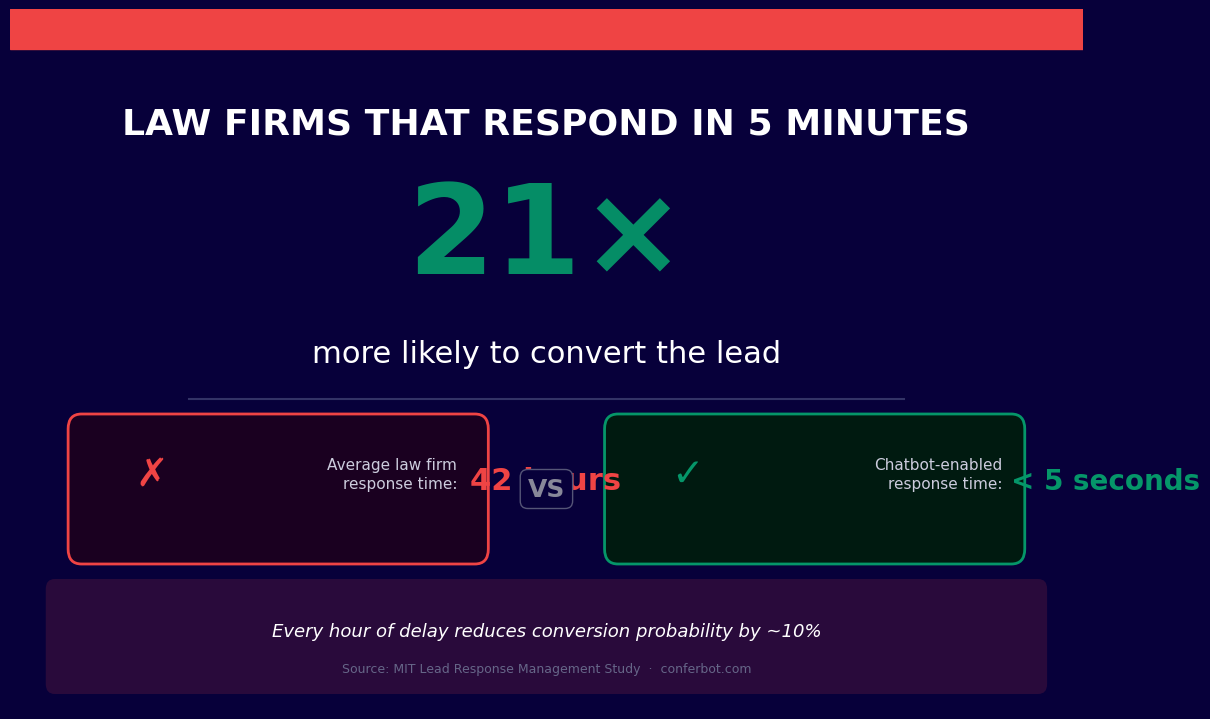
A legal chatbot is an AI-powered conversational agent that closes this gap. Deployed on your firm's website, it engages every prospective client the moment they arrive, qualifies their matter, routes them to the appropriate practice area, schedules a consultation, and begins collecting the intake information attorneys need before a first meeting -- whether it is 9 AM on a Tuesday or midnight on a Friday.
Beyond lead capture, legal chatbots deliver operational value throughout the client lifecycle. Automated intake can reduce the administrative time staff spend opening each new matter. Billing FAQ bots handle routine invoice and retainer questions without partner involvement. Document collection workflows gather discovery materials and signatures conversationally. And conflict-check pre-screening helps the firm avoid inadvertently engaging adverse parties.
Conferbot's AI chatbot builder includes legal-specific templates for client intake, consultation scheduling, and FAQ handling. The platform's calendar booking integration connects directly to attorney availability, and the live chat handoff ensures that complex matters reach a qualified team member the moment human judgment is required. No code is required to build, test, and deploy.
This guide covers every significant chatbot application for law firms and legal services organizations in 2026, from first-touch lead capture to post-matter client retention.
Client Intake Automation and Case Qualification
Client intake is the most labor-intensive administrative process in most law firms. A new matter requires collecting the prospective client's contact information, a description of their legal matter, relevant dates, prior legal history, and enough preliminary detail for an attorney to determine whether the firm can and should take the case. Done manually by a receptionist or paralegal, a thorough intake can take many minutes per prospective client. Done poorly, it leaves attorneys with insufficient context for a first consultation -- wasting everyone's time.
Structured Intake Without Staff Involvement
A legal intake chatbot conducts a structured intake interview conversationally, guiding prospective clients through each required question at their own pace. The bot collects contact details, matter description, key dates (accident date, contract date, employment termination date, etc.), jurisdiction, relevant parties, and any documents the client has already gathered. All responses are organized and delivered to the assigned attorney before the consultation begins.
This eliminates the redundant work of having a paralegal call the client to gather information that could have been collected automatically. Attorneys enter every consultation prepared, and prospective clients experience the firm as organized and professional from the very first interaction.
Case Type Qualification and Viability Pre-Screening
Not every inbound inquiry represents a viable matter. Personal injury firms, for example, need to quickly determine whether a potential case has damages, liability, and a defendant with insurance coverage or assets. Immigration firms need to identify whether a prospective client's situation falls within the practice's scope. A chatbot can ask the qualifying questions that determine case viability before any attorney time is invested.
Cases that do not meet the firm's criteria are handled gracefully -- the bot provides a respectful response, offers referral resources where appropriate, and closes the conversation without consuming attorney or paralegal time. Cases that do qualify are immediately routed to the correct practice area team with a complete intake summary.
The table below is an illustrative comparison of manual versus chatbot-assisted intake. Actual outcomes vary by firm, practice area, and matter volume.
| Intake Stage | Manual Process | Chatbot Process | Potential Benefit (illustrative) |
|---|---|---|---|
| Initial contact collection | Receptionist call during office hours | Automated, immediate | Frees front-desk staff from repetitive data entry |
| Matter description | Paralegal interview | Structured bot interview | Reduces manual interview time |
| Case qualification | Attorney review of raw notes | Structured summary delivered pre-call | Less attorney prep before the consultation |
| After-hours inquiries | Voicemail, often a lost lead | Full intake completed immediately | Captures inquiries that would otherwise go unanswered |
Consultation Scheduling and Calendar Management
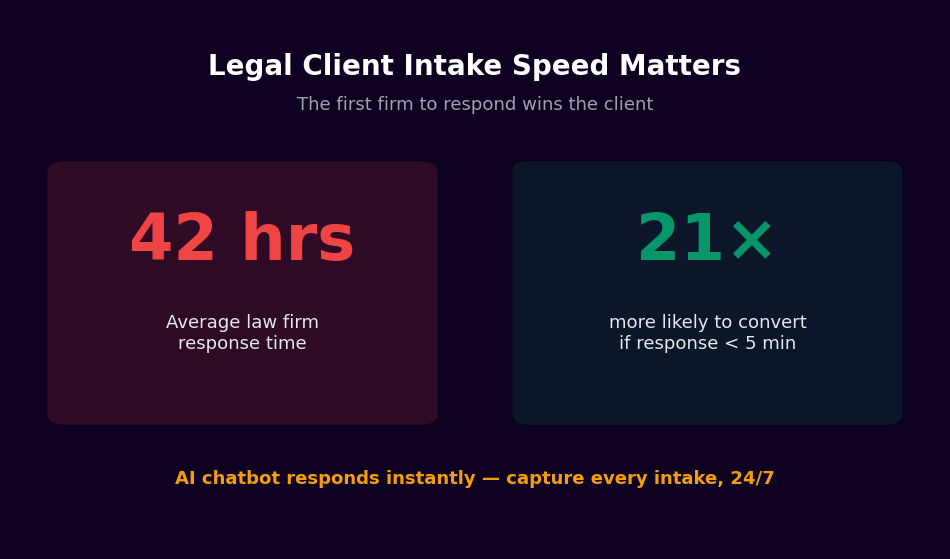
Scheduling a first consultation is frequently the point where prospective clients abandon the engagement process. If a firm's only scheduling option is calling during business hours to speak with a receptionist, a significant portion of after-hours and weekend inquiries will contact a competitor who offers easier scheduling. Automated consultation booking removes this friction entirely.
Real-Time Attorney Availability Booking
Conferbot's calendar booking integration connects your chatbot directly to attorney and paralegal calendars. After a prospective client completes the initial intake questions, the bot presents available consultation slots in real time and confirms the booking immediately. The attorney receives a notification with the confirmed time and the intake summary the bot has already collected.
For firms that offer free initial consultations, this workflow converts website visitors into booked appointments without any staff intervention. For firms that charge consultation fees, the bot can collect payment information or direct the client to a payment page before confirming the slot.
Automated Confirmation and Preparation Instructions
After a consultation is booked, the chatbot sends an immediate confirmation with the date, time, attorney name, and any preparation instructions -- documents to gather, questions to consider, or forms to complete before the appointment. A reminder is sent 24 hours before the consultation, reducing no-shows and ensuring clients arrive prepared.
Routing by Practice Area
Firms with multiple practice areas need to ensure that consultations are booked with the appropriate attorney. The chatbot uses the case type information gathered during intake to route bookings to the correct team. A family law matter goes to the family law calendar. A business formation inquiry routes to the corporate group. An employment claim is directed to the employment attorneys. This routing happens automatically based on the client's intake responses, without requiring a receptionist to make judgment calls.
Document Collection and Conflict Check Pre-Screening
Two of the most time-consuming administrative tasks in legal practice -- gathering client documents and checking for conflicts of interest -- are prime candidates for chatbot automation. Both involve collecting structured information from clients, and both directly affect when an attorney can begin substantive work on a matter.
Conversational Document Collection
Sending a new client a long list of required documents via email and waiting for a response is inefficient and frustrating for both parties. A chatbot handles document collection conversationally, explaining what each document is needed for, providing upload prompts in a logical order, confirming receipt, and following up automatically when expected documents have not been received.
Using Conferbot's API integration, collected documents can be routed directly to your document management system or client portal, tagged by matter number and document type. Attorneys can review a complete, organized document set rather than an unstructured email attachment chain.
Conflict Check Pre-Screening
Before an attorney can agree to represent a client, the firm must confirm there is no existing relationship with an adverse party that would create a conflict of interest. The chatbot collects the names of all parties involved in the matter -- opposing parties, business entities, individuals -- as part of the intake flow and flags the matter for conflict review before a consultation is confirmed.
This does not replace the firm's formal conflict check process, but it ensures that the intake team has the information needed to run the check immediately, rather than discovering the required information is missing when the attorney attempts to open a new matter file. Potential conflicts are identified and addressed before the attorney invests preparation time.
Signature and Consent Collection
Engagement letters, fee agreements, and HIPAA-equivalent legal privacy notices require client signatures before work begins. The chatbot can deliver these documents for electronic signature and collect completed forms before the first consultation, ensuring the client relationship is properly documented from the start.
Billing FAQ Automation and After-Hours Lead Capture
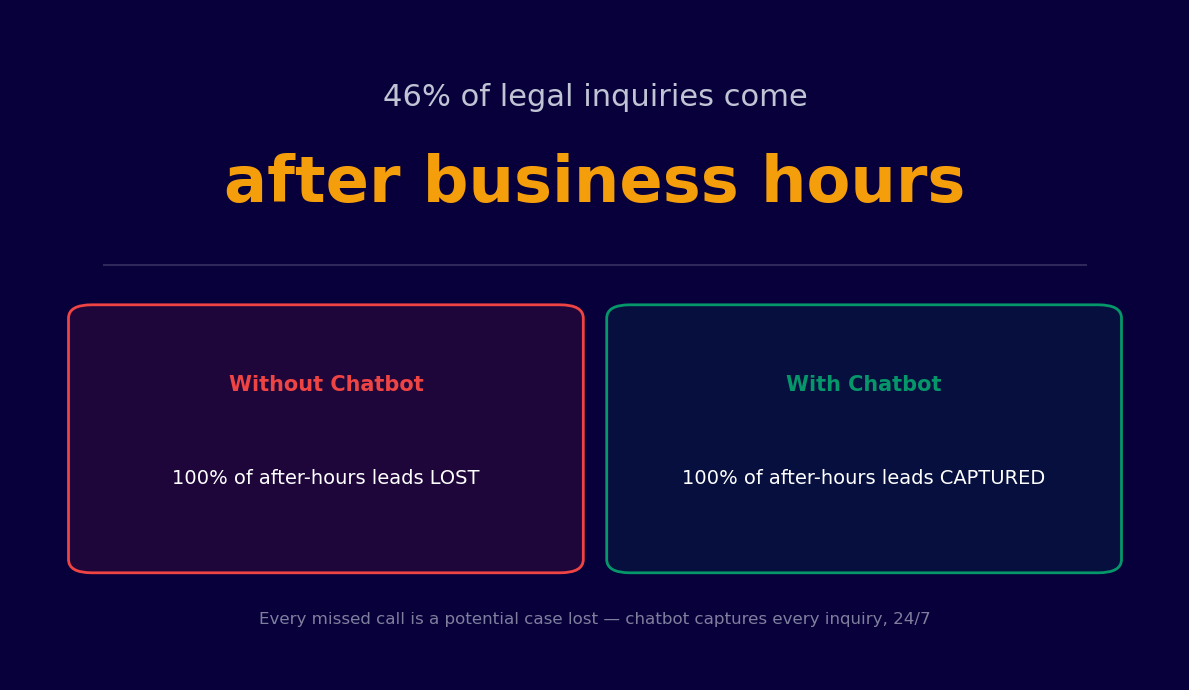
Billing inquiries and after-hours lead capture represent two distinct but equally important chatbot applications for law firms. The first reduces the administrative burden on billing staff and eliminates a common source of client frustration. The second directly addresses the leads that many firms lose when after-hours inquiries reach only a voicemail box, making after-hours coverage one of the higher-impact investments a firm can make.
Billing FAQ Handling
Billing questions consume significant time at firms of every size. Clients ask about invoice line items, retainer balances, billing rates, payment methods, installment arrangements, and the status of outstanding invoices. Most of these questions have straightforward answers that do not require partner involvement -- but they arrive during hours when partners and billing staff are least available.
A billing FAQ chatbot answers common questions instantly: it explains billing rate structures, describes what specific charges cover, provides retainer balance information (via integration with your practice management system), outlines accepted payment methods, and escalates unusual billing disputes to the appropriate staff member through live chat handoff with full context.
After-Hours Lead Capture
After-hours lead loss is not abstract -- it represents cases that go to competing firms because a prospective client tried to reach you after 5 PM, got a voicemail, and called the next name on their search results list. A chatbot helps close this gap by being available every hour of every day, collecting the same structured intake information a paralegal would gather during business hours, and delivering a formatted lead summary to the attorney of record the next morning.
After-hours leads that complete a chatbot intake can be more detailed than leads collected via a short web form, because the conversational intake collects more nuanced information and the prospective client has already invested the time to provide it. Attorneys who start the next morning with three qualified, fully intaked leads in their inbox are positioned to begin follow-up calls immediately rather than spending the first two hours of the day handling preliminary screening.
| Aspect | Without After-Hours Chatbot | With After-Hours Chatbot |
|---|---|---|
| After-hours inquiries | Often reach voicemail only | Bot completes a full intake |
| Lead response time | Next business day, sometimes longer | Intake captured immediately; attorney notified at open of business |
| Lead detail captured | Name and callback number only | Full structured intake summary |
| Billing inquiry resolution | Wait for billing staff callback | Instant for common questions |
Practice Area Routing and Live Chat Escalation
Multi-practice firms face a routing challenge that is more complex than it appears. A prospective client describing a situation involving a business dispute may actually need a corporate litigator, a commercial contracts specialist, or an employment attorney -- and routing to the wrong practice area wastes everyone's time. Intelligent chatbot routing solves this at scale.
Intelligent Practice Area Identification
Conferbot's AI chatbot builder allows firms to train the bot on the characteristics of each practice area's typical matters. When a prospective client describes their situation in natural language, the bot identifies the most appropriate practice group and routes accordingly. Complex matters where practice area identification is genuinely ambiguous are escalated to a human intake specialist for manual routing.
Dedicated Practice Area Flows
Each practice area can have its own intake flow, tailored to the specific information its attorneys need before a first consultation. The personal injury intake flow asks about accident date, nature of injuries, treatment received, and insurance coverage. The estate planning flow asks about estate size, existing documents, family structure, and primary objectives. The employment law flow asks about employment dates, termination circumstances, and any prior HR complaints. Each flow collects exactly the information that practice area needs -- no more, no less.
Seamless Live Chat Escalation
Legal matters are inherently sensitive, and some prospective clients will have questions or concerns that a chatbot cannot appropriately address. When a conversation requires nuanced legal judgment, involves a client in distress, or raises a situation the bot's flows do not cover, it escalates immediately to a live team member through Conferbot's live chat feature. The escalating attorney or paralegal receives the full conversation history and intake data already collected, so the client never has to repeat themselves.
Live chat escalation is also the safety net that makes ambitious chatbot automation responsible in a legal context. The bot handles high-volume, structured interactions. The human team handles everything that requires judgment, empathy, or legal expertise.
How to Build a Legal Chatbot with Conferbot
Building a legal chatbot with Conferbot is straightforward and does not require technical expertise. The following steps will take you from zero to a live client-facing chatbot that captures leads and automates intake.
Step 1: Map Your Current Intake Process
Document every question your intake team asks prospective clients, along with the qualifying criteria that determine case viability for each practice area. This mapping exercise is the most important step -- it defines what your chatbot needs to ask and what responses should trigger escalation versus automated routing.
Step 2: Choose Your Deployment Channel
Most law firms begin with a website chatbot. The website is where the majority of prospective client searches terminate, and a well-positioned chatbot widget captures visitors who would otherwise leave without engaging. Add additional channels as volume warrants. Conferbot supports deployment across website, WhatsApp, and other messaging platforms from a single dashboard.
Step 3: Build Your Intake Flows by Practice Area
Use the legal and compliance templates in Conferbot's template library as your starting point. Customize each practice area flow with your firm's specific qualifying questions, acceptable case criteria, and escalation rules. Configure routing logic based on case type responses.
Step 4: Connect Your Calendar
Integrate Conferbot's calendar booking with your attorneys' scheduling systems. Set availability windows for each practice area, configure consultation types (free initial consultation, paid consultation, telephone screening), and define the intake information required before a booking can be confirmed.
Step 5: Configure Live Chat Escalation
Define the conditions under which the bot should escalate to a human: urgent legal situations, matters outside your practice areas, clients expressing distress, or any matter type where the bot's confidence in routing is low. Set up live chat routing to the appropriate team members and configure out-of-hours handling for escalations that arrive when staff are unavailable.
Step 6: Integrate with Your Practice Management System
Use Conferbot's API integration to connect intake data to your practice management software. Intake summaries, collected documents, and booking confirmations flow directly into new matter records, eliminating manual data entry and ensuring the attorney has complete information in a single location.
Get Started with Legal Chatbots Today
Every prospective client who contacts your firm after hours and receives a voicemail is a potential case that will be filed by a competitor by morning. Legal chatbots are the most direct solution available to this problem, and they deliver additional value across intake efficiency, staff time savings, and client experience quality throughout the matter lifecycle.
Launch in 3 Steps
- Sign up free at app.conferbot.com/signup -- no credit card required. The free plan includes 600 conversations a month, enough for initial testing and small-volume deployments.
- Start with a legal template from the legal and compliance library, or build a custom intake flow with the AI chatbot builder.
- Connect your calendar using calendar booking integration and publish your bot to begin capturing after-hours leads immediately.
Why Law Firms Choose Conferbot
- After-hours lead capture -- Full intake completed for every inquiry, regardless of time, with structured summaries delivered to attorneys at start of business
- Case qualification automation -- Pre-screen cases against your criteria before any attorney time is invested
- Calendar booking -- Real-time consultation scheduling connected to attorney availability
- Live chat escalation -- Seamless handoff to human team members with full conversation context
- API integration -- Connect intake data to your practice management system via REST API and webhooks
- No code required -- Visual builder lets legal ops and administrative staff build and modify flows without IT involvement
See how chatbots are delivering results in adjacent professional services industries: healthcare, insurance, real estate, HR, and technology.
Create your free legal chatbot now and stop losing leads to after-hours voicemail in 2026.
Legal FAQ
Everything you need to know about chatbots for legal.
Chatbots for Other Industries
Discover how businesses in other industries use AI chatbots to automate support, capture leads, and grow.
Legal Chatbots by Channel
What running a Legal chatbot looks like on each channel - the setup, the handoff rules, and what should never be automated.

Continue Exploring
Explore features, connect third-party tools, and browse ready-made templates.
Deep-dive pillar guides, real use cases, and the chatbot & AI glossary.