The AI Customer Service Revolution: Why Choosing the Right Tool Matters in 2026
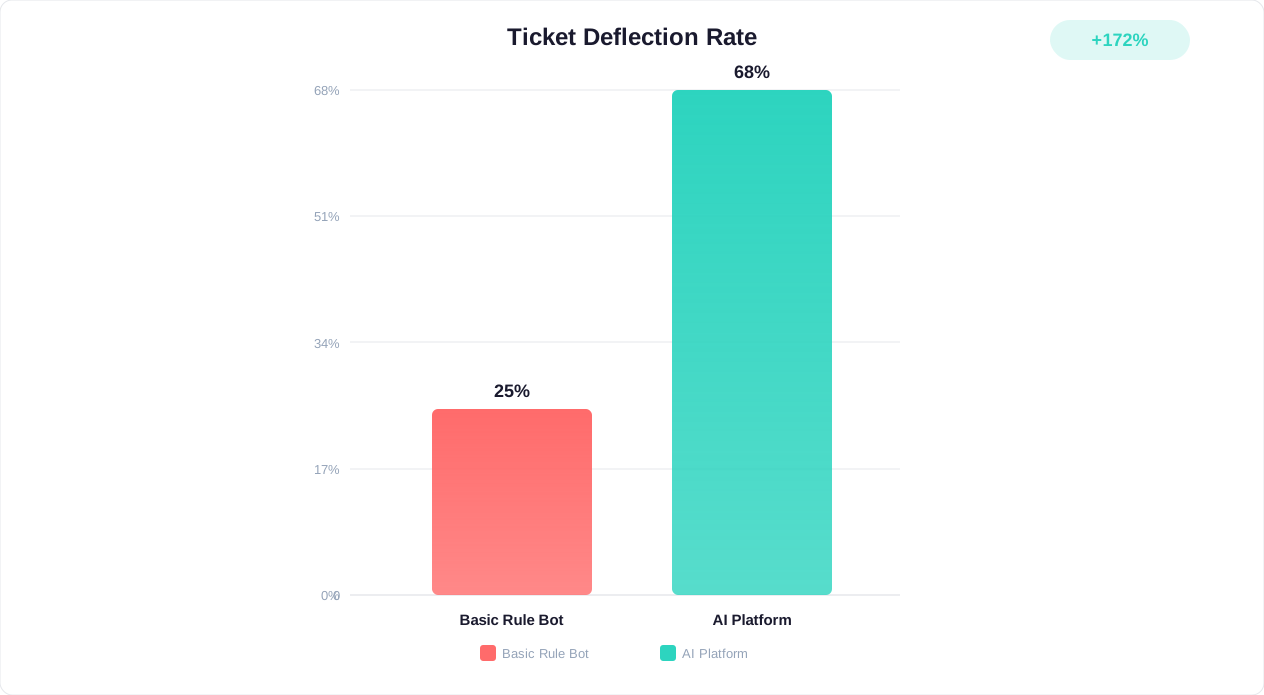
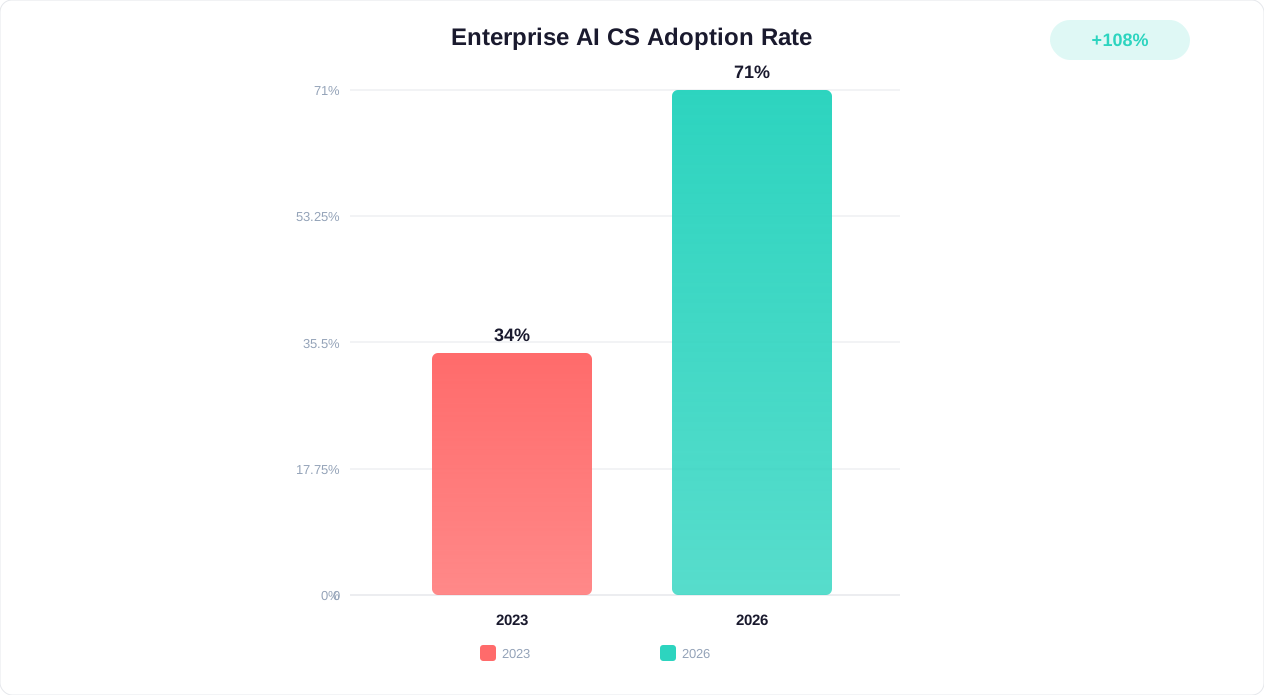
AI customer service is no longer a luxury reserved for enterprise companies with six-figure budgets. In 2026, intelligent chatbots, automated ticket routing, and AI-powered agent assist tools have become the baseline expectation for any business serious about customer experience. According to Gartner, 80% of customer service organizations will apply generative AI to improve both agent productivity and customer experience by the end of 2026.
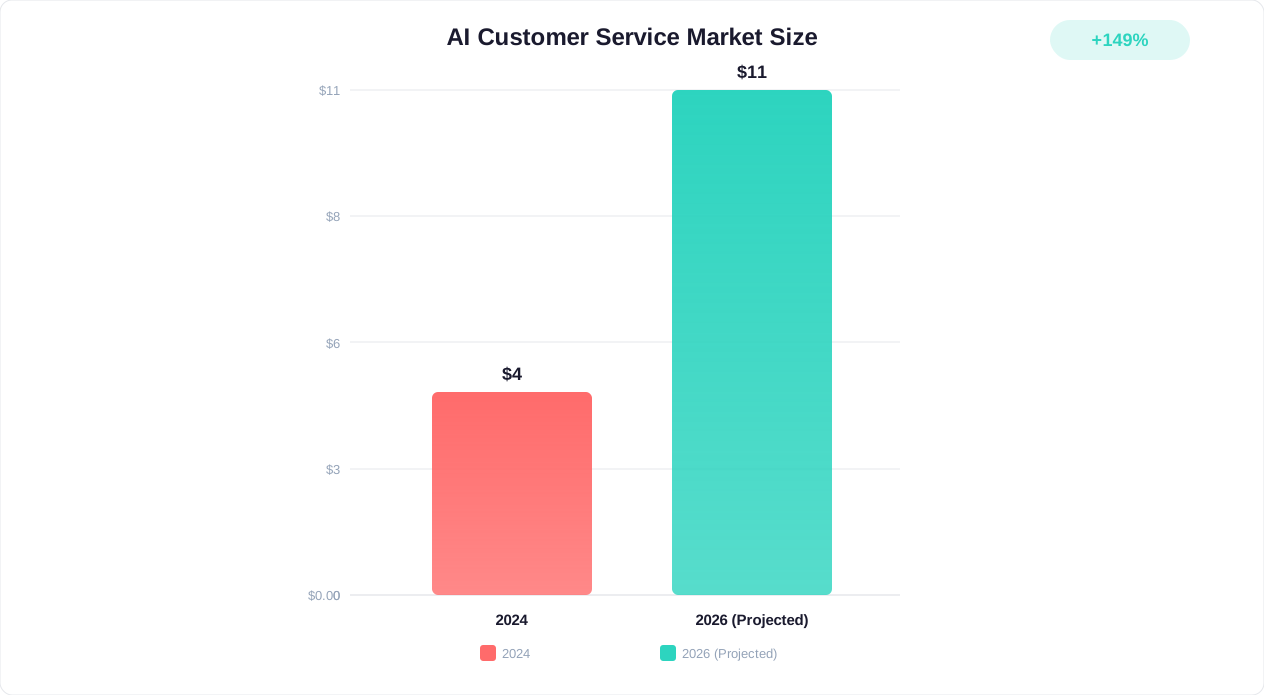
The numbers speak for themselves: Statista reports that the global AI customer service market reached $12.1 billion in 2025 and is projected to exceed $18 billion by 2027. Businesses using AI tools for customer service see average resolution time reductions of 40-60% and cost savings of 25-45% compared to purely human-staffed operations.
But with dozens of platforms competing for your attention — each claiming to be the "best AI chatbot" or "most advanced customer service platform" — choosing the right tool is overwhelming. Pricing models range from completely free to $2,500+/month. Feature sets vary from simple FAQ bots to autonomous AI agents that handle complex multi-step processes. Some tools excel at live chat but lack AI depth; others have powerful AI but deploy on limited channels.
This guide cuts through the noise. We have tested, analyzed, and compared 15 of the best AI customer service tools available in 2026, evaluating each on:
- AI capabilities: Natural language understanding, generative responses, learning ability, and autonomy
- Channel coverage: Website, WhatsApp, Messenger, Slack, email, SMS, and beyond
- Ease of use: How quickly non-technical teams can deploy and manage the tool
- Pricing and value: Total cost of ownership including AI usage charges, per-seat fees, and add-ons
- Integration ecosystem: CRM, helpdesk, e-commerce, and third-party tool connections
- Real user ratings: G2, Capterra, and TrustRadius scores from verified users
Whether you are a startup looking for your first chatbot, a growing business outgrowing a basic tool, or an enterprise evaluating a platform switch — this guide will help you make a confident, data-driven decision.
For related comparisons, see our chatbot pricing comparison and best no-code chatbot builders guides.
1. Conferbot — Best Overall AI Customer Service Platform
Conferbot earns the top spot in our 2026 rankings for delivering the most complete AI customer service package at a price point that works for businesses of every size. It combines a powerful AI agent with a no-code visual builder, live chat, omnichannel deployment, and built-in analytics — without charging per AI resolution or gating core features behind enterprise plans.
Key Features
- AI-Powered Conversations: GPT-integrated AI that understands context, maintains conversation history, and generates accurate responses from your knowledge base — included in all paid plans
- 13+ Channel Deployment: Build once and deploy across website, WhatsApp, Messenger, Slack, Telegram, Instagram, and more from a single dashboard
- Visual No-Code Builder: Drag-and-drop flow creation with conditional logic, variables, and API integration nodes — no developer required
- Smart Human Handoff: AI automatically escalates complex issues to live agents with full conversation context preserved
- Advanced Analytics: Conversation insights, drop-off analysis, resolution tracking, and AI accuracy metrics
- Knowledge Base Integration: Train AI on your docs, FAQs, and product content for accurate, brand-consistent responses
- Built-in Ticketing: Unresolved conversations automatically become trackable tickets
- Team Management: Role-based access, conversation routing, and workload balancing
Best For
SMBs, e-commerce, SaaS, agencies, and any business wanting enterprise-grade AI customer service without enterprise pricing. Especially strong for teams needing omnichannel deployment and AI included in the base price.
Pricing
- Free tier: Available with basic AI capabilities and limited conversations
- Starter: $49/month — full AI, 1,000 conversations, 3 channels
- Pro: $99/month — unlimited AI, all channels, advanced analytics
- Business: $149/month — team features, priority support, custom integrations
- AI charges: Included in all paid plans (no per-resolution fees)
Pros and Cons
Pros:
- AI included in base pricing — no per-resolution or per-interaction charges
- Broadest channel coverage (13+) among mid-market tools
- Fastest time-to-value: most teams deploy in under 2 hours
- Generous free tier for testing and small-scale use
- Clean, modern interface that non-technical teams love
Cons:
- Newer platform — smaller community and fewer third-party tutorials compared to established players like Intercom or Zendesk
- Enterprise features (SSO, custom SLAs) are still maturing
- Integration marketplace is growing but not as extensive as legacy platforms
User Ratings
G2: 4.7/5 (based on user reviews) | Capterra: 4.8/5 | Best for: AI value, ease of use, omnichannel
2. Intercom — Best for Established SaaS Companies
Intercom is the incumbent heavyweight of customer messaging, consistently ranked highly in G2's live chat software rankings. Its Fin AI agent is one of the most sophisticated AI customer service bots on the market, capable of resolving complex queries using your help center content. However, Intercom's pricing model — combining per-seat subscriptions with per-resolution AI charges — makes it one of the most expensive options for scaling teams.
Key Features
- Fin AI Agent: Generative AI that resolves customer queries using your knowledge base, with human-like conversation abilities and multi-step reasoning
- Product Tours: Interactive guides that onboard users directly within your product
- Workflow Automation: Complex routing rules, assignment logic, and SLA management
- Help Center: Built-in knowledge base with AI-powered article suggestions
- User Segmentation: Target messages based on behavior, attributes, and lifecycle stage
- Reporting Suite: Detailed analytics on team performance, AI resolution rate, and customer satisfaction
Best For
Well-funded SaaS companies with 10+ support agents, complex onboarding needs, and budget for premium tooling. Particularly strong for product-led growth teams that need in-app messaging combined with support.
Pricing
- Essential: $39/seat/month
- Advanced: $99/seat/month
- Expert: $139/seat/month
- Fin AI: $0.99 per resolution (additional)
- 5-agent team cost: $495-695/month + AI charges
Pros and Cons
Pros: Industry-leading AI resolution quality, mature platform with extensive integrations, excellent for SaaS in-app communication, strong product tour capabilities
Cons: Expensive and complex pricing, AI charged per resolution ($0.99 each adds up fast), steep learning curve, overkill for simple use cases
User Ratings
G2: 4.5/5 (3,000+ reviews) | Capterra: 4.5/5 | Best for: SaaS, product tours, complex automation
For a detailed comparison, see our Intercom alternatives guide.
3. Zendesk — Best for Enterprise Support Teams
Zendesk is the enterprise standard for customer service infrastructure, recognized by Gartner Peer Insights as a market leader. Its AI features — including Answer Bot and the newer AI agents — integrate with a comprehensive ticketing system, knowledge base, and multi-channel support. For large organizations with complex routing needs, SLAs, and compliance requirements, Zendesk remains the go-to choice.
Key Features
- AI Agents: Generative AI bots that resolve queries from your knowledge base with human escalation
- Advanced Ticketing: SLA management, automated assignment, custom ticket fields, and macro workflows
- Omnichannel Routing: Email, chat, phone, social media, and messaging unified in a single agent workspace
- Analytics and Reporting: Enterprise-grade dashboards with custom reports, CSAT tracking, and performance benchmarks
- Knowledge Base (Guide): Self-service portal with AI-powered search and article recommendations
- Marketplace: 1,200+ pre-built integrations
Best For
Enterprise companies with 50+ support agents, complex ticketing workflows, strict SLA requirements, and the need for a comprehensive support infrastructure. Also strong for companies that need phone support (Zendesk Talk) integrated with chat and email.
Pricing
- Suite Team: $55/agent/month
- Suite Growth: $89/agent/month
- Suite Professional: $115/agent/month
- Suite Enterprise: Custom pricing
- AI add-on: $1.00 per automated resolution (additional)
- 10-agent team cost: $550-1,150/month + AI charges
Pros and Cons
Pros: Most comprehensive support suite on the market, 1,200+ integrations, enterprise-grade security and compliance, handles enormous scale
Cons: Expensive for small teams, AI charged per resolution (like Intercom), complex configuration, slow implementation for full suite, dated UI in some areas
User Ratings
G2: 4.3/5 (5,000+ reviews) | Capterra: 4.4/5 | Best for: Enterprise ticketing, multi-channel support
For alternatives, see our Zendesk alternatives guide.
4. Drift (Salesloft) — Best for B2B Sales Conversations
Drift, now part of Salesloft, pioneered conversational marketing and remains the leader for B2B sales teams that use chat to book meetings, qualify leads, and accelerate pipeline. Its AI focuses on revenue generation rather than support deflection — making it a fundamentally different tool from others on this list.
Key Features
- Revenue AI: Conversational AI trained on sales methodology that qualifies leads, books meetings, and routes opportunities to the right rep
- Account-Based Marketing (ABM): Target website visitors based on company data, intent signals, and CRM enrichment
- Meeting Scheduling: AI books meetings directly from chat conversations with calendar integration
- Sales Playbooks: Pre-configured conversation paths for different buyer segments
- Prospector: AI-powered outreach across email and chat channels
- Pipeline Analytics: Revenue attribution, conversation-to-pipeline tracking, and rep performance metrics
Best For
Enterprise B2B sales teams with $100K+ ACVs, dedicated sales development reps, and the budget to invest in conversational sales infrastructure. Not suitable for customer support or small businesses.
Pricing
- Premium: $2,500/month (billed annually)
- Advanced: Custom pricing (typically $4,000+/month)
- Enterprise: Custom pricing (typically $6,000+/month)
- No free tier or trial without demo
Pros and Cons
Pros: Unmatched B2B sales automation, exceptional ABM capabilities, proven ROI for high-value sales teams, strong integration with Salesforce and HubSpot CRM
Cons: Extremely expensive ($2,500/month minimum), exclusively sales-focused (not for support), steep learning curve, requires dedicated admin, overkill for SMBs
User Ratings
G2: 4.4/5 (1,200+ reviews) | Capterra: 4.5/5 | Best for: B2B sales, ABM, meeting booking
For alternatives, see our Drift alternatives guide.
5. Freshdesk — Best Free Helpdesk with AI Capabilities
Freshdesk by Freshworks offers one of the most generous free tiers in the helpdesk space (up to 10 agents) and has steadily added AI capabilities through its Freddy AI suite. For growing support teams that need ticketing, live chat, and basic AI without a large upfront investment, Freshdesk strikes a compelling balance.
Key Features
- Freddy AI: AI-powered chatbot, auto-triage, response suggestions for agents, and automated ticket classification
- Multi-Channel Ticketing: Email, chat, phone, social media, and messaging converge into unified tickets
- Knowledge Base: Self-service portal with AI-powered search and multilingual support
- Automations: Scenario-based ticket routing, time-triggered escalations, and SLA management
- Collaboration: Team huddles, shared ownership, and parent-child ticketing
- Freshworks Ecosystem: Native integration with Freshsales CRM, Freshmarketer, and Freshservice
Best For
Growing support teams (5-50 agents) that need a full helpdesk system with ticketing as the primary workflow. Particularly strong for teams already using or considering other Freshworks products.
Pricing
- Free: Up to 10 agents, basic ticketing and knowledge base
- Growth: $15/agent/month
- Pro: $49/agent/month
- Enterprise: $79/agent/month
- Freddy AI add-on: Varies by usage
Pros and Cons
Pros: Generous free tier (10 agents), strong ticketing system, affordable paid plans, part of broader Freshworks ecosystem, good automation capabilities
Cons: AI (Freddy) features cost extra on most plans, chatbot builder is basic compared to dedicated platforms, UI can feel cluttered, live chat features less polished than specialists
User Ratings
G2: 4.4/5 (3,100+ reviews) | Capterra: 4.5/5 | Best for: Ticketing, growing teams, budget-conscious
6. Tidio — Best for E-Commerce Customer Service
Tidio has carved out a strong niche in e-commerce customer service, with deep Shopify and WooCommerce integrations that let chatbots access order data, display product cards, and trigger automations based on cart behavior. Its Lyro AI assistant handles customer conversations using your help content, though it is charged separately from the base plan.
Key Features
- Lyro AI: Conversational AI trained on your help center content with natural language understanding
- E-Commerce Integrations: Native Shopify, WooCommerce, and BigCommerce connections with order lookup and product display
- Visual Chatbot Builder: Drag-and-drop flow creation with e-commerce-specific triggers (cart abandonment, order status, etc.)
- Live Chat: Real-time messaging with visitor tracking and canned responses
- Multichannel: Website, email, Messenger, Instagram, and WhatsApp support
- Visitor Tracking: See who is browsing your site in real-time with page history and device info
Best For
E-commerce businesses (especially Shopify and WooCommerce stores) that need customer service automation tightly integrated with their product catalog and order management system.
Pricing
- Free: 50 live chat conversations/month, 100 chatbot triggers
- Starter: $29/month — 100 live chat conversations
- Growth: $59/month — up to 1,000 conversations
- Tidio+: $499/month — custom limits, dedicated manager
- Lyro AI: $39/month add-on (50 conversations) or $0.70/conversation
Pros and Cons
Pros: Best-in-class e-commerce integrations, affordable base plans, user-friendly interface, good template library for online stores
Cons: AI (Lyro) is an expensive add-on ($39/month for only 50 conversations), limited to 5 channels, less suitable for B2B or non-e-commerce use cases, per-conversation AI pricing adds up quickly
User Ratings
G2: 4.7/5 (1,500+ reviews) | Capterra: 4.7/5 | Best for: E-commerce, Shopify, small online stores
For a detailed comparison, see our Tidio alternatives guide.
7. HubSpot Service Hub — Best for CRM-Integrated Customer Service
HubSpot Service Hub is the logical choice for businesses already using HubSpot CRM. Every customer interaction — chat, email, phone — is automatically linked to the contact record, giving agents full context. The AI features (Breeze AI) are evolving quickly, though advanced capabilities require the expensive Professional plan.
Key Features
- Breeze AI: AI-powered chatbot, conversation summaries, response generation, and ticket routing
- CRM Integration: Every conversation linked to HubSpot contact records with full history, deals, and company data
- Conversational Inbox: Unified inbox for chat, email, forms, and social media
- Knowledge Base: Self-service portal with analytics on article effectiveness
- Customer Portal: Branded portal where customers track their own tickets
- Feedback Surveys: NPS, CSAT, and CES surveys triggered at key moments
Best For
Businesses already invested in the HubSpot ecosystem (CRM, Marketing Hub, Sales Hub) that want unified customer data across every department. The value multiplies when service data informs sales and marketing activities.
Pricing
- Free: Basic live chat, ticketing, and shared inbox
- Starter: $20/seat/month
- Professional: $100/seat/month (minimum 5 seats = $500/month)
- Enterprise: $150/seat/month (minimum 10 seats = $1,500/month)
- Breeze AI: Included in paid plans with usage limits
Pros and Cons
Pros: Seamless CRM integration (the best on this list), free tier to start, unified platform across sales/marketing/service, AI included in paid plans, excellent reporting
Cons: Advanced features require expensive Professional plan ($500+/month minimum), chatbot builder is basic compared to dedicated platforms, lock-in to HubSpot ecosystem, per-seat pricing adds up for large teams
User Ratings
G2: 4.4/5 (2,200+ reviews) | Capterra: 4.4/5 | Best for: CRM integration, marketing-service alignment
8. ManyChat — Best for Social Media Customer Service
ManyChat dominates social media chatbot automation, with the deepest Instagram DM, Facebook Messenger, and WhatsApp integrations available. Its Flow Builder is designed for marketing automation and social commerce, making it the top choice for businesses whose customers primarily communicate through social platforms.
Key Features
- Instagram DM Automation: Story replies, comment triggers, keyword responses, and DM-based funnels
- Messenger Marketing: Broadcast sequences, drip campaigns, and sponsored message integration
- WhatsApp Business: Automated conversations, catalog sharing, and order confirmations
- Flow Builder: Visual conversation builder with conditional logic and audience segmentation
- AI Intents: Natural language recognition for routing conversations without rigid keyword matching
- E-Commerce Integration: Shopify connection for order updates, product recommendations, and cart recovery via DM
Best For
Social media-focused businesses, influencers, DTC brands, and anyone whose primary customer communication channel is Instagram, Messenger, or WhatsApp rather than website chat.
Pricing
- Free: Up to 1,000 contacts, basic automation
- Pro: From $15/month (scales with contacts)
- Elite: Custom pricing for agencies and large brands
- AI features: Included in Pro plan
Pros and Cons
Pros: Unmatched Instagram/Messenger automation, very affordable for social commerce, intuitive flow builder, strong community and template marketplace
Cons: Limited to social channels (no website chat widget), not designed for traditional customer support, analytics focused on marketing metrics not service KPIs, compliance risks if misused (Meta policy)
User Ratings
G2: 4.6/5 (150+ reviews) | Capterra: 4.4/5 | Best for: Instagram, Messenger, social commerce
9. Chatfuel — Best for Messenger and WhatsApp Automation
Chatfuel is a Meta-official partner specializing in Messenger and WhatsApp chatbot automation. It offers a straightforward builder for creating automated conversations on Meta platforms, with recent additions including AI-powered responses using ChatGPT integration. Simpler and more affordable than ManyChat for teams focused exclusively on Meta channels.
Key Features
- WhatsApp Business API: Full WhatsApp automation with template messages, catalog sharing, and payment collection
- Messenger Automation: Comment-to-DM, keyword triggers, broadcast messaging, and drip sequences
- ChatGPT Integration: AI-powered responses that handle natural language queries within chatbot flows
- E-Commerce Tools: Product recommendations, order tracking, and abandoned cart recovery
- Flow Builder: Block-based visual builder for conversation design
- Analytics: Conversation metrics, funnel tracking, and revenue attribution
Best For
Small-to-mid-size businesses focused exclusively on WhatsApp and Messenger as customer communication channels. Particularly popular in regions where WhatsApp is the dominant messaging platform (Latin America, India, Southeast Asia, Europe).
Pricing
- Business (Facebook): From $14.39/month (500 conversations)
- Business (WhatsApp): From $41.29/month (1,000 conversations)
- Enterprise: Custom pricing
- AI features: Included in all plans
Pros and Cons
Pros: Official Meta partner (reliable API access), affordable for WhatsApp automation, AI included, simple builder with good templates
Cons: Limited to Meta platforms only (no website widget), less sophisticated AI than top competitors, builder is less flexible than Conferbot or Botpress, analytics are basic
User Ratings
G2: 4.5/5 (100+ reviews) | Capterra: 4.4/5 | Best for: WhatsApp automation, Messenger marketing
10. LivePerson — Best for Enterprise Conversational AI
LivePerson is an enterprise conversational AI platform that powers customer messaging for some of the world's largest brands (T-Mobile, HSBC, Virgin Media). Its Conversational Cloud supports complex deployments across voice, messaging, and web with advanced AI orchestration, intent management, and analytics capabilities beyond what mid-market tools offer.
Key Features
- Conversational Cloud: Enterprise platform unifying messaging, voice, and AI across all customer touchpoints
- Intent Manager: AI-powered intent detection with real-time dashboard showing customer needs and satisfaction
- Generative AI: LLM-powered responses with safety guardrails, hallucination detection, and brand-voice controls
- Conversation Orchestrator: Intelligent routing between AI, human agents, and hybrid workflows
- Voice to Digital: Deflect phone calls to messaging channels with AI-powered IVR integration
- Enterprise Analytics: Revenue attribution, operational efficiency metrics, and predictive staffing
Best For
Enterprise brands (1,000+ agents) with high-volume customer messaging needs, strict compliance requirements, and the budget for a premium platform. Particularly strong for companies wanting to shift from phone-based support to messaging.
Pricing
- Custom pricing only (typically $10,000-50,000+/month)
- Implementation fee: Separate (often $50,000+)
- Requires sales consultation
Pros and Cons
Pros: True enterprise scale, advanced AI orchestration, voice-to-digital deflection, handles millions of conversations, strong compliance and security
Cons: Extremely expensive (enterprise-only pricing), long implementation timelines (months), complex platform requiring dedicated administrators, not suitable for SMBs, minimum contract commitments
User Ratings
G2: 4.2/5 (400+ reviews) | Capterra: 4.4/5 | Best for: Enterprise messaging, voice deflection
11. Ada — Best for AI-First Automated Resolution
Ada positions itself as an AI-first customer service platform focused purely on automated resolution. Unlike tools that add AI to a live chat product, Ada was built from the ground up to maximize the percentage of customer inquiries resolved without human intervention. Its AI agent handles complex, multi-step interactions across channels.
Key Features
- AI Agent: Generative AI trained on your content that resolves multi-step queries, takes actions (refunds, order changes), and integrates with backend systems
- Reasoning Engine: AI that can follow complex decision trees, access multiple data sources, and explain its reasoning
- Action-Taking: AI can execute transactions — not just answer questions — by connecting to your APIs and backend systems
- Multilingual: Supports 50+ languages without separate bot configurations
- Proactive Messaging: AI-triggered outbound messages based on user behavior and predicted intent
- Resolution Analytics: Measures actual resolution (not just deflection) with customer satisfaction correlation
Best For
Mid-to-large businesses with high support volume (10,000+ conversations/month) seeking to maximize automated resolution rate. Ideal for teams that want AI handling 60-80% of inquiries end-to-end, not just triaging.
Pricing
- Custom pricing (typically $5,000-20,000+/month based on resolution volume)
- Per-resolution pricing model aligned with outcomes
- Requires sales consultation
Pros and Cons
Pros: Highest automated resolution rates in the industry, AI that takes actions (not just answers), excellent multilingual support, outcome-based pricing model
Cons: Expensive (minimum $5,000/month for most deployments), no free tier or self-serve signup, focused on automation (limited live chat features), requires significant content preparation for best results
User Ratings
G2: 4.6/5 (200+ reviews) | Capterra: 4.5/5 | Best for: Automated resolution, action-taking AI
12. Kommunicate — Best for Developer-Friendly AI Customer Service
Kommunicate bridges the gap between no-code simplicity and developer flexibility. It supports multiple AI/NLP backends (Dialogflow, IBM Watson, Amazon Lex, OpenAI), offers extensive API access, and provides a clean interface for managing bot-human handoff. For technical teams that want customization without building from scratch, it hits a sweet spot.
Key Features
- Multi-NLP Support: Connect Dialogflow, IBM Watson, Amazon Lex, Rasa, or OpenAI as your AI backend
- Bot-Human Handoff: Intelligent escalation with configurable rules and full context transfer
- Custom Bot Builder: Visual builder for simple flows plus code editor for advanced logic
- Rich Messaging: Cards, carousels, buttons, forms, and custom templates within chat
- API-First Architecture: Comprehensive REST APIs for custom integrations and workflow automation
- Mobile SDKs: Native iOS and Android SDKs for in-app customer service
Best For
Developer-led teams that want to use their own AI models or prefer flexibility in choosing NLP backends. Also strong for businesses building in-app chat experiences in mobile applications.
Pricing
- Lite: $40/month (2 teammates, 1,000 conversations)
- Advanced: $80/month (5 teammates, unlimited conversations)
- Enterprise: Custom pricing
- 30-day free trial
Pros and Cons
Pros: Unmatched AI backend flexibility (use any NLP engine), strong APIs, affordable for feature set, excellent mobile SDKs, good bot-human handoff
Cons: Requires more technical setup than Conferbot or Tidio, UI less polished than premium competitors, smaller user community, limited no-code template library
User Ratings
G2: 4.5/5 (90+ reviews) | Capterra: 4.5/5 | Best for: Developer teams, custom AI integration, mobile apps
13. Botpress — Best Open-Source AI Customer Service Platform
Botpress is the leading open-source chatbot platform, offering unparalleled customization for teams that want full control over their AI customer service infrastructure. Its recent cloud offering adds managed hosting while maintaining the flexibility that developers love. The AI capabilities are powered by LLMs with a unique "autonomous node" system for complex conversations.
Key Features
- Open Source Core: Full access to source code with self-hosting option for complete data control
- Autonomous Nodes: LLM-powered conversation nodes that handle complex, dynamic interactions without rigid flow definitions
- Knowledge Base AI: RAG-powered responses that answer from your documentation with source attribution
- Multi-Channel: Website, WhatsApp, Messenger, Telegram, Slack, Microsoft Teams, and custom channels via API
- Code Editor: Write custom JavaScript/TypeScript within the visual builder for advanced logic
- Community: Active open-source community with shared components, templates, and integrations
Best For
Technical teams that want maximum control and customization. Strong for companies with data sovereignty requirements (self-host option), developer-led organizations, and teams that need custom AI behavior beyond what no-code platforms offer.
Pricing
- Free (Community): Generous cloud tier with 2,000 AI messages/month
- Team: $495/month (25,000 messages, 5 collaborators)
- Enterprise: Custom pricing (self-hosted or cloud)
- Self-hosted: Free (infrastructure costs only)
Pros and Cons
Pros: Open source with self-hosting option, very generous free tier, powerful AI with autonomous nodes, excellent developer experience, active community, full data ownership
Cons: Steeper learning curve for non-technical users, cloud pricing jumps significantly at Team tier ($495/month), documentation can be fragmented, fewer polished templates than commercial platforms
User Ratings
G2: 4.4/5 (60+ reviews) | Capterra: 4.4/5 | Best for: Developers, open source, data sovereignty
14. Crisp — Best Budget All-in-One Customer Service Platform
Crisp offers a surprisingly complete customer service suite — live chat, chatbot, knowledge base, shared inbox, and CRM — at a flat monthly rate regardless of team size. This predictable pricing makes it a favorite among small businesses and startups that want comprehensive tooling without worrying about per-seat costs escalating as they grow.
Key Features
- MagicReply AI: AI-powered response suggestions and automated conversations trained on your content
- Flat-Rate Pricing: One price includes unlimited agents — no per-seat multiplication
- Shared Inbox: Email, chat, Messenger, WhatsApp, Telegram, and Twitter in one interface
- Knowledge Base: Help center with AI-powered search and multilingual support
- Built-in CRM: Contact management, company profiles, and deal tracking
- Co-Browsing: View and interact with your customer's screen in real-time for complex support
Best For
Small-to-mid-size businesses (3-20 people) that want an all-in-one platform at a predictable cost. Especially attractive for growing teams because the price stays the same whether you have 3 agents or 20.
Pricing
- Free: 2 seats, basic features
- Pro: $25/month (flat, 4 seats included)
- Unlimited: $95/month (flat, unlimited seats)
- Enterprise: Custom pricing
- AI features: Included in Unlimited plan
Pros and Cons
Pros: Flat pricing (no per-seat anxiety), built-in CRM and knowledge base, clean UI, co-browsing feature, predictable cost as team grows
Cons: AI features less mature than Conferbot or Intercom, free tier very limited (2 seats), smaller integration ecosystem, chatbot builder less sophisticated than dedicated platforms
User Ratings
G2: 4.5/5 (150+ reviews) | Capterra: 4.5/5 | Best for: Budget teams, all-in-one, flat pricing
15. Tawk.to — Best Free Live Chat with AI Add-On
Tawk.to breaks the mold by offering a fully-featured live chat platform at literally zero cost. No agent limits, no conversation caps, no feature gates. The catch? Revenue comes from optional paid add-ons (AI Assist, video chat, screen sharing) and a hired-agent service. For businesses with zero budget for customer service tooling, Tawk.to provides a legitimate starting point.
Key Features
- Free Live Chat: Unlimited agents, unlimited conversations, unlimited sites — genuinely free
- AI Assist: AI-powered chatbot add-on ($29/month) that handles common queries from your knowledge base
- Knowledge Base: Free help center with articles, categories, and search
- Ticketing: Free ticketing system integrated with chat
- Screen Sharing: Paid add-on for visual support ($29/month)
- Hired Agents: Professional support agents available for $1/hour (Tawk.to's revenue model)
Best For
Bootstrapped startups, solo founders, and businesses with zero budget for customer service tools. Also useful as a secondary live chat tool for landing pages or microsites where you do not want to pay per-seat for your primary platform.
Pricing
- Live Chat: Free (completely)
- AI Assist: $29/month add-on
- Remove Branding: $19/month
- Video + Voice: $29/month
- Screen Sharing: $29/month
- Hired Agents: From $1/hour
Pros and Cons
Pros: Genuinely free live chat with unlimited agents, solid feature set for $0, knowledge base and ticketing included free, widely used (4M+ businesses)
Cons: AI features require paid add-on and are basic compared to AI-first platforms, chatbot builder is limited, branding removal costs extra, support response times can be slow, interface feels dated
User Ratings
G2: 4.5/5 (200+ reviews) | Capterra: 4.6/5 | Best for: Zero budget, free live chat
For more free options, see our free chatbot for website guide.
Master Comparison Table: All 15 AI Customer Service Tools
This comprehensive table compares all 15 tools across the metrics that matter most for choosing an AI customer service platform. Use it as a quick reference alongside the detailed reviews above.
| Tool | Best For | Starting Price | AI Included? | Channels | Free Tier? | G2 Rating |
|---|---|---|---|---|---|---|
| Conferbot | Overall best value | Free / $49/mo | Yes (all plans) | 13+ | Yes | 4.7/5 |
| Intercom | SaaS companies | $39/seat/mo | $0.99/resolution | 8+ | Trial only | 4.5/5 |
| Zendesk | Enterprise support | $55/agent/mo | $1/resolution | 10+ | Trial only | 4.3/5 |
| Drift (Salesloft) | B2B sales | $2,500/mo | Premium only | 4 | No | 4.4/5 |
| Freshdesk | Growing teams | Free / $15/agent | Add-on (Freddy) | 7+ | Yes (10 agents) | 4.4/5 |
| Tidio | E-commerce | Free / $29/mo | $39/mo (Lyro) | 5 | Yes | 4.7/5 |
| HubSpot Service | CRM-integrated | Free / $20/seat | Included (limits) | 6 | Yes | 4.4/5 |
| ManyChat | Social media | Free / $15/mo | Included (Pro) | 4 | Yes | 4.6/5 |
| Chatfuel | WhatsApp/Messenger | $14.39/mo | Yes | 3 | Trial only | 4.5/5 |
| LivePerson | Enterprise messaging | Custom ($10K+) | Yes | 15+ | No | 4.2/5 |
| Ada | Automated resolution | Custom ($5K+) | Yes (core focus) | 10+ | No | 4.6/5 |
| Kommunicate | Developer teams | $40/mo | Yes (multi-NLP) | 7 | 30-day trial | 4.5/5 |
| Botpress | Open source | Free / $495/mo | Yes | 8+ | Yes | 4.4/5 |
| Crisp | Budget all-in-one | Free / $25/mo | Unlimited plan | 6 | Yes | 4.5/5 |
| Tawk.to | Free live chat | Free | $29/mo add-on | 3 | Yes (fully) | 4.5/5 |
Key Insights from the Comparison
- AI pricing is the biggest differentiator. Platforms that include AI in base pricing (Conferbot, Botpress, Ada, ManyChat Pro) deliver dramatically better value at scale than per-resolution models (Intercom at $0.99/resolution, Zendesk at $1/resolution). A business handling 2,000 AI resolutions/month saves $2,000/month choosing included-AI platforms.
- Channel coverage varies 4x. From Chatfuel's 3 channels to LivePerson's 15+ and Conferbot's 13+, the range is enormous. If you serve customers across multiple platforms, this is a critical differentiator.
- Enterprise tools cost 10-100x more. Drift, LivePerson, and Ada serve large organizations but their pricing ($2,500-50,000+/month) puts them out of reach for most businesses. The mid-market sweet spot (Conferbot, Tidio, Crisp, Kommunicate) delivers 80% of enterprise capabilities at 5-10% of the cost.
- Free tiers are legitimate starting points. Conferbot, Freshdesk, Tawk.to, and Botpress all offer free tiers useful for real deployment — not just demos.
Pricing Comparison: What You Will Actually Pay in 2026
Sticker prices are misleading. A tool listed at $29/month may cost $300/month once you add agents, AI charges, and necessary add-ons. Here is what businesses actually pay for each platform based on a realistic scenario: 5 agents, 2,000 customer conversations/month, AI chatbot handling 60% of queries.
| Platform | Base Cost (5 agents) | AI Cost (1,200 resolutions) | Essential Add-ons | Total Monthly Cost |
|---|---|---|---|---|
| Conferbot (Pro) | $99/mo | $0 (included) | $0 | $99/mo |
| Intercom (Advanced) | $495/mo | $1,188/mo | $0 | $1,683/mo |
| Zendesk (Growth) | $445/mo | $1,200/mo | $0 | $1,645/mo |
| Drift (Premium) | $2,500/mo | $0 (included) | $0 | $2,500/mo |
| Freshdesk (Pro) | $245/mo | ~$200/mo | $0 | ~$445/mo |
| Tidio (Growth + Lyro) | $59/mo | $840/mo | $0 | ~$899/mo |
| HubSpot (Professional) | $500/mo | $0 (included) | $0 | $500/mo |
| ManyChat (Pro) | $45/mo | $0 (included) | $0 | $45/mo |
| Chatfuel (WhatsApp) | $41/mo | $0 (included) | WhatsApp fees | ~$80/mo |
| LivePerson | Custom | Custom | Implementation | $10,000+/mo |
| Ada | Custom | Per resolution | Implementation | $5,000+/mo |
| Kommunicate (Advanced) | $80/mo | $0 (included) | $0 | $80/mo |
| Botpress (Team) | $495/mo | $0 (included) | $0 | $495/mo |
| Crisp (Unlimited) | $95/mo | $0 (included) | $0 | $95/mo |
| Tawk.to + AI | $0/mo | $29/mo | $19 (branding) | $48/mo |
The True Cost of Per-Resolution AI Pricing
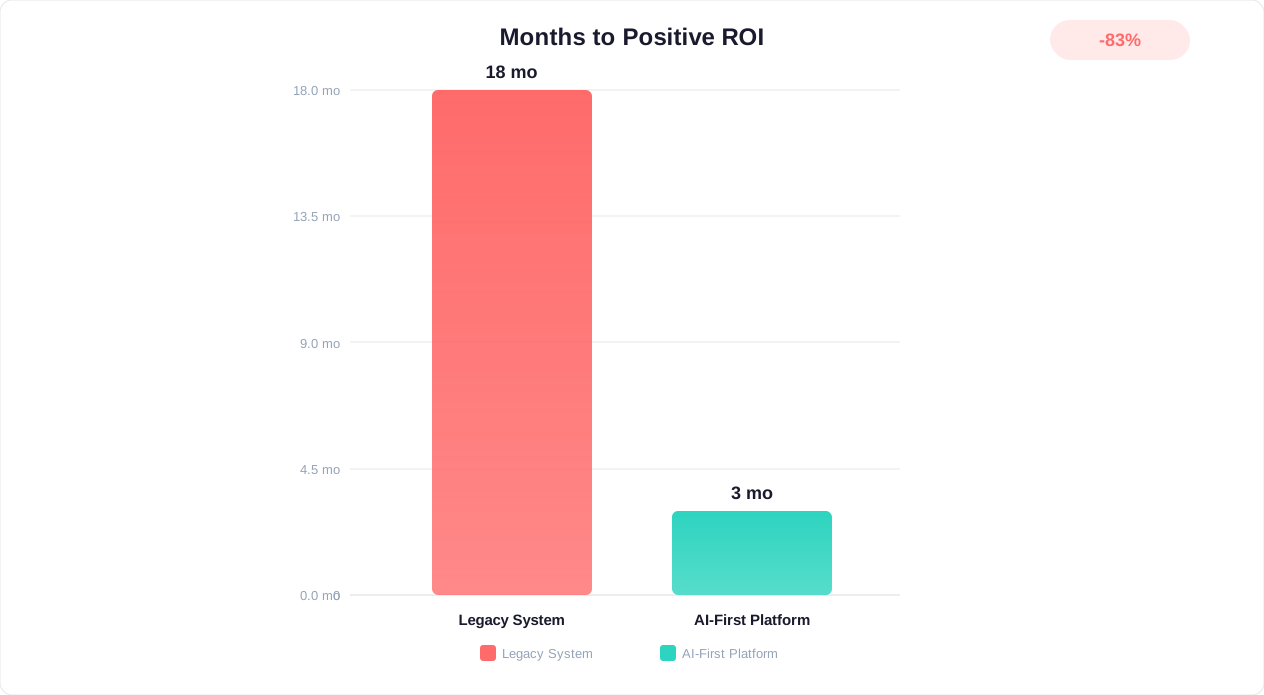
The table above reveals a striking pattern: per-resolution AI pricing (Intercom, Zendesk, Tidio) inflates costs by 5-15x compared to platforms with included AI (Conferbot, Crisp, Kommunicate).
Consider the math: a business with 2,000 monthly conversations where AI handles 60% (1,200 resolutions):
- Intercom: 1,200 x $0.99 = $1,188/month in AI charges alone
- Zendesk: 1,200 x $1.00 = $1,200/month in AI charges alone
- Tidio Lyro: 1,200 x $0.70 = $840/month (after exhausting included quota)
- Conferbot: $0 additional — AI included in $99/month Pro plan
Over 12 months, the difference is staggering: $14,256 at Intercom vs. $1,188 at Conferbot for the same volume of AI-resolved conversations. That is a $13,068 annual saving — enough to fund multiple other tools in your stack.
This cost differential is why Forrester reports that businesses switching from per-resolution to included-AI platforms save an average of 40-65% on their customer service technology spend within the first year.
For a more detailed pricing breakdown across platforms, see our comprehensive chatbot pricing comparison.
How to Choose the Right AI Customer Service Tool: Decision Framework
With 15 strong options to consider, here is a structured framework to narrow your choice to 2-3 platforms worth testing. According to McKinsey's research on customer engagement, companies that align their tool selection with strategic outcomes see 2-3x better adoption rates. Follow these steps in order.
Step 1: Define Your Budget Ceiling
Be honest about what you can sustain monthly, including growth projections for the next 12 months.
- $0-50/month: Tawk.to (free chat) + Conferbot free tier, ManyChat, Chatfuel
- $50-150/month: Conferbot Pro, Crisp Unlimited, Kommunicate, Tidio
- $150-500/month: Conferbot Business, HubSpot Professional, Freshdesk Pro, Botpress Team
- $500-2,500/month: Intercom, Zendesk Suite, HubSpot Enterprise, Drift
- $2,500+/month: Drift, LivePerson, Ada, enterprise plans
Step 2: Identify Your Primary Use Case
- Customer support automation (deflect tickets): Conferbot, Ada, Zendesk, Freshdesk
- Sales and lead qualification: Drift, Conferbot, HubSpot, ManyChat
- E-commerce customer service: Tidio, Conferbot, Chatfuel
- Social media messaging: ManyChat, Chatfuel, Conferbot
- Enterprise contact center: LivePerson, Zendesk, Ada
- Developer-custom AI: Botpress, Kommunicate, Conferbot
Step 3: Evaluate Your Channel Requirements
Where do your customers actually reach you? Map your top 3 channels and verify each shortlisted platform supports them natively:
- Website only: Any platform works
- Website + WhatsApp: Conferbot, Chatfuel, Tidio, Crisp
- Website + Social (Instagram/Messenger): ManyChat, Conferbot, Tidio
- Website + Slack/Teams (internal): Conferbot, Botpress, Kommunicate
- Omnichannel (5+ channels): Conferbot, Zendesk, LivePerson
Step 4: Check Your Must-Have Features
Create a checklist and verify each candidate:
- AI chatbot that learns from your content (not just rules-based)
- Human handoff with context preservation
- CRM integration (which specific CRM?)
- Analytics and reporting depth
- Multilingual support
- GDPR/compliance requirements
- API access for custom integrations
- Mobile SDK (if you have a mobile app)
Step 5: Run the 48-Hour Trial Test
For your top 2-3 choices, sign up and complete these tasks within 48 hours:
- Build a chatbot that handles your #1 support question (measure: how long did it take?)
- Upload your FAQ content and test AI response accuracy (measure: correct answers out of 10 test queries)
- Set up one live chat conversation and evaluate the agent experience
- Connect one integration (CRM, email, or Slack notification)
- Check analytics after 10+ test conversations (measure: insight quality)
The platform that delivers the best experience across these five tests — with the least friction — is your winner.
Step 6: Calculate 12-Month Total Cost of Ownership
Before committing, project your costs for a full year including:
- Base subscription at current team size
- AI/chatbot usage charges at projected conversation volume
- Required add-ons and channel fees
- Projected cost at 2x current volume (will you hit a pricing cliff?)
- Implementation and migration costs (if switching platforms)
The platform with the best combination of trial experience and 12-month TCO is your answer.
Implementation Timeline: From Selection to Launch
Once you have chosen your platform, here is a realistic implementation timeline. According to HubSpot's 2025 State of AI report, the average implementation time for AI customer service tools has decreased by 60% since 2023. The exact duration depends on your complexity, but this framework applies to most businesses deploying an AI customer service tool for the first time or switching from an existing platform.
Week 1: Setup and Configuration
- Day 1-2: Account setup, team invitations, role configuration, and branding customization (widget colors, logo, position)
- Day 3-4: Knowledge base preparation — upload FAQs, help articles, product documentation, and support policies that will train the AI
- Day 5: Integration connections — CRM sync, email notifications, Slack alerts, and any third-party tools your team needs
Week 2: AI Training and Bot Building
- Day 6-8: Build your primary chatbot flows — start with your top 5 most common customer questions and create conversation paths for each
- Day 9-10: AI training and testing — verify the AI answers accurately from your knowledge base, refine responses, and configure fallback behaviors
- Day 10: Human handoff configuration — set escalation rules, agent availability schedules, and routing logic
Week 3: Testing and Soft Launch
- Day 11-12: Internal testing — every team member tests as both customer and agent, documenting issues
- Day 13-14: Soft launch on a single page or low-traffic section of your site to test with real customers at low risk
- Day 14-15: Analyze soft launch data, fix any issues discovered, and refine AI responses based on real conversations
Week 4: Full Launch and Optimization
- Day 16-17: Full deployment across all pages and channels
- Day 18-20: Monitor performance closely — watch for AI accuracy issues, missed handoffs, or unexpected customer paths
- Day 21+: Begin optimization cycle — review analytics weekly, improve flows based on drop-off data, expand AI knowledge base based on unresolved queries
Expected Results by Timeframe
| Timeframe | Expected Outcome |
|---|---|
| End of Week 1 | Platform configured, knowledge base loaded, integrations connected |
| End of Week 2 | Chatbot handling top 5 questions, AI responding accurately to 70%+ of queries |
| End of Week 3 | Soft launch validated, real customer interactions successful, team comfortable with tools |
| End of Month 1 | Full launch complete, 40-50% of conversations handled by AI without human intervention |
| End of Month 3 | AI accuracy above 85%, 60%+ automated resolution rate, measurable reduction in support workload |
| End of Month 6 | Fully optimized system handling 70-80% of tier-1 queries autonomously, team focused on complex issues only |
Common Implementation Pitfalls to Avoid
- Trying to automate everything on day one. Start with your top 5 queries and expand. A chatbot that handles 5 things perfectly beats one that handles 50 things poorly.
- Skipping knowledge base preparation. AI is only as good as the content it is trained on. Invest time in clean, accurate, comprehensive documentation before expecting great AI results.
- Not briefing the team. Agents need training on the new tool — how to handle escalations, where to find conversation history, how to rate AI responses for improvement.
- Ignoring analytics after launch. The first 30 days of data are gold. Review conversations daily for the first week, then weekly. Fix AI mistakes immediately — they compound if ignored.
- Not setting success metrics. Define what success looks like before launch: target resolution rate, response time goals, CSAT benchmark. Without metrics, you cannot prove ROI or identify problems.
Most businesses on mid-market platforms (Conferbot, Tidio, Crisp, Kommunicate) complete the full implementation in 2-3 weeks. Enterprise platforms (Zendesk, LivePerson, Intercom with advanced features) typically require 4-8 weeks due to complex routing, integration, and compliance requirements.
Final Verdict: Our Top Picks for 2026
After analyzing all 15 platforms across features, pricing, AI capabilities, using evaluation criteria aligned with Forrester's customer service technology Wave reports, channel coverage, and user satisfaction, here are our definitive recommendations for 2026:
Best Overall (Value + Features + AI)
Conferbot — Delivers the most complete AI customer service package at a price point accessible to businesses of every size. AI included in base pricing, 13+ channels, no-code builder, and the fastest time-to-value on this list. Start with the free tier and scale from there.
Best for Enterprise Support
Zendesk — When you need enterprise-grade ticketing, complex routing, 1,200+ integrations, and proven scale. Worth the premium for organizations with 50+ agents and complex compliance needs.
Best for SaaS Product Teams
Intercom — If you need product tours, in-app messaging, and advanced user segmentation alongside support. The $1,500+/month total cost is justified for well-funded product-led growth companies.
Best for E-Commerce
Tidio — Deepest Shopify/WooCommerce integration for order-aware customer service. Just budget for the Lyro AI add-on or consider Conferbot as the value alternative.
Best for Zero Budget
Tawk.to + Conferbot Free Tier — Unlimited free live chat from Tawk.to paired with Conferbot's free AI chatbot capabilities gives you a functional AI customer service setup at zero cost.
Best for B2B Sales Teams
Drift (Salesloft) — Purpose-built for conversational sales with ABM, meeting booking, and revenue attribution. The $2,500/month minimum is steep but justified for high-value B2B pipeline generation.
Best for Developers
Botpress (open-source control) or Kommunicate (multi-NLP flexibility) — Both give technical teams the customization and API access that no-code-only platforms lack.
The Bottom Line
The AI customer service market in 2026 is mature enough that there is no excuse for not using AI to improve your customer experience. With free tiers from Conferbot, Freshdesk, Tawk.to, Botpress, and others, the barrier to entry is zero.
For most businesses reading this guide — small-to-mid-size companies wanting AI-powered customer service without enterprise complexity or pricing — Conferbot represents the best starting point. Its combination of included AI, broad channel coverage, intuitive builder, and transparent pricing means you get the most capability for the least investment of both money and time.
Whatever you choose, the key principles remain the same: start small, train your AI thoroughly, measure results, and iterate based on data. The best AI customer service tool is the one your team actually uses and improves over time.
For more detailed comparisons with specific platforms, explore our alternative guides: Intercom alternatives, Zendesk alternatives, Drift alternatives, and Tidio alternatives.
Was this article helpful?
15 Best AI Customer Service Tools in 2026 FAQ
Everything you need to know about chatbots for 15 best ai customer service tools in 2026.
About the Author
Conferbot Team specializes in conversational AI, chatbot strategy, and customer engagement automation. With deep expertise in building AI-powered chatbots, they help businesses deliver exceptional customer experiences across every channel.
View all articles