
Consulting Inquiry Chatbot
Free B2B Services Chatbot Template
A professional consulting inquiry chatbot that qualifies prospective clients by identifying their practice area, business challenge, company size, and urgency level. Visitors can explore consulting specialties — strategy, operations, digital transformation, finance, and HR — describe their challenge, and book a consultation call directly. Perfect for management consulting firms, advisory practices, and professional services companies looking to streamline client acquisition and pre-qualify leads.


What Is a Consulting Inquiry & Engagement Chatbot?
A consulting inquiry and engagement chatbot is a conversational system that handles the front end of the consulting sales process: identifying a prospect's business challenge, matching it to your firm's practice areas and expertise, sizing the likely engagement scope, assessing urgency and decision timeline, and booking an initial consultation — all through a structured conversation that takes under five minutes. It replaces the generic "Contact Us" form with an intelligent intake process that delivers qualified, structured inquiries to your partners and practice leads.
Consulting firms face a distinctive business development challenge. The services are complex, high-value, and entirely custom-scoped. A prospect who reaches your website knows they have a business problem but often cannot articulate which type of consultant or practice area they need. They might describe a "growth problem" that could be addressed by strategy, operations, marketing, or organizational design. A "technology problem" could mean IT strategy, digital transformation, systems integration, or cybersecurity. The intake chatbot bridges this gap — asking the right diagnostic questions to route the prospect to the right practice and partner, while capturing enough context for the consulting team to prepare a relevant first conversation.
Why Consulting Firms Lose Prospects at Intake
The consulting sales cycle is long and relationship-driven, but it starts with a moment of intent — a prospect who has recognized a business problem, researched potential solutions, and decided to reach out to a firm. That moment is fragile. If the prospect fills out a generic form and waits 48 hours for a response, they have already contacted competing firms. If they receive a response that routes them to the wrong practice area, they question the firm's understanding of their needs. If the first call starts with 20 minutes of basic discovery that a chatbot could have handled, the prospect's time is wasted and the partner's time is misallocated.
- Immediate engagement: The chatbot responds in under 3 seconds, engaging the prospect at the exact moment they decide to reach out — not hours or days later.
- Diagnostic accuracy: Structured questions identify the right practice area with 90%+ accuracy, ensuring the prospect's first human conversation is with someone who understands their challenge.
- Partner preparation: The structured inquiry brief gives the partner 5-10 minutes of discovery context before the first call, transforming a cold introduction into a warm, informed conversation.
- 24/7 availability: C-suite executives and business owners often research and reach out to consulting firms outside business hours. The chatbot captures these high-value inquiries immediately rather than losing them to next-day follow-up.
Who This Template Is Built For
This template serves management consulting firms, strategy consultancies, IT and technology consulting firms, HR and organizational development consultancies, financial advisory firms, operations consulting practices, and solo or boutique consultants. It scales from individual practitioners who need to qualify prospects before committing to unpaid discovery calls, to mid-size firms with multiple practice areas and partner-level routing, to large consultancies with regional offices and industry verticals. Explore Conferbot's AI chatbot builder to customize the template to your practice areas and engagement model.
Practice Area Matching: Routing Prospects to the Right Expertise
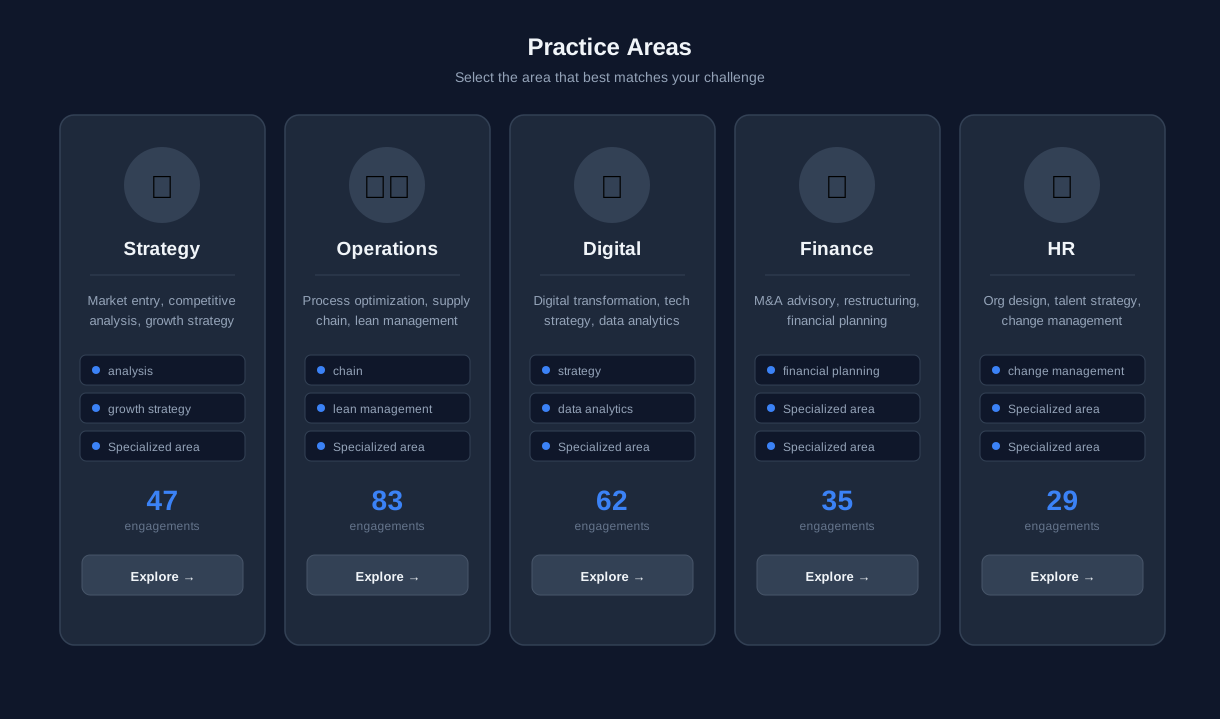
Practice area matching is the most critical function of the consulting inquiry chatbot. A prospect who is routed to the wrong practice area — or worse, to a generic business development contact — receives a poor first impression that is difficult to recover. The chatbot uses a diagnostic conversation flow to identify the prospect's core business challenge and map it to the specific practice area, partner, or team best equipped to help.
The Diagnostic Flow
Rather than asking the prospect to self-select a practice area (which assumes knowledge of your firm's internal structure), the chatbot asks about the business challenge in the prospect's own terms. The flow begins with a high-level challenge category: growth and market strategy, operational efficiency, technology and digital transformation, people and organization, financial performance, or risk and compliance. Each selection triggers a second layer of more specific questions that narrow the challenge to a specific practice area.
Challenge-to-Practice Mapping
| Prospect's Stated Challenge | Diagnostic Follow-Up | Practice Area Match | Typical Engagement |
|---|---|---|---|
| "We need to grow revenue" | Market entry, pricing, or sales effectiveness? | Strategy / Growth | Market assessment, GTM strategy |
| "Our operations are inefficient" | Supply chain, process, or cost structure? | Operations Excellence | Process optimization, cost reduction |
| "We need to modernize our technology" | Systems, data, or digital products? | Technology / Digital | Digital transformation roadmap |
| "We're struggling with talent" | Hiring, retention, or organizational design? | People & Organization | Org design, talent strategy |
| "We need better financial performance" | Profitability, capital allocation, or M&A? | Financial Advisory | Performance improvement, due diligence |
| "We have compliance concerns" | Regulatory, cybersecurity, or governance? | Risk & Compliance | Compliance assessment, risk framework |
Multi-Practice Inquiries
Many consulting engagements span multiple practice areas. A digital transformation project may require technology, operations, and organizational change expertise. The chatbot handles multi-practice inquiries by identifying the primary practice area (the one that owns the client relationship) and flagging secondary areas for cross-practice collaboration. The inquiry brief delivered to the partner includes both the primary match and any secondary practice areas that surfaced during the conversation — enabling the partner to assemble the right team for the first meeting.
Configure your practice area mapping in Conferbot's chatbot builder. The diagnostic questions and routing rules are fully editable, allowing you to update them as your practice areas evolve or as you identify new patterns in prospect inquiries.
Engagement Sizing: Qualifying Scope and Investment Level in 2026
Consulting engagements range from a $10,000 two-week diagnostic to a $5 million multi-year transformation. Understanding the likely size of an engagement before the first conversation allows the firm to allocate the right level of partner attention, prepare relevant references, and set appropriate expectations. The chatbot collects engagement sizing data through contextual questions that feel consultative rather than transactional.
Sizing Dimensions
The chatbot collects four data points that together predict engagement size with reasonable accuracy: organization size (revenue or employee count), challenge scope (single function vs. enterprise-wide), internal capability (do they have a team to execute or do they need end-to-end support), and prior consulting experience (have they worked with firms before and at what scale). These dimensions map to a sizing framework that categorizes inquiries into tiers.
| Sizing Tier | Typical Indicators | Expected Engagement Range | Partner Allocation |
|---|---|---|---|
| Strategic advisory | Large enterprise, C-suite sponsor, enterprise-wide scope | $500K–$5M+ | Senior partner lead, dedicated team |
| Project engagement | Mid-market company, specific function, defined timeline | $100K–$500K | Partner oversight, manager-led delivery |
| Diagnostic / assessment | Any size, needs clarity before committing to larger scope | $25K–$100K | Manager or senior consultant lead |
| Advisory retainer | Ongoing guidance, fractional executive, board advisory | $5K–$25K/month | Partner or principal, limited hours |
| Workshop or training | Skill building, team alignment, strategic planning facilitation | $10K–$50K | Subject matter expert facilitator |
Budget Conversation Framing
Consulting prospects, particularly those engaging a firm for the first time, are often uncertain about appropriate investment levels. The chatbot handles this by framing budget as a contextual question rather than a direct ask. After collecting organization size and scope, the chatbot presents typical investment ranges for similar engagements — "Organizations of your size addressing this type of challenge typically invest between $X and $Y in consulting support. Does that range align with your expectations?" This approach educates the prospect on market rates while collecting budget qualification data in a way that feels informative rather than invasive.

Sizing Data in the Inquiry Brief
The engagement sizing data is included in the structured inquiry brief delivered to the practice lead. The brief includes the estimated tier, the data points that informed the sizing, and any budget signals the prospect provided. This allows the partner to calibrate their preparation: a strategic advisory inquiry from a Fortune 500 company warrants a different level of pre-meeting research than a diagnostic request from a 50-person startup. Both are valuable — but they require different preparation and different first-meeting approaches. See Conferbot's pricing plans to model the platform cost against the value of better-qualified consulting inquiries.
How Sizing Intelligence Improves Win Rates
Consulting firms that implement engagement sizing in their intake process report measurably higher win rates on proposals. The reason is straightforward: when a partner walks into a first meeting already calibrated to the prospect's scale and expectations, the conversation is more relevant, the proposed approach is better scoped, and the investment discussion is less likely to produce sticker shock. Partners who receive sizing data in advance spend less time on mismatched opportunities — they can focus their limited business development time on prospects where the firm's typical engagement model and pricing align with the prospect's needs and budget. This precision reduces the number of proposals that go nowhere and increases the conversion rate of the proposals that are written. For firms that track proposal win rates, the improvement typically ranges from 15-25% after implementing structured intake with engagement sizing.
Ready to try Consulting Inquiry Chatbot?
Deploy this template in under 10 minutes. No coding required.
Use This Template Free →Urgency Assessment: Prioritizing High-Intent Prospects
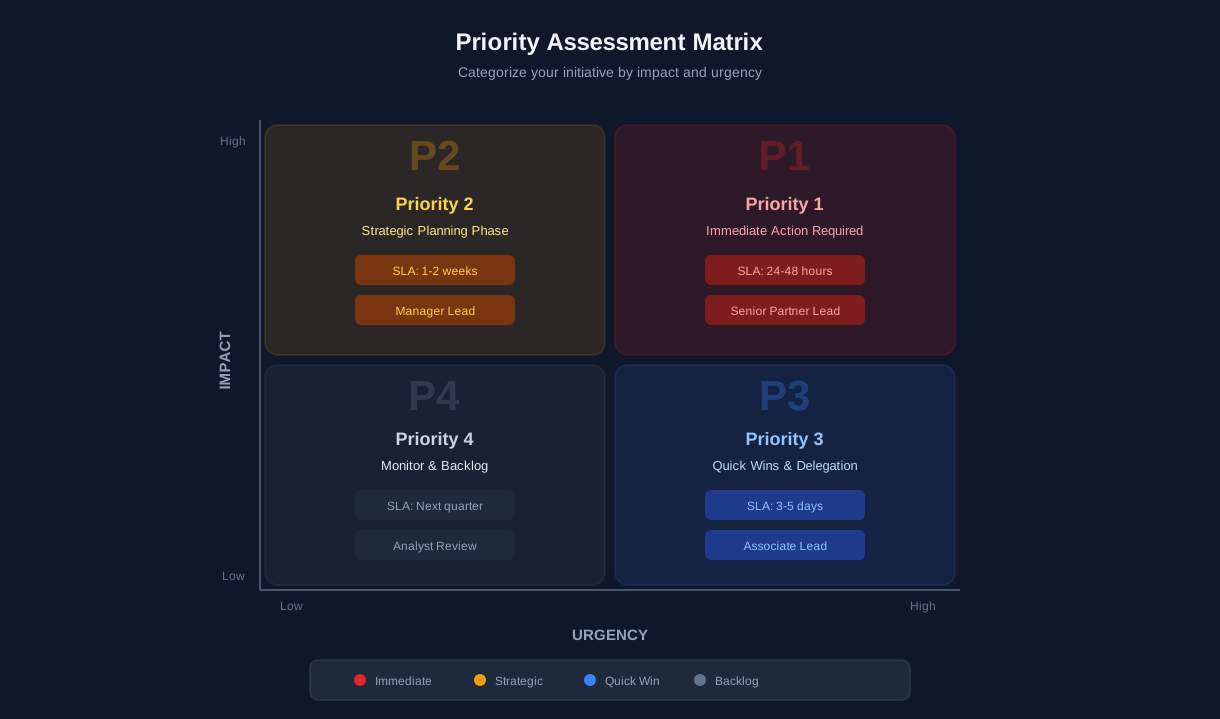
Not every consulting inquiry has the same urgency. A CEO facing a board mandate to improve profitability by next quarter needs help immediately. A VP exploring options for a strategic planning process six months away is valuable but not time-critical. The chatbot's urgency assessment module distinguishes between these scenarios, ensuring that high-urgency prospects receive immediate partner attention while lower-urgency prospects enter an appropriate nurture and follow-up cadence.
Urgency Signals
The chatbot collects urgency through two mechanisms: direct timeline questions and contextual signals. The direct question asks when the prospect wants to begin the engagement: "Immediately — we need help now," "Within 1-2 months," "Within 3-6 months," or "Just exploring — no fixed timeline." Contextual signals include the prospect's description of the driving event — a regulatory deadline, a competitive threat, a board directive, or an upcoming planning cycle. The combination of stated timeline and driving event creates a reliable urgency score.
Urgency-Based Response Protocol
| Urgency Level | Typical Trigger | Response Protocol | Follow-Up Timeline |
|---|---|---|---|
| Critical (immediate) | Regulatory deadline, crisis, board mandate | Partner notification within 1 hour, same-day callback | Consultation within 24-48 hours |
| High (1-2 months) | Budget cycle, competitive pressure, new leadership | Partner notification same day, next-day follow-up | Consultation within 1 week |
| Medium (3-6 months) | Strategic planning cycle, growth initiative | BD team follow-up within 48 hours | Consultation within 2-3 weeks |
| Exploratory (no timeline) | General research, capability evaluation | Automated thought leadership + nurture sequence | Monthly touchpoint, quarterly check-in |
Prioritization for Partners
Consulting partners have limited availability. A partner who receives six new inquiry notifications per week cannot treat them all with equal priority. The urgency assessment ensures that the partner's attention is allocated to the highest-value, highest-urgency opportunities first. Critical and high-urgency inquiries trigger immediate Slack and email notifications with the full inquiry brief. Medium-urgency inquiries are batched in a daily digest. Exploratory inquiries are handled by the BD team or automated nurture — surfacing to partner attention only when the prospect signals increased intent.
Converting Exploratory Prospects
Exploratory prospects — those with no fixed timeline — represent approximately 40% of consulting website inquiries. While they are not immediately actionable, they are valuable pipeline. The chatbot handles these prospects by offering relevant thought leadership content (whitepapers, case studies, industry reports) matched to their stated challenge area. This content delivery positions the firm as a trusted advisor and keeps the relationship warm until the prospect's timeline firms up. When an exploratory prospect returns to the chatbot months later with a defined need, their previous conversation context is available — creating continuity that generic email nurture cannot match. Deploy across channels using Conferbot's omnichannel platform.
Consultation Booking: From Inquiry to First Meeting
The consultation booking module is the conversion point of the consulting inquiry chatbot. After the prospect's challenge has been identified, their engagement sized, and their urgency assessed, the chatbot offers to schedule an initial consultation with the matched partner or practice lead. This booking happens within the same conversation — no email exchange, no separate scheduling link, no waiting for a callback. The prospect goes from "I have a problem" to "I have a meeting with an expert" in under five minutes.
Calendar Integration
The chatbot integrates with partner calendars through Conferbot's API integration with Google Calendar and Microsoft Outlook. Available consultation slots are pulled from the matched partner's actual calendar, filtered by the consultation type (30-minute introductory call, 60-minute deep-dive, or 90-minute workshop-style session). The prospect selects a slot in their local timezone, confirms their contact details, and receives an immediate calendar invite with a video conferencing link.
Pre-Consultation Brief
The partner receives the structured inquiry brief immediately upon booking. This brief includes: prospect name and title, company name and size, business challenge description, practice area match, engagement sizing estimate, urgency level, decision process, and any additional context the prospect provided. A partner who reviews this brief in 2-3 minutes walks into the consultation already understanding the prospect's situation — enabling them to demonstrate insight and relevance from the first minute of the call rather than spending 15 minutes on basic discovery.
Consultation Format Options
| Consultation Type | Duration | Best For | Typical Outcome |
|---|---|---|---|
| Introductory call | 30 minutes | Initial fit assessment, relationship building | Decision to proceed to proposal or diagnostic |
| Deep-dive session | 60 minutes | Detailed challenge exploration, approach discussion | Preliminary scope and approach framework |
| Strategy workshop | 90 minutes | Complex or multi-stakeholder challenges | Working session output, engagement roadmap |
| Follow-up consultation | 45 minutes | Post-proposal discussion, stakeholder alignment | Refined scope, contract discussion |
Booking Confirmation and Reminders
Upon booking, the prospect receives an immediate confirmation email with the meeting details, the partner's bio and relevant expertise, and a brief overview of what to expect during the consultation. Automated reminders are sent 24 hours and 1 hour before the meeting. The 24-hour reminder includes a prompt asking if the prospect wants to share any additional materials (financial reports, strategic plans, organizational charts) before the call — giving the partner even more context for preparation. This pre-consultation material sharing reduces time-to-value in the first meeting and demonstrates a level of preparation that distinguishes your firm from competitors who walk into calls cold.
For firms with multiple offices or regional partners, the chatbot can route consultations based on the prospect's geography — ensuring that a prospect in London is matched with a UK-based partner who shares their timezone and regulatory context. Configure geographic routing in Conferbot's chatbot builder using conditional logic nodes.
50,000+ businesses use Conferbot templates to automate conversations
Setup Guide: Deploy Your Consulting Chatbot in Under 60 Minutes
Deploying the consulting inquiry chatbot involves four phases: practice area configuration, conversation flow customization, calendar and notification setup, and deployment. Most consulting firms complete the full setup in under 60 minutes.
Phase 1: Practice Area Configuration (15 Minutes)
Open the template in Conferbot's chatbot builder and configure your practice structure:
- Practice areas: Replace the default categories with your actual practice areas or service lines.
- Diagnostic questions: Customize the challenge identification questions for each practice area to reflect the specific problems you solve.
- Partner routing: Map each practice area to the partner or team lead who should receive inquiry briefs and consultation bookings.
- Engagement sizing tiers: Adjust the sizing framework to match your firm's typical engagement ranges.
Phase 2: Conversation Flow Customization (20 Minutes)
- Update the welcome message to reflect your firm's positioning and tone.
- Customize urgency assessment questions and response protocols for your team's availability model.
- Add thought leadership content links for the exploratory prospect path — whitepapers, case studies, and industry reports organized by practice area.
- Review and adjust the budget framing language to match how your firm discusses investment with prospects.
Phase 3: Calendar and Notification Setup (15 Minutes)
- Connect partner calendars via Google Calendar or Outlook OAuth integration.
- Set consultation availability windows and meeting durations for each partner.
- Configure notification delivery: email and Slack channels for each urgency level.
- Connect HubSpot or Salesforce to log inquiry records and create deal/opportunity entries automatically.
Phase 4: Deployment and Testing (10 Minutes)
Deploy the chatbot to your website — prioritizing your homepage, practice area pages, and "Contact" or "Work With Us" pages. Run test conversations through each practice area path to confirm routing accuracy, calendar availability, notification delivery, and CRM record creation. For firms that receive inquiries through LinkedIn or professional networks, extend the chatbot to additional channels via Conferbot's omnichannel platform to capture prospects wherever they discover your firm.
Consulting Inquiry Chatbot FAQ
Everything you need to know about chatbots for consulting inquiry chatbot.
Why Use a Template vs Building from Scratch?
Templates encode years of optimization data into the conversation flow before you start.
| Factor | Conferbot Template | Build from Scratch | Hire a Developer |
|---|---|---|---|
| Time to deploy | 10 minutes | 2-8 hours | 2-6 weeks |
| Cost | Free | Your time | $5,000-$25,000 |
| Day-1 conversion | 15-22% | 5-8% | 10-15% |
| Proven flows | Yes, data-tested | No | Depends |
| Updates included | Automatic | Manual | Paid |
| Multi-channel | 8+ channels | 1 channel | Extra cost |
| Analytics | Built-in | Must build | Extra cost |
Ready to Deploy Consulting Inquiry Chatbot?
Join 50,000+ businesses. Free forever plan available. No credit card required.