
Agency Client Intake Chatbot
Free B2B Services Chatbot Template
A smart agency client intake chatbot that qualifies incoming project inquiries by collecting project type, budget range, timeline, and goals. Prospective clients can explore your service offerings - web design, branding, marketing, SEO, and app development - view portfolio examples, and submit their brief, all through a guided conversation. Ideal for creative agencies, digital studios, and marketing firms looking to filter qualified leads and reduce back-and-forth emails.



What Is an Agency Client Intake Chatbot?
An agency client intake chatbot is a conversational automation system that handles the entire new business inquiry process for creative, digital, marketing, and professional services agencies. It greets prospective clients on your website, asks structured discovery questions to understand their project needs, matches those needs to your service offerings, collects budget range and timeline expectations, showcases relevant portfolio work, and either books a discovery call or delivers a qualified brief to your business development team. The entire process takes under five minutes and operates around the clock.
For agencies, the client intake process is simultaneously the most important and the most neglected part of the sales funnel. Most agencies rely on a "Contact Us" form or a generic email address to receive new business inquiries. The prospect fills out a name, email, and a free-text message field - providing minimal structure and zero qualification. The inquiry lands in a shared inbox where it competes with vendor emails, existing client requests, and internal messages. A business development lead reviews it hours or days later, sends a follow-up email asking for the details the form should have captured, and begins a multi-day email chain to schedule a discovery call. By the time the first real conversation happens, the prospect may have already spoken with two competing agencies who responded faster.
Why Generic Contact Forms Fail Agencies
The agency business model creates a unique intake challenge. Unlike SaaS products with standardized pricing and features, every agency engagement is custom-scoped. A prospect who writes "we need help with marketing" could mean a $5,000 one-time project or a $50,000/month retainer. Without structured qualification, your team cannot prioritize, route, or prepare for the conversation. The intake chatbot solves this by asking the right questions in the right order - project type, scope, budget range, timeline, and decision process - and delivering a structured brief that your team can act on immediately.
- Structured discovery: The chatbot collects project type, scope, objectives, budget range, and timeline in a guided conversation - replacing the empty text box with actionable data.
- 24/7 responsiveness: Agency prospects often browse and research outside business hours. A chatbot that engages at 9pm on a Thursday captures the prospect at peak intent rather than letting them bookmark and forget.
- Consistent qualification: Every prospect goes through the same discovery flow, ensuring that your BD team receives uniformly structured briefs regardless of when the inquiry arrives or which page the prospect was on.
- Portfolio integration: The chatbot showcases relevant case studies and portfolio examples based on the prospect's stated industry and project type - turning intake into a sales tool.
Who This Template Is Built For
This template is designed for digital marketing agencies, creative agencies, web design and development shops, branding studios, PR firms, advertising agencies, SEO/SEM agencies, and any professional services firm that handles custom-scoped client engagements. It adapts to agencies of any size - from solo consultants who need to qualify prospects before investing time in unpaid discovery calls, to multi-office agencies with departmental routing and specialized service lines. Explore Conferbot's AI chatbot builder to customize the template to your specific services and intake process.
Project Scoping Flow: From Vague Request to Structured Brief
The project scoping flow is the core of the agency client intake chatbot. It transforms a vague "we need help" inquiry into a structured project brief that your business development team can review and act on in minutes. The flow follows a logical discovery sequence that mirrors how an experienced account manager would conduct a first conversation - but does it consistently, completely, and in under five minutes.
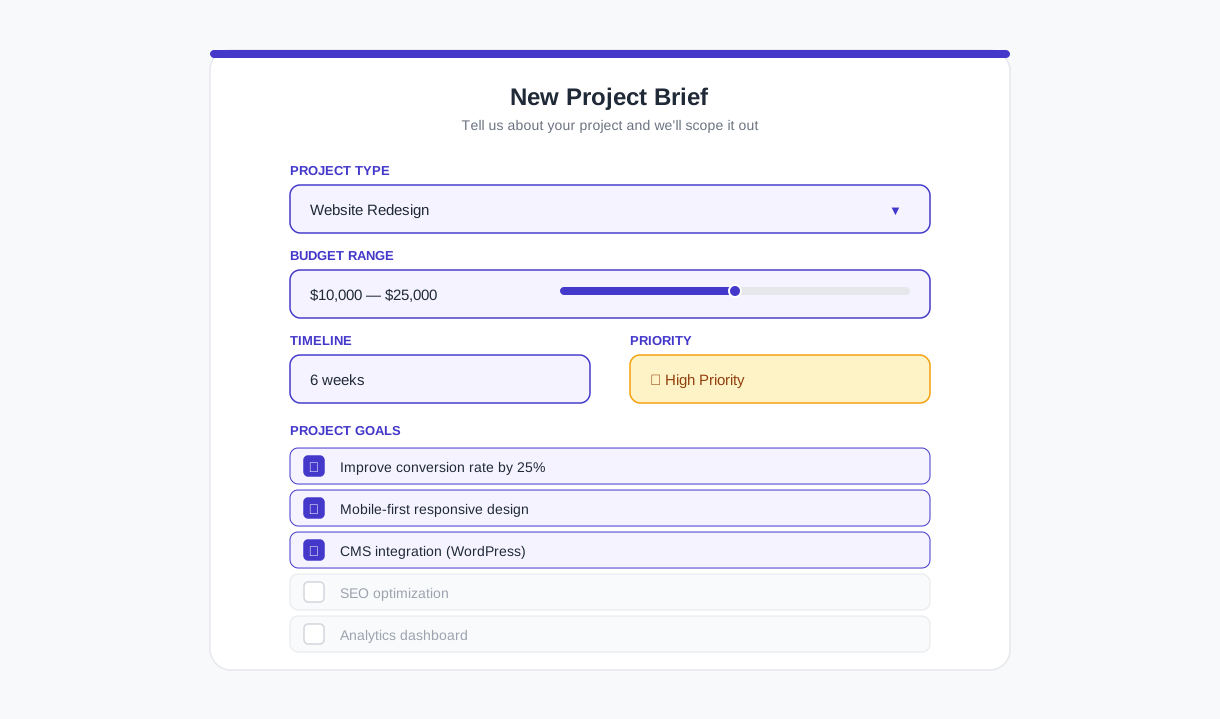
Step 1: Project Type Identification
The chatbot opens by asking the prospect to select their primary project type from your service categories. For a digital agency, this might include: website design and development, brand identity, digital marketing campaign, SEO and content strategy, social media management, paid advertising, or "not sure - help me figure it out." This initial selection determines the follow-up questions and the service team that will receive the brief. Prospects who select "not sure" enter a guided discovery path where the chatbot asks about their business goals and recommends appropriate service categories.
Step 2: Scope and Objectives
Based on the project type, the chatbot asks targeted scope questions. A website project triggers questions about current website status (redesign vs. new build), number of pages, functionality requirements (e-commerce, booking, CMS), and content readiness. A marketing campaign triggers questions about target audience, geographic focus, channels of interest, and success metrics. Each project type has its own question set - ensuring that the brief captures the information that matters for that specific engagement type.
Step 3: Deliverables and Success Criteria
The chatbot asks the prospect to describe what success looks like for this project. This open-ended question captures the prospect's expectations in their own words - critical context that structured questions alone cannot provide. Responses like "we need to double our organic traffic within 6 months" or "we want a website that positions us as the premium option in our market" give your team immediate insight into the prospect's priorities and how to frame your proposal.
Structured Brief Output
At the end of the scoping flow, the chatbot generates a formatted project brief containing every data point collected: contact information, company details, project type, scope parameters, objectives, success criteria, budget range, timeline, and any additional notes. This brief is delivered to your BD team via email, Slack notification, and CRM record creation. The brief replaces the typical "someone filled out the contact form" alert with an actionable document that your team can use to prepare for the discovery call - or in some cases, to begin scoping a proposal before the first conversation. Track brief delivery and response times using Conferbot's chatbot analytics to identify bottlenecks in your sales process.
Intelligent Service Matching: Connecting Needs to Capabilities
One of the highest-value functions of the agency intake chatbot is service matching - the ability to take a prospect's stated needs and map them to your specific service offerings, including services the prospect may not have known you provide. This capability converts more inquiries into engagements and increases average deal size by surfacing cross-sell opportunities during the first interaction.
How Service Matching Works
The chatbot maintains a mapping between prospect needs (expressed as problems, goals, or project types) and your service catalog. When a prospect describes their project, the chatbot identifies the primary service match and any complementary services that would strengthen the engagement. A prospect who selects "website redesign" and mentions "we also need to improve our Google rankings" receives a recommendation for both web design and SEO services - with a brief explanation of how they work together. This is not a hard upsell; it is a consultative suggestion that demonstrates your agency's breadth and strategic thinking.
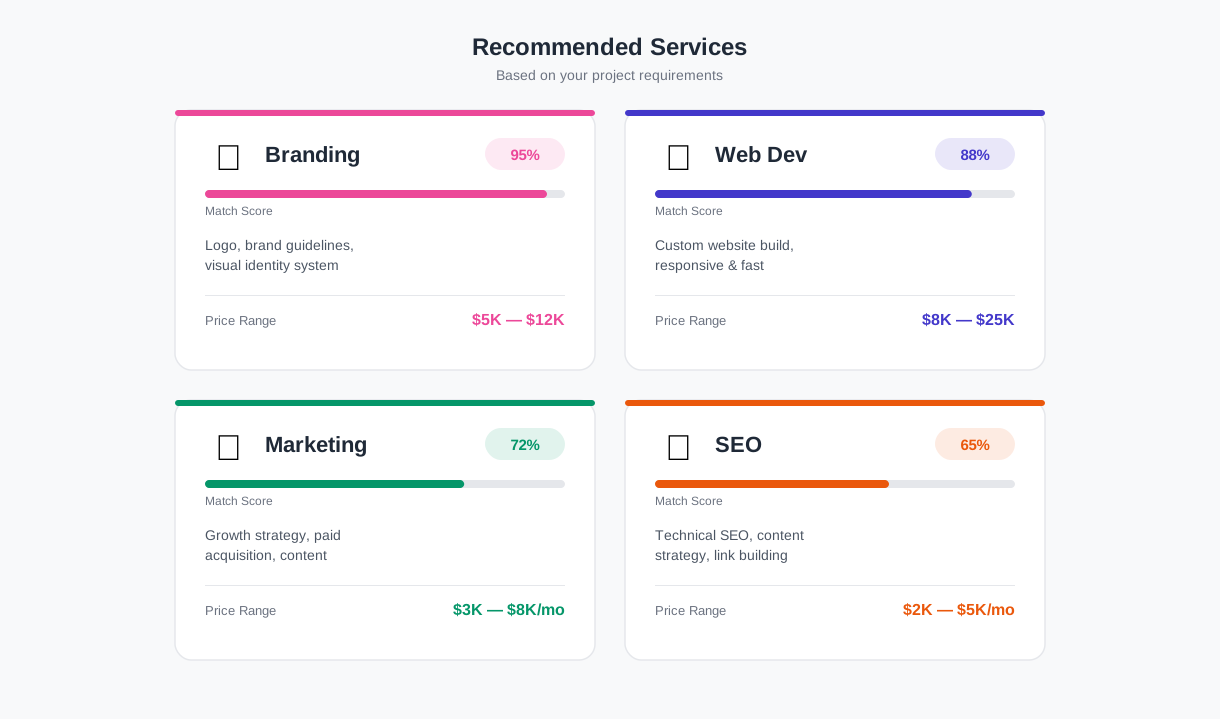
Service Matching Matrix
| Prospect Need | Primary Service Match | Complementary Services | Average Deal Uplift |
|---|---|---|---|
| "We need a new website" | Web Design & Development | SEO, Content Strategy, Brand Identity | +35-50% |
| "We want more leads online" | Digital Marketing / Paid Ads | Landing Page Design, CRO, Analytics | +25-40% |
| "Our brand feels outdated" | Brand Identity & Strategy | Website Redesign, Social Media Refresh | +40-60% |
| "We need social media help" | Social Media Management | Content Creation, Paid Social, Influencer | +30-45% |
| "We're launching a product" | Go-to-Market Campaign | PR, Content, Paid Ads, Website Landing Pages | +50-80% |
Industry-Specific Recommendations
When the chatbot collects the prospect's industry during intake, it can tailor service recommendations to industry-specific needs. A healthcare company asking about digital marketing receives recommendations that emphasize HIPAA-compliant content and medical review processes. A B2B SaaS company asking about brand identity receives recommendations that include product positioning and sales enablement content. These industry-aware recommendations demonstrate expertise and build immediate credibility - the prospect sees that your agency understands their vertical, not just their project type.
Configure your service catalog and matching rules directly in Conferbot's chatbot builder. As you add new services or refine your positioning, update the matching rules in minutes without developer involvement. For agencies that serve clients across multiple channels, extend the intake chatbot to WhatsApp and Messenger to capture prospects wherever they discover your agency.
Ready to try Agency Client Intake Chatbot?
Deploy this template in under 10 minutes. No coding required.
Use This Template Free →Budget and Timeline Collection: Qualifying Without Friction in 2026
Budget and timeline are the two qualification dimensions that agencies most need - and that prospects are most reluctant to share on a generic form. The chatbot handles this sensitive collection through a conversational approach that feels natural rather than interrogative, using range selections rather than exact figures and contextual framing that helps the prospect understand why this information improves their experience.
Budget Range Collection
Rather than asking "What is your budget?" - a question that triggers defensive responses and frequently produces inaccurate answers - the chatbot frames budget as a range selection tied to project scope. After the prospect has described their project, the chatbot presents budget ranges calibrated to the specific project type. A website project might show ranges of $5,000-$15,000, $15,000-$40,000, $40,000-$100,000, and $100,000+. A monthly retainer engagement might show $2,000-$5,000/month, $5,000-$15,000/month, and $15,000+/month. The ranges are presented with brief descriptions of what each tier typically includes - helping the prospect self-select accurately.
| Collection Method | Response Rate | Accuracy | Prospect Comfort Level |
|---|---|---|---|
| Open text field ("What's your budget?") | 28% | Low (aspirational or deflective) | Low - feels invasive |
| Range selection with context | 82% | High (calibrated to project type) | High - feels consultative |
| "Not sure yet" option with guidance | 95% (incl. "not sure") | Medium (some self-select after guidance) | Very high - no pressure |
Timeline Expectations
The chatbot collects timeline through a similar range-based approach. After scope and budget, the chatbot asks when the prospect wants to start the engagement and when they need initial deliverables. Options are presented as ranges: "Within 2 weeks," "Within 1-2 months," "Within 3-6 months," and "No fixed timeline - planning phase." This information helps your team prioritize hot leads (start within 2 weeks, budget confirmed) versus pipeline prospects (planning phase, budget TBD) and allocate resources accordingly.
Decision Process Mapping
The chatbot also captures decision process information: who else is involved in the agency selection (solo decision, team decision, procurement process), what stage they are at (researching options, shortlisted agencies, ready to choose), and whether they have worked with an agency before. This data is critical for forecasting: a solo decision-maker who is ready to choose and has budget approved is a 2-week close. A prospect in research phase with a procurement process is a 2-3 month cycle. Your BD team can calibrate follow-up cadence and proposal depth based on this context.
Handling "Not Sure" Responses
Approximately 20-30% of prospects select "not sure" or "prefer not to say" for budget. The chatbot handles this gracefully by offering a brief explanation: "No problem - we work with a wide range of budgets. To give you the most relevant recommendation, here's what similar projects typically cost:" followed by the range options with scope descriptions. After seeing the context, approximately half of "not sure" respondents select a range. The remainder proceed through the flow without budget data - and that is acceptable. A qualified lead without a budget number is still far more valuable than no lead at all.
Portfolio Showcase: Selling Through Relevant Work
The portfolio showcase capability transforms the intake chatbot from a qualification tool into an active sales tool. Based on the prospect's industry, project type, and stated objectives, the chatbot surfaces relevant case studies and portfolio examples - giving the prospect immediate evidence that your agency has solved similar problems for similar companies. This is the conversational equivalent of a BD lead saying "let me show you something we did for a company just like yours" - the most effective move in agency sales.
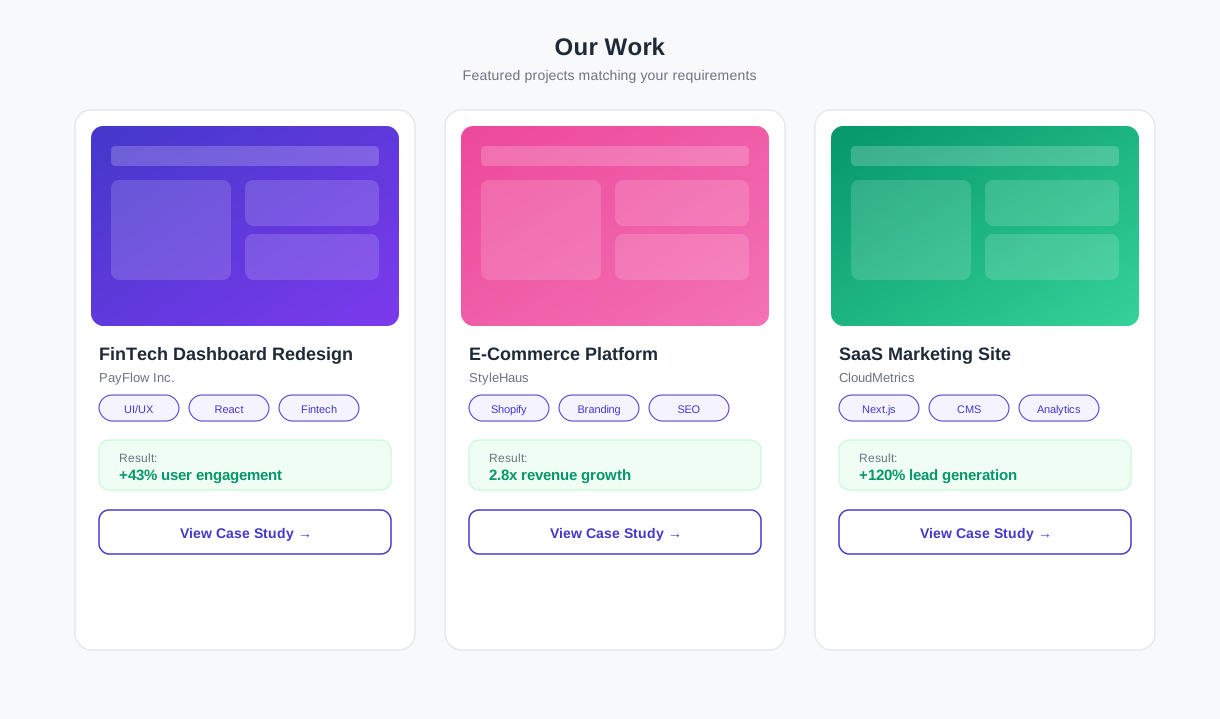
Dynamic Case Study Selection
The chatbot maintains a library of case study references organized by industry, project type, and outcome metric. When a prospect in the healthcare industry describes a website redesign project, the chatbot surfaces your healthcare website case studies. When a SaaS company asks about paid advertising, the chatbot shows your B2B SaaS campaign results. Each case study reference includes a project title, client industry, key deliverables, and a headline result metric ("42% increase in qualified leads" or "3x improvement in conversion rate"). The prospect can click through to the full case study on your website for details.
Outcome-Based Positioning
Portfolio showcase is not just about showing pretty work - it is about demonstrating outcomes that match the prospect's goals. The chatbot links case studies to the prospect's stated success criteria. A prospect who said "we want to increase online sales" sees case studies with revenue and conversion metrics. A prospect who said "we want to build brand awareness" sees case studies with reach, engagement, and brand recall metrics. This outcome matching demonstrates that your agency measures what matters to the prospect, not just what looks good in a portfolio.
Competitive Differentiation During Intake
Most agencies save portfolio presentation for the pitch meeting - by which point the prospect has already shortlisted 2-4 agencies and has limited attention for each. Showing relevant work during intake gives you a critical advantage: you establish credibility before any competitor has a chance to present. The prospect enters the discovery call already having seen evidence of your capability, shifting the conversation from "can you do this?" to "how would you approach this?" - a fundamentally stronger starting position.
Portfolio Showcase Impact
| Metric | Without Portfolio in Intake | With Dynamic Portfolio | Impact |
|---|---|---|---|
| Discovery call booking rate | 35% | 58% | +66% |
| Prospect-initiated follow-up | 12% | 29% | +142% |
| Time from inquiry to signed proposal | 18 days average | 11 days average | -39% |
| Proposal win rate | 25% | 38% | +52% |
Configure your portfolio library in Conferbot's chatbot builder by adding case study cards with industry tags, project type tags, and outcome metrics. The chatbot's matching logic handles the rest - surfacing the right work for the right prospect automatically. Deploy across your website via Conferbot's omnichannel platform to ensure portfolio-enhanced intake is available on every page and channel where prospects discover your agency.
businesses worldwide use Conferbot templates to automate conversations
Setup Guide: Deploy Your Agency Intake Chatbot in Under 60 Minutes
Deploying the agency client intake chatbot involves four configuration phases: service catalog setup, conversation flow customization, portfolio integration, and channel deployment. Most agencies complete the full deployment in under 60 minutes.
Phase 1: Service Catalog Configuration (15 Minutes)
Open the template in Conferbot's chatbot builder and update the service categories to match your agency's offerings:
- Service categories: Replace the default service list with your actual service lines (e.g., "Brand Strategy," "Web Development," "Performance Marketing").
- Budget ranges: Calibrate the budget range options for each service type to reflect your actual pricing tiers.
- Routing rules: Map each service category to the team member or department that should receive intake briefs for that service type.
- Complementary service matching: Configure which services should be recommended alongside each primary service selection.
Phase 2: Conversation Flow Customization (20 Minutes)
- Update the welcome message to reflect your agency's voice and value proposition.
- Customize scope questions for each project type to collect the information your team actually needs for scoping.
- Adjust the budget range labels and descriptions to match your pricing structure.
- Configure the discovery call booking flow with your team's calendar availability (via Google Calendar or Outlook integration through Conferbot's calendar booking feature).
- Set up notification delivery: email addresses, Slack channels, and CRM connection for intake brief delivery.
Phase 3: Portfolio Integration (15 Minutes)
- Add your top 10-15 case studies to the portfolio library with industry tags, project type tags, and headline result metrics.
- Link each case study to the full case study page on your website.
- Test the matching logic by running intake conversations for different industry/project combinations to verify that relevant case studies surface correctly.
Phase 4: Deployment and Testing (10 Minutes)
Copy the embed snippet from the Deploy panel and add it to your website - prioritizing your homepage, services pages, portfolio page, and contact page. Run three test conversations covering different project types to confirm that routing, notifications, and portfolio matching work correctly. For agencies that receive inquiries through social media or messaging, extend the intake flow to additional channels via Conferbot's omnichannel platform.
Agency Client Intake Chatbot FAQ
Everything you need to know about chatbots for agency client intake chatbot.
Why Use a Template vs Building from Scratch?
Templates give you a proven starting structure instead of a blank canvas.
| Factor | Conferbot Template | Build from Scratch | Hire a Developer |
|---|---|---|---|
| Time to deploy | 10 minutes | 2-8 hours | 2-6 weeks |
| Cost | Free | Your time | Custom dev quote |
| Proven flows | Yes, pre-built | No | Depends |
| Updates included | Automatic | Manual | Paid |
| Multi-channel | 8+ channels | 1 channel | Extra cost |
| Analytics | Built-in | Must build | Extra cost |
Learn More About Chatbots
Go deeper on how b2b services chatbots work and how to pick the right builder.
Ready to Deploy Agency Client Intake Chatbot?
Start with a free-forever plan. No credit card required.