
Partner Onboarding Chatbot
Free B2B Services Chatbot Template
A streamlined partner onboarding chatbot that guides new channel partners through tier selection, company registration, regional setup, and certification enrollment. Partners can explore Silver, Gold, and Platinum tiers, submit their company information, and get enrolled in the partner program - all through a guided conversational flow. Ideal for SaaS companies, technology vendors, and enterprises with channel partner ecosystems looking to accelerate partner activation and reduce onboarding friction.



What Is a Partner & Channel Onboarding Chatbot?
A partner and channel onboarding chatbot is a conversational automation system that guides new channel partners, resellers, affiliates, and referral partners through every step of the onboarding process: program enrollment, agreement execution, certification requirements, portal access setup, deal registration, and first-deal support. It replaces the manual, email-heavy onboarding process that most partner programs rely on - a process that typically takes 2-4 weeks and involves dozens of back-and-forth messages - with a structured, self-service experience that partners can complete at their own pace, 24/7.
For companies that sell through channel partners, onboarding speed directly impacts revenue. A partner who completes onboarding in 3 days starts generating pipeline 3 weeks earlier than one who takes a month. Yet most partner programs treat onboarding as an administrative process rather than a revenue acceleration opportunity. New partners receive a welcome email with links to a dozen different resources, a PDF partner agreement to review and sign, login credentials for a portal they have never seen, and a list of certification requirements with no clear starting point. The result is predictable: partners get stuck, drop off, or take weeks to become productive - and the channel team spends hours answering the same onboarding questions repeatedly.
The Partner Onboarding Problem
Channel programs at scale face three structural onboarding challenges. First, volume: a growing partner program may onboard 20-50 new partners per month, each requiring individual attention and support through a multi-step process. Second, consistency: when onboarding is handled by channel managers via email, the quality and completeness of the onboarding experience varies by manager workload and expertise. Third, time-to-productivity: the gap between partner enrollment and first deal registration is the critical metric, and every friction point in onboarding extends that gap.
- Self-service onboarding: Partners complete enrollment, agreement review, portal setup, and certification at their own pace - no waiting for channel manager availability or business hours.
- Step-by-step guidance: The chatbot presents onboarding tasks in logical sequence, tracking progress and reminding partners of incomplete steps.
- Instant answers: Partners get immediate responses to common onboarding questions (pricing tiers, margin structure, certification timeline) instead of emailing the channel team and waiting hours.
- Consistency at scale: Every partner receives the same high-quality onboarding experience regardless of when they enroll or how many other partners are onboarding simultaneously.
Who This Template Is Built For
This template is designed for SaaS companies with reseller or referral partner programs, technology vendors with VAR (value-added reseller) channels, companies with affiliate or referral programs, manufacturers with distributor networks, and any organization that onboards external partners who need access to resources, certifications, and deal registration systems. It scales from early-stage partner programs with 10-20 partners to mature channel ecosystems with hundreds of active partners across multiple tiers. Explore Conferbot's AI chatbot builder to customize the template to your partner program structure.
Enrollment Flow: From Application to Active Partner in Days, Not Weeks
The enrollment flow is the first interaction a new partner has with your program - and it sets the tone for the entire relationship. A smooth, guided enrollment process signals that your company is organized, partner-friendly, and easy to work with. A confusing, multi-step process with broken links and unanswered emails signals the opposite. The chatbot delivers a structured enrollment experience that moves partners from initial application to active status in days rather than weeks.
Step 1: Partner Application
The chatbot collects the core application data: company name, contact information, business type (reseller, referral, affiliate, technology partner), geographic coverage, target market, and current customer base size. This information determines program eligibility and initial tier placement. Unlike a static form that collects the same fields regardless of partner type, the chatbot adapts follow-up questions based on the business type selected - a reseller is asked about sales team size and technical certifications, while a referral partner is asked about audience reach and referral volume expectations.
Step 2: Program Tier Selection
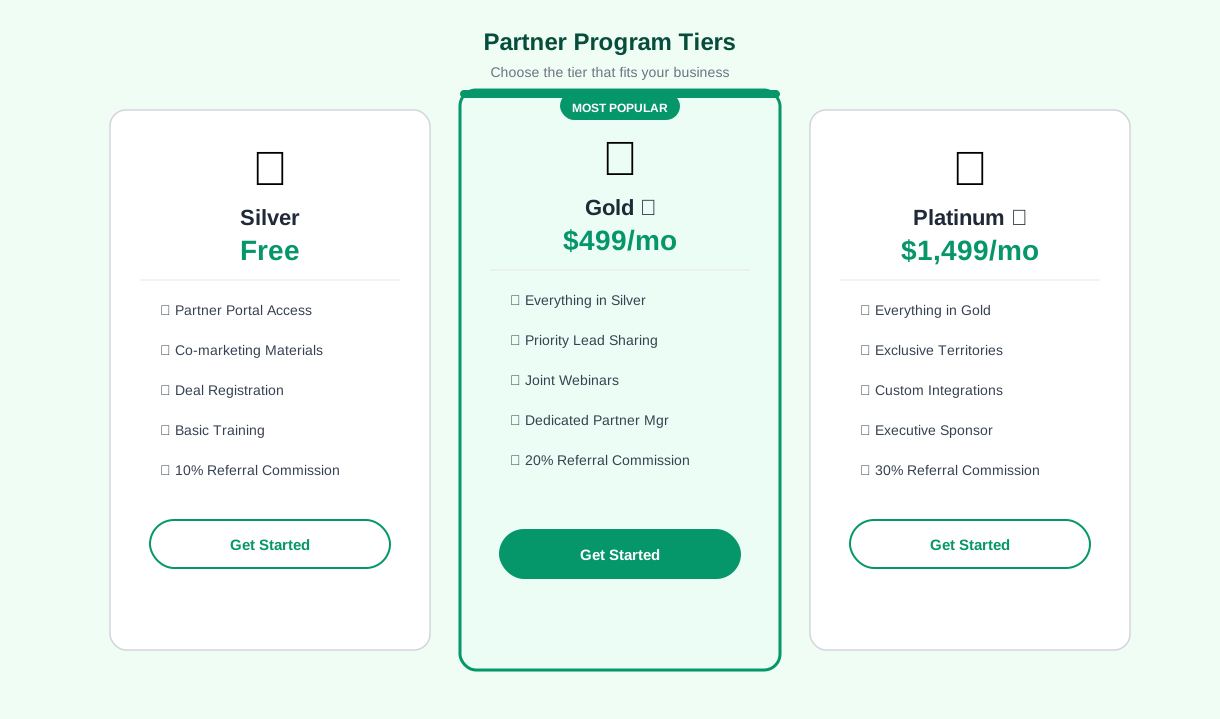
Based on the application data, the chatbot presents eligible program tiers with a clear comparison of benefits, requirements, and margin structures. Partners see exactly what each tier offers - marketing development funds, lead sharing, co-branding rights, dedicated channel manager access, and margin percentages - and can select the tier that matches their current capacity with a clear path to upgrade.
| Program Tier | Requirements | Key Benefits | Margin Range |
|---|---|---|---|
| Registered | Application approval, basic agreement | Deal registration, partner portal access, sales materials | 10-15% |
| Silver | 1 certified rep, 2 deals/quarter minimum | Co-marketing funds, lead sharing, priority support | 15-20% |
| Gold | 3 certified reps, 5 deals/quarter minimum | Dedicated channel manager, joint business planning, MDF | 20-30% |
| Platinum | 5+ certified reps, 10 deals/quarter minimum | Executive sponsor, custom pricing, co-selling support | 25-35% |
Step 3: Agreement Review and Execution
The chatbot presents the partner agreement for review, walking the partner through key terms: program obligations, pricing and margin structure, deal registration rules, territory policies, and termination provisions. Partners can ask questions about specific clauses - "What is the deal registration protection period?" or "Can I sell outside my territory?" - and receive immediate answers from a pre-configured FAQ library. Once reviewed, the agreement can be electronically signed directly within the chat flow or via a linked e-signature tool.
Step 4: Portal Access and Activation
Upon agreement execution, the chatbot provisions partner portal access: credentials are created, the partner receives login instructions, and the chatbot walks them through the portal's key sections - deal registration, sales materials, certification courses, and support ticket creation. The partner's status is updated to "Active" in your partner management system, and the assigned channel manager receives a notification with the partner's profile and enrollment details. Configure enrollment workflows in Conferbot's API integration layer to connect with your PRM or CRM.
Certification Support: Accelerating Partner Competency in 2026
Partner certification is the foundation of channel quality. Certified partners sell more effectively, deliver better customer experiences, and generate fewer support escalations. But certification programs are also the most common source of onboarding friction - partners struggle to find the right courses, lose track of their progress, miss deadlines, and abandon certification entirely when the process is confusing or time-consuming. The chatbot eliminates this friction by serving as a persistent certification guide that tracks progress, answers questions, and keeps partners moving forward.
Certification Path Guidance
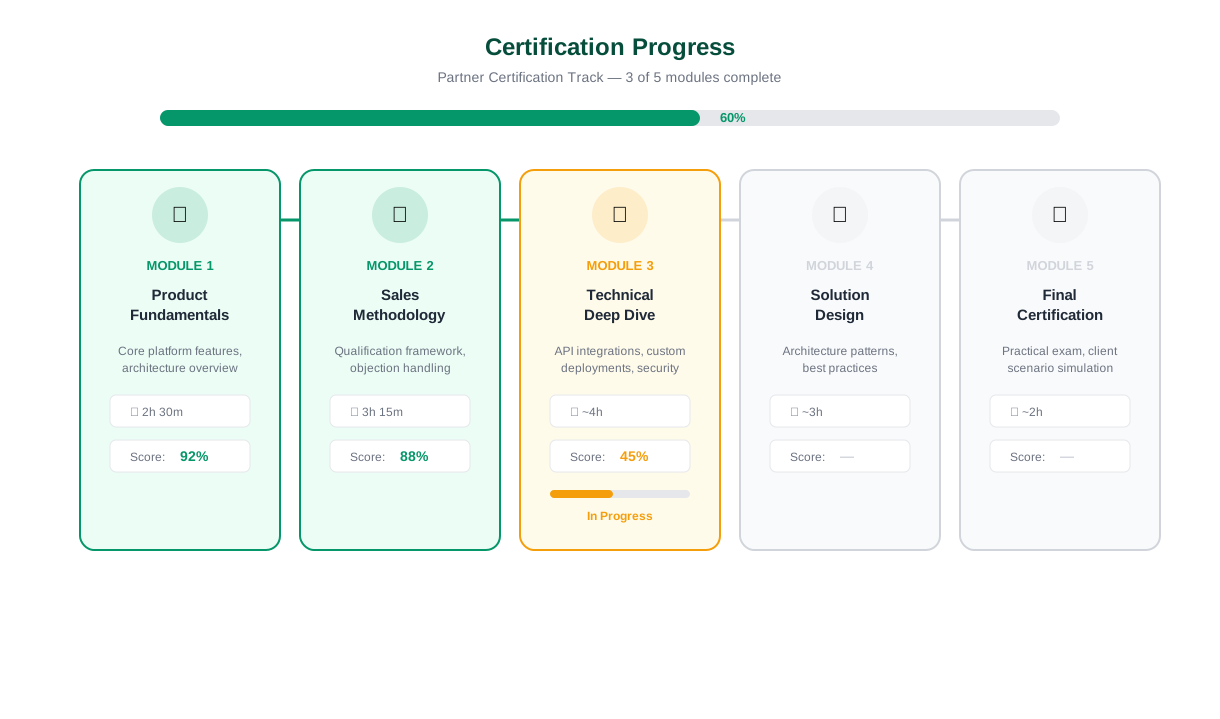
The chatbot presents a personalized certification path based on the partner's tier, role, and product focus. A sales representative sees the sales certification track: product positioning, competitive differentiation, pricing and packaging, and demo delivery. A technical resource sees the technical certification track: implementation methodology, configuration, integration, and troubleshooting. Each track shows the total number of modules, estimated completion time, and the deadline for certification (if applicable). The partner can start any available module directly from the chatbot conversation.
Progress Tracking and Reminders
The chatbot tracks certification progress and proactively nudges partners who have stalled. If a partner completes two of five modules and has not returned in a week, the chatbot sends a reminder via the website widget or messaging channel: "You're 40% through your sales certification - Module 3 takes about 25 minutes. Ready to continue?" This proactive engagement increases certification completion rates significantly compared to passive LMS systems that rely on the partner to remember and self-motivate.
Certification Completion Impact
| Metric | Without Chatbot Support | With Chatbot Certification Guide | Improvement |
|---|---|---|---|
| Certification completion rate | 38% | 72% | +89% |
| Average time to completion | 28 days | 11 days | -61% |
| Support tickets about certification | 4.2 per partner | 0.8 per partner | -81% |
| Time to first deal (certified partners) | 45 days post-enrollment | 18 days post-enrollment | -60% |
On-Demand Knowledge Support
During and after certification, partners frequently have product and program questions that fall outside the certification curriculum. "What's the competitive positioning against [Competitor X]?" "What's the SLA for implementation support?" "Can the product integrate with [specific platform]?" The chatbot answers these questions instantly from a structured knowledge base, saving the partner from searching through portal documentation or waiting for a channel manager response. This instant-answer capability turns the chatbot into an always-available product expert that partners can rely on whenever they are in a customer conversation and need a quick answer. Build and manage your partner-facing content library using Conferbot's knowledge base feature for instant, accurate responses to partner queries.
Connect your LMS or training platform through Conferbot's API integration to sync certification status and enable direct module launch from the chatbot conversation.
Ready to try Partner Onboarding Chatbot?
Deploy this template in under 10 minutes. No coding required.
Use This Template Free →Deal Registration: Streamlining Pipeline Submission and Approval
Deal registration is the mechanism by which channel partners claim protection on specific opportunities - and it is the single most important process in the partner relationship. A smooth deal registration process incentivizes partners to bring you deals early. A clunky, slow, or opaque process causes partners to delay registration, submit incomplete information, or skip registration entirely - all of which damage pipeline visibility and partner satisfaction. The chatbot streamlines deal registration into a guided conversation that takes under three minutes.
Guided Deal Registration Flow
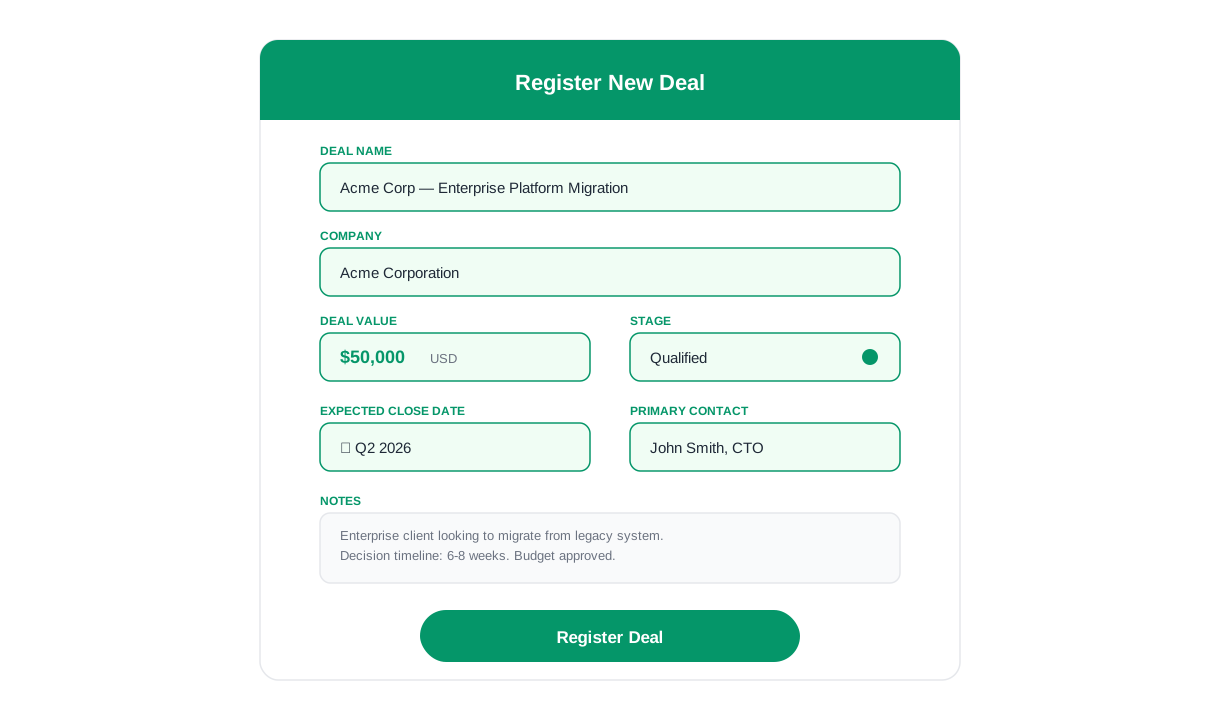
The chatbot walks partners through each required field in a conversational format: customer company name, contact information, deal description, estimated deal size, expected close date, products of interest, and competitive situation. Each field includes contextual guidance - "deal description" prompts the partner to describe the customer's business challenge and how your product addresses it, not just a product name. This guided approach produces higher-quality registrations that your channel team can evaluate and approve faster.
Registration Validation and Duplicate Checking
Before submitting a registration, the chatbot validates the data for completeness and checks for potential duplicates. If the customer company name matches an existing registration or active customer, the chatbot alerts the partner immediately - before they invest time completing the full registration - and provides guidance on next steps (contact the channel team, check if the existing registration has expired, or register under a different customer entity). This real-time validation eliminates the frustration of submitting a registration only to receive a rejection email days later.
Deal Registration Performance
| Metric | Portal Form Registration | Chatbot-Guided Registration | Improvement |
|---|---|---|---|
| Registration completion rate | 64% | 92% | +44% |
| Time to complete registration | 8-12 minutes | Under 3 minutes | -70% |
| Registrations requiring follow-up | 35% | 8% | -77% |
| Average approval time | 3.2 days | 1.1 days (higher data quality) | -66% |
| Partner satisfaction with process | 3.1/5 | 4.6/5 | +48% |
Status Tracking and Updates
After submission, partners can check the status of their deal registrations at any time through the chatbot. "What's the status of my registration for [Company X]?" returns the current status (pending review, approved, expired, or declined), the protection period dates, and any notes from the channel team. Partners can also ask for a summary of all active registrations, upcoming expirations, and deals requiring action. This self-service status tracking reduces the volume of "where's my registration?" emails to the channel team by over 70%.
Approval Notification
When a registration is approved, the chatbot delivers a confirmation to the partner with the protection period dates, approved margin or discount level, and links to relevant sales materials for the registered products. If a registration is declined, the chatbot provides the reason and suggests next steps - resubmission with additional information, contact with the channel manager, or alternative deal structures. Every interaction is logged for audit and reporting purposes.
50,000+ businesses use Conferbot templates to automate conversations
Setup Guide: Deploy Your Partner Onboarding Chatbot in Under 60 Minutes
Deploying the partner onboarding chatbot involves four configuration phases: program structure setup, conversation flow customization, system integrations, and deployment. Most companies complete the full setup in under 60 minutes.
Phase 1: Program Structure Configuration (15 Minutes)
Open the template in Conferbot's chatbot builder and configure your partner program structure:
- Partner types: Define the partner categories your program supports (reseller, referral, affiliate, technology partner, etc.).
- Program tiers: Configure tier names, requirements, benefits, and margin structures for each tier level.
- Certification tracks: Set up the certification paths for each partner role (sales, technical, executive) with module names and completion requirements.
- Deal registration fields: Define the required and optional fields for deal registration submissions.
Phase 2: Conversation Flow Customization (20 Minutes)
- Update the welcome message and enrollment flow to match your program's branding and terminology.
- Customize the FAQ knowledge base with your program-specific answers: pricing structure, margin details, territory policies, and certification timelines.
- Configure the deal registration validation rules: duplicate checking criteria, required field validations, and minimum deal size thresholds.
- Set up portal navigation shortcuts: direct links to your most-requested resources (price lists, sales materials, MDF forms).
Phase 3: System Integrations (15 Minutes)
- PRM/CRM: Connect your partner relationship management system or CRM (Salesforce PRM, HubSpot, PartnerStack, etc.) to sync partner records, deal registrations, and status updates.
- LMS: Connect your learning management system to sync certification progress and enable direct module launch from the chatbot.
- Notifications: Configure email and Slack notifications for channel managers when new partners enroll, deal registrations are submitted, or partners request support.
- E-signature: Connect DocuSign or equivalent for in-flow partner agreement execution.
Phase 4: Deployment and Testing (10 Minutes)
Deploy the chatbot on your partner portal, partner program landing page, and any partner-facing web properties. Run test conversations through each major flow: enrollment, certification check, deal registration, and portal navigation. For partner programs that communicate through Slack or Microsoft Teams, deploy the chatbot to those channels via Conferbot's omnichannel platform to meet partners where they already work.
Partner Onboarding Chatbot FAQ
Everything you need to know about chatbots for partner onboarding chatbot.
Why Use a Template vs Building from Scratch?
Templates encode years of optimization data into the conversation flow before you start.
| Factor | Conferbot Template | Build from Scratch | Hire a Developer |
|---|---|---|---|
| Time to deploy | 10 minutes | 2-8 hours | 2-6 weeks |
| Cost | Free | Your time | $5,000-$25,000 |
| Day-1 conversion | 15-22% | 5-8% | 10-15% |
| Proven flows | Yes, data-tested | No | Depends |
| Updates included | Automatic | Manual | Paid |
| Multi-channel | 8+ channels | 1 channel | Extra cost |
| Analytics | Built-in | Must build | Extra cost |
Ready to Deploy Partner Onboarding Chatbot?
Join 50,000+ businesses. Free forever plan available. No credit card required.