
Sales Pipeline Management Assistant
Free B2B Services Chatbot Template
A complete sales pipeline management assistant chatbot template - deploy in minutes to automate conversations, capture leads, and provide 24/7 assistance.



What Is a Sales Pipeline Management Assistant Chatbot?
A sales pipeline management assistant chatbot is a conversational AI that automates the administrative burden of managing a sales pipeline -- handling lead intake and initial qualification, tracking deals through pipeline stages, scheduling follow-ups, updating CRM records, providing deal insights, and generating pipeline reports -- through a natural conversational interface accessible via your website, WhatsApp, Slack, or directly within your CRM platform. It functions as an always-available sales operations assistant that ensures no lead is forgotten, no follow-up is missed, and no deal falls through the cracks due to administrative neglect.
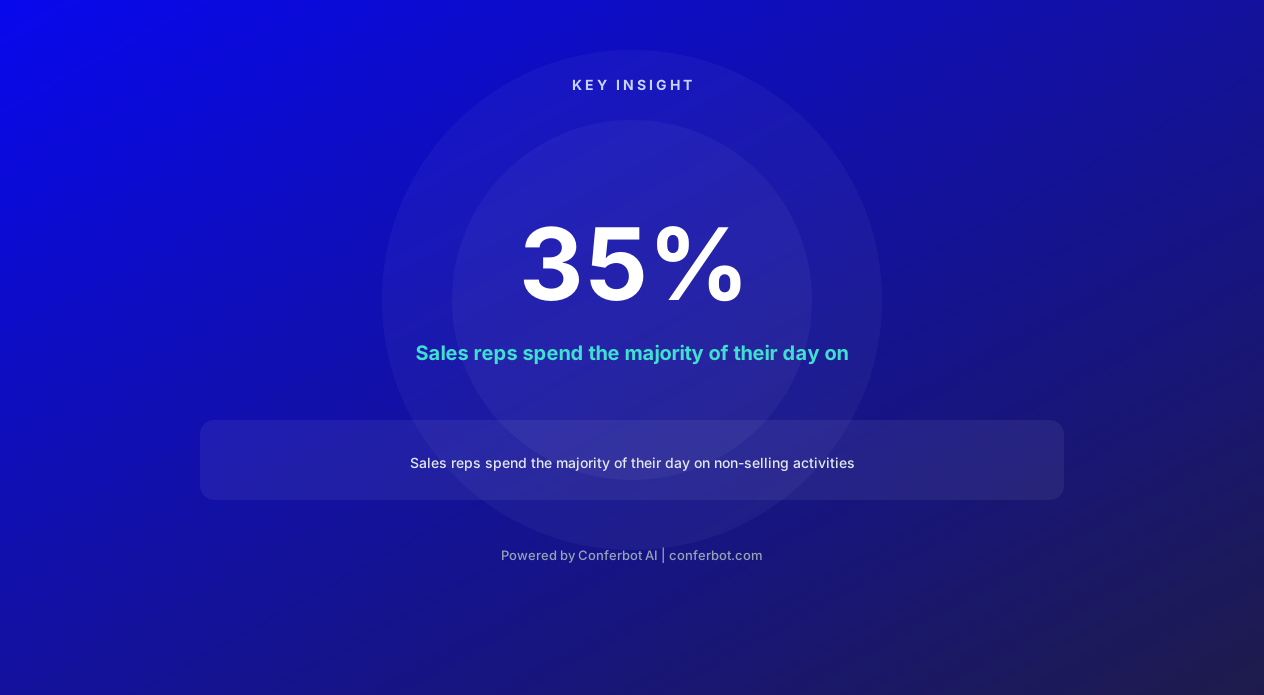
The fundamental problem in sales productivity is stark: sales representatives spend only 35% of their time actually selling. The remaining 65% is consumed by administrative tasks -- updating CRM records, logging call notes, scheduling follow-ups, researching prospects, generating reports, and managing the mechanical aspects of pipeline progression. This administrative overhead is not just inefficient; it is actively damaging to revenue. Every minute spent updating Salesforce is a minute not spent on the phone with a prospect. Every forgotten follow-up is a deal that quietly dies. Every outdated CRM record is a decision made on stale data.
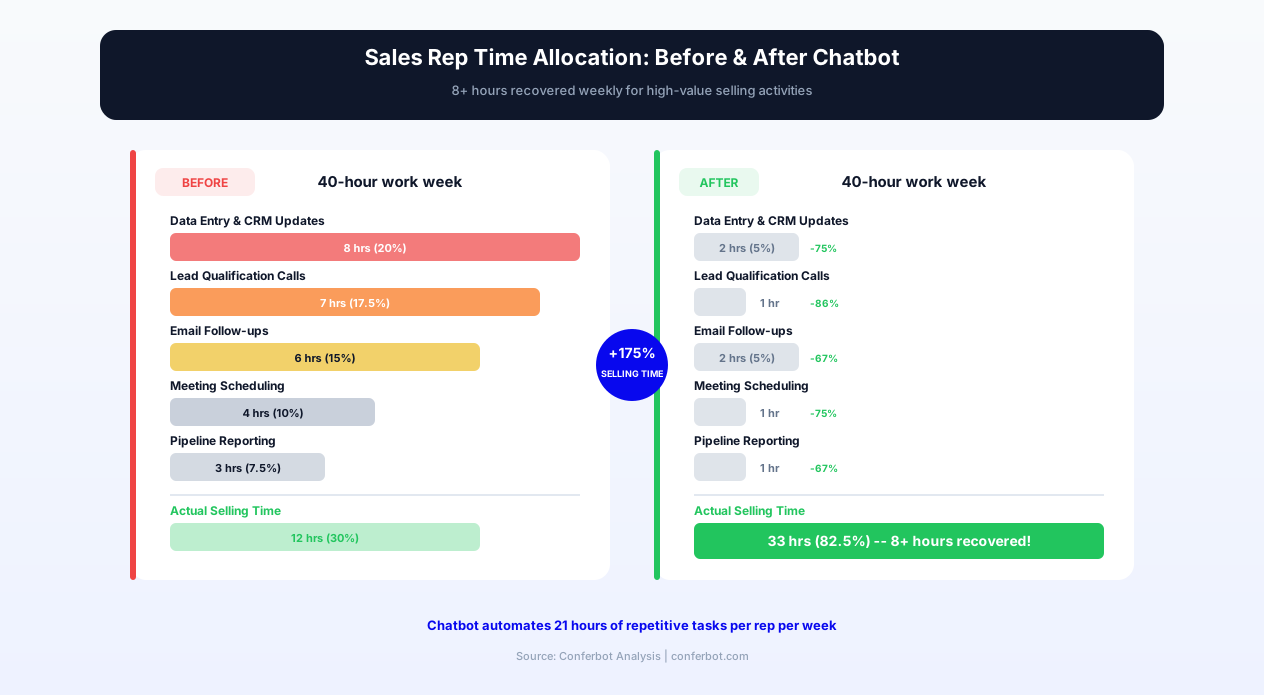
The chatbot addresses this productivity gap by automating the administrative layer of pipeline management while keeping sales reps focused on the human activities that actually close deals -- building relationships, handling objections, and negotiating terms. It captures lead information from inbound sources, qualifies prospects using your scoring criteria, moves deals through pipeline stages based on conversation outcomes, reminds reps of upcoming follow-ups, and maintains CRM accuracy without requiring reps to manually log activities. The result is a measurable shift in time allocation: reps using pipeline management chatbots report recovering 8+ hours per week of selling time that was previously consumed by administrative tasks.
In 2026, sales organizations deploying pipeline management chatbots report 23% higher quota attainment, 34% faster deal velocity, and 45% improvement in CRM data accuracy. Conferbot's AI chatbot builder powers this template with deep integrations into Salesforce, HubSpot, Pipedrive, and other major CRM platforms through the API integration framework. This guide covers the complete pipeline management capability, from lead capture through win/loss analysis.
How the Sales Pipeline Assistant Works: From Lead Capture to Close
The sales pipeline management assistant operates across the entire deal lifecycle, automating administrative touchpoints while escalating high-value human interactions to the sales rep. It functions as the operational backbone of the pipeline, ensuring mechanical precision in tracking while freeing reps for strategic selling.
Inbound Lead Capture and Initial Qualification
When a new lead enters the pipeline -- through a website form submission, chatbot conversation, email inquiry, or event registration -- the assistant immediately captures the lead data, enriches it with publicly available information (company size, industry, technology stack, recent funding), and conducts an initial qualification conversation. For inbound web leads, this qualification happens live through the website chatbot: "Thanks for your interest. To connect you with the right person on our team, could you tell me about your current challenge?" The qualification conversation collects company name, role, team size, current solution, timeline, and budget range -- all flowing directly into the CRM without manual data entry.
The qualification scoring model uses your defined criteria (BANT, MEDDIC, CHAMP, or custom frameworks) to generate a lead score that determines routing: high-score leads get immediate rep notification with full context; medium-score leads enter a nurture sequence with scheduled follow-up; low-score leads receive self-service resources. This instant qualification and routing ensures that no high-intent lead waits in an unmonitored inbox while a rep is in a meeting or offline.
Pipeline Stage Progression
As deals move through the pipeline, the assistant manages stage transitions based on signal data rather than manual updates. After a discovery call, the rep tells the chatbot: "Had the discovery call with Acme Corp -- they have a clear need, $200K budget, and want to implement by Q3." The assistant updates the deal stage from Discovery to Qualification, logs the call notes, updates the deal value to $200K, sets the expected close date, and schedules the next follow-up based on the stated timeline. This single conversational input replaces what would typically be 5-8 separate CRM field updates across multiple screens.
The assistant also proactively prompts stage progression when signals indicate a deal has advanced. If a proposal was sent but the deal stage has not been updated in 3 days, the assistant asks the rep: "You sent the Acme Corp proposal on Tuesday. Has there been any response? Should I move this to Negotiation stage or keep it at Proposal Sent?" This proactive prompting ensures that pipeline data reflects reality rather than lagging behind actual deal progress by days or weeks.
Follow-Up Scheduling and Enforcement
Missed follow-ups are the silent killer of sales pipelines. Research shows that 44% of salespeople give up after one follow-up, despite the fact that 80% of deals require five or more touchpoints to close. The assistant eliminates this follow-up failure through systematic scheduling and reminder enforcement. After every customer interaction, it asks: "When should the next touchpoint be?" and schedules it with appropriate reminder lead time. As the follow-up date approaches, it sends the rep a reminder with full deal context -- what was discussed last, what the prospect's concerns were, and what was promised for this touchpoint.
For reps who miss scheduled follow-ups, the assistant escalates: first a reminder, then a stronger nudge with context about deal value at risk, and if necessary, an escalation to the sales manager. This systematic follow-up enforcement ensures that high-value deals never quietly die from inattention. Connect follow-up scheduling to your calendar through Conferbot's calendar integration.
Deal Intelligence and Insights
The assistant provides real-time deal intelligence that helps reps prioritize and strategize. It answers questions like "Which deals are most likely to close this month?" by analyzing pipeline velocity, engagement patterns, and historical close data. It flags at-risk deals based on signals: extended time without contact, delayed stage progression, or reduced engagement compared to successfully closed deals. It provides competitive intelligence when a prospect mentions evaluating alternatives, pulling relevant battlecard information and suggesting positioning strategies.
Key Features of the Sales Pipeline Management Assistant
The pipeline management assistant requires capabilities that span the full breadth of sales operations -- from initial lead processing through post-close analysis -- while maintaining the conversational simplicity that ensures rep adoption.
| Feature | Description | Operational Benefit | Customer Benefit |
|---|---|---|---|
| Conversational CRM updates | Reps update deals through natural language -- "Moved Acme to negotiation, deal is $200K, close by March" | CRM data stays current without manual field-by-field entry | Prospects receive timely, contextual follow-ups based on accurate deal data |
| Automated lead scoring | Scores inbound leads based on firmographic data, behavioral signals, and qualification responses | High-intent leads routed to reps within seconds; low-quality leads filtered automatically | Qualified buyers connect with sales immediately instead of waiting in queue |
| Follow-up scheduling and reminders | Schedules next touchpoints after every interaction and sends contextual reminders before due dates | Zero missed follow-ups; 80% of deals that require 5+ touches actually receive them | Prospects feel valued with consistent, timely communication throughout the process |
| Pipeline stage automation | Advances deal stages based on confirmed actions (proposal sent, demo completed, contract signed) | Pipeline data reflects reality in real time; forecasting accuracy improves 30-40% | Internal stakeholders have accurate visibility into deal progress |
| Deal velocity tracking | Monitors time spent in each stage and flags deals that exceed historical averages | At-risk deals identified early; management can intervene before deals die | Buyers experience consistent momentum rather than stalled processes |
| Win/loss analysis automation | Collects and categorizes close reasons, competitive mentions, and objection patterns | Pattern recognition across losses informs product, pricing, and messaging improvements | Future prospects benefit from lessons learned in previous deal outcomes |
| Activity logging | Logs all calls, emails, meetings, and touchpoints to CRM automatically from conversation input | Complete activity history without manual logging; managers see true rep activity levels | Every rep working an account has full context from prior interactions |
| Pipeline reporting on demand | Generates pipeline snapshots, forecast reports, and activity summaries through chat commands | Instant reporting without navigating CRM dashboards or building custom reports | Sales leaders get real-time pipeline visibility for accurate decision-making |
| Handoff and reassignment | Manages deal handoffs between reps with complete context transfer and notification | No deal context lost during rep transitions, territory changes, or promotions | Buyers experience seamless continuity regardless of internal rep changes |
| Multi-CRM synchronization | Syncs with Salesforce, HubSpot, Pipedrive, Zoho, and custom CRM platforms bidirectionally | Works with existing CRM investment; no platform migration required | Sales tech stack remains unified with the chatbot as an acceleration layer |
Conversational CRM Updates: The Core Workflow
The adoption-critical feature of the pipeline assistant is the ability to update CRM data through natural conversation rather than through the CRM interface. A rep returning from a meeting opens the chatbot and says: "Just finished the demo with TechStart. They loved the analytics module, concern about implementation timeline. Budget confirmed at $150K. Sarah Johnson is the decision maker, reports to VP of Ops. Need to send them a custom proposal by Friday. Schedule follow-up for next Wednesday." From this single conversational input, the assistant:
- Updates the deal stage: Demo Completed → Proposal
- Logs the call notes: Positive demo response, analytics module resonated, timeline concern identified
- Updates the deal value: $150,000
- Adds the contact: Sarah Johnson, Decision Maker, reports to VP of Operations
- Creates a task: Send custom proposal, due Friday
- Schedules a follow-up: Next Wednesday, with reminder Tuesday evening
- Flags the objection: Implementation timeline concern logged for tracking
This single 30-second conversation replaces what would be 3-5 minutes of CRM data entry across multiple fields and screens. Over a day with 8-10 prospect interactions, this saves the rep 30-50 minutes of administrative time -- time that compounds to the 8+ hours per week of recovered selling time that organizations consistently report. The CRM stays accurate because updating is effortless, and the assistant prompts for any missing information rather than allowing incomplete records.
Deal Velocity Tracking and Risk Identification
The assistant continuously monitors deal velocity -- the speed at which opportunities progress through pipeline stages -- and flags anomalies that indicate risk. If the average deal spends 12 days in the Proposal stage but a specific deal has been stuck for 20 days, the assistant alerts the rep: "Acme Corp has been in Proposal stage for 20 days (average is 12). Last contact was 8 days ago. Would you like to schedule a follow-up call or should I flag this for your manager's pipeline review?" This proactive risk identification catches stalling deals before they quietly die from inertia, giving reps and managers the chance to intervene with re-engagement strategies while the deal is still recoverable.
Ready to try Sales Pipeline Management Assistant?
Deploy this template in under 10 minutes. No coding required.
Use This Template Free →Before and After: Pipeline Management Without and With the Chatbot
The transformation in sales team productivity and pipeline health is measurable across every operational dimension. The following data represents aggregated results from sales organizations of 10-100 reps that deployed the pipeline management assistant.
| Metric | Before (Manual CRM) | After (Chatbot Assistant) | Improvement |
|---|---|---|---|
| Time spent on CRM admin per rep per day | 90-120 minutes | 15-25 minutes | 75-80% reduction |
| CRM data accuracy (fields current and complete) | 40-55% | 85-92% | +45 percentage points |
| Missed follow-ups per rep per week | 5-8 missed touches | 0-1 missed touches | 85-100% elimination |
| Average lead response time (inbound) | 4-6 hours | Under 5 minutes | 98% faster response |
| Quota attainment (team average) | 58-65% | 72-85% | +23% improvement |
| Deal velocity (average days to close) | 45-65 days | 30-45 days | 34% faster close |
| Forecast accuracy | 55-65% | 78-88% | +25 percentage points |
| Pipeline visibility (deals with current data) | 50-60% | 90-95% | +35 percentage points |
The Before Experience: A Rep's Day Without the Assistant
Without the chatbot, a typical sales rep's day includes 90-120 minutes of CRM administration spread across the day. After a morning call, they open Salesforce, navigate to the opportunity record, update the stage, add call notes (often abbreviated or forgotten because the interface is tedious), update the close date, and set a follow-up task. The process takes 4-5 minutes per interaction. Multiply this by 10-12 daily prospect interactions and the administrative load becomes a significant portion of the day. By afternoon, many reps are behind on logging and resolve to "update CRM at the end of the day" -- at which point details are fuzzy, context is lost, and many interactions simply never get logged.
The consequences compound. Stale CRM data means managers cannot trust the pipeline view. Missed follow-ups mean deals stall without intervention. Incomplete notes mean that when a deal is reassigned or a manager tries to help, the history is missing. The CRM becomes a system that sales leadership requires but sales reps resent -- a tax on their time that provides value primarily to others, not to the rep doing the data entry.
The After Experience: A Rep's Day With the Assistant
With the pipeline assistant deployed, the same rep finishes a call and sends a quick voice message or chat message: "Good call with TechStart. Moving to proposal stage. Sarah liked the demo, wants pricing by Friday. Follow up Wednesday." The assistant processes this in seconds, updates all relevant CRM fields, schedules the tasks, and responds: "Updated. TechStart moved to Proposal, $150K. Task created: Send pricing by Friday. Follow-up scheduled: Wednesday 10am. Anything else?" The rep confirms and moves to their next call. Total CRM update time: 20 seconds.
Over the course of the day, the assistant also proactively reminds the rep of upcoming follow-ups with context ("Your 2pm follow-up with DataFlow -- last call they asked about enterprise security features. Want me to pull the security whitepaper link?"), flags at-risk deals ("CloudNine has been quiet for 12 days -- historically your deals that go 14 days without contact in this stage have 3x lower close rate"), and provides instant pipeline snapshots when needed ("What is my forecast for this month?" answered in seconds instead of a 10-minute CRM report generation).
Impact on Sales Leadership
For sales managers, the assistant transforms pipeline visibility from a weekly ritual (the dreaded pipeline review meeting where reps scramble to update their data the night before) into continuous real-time awareness. Managers can ask the chatbot: "Show me all deals over $100K that have not been updated in 7 days" or "Which reps are below 80% of quota with less than 3 weeks remaining?" and receive instant, accurate answers based on live pipeline data. This visibility enables proactive coaching interventions rather than post-mortem analysis of lost deals. Track team performance patterns through Conferbot Analytics dashboards.
CRM Integration Architecture: Salesforce, HubSpot, and Pipedrive
The pipeline management assistant's value depends entirely on its integration depth with your CRM platform. Conferbot's API integration framework provides bidirectional, real-time synchronization with all major CRM platforms, ensuring that the chatbot reflects your current pipeline data and that all chatbot-initiated updates appear in the CRM instantly.
Salesforce Integration
The Salesforce integration connects through the Salesforce REST API with OAuth 2.0 authentication. The chatbot reads and writes to standard objects (Leads, Contacts, Accounts, Opportunities, Tasks, Events) and supports custom objects and fields. Deal stage transitions follow your configured sales process and validation rules -- the chatbot cannot bypass Salesforce workflow logic. The integration supports Salesforce Lightning and Classic interfaces, and works with both Sales Cloud and custom Salesforce implementations. For enterprises using Salesforce Einstein, the chatbot's deal scoring can incorporate Einstein lead scores alongside its own behavioral scoring model.
HubSpot Integration
The HubSpot integration uses the HubSpot API v3 with private app token authentication. It synchronizes deals, contacts, companies, and activities bidirectionally. The chatbot respects HubSpot's deal pipeline configuration, stage requirements, and automation workflows. When the chatbot moves a deal stage, any HubSpot workflow triggers associated with that stage (automated emails, internal notifications, task creation) fire normally. The integration supports HubSpot's deal rotation rules and team assignment logic, ensuring that chatbot-qualified leads are routed according to your existing distribution rules.
Pipedrive Integration
The Pipedrive integration connects through Pipedrive's REST API with API token authentication. It supports all Pipedrive pipeline features: multiple pipelines, custom stages, deal rotting periods, and activity scheduling. The chatbot leverages Pipedrive's deal rotting concept to flag stale deals proactively -- when a deal enters its rotting threshold, the chatbot alerts the rep before it shows as rotted in the Pipedrive interface, creating an earlier intervention point. Activities logged through the chatbot appear in Pipedrive's activity log with full detail.
Custom CRM and Multi-System Integration
For organizations using custom-built CRMs, niche platforms, or multiple systems that need synchronization, Conferbot's open API framework provides webhook-based integration and REST API connectivity. The chatbot can serve as a unification layer -- allowing reps to interact with a single interface that writes to multiple backend systems simultaneously. A rep updating a deal through the chatbot can have the data reflected in both the primary CRM and the finance team's forecasting platform, the marketing team's lead database, and the customer success team's account health tracker -- all from a single conversational input.
Data Security and Access Control
CRM data is among the most sensitive business information. The pipeline assistant operates within your CRM's existing permission model -- reps see only their own deals and accounts unless explicitly granted broader access. The chatbot authenticates users before providing deal information and enforces role-based access: reps see individual pipelines, managers see team pipelines, and leadership sees organizational rollups. All data transmission uses TLS encryption, and no CRM data is stored outside your CRM platform -- the chatbot queries in real time and does not cache deal information. This architecture satisfies enterprise security requirements including GDPR data residency rules.
Use Cases: SMB Sales Teams, Enterprise Sales, and Channel Management
The pipeline management assistant adapts to different sales models, team sizes, and deal structures. The core automation -- CRM updates, follow-up management, and deal tracking -- remains consistent, but the conversation flows and intelligence features are optimized for each context.
SMB Sales Teams (5-25 Reps)
Small and mid-market sales teams often lack dedicated sales operations resources. Reps manage their own pipelines with minimal process enforcement, leading to inconsistent data quality and unpredictable forecasting. The chatbot serves as the sales operations layer that these teams cannot afford to staff: enforcing stage definitions, ensuring follow-up consistency, maintaining CRM accuracy, and providing the pipeline visibility that managers need for coaching and forecasting. For SMB teams, the immediate value is in follow-up enforcement -- ensuring that the 80% of deals requiring multiple touches actually receive them, which directly translates to higher close rates.
SMB teams deploying the assistant typically see the fastest ROI because the gap between current pipeline management (often minimal) and chatbot-assisted management is largest. A team of 10 reps each recovering 8 hours per week represents 80 hours of additional selling time weekly -- equivalent to hiring 2 additional reps at zero headcount cost.
Enterprise Sales Teams (Complex, Long-Cycle Deals)
Enterprise sales cycles involve multiple stakeholders, extended timelines (6-18 months), and complex procurement processes. The chatbot manages the operational complexity of these long-cycle deals: tracking multiple contacts within an account, managing parallel workstreams (legal review, security assessment, procurement process), and maintaining momentum across deal stages that may span months. It tracks mutual action plans, reminds reps of stakeholder-specific touchpoints, and alerts when enterprise deals show the stalling patterns that predict loss.
For enterprise sales, the deal intelligence features are most valuable. The chatbot surfaces patterns from historical data: "Deals in this segment that enter Legal Review in Q3 have 40% lower close rates -- budget freeze season. Consider accelerating timeline or getting verbal commitment before legal begins." This pattern recognition, drawn from the organization's own deal history, provides strategic intelligence that individual reps may not perceive from their limited deal exposure.
Channel and Partner Sales Management
Organizations selling through channel partners face a unique pipeline visibility challenge: deals progress through partner organizations where direct CRM access is impossible. The chatbot provides a lightweight interface for partner account managers to report deal progress through WhatsApp or web chat without requiring access to the vendor's CRM. Partners update deal stages, report competitive threats, and flag deals that need vendor support -- all through a conversational interface that requires zero training or CRM login. The chatbot syncs partner-reported data to the vendor CRM, providing the pipeline visibility that channel sales teams traditionally struggle to maintain.
Sales Development Representatives (SDRs)
SDRs who focus on outbound prospecting and initial qualification benefit from the chatbot's lead research and outreach management capabilities. The chatbot helps SDRs manage high-volume outreach sequences: tracking which prospects have been contacted, scheduling follow-up cadences, logging response data, and identifying when a prospect's engagement signals warrant escalation to an account executive. For SDR teams measured on meetings booked and qualified leads generated, the chatbot ensures that no prospect slips through the sequence cracks and that handoffs to AEs include complete qualification context.
businesses worldwide use Conferbot templates to automate conversations
Setup Guide: Deploying Your Sales Pipeline Management Assistant
Setting up the sales pipeline management assistant requires connecting your CRM, configuring qualification criteria, defining pipeline stages and automation rules, and deploying across your team's communication channels. Most organizations complete setup in one day with immediate rep access the following morning.
Step 1: Connect Your CRM Platform
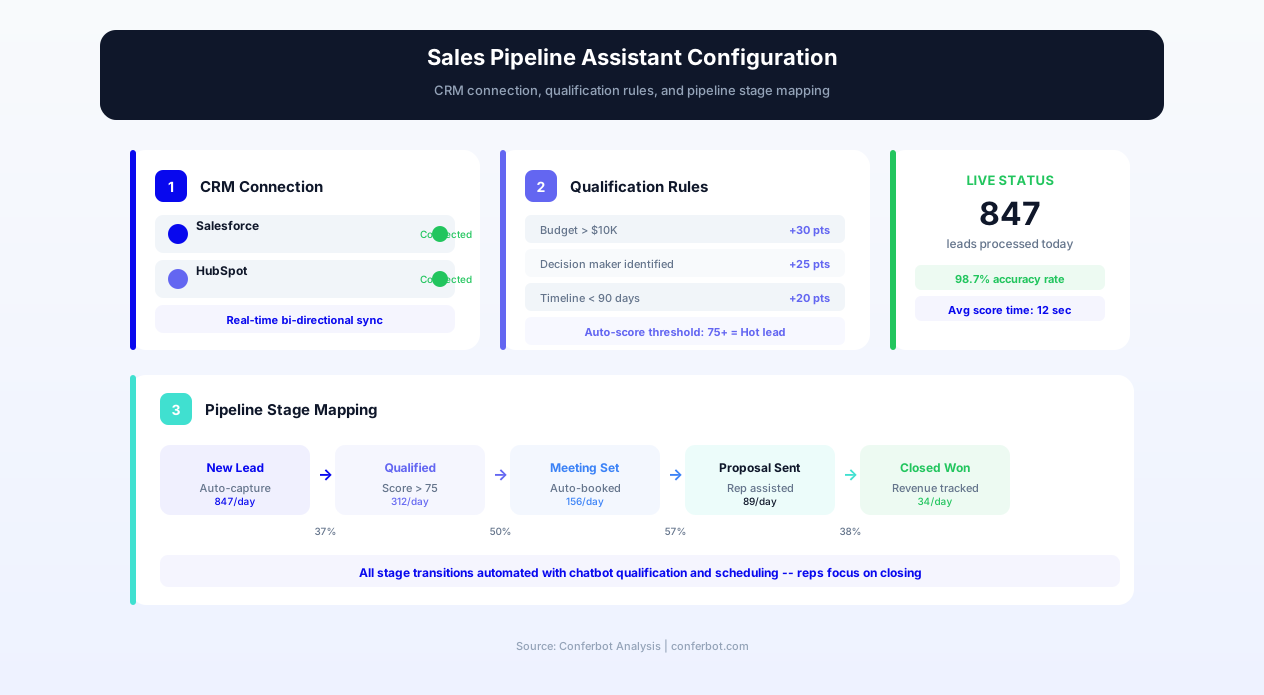
In the Conferbot dashboard, open the Sales Pipeline Management template and navigate to CRM integration. Select your platform (Salesforce, HubSpot, Pipedrive, Zoho, or custom) and authenticate through OAuth or API token. The integration setup wizard guides you through permission scoping -- the chatbot needs read/write access to deal, contact, and activity objects. Test the connection by pulling a sample deal and confirming that all fields map correctly. For Salesforce, ensure that the connected user has appropriate object permissions and that any validation rules are documented so the chatbot respects them.
Step 2: Configure Lead Qualification Model
Define your qualification framework in the scoring configuration panel. Select your methodology (BANT, MEDDIC, CHAMP, or custom) and weight each criterion. For BANT: assign point values to Budget (confirmed budget vs. exploring), Authority (decision maker vs. influencer), Need (critical vs. nice-to-have), and Timeline (this quarter vs. next year). Set score thresholds that determine routing: scores above 80 route to immediate rep follow-up; 50-80 enter nurture with scheduled outreach; below 50 receive self-service resources. The chatbot uses these criteria for its qualification conversations with inbound leads.
Step 3: Define Pipeline Stages and Automation Rules
Map your pipeline stages in the configuration panel -- these should mirror your CRM's stage definitions exactly. For each stage, define: the entry criteria (what signals confirm a deal has reached this stage), the expected duration (used for velocity tracking and stale deal alerts), the required fields (what information must be present before a deal can advance), and any automated actions triggered by stage entry (email sequences, internal notifications, task creation). Configure deal rotting thresholds -- the number of days without activity before the chatbot flags a deal as at-risk.
Step 4: Set Up Follow-Up Rules and Reminders
Configure the follow-up management system. Set default reminder lead times (how far before a scheduled follow-up the chatbot reminds the rep), escalation rules (what happens when a follow-up is missed -- reminder, manager notification, deal flag), and cadence templates for common scenarios (initial outreach sequence, post-demo follow-up, proposal follow-up). Connect the follow-up system to your calendar integration so scheduled follow-ups appear in rep calendars alongside their other appointments.
Step 5: Deploy Across Team Communication Channels
Deploy the chatbot on the channels your team uses daily. For Slack-first teams, install the Conferbot Slack app and configure the bot channel or DM interface. For Microsoft Teams environments, deploy through the Teams admin center. For field sales teams who work primarily from mobile, deploy via WhatsApp -- reps can update deals and check pipeline data from their phone between meetings. The web widget is ideal for embedding within your CRM's interface itself, creating an in-context assistant that reps access without switching applications.
Step 6: Onboard the Team and Monitor Adoption
Roll out to the sales team with a brief training session (15-20 minutes covers all common interactions). Start with a pilot group of 3-5 reps who are CRM-resistant -- they typically show the most dramatic improvement in data quality and will become advocates for broader adoption. Monitor adoption through Conferbot Analytics: track interactions per rep, CRM updates generated, follow-ups scheduled, and deals progressed. Within the first week, compare CRM data quality and follow-up completion rates between chatbot-using reps and the control group. The difference is typically compelling enough to drive full team adoption without management mandate.
Pipeline Forecasting and Analytics: Data-Driven Sales Management
The pipeline management assistant transforms sales forecasting from a subjective exercise based on rep optimism into a data-driven prediction model based on actual pipeline behavior, historical patterns, and real-time deal signals.
Automated Forecast Generation
Traditional sales forecasting asks reps to estimate their own close probability -- a notoriously unreliable method biased by optimism, recency, and the desire to appear on track. The chatbot generates forecasts algorithmically by analyzing actual deal behavior: time in stage, engagement frequency, stakeholder involvement, competitive mentions, and historical close rates for similar deals. A deal that has been in Negotiation for 8 days with daily email engagement and a confirmed timeline is scored differently from a deal that has been in Negotiation for 30 days with no contact in two weeks -- regardless of what the rep believes the probability is.
This behavioral forecasting typically improves forecast accuracy from 55-65% to 78-88% -- a dramatic improvement that enables reliable revenue planning, hiring decisions, and resource allocation. Managers can ask the chatbot: "What is our realistic forecast for this quarter?" and receive a probability-weighted pipeline view that accounts for deal behavior rather than rep sentiment.
Pipeline Health Metrics
Beyond individual deal tracking, the assistant monitors aggregate pipeline health: total pipeline coverage ratio (pipeline value vs. quota), stage distribution (healthy pipeline has deals at every stage, not clustered at the top), velocity trends (are deals speeding up or slowing down this quarter?), and win rate trends by segment, deal size, and rep. These metrics surface problems early: declining coverage ratio 6 weeks before quarter end signals a prospecting deficit; clustering at early stages signals qualification or advancement problems; declining velocity signals competitive or market headwinds.
Win/Loss Analysis Automation
When deals close (won or lost), the chatbot conducts a structured debrief: "Congratulations on closing Acme Corp! Quick debrief: What was the primary driver of this win? Did we compete against anyone? What would you do differently?" For losses: "Sorry about DataFlow. Was this a competitive loss, budget issue, timing change, or did the project get deprioritized? Who did they choose?" These conversational debriefs take 30 seconds and produce categorized win/loss data that aggregates into actionable patterns over time.
After 50-100 closed deals with debrief data, the patterns become powerful: "62% of losses against Competitor X cite their faster implementation timeline. Deals where we demonstrate our onboarding concierge service win against Competitor X at 2x the rate of deals where we do not." This intelligence feeds product development (build faster implementation), sales enablement (always demo onboarding concierge against Competitor X), and marketing (create content addressing implementation speed concerns). Track pattern evolution through Conferbot Analytics over quarterly periods.
Activity-to-Outcome Correlation
The assistant tracks the correlation between rep activities and deal outcomes, identifying the behaviors that predict success in your specific selling environment. It might surface that reps who schedule a second discovery call before proposing have 35% higher close rates, or that deals where the champion receives a case study within 48 hours of the demo advance to Negotiation 50% faster. These activity-to-outcome correlations become coaching tools -- new reps can be guided toward the specific behaviors that historical data shows produce results, rather than relying on generic sales methodology prescriptions.
ROI Analysis: Quantifying the Revenue Impact of Pipeline Automation
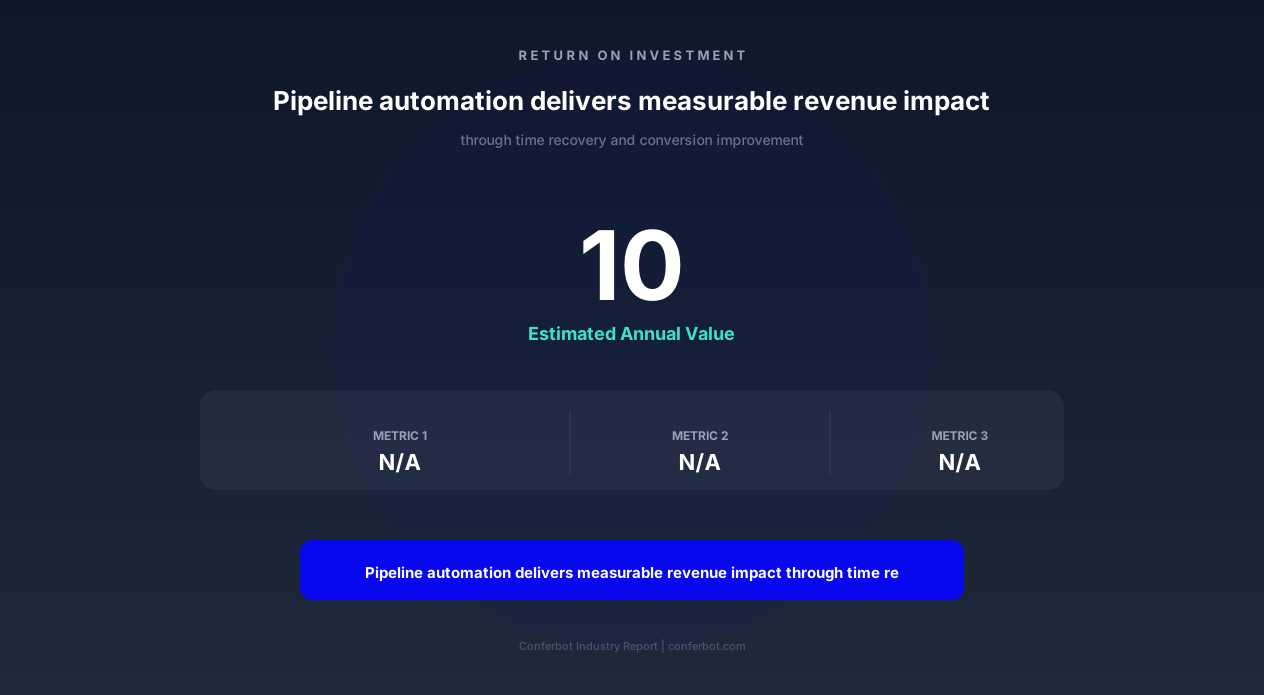
The return on investment for a sales pipeline management assistant is directly quantifiable in recovered selling time, improved conversion rates, and the revenue impact of better pipeline execution. Here is the ROI framework for a 10-rep sales team.
Time Recovery Revenue Impact
The primary ROI driver is the conversion of administrative time to selling time. With each rep recovering 8+ hours per week from CRM administration, follow-up management, and reporting tasks:
- Weekly time recovered per rep: 8 hours
- Weekly time recovered team-wide (10 reps): 80 hours
- Additional selling hours annually: 4,000 hours (80 hrs x 50 weeks)
- Value per selling hour (based on quota/total hours): $150-$300
- Annual revenue capacity recovered: $600,000-$1,200,000
Not all recovered time converts directly to closed revenue, but even a 20-30% realization rate on recovered selling time produces $120,000-$360,000 in incremental annual revenue -- a multiple of any platform investment for a 10-person team.
Conversion Rate Improvement Value
Better follow-up discipline and faster lead response directly improve conversion rates. If the team processes 200 qualified leads per month and closes at 15% without the assistant versus 19% with it (a 4-percentage-point improvement from better follow-up and faster response):
- Additional deals per month: 8 (200 x 4%)
- Additional annual deals: 96
- At average deal value of $25,000: $2,400,000 in incremental annual revenue
Forecast Accuracy Business Value
Improved forecast accuracy from 60% to 85% has compounding business value beyond the sales team: more accurate headcount planning, better cash flow management, more reliable growth projections for investors or board, and reduced end-of-quarter desperation discounting. While harder to quantify precisely, organizations that achieve reliable forecasting consistently attribute it to better operational discipline and real-time pipeline visibility -- both direct outputs of the pipeline assistant.
Total Cost of Ownership vs. Alternative
The alternative to the pipeline assistant is hiring dedicated sales operations staff to manage CRM hygiene, follow-up enforcement, and reporting. A single Sales Operations Manager costs $80,000-$120,000 annually in total compensation and can support approximately 15-20 reps. The chatbot provides equivalent or superior coverage at a fraction of this cost while operating 24/7, handling multiple reps simultaneously, and eliminating the single-point-of-failure risk of depending on one operations hire. For organizations already investing in sales operations headcount, the chatbot amplifies that investment by handling the mechanical tasks (CRM updates, reminders, reporting) while the human operations resource focuses on strategy, process design, and cross-functional alignment.
Sales Pipeline Management Assistant FAQ
Everything you need to know about chatbots for sales pipeline management assistant.
Why Use a Template vs Building from Scratch?
Templates give you a proven starting structure instead of a blank canvas.
| Factor | Conferbot Template | Build from Scratch | Hire a Developer |
|---|---|---|---|
| Time to deploy | 10 minutes | 2-8 hours | 2-6 weeks |
| Cost | Free | Your time | Custom dev quote |
| Proven flows | Yes, pre-built | No | Depends |
| Updates included | Automatic | Manual | Paid |
| Multi-channel | 8+ channels | 1 channel | Extra cost |
| Analytics | Built-in | Must build | Extra cost |
Learn More About Chatbots
Go deeper on how b2b services chatbots work and how to pick the right builder.
Ready to Deploy Sales Pipeline Management Assistant?
Start with a free-forever plan. No credit card required.