
Order Tracking Assistant Chatbot
Free E-commerce And Retail Chatbot Template
A reliable order tracking chatbot that helps customers check their order status, view delivery estimates, and resolve shipping issues. It provides real-time updates and connects customers with support when needed - reducing support tickets and improving post-purchase satisfaction.


What Is an Order Tracking Assistant Chatbot?
An order tracking assistant chatbot is an automated conversational tool that gives customers instant, accurate visibility into the status of their shipments by querying carrier APIs and order management systems in real time. Rather than forcing customers to navigate to multiple carrier websites, enter tracking numbers manually, and interpret inconsistent carrier status codes, the chatbot delivers a unified, human-readable status update in a single conversational exchange -- on your website, WhatsApp, Messenger, or any channel the customer prefers.
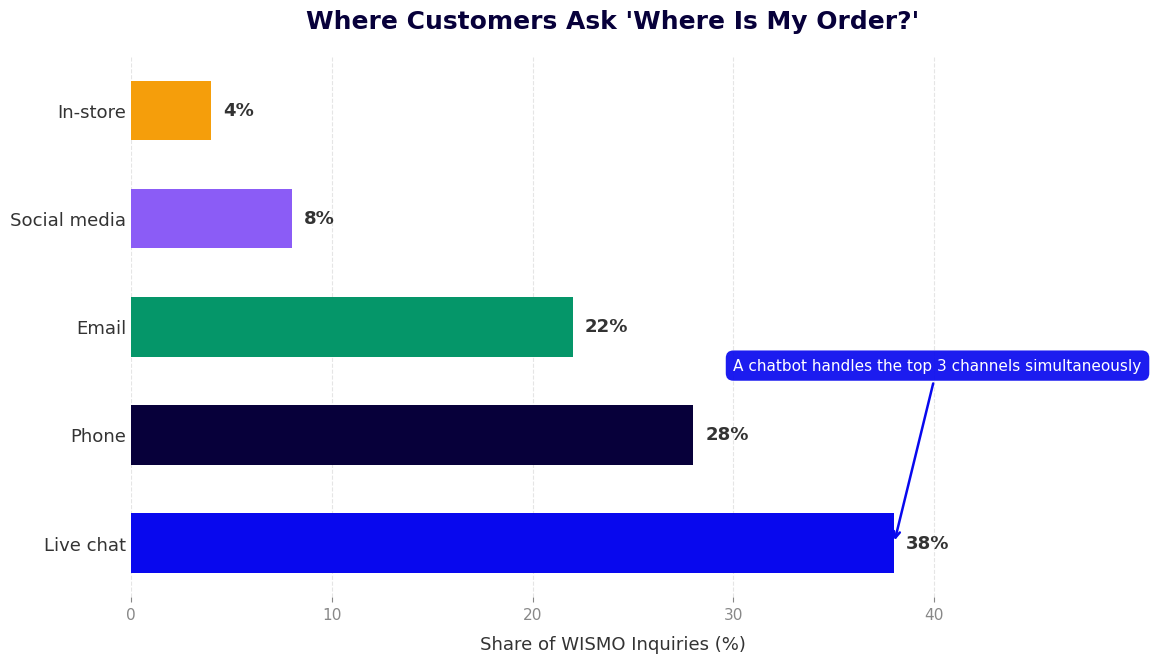
In 2026, "Where is my order?" (commonly abbreviated as WISMO) remains the single highest-volume customer service inquiry across virtually every e-commerce category. Research from Narvar and similar platforms consistently shows that 83% of online shoppers want regular updates on their orders, and 53% will abandon a retailer after a single poor post-purchase experience. Despite this, most stores still handle WISMO queries through email support queues that take hours to respond, or through static carrier tracking pages that customers find confusing.
An order tracking assistant chatbot solves this systematically. It looks up orders by order number, email address, or phone number, calls the relevant carrier's tracking API (FedEx, UPS, USPS, DHL, or any regional carrier), translates raw carrier status codes into plain-language updates, and delivers them conversationally within seconds. For orders with exceptions -- delays, failed delivery attempts, customs holds -- it proactively explains the situation and offers actionable next steps.
Beyond reactive lookups, a properly configured order tracking chatbot sends proactive status notifications at key shipping milestones: order confirmed, shipped, out for delivery, delivered. These outbound notifications reduce inbound WISMO inquiries by 30-50% because customers receive updates before they feel the need to ask.
Conferbot's AI chatbot builder and API integration framework power order tracking assistants that connect to any carrier or order management system, handle multi-package and multi-carrier orders, and escalate exception cases to a live agent through live chat when human judgment is needed. This page covers how the bot works, carrier integrations, support deflection data, setup steps, and proactive notification strategies.
How an Order Tracking Chatbot Works
The order tracking conversation flow combines identity verification, order lookup, carrier API querying, and status translation into a seamless experience that resolves most tracking inquiries without human involvement. Here is the step-by-step mechanics.
Step 1: Customer Identification
The bot opens by asking for the information needed to locate the customer's order. Depending on your store configuration, this is typically an order number plus an email address or phone number for verification. If the customer is already authenticated on your website, the bot can skip this step by pulling their identity from the session. For repeat customers using WhatsApp or Messenger, the bot can recognize them by their messaging channel ID and surface their most recent order automatically without requiring any input.
Step 2: Order Lookup
Using the provided identifiers, the chatbot queries your order management system (OMS) or e-commerce platform API to retrieve order details: line items, fulfillment status, shipment records, and tracking numbers. For orders with multiple packages or split shipments -- common in stores that ship from multiple warehouses -- the bot retrieves all associated tracking numbers and presents them as a unified view, clearly labeling which items are in which package.
Carrier API Query
With the tracking number(s) in hand, the chatbot calls the relevant carrier's tracking API in real time. The query returns a raw event log: a sequence of timestamps and carrier-specific status codes representing every scan point the package has passed through. Raw carrier data looks like: "ORMD - 2024-11-14 06:23 - Origin Scan - MEMPHIS TN" -- meaningful to logistics professionals, not to customers.
Status Translation and Plain-Language Delivery
This is where the chatbot adds the most value. Conferbot's NLP layer maps carrier status codes to human-readable summaries. Instead of "ORMD," the customer sees: "Your package left the Memphis facility on November 14th and is on its way to the next sorting hub. Estimated delivery: November 16th." The bot surfaces the most relevant event (current status), the most actionable piece of information (estimated delivery date), and any notable exceptions (delay, attempted delivery, customs hold).
Exception Handling
Most tracking queries are routine, but exceptions -- missed deliveries, weather delays, address corrections, customs holds -- represent the interactions where customers most need clear guidance. The chatbot identifies exception status codes across all integrated carriers and routes them into exception-specific conversation branches: a failed delivery attempt triggers a message with the carrier's redelivery scheduling link; a customs hold triggers an explanation of what documents may be required and who to contact; an address exception triggers a form to submit a corrected delivery address.
Escalation to Live Support
For situations the bot cannot resolve autonomously -- lost package claims, damage reports, high-value order disputes -- it transitions smoothly to a live agent through Conferbot's live chat integration. The agent receives the full conversation context: order details, tracking history, and what the bot already attempted, eliminating the need for the customer to repeat themselves.
Key Features of an Order Tracking Assistant
An effective order tracking assistant requires capabilities that go beyond a simple API proxy. These features determine whether the bot genuinely resolves customer inquiries or merely redirects them to another tool.
| Feature | What It Does | Customer Experience Impact |
|---|---|---|
| Multi-carrier lookup | Queries FedEx, UPS, USPS, DHL, and regional carriers from a single interface | Eliminates need for customers to identify the correct carrier themselves |
| Order number + email lookup | Finds tracking numbers without requiring customers to have the tracking number itself | Resolves 90%+ of WISMO queries without tracking number friction |
| Plain-language status translation | Converts carrier status codes into human-readable updates | Eliminates confusion from carrier jargon and reduces follow-up contacts |
| Proactive delivery notifications | Pushes status updates at key milestones without customer initiation | Reduces inbound WISMO volume by 30-50% |
| Multi-package order handling | Presents all packages in a split shipment as a unified order status | Prevents confusion when items ship from different warehouses |
| Estimated delivery date display | Pulls EDD from carrier API and presents it prominently | Addresses the core customer concern in the first response |
| Exception escalation flows | Routes delays, failed deliveries, and address exceptions to specific resolution paths | Reduces exception handling time by 60-70% vs. email queues |
| Return shipment tracking | Tracks inbound return labels using the same lookup interface | Reduces "Did you receive my return?" contacts by 40-60% |
Order Number Lookup Without Tracking Number
A significant share of customers who want to track an order do not have their tracking number. It may be buried in a shipping confirmation email they cannot find, or they may not realize they received one. The order tracking assistant sidesteps this entirely by looking up the tracking number using the order number and a verification identifier (email or phone). This approach resolves the vast majority of WISMO queries without requiring customers to locate a piece of information they often do not have.
Proactive Milestone Notifications
The highest-value feature of an order tracking chatbot is the one customers never explicitly request: proactive status updates sent outbound at key milestones. When a package ships, the bot sends a notification with the tracking number and estimated delivery date. When it is out for delivery, a same-day alert fires. When delivery is confirmed, a delivery notification closes the loop. These proactive touches eliminate the anxiety that drives WISMO contacts and create a post-purchase experience that builds loyalty. See the dedicated proactive notifications section for channel-by-channel configuration guidance.
Return Tracking Integration
Returns generate a second wave of "Where is my package?" inquiries -- this time asking about inbound return shipments. The order tracking assistant handles return tracking using the same carrier API integration, looking up return labels by return authorization number or order number. For stores integrated with return management platforms like Loop Returns or Narvar, the bot can also show the return processing status and expected refund timeline, addressing the full post-return customer journey.
Ready to try Order Tracking Assistant Chatbot?
Deploy this template in under 10 minutes. No coding required.
Use This Template Free →Carrier API Integration: FedEx, UPS, USPS, and DHL
The accuracy and reliability of an order tracking chatbot depends on the quality of its carrier integrations. Each major carrier exposes a tracking API with distinct authentication methods, data structures, and status code taxonomies. Here is how Conferbot integrates with each major carrier and what that means for your tracking chatbot's capabilities.
FedEx Tracking API
FedEx's Track API (v1) provides shipment tracking using tracking numbers, door tag numbers, or FedEx Office order numbers. Key capabilities include real-time scan event history, proof of delivery including signature data, estimated delivery window (not just date), and special handling notifications for temperature-sensitive or high-value shipments. FedEx's API also supports track by reference, allowing lookup by your internal order number if you configure the reference number during label creation -- a feature that allows seamless order-number-to-status lookup without maintaining a tracking number mapping table.
UPS Tracking API
UPS offers tracking through its Tracking API (v1) with support for up to 50 tracking numbers per API call -- useful for stores processing batch status updates for proactive notification systems. UPS tracking data includes delivery status, delivery attempt history, access point information (for UPS Access Point deliveries), and carbon neutral shipment data for sustainability-conscious retailers. UPS's Quantum View Notify service additionally provides webhook-based tracking updates that can trigger proactive notifications without polling.
USPS Web Tools Tracking API
USPS provides tracking through its Web Tools API, which covers all USPS domestic services including Priority Mail, First-Class Package, Parcel Select, and Media Mail. USPS tracking data includes scan events with facility names, delivery confirmation, and notification opt-in status. One important limitation: USPS tracking detail is significantly less granular than FedEx or UPS for packages in transit between facilities, so the bot's status translation layer is particularly important for setting customer expectations around USPS shipments.
DHL Express and DHL eCommerce APIs
DHL operates two distinct tracking products: DHL Express (for international express shipments) and DHL eCommerce (for domestic parcel delivery in supported markets). DHL Express's Shipment Tracking API provides the richest international tracking data including customs clearance events, duty and tax status, and estimated time of delivery windows. DHL eCommerce's API covers last-mile domestic delivery events. Conferbot's integration handles both APIs and routes tracking queries to the appropriate DHL product based on service type.
Regional and Third-Party Carrier Support
Many e-commerce stores use regional carriers -- OnTrac, LaserShip, Lasership, Australia Post, Royal Mail, Canada Post, Sendle -- for specific geographies or service tiers. Conferbot's open API framework supports custom carrier integrations using any carrier that exposes a tracking API. For stores using multi-carrier shipping platforms like EasyPost, Shippo, or ShipStation, a single integration with the aggregator platform provides unified tracking across all carriers without separate per-carrier API credentials.
| Carrier | API Name | Key Tracking Capabilities | Webhook Support |
|---|---|---|---|
| FedEx | Track API v1 | Real-time scans, POD, signature, EDD window, track-by-reference | Yes (FedEx Insight) |
| UPS | Tracking API v1 | Batch tracking, access point info, delivery attempts, carbon data | Yes (Quantum View) |
| USPS | Web Tools API | Scan events, delivery confirmation, notification opt-in | No (polling required) |
| DHL Express | Shipment Tracking API | International events, customs status, duty/tax, ETD window | Yes |
| DHL eCommerce | eCommerce API | Last-mile domestic events, delivery confirmation | Limited |
| Multi-carrier (EasyPost, Shippo) | Aggregator API | Unified tracking across 100+ carriers, normalized status codes | Yes |
Use Cases Across E-Commerce Categories
While all e-commerce stores benefit from an order tracking assistant, certain product categories and business models see outsized returns from the investment. Here are the highest-impact use cases and the specific ways the chatbot addresses category-specific tracking challenges.
Fashion and Apparel
Fashion has some of the highest return rates in e-commerce (20-40%), meaning customers frequently need to track both outbound orders and return shipments. An order tracking assistant that handles both outbound delivery tracking and return shipment status in a single interface dramatically reduces the support contact volume that fashion retailers experience around peak seasons. The bot also addresses exchange status queries -- "My exchange shipped from your warehouse, when will it arrive?" -- through the same order lookup flow.
Consumer Electronics
High-value electronics shipments generate anxiety-driven tracking contacts. A customer who ordered a $1,200 laptop wants real-time visibility, and any ambiguous status message -- "in transit," "at facility" -- generates a support contact asking for clarification. The order tracking chatbot's plain-language status translation is particularly valuable here: "Your laptop is in the FedEx Memphis hub and is on schedule for delivery tomorrow between 10 AM and 2 PM" eliminates the ambiguity that drives repeat contacts.
Subscription Box and Recurring Commerce
Subscription box customers receive shipments monthly and query status for every box. A tracking chatbot that recognizes returning customers and proactively surfaces their current box's status -- without requiring any input -- creates a premium post-purchase experience that improves subscriber retention. For subscription businesses integrated with platforms like Recharge or Bold Subscriptions, the chatbot can additionally confirm upcoming billing dates and next box contents during the tracking conversation.
B2B and Wholesale Distributors
B2B customers often manage multiple concurrent orders and need tracking visibility for procurement and inventory planning purposes. An order tracking chatbot with multi-order lookup capability -- "Show me all open orders for my account" -- serves procurement managers who would otherwise spend hours cross-referencing tracking emails. For distributors shipping large orders via freight carriers, the chatbot can integrate with LTL and FTL freight tracking APIs alongside parcel carriers.
Furniture and Large Item Delivery
White-glove and scheduled delivery for furniture and large appliances involves complex delivery coordination that generates high support contact rates. An order tracking assistant integrated with white-glove delivery platforms (XPO Last Mile, OnTrac, Ceva Logistics) can show scheduled delivery windows, allow delivery date rescheduling through calendar booking integration, and send 24-hour delivery reminders -- all without human agent involvement.
Across all categories, the order tracking assistant integrates naturally with Conferbot's broader e-commerce chatbot templates, allowing stores to offer order tracking alongside product recommendations, returns initiation, and customer account management in a single unified bot experience.
Support Ticket Deflection Data
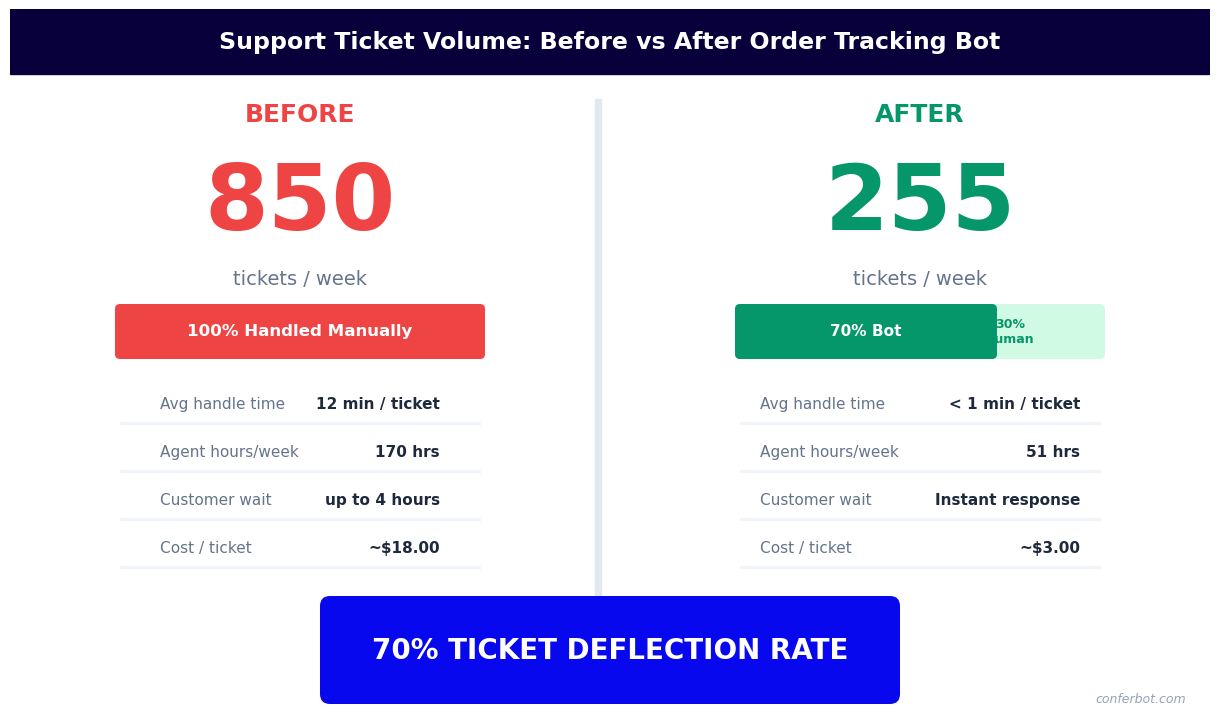
Order tracking is the clearest ROI story in e-commerce customer support automation. WISMO inquiries are high-volume, low-complexity, and perfectly suited for automation -- every one deflected by the chatbot represents a support ticket that does not need to be created, assigned, and answered by a human agent.
WISMO Contact Volume Benchmarks
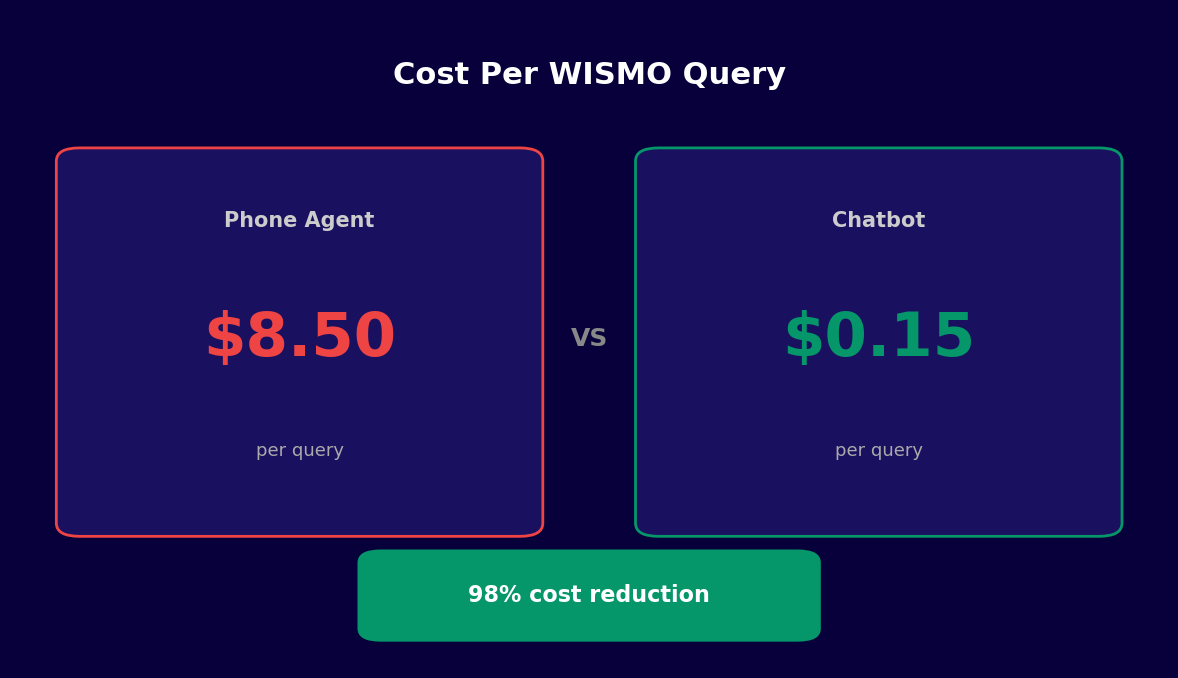
Industry research consistently shows that WISMO inquiries represent 35-50% of total e-commerce support contact volume. For a store receiving 1,000 support contacts per month, 350-500 of those contacts are customers asking where their order is. At a typical support cost of $5-12 per ticket (including agent time, platform cost, and overhead), that represents $1,750-$6,000 per month in support costs -- most of which can be eliminated by an order tracking chatbot.
| Metric | Pre-Chatbot (Email/Phone) | Post-Chatbot (Automated) |
|---|---|---|
| WISMO resolution time | 4-24 hours (email queue) | Under 30 seconds |
| WISMO deflection rate | 0% (all human-handled) | 80-92% automated resolution |
| Cost per WISMO contact | $5-$12 | $0.08-$0.25 (API + compute) |
| Customer satisfaction (CSAT) for tracking query | 62-71% (delay-dependent) | 84-91% (instant resolution) |
| After-hours coverage | No (or expensive) | 24/7 automatic |
| Contacts per order shipped | 0.35-0.55 | 0.04-0.09 (post-notification setup) |
Why WISMO Deflection Rates Are So High
WISMO queries are almost uniquely well-suited for chatbot automation. They are structured (the customer wants a specific piece of information about a specific order), they are answerable by a bot (the answer is available via API), and they have a clear success state (the customer knows where their order is). Contrast this with complaint resolution or return policy disputes, where human judgment adds genuine value. An order tracking chatbot achieves 80-92% deflection rates because the majority of WISMO queries fall into a small set of scenarios that the bot handles perfectly: "Where is it?", "When will it arrive?", and "Has it been delivered?"
Impact on Agent Capacity
For a 5-agent support team handling 1,000 monthly contacts, eliminating 400 WISMO contacts does not simply reduce overtime -- it frees agent capacity for the higher-complexity contacts that actually require human judgment: fraud claims, product defects, relationship management for VIP customers. Teams that deploy order tracking automation consistently report improved agent satisfaction scores because agents spend less time on repetitive lookups and more time on meaningful problem-solving.
Track your deflection rate and cost savings in real time through Conferbot's analytics dashboard. The dashboard separates WISMO deflections from other automated interactions and calculates estimated cost savings based on your configured cost-per-contact baseline.
50,000+ businesses use Conferbot templates to automate conversations
Step-by-Step Setup Guide
Setting up an order tracking assistant with Conferbot requires connecting three systems: your e-commerce platform (for order data), your carrier accounts (for tracking data), and your customer-facing channels (for delivering status updates). Here is the complete setup process.
Step 1: Connect Your E-Commerce Platform
Start in Conferbot's integrations hub and connect your e-commerce platform. For Shopify, install the Conferbot app and authorize access to the Orders and Customers APIs. For WooCommerce, install the plugin and enter your REST API credentials. For custom platforms, use Conferbot's webhook receiver to push order creation, fulfillment, and tracking number assignment events to Conferbot as they occur in your system. Verify the connection by looking up a real recent order in the Conferbot test console.
Step 2: Configure Carrier API Credentials
For each carrier you use, add API credentials in Conferbot's carrier settings. FedEx requires a Client ID and Secret from the FedEx Developer Portal. UPS requires a Client ID, Client Secret, and Account Number from UPS Developer Kit. USPS requires a User ID from the USPS Web Tools registration. DHL requires an API Key and API Secret from the DHL Developer Portal. If you use a multi-carrier aggregator like EasyPost or Shippo, a single API key covers all carriers through that platform and is simpler to maintain.
Step 3: Build the Tracking Conversation Flow
Open the order tracking assistant template in Conferbot's no-code builder. The template includes the core lookup flow: customer ID collection, order lookup API call, carrier tracking API call, status translation, and delivery of the formatted status message. Customize the status message templates to match your brand voice. Configure the exception branches for each exception type your carriers return: failed delivery, weather delay, address exception, customs hold, and lost package claim initiation.
Step 4: Configure the Identification Method
Decide how customers will identify themselves: order number + email is the most common combination and works well for most stores. For stores where customers frequently lose their order numbers, email + last four digits of the payment method provides an alternative path. For authenticated website sessions, configure the chatbot to pull the customer identity automatically from the session token, skipping the identification step entirely for logged-in users.
Step 5: Set Up Proactive Notifications
Enable outbound notification triggers in the proactive notifications section of the bot configuration. Define the milestone events that trigger notifications: order confirmed, shipment created (with tracking number), out for delivery, delivery confirmed, delivery exception, return label created, return received. For each event, configure the message template and the channels on which to deliver the notification. Connect WhatsApp and Messenger channels through Conferbot's omnichannel settings.
Step 6: Test Across Scenarios
Test the complete flow across several scenarios: a routine in-transit lookup, a delivered order, a failed delivery attempt, a multi-package order, and a return shipment. Verify that the carrier API calls return accurate data, that status translations read naturally, and that exception flows route correctly. Test the proactive notification triggers by placing a test order and advancing it through fulfillment stages.
Step 7: Deploy and Monitor
Embed the tracking chatbot on your order confirmation and account pages, and activate it across your messaging channels. Monitor WISMO deflection rate, average resolution time, exception escalation rate, and customer satisfaction scores through Conferbot's analytics dashboard. Review the escalated conversations weekly to identify any exception types the bot should be handling automatically but is not.
Proactive Notification Strategies
Reactive tracking -- answering customer questions when they ask -- is the baseline capability of an order tracking chatbot. The greater long-term value comes from proactive notification: pushing status updates to customers before they feel the need to inquire. A well-designed proactive notification strategy reduces inbound support volume, improves post-purchase satisfaction, and creates organic touchpoints for cross-sell and loyalty messaging.
Milestone-Based Notification Architecture
The most effective proactive tracking programs use a milestone-based architecture where specific carrier or order events trigger pre-configured outbound messages. The core milestone set for most e-commerce stores is:
- Order confirmed: Sent immediately after purchase with order summary and expected processing time
- Order shipped: Sent when a tracking number is assigned, including the tracking number, carrier name, and estimated delivery date
- Out for delivery: Sent the morning of the delivery day with the delivery window if the carrier provides it
- Delivered: Sent when the carrier scan confirms delivery, with a prompt to contact support if there is an issue
- Delivery exception: Sent immediately when an exception code is detected, with plain-language explanation and recommended action
Channel Strategy for Proactive Notifications
The channel choice for proactive notifications significantly affects open rates and the customer's perception of the post-purchase experience. WhatsApp delivers the highest engagement: 85-98% open rates and average response within 90 minutes. Customers who have opted into WhatsApp Business notifications during checkout represent the highest-value audience for proactive tracking messages. Messenger and Instagram DM are effective for customers who engaged with your brand through those channels. Email remains necessary as a universal fallback for customers who have not opted into messaging channels.
Exception Notifications as Recovery Opportunities
Delivery exceptions -- missed deliveries, weather delays, address issues -- are moments of elevated customer anxiety. A proactive exception notification that reaches the customer within minutes of the exception event, explains the situation clearly, and provides a concrete next step transforms a potentially negative experience into a demonstration of your brand's reliability. Exception notifications that include a self-service resolution link (reschedule delivery, update address, contact carrier) resolve the exception without any human agent involvement in the majority of cases.
Post-Delivery Engagement
The delivery confirmation notification is an underused opportunity. The moment a package is confirmed delivered, the customer is maximally engaged with your brand -- they are likely opening the package or about to. A delivery confirmation notification that asks "How is your order looking?" creates a natural moment for a product review request, a cross-sell recommendation based on the purchased item, or a loyalty points notification. These post-delivery messages should be configured through Conferbot's post-purchase flow, which connects to your e-commerce template ecosystem for seamless transitions between tracking and engagement.
Notification Frequency and Opt-Out Management
Proactive notifications are effective when they provide genuine value at appropriate intervals. Over-notifying -- sending four messages for a same-day delivery -- creates annoyance and drives opt-outs. Best practice is to send notifications only at milestone events, not at every carrier scan. Always honor opt-out requests immediately, and configure Conferbot's suppression lists to prevent future notifications to opted-out contacts. Track opt-out rates in analytics; a rate above 3% per notification type suggests that notification is adding more noise than value and should be reconsidered.
Order Tracking Assistant Chatbot FAQ
Everything you need to know about chatbots for order tracking assistant chatbot.
Why Use a Template vs Building from Scratch?
Templates encode years of optimization data into the conversation flow before you start.
| Factor | Conferbot Template | Build from Scratch | Hire a Developer |
|---|---|---|---|
| Time to deploy | 10 minutes | 2-8 hours | 2-6 weeks |
| Cost | Free | Your time | $5,000-$25,000 |
| Day-1 conversion | 15-22% | 5-8% | 10-15% |
| Proven flows | Yes, data-tested | No | Depends |
| Updates included | Automatic | Manual | Paid |
| Multi-channel | 8+ channels | 1 channel | Extra cost |
| Analytics | Built-in | Must build | Extra cost |
Ready to Deploy Order Tracking Assistant Chatbot?
Join 50,000+ businesses. Free forever plan available. No credit card required.