
Price Drop Alert System Chatbot
Free E-commerce And Retail Chatbot Template
A price monitoring chatbot that lets customers set target prices for products they want. When prices drop to their desired level, they get notified instantly - driving conversions from price-sensitive shoppers and building a list of high-intent buyers.



What Is a Price Drop Alert Chatbot?
A price drop alert chatbot is an AI-powered conversational tool that lets online shoppers subscribe to price notifications for specific products and automatically contacts them when the price falls to their target level or below. Rather than relying on passive mechanisms like email newsletters or browser bookmarks, the chatbot creates an active, two-way monitoring relationship between the shopper and your catalog -- one that drives shoppers back to your store at precisely the moment they are most likely to convert.
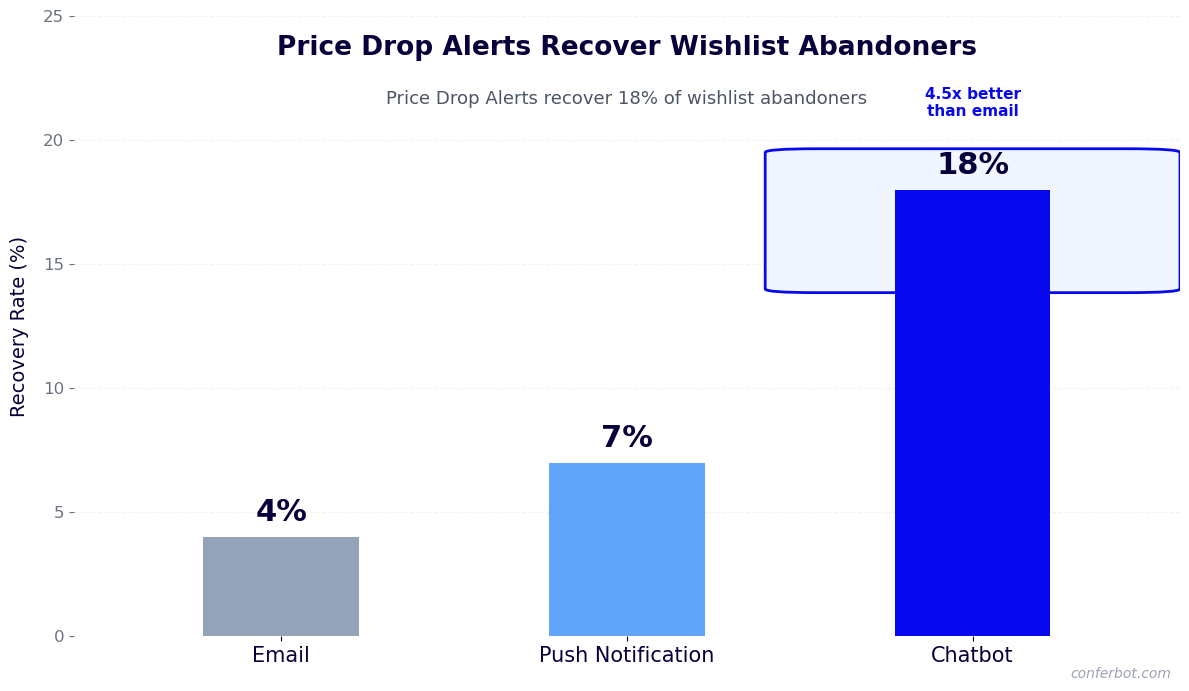
In 2026, the average online shopping cart abandonment rate sits at 70-75%. A significant fraction of those abandoned sessions are not driven by lack of interest -- they are driven by price sensitivity. The shopper wants the product but decides the current price is too high. Without a mechanism to bring them back when the price drops, that potential revenue is permanently lost. A price drop alert chatbot changes that equation by turning price-sensitive abandoners into a recoverable segment.
The chatbot works across three trigger moments: when a visitor views a product page without adding to cart, when a visitor adds to cart but does not complete checkout, and when an existing customer proactively asks to be notified about future sales on a product they are watching. In each case, the bot captures the shopper's contact details and target price through a brief, friendly conversation and then monitors your pricing data continuously to fire notifications at the right moment.
Built on Conferbot's AI chatbot builder, the price drop alert system integrates with your e-commerce catalog in real time through API integrations and delivers notifications via WhatsApp, email, Messenger, and on-site chat. Setup requires no engineering work using the no-code builder, and the bot can be live within a single business day.
This page covers how the price monitoring pipeline works, the channel strategy for delivering alerts, integration with pricing engines, industry benchmarks for alert conversion rates, cost-versus-revenue analysis, and a setup guide that walks through every configuration step.
How the Price Monitoring and Alert Pipeline Works
The price drop alert system operates through a four-stage pipeline that spans from the moment a shopper expresses interest through the notification delivery and conversion event. Each stage is automated and runs continuously without human involvement.
Stage 1: Intent Detection and Subscription Capture
The pipeline begins when the chatbot detects a price-sensitive intent signal. These signals include a visitor spending more than a configured threshold on a product page without adding to cart, a visitor abandoning a cart that contains items with recent price history, or a visitor explicitly clicking a "Notify me when price drops" button that triggers the chat widget. The NLP engine also recognizes natural-language phrases like "Is this going to go on sale?" or "Does the price ever drop on this?" and routes the conversation into the alert subscription flow.
Stage 2: Subscription Conversation
Once the intent is detected, the bot opens a short subscription dialogue. It confirms which product the shopper is watching, asks whether they want to be notified at any price drop or only when the price falls below a specific target, captures their preferred notification channel (WhatsApp, email, or on-site), and optionally asks for a target price. The entire conversation takes under 60 seconds. The bot validates the contact information, creates a subscription record linked to the product SKU, and confirms the subscription with a friendly summary message.
Stage 3: Price Monitoring
After the subscription is created, the bot's monitoring engine polls your pricing data at configurable intervals -- typically every 15 to 60 minutes for active catalogs. It compares the current price for each watched SKU against the subscriber's target and against the price at the time of subscription. When the price meets the alert condition (any drop, or a drop to the target price), the engine queues a notification for each matching subscriber. The monitoring engine handles variants correctly: if a shopper is watching a specific size or color variant, the alert fires on that variant's price, not the base product price.
Stage 4: Alert Delivery and Re-engagement
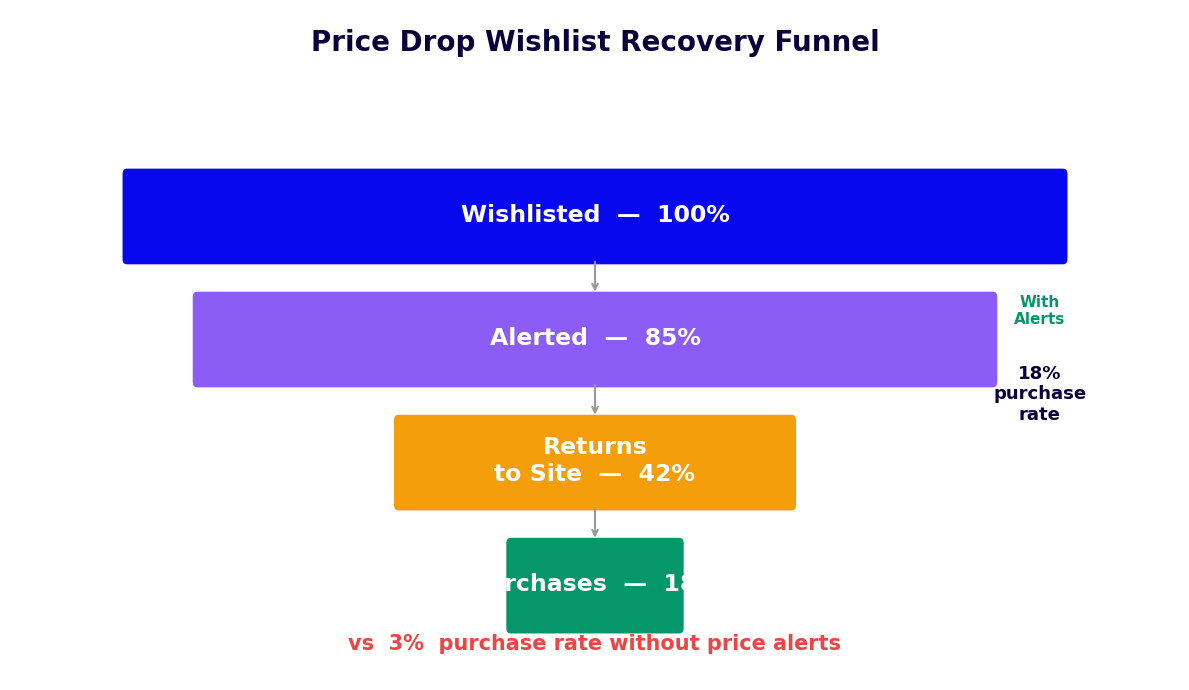
When a price drop is detected, the bot delivers a personalized notification through the subscriber's chosen channel. The message includes the product name, the original price, the new price, the percentage discount, a product image, and a direct link to purchase. On WhatsApp and Messenger, the message includes an interactive button for one-tap purchase. The bot tracks whether the subscriber clicks through, adds to cart, or completes purchase after receiving the alert. Subscribers who receive an alert but do not purchase within 24 hours receive a single follow-up message reminding them that the price may not stay low. This two-message sequence is the driver of the 18-28% conversion rates that businesses report from price alert programs.
Key Features of the Price Drop Alert System
A high-performing price alert chatbot requires specific capabilities beyond simple notification delivery. These features determine whether the system recovers meaningful revenue or operates as a low-impact background tool.
| Feature | What It Does | Business Impact |
|---|---|---|
| Multi-channel delivery | Sends alerts via WhatsApp, email, Messenger, and on-site chat from one subscription | Reaches subscribers on their preferred channel, lifting open rates to 80-95% |
| Target price subscriptions | Shoppers set a target price; alert fires only when that threshold is reached | Increases alert relevance and reduces unsubscribes |
| Variant-level monitoring | Tracks price changes at the SKU variant level, not just base product | Prevents irrelevant alerts when only one size or color drops in price |
| Cart abandonment integration | Automatically offers price alerts to shoppers who abandon cart without checking out | Turns 15-20% of abandoners into alert subscribers |
| Flash sale burst notifications | Instantly notifies all relevant subscribers when a flash sale is activated | Drives concentrated traffic spikes during promotions |
| Price expiry urgency | Adds countdown messaging when a sale price is scheduled to expire | Increases conversion rate of alerts by 22-30% |
| Subscription management | Lets shoppers add, pause, or remove watched products through the chat interface | Reduces unsubscribes by giving shoppers control |
Multi-Channel Alert Delivery
The primary reason price alert programs underperform is channel mismatch: the business sends email alerts that go to a promotions folder while the shopper checks WhatsApp constantly. Conferbot's omnichannel framework lets subscribers choose their preferred channel at the time of subscription and guarantees delivery through that channel. WhatsApp alerts achieve open rates of 85-95% compared to 20-30% for promotional email, which directly translates to higher conversion rates from the same alert volume.
Cart Abandonment Trigger Integration
The cart abandonment integration is the highest-volume source of price alert subscriptions for most retailers. When a shopper adds an item to cart and begins checkout without completing it, the bot sends a recovery message within 30 minutes. If the shopper does not complete the purchase, the bot follows up with a price alert offer: "Would you like us to notify you if the price drops on the items in your cart?" This converts shoppers who would otherwise be permanently lost into warm subscribers who return when the price is right.
Flash Sale Burst Notifications
Beyond passive monitoring, the price alert system supports proactive flash sale notifications. When you activate a limited-time sale in your pricing system, the bot immediately notifies all subscribers watching the affected products. This burst notification capability turns your subscriber list into a high-intent flash sale audience -- shoppers who have already expressed interest in those specific products at a lower price point. Flash sale alerts to existing subscribers consistently outperform standard promotional email campaigns by 3-5x in conversion rate.
Ready to try Price Drop Alert System Chatbot?
Deploy this template in under 10 minutes. No coding required.
Use This Template Free →Channel Strategy for Price Alert Delivery
Where you deliver price alerts matters as much as what the alerts say. Different channels have dramatically different open rates, click rates, and conversion rates. A mature price alert strategy deploys alerts across multiple channels and lets shopper preference determine which channel carries each notification.
WhatsApp Price Alerts
WhatsApp is the highest-performing channel for price alert delivery in 2026. With 2.7 billion active users globally and average open rates above 85%, WhatsApp messages land in front of subscribers faster and more reliably than any other channel. Conferbot's WhatsApp integration supports rich alert messages with product images, price comparison formatting, and one-tap purchase buttons. WhatsApp Business API compliance requires that price alerts use approved message templates, which Conferbot manages on your behalf as part of the template approval process.
Facebook Messenger Alerts
Facebook Messenger is a strong secondary channel, particularly for consumer segments that spend significant time on Facebook. Messenger supports rich card formats with product images and interactive buttons. Messenger's subscriber list is built through opt-in flows on your Facebook page or through the website chat widget, making it complementary to WhatsApp rather than competitive with it. Subscribers acquired through Facebook product catalog ads are particularly high-value targets for price alert opt-ins.
On-Site Chat Re-engagement
When a subscribed shopper returns to your website, the chat widget can proactively surface price alerts for products they are watching, even if the trigger condition has not been met yet. For example, the bot might say "The running shoes you are watching dropped 8% last week -- they are still above your target, but trending down." This contextual on-site re-engagement keeps subscribers engaged with their watchlists and increases the likelihood of a purchase even before the target price is reached.
Instagram DM Integration
For fashion, beauty, and lifestyle brands with strong Instagram presences, Instagram DM delivery of price alerts connects product discovery (which often happens on Instagram) with conversion (which happens on the website). A shopper who saves a product post on Instagram can be added to the price alert list directly through a DM opt-in flow, creating a seamless path from social discovery to alert subscription to purchase.
Channel Performance Benchmarks
| Channel | Average Open Rate | Click-Through Rate | Alert-to-Purchase Conversion |
|---|---|---|---|
| 85-95% | 45-60% | 18-28% | |
| Facebook Messenger | 70-85% | 35-50% | 14-22% |
| Instagram DM | 65-80% | 30-45% | 12-18% |
| Email (promotional) | 20-30% | 8-15% | 3-8% |
| On-site chat proactive | N/A (impression-based) | 25-40% | 10-16% |
Integration with Pricing Engines and Catalogs
The accuracy and responsiveness of price drop alerts depends entirely on how well the chatbot connects to your pricing data. A system that polls prices every 24 hours will miss flash sales and short-duration promotions. A system that does not handle SKU variants correctly will send irrelevant alerts that erode subscriber trust. Here is how to build a pricing integration that keeps alerts accurate and timely.
Shopify and Shopify Plus
For Shopify stores, Conferbot connects to the Storefront API to monitor product variant prices in real time. The integration listens to Shopify's product update webhooks, which fire whenever a price, compare-at-price, or availability field changes. This event-driven approach means the monitoring engine does not need to poll -- it responds to changes as they happen, typically within 30-60 seconds of a price update in the Shopify admin. Discount codes and automatic discounts applied through Shopify Scripts are also captured, enabling alerts that reflect the actual checkout price rather than just the listed price.
WooCommerce
WooCommerce integration uses the Products REST API combined with a lightweight webhook plugin that fires on product save events. The integration reads both regular price and sale price fields at the variant level, enabling accurate monitoring when scheduled sales activate and deactivate. Dynamic pricing plugins commonly used with WooCommerce -- such as WooCommerce Dynamic Pricing and Discounts -- are supported through periodic polling of the price endpoints since dynamic prices may not trigger standard product update webhooks.
Custom Pricing APIs
Retailers with custom pricing engines, headless commerce setups, or real-time demand-based pricing can connect via Conferbot's API integration framework. You expose a price query endpoint; the monitoring engine calls it on a configurable polling schedule or subscribes to your price change event stream via webhook. This approach works for complex pricing scenarios including member pricing tiers, geographic pricing, bundle pricing, and real-time inventory-driven price floors.
Price History and Alert Logic
The monitoring engine maintains a price history log for every watched SKU, enabling sophisticated alert logic beyond simple threshold detection. The bot can detect and alert on: price drops relative to the 30-day average (indicating a genuine sale rather than a correction from an inflated price), prices that have returned to a previous low (signaling a recurring sale pattern), and prices that have dropped for the first time in more than 90 days (indicating a rare discount on a normally full-price product). This history-aware alert logic reduces noise and ensures subscribers receive alerts that are genuinely worth acting on.
ROI and Revenue Recovery from Price Alert Programs
Price drop alert programs are among the highest-ROI retention tools available to e-commerce businesses because they convert shoppers who have already demonstrated product interest. The incremental cost per recovered sale is extremely low compared to paid acquisition channels.
Subscriber Acquisition Cost
Unlike paid acquisition where each new visitor costs $0.50-$5.00 depending on category, price alert subscribers are acquired at zero marginal cost from visitors already on your site. A retailer with 50,000 monthly product page visitors who converts 3-5% to alert subscribers builds a list of 1,500-2,500 high-intent watchers per month. These subscribers did not require any advertising spend to acquire -- they arrived through organic search, paid campaigns, or direct traffic that was already in the marketing budget.
Alert Conversion Rate
Across retail categories, price alert programs that use WhatsApp or Messenger as the primary delivery channel achieve conversion rates of 18-28% per alert sent. By comparison, standard promotional email campaigns to the same customer base typically convert at 1-3%. The difference reflects the combination of channel open rate (subscribers see the alert) and intent quality (subscribers have already expressed interest in that specific product at a lower price).
Revenue Per Alert Sent
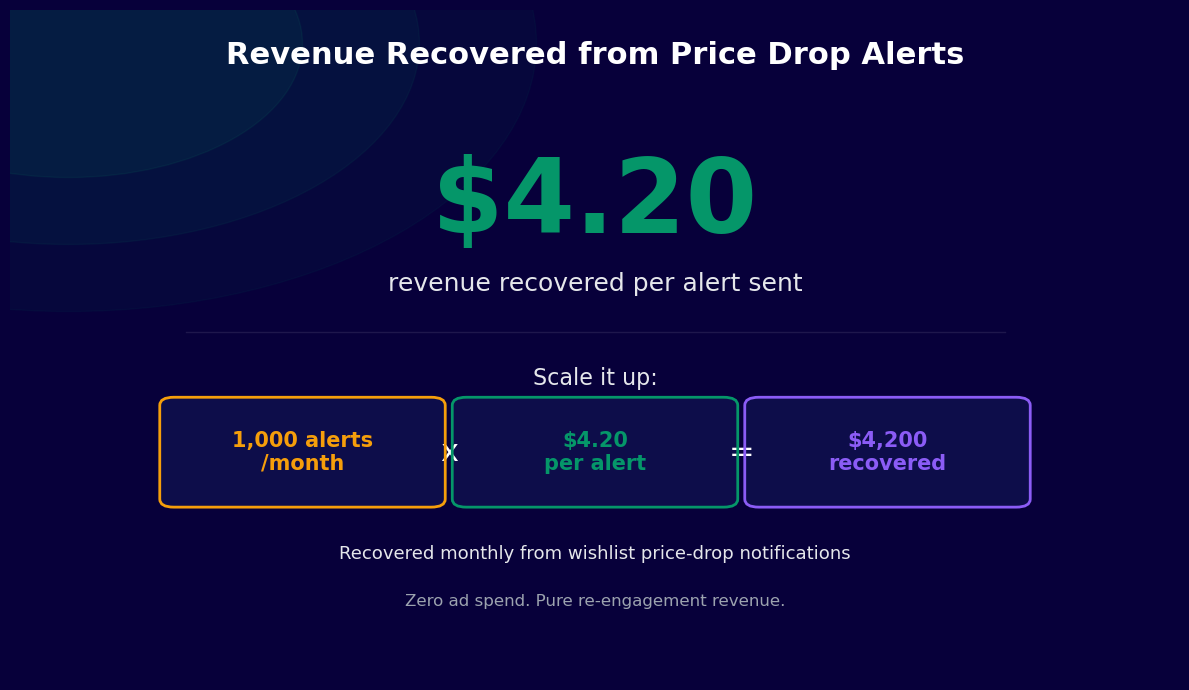
For a retailer with an average order value of $85 and a 22% alert conversion rate, each alert sent generates approximately $18.70 in expected revenue. Given that the cost of sending a WhatsApp message through the Business API is approximately $0.005-$0.015, the revenue-to-cost ratio per alert is roughly 1,200-3,700 to one. Even accounting for the labor costs of initial setup and ongoing monitoring, price alert programs consistently rank among the top three revenue-generating marketing activities for the retailers that implement them.
Impact on Margin
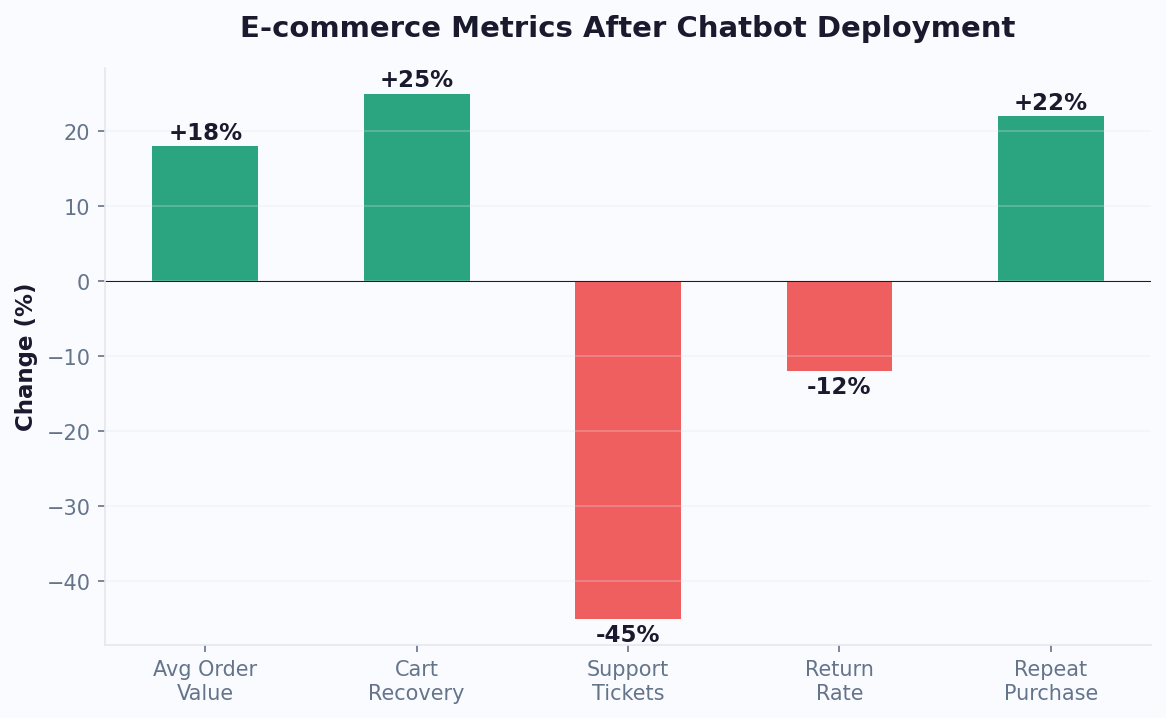
A common concern about price drop alerts is that they may train shoppers to wait for discounts, ultimately compressing margins. Data from retailers using alert programs shows this concern is largely unfounded for two reasons: first, subscribers who receive alerts convert at such high rates that the volume of full-price sales far exceeds the discount-driven conversions; second, alert subscribers tend to have higher lifetime value than the average customer because they are actively engaged with your catalog. Monitoring alert program performance through Conferbot's analytics dashboard gives you the data to evaluate margin impact at the SKU and category level.
50,000+ businesses use Conferbot templates to automate conversations
Price Alert Use Cases by Product Category
Price sensitivity and shopping behavior vary significantly across product categories. Here is how price drop alert chatbots deliver value in the highest-impact verticals and the specific configuration choices that maximize performance in each.
Fashion and Apparel
Fashion shoppers are highly price-sensitive and frequently browse without purchasing, particularly for premium items. Price alert subscriptions work well on individual item pages for clothing, footwear, and accessories. The key configuration consideration is variant-level monitoring: a shopper watching a jacket in size Medium at $180 should only receive an alert when that specific variant drops in price, not when a size XL variant goes on clearance. Configure the chatbot to capture size and color preferences during the subscription conversation to ensure alerts are relevant.
Consumer Electronics
Electronics purchases often involve extended research periods of 30-90 days during which shoppers monitor prices across multiple retailers. A price alert chatbot on your site captures shoppers who are in this research phase and brings them back when your price becomes competitive. For high-ticket electronics, the chatbot conversation can include a target price prompt ("What price would make you buy today?") that captures highly specific intent data and allows for extremely targeted alert delivery.
Home and Furniture
Furniture and home goods have long purchase cycles with significant price variation during seasonal sales events (Black Friday, end-of-season clearance). Alert subscribers in this category often wait weeks or months for a price drop. Configure the monitoring engine to handle a 90-day monitoring window with periodic re-engagement messages ("Still watching this sofa? Current price is $620 -- 8% below when you subscribed") to keep subscribers warm during long waiting periods.
Travel and Experiences
Flight prices, hotel rates, and experience ticket prices fluctuate constantly. A price alert bot for travel products must handle the complexity of date-specific pricing: the shopper is not watching "a flight to Lisbon" but "a flight to Lisbon on August 15th in economy class." Configure alert subscriptions to capture the full set of booking parameters during the subscription conversation so the monitoring engine tracks the exact itinerary the shopper wants. Integrate with your booking website to surface alerts with one-tap booking buttons that pre-fill the search parameters.
How to Set Up a Price Drop Alert Chatbot
Deploying a price drop alert chatbot with Conferbot follows a structured setup process that covers catalog integration, subscription flow configuration, channel setup, and analytics. Most retailers complete the full setup within one business day.
Step 1: Connect Your Product Catalog
Begin by connecting your product catalog to the price monitoring engine. For Shopify, install the Conferbot app and authorize catalog read permissions. For WooCommerce, install the Conferbot plugin and configure the REST API connection. For custom platforms, configure the API endpoint and authentication credentials in Conferbot's API integration settings. Verify that the integration retrieves accurate prices and variant data by testing with a sample of products.
Step 2: Configure Alert Conditions
Define the alert conditions that will trigger notifications. Standard options include any price drop, price drop of more than a configured percentage (e.g., 10%), and price drop to a subscriber's stated target. Set the monitoring frequency -- hourly is recommended for most retailers; 15-minute intervals are available for catalogs with high-frequency price changes. Configure expiry rules for subscriptions: how long the bot should monitor a product before sending the subscriber a "we have not seen a price drop" message and offering to extend or cancel the watch.
Step 3: Build the Subscription Conversation Flow
Using Conferbot's no-code builder, customize the subscription conversation flow. Adjust the brand voice, the questions asked during subscription setup, the confirmation message text, and the notification message templates. Ensure the flow is brief -- three to four messages maximum before the subscription is confirmed. Test the flow on mobile to verify that the conversation fits comfortably on small screens.
Step 4: Configure Notification Templates
Create notification message templates for each delivery channel. WhatsApp requires pre-approved message templates submitted through Conferbot's WhatsApp Business API integration. Messenger templates use Conferbot's visual template builder. Email templates can be configured directly or connected to your existing email service provider through API integration. Test each template across device types to confirm formatting and button functionality.
Step 5: Deploy and Monitor
Embed the price alert chatbot widget on your product pages and cart abandonment flow. Activate the cart abandonment trigger that presents alert subscriptions to shoppers who exit during checkout. Monitor subscription acquisition rates, alert delivery rates, and conversion rates from the day of launch using Conferbot's analytics dashboard. Use the first two weeks of data to refine the subscription conversation copy, adjust alert conditions, and identify which product categories generate the most subscriptions and the highest alert conversion rates.
Price Drop Alert System Chatbot FAQ
Everything you need to know about chatbots for price drop alert system chatbot.
Why Use a Template vs Building from Scratch?
Templates encode years of optimization data into the conversation flow before you start.
| Factor | Conferbot Template | Build from Scratch | Hire a Developer |
|---|---|---|---|
| Time to deploy | 10 minutes | 2-8 hours | 2-6 weeks |
| Cost | Free | Your time | $5,000-$25,000 |
| Day-1 conversion | 15-22% | 5-8% | 10-15% |
| Proven flows | Yes, data-tested | No | Depends |
| Updates included | Automatic | Manual | Paid |
| Multi-channel | 8+ channels | 1 channel | Extra cost |
| Analytics | Built-in | Must build | Extra cost |
Ready to Deploy Price Drop Alert System Chatbot?
Join 50,000+ businesses. Free forever plan available. No credit card required.