
Wedding RSVP Chatbot
Free Events And Conferences Chatbot Template
A beautifully designed wedding RSVP chatbot that collects guest responses, plus-one details, dietary preferences, song requests, and accommodation needs. Perfect for couples who want a modern, interactive way to manage their guest list and make every attendee feel welcome.



What Is a Wedding RSVP & Planning Chatbot?
A wedding RSVP chatbot is an AI-powered conversational assistant that manages every aspect of wedding guest communication - from RSVP collection and dietary preference tracking to plus-one management, venue directions, accommodation recommendations, and day-of timeline sharing. It replaces paper RSVP cards, scattered text messages, and hours of manual spreadsheet tracking with a single, elegant digital experience that guests genuinely enjoy using.
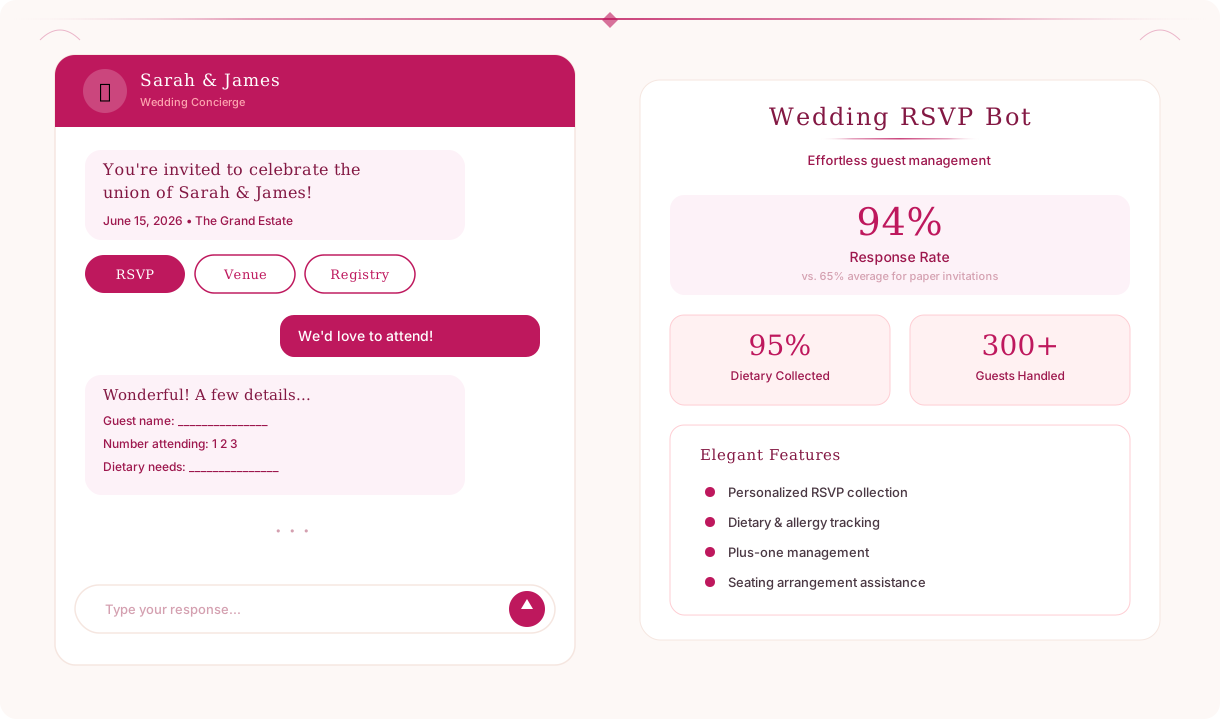
Wedding planning generates an extraordinary volume of repetitive guest communication. The average wedding with 150 guests produces 300-500 individual messages across RSVP follow-ups, dietary questions, venue directions, accommodation inquiries, dress code confirmations, and day-of logistics. Couples and wedding planners spend 15-25 hours managing this communication - hours that could be spent on designing the ceremony, choosing flowers, or simply enjoying the engagement.
A wedding RSVP chatbot absorbs this communication workload entirely. Guests interact with a beautifully branded conversational interface that answers every question instantly, collects every detail accurately, and updates the guest list in real time. The couple sees a live dashboard with RSVP counts, dietary breakdowns, and plus-one totals - no more chasing down RSVPs three weeks after the deadline.
Conferbot's wedding RSVP chatbot template is built on a no-code visual builder that lets couples or wedding planners launch a fully functional RSVP system in under an hour. It deploys on the wedding website, can be shared via a direct link in invitations, and works on any device. Whether you are planning an intimate 30-person ceremony or a 400-person celebration, the chatbot scales to handle every guest interaction seamlessly. This guide covers everything you need to know about deploying a wedding RSVP chatbot in 2026.
RSVP Collection: From Invitation to Confirmed Guest
The RSVP process is the foundation of wedding planning - every decision from catering headcount to seating arrangements depends on knowing who is actually coming. Yet traditional RSVP methods are plagued by low response rates, lost mail-in cards, and the awkward task of chasing down non-responders. A wedding RSVP chatbot solves all of these problems with a guided conversational flow that takes guests under 60 seconds to complete.
Guest Identification
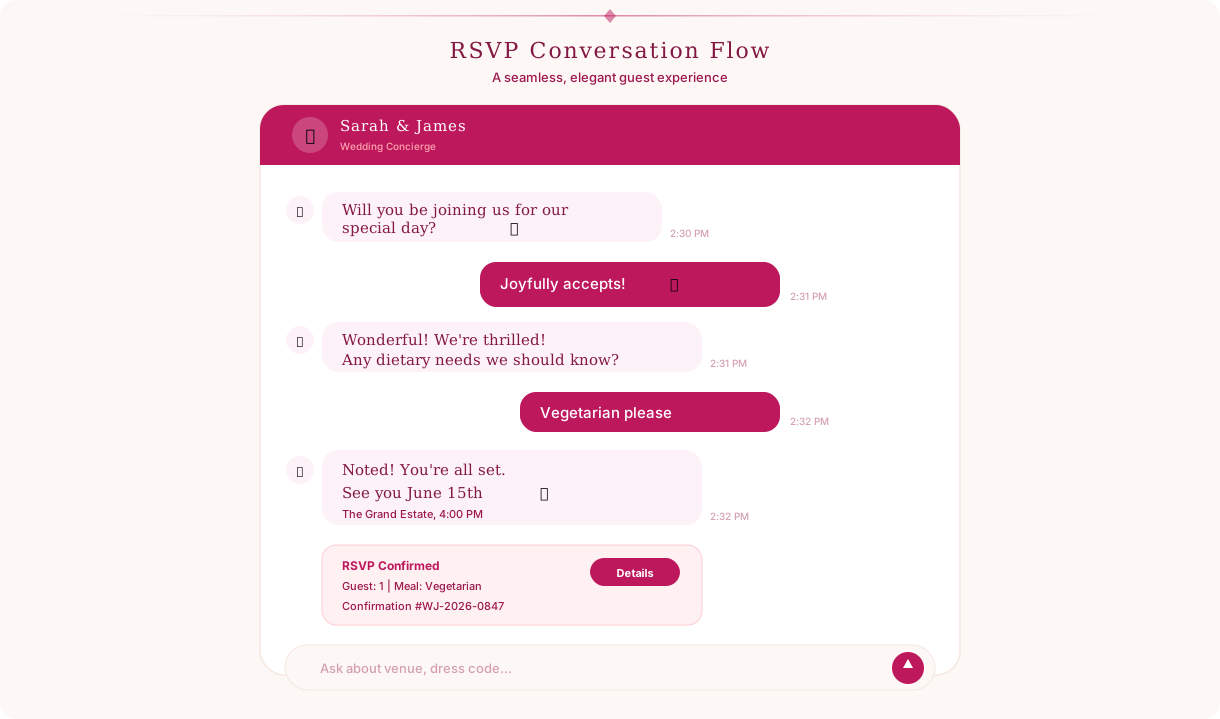
When a guest opens the chatbot, they are greeted with a personalized welcome message from the couple and asked to identify themselves by name. The chatbot matches the name against the guest list to pull up their invitation details - whether they were invited with a plus-one, which events they are invited to (ceremony only, reception, rehearsal dinner, brunch), and any notes the couple has attached. This lookup ensures that each guest sees only the options relevant to their invitation, preventing confusion about whether they can bring a date or attend the rehearsal dinner.
Attendance Confirmation
The chatbot asks the guest to confirm their attendance with clear options: Joyfully accept, Regretfully decline, or Need more time. Guests who accept are immediately routed to the dietary preference and plus-one flows. Guests who decline receive a warm acknowledgment message and are offered an option to send a note to the couple. Guests who need more time are added to the follow-up list and receive a gentle reminder one week before the RSVP deadline.
| RSVP Method | Response Rate | Average Response Time | Data Accuracy |
|---|---|---|---|
| Paper mail-in cards | 65-70% | 3-4 weeks | Low (illegible handwriting, missing fields) |
| Email/online form | 75-80% | 1-2 weeks | Medium (form abandonment, typos) |
| Text/phone calls | 85-90% | 1-3 days | Low (informal, no structured data) |
| Wedding RSVP chatbot | 92-97% | Under 24 hours | High (validated, structured, complete) |
Automated Follow-Up
The chatbot automatically identifies guests who have not responded and sends gentle reminder messages at intervals the couple configures - typically two weeks before the deadline, one week before, and a final reminder on the deadline date. Each reminder is warm and personal in tone, not the generic "you haven't RSVP'd" email that feels like a demand. This automated follow-up eliminates the most emotionally draining part of wedding planning: the awkward task of calling Aunt Margaret for the third time to ask if she is coming.
Dietary Preferences and Meal Selection
Catering is one of the largest line items in a wedding budget, and accurate headcounts by dietary preference are essential for both food quality and cost management. Ordering 20% extra of everything "just in case" is expensive. Discovering on the wedding day that 15 guests are vegan when you planned for 3 is a catering disaster. The wedding planning chatbot collects dietary information from every guest as part of the RSVP flow, ensuring the catering team has precise numbers weeks in advance.
Structured Dietary Collection
After confirming attendance, the chatbot presents meal options configured by the couple - typically the entree choices offered by their caterer (chicken, fish, beef, vegetarian, vegan) - and asks if the guest has any dietary restrictions or allergies. The dietary restriction options are presented as a clear checklist: vegetarian, vegan, gluten-free, dairy-free, nut allergy, shellfish allergy, halal, kosher, and a free-text field for other restrictions. This structured approach captures information that guests often forget to mention on paper RSVP cards.
| Dietary Need | Typical Percentage | Chatbot Collection Rate | Paper Card Collection Rate |
|---|---|---|---|
| No restrictions | 65-70% | Confirmed explicitly | Assumed (risky) |
| Vegetarian | 10-15% | 95%+ captured | 60-70% captured |
| Vegan | 3-5% | 95%+ captured | 40-50% captured |
| Gluten-free | 5-8% | 95%+ captured | 30-40% captured |
| Severe allergies | 3-5% | 95%+ captured | 50-60% captured |
| Religious dietary laws | 2-5% | 95%+ captured | 40-50% captured |
Children's Meals
For families with children, the chatbot asks whether a children's meal is needed and collects any children's dietary restrictions separately. This seemingly small feature saves significant catering cost - children's plates are typically 40-60% less expensive than adult entrees, and knowing the exact count prevents the caterer from plating full adult portions for six-year-olds.
Catering Summary Export
The couple's dashboard displays a real-time catering summary: total confirmed guests, meal selection breakdown, dietary restriction breakdown, and children's meal count. This data exports directly into a format that can be sent to the caterer, eliminating the hours of spreadsheet compilation that couples typically do three weeks before the wedding. When a guest modifies their RSVP or dietary preference, the summary updates automatically - no manual reconciliation required.
Ready to try Wedding RSVP Chatbot?
Deploy this template in under 10 minutes. No coding required.
Use This Template Free →Plus-One and Guest Party Management
Plus-one management is one of the most logistically complex aspects of wedding guest tracking. Some guests are invited with a named partner, others with an open plus-one, and others individually. Families may be invited as a unit of four. Tracking who is bringing whom, collecting names for place cards, and ensuring the headcount reflects actual attendees rather than invitation count is a spreadsheet nightmare that the wedding RSVP chatbot handles automatically.
Invitation-Aware Plus-One Logic
The chatbot is configured with each guest's invitation details: whether they have a plus-one (and whether the plus-one is named or open), how many family members are included in the invitation, and which events each person is invited to. When a guest RSVPs, the chatbot presents only the options relevant to their invitation. A guest invited with a named partner sees "Will [Partner Name] be joining you?" A guest with an open plus-one sees "Would you like to bring a guest?" A guest invited individually sees neither question. This prevents the uncomfortable situation where a guest assumes they have a plus-one when they do not.
Plus-One Detail Collection
For guests bringing a plus-one, the chatbot collects the plus-one's full name (for place cards and seating), meal selection, and dietary restrictions through the same conversational flow. For families, the chatbot walks through each family member's details individually, building a complete guest party record. This level of detail collection is nearly impossible with paper RSVP cards, where a family of four typically writes "The Johnsons - 4 attending" with no individual names or meal preferences.
Headcount Dashboard
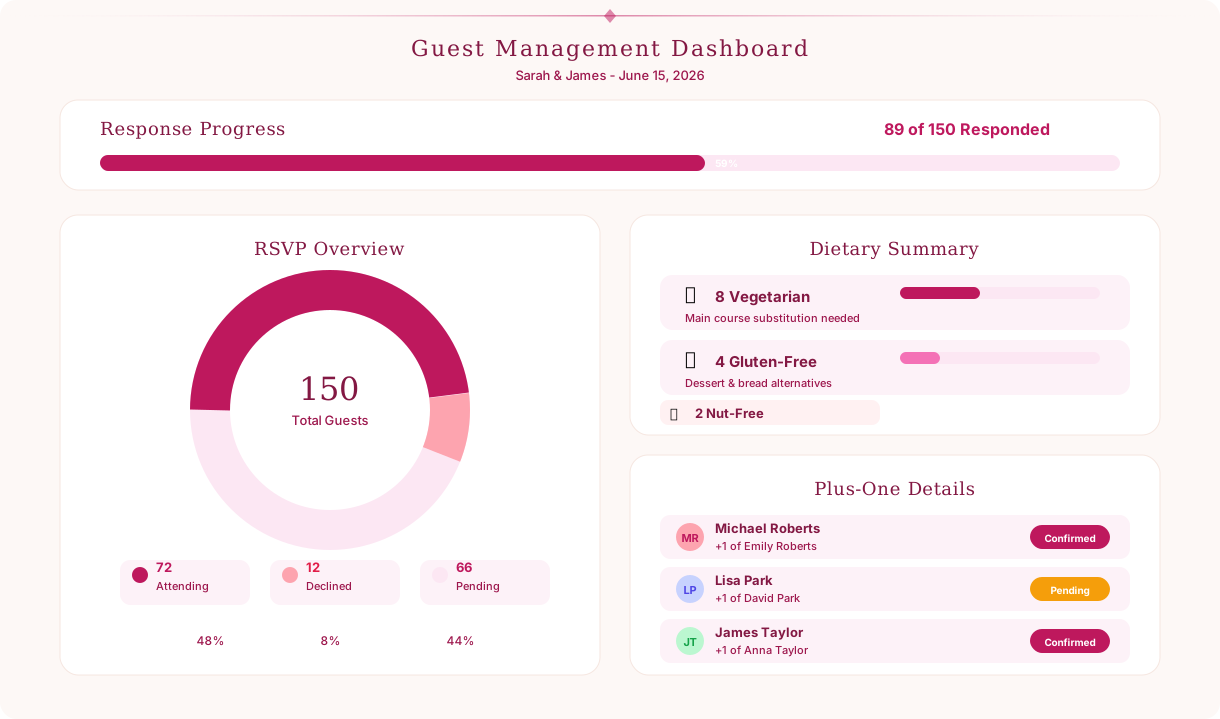
The couple's dashboard shows real-time headcount with full breakdown:
| Category | Count | Status |
|---|---|---|
| Total invited | 180 | All invitations sent |
| Confirmed attending | 132 | Includes plus-ones and children |
| Declined | 24 | Regrets received |
| Awaiting response | 24 | Reminders scheduled |
| Plus-ones confirmed | 38 | Names and meals collected |
| Children attending | 12 | Children's meals ordered |
Seating Group Tags
The chatbot allows the couple to tag guests with seating groups (Bride's family, Groom's college friends, Work colleagues) during setup. When RSVPs come in, the dashboard displays attendance by seating group, making seating chart planning significantly easier. Couples can see at a glance that 8 of 10 college friends are attending, which tables will be full, and where there are gaps that need to be filled with compatible guests.
Venue & Accommodation Information
After "Will you be there?" the most common guest questions are "Where exactly is it?" and "Where should I stay?" Couples typically answer these questions dozens of times individually via text, email, and phone calls - all with slightly different wording and sometimes conflicting details. A wedding chatbot provides a single, authoritative source of venue and accommodation information that every guest can access on demand.
Venue Details and Directions
The chatbot provides complete venue information for each event: ceremony location, reception venue (if different), rehearsal dinner venue, and morning-after brunch location. Each venue entry includes the full address, a Google Maps link, driving directions from major highways and airports, parking information (on-site, nearby lots, valet availability), and rideshare notes (Uber/Lyft pickup and drop-off points). For destination weddings, the chatbot includes airport information, ground transportation options, and estimated travel times from the airport to the venue and hotel.
Accommodation Recommendations
The chatbot presents the couple's recommended hotels with room block details:
| Hotel | Distance to Venue | Rate | Block Deadline | Booking Link |
|---|---|---|---|---|
| The Grand Hotel | 0.5 miles | $189/night | Oct 15, 2026 | Direct link in chatbot |
| Riverside Inn | 1.2 miles | $139/night | Oct 15, 2026 | Direct link in chatbot |
| Downtown Suites | 3 miles | $109/night | Oct 20, 2026 | Direct link in chatbot |
Each hotel entry includes the room block code, booking link, cancellation policy, and amenities (pool, breakfast, shuttle service). When a room block deadline is approaching, the chatbot can send a reminder to guests who have not yet booked accommodation, helping the couple meet their room block commitments and avoid attrition penalties.
Transportation and Logistics
For weddings with shuttle service between the hotel and venue, the chatbot shares the shuttle schedule with pickup times and locations. For weddings without shuttles, the chatbot provides rideshare cost estimates, taxi company numbers, and parking details. This logistical information reduces the "how do I get there?" anxiety that out-of-town guests often experience, especially for evening events where driving may not be ideal.
Local Area Guide
The chatbot includes a curated local area guide for out-of-town guests: restaurant recommendations near the hotel, activities for guests arriving early or staying after the wedding (wineries, hiking trails, museums, beaches), and practical information like nearest pharmacy, grocery store, and urgent care. This personal touch transforms the chatbot from a transactional RSVP tool into a genuine hospitality experience that makes guests feel welcomed and cared for. All venue and accommodation content is managed through Conferbot's knowledge base, allowing couples to update directions, hotel details, and local recommendations at any time without editing the chatbot's conversation structure.
Wedding Day Timeline and Communication
The wedding day itself generates a final wave of guest communication: "What time should I arrive?", "Is there a cocktail hour?", "When is the first dance?", "Can I take photos during the ceremony?" The wedding planning chatbot serves as the day-of information hub, ensuring every guest knows exactly where to be, when to be there, and what to expect.
Day-Of Timeline
The chatbot shares a detailed timeline for the wedding day, customized by guest type (wedding party members see preparation details, general guests see arrival times and event flow):
| Time | Event | Location | Notes |
|---|---|---|---|
| 3:30 PM | Guest arrival | Chapel Garden | Seating is open, no assigned sides |
| 4:00 PM | Ceremony | Chapel Garden | Unplugged ceremony - no phones please |
| 4:45 PM | Cocktail hour | Terrace | Drinks and appetizers served |
| 6:00 PM | Reception doors open | Grand Ballroom | Find your table on the seating chart |
| 6:30 PM | First dance & toasts | Grand Ballroom | Dinner service follows |
| 8:00 PM | Cake cutting | Grand Ballroom | Dessert bar also available |
| 8:30 PM | Dancing | Grand Ballroom | Open bar until 11:00 PM |
| 10:45 PM | Last dance & sparkler send-off | Front entrance | Sparklers provided |
Dress Code and Etiquette
The chatbot communicates the dress code with helpful specifics - not just "cocktail attire" but a description of what that means for the venue and season: "Cocktail attire is perfect for our garden ceremony. Think summer dresses, linen suits, or smart separates. The ceremony and cocktail hour are outdoors on grass, so consider shoes accordingly. The reception is indoors and air-conditioned." This guidance reduces the "what do I wear?" anxiety that guests universally experience, especially for weddings with unfamiliar dress codes like "garden formal" or "festive attire."
Photo and Social Media Guidance
The chatbot communicates the couple's preferences about photography: whether the ceremony is unplugged (no phones or cameras), whether there is a wedding hashtag for social media sharing, and whether guests should avoid posting photos until the couple shares their own. This preemptive communication prevents the common frustration of guests blocking the photographer's shot with smartphones or posting unflattering candids before the couple has seen their professional photos.
Day-Of Communication
On the wedding day, the chatbot can send timed messages to guests: a morning greeting with the day's timeline, a reminder 90 minutes before the ceremony, and a post-ceremony message with cocktail hour details. For destination weddings with multi-day itineraries, the chatbot serves as the daily guide - welcome dinner details on Friday, ceremony timeline on Saturday, brunch information on Sunday. This consistent, centralized communication ensures no guest is left wondering what comes next.
businesses worldwide use Conferbot templates to automate conversations
Multichannel Guest Access: Website, WhatsApp, and Beyond
Wedding guests span multiple generations and communication preferences - tech-savvy millennials who live on their phones, older relatives who prefer traditional channels, and everyone in between. A wedding RSVP chatbot must be accessible through whatever channel each guest finds most natural, without compromising the data quality or the couple's ability to manage responses centrally.
Wedding Website Integration
The primary deployment for most wedding chatbots is the couple's wedding website. The chatbot embeds as a widget on the site, greeting visitors and guiding them to RSVP, view venue details, or ask questions. For couples using popular wedding website platforms (The Knot, Zola, Squarespace), the chatbot installs via a simple embed code that requires no technical knowledge. The chatbot's visual styling - colors, fonts, welcome message - can be customized to match the wedding's design aesthetic.
WhatsApp and Messaging Access
For guests who prefer messaging, the chatbot deploys on WhatsApp and Messenger, allowing RSVPs and questions to be handled entirely within a messaging app. This is particularly valuable for international weddings where guests span multiple countries and time zones - a WhatsApp link included in the digital invitation allows guests to RSVP instantly without navigating to a website. The chatbot conversation is identical across channels: a guest who RSVPs on WhatsApp generates the same structured data as one who RSVPs on the website.
QR Code for Physical Invitations
Couples who send physical invitations can include a QR code that opens the chatbot directly - either on the website or in the guest's preferred messaging app. The QR code links to a personalized URL that pre-identifies the guest, so they do not need to type their name to begin the RSVP flow. This bridge between physical invitations and digital RSVP combines the elegance of printed stationery with the efficiency of automated data collection.
Analytics and Guest Engagement Tracking
The couple's dashboard, powered by Conferbot's analytics, tracks all guest interactions across channels: who has RSVP'd, who has viewed venue information, who has asked questions, and who has not engaged at all. This visibility enables targeted follow-up - instead of sending a blanket reminder to all guests, the couple can focus their personal outreach on the handful of guests who have not interacted with the chatbot at all, while trusting the automated reminders to handle the rest. For couples working with wedding planners, the API integration allows the chatbot data to sync directly with the planner's event management tools, keeping all stakeholders informed without duplicating data entry.
Ready to simplify your wedding RSVP process? Explore all chatbot templates for more event automation options, or learn how the NLP chatbot engine can handle natural language questions from your wedding guests with conversational intelligence.
Wedding RSVP Chatbot FAQ
Everything you need to know about chatbots for wedding rsvp chatbot.
Why Use a Template vs Building from Scratch?
Templates give you a proven starting structure instead of a blank canvas.
| Factor | Conferbot Template | Build from Scratch | Hire a Developer |
|---|---|---|---|
| Time to deploy | 10 minutes | 2-8 hours | 2-6 weeks |
| Cost | Free | Your time | Custom dev quote |
| Proven flows | Yes, pre-built | No | Depends |
| Updates included | Automatic | Manual | Paid |
| Multi-channel | 8+ channels | 1 channel | Extra cost |
| Analytics | Built-in | Must build | Extra cost |
Learn More About Chatbots
Go deeper on how events and conferences chatbots work and how to pick the right builder.
Ready to Deploy Wedding RSVP Chatbot?
Start with a free-forever plan. No credit card required.