
Budgeting & Expense Tracker Chatbot
Free Finance Chatbot Template
A smart budgeting chatbot that helps users track income, categorize expenses, set savings goals, and receive personalized spending tips. Users walk through a guided flow to input their financial details and receive a comprehensive budget summary with actionable recommendations. Ideal for financial advisors, banks, and personal finance apps looking to engage users with interactive money management tools.



What Is a Budgeting and Expense Tracker Chatbot?
A budgeting and expense tracker chatbot is an AI-powered conversational tool that guides individuals and small business owners through income capture, expense categorization, budget limit setting, and real-time spending analysis - all within a familiar messaging interface. Unlike static spreadsheets or app-based trackers that require manual data entry and discipline to open regularly, the chatbot proactively engages users at the moments that matter: when they want to log a purchase, check a category balance, or understand where last month's paycheck actually went.
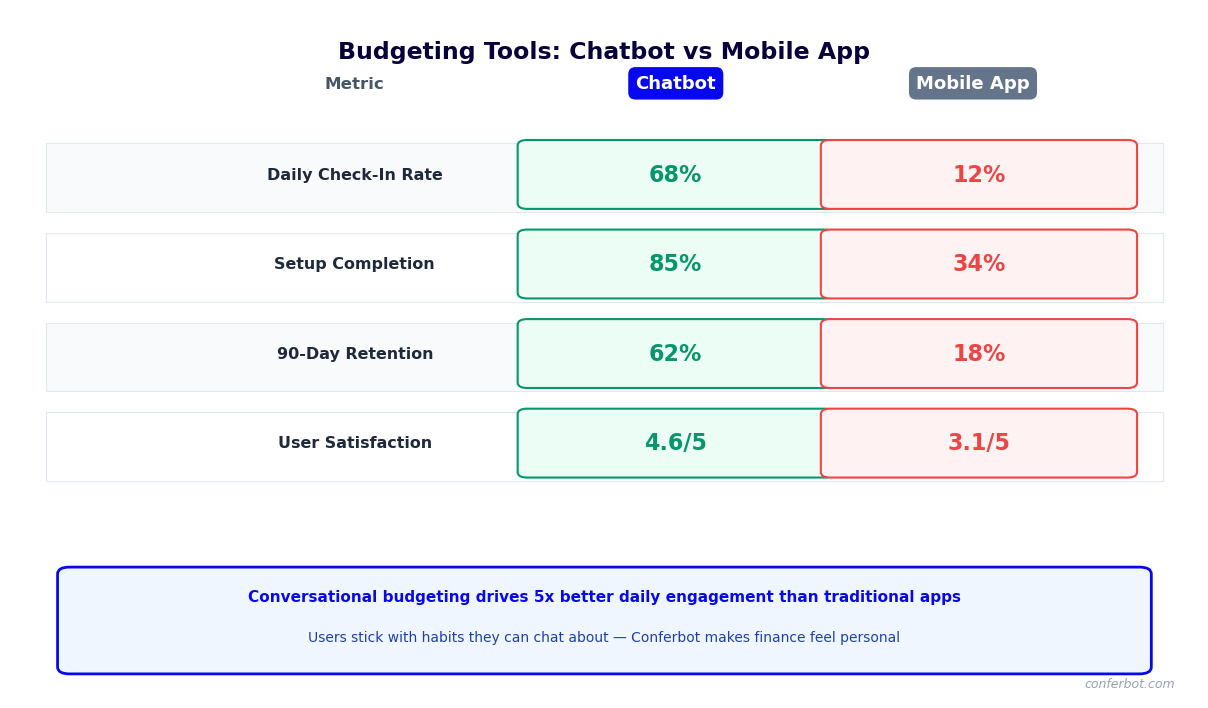
The personal finance software market is crowded with tools that users download with enthusiasm and abandon within 30 days. The core problem is not a lack of features - it is friction. Every extra tap, login, or form field between a user and a budget update is an opportunity for the habit to break. A conversational chatbot eliminates that friction by meeting users on channels they already use daily - WhatsApp, a website widget, SMS - and requiring nothing more than a natural language message to log an expense or check a balance.
Who Deploys This Template
- Retail banks and credit unions: Embed a budgeting chatbot in online banking portals or mobile apps to increase product stickiness, reduce churn, and cross-sell savings products to customers actively tracking spending.
- Fintech platforms: Offer conversational budgeting as a differentiated feature in neobank apps, personal finance platforms, or payroll products - driving daily active use that generic banking apps cannot match.
- Financial coaches and advisors: Deploy a white-labeled chatbot to keep clients on track between sessions, capture real spending data for review meetings, and demonstrate measurable progress toward savings goals.
- Small business accounting tools: Extend expense tracking to business owners via a conversational interface that captures receipts, categorizes deductible expenses, and flags when a category exceeds the monthly budget - without requiring the owner to log into accounting software.
- Employee benefits platforms: Integrate budgeting tools within financial wellness programs to improve workforce financial health scores, reduce paycheck-advance demand, and demonstrate measurable benefit program ROI.
Conferbot's AI chatbot builder provides the conditional logic engine required to handle multi-category budget comparisons, alert thresholds, and personalized spending recommendations without any backend coding. The NLP layer interprets natural language inputs like "spent $45 on lunch" or "charged $120 to the car" without requiring users to follow a rigid command syntax.
How the Budgeting and Expense Tracker Chatbot Works
The chatbot operates through four sequential functional modules - income capture, expense categorization, budget limit management, and spending insights - each of which can be triggered by user messages at any time. The flow is non-linear by design: users do not complete a lengthy onboarding wizard before getting value. They can log a single expense on day one, set budgets on day three, and start receiving weekly digests automatically once the system has enough data to be meaningful.
Module 1: Income Capture
The chatbot begins with a lightweight income setup: "What is your monthly take-home income? Include your primary salary plus any regular freelance, rental, or other income." For users with irregular income - freelancers, gig workers, small business owners - the bot asks for a three-month average and flags months where income falls below that baseline as a signal to tighten discretionary spending. Income data is used to calculate the savings rate automatically: total income minus total tracked expenses, expressed as a percentage and compared against the user's stated savings goal.
Module 2: Expense Categorization
Users log expenses in natural language. The NLP engine maps each entry to one of the configurable budget categories. The default category set covers the primary budget areas:
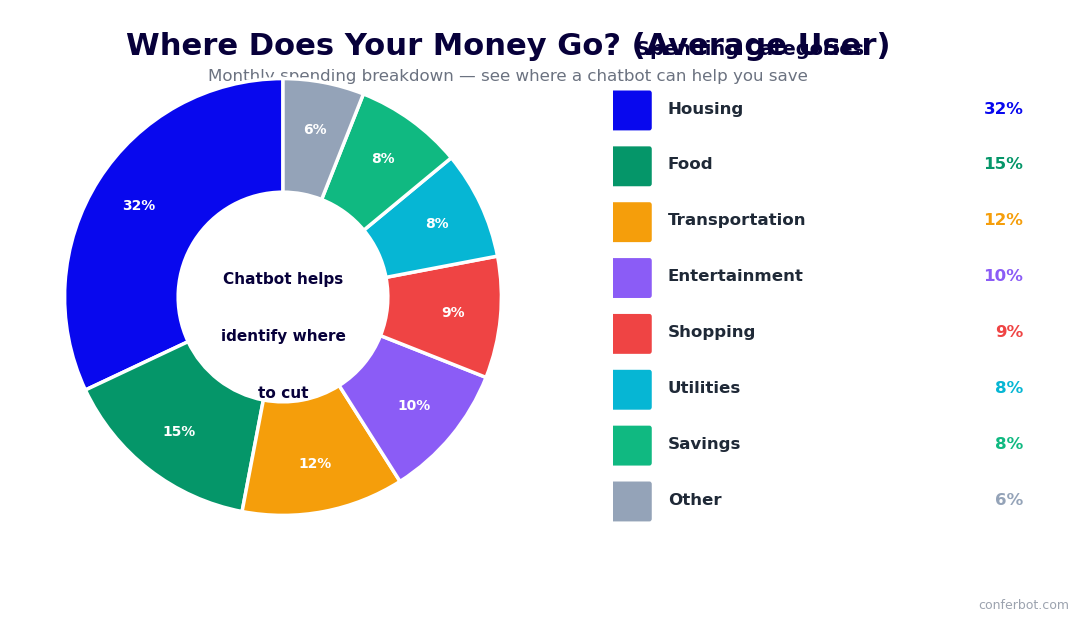
| Category | Default Sub-Categories | Alert Threshold (% of Budget) |
|---|---|---|
| Housing | Rent/mortgage, utilities, maintenance | 110% |
| Food | Groceries, restaurants, coffee/drinks | 115% |
| Transportation | Fuel, transit, rideshare, parking | 120% |
| Health | Insurance premiums, prescriptions, gym | 105% |
| Entertainment | Streaming, events, hobbies | 130% |
| Personal care | Clothing, salon, personal hygiene | 125% |
| Savings / Investments | Emergency fund, retirement, brokerage | N/A (tracked as goal) |
| Debt payments | Credit card, student loan, personal loan | 100% |
Module 3: Budget Alerts
When a category approaches or exceeds its monthly limit, the chatbot sends a proactive alert through the user's chosen channel. Alert messages are framed constructively rather than as warnings: "You have used 87% of your dining budget with 11 days left in the month. At your current pace, you will exceed it by $34. Want to see where the spend went?" This framing invites engagement rather than triggering avoidance, which is the primary behavioral risk with budget alerts that simply say "You are over budget."
Module 4: Spending Insights
At the end of each week and month, the chatbot delivers a structured spending digest - total spent by category versus budget, categories where the user came in under or over, the single largest transaction of the period, and the month-over-month trend for the top three spending categories. The digest closes with one actionable recommendation based on the data: the category with the highest overage and a concrete strategy to reduce it. This insight layer is what converts a transaction logger into a genuine financial coaching tool. Build this flow using Conferbot's no-code builder and deploy it instantly to your website or WhatsApp.
Key Features of the Budgeting and Expense Tracker Template
The budgeting chatbot template is built for production deployment in financial services and fintech environments. Every feature is designed to serve two masters simultaneously: the user who wants effortless expense tracking and actionable insights, and the deploying organization that needs engagement metrics, product cross-sell opportunities, and data that improves over time. Here is a detailed breakdown of every capability included in the template.
Feature Comparison: Chatbot vs. Traditional Budgeting Tools
| Capability | Budgeting Chatbot | Spreadsheet | Standalone App | Bank Portal |
|---|---|---|---|---|
| Natural language expense logging | Yes - any channel, any time | No | Partial (requires app open) | No |
| Real-time budget alerts | Yes - proactive push | No | Yes (if notifications enabled) | Rarely |
| Conversational spending insights | Yes - personalized narrative | No (requires manual analysis) | Partial (dashboard only) | No |
| Banking API integration (Plaid) | Yes - automatic transaction import | No | Yes (primary model) | Proprietary only |
| Behavioral nudge messages | Yes - timed and contextual | No | Rare | No |
| Multi-channel deployment | Yes - Web, WhatsApp, Messenger, SMS | N/A | iOS/Android only | Web/mobile app only |
| Financial coach/advisor access | Yes - live chat escalation | No | No | Rare |
| Savings goal tracking | Yes - conversational milestone updates | Manual | Yes | Limited |
Savings Goal Engine
Users define savings goals by name and target amount - "Emergency fund: $8,000," "Vacation: $2,400 by June," "Car down payment: $5,000." The chatbot calculates the required monthly contribution to reach each goal on schedule, tracks progress as transactions are logged, and sends milestone messages when the user hits 25%, 50%, and 75% of each goal. When spending in discretionary categories is running high and savings contributions are falling behind, the chatbot connects the two data points explicitly: "You are $87 short on your emergency fund contribution this month, and you have spent $94 more on dining than budgeted. Redirecting that dining overage would put you back on track."
Recurring Expense Detection
The chatbot identifies recurring expenses - subscriptions, loan payments, membership fees - from logged transactions or bank feed data and adds them to the budget as fixed line items automatically. It flags subscriptions the user may have forgotten about ("You are paying $14.99/month for a service you have not mentioned in 60 days - want to keep tracking it?") and calculates the annual cost of each recurring charge to make the value judgment concrete. This subscription audit feature alone drives significant user engagement and positions the chatbot as a money-saving tool rather than merely a money-tracking tool.
Review all channel options in the omnichannel deployment guide and connect to your existing CRM or financial platform through the integrations hub.
Ready to try Budgeting & Expense Tracker Chatbot?
Deploy this template in under 10 minutes. No coding required.
Use This Template Free →Integration With Banking APIs: Plaid, Open Banking, and Direct Feeds
Manual expense logging produces incomplete data. Studies of budgeting app usage consistently show that manual loggers capture only 60-70% of their actual transactions - they log the big, memorable purchases and miss the small, frequent ones that often account for the largest overspending. Integrating the budgeting chatbot with banking APIs solves this problem by importing transactions automatically, giving users a complete and accurate picture of their spending without requiring any manual entry beyond an initial bank connection.
Plaid Integration
Plaid is the dominant bank connectivity layer in North America, connecting to over 12,000 financial institutions. The budgeting chatbot connects to Plaid's Transactions API to pull categorized transaction data from the user's linked checking, savings, and credit card accounts in near real-time (typically within 24 hours of transaction settlement). The integration workflow within the chatbot is designed for maximum trust and minimal friction: the user authorizes the connection through Plaid's hosted bank login flow (OAuth for institutions that support it, credential-based for those that do not), and the chatbot immediately imports the past 30 days of transactions as a baseline, categorizes them against the user's budget structure, and delivers a first spending digest.
Open Banking (UK, EU, and Global)
Outside North America, open banking frameworks - PSD2 in the EU, the UK Open Banking Standard, and equivalent frameworks in Australia (CDR), Canada, Brazil, and Singapore - provide standardized, consent-based APIs for bank data access. The chatbot connects to these ecosystems through aggregation partners including TrueLayer (UK/EU), Basiq (Australia), and Belvo (Latin America). For financial institutions deploying the chatbot as a first-party product for their own customers, direct API access to their core banking system is typically the most efficient path and eliminates third-party data sharing considerations.
Integration Architecture Comparison
| Integration Method | Best For | Data Freshness | Transaction Coverage | Implementation Complexity |
|---|---|---|---|---|
| Plaid Transactions API | US/Canada fintech, independent PFM tools | 24-48 hours post-settlement | 12,000+ institutions | Low - SDK-based, 1-2 days |
| Plaid Real-Time Transactions | Premium fintech apps needing instant data | Real-time (supported institutions) | Subset of Plaid network | Medium - requires webhook infrastructure |
| Open Banking / PSD2 | UK, EU, and global deployments | Near real-time to 24 hours | Regulated institutions in scope | Medium - varies by aggregator |
| Direct bank API | Banks deploying for own customers | Real-time | Full account history | High - custom integration per institution |
| CSV / statement upload | Users with unsupported institutions | Manual refresh required | Complete when up to date | None - file parsing handled in platform |
| Manual chat logging | Privacy-sensitive users, no bank link | Instant (user-driven) | User-reported only | None |
Transaction Categorization and AI Enrichment
Raw bank transactions arrive with merchant names and amounts but minimal context. Plaid and open banking APIs provide basic merchant category codes (MCCs), but these are often too broad (all coffee shops and fast food coded as "Food") or ambiguous (a large department store purchase could be clothing, electronics, or home goods). The chatbot applies a secondary AI enrichment layer that uses the merchant name, transaction amount, and time of day to improve category assignment accuracy. When confidence is below threshold, the bot asks the user to confirm: "I see a $127 charge at Costco - was this groceries, household supplies, or something else?" Each confirmed categorization trains the model, so accuracy improves over the first 60-90 days of use. Connect your bank data pipeline through Conferbot's API integration layer.
Use Cases: Consumers, Small Businesses, and Financial Coaches
The budgeting and expense tracker chatbot is not a single-audience tool. The same core technology serves meaningfully different use cases depending on who is deploying it and for whom. This section covers the three primary deployment contexts - individual consumers, small business owners, and financial coaches - and explains how the template is configured differently for each.
Consumer Personal Finance
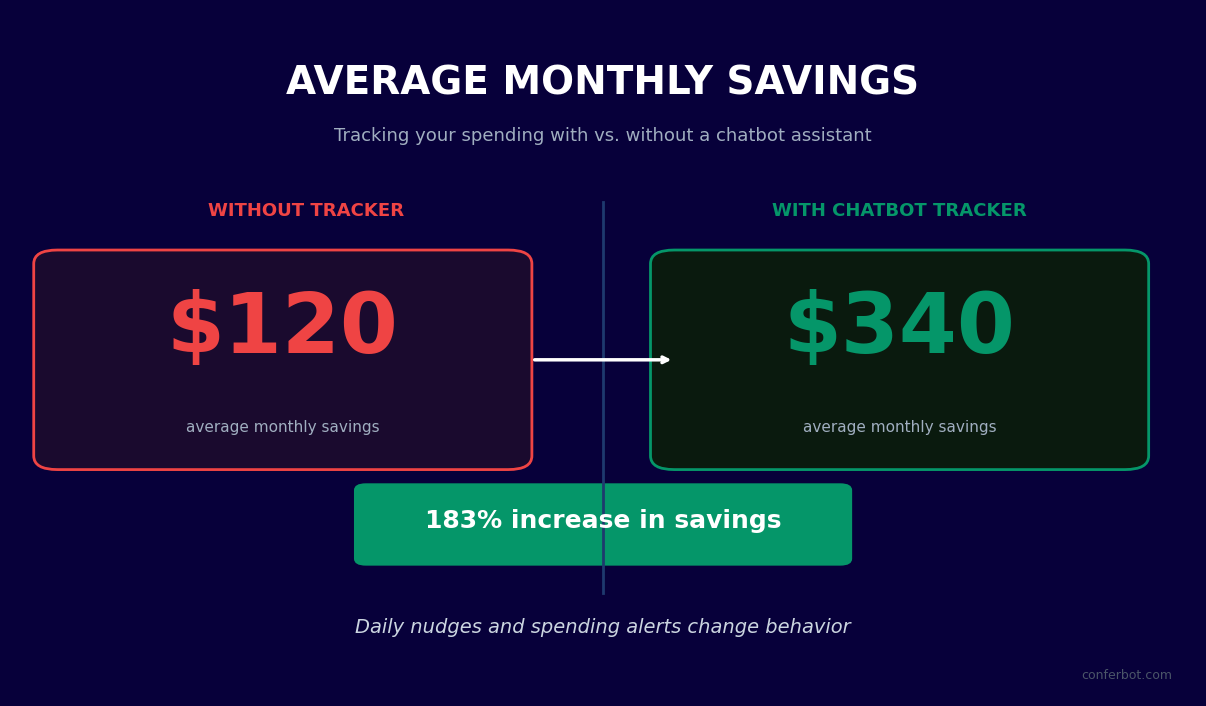
For individual consumers, the chatbot functions as a personal financial accountability partner. The primary value proposition is not data capture - smartphones already have dozens of ways to track spending - it is behavior change. The chatbot converts spending data into plain-language feedback that connects financial behavior to personal goals in terms the user cares about.
A consumer who logs $340 in restaurant spending in the first two weeks of the month does not need a chart. They need the chatbot to say: "At this pace, you will spend $680 on dining this month - $180 over your $500 budget. That is equal to 3 months of your gym membership, or 18% of your stated monthly savings goal. Want to set a softer checkpoint at $500 so I can flag it before you exceed it?" This kind of contextual, goal-linked feedback is what drives sustained behavior change, and it is only possible in a conversational interface.
Small Business Expense Management
Small business owners face a different problem: they need to separate business and personal expenses, track potentially tax-deductible categories, and have a record of expenses ready for their accountant at quarter-end. The chatbot supports a business configuration with category structures aligned to common tax deduction categories:
| Business Expense Category | IRS Schedule C / Common Deduction | 2026 Documentation Requirement |
|---|---|---|
| Home office | Schedule C, Line 30 | Square footage ratio + utility bills |
| Vehicle / mileage | Schedule C, Line 9 | Mileage log or actual expense receipts |
| Meals (business) | Schedule C, Line 24b (50% deductible) | Business purpose + attendees required |
| Software / subscriptions | Schedule C, Line 18 | Business use documentation |
| Marketing / advertising | Schedule C, Line 8 | Receipt + business purpose |
| Professional services | Schedule C, Line 17 | Invoice + 1099 threshold tracking |
The chatbot prompts users to note the business purpose of ambiguous transactions (especially meals and travel) at the time of logging, ensuring the documentation requirement is met without creating a retroactive administrative burden at tax time.
Financial Coaches and Advisors
Financial coaches deploy the budgeting chatbot as a between-session accountability tool for their client roster. Rather than waiting for a monthly review meeting to see how a client actually spent versus their budget, the coach receives a weekly digest of each client's spending data - aggregated, categorized, and flagged for any categories that exceeded thresholds. Clients who would never voluntarily report overspending to their coach are comfortable logging expenses in a chatbot that feels private, and the data surfaces automatically in the coach's dashboard. This transforms the coaching relationship from reactive review ("here is what happened last month") to proactive intervention ("I see you are trending over on dining this week - let us talk about it before the pattern sets in"). Explore the live chat escalation feature for enabling coach-to-client conversations within the same interface.
Behavioral Nudge Strategies for Sustained Budget Adherence
The gap between knowing your budget and staying within it is a behavioral problem, not an information problem. Financial literacy research consistently shows that people understand they should spend less than they earn and save more - but this knowledge does not translate into sustained behavioral change without the right environmental supports. The budgeting chatbot is uniquely positioned to implement evidence-based behavioral economics nudges because it is conversational, contextual, and present at the moments when financial decisions are being made.
Implementation Timing
Nudges delivered at the wrong moment are noise. The chatbot is configured to deliver different nudge types based on where the user is in their budget cycle:
- Week 1 of month (Anchoring nudge): "Your dining budget this month is $400. To stay on track, aim to spend no more than $100 per week. This week you have spent $67 - you are in great shape." Establishing the weekly sub-target early makes the monthly goal concrete and trackable.
- Mid-month category alert (Loss framing): "You have 14 days left in the month and $48 remaining in your entertainment budget. That is roughly one dinner out or two streaming rentals. How do you want to use it?" Presenting the remaining budget as a finite resource - not a warning - engages deliberate decision-making.
- Post-overspend recovery (Self-compassion + forward focus): "You went over your food budget by $94 this month. That happens. Next month, your food budget resets to $450. Want to try a specific strategy - like packing lunch on Mondays and Wednesdays - to start the month stronger?" Research in financial behavior shows that shame-based messaging after overspending increases avoidance, while forward-focused recovery framing increases re-engagement.
- Savings goal milestone (Positive reinforcement): "You hit 50% of your emergency fund goal - you now have $4,000 saved. At your current pace, you will reach $8,000 in 4 months. Want to see what getting there 3 weeks earlier would look like?" Milestone celebrations with a specific forward projection maintain motivation through the middle of a savings goal, which is where most people give up.
Commitment Device Integration
The chatbot supports implementation intention prompts - a nudge technique with strong behavioral evidence showing that asking people to specify when, where, and how they will take a financial action significantly increases follow-through. When a user says they want to reduce restaurant spending, the chatbot asks: "When this week would you normally eat out that you could replace with cooking at home? Committing to a specific time makes it much more likely to happen." This simple conversational exchange produces the behavioral equivalent of a written commitment device. View the chatbot ROI calculator to model engagement and savings impact for your specific deployment context.
50,000+ businesses use Conferbot templates to automate conversations
Setup Guide: Deploying a Budgeting Chatbot for Your Platform
Deploying the budgeting and expense tracker chatbot from template to live production involves five phases: configuration, data integration, channel deployment, user onboarding optimization, and ongoing performance management. This guide covers each phase with specific guidance for financial institutions, fintech platforms, and financial coaching practices.
Phase 1: Template Configuration (Days 1-3)
Load the budgeting and expense tracker template in Conferbot's no-code builder and configure the following elements before connecting any data sources:
- Budget category structure: Customize the default category set to match your users' most common expense types. Consumer-focused deployments typically use the default 8-category structure. Small business deployments should add tax category metadata to each expense type. Coaching deployments may want a more granular sub-category structure to support detailed client analysis.
- Alert thresholds: Set the percentage-of-budget trigger for each category's proactive alert. Conservative defaults (80% trigger) drive engagement but can feel intrusive. More permissive defaults (90-95%) reduce alert frequency but may miss the critical intervention window. Test both with a small user group before full rollout.
- Nudge message library: Review and customize the default nudge messages to match your brand voice. Financial coaching deployments should have the coach's name and approach reflected in the messaging. Bank deployments should align nudge framing with the institution's financial wellness program language.
- Savings goal presets: Configure suggested savings goals that are relevant to your user base - emergency fund (3-6 months expenses), debt payoff timeline, retirement contribution increase. Users who start with a named goal are 3.2x more likely to remain active 60 days after signup.
Phase 2: Banking API Connection (Days 3-7)
For deployments using Plaid or open banking data, complete the API credentials setup and test transaction import with a sandbox environment before going live. Verify that the category mapping logic correctly assigns the most common transaction types for your user base - the default mapping is optimized for US consumers but may need adjustment for specific geographies, user demographics, or business expense types.
Phase 3: Channel Deployment (Days 5-10)
Deploy the chatbot to your primary user channels using Conferbot's omnichannel tools. Website widget deployment takes under 30 minutes with a single script tag. WhatsApp Business deployment requires a verified WhatsApp Business Account and typically takes 3-5 business days for approval. For bank portal and mobile app embedding, use the API integration to render the chatbot within your existing authenticated session - this allows the chatbot to access user account context without requiring a separate login.
Phase 4: Onboarding Flow Optimization (Days 10-30)
The first conversation is the highest-stakes moment in the user lifecycle. Users who complete income setup and log at least one expense in their first session have a 60-day retention rate of 71%, versus 23% for users who set up an account but do not log anything. Optimize the first-session experience by reducing the number of required steps before the user gets a first piece of value - ideally, the chatbot should deliver a useful insight within 2-3 exchanges of the opening message.
Phase 5: Performance Monitoring (Ongoing)
Track weekly active users, average expenses logged per user per week, category alert click-through rate, savings goal progress rate, and advisor escalation rate using Conferbot's analytics dashboard. The most important leading indicator of long-term retention is week-2 return rate - users who return in their second week have an 8x higher 90-day retention rate than users who do not. Identify the point in the onboarding flow where week-2 return is lowest and A/B test alternative engagement triggers to improve it.
Data Privacy and Security for Financial Chatbots
A budgeting chatbot handles some of the most sensitive personal information a user can share: income, account balances, spending patterns, debt obligations, and savings goals. This data profile is more revealing than almost any other digital footprint - it exposes financial stress, relationship patterns, health spending, and personal values in ways that a simple transaction list does not. Deploying a financial chatbot in 2026 requires a security and privacy posture that is transparent to users, defensible to regulators, and robust against the threat environment that financial services platforms face.
Data Classification and Handling Standards
| Data Type | Sensitivity Level | Storage Approach | Retention Policy | Sharing Controls |
|---|---|---|---|---|
| Bank account credentials | Critical - never stored | Handled exclusively by Plaid OAuth; never touches Conferbot servers | Not retained | Not shared; credential flow is Plaid-to-bank direct |
| Transaction data | High | AES-256 encrypted at rest; TLS 1.3 in transit | Configurable - default 24 months, user-deletable | Not shared with third parties without explicit consent |
| Income and budget settings | High | Encrypted; tied to authenticated user session | Active account + 12 months post-deletion | Advisor access with explicit user permission only |
| Chat conversation logs | Medium-High | Encrypted; indexed for support and improvement | 12 months default; configurable | Support staff access with audit logging |
| Aggregate usage analytics | Low | Anonymized before storage | Indefinite (anonymized) | Used for product improvement; no PII |
Regulatory Compliance Framework
Financial chatbot deployments in the United States are subject to the Gramm-Leach-Bliley Act (GLBA), which requires financial institutions and their service providers to implement safeguards for customer financial information and provide clear privacy notices. Conferbot functions as a service provider under GLBA and executes data processing agreements that specify the purposes for which data is processed, the security standards applied, and the conditions under which data is returned or deleted at contract termination.
For deployments that connect to banking APIs and hold account balance or transaction data, additional obligations under state money transmission laws and the Consumer Financial Protection Bureau's rulemaking under Section 1033 of the Dodd-Frank Act (finalized in 2024) apply. These rules establish consumer rights to access, correct, and delete their financial data held by third-party platforms - rights that are handled through Conferbot's user data management API. International deployments in the EU are subject to GDPR, requiring a Data Processing Agreement (DPA) and, in some configurations, an Article 30 records of processing activities entry. The UK GDPR applies analogously post-Brexit.
Security Architecture
Conferbot's platform operates on SOC 2 Type II certified infrastructure with annual penetration testing by third-party security firms. Access to production financial data is governed by role-based access controls with least-privilege principles - customer support staff cannot access full transaction histories; only users and their explicitly authorized advisors can view individual spending records. All administrative access to production systems requires multi-factor authentication and is logged to an immutable audit trail. Connect your security and compliance tooling through the API integration layer to incorporate chatbot audit logs into your existing SIEM or compliance monitoring infrastructure.
Budgeting & Expense Tracker Chatbot FAQ
Everything you need to know about chatbots for budgeting & expense tracker chatbot.
Why Use a Template vs Building from Scratch?
Templates encode years of optimization data into the conversation flow before you start.
| Factor | Conferbot Template | Build from Scratch | Hire a Developer |
|---|---|---|---|
| Time to deploy | 10 minutes | 2-8 hours | 2-6 weeks |
| Cost | Free | Your time | $5,000-$25,000 |
| Day-1 conversion | 15-22% | 5-8% | 10-15% |
| Proven flows | Yes, data-tested | No | Depends |
| Updates included | Automatic | Manual | Paid |
| Multi-channel | 8+ channels | 1 channel | Extra cost |
| Analytics | Built-in | Must build | Extra cost |
Ready to Deploy Budgeting & Expense Tracker Chatbot?
Join 50,000+ businesses. Free forever plan available. No credit card required.