
Smart Home Device Setup Guide Chatbot
Free Home Services Chatbot Template
An interactive smart home setup chatbot that guides users through configuring and troubleshooting smart home devices. It covers thermostats, cameras, lights, speakers, and smart locks with step-by-step instructions. Users who need additional help can schedule a technician visit. Perfect for smart home retailers, tech support companies, and home automation installers.



What Is a Smart Home Device Setup Guide Chatbot?
A smart home device setup guide chatbot is a conversational AI tool that walks homeowners through the installation, configuration, and troubleshooting of connected home devices - smart speakers, thermostats, security cameras, lighting systems, smart locks, and hub controllers - without requiring a call to customer support or a technician visit. For brands and retailers selling smart home products in 2026, this kind of self-service capability directly addresses the highest-volume, most costly support interaction in the category: first-time setup failures.
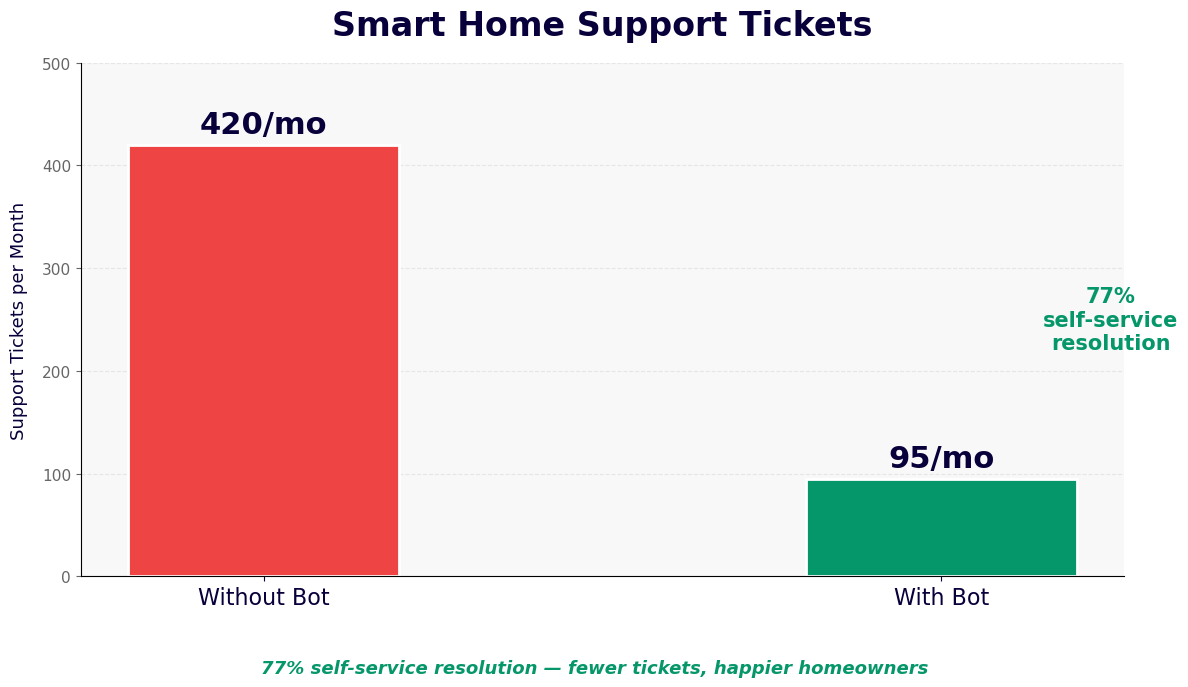
Smart home adoption has accelerated dramatically, but the dropout rate during setup remains stubbornly high. Research consistently shows that 30-40% of smart home device purchases result in a return or abandonment within 90 days, and the leading cause is not product failure - it is setup friction. Customers who cannot pair a device to their Wi-Fi, cannot get the companion app to recognize the hardware, or cannot integrate a new device with their existing smart home ecosystem give up and return the product, often writing negative reviews in the process.
The setup guide chatbot eliminates this friction by providing a personalized, device-specific walkthrough that adapts to the customer's specific hardware model, router type, mobile operating system, and existing smart home platform. It does not serve a generic instruction manual - it asks which device the customer has, which step they are on, and what they are seeing, then provides the exact next action in plain language. When the chatbot reaches the boundary of what guided troubleshooting can resolve, it escalates to a human technician via live chat handoff with the complete diagnostic session included, eliminating the need for the customer to start over.
Built on Conferbot's AI chatbot builder, the smart home setup guide requires no coding to deploy or maintain. Product teams and customer success managers configure device-specific flows through a visual interface. When new products launch or firmware updates change setup procedures, flows update in minutes. The chatbot deploys on your website, within the companion app's help section, and via WhatsApp for customers who prefer messaging support.
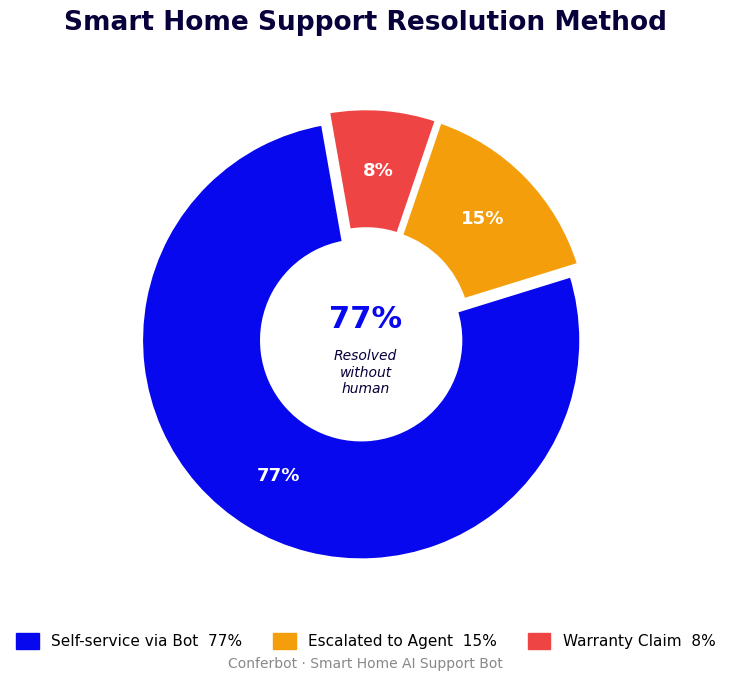
How the Smart Home Setup Chatbot Works
The setup guide chatbot operates through a structured diagnostic conversation that first identifies the device, platform, and current state - then walks the customer through the exact resolution path for their specific situation. The flow handles both fresh installations and existing-device troubleshooting within the same interface.
Stage 1: Device and Platform Identification
The conversation opens by identifying the customer's device model, mobile platform (iOS or Android), and existing smart home ecosystem (Amazon Alexa, Google Home, Apple HomeKit, Samsung SmartThings, or standalone app). Each combination follows a distinct setup path - the steps for pairing a smart bulb to Apple HomeKit differ meaningfully from the same bulb on Google Home. This identification stage prevents customers from following the wrong instructions, which is one of the most common causes of setup failures.
Stage 2: Current State Assessment
The chatbot asks which step in the process the customer has reached and what they are currently seeing. It uses NLP processing to interpret natural-language descriptions - "the app just spins and never connects" is correctly identified as a network discovery failure, triggering the Wi-Fi troubleshooting path rather than the app permissions path. Customers do not need to know technical terminology; the chatbot translates what they describe into the correct diagnostic branch.
Stage 3: Step-by-Step Guided Resolution
The chatbot delivers instructions one step at a time, confirming progress before advancing. Each instruction is written for the specific device model and operating system the customer identified, with visual descriptions of what they should see on screen. After each step, the customer confirms "Done, I see the pairing screen" or "It shows an error - the light is blinking red." The response to an error triggers the appropriate sub-branch: a red blinking light means a different problem than a yellow blinking light, and the chatbot knows the difference.
Stage 4: Integration and Automation Setup
Once the device is successfully paired to the network and app, the chatbot offers to walk the customer through integration steps: adding the device to an existing voice assistant ecosystem, configuring automations ("turn off at 10pm"), and grouping devices with others in the same room. This post-pairing configuration is where many customers abandon without help - they successfully install the device but never unlock the features that make smart home ownership valuable.
Stage 5: Escalation for Complex Issues
Hardware faults, ISP network issues, router compatibility problems, and defective units cannot be resolved through guided troubleshooting. The chatbot identifies these situations - when a device has failed the same diagnostic step three times despite following instructions correctly - and escalates to a live support agent with the complete conversation log, device model, error codes observed, and steps already attempted. The agent receives full context and can resolve or authorize a replacement without the customer repeating the entire diagnostic process.
Key Features: Device Pairing, Wi-Fi Diagnostics, and Ecosystem Integration
The smart home setup guide chatbot includes capabilities purpose-built for the specific technical and UX challenges of connected device support. These features address the failure modes that generate the most support volume and customer frustration.
Device-Specific Flow Library
The chatbot maintains a library of setup flows organized by device category, manufacturer, and model. Smart thermostats require a different installation flow than smart plugs; a Zigbee hub has different pairing steps than a Wi-Fi direct device. Each flow is configurable in the visual builder and can be updated by product teams when firmware changes or new hardware variants are released. The library approach means a customer with a thermostat and a customer with a security camera receive completely different conversations - both tailored to exactly what their device requires.
Wi-Fi Diagnostic Guidance
Wi-Fi connectivity is the source of the majority of smart home setup failures. The chatbot includes a dedicated Wi-Fi diagnostic branch that helps customers identify and resolve the most common network issues: 2.4GHz vs. 5GHz band confusion (most smart home devices only support 2.4GHz), router firewall settings that block device discovery, IP address conflicts, and distance from the router causing intermittent signal. The chatbot asks diagnostic questions about the customer's router model and placement, then provides specific steps rather than generic advice. This branch alone resolves 40-55% of network-related setup failures without human escalation.
Voice Assistant Integration Walkthroughs
Adding a new device to Amazon Alexa, Google Home, or Apple HomeKit involves steps that many customers find confusing: enabling the correct skill, relinking accounts, running a device discovery scan, and assigning the device to the correct room. The chatbot provides a complete walkthrough for each platform, with specific attention to the places where the customer's voice assistant app may look different depending on their region or app version. This integration support is delivered after successful device pairing, turning a one-time setup success into a fully functional smart home addition.
Automation and Scene Configuration
The value of smart home devices is realized through automations - schedules, triggers, and scenes that make the home respond to occupant behavior without manual control. The chatbot offers to help customers configure their first automation immediately after setup: "Your smart light is connected. Want me to walk you through setting it to turn on at sunset automatically?" This in-the-moment guidance significantly increases the activation rate for automation features and reduces the rate of buyer's remorse that leads to returns.
| Feature | Issue Addressed | Resolution Rate | Benefit |
|---|---|---|---|
| Wi-Fi diagnostic branch | Network connectivity failures | 40-55% without escalation | Reduces technical support call volume |
| Device-specific flow library | Wrong instruction set for device model | Prevents 70%+ of instruction mismatch errors | Fewer repeat contacts and returns |
| Voice assistant integration guides | Post-pairing ecosystem connection failures | 65-75% self-service resolution | Higher feature activation rate |
| Automation setup assistance | Low feature adoption after pairing | Increases automation setup rate by 3x | Higher customer lifetime value and retention |
| Live chat escalation with context | Hardware faults, defective units | Full context handoff, no repeat intake | Faster resolution and higher satisfaction |
Ready to try Smart Home Device Setup Guide Chatbot?
Deploy this template in under 10 minutes. No coding required.
Use This Template Free →Use Cases: Smart Speakers, Thermostats, Security Cameras, and Lighting
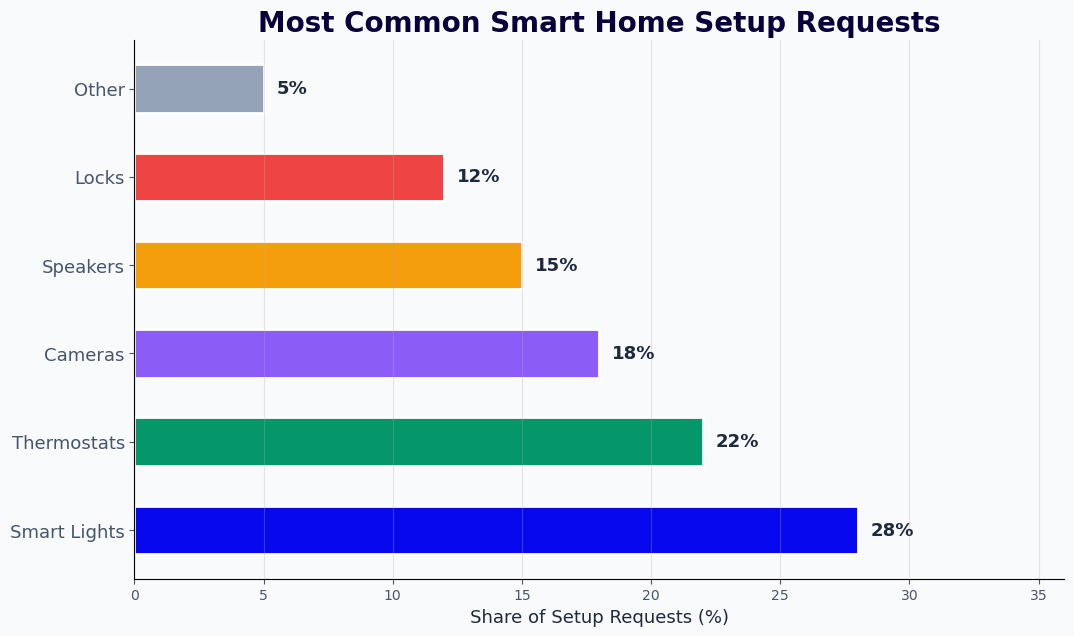
The smart home setup guide chatbot handles the full range of connected home device categories, each with its own installation requirements, common failure points, and ecosystem integration paths. Here is how the chatbot addresses the four highest-volume device categories.
Smart Speakers and Displays
Smart speakers and displays have the highest first-time setup success rate of any category - the setup process is intentionally streamlined by manufacturers - but they generate significant ongoing support volume around account linking, multi-room audio configuration, and routine troubleshooting (device not responding to wake word, degraded sound quality, connectivity drops). The chatbot handles these ongoing issues through a troubleshooting branch that covers the complete range of post-setup problems, reducing the need for customers to contact support for issues that have well-established resolution paths.
Smart Thermostats
Thermostat installation involves a physical wiring step that many homeowners find intimidating: identifying C-wire presence, understanding compatibility with existing HVAC systems, and correctly labeling wires during the swap. The chatbot walks customers through a wiring identification process with visual descriptions and safety guidance, then confirms compatibility before encouraging the customer to proceed. When wiring is genuinely incompatible - an older HVAC system without a C-wire - the chatbot explains the available solutions (power adapter kit, professional installation, alternative thermostat model) and books a technician if needed via calendar booking integration.
Security Cameras
Security camera setup involves network configuration, app permissions (camera access, location, notifications), cloud storage or local NVR setup, and motion detection calibration. Each step involves permissions that vary between iOS and Android, and customers who skip or deny a permission during setup frequently encounter functionality issues that seem like hardware failures but are actually permission gaps. The chatbot proactively covers permission requirements at the relevant step, explains why each permission is needed, and includes a permission verification check before declaring setup complete.
Smart Lighting
Smart lighting setup varies significantly based on the protocol used: Zigbee bulbs require a hub, Z-Wave bulbs require a different hub, and Wi-Fi bulbs connect directly but are more susceptible to router configuration issues. The chatbot identifies the bulb type and hub configuration in the first stage and routes accordingly. For customers setting up their first smart lighting system, the chatbot also helps with room assignment, color temperature configuration, and syncing with voice assistants and sunrise/sunset automations that form the foundation of a useful smart lighting setup.
Reducing Returns and Support Costs with Setup Automation
The financial impact of a smart home setup chatbot is measurable across three areas: return rate reduction, support ticket deflection, and product activation improvement. Each represents a meaningful revenue and cost opportunity for brands and retailers in the connected home category.
| Metric | Without Setup Chatbot | With Setup Chatbot | Impact |
|---|---|---|---|
| 90-day return rate (setup-related) | 18-28% | 8-14% | 40-50% reduction |
| Support tickets per device sold | 0.35-0.55 | 0.12-0.20 | 55-65% ticket deflection |
| First-contact resolution rate | 48-62% | 75-85% | 25-35% improvement |
| Automation feature activation rate | 22-35% | 55-70% | 2-2.5x improvement |
| Customer satisfaction (setup experience) | 3.2/5.0 | 4.4/5.0 | +1.2 point increase |
| Average resolution time (self-service) | N/A (phone only) | 6-12 minutes | New self-service channel |
Return Rate Economics
In smart home retail, product returns carry a fully loaded cost of 20-35% of the product's retail price when reverse logistics, refurbishment, and repackaging costs are included. For a product priced at $80, a setup-related return costs the retailer or brand $16-$28 per unit. At a volume of 10,000 units sold per month with a 22% setup-related return rate, that is 2,200 returns per month costing $35,000-$62,000. Reducing that rate to 10% through chatbot-assisted setup saves $21,000-$37,000 per month - from a single product line.
Support Ticket Deflection
Live agent support for smart home setup issues costs $8-$18 per contact when fully loaded for agent time, training, tooling, and management overhead. A chatbot that deflects 65% of those contacts at a cost of under $0.50 per conversation delivers 16-35x cost efficiency on every contact deflected. For a brand handling 5,000 setup support contacts per month, deflecting 65% means 3,250 fewer live agent interactions monthly - saving $26,000-$58,500 per month in support costs. Track all deflection and resolution metrics through Conferbot's analytics dashboard.
Activation Rate Impact on Lifetime Value
Customers who successfully activate automation features within the first 30 days of purchase have dramatically higher retention and repurchase rates than customers who only use basic manual control. Smart home customers with active automations buy additional compatible devices at 3x the rate of passive users. A setup chatbot that improves automation activation from 28% to 60% is not just reducing returns - it is expanding the customer relationship that drives future purchases and platform stickiness.
Integrations with Smart Home Platforms and Support Systems
A smart home setup chatbot generates its maximum value when it is connected to the product's backend systems - device registration databases, firmware version tracking, support ticketing, and CRM platforms. These integrations allow the chatbot to personalize the setup experience using data the brand already has and to route escalations with the context support agents need.
Device Registration and Account Integration
When a customer opens the setup chatbot after purchasing, the chatbot can query the product registration system to identify which device the customer has - by serial number or order confirmation - without asking them to type model numbers. This recognition personalizes the entire flow immediately: "I can see you have the X-Series thermostat with firmware 3.2.1. The setup steps for your model are slightly different from the older version - let me walk you through the current process." This level of personalization requires Conferbot's API integration layer connecting to the device management backend.
Firmware and Compatibility Database
Smart home device setup instructions change when firmware updates ship. A setup chatbot that serves instructions for an outdated firmware version after an update creates more confusion than it resolves. Integration with the firmware version database allows the chatbot to serve version-specific instructions based on the customer's actual device state. Known compatibility issues - a specific router model that blocks device discovery on a particular firmware version - can be proactively flagged and resolved before the customer encounters them.
Support Ticketing Integration
When the chatbot escalates to a live agent, the integration with your support ticketing system (Zendesk, Freshdesk, Intercom, Salesforce Service Cloud) creates a ticket automatically with the full diagnostic session attached: device model, firmware version, steps completed, errors encountered, and any error codes or LED patterns observed. The agent opens the ticket already knowing everything the customer has tried. This context eliminates the "start from the beginning" experience that is the most common frustration in technical support and significantly improves first-contact resolution rates on escalated cases.
Omnichannel Deployment
Smart home customers seek setup help across multiple touchpoints - the brand website, the companion app help section, and messaging apps. The setup chatbot deploys consistently across all channels via Conferbot's omnichannel platform, ensuring a customer who starts a troubleshooting session on the website and continues on WhatsApp picks up where they left off without repeating the identification and diagnostic steps.
50,000+ businesses use Conferbot templates to automate conversations
Setup Guide: Deploying Your Smart Home Support Chatbot
Deploying the smart home device setup guide chatbot involves configuring device-specific flows, connecting to product and support backends, and deploying across the channels where customers seek help. Most product teams complete a full deployment in 3-7 days. Here is the step-by-step process.
Step 1: Define Your Device Library
Begin by listing every device model the chatbot needs to support. For each model, document the setup procedure step-by-step, the common failure points at each step, the error indicators (LED colors, error codes), and the resolution for each error. This documentation becomes the knowledge base for the chatbot's flow library. If you have existing technical support documentation, it can be adapted directly - the chatbot builder imports structured content and organizes it into branching flows.
Step 2: Build Device-Specific Flows
Using Conferbot's AI chatbot builder, create a flow for each device category. Start with your highest-volume device - the one generating the most support tickets today - and build its complete setup and troubleshooting flow first. Organize the flow around the decision points that branch into different resolution paths: device type, mobile OS, router type, and current error state. Test the flow against your existing support ticket data: does it cover the top 10 issue types that generate tickets for that device?
Step 3: Connect Backend Systems
Use the integrations hub to connect the chatbot to your device registration database, support ticketing system, and CRM. Configure the API calls that retrieve customer device information by order number or registration email, and set up the ticket creation webhook that fires when the chatbot escalates to a live agent. Test the full escalation path: start a chatbot session, reach the escalation trigger, and verify that the support ticket is created with all session data correctly populated.
Step 4: Configure Escalation Rules
Define the conditions that trigger live agent escalation: three consecutive failed resolution attempts on the same step, customer expression of intent to return the product, identification of a known hardware defect pattern, or explicit customer request for human help. Set up the live chat handoff so escalated sessions route to the correct agent queue based on device category and issue type. Ensure escalation availability hours are configured and that customers outside those hours receive a clear message with a callback or email option.
Step 5: Deploy and Monitor Performance
Embed the chatbot on your product support page, the help section of your companion app (via webview or deep link), and your WhatsApp Business channel. For the first two weeks, monitor the analytics dashboard daily: track self-service resolution rate by device and issue type, escalation rate, conversation drop-off points, and the specific steps where customers most frequently abandon. Use this data to identify which flows need additional branching to cover failure modes the initial configuration missed.
Best Practices for Smart Home Support Chatbots
Smart home support chatbots have specific operational requirements that differ from general customer service bots. The technical complexity of the subject matter, the diversity of device configurations, and the high emotional stakes of a setup failure demand particular attention to flow design, escalation logic, and ongoing maintenance.
Write for Non-Technical Users
The customer who bought a smart home device is not necessarily technically proficient. Instructions that assume familiarity with terms like "DHCP reservation," "subnet mask," or "MAC address filtering" will lose the majority of your customer base at those steps. Every instruction in the chatbot should be written at a reading level that requires no prior networking or smart home knowledge. Where technical actions are unavoidable - such as accessing router settings - the chatbot should include the path to find that setting on the 5-10 most common router models rather than referring the customer to their "router documentation."
Update Flows with Firmware Releases
Smart home device firmware updates frequently change app interfaces, pairing procedures, and feature locations. A chatbot that references UI elements that no longer exist after an update creates confusion and erodes trust. Build firmware update reviews into your release process: when a firmware update ships, designate someone to review the affected chatbot flows and update any instructions that reference changed UI elements or procedures. This is a 30-60 minute task per update if flows are well-organized - not a rebuild.
Surface Known Issues Proactively
When a firmware bug or hardware batch issue is identified - situations where a specific device model or production run has a known defect - configure the chatbot to proactively identify affected customers and route them directly to the resolution path or replacement process, bypassing the full diagnostic flow. Customers who are affected by a known issue do not benefit from guided troubleshooting steps that cannot resolve a hardware defect; they benefit from immediate acknowledgment of the issue and a clear path to resolution.
Use Escalation Data to Improve Flows
Every live agent escalation represents a gap in the chatbot's ability to resolve an issue. Review escalation transcripts weekly in the first month and monthly thereafter: what was the customer trying to do, where did the chatbot fail to resolve it, and what did the agent do to resolve it? Each of these patterns is a flow improvement opportunity. Escalation rate should decrease by 15-25% in the first 90 days as flows are refined based on real conversation data from the analytics dashboard.
Localize for International Markets
Smart home devices sold in multiple countries face hardware variation, different companion app versions, different voice assistant availability, and different ISP default router configurations. If you sell into multiple markets, maintain separate flow libraries for different regions rather than trying to build a single universal flow. Regional flows can share most of their structure but handle the specific differences - app store region differences, local power standard considerations, and regional voice assistant availability - through localized branches.
Smart Home Device Setup Guide Chatbot FAQ
Everything you need to know about chatbots for smart home device setup guide chatbot.
Why Use a Template vs Building from Scratch?
Templates encode years of optimization data into the conversation flow before you start.
| Factor | Conferbot Template | Build from Scratch | Hire a Developer |
|---|---|---|---|
| Time to deploy | 10 minutes | 2-8 hours | 2-6 weeks |
| Cost | Free | Your time | $5,000-$25,000 |
| Day-1 conversion | 15-22% | 5-8% | 10-15% |
| Proven flows | Yes, data-tested | No | Depends |
| Updates included | Automatic | Manual | Paid |
| Multi-channel | 8+ channels | 1 channel | Extra cost |
| Analytics | Built-in | Must build | Extra cost |
Ready to Deploy Smart Home Device Setup Guide Chatbot?
Join 50,000+ businesses. Free forever plan available. No credit card required.