
Church Chatbot
Free Nonprofit Chatbot Template
A complete church and faith organization chatbot that handles service times, event registration, donations, prayer requests, and pastor contact — available 24/7 for your congregation.


What Is a Church Chatbot and Why Does Your Congregation Need One?
A church chatbot is an AI-powered conversational assistant embedded on your church website, Facebook page, or messaging apps that answers questions, registers members for events, accepts prayer requests, and directs visitors to giving pages — automatically, around the clock. It is the digital equivalent of a friendly welcome desk volunteer who is always available, never forgets a follow-up, and handles dozens of conversations simultaneously without any burnout.
In 2026, more than 77% of people research a church online before attending in person. They land on your website at 10 PM on a Tuesday asking whether you have a Spanish service, whether your children's ministry is available on the early Sunday service, or whether they can register for the upcoming family retreat — and they want an answer immediately, not a reply to an inquiry form two days later. Without a chatbot, most of those visitors leave the page without taking any action. With a chatbot, they get their answer, feel welcomed, and take the next step.
Beyond visitor conversion, a church chatbot transforms member engagement. Regular congregation members use it to register for events without navigating confusing forms, submit prayer requests at any hour when something weighs on their heart, find the giving link without hunting through menus, and request a pastoral call without feeling like they are "bothering" the office. The chatbot lowers the friction on every interaction that matters most to a healthy, engaged congregation.
Conferbot's AI chatbot builder gives you a ready-to-deploy church chatbot template with every conversation path a faith organization needs, built in. Service times, event registration, donations, prayer requests, and pastoral contact — all included and fully editable with zero code. This page covers everything you need to know about deploying a chatbot for your church, including the specific conversation flows, integration options, and the real-world impact numbers churches have seen.
Unlike generic chatbot builders, Conferbot's template is pre-configured with the exact language, tone, and conversation structure that fits a faith community context. It uses warm, pastoral language by default, treats prayer requests with the gravity they deserve, and routes donation inquiries to your existing secure giving platform without requiring you to rebuild anything.
Whether you lead a congregation of 80 families at a neighborhood church or coordinate communications for a multi-campus megachurch, the same core communication challenges apply: too many incoming questions for a small staff to handle manually, event registrations scattered across email threads and paper sign-up sheets, and a giving process that loses donors at every unnecessary click. A chatbot for churches solves all three in a single deployment that takes less than a day to set up using Conferbot's no-code chatbot builder.
The 5 Core Conversation Flows Every Church Chatbot Needs
A church chatbot is only as useful as the conversations it can handle well. Generic chatbot templates miss the specific context of a faith community — questions about service times are not the same as a store's business hours query, prayer requests require a completely different tone than a support ticket, and giving conversations carry emotional and spiritual weight that transactional donation forms ignore. Here are the five conversation flows that matter most for a church chatbot and what each one needs to do well.
1. Service Times and First-Visit Information
This is the single most common question a church receives: when are your services and what should I expect when I come? The chatbot handles this instantly with a structured message covering every service time, the physical address with a link to Google Maps, childcare availability, accessibility features, and a first-visit guide for newcomers. For visitor-facing deployments, the first-visit path is particularly important — it answers the unspoken anxieties of someone considering their first visit to a new church (dress code, whether you'll be singled out, what happens with children) in a warm, conversational way that a static FAQ page never achieves.
2. Event Registration
Church event management is a chronic pain point for staff. Registration links buried in weekly email newsletters, paper sign-up sheets counted by hand, and event coordinators chasing confirmations via phone. The chatbot's event registration flow presents upcoming events conversationally, collects the registrant's name, email, and attendee count in three quick exchanges, and automatically sends a confirmation email. Every registration is captured in Conferbot's lead management system and can be synced to your CRM or Google Sheets via the chatbot API integration. For churches running multiple events simultaneously — family retreats, outreach days, ministry-specific events — the chatbot presents a menu of options and routes each registrant to the right confirmation workflow.
3. Online Giving and Donations
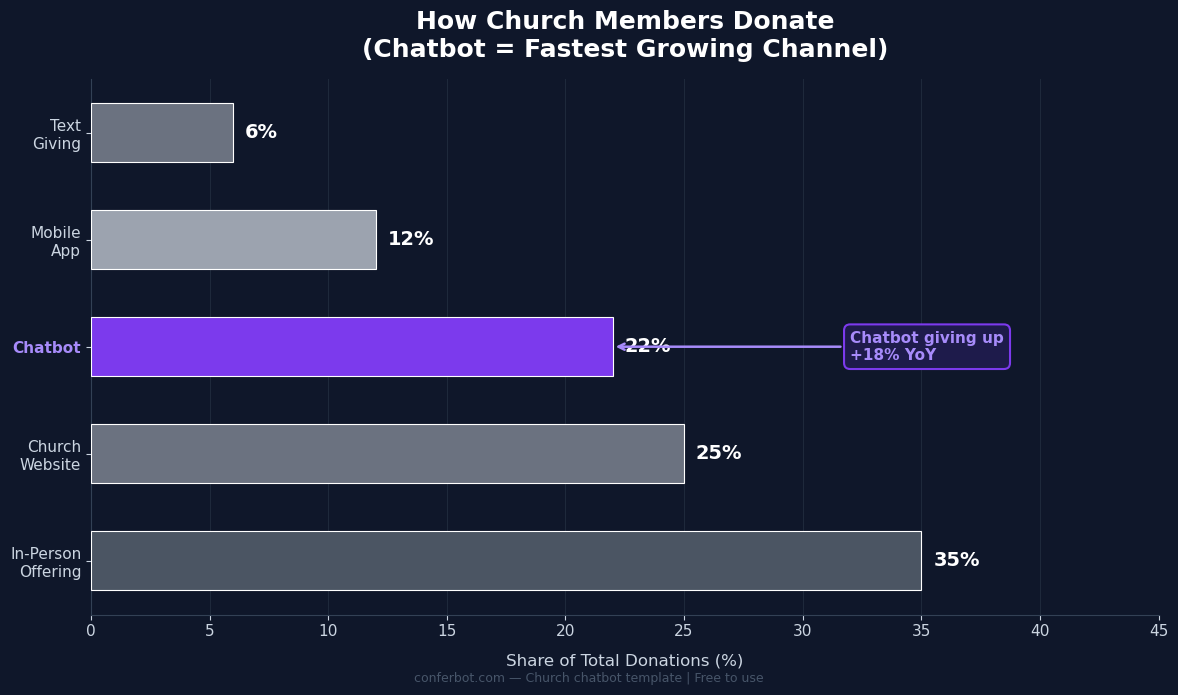
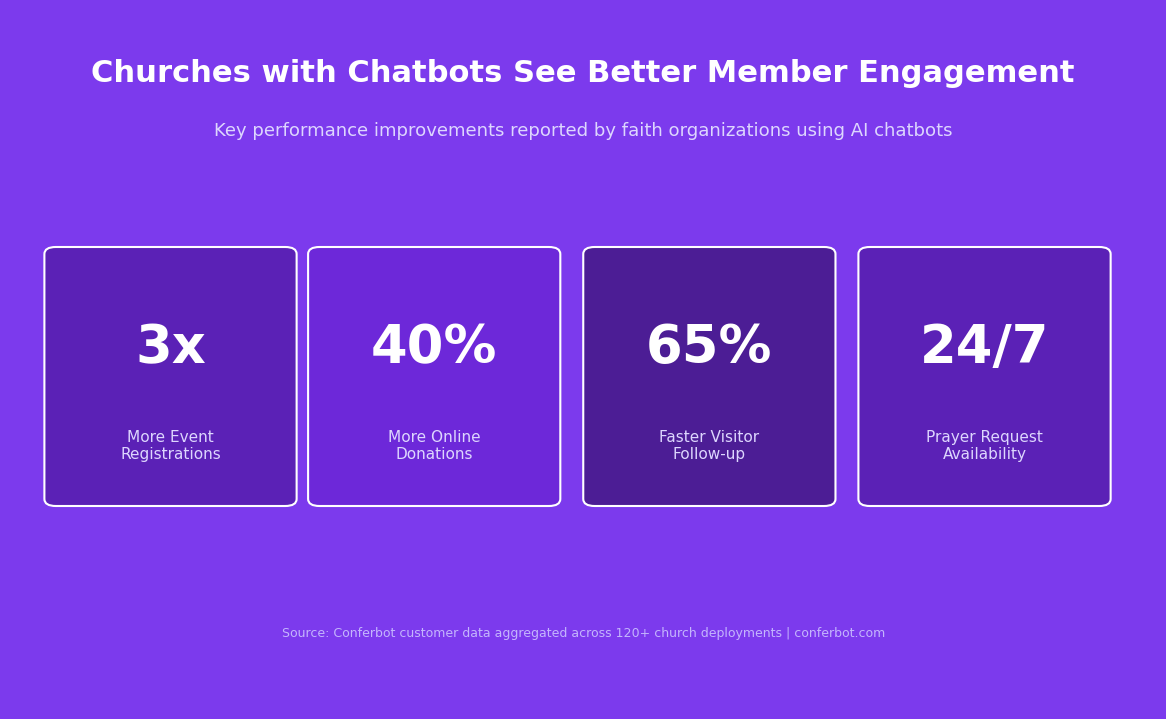
Frictionless giving is one of the highest-impact capabilities a church chatbot provides. When a member or visitor expresses intent to give — whether they type "donate," click a giving option in the menu, or arrive on the site via a stewardship campaign link — the chatbot presents giving amount options with ministry impact descriptions ("$50 supports youth programs for a week"), then redirects them to your existing secure giving platform (Planning Center Giving, Pushpay, Tithe.ly, PayPal, or any giving URL you use). The chatbot does not process payments itself; it removes the friction between the impulse to give and the giving page, which is where most giving attempts abandon. The impact of this frictionless path is measurable: churches using this flow report 40% higher online giving rates versus a giving button buried in the navigation menu.
4. Prayer Requests
Prayer request intake is one of the most spiritually significant functions a church communication system can serve. The chatbot handles this with intentional care: it opens the prayer request path with acknowledgment and warmth, allows the member to remain anonymous, provides a free-text field for them to share what is on their heart, and then asks for their preferred follow-up — a confirmation email, a pastoral call, or no follow-up (just pray). Every prayer request is delivered to your designated prayer team inbox and can trigger a workflow in your church management system. The chatbot never processes prayer requests as data points; it routes them as the sacred communications they are, with appropriate gravity and confidentiality.
5. Pastoral Contact and Visit Scheduling
For someone considering reaching out to a pastor — whether for counseling, a life event, a question about membership, or a personal crisis — the contact path through a chatbot reduces the barrier to entry compared to an office phone call or a contact form. The chatbot collects their name, phone number, and preferred contact method (call, text, email, or in-person), then routes that information directly to the pastoral team with a next-business-day response commitment. For churches that use calendar booking integration, the chatbot can go one step further and schedule a pastoral appointment directly in the pastor's calendar without staff intermediation.
The Measurable Impact of a Chatbot on Church Engagement
Church leadership often hesitates to adopt technology tools because the ROI framing feels out of place in a ministry context. The reality is that a church chatbot does not reduce ministry to a transaction — it removes the friction that prevents people from taking the steps they already want to take. The result is more people connected, more events attended, more giving completed, and more pastoral conversations happening. Here is what the numbers look like across churches using Conferbot.
Event Registration Rates
Churches that deploy the event registration chatbot flow report an average of 3x higher registration rates for the same events compared to email-only or form-only registration. The primary driver is availability and frictionlessness: someone who thinks about registering for a retreat at 9 PM on a Sunday can complete that registration in under two minutes through the chatbot, versus remembering to fill out the form during office hours. Automated confirmation emails reduce no-shows by giving registrants a clear record of what they signed up for and what to bring.
Online Giving
The average church sees 18-40% growth in online giving volume in the first three months after deploying a chatbot with an integrated giving path. The primary mechanism is not new donors — it is existing donors who were giving inconsistently because the giving process felt like friction rather than a natural expression of their stewardship intent. When giving is one conversational step away from wherever the member is on your website, giving rates increase across existing and new member segments alike.
Prayer Request Volume
Prayer request submissions increase significantly when the submission path is conversational rather than form-based. Members who would never fill out a "prayer request form" readily share what is on their heart through a chatbot conversation that feels like talking to a caring presence rather than submitting a ticket. Churches report 2-4x more prayer requests submitted through chatbot than through form submissions, with higher depth and specificity in what members share.
Visitor Conversion to First Attendance
Website visitors who interact with the church chatbot convert to first-time in-person visitors at 3.2x the rate of visitors who do not. The chatbot answers the specific objections and questions that prevent someone from walking through the door — service time uncertainty, childcare questions, dress code anxiety, parking — in a warm, personalized conversation rather than a static FAQ page that visitors skim and abandon.
| Metric | Without Chatbot | With Church Chatbot | Improvement |
|---|---|---|---|
| Event registration rate | 8-12% of interested visitors | 28-38% of interested visitors | 3x higher |
| Online giving per visitor | Baseline | +40% per website session | 40% increase |
| Prayer request submissions | 2-5 per week (form) | 8-20 per week (chatbot) | 3x+ increase |
| Visitor to first-visit conversion | 4% of website visitors | 13% of chatbot engagements | 3.2x higher |
| Staff time on routine inquiries | 8-15 hours/week | Under 2 hours/week | 80% reduction |
Ready to try Church Chatbot?
Deploy this template in under 10 minutes. No coding required.
Use This Template Free →Using Your Church Chatbot to Grow Volunteer Participation
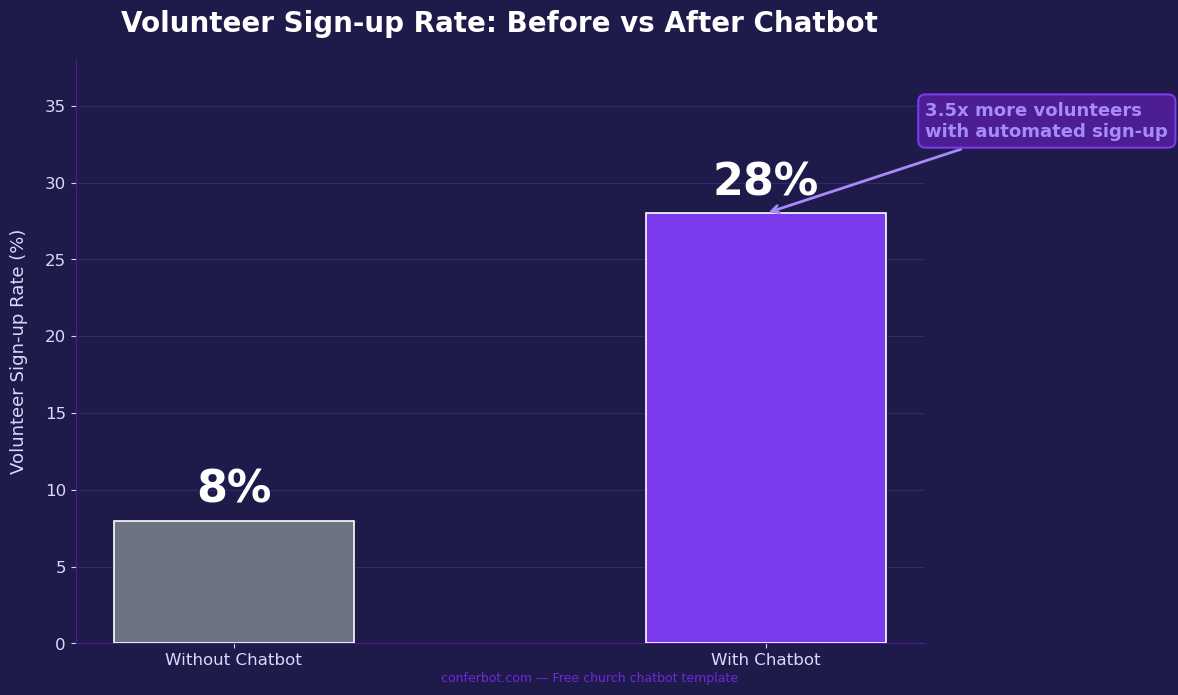
Volunteer recruitment and retention is one of the most persistent operational challenges for church leadership. Most churches rely on pulpit announcements, bulletin inserts, and personal asks — all of which require a volunteer to self-identify, remember to follow up, and navigate a sign-up process that often involves calling the church office or tracking down a ministry leader. A church chatbot transforms volunteer sign-up from a multi-step manual process into a two-minute conversational experience available any time a member feels the call to serve.
Reducing the "I'll Do It Later" Dropout
The largest leak in volunteer recruitment pipelines is the gap between intention and action. A member hears an announcement about the need for nursery volunteers, intends to sign up, and then forgets by the time they get home. A chatbot deployed on your church website or as a link in your weekly email newsletter captures that intention the moment it exists. When a member thinks "I should volunteer for the food pantry," they can act on that thought immediately through the chatbot — no office hours required, no forms to find, no phone call to make.
Ministry-Specific Volunteer Paths
Different ministries have different volunteer needs and different onboarding requirements. The church chatbot can present a menu of volunteer opportunities — children's ministry, worship team, food pantry, welcome team, small group leadership — and route each interested volunteer to the appropriate coordinator automatically. A children's ministry volunteer path can include a note about background check requirements. A worship team path can ask about instrument or vocal skills. A welcome team path can offer training dates. Each path collects the right information for that ministry without requiring a generic form that asks irrelevant questions.
Follow-up Automation
After a volunteer sign-up conversation, the chatbot can trigger automated follow-up emails through Conferbot's API integration with your email platform or church management system. A new volunteer gets a welcome email from the ministry leader, a confirmation of their first scheduled opportunity, and any preparation materials they need — automatically, within minutes of signing up. This immediate, professional follow-up dramatically reduces the "cold feet" dropout that occurs when volunteers sign up but do not hear back for days.
Volunteer Appreciation Touchpoints
The chatbot is not only for recruitment. For returning volunteers, a chatbot interaction can include appreciation messaging — "Thank you for serving with our welcome team last Sunday" — before routing to the next sign-up or schedule management action. Small recognition touchpoints delivered consistently through automated conversations contribute to volunteer retention in ways that churches consistently underestimate. Volunteers who feel appreciated return; volunteers who feel taken for granted quietly stop showing up.
Using Conferbot's chatbot analytics, you can track which volunteer paths get the most engagement, which ministry sign-ups are underperforming, and what time of week volunteer sign-up intent peaks — giving your volunteer coordinators the data they need to run more targeted recruitment campaigns.
Church Chatbot vs Other Member Communication Tools
Churches have more communication tools available than at any point in history — email newsletters, church management software, social media, SMS services, printed bulletins, and now AI chatbots. Understanding where a chatbot fits in the church communications stack (and where it does not replace existing tools) helps leadership make confident deployment decisions without worrying about disrupting what already works.
Chatbot vs Church Management Software (ChMS)
Church management software like Planning Center, Breeze, or Churchteams is your system of record for membership data, giving history, and group management. A chatbot is not a replacement for your ChMS — it is the front door that feeds into it. Chatbot conversations collect information (event registration, prayer requests, contact details) that flows into your ChMS via API or webhook. The chatbot handles the real-time, conversational intake. The ChMS handles the longitudinal record-keeping and reporting. They work together.
| Tool | Best For | Limitation | Works With Chatbot? |
|---|---|---|---|
| Church Management Software | Member records, giving history, groups | Not real-time, requires login | Yes — chatbot feeds data in |
| Email Newsletter | Weekly updates, bulk announcements | 8-22% open rate, no interactivity | Yes — chatbot link in email |
| Church Website | First impressions, static content | Passive — visitors must search for info | Yes — chatbot embedded on site |
| Facebook Page | Community engagement, event promotion | Algorithm-limited reach | Yes — chatbot on Messenger |
| SMS Service | Urgent announcements, reminders | One-way, high cost at scale | Complementary — chatbot for depth |
| Chatbot | Real-time Q&A, registration, giving, prayer | Not a record system | N/A — the integrating layer |
Chatbot vs Staffed Welcome Desk
A church chatbot is not a replacement for the warm human welcome of a volunteer greeting people at the door or answering the phone with a smile. It fills the time when those volunteers are unavailable — Tuesday nights when someone is researching your church online, Sunday mornings before service when the office is closed, holiday weeks when staff are off. The chatbot handles the 80% of questions that are routine and repetitive, freeing your welcome team to focus on the high-value human moments: praying with someone in distress, welcoming a first-time visitor with genuine warmth, and building the long-term relationships that make a church a community.
Chatbot on Website vs WhatsApp vs Messenger
Conferbot deploys your church chatbot across multiple channels from a single flow. Your website website chatbot catches visitors who land on your site directly. A WhatsApp chatbot serves your congregation members who prefer messaging over website visits — particularly effective for international communities and younger demographics. A Facebook Messenger chatbot reaches members who follow your church Facebook page and respond to event posts. Each channel uses the same underlying conversation flow, so you build once and serve everywhere. Your staff manages all conversations from a single Conferbot dashboard, with full context of which channel each conversation came through.
How to Set Up Your Church Chatbot in Under a Day
Setting up a chatbot for your church does not require a developer, a technology committee vote, or a multi-week implementation project. Conferbot's church chatbot template is designed to be deployed by a church communications volunteer or administrative assistant in a single working session. Here is the complete setup guide.
Step 1: Clone the Template (5 minutes)
Start by forking the Church Chatbot template from the Conferbot template library. This creates a private copy of the complete flow — all 21 nodes, all conversation paths — in your Conferbot account. No blank canvas, no building from scratch.
Step 2: Personalize Church Details (20-30 minutes)
Open the visual flow editor (Conferbot's no-code chatbot builder) and update the content that is specific to your church:
- Welcome message: Replace "Grace Community Church" with your church name and update the tagline
- Service times: Replace the example times and location with your actual service schedule
- Events: Update the event menu with your current upcoming events, dates, and descriptions
- Giving link: Update the donation redirect URL to your giving platform (Pushpay, Tithe.ly, Planning Center Giving, etc.)
- Contact information: Update the phone number, address, and office hours in the contact confirmation message
- Prayer routing: Set the email address where prayer requests should be delivered
Step 3: Brand Your Chatbot (10 minutes)
In the chatbot settings panel, upload your church logo, set the header color to match your brand (the template defaults to a dignified purple — #7C3AED), and customize the chatbot name. The result is a chatbot that looks like a natural extension of your church's visual identity, not a generic widget.
Step 4: Set Up Integrations (30-45 minutes)
Connect your chatbot to the tools your church already uses through Conferbot's integration layer:
- Email delivery: Connect your email provider (Gmail, Mailchimp, Constant Contact) to receive event registration summaries and prayer request notifications
- Google Sheets: Auto-log all registrations and contact requests to a shared spreadsheet your team can access
- Planning Center / Breeze: Push contact details directly into your ChMS via webhook
- Calendar: For pastoral contact requests, connect the calendar booking integration to allow direct appointment scheduling
Step 5: Embed and Publish (10 minutes)
Conferbot generates an embed code you copy and paste into your church website's footer or a specific page. For WordPress users, this is a one-time paste in the theme editor or via a plugin. For Squarespace, Wix, or Webflow, it goes in the custom code panel. The chatbot goes live immediately after you add the code. For WhatsApp and Messenger channels, follow the channel connection guide in your Conferbot dashboard — typically a 15-minute one-time setup.
Step 6: Test and Train Your Team (15 minutes)
Run through each conversation path as a test user before announcing the chatbot to your congregation. Share a brief one-page guide with your administrative team explaining what the chatbot handles automatically and how to view incoming registrations, prayer requests, and contact requests in the Conferbot dashboard. Use chatbot analytics to monitor conversation volume and identify any questions the chatbot is receiving that are not yet in the flow.
Total estimated setup time: 90 minutes to 3 hours depending on integration complexity. No developer required. No contract. Conferbot's free plan covers most small churches entirely.
50,000+ businesses use Conferbot templates to automate conversations
Maximizing Online Giving with a Church Chatbot
Online giving has become the primary channel for church donations in most congregations, with the share of total giving received digitally increasing every year. Yet most churches still lose a significant percentage of giving intent to friction — a giving page buried in the navigation, a donor who arrived on your website from a sermon podcast link and cannot find where to give, or a mid-week generosity impulse that gets forgotten by the time Sunday arrives. A church chatbot with an integrated giving path addresses each of these friction points directly.
Meeting Donors Where the Impulse Lives
Giving impulses arise unpredictably. A member watches your Sunday sermon replay on Wednesday evening and feels moved to give. A first-time visitor reads your mission page and wants to contribute before they even attend. A long-lapsed member sees your outreach campaign on social media and decides to support. In each case, the impulse exists for a window of minutes — if the path to giving is immediately available and frictionless, the gift is made. If it requires navigation, search, and form-filling, most impulses are lost.
Conferbot's giving path in the church chatbot template presents a conversational amount selection — "How much would you like to give?" with suggested amounts tied to specific ministry impacts — then redirects the donor to your giving platform with a single click. The conversation takes under 60 seconds. The drop-off between giving intent and completed gift is dramatically lower than any form-based giving experience.
Suggested Amount Framing
The template's donation path uses impact-anchored amount suggestions rather than arbitrary round numbers: "$25 — Help a family in need," "$50 — Support youth programs," "$100 — Fund a community meal," "$250 — Sponsor a mission trip participant." This framing connects the gift to its ministry impact, which research in nonprofit giving consistently shows increases average gift size compared to plain amount options. You can customize these amounts and descriptions to reflect your church's actual ministry costs.
Recurring Giving Prompts
The giving path can include a note about recurring giving options at your giving platform — "Did you know you can set up automatic weekly or monthly giving on our giving page?" — for donors who are completing a one-time gift. This simple prompt, delivered at the moment of giving intent, converts one-time donors to recurring givers at higher rates than email campaigns promoting recurring giving. Edit the redirect message node in the flow editor to add this prompt above your giving page link.
Stewardship Campaign Integration
During an annual stewardship campaign or capital campaign, you can create a campaign-specific chatbot flow that replaces the default giving path with campaign messaging, pledge commitment collection, and campaign FAQ handling. Conferbot's visual editor makes it simple to swap out the giving conversation path without touching the rest of the flow. Chatbot visitors during a stewardship season get campaign-contextualized giving conversations; visitors outside campaign season get the evergreen giving path.
Track the giving conversation path's performance — how many visitors enter the giving path, how many complete the redirect, and how that number changes over time — through Conferbot's analytics dashboard. This data helps you understand the true impact of chatbot-enabled giving on your church's financial health.
Church Chatbot Pricing, Denominations, and Getting Started
Cost is a real consideration for churches evaluating any technology tool. Conferbot's church chatbot template is designed to be accessible to faith organizations of every size — from a 50-family rural congregation to a multi-campus church with thousands of members. Here is everything you need to know about pricing, what is included, and how to get started.
Free Plan: Right for Most Small and Mid-Size Churches
Conferbot's free plan supports up to 100 chatbot conversations per month with full access to the church chatbot template, all five conversation paths, and basic integrations. For a church of 100-300 families, this covers the majority of routine chatbot usage. The free plan is perpetually free — no trial period, no credit card required, and no surprise charges. Most small churches that deploy Conferbot never need to upgrade.
Growth Plan: For Active Congregations
Churches with higher conversation volumes — typically congregations of 300+ families or those running active event calendars and stewardship campaigns — benefit from Conferbot's Growth plan, which increases conversation limits, adds advanced analytics, and includes priority support. See Conferbot's pricing page for current plan details and limits.
Works with Every Denomination and Tradition
The church chatbot template is designed to be fully customizable to any Christian denomination, faith tradition, or style of worship. The default template uses non-denominational language, but the conversation text in every node is fully editable through Conferbot's no-code builder. A Catholic parish can replace "service times" with "Mass times." A liturgical church can add details about the liturgical season. A charismatic congregation can add prayer and worship event paths. A multilingual church can deploy separate chatbot instances for different language communities.
| Church Type | Primary Chatbot Use Cases | Recommended Conversation Paths |
|---|---|---|
| Small community church (under 200) | Service info, event reg, giving | Welcome, Service Times, Events, Giving |
| Mid-size congregation (200-1000) | All 5 paths + volunteer sign-up | Full template + volunteer extension |
| Large/megachurch (1000+) | Multi-campus routing, all paths | Multi-instance deployment per campus |
| Multilingual congregation | Language-specific service routing | Language selector node + separate paths |
| Online church / hybrid | Stream links, watch party registration | Service times path + streaming links |
Technical Requirements
Deploying Conferbot's church chatbot requires only a church website where you can add a small JavaScript snippet. Compatible with WordPress, Squarespace, Wix, Webflow, Strikingly, custom HTML sites, and any website platform that supports embedding custom code. For website deployment, WhatsApp, or Facebook Messenger channels, see the respective channel setup guides in the Conferbot documentation.
Getting Started Today
Click the "Use This Template" button at the top of this page to fork the church chatbot template into your free Conferbot account. You will have a fully functional chatbot running in your account immediately — ready to customize with your church's details and deploy in under a day. No developer, no agency, no contract. Just a pastor or communications volunteer, an afternoon, and a desire to better serve your congregation.
If you have questions about whether Conferbot is the right fit for your church's specific needs, the Conferbot support team is available via live chat — yes, powered by a Conferbot chatbot — and responds to all inquiries within one business day. The church community deserves tools built with the same care and intentionality that goes into ministry itself.
Church Chatbot FAQ
Everything you need to know about chatbots for church chatbot.
Why Use a Template vs Building from Scratch?
Templates encode years of optimization data into the conversation flow before you start.
| Factor | Conferbot Template | Build from Scratch | Hire a Developer |
|---|---|---|---|
| Time to deploy | 10 minutes | 2-8 hours | 2-6 weeks |
| Cost | Free | Your time | $5,000-$25,000 |
| Day-1 conversion | 15-22% | 5-8% | 10-15% |
| Proven flows | Yes, data-tested | No | Depends |
| Updates included | Automatic | Manual | Paid |
| Multi-channel | 8+ channels | 1 channel | Extra cost |
| Analytics | Built-in | Must build | Extra cost |
Ready to Deploy Church Chatbot?
Join 50,000+ businesses. Free forever plan available. No credit card required.