
Virtual Shopping Assistant
Free E-commerce And Retail Chatbot Template
An AI-powered virtual shopping assistant that guides customers through product discovery. It asks about preferences, budget, and style to deliver personalized product recommendations - turning browsers into buyers with a conversational shopping experience.



How this template opens - rendered from its flow. Use the interactive preview to click through the full conversation.
What Is a Virtual Shopping Assistant Chatbot?
A virtual shopping assistant chatbot is an AI-powered conversational tool that replicates the experience of an in-store sales associate directly inside your e-commerce website or messaging channels. It greets shoppers, understands their preferences, asks clarifying questions, and guides them from browsing to purchase through a natural dialogue -- all without requiring any human intervention.
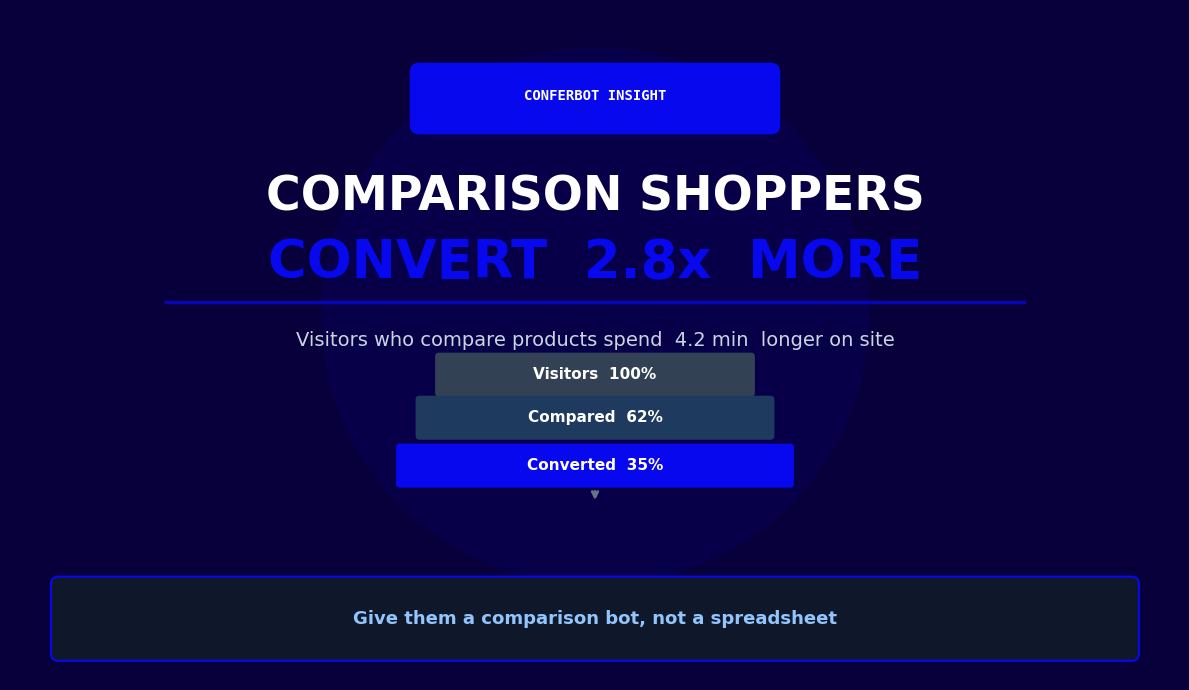
Unlike a basic FAQ bot or a search bar, a virtual shopping assistant actively participates in the shopping journey. It does not wait to be asked the right question. Instead, it engages proactively, helps shoppers articulate what they want even when they are not sure themselves, and presents curated product selections that match their lifestyle, budget, and intent. The result is an experience that feels closer to being helped by a knowledgeable friend than navigating a product grid alone.
In 2026, average e-commerce conversion rates remain low. The overwhelming majority of site visitors leave without buying. A large portion of that abandonment is not price-driven -- it is decision paralysis. Shoppers cannot find the right product, do not know which size to choose, or feel unsure whether an item fits their specific need. A virtual shopping assistant directly solves these problems by guiding shoppers through exactly the decision they are trying to make.
Conferbot's AI chatbot builder enables you to deploy a fully functional virtual shopping assistant that integrates with your product catalog, understands natural language through NLP processing, and delivers personalized recommendations across your website, WhatsApp, and Instagram. The setup requires no coding and the bot can be customized to match your brand voice, product categories, and conversion goals.
This page covers how a virtual shopping assistant works, the key features that drive results, platform-specific integrations for Shopify and WooCommerce, industry use cases across retail categories, conversion benchmarks, and a step-by-step deployment guide.
How a Virtual Shopping Assistant Works
The conversation flow of a virtual shopping assistant mirrors the way a skilled retail associate guides a customer through a store. Each step is designed to reduce friction, narrow choices, and build the shopper's confidence toward making a purchase.
Step 1: Proactive Engagement
The assistant initiates contact rather than waiting passively for the shopper to type a question. It can greet first-time visitors with an onboarding message ("Looking for something specific today, or browsing for inspiration?"), re-engage returning visitors with personalized prompts based on browsing history, and trigger conversations when a shopper has spent time on a product page without converting. This proactive behavior alone typically increases chatbot engagement rates substantially compared to passive widget placements.
Step 2: Preference Discovery
The assistant asks structured but conversational questions to understand what the shopper needs. For a fashion retailer this means asking about occasion, style preference, size, and budget. For a home goods store it means understanding room style, dimensions, and color palette. For electronics it means exploring use case, technical requirements, and price ceiling. The questions are calibrated to the product category and adapt based on the answers, avoiding unnecessary queries that slow the interaction.
Step 3: Personalized Product Matching
Using the gathered preferences, the assistant queries your product catalog through API integration and returns a curated shortlist. The Conferbot AI engine ranks results by relevance score, factoring in the user's stated priorities, current inventory levels, and bestseller status. Products are presented with images, key specifications, pricing, and a natural-language explanation of why each was selected -- "This jacket fits your preference for a minimalist style and is currently 20% off."
Step 4: Objection Handling and Enrichment
After presenting recommendations, the assistant stays in the conversation to handle follow-up questions: availability in a specific size, material composition, care instructions, return policy, or shipping timeline. It can surface matching accessories, explain the difference between two similar options, or offer a size guide for items where fit is critical. This layer of support directly reduces the "I'll think about it" abandonment pattern.
Step 5: Conversion and Wishlist Actions
When the shopper is ready to act, the assistant provides a direct path to checkout, adds items to cart, or saves products to a wishlist for later. It can also trigger follow-up messages via WhatsApp or email if the shopper wants to revisit the selection after thinking it over -- recovering sales that would otherwise be lost to time.
Step 6: Post-Purchase Engagement
The assistant's role does not end at purchase. It can deliver order confirmations, track shipping status, prompt post-purchase reviews, and surface complementary products in a follow-up message. This post-purchase loop increases repeat purchase rates and lifetime customer value.
Key Features: Product Recommendations, Size Guides, and Wishlists
A virtual shopping assistant derives its value from a specific set of features that address the most common reasons shoppers fail to convert. Here are the capabilities that matter most and how each one drives measurable business outcomes.
| Feature | What It Does | Impact on Conversion |
|---|---|---|
| Personalized product recommendations | Curates a shortlist from the full catalog based on stated preferences and behavior | Meaningfully higher conversion vs. unaided browsing |
| Size and fit guides | Asks body measurements or device specs and maps to brand sizing charts | Meaningfully reduces size-related returns |
| Wishlist management | Saves items, sends restock alerts and price-drop notifications | Recovers a share of undecided shoppers |
| Bundle and cross-sell suggestions | Recommends complementary items based on the selected product and purchase history | Increases average order value |
| Real-time inventory checks | Confirms size/variant availability before surfacing recommendations | Eliminates dead-end product pages |
| Natural language search | Understands queries like "something cozy for a beach vacation under $80" | Surfaces relevant products much faster than search bars |
| Multi-language support | Conducts shopping conversations in the user's preferred language | Expands addressable global market |
Personalized Product Recommendations
The recommendation engine is the core of the virtual shopping assistant. It does not simply return keyword matches -- it applies the user's stated context (occasion, style, budget, constraints) to rank and curate a shortlist that feels genuinely personal. Conferbot's AI layer enables semantic understanding of preferences, so "something elegant but not too formal" returns appropriate results even when no product in your catalog uses those exact words. Businesses using AI-powered recommendations report conversion rates meaningfully higher than with unaided catalog browsing.
Size and Fit Guides
Sizing uncertainty is one of the most common reasons shoppers abandon fashion, footwear, and sporting goods purchases. A virtual shopping assistant eliminates this friction by collecting the right measurements and mapping them to brand-specific sizing charts. For clothing, the bot asks chest, waist, and hip measurements or their usual size in a reference brand. For footwear, it asks foot length in cm or their size in a popular brand and maps to the store's sizing. For technology accessories, it asks the exact device model and checks compatibility. This interactive size guide meaningfully reduces return rates, which directly improves gross margin.
Wishlists and Recovery Flows
Not every shopper is ready to buy immediately. The assistant offers to save selected products to a wishlist, then sends automated follow-up messages via WhatsApp or email when a wishlist item goes on sale, comes back into stock, or when inventory is running low. These recovery flows convert a meaningful share of "not yet" shoppers into buyers without any manual outreach from your team.
Ready to try Virtual Shopping Assistant?
Deploy this template in under 10 minutes. No coding required.
Use This Template Free →Shopify and WooCommerce Integration
The practical value of a virtual shopping assistant depends entirely on its connection to your store's product data, inventory, and order systems. Conferbot provides native integrations with the two most widely used e-commerce platforms -- Shopify and WooCommerce -- as well as API-level connections for custom and headless commerce setups.
Shopify Integration
Conferbot connects to Shopify through an official app and Shopify's Admin API. Once connected, the chatbot automatically syncs your full product catalog including titles, descriptions, images, variants (size, color, material), pricing, compare-at prices, and inventory levels by location. The sync is bidirectional: when you update a product in Shopify, the chatbot reflects the change within minutes. The integration also reads metafields, enabling the assistant to surface custom attributes like fabric composition, country of origin, or care instructions during the shopping conversation.
For order management, the Shopify integration enables the assistant to check order status by order number or email, handle simple reorder requests, and trigger abandoned cart recovery messages to shoppers who added items but did not complete checkout. The assistant can also apply discount codes during the conversation, creating a seamless promotional experience.
WooCommerce Integration
For WooCommerce stores, Conferbot connects via the WooCommerce REST API using consumer key authentication. The integration supports simple products, variable products (with all variation attributes), grouped products, and external/affiliate products. Product categories, tags, and custom attributes defined in WooCommerce are all available to the chatbot for filtering and matching during recommendations.
WooCommerce integration also supports Conferbot reading product reviews and ratings, which the assistant uses to surface social proof during the shopping conversation ("This is one of our top-rated products for durability, with 4.8 stars from 340 reviews."). Stock status, backorder availability, and low-stock thresholds are read in real time so the assistant never recommends items that are unavailable.
Headless Commerce and Custom APIs
Retailers using headless commerce architectures -- Shopify Hydrogen, Next.js Commerce, or custom storefronts backed by Magento, BigCommerce, or proprietary systems -- can connect to Conferbot through the API integration framework. You define the endpoints for product search, inventory lookup, and cart management. The assistant calls these endpoints in real time during conversations, ensuring every recommendation reflects current catalog state.
Analytics and Data Flow
All shopping conversations generate data that flows into Conferbot's analytics dashboard and can be forwarded to your CRM or analytics stack. You can see which products are most frequently recommended, which products shoppers reject after seeing them, common size or preference queries, and conversion rates by product category. This behavioral data is more granular and actionable than standard e-commerce analytics because it reveals why shoppers made the decisions they did, not just what they clicked.
Industry Use Cases Across Retail Categories
Virtual shopping assistants are applicable across virtually every retail vertical, but the specific value proposition and conversation design differ by category. Here are the highest-impact use cases and how they are implemented in practice.
| Retail Category | Primary Assistant Role | Key Questions Asked | Conversion Lift |
|---|---|---|---|
| Fashion and Apparel | Personal stylist | Occasion, style, size, budget | Highest |
| Beauty and Skincare | Beauty advisor | Skin type, concern, sensitivity, budget | High |
| Consumer Electronics | Tech consultant | Use case, compatibility, specs, budget | Moderate |
| Sporting Goods | Activity specialist | Activity type, experience level, body measurements | Solid |
| Home Furnishings | Interior design consultant | Room dimensions, existing style, color palette | Moderate |
Fashion and Apparel
Fashion is the category where virtual shopping assistants show the most dramatic impact on return rates and conversion. The assistant asks about occasion ("Is this for a work event, casual wear, or a formal occasion?"), style preference, and size before surfacing recommendations. For brands with lookbooks or curated collections, the assistant can guide shoppers through style narratives rather than individual products, increasing basket size. Personalized styling recommendations convert at a substantially higher rate than standard search-driven browsing in this category.
Beauty and Skincare
Beauty purchases require understanding skin type, tone, concerns, and sensitivity before a recommendation is meaningful. A virtual shopping assistant acts as a virtual beauty advisor: it asks about skin type (oily, dry, combination, sensitive), primary concern (hydration, anti-aging, acne control), and budget, then recommends products and explains how each addresses the stated concern. For makeup, foundation shade matching through conversational questions significantly reduces the uncertainty that stops online beauty shoppers from committing to a purchase.
Consumer Electronics
Electronics shoppers benefit from a virtual assistant that can translate technical specifications into practical outcomes. Instead of confronting a shopper with processor benchmarks and RAM figures, the assistant asks "What will you mainly use this laptop for?" and maps the answer to relevant specs. It handles compatibility questions (will this monitor work with my laptop?), accessory recommendations, and protection plan suggestions within the same conversation. See also our e-commerce and retail templates for more electronics-specific flows.
Sporting Goods and Outdoor Equipment
Sporting goods purchases are highly dependent on the buyer's activity level, experience, and physical requirements. An assistant for a running store asks about terrain, weekly mileage, pronation type, and foot width before recommending shoes. An assistant for outdoor gear asks about the type of trip, expected conditions, and pack weight tolerance before suggesting a tent or sleeping bag. This consultative approach reduces the overwhelm of large sporting goods catalogs and dramatically reduces returns driven by poor fit-to-activity matches.
Home Furnishings and Decor
Home purchases involve multiple constraints: room dimensions, existing furniture style, color palette, and budget. A virtual shopping assistant collects these constraints conversationally, then filters your furniture and decor catalog to products that actually fit. The assistant can ask the shopper to describe their current room or select from style categories, then surface coordinated product sets rather than individual items. This approach increases basket size through coordinated set recommendations.
Across all of these categories, the common thread is that a virtual shopping assistant replaces passive browsing with an active, guided discovery process that mirrors expert in-store service and consistently converts at higher rates.
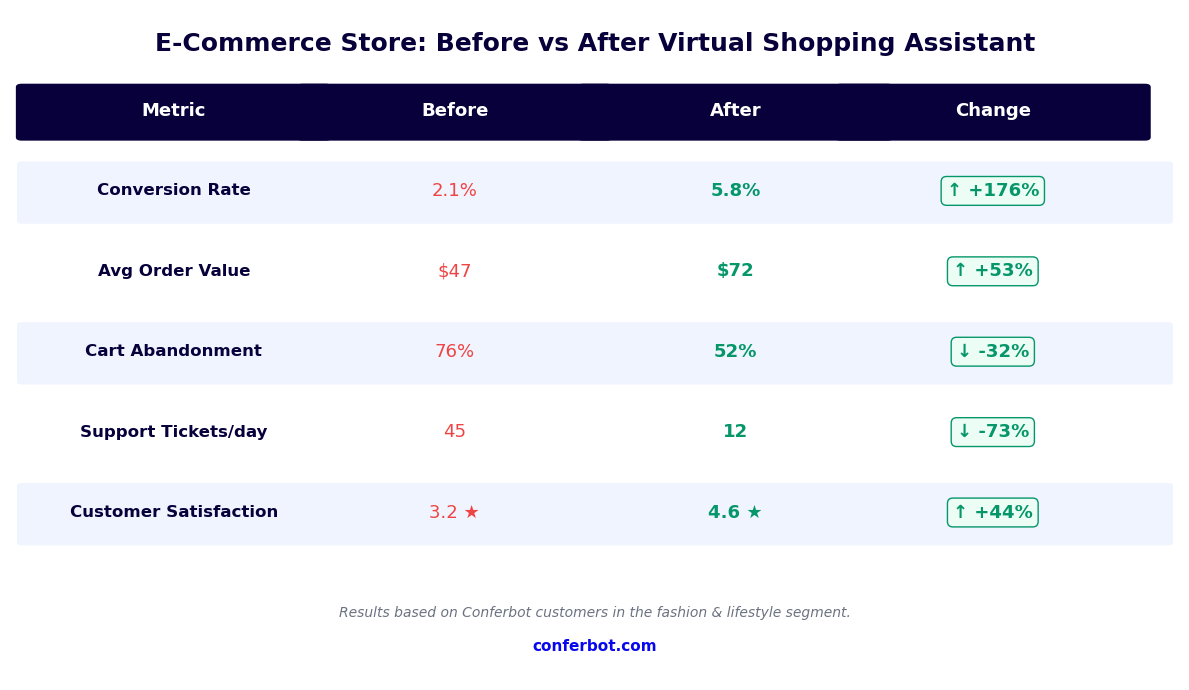
Conversion Data and Business Impact
The decision to deploy a virtual shopping assistant is ultimately a revenue decision. Here is what the performance data shows across businesses that have implemented conversational shopping experiences on their e-commerce sites.
Conversion Rate Improvement
Shoppers who engage with a virtual shopping assistant convert at rates meaningfully higher than shoppers who navigate independently. The lift is consistent across retail categories, though the magnitude varies: fashion and beauty see the highest lifts because these purchases are highly dependent on personal guidance, while electronics and home goods see more moderate lifts driven primarily by objection handling and compatibility assurance. The baseline conversion rate of your site affects the absolute improvement, but the relative lift is consistent.
Average Order Value
Virtual shopping assistants increase average order value through two mechanisms: upsell to better-fit (and typically higher-priced) products, and cross-sell of complementary items. Businesses report a meaningful AOV increase among bot-assisted shoppers. The cross-sell mechanism is particularly effective because recommendations are contextual -- a customer buying a specific camera is suggested the compatible battery grip and memory card, not a generic "customers also bought" carousel.
Return Rate Reduction
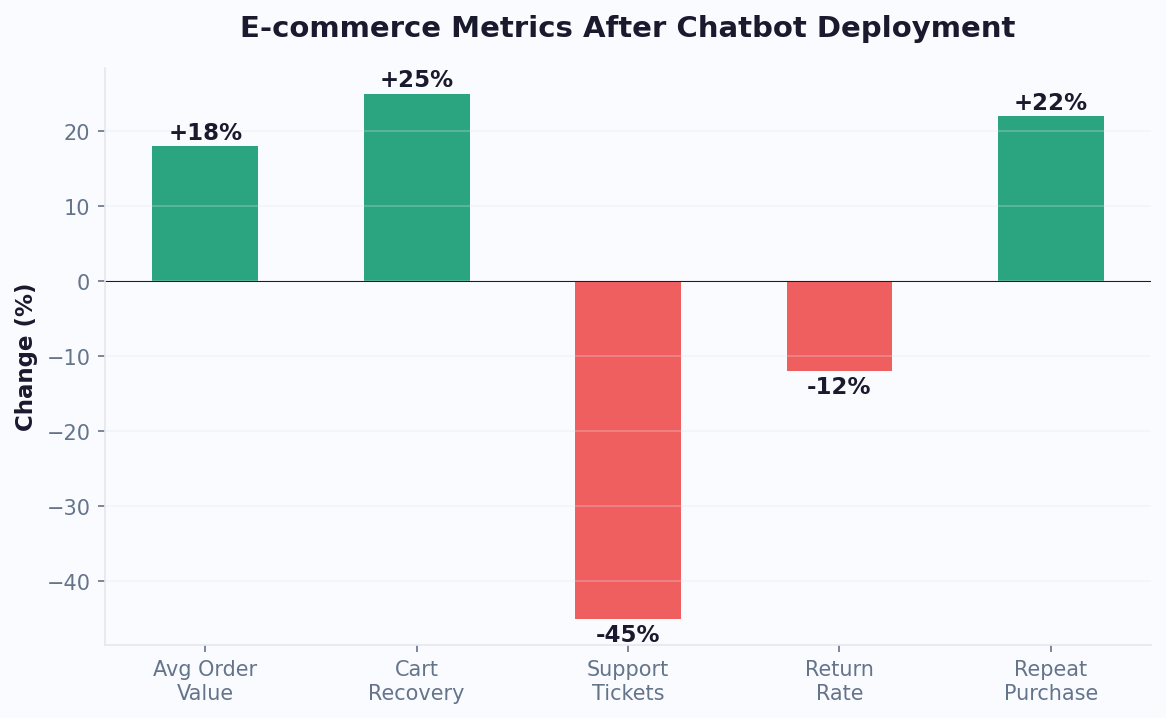
Returns are one of the most significant margin destroyers in e-commerce, and return rates vary widely by category, with fashion typically running highest and home goods typically lowest. Businesses using virtual shopping assistants -- particularly those with integrated size guides and detailed product matching -- report meaningful return rate reductions. Model the margin impact for your own business by applying your return reduction estimate to your actual return volume and average reverse-logistics cost per return.
Cart Abandonment Recovery
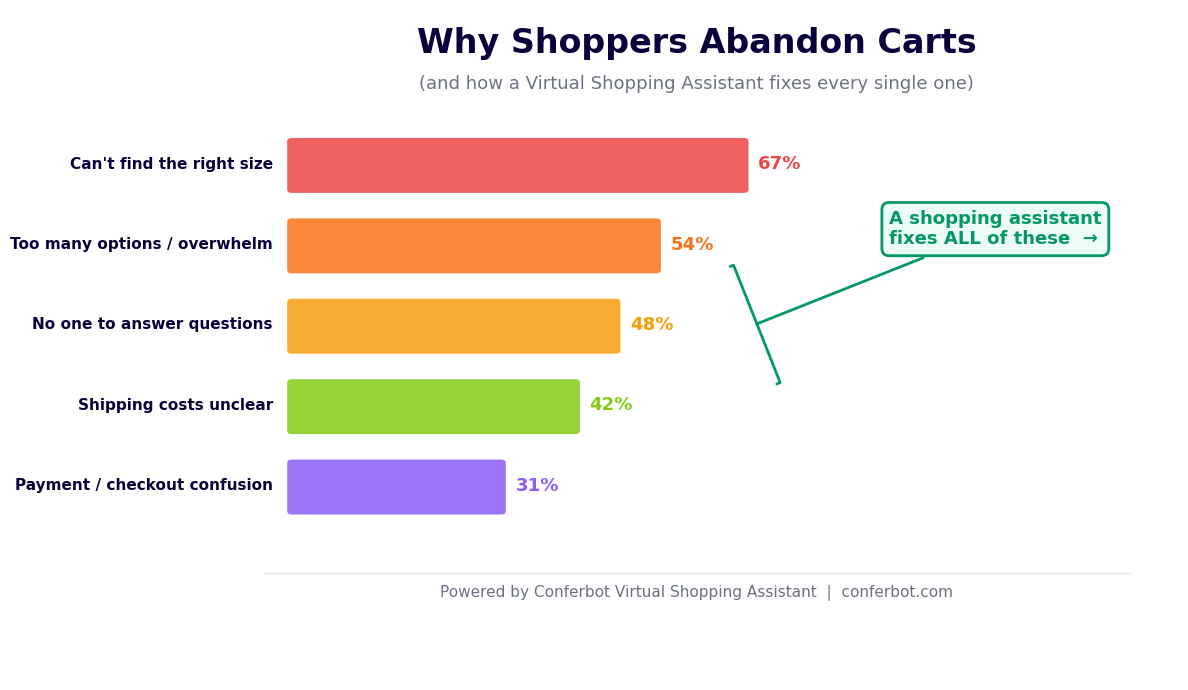
Global cart abandonment rates run high across e-commerce. Virtual shopping assistants reduce initial abandonment by resolving questions before the shopper leaves, and recover some of the remaining abandonment through wishlist follow-up and reengagement messages via WhatsApp and email. Businesses using chatbot-driven abandonment recovery recover a meaningfully higher share of abandoned carts compared to traditional email-only recovery sequences.
Customer Support Cost Reduction
Pre-sale questions -- "Which size should I order?", "Does this come in navy?", "What is the return policy?" -- account for a large share of e-commerce support volume. A virtual shopping assistant handles all of these queries automatically. Businesses deploying Conferbot's assistant report a substantial reduction in pre-sale support tickets, freeing customer service teams to focus on complex post-sale issues. Use the chatbot ROI calculator to estimate the specific savings for your business.
businesses worldwide use Conferbot templates to automate conversations
Setup Guide: Deploying Your Virtual Shopping Assistant
Deploying a virtual shopping assistant with Conferbot's no-code builder follows a structured process that most teams complete within one to two business days. Here is the step-by-step guide.
Step 1: Load the Template and Configure Branding
Start from the Virtual Shopping Assistant template in the Conferbot template library. The template includes pre-built conversation flows for preference discovery, product recommendation, size guidance, wishlist management, and post-purchase follow-up. Customize the bot's name, avatar, greeting message, and color scheme to match your brand. Adjust the tone (conversational, formal, playful) to fit your brand voice using the conversation editor without writing any code.
Step 2: Connect Your Product Catalog
For Shopify stores, install the Conferbot app from the Shopify App Store and authorize the connection. For WooCommerce, add the Conferbot plugin and enter your REST API credentials. For custom setups, configure the API endpoint mappings in Conferbot's API integration panel. Run a sync test to confirm that product names, prices, variants, and images are loading correctly into the bot's knowledge base.
Step 3: Configure Product Categories and Attributes
Define which product attributes are relevant for each category in your catalog. A fashion store needs size, color, occasion, and style. An electronics store needs compatibility, use case, and technical tier. Map these attributes to the conversation flow's discovery questions so the bot collects the right information before making recommendations. Set up any custom size guide rules for categories where sizing is a major purchase barrier.
Step 4: Set Up Wishlist and Recovery Flows
Configure the wishlist capture mechanism -- the bot asks for an email or phone number when a shopper saves an item. Set up automated follow-up sequences: a price-drop alert when a wishlist item goes on sale, a low-stock notification when inventory falls below a threshold, and a reengagement message if the shopper has not returned within a set number of days. These flows run automatically once configured.
Step 5: Deploy Across Channels
Embed the assistant on your website using Conferbot's JavaScript snippet -- one line of code placed before the closing body tag. Enable the assistant on WhatsApp, Instagram, and Messenger through the omnichannel settings. For WhatsApp and Instagram, connect your business accounts through the respective platform approvals. Each channel adapts the assistant's display format automatically.
Step 6: Test, Launch, and Iterate
Run end-to-end test conversations covering your main product categories, edge cases (out-of-stock items, unusual size queries, budget below your catalog's lowest price), and channel-specific display on mobile. Launch the assistant and monitor the analytics dashboard daily for the first two weeks. Identify the most common drop-off points in the conversation flow and refine those steps. Most improvements come from expanding the attribute coverage for categories where shoppers ask questions the bot cannot yet answer.
Optimization Tips for Maximum Shopping Conversions
Deploying the assistant is the start, not the finish. The highest-performing virtual shopping assistants are the result of continuous iteration based on conversation data and business context. Here are the optimization strategies that consistently drive the largest improvements in conversion rates and customer satisfaction.
Refine Preference Questions Based on Real Queries
Review the conversation analytics weekly to identify questions shoppers ask that are not covered by your current preference discovery flow. If a high volume of shoppers are asking "Is this sustainable?" or "Can I wash this in a machine?" -- and the bot cannot answer -- those are attributes worth adding to both your product data and your discovery questions. The preference questions that drive the highest conversions are the ones that directly map to the objections that stop people from buying.
Segment Flows by Traffic Source
Shoppers arriving from a paid Instagram ad for a specific product are in a different mindset than someone arriving from a Google search for "best running shoes." Use Conferbot's URL parameter detection to trigger different opening messages and conversation flows based on the source, campaign, or product page the shopper landed on. An ad-driven shopper needs validation and size guidance for a specific item; an organic searcher needs broader discovery assistance. Segmented flows consistently outperform one-size-fits-all conversation design.
Optimize Recommendation Timing
Test different trigger points for proactive engagement. Assistants that trigger immediately on page load tend to feel intrusive and get dismissed. Assistants that trigger after 30-45 seconds on a product page, or when exit intent is detected, reach shoppers at a moment of genuine uncertainty and receive much higher engagement rates. For category pages, triggering after two or more products are viewed indicates active comparison behavior and is an effective engagement point.
Use Bestseller and Social Proof Data
When multiple products match a shopper's criteria equally well, the assistant should surface social proof as a tiebreaker: "This is our most popular option in this category" or "This has a 4.9-star rating from over 500 reviews." Configure the recommendation engine to weight bestseller status and review rating as secondary ranking factors so the bot naturally leads with your highest-performing products when preferences are met by multiple options.
Integrate with Live Chat for Complex Cases
A virtual shopping assistant handles the majority of shopping queries automatically, but some situations require a human touch -- a shopper making a large purchase, a customer with a complex customization request, or a VIP customer who expects white-glove service. Configure the assistant to seamlessly hand off to a human agent via Conferbot's live chat integration when specific triggers are detected: high cart value, repeated back-and-forth without resolution, or explicit requests to speak with a person. The handoff should preserve the full conversation context so the human agent does not start from scratch.
Run Seasonal Flow Variations
Update your shopping assistant's opening messages, featured categories, and recommendation logic for seasonal events: back-to-school, holiday gifting, summer sales, and other relevant periods for your product mix. A shopper visiting in December asking for "something for a friend" needs a gift-finding flow, not a standard preference discovery flow. Seasonal variations show meaningfully higher engagement rates compared to evergreen flows during peak retail periods.
Virtual Shopping Assistant FAQ
Everything you need to know about chatbots for virtual shopping assistant.
Why Use a Template vs Building from Scratch?
Templates give you a proven starting structure instead of a blank canvas.
| Factor | Conferbot Template | Build from Scratch | Hire a Developer |
|---|---|---|---|
| Time to deploy | 10 minutes | 2-8 hours | 2-6 weeks |
| Cost | Free | Your time | Custom dev quote |
| Proven flows | Yes, pre-built | No | Depends |
| Updates included | Automatic | Manual | Paid |
| Multi-channel | 8+ channels | 1 channel | Extra cost |
| Analytics | Built-in | Must build | Extra cost |
Related E-commerce And Retail Templates
Explore more chatbot templates like this one






Learn More About Chatbots
Go deeper on how e-commerce and retail chatbots work and how to pick the right builder.
Ready to Deploy Virtual Shopping Assistant?
Start with a free-forever plan. No credit card required.