
Restaurant Reservation & Ordering Chatbot
Free Food And Beverage Chatbot Template
A smart restaurant reservation chatbot that handles table bookings, party size selection, dietary preferences, and special requests. Streamlines the reservation process with instant confirmation and menu access. Ideal for restaurants, bistros, cafes, and fine dining establishments.


What Is a Restaurant Reservation & Ordering Chatbot?
A restaurant reservation and ordering chatbot is a conversational AI assistant designed for restaurants, cafes, and dining establishments that handles the full spectrum of guest interactions: table reservations, menu browsing with dietary filtering, waitlist management, special event and private dining inquiries, online ordering, and guest feedback collection. It operates 24/7 across your website, WhatsApp, Instagram, Messenger, and Google Business Profile, ensuring that every prospective diner who wants to eat at your restaurant can book a table, explore the menu, or place an order without waiting for a phone call to be answered during a busy dinner rush.
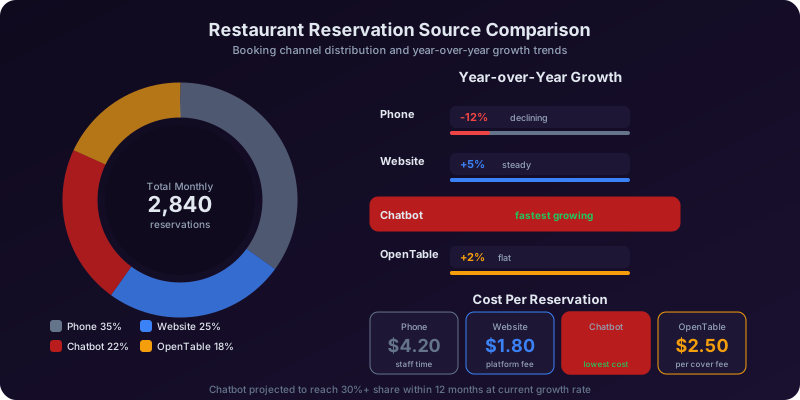
The restaurant industry in 2026 is navigating a fundamental shift in how diners interact with establishments. The National Restaurant Association reports that 67% of diners prefer to make reservations digitally rather than by phone, and 72% want to view a restaurant's full menu with dietary information before deciding where to eat. Yet the majority of independent and small-chain restaurants still rely on phone calls for reservations, a process that fails during peak hours when the host is seating guests and the phone rings unanswered. Industry data shows that restaurants miss an average of 30-45% of reservation calls during dinner service, and each missed call represents a party of 2-4 guests who will simply book at the next restaurant on their list.
The restaurant chatbot changes this dynamic completely. When a diner messages your restaurant -- whether from a Google search result, an Instagram post, or your website -- the chatbot responds in seconds with a conversation tailored to what they need. A couple looking for a Saturday dinner reservation gets available time slots and confirms their table in under a minute. A parent researching restaurants for a child with food allergies gets a detailed breakdown of allergen-safe menu options. A corporate event planner inquiring about private dining gets a guided consultation that captures their event details and budget. An office worker who wants to skip the lunch line places a takeout order and pays without a phone call. Every interaction is handled professionally, consistently, and without making any guest wait on hold.
Built on Conferbot's no-code chatbot builder, the restaurant chatbot requires no technical skills to deploy or manage. Restaurant owners and managers configure menus, reservation availability, policies, and special event options through a visual interface. Deployment across website, social media, and messaging platforms happens in hours. This guide covers the complete chatbot system: reservation management, menu presentation with dietary intelligence, waitlist automation, private dining and event booking, online ordering, and the revenue data from restaurants already using chatbot technology.
How the Table Reservation System Works
The reservation system is the chatbot's core capability, designed to convert the "I want to eat at your restaurant" impulse into a confirmed booking within 60 seconds -- faster than most phones are answered and significantly faster than third-party reservation platforms that require account creation and multiple screens.
Stage 1: Party Size and Date/Time Selection
The chatbot opens the reservation flow with the essential questions: "How many guests?" and "When would you like to dine?" The party size determines which table configurations are available, and the date/time input checks against your reservation system's real-time availability. The chatbot presents available time slots around the requested time: "For a party of 4 this Saturday, I have availability at 6:00 PM, 6:30 PM, 7:15 PM, and 8:00 PM. Which works best for you?" If the exact requested time is not available, the chatbot offers the nearest alternatives rather than simply saying "unavailable" -- a critical conversion technique that retains the guest rather than losing them to a competitor. For large parties (typically 8+), the chatbot notes that the reservation may require a special table arrangement and offers to connect the guest with the manager for confirmation.
Stage 2: Guest Information and Preferences
Once the time is selected, the chatbot collects the guest's name, phone number, email (optional), and any special requests: "Any special requests for your visit? For example: birthday celebration, high chair needed, wheelchair-accessible seating, or dietary needs we should prepare for?" Special requests are tagged by category and forwarded to the appropriate staff: kitchen for dietary needs, host for seating arrangements, and management for celebration setups. Returning guests recognized through omnichannel integration have their preferences pre-loaded: "Welcome back, Sarah! Last time you preferred the patio seating. Would you like the same this time?"
Stage 3: Confirmation and Pre-Visit Communication
The guest receives an immediate confirmation with all reservation details: date, time, party size, and any noted special requests. The confirmation includes the restaurant's address, parking information, and dress code if applicable. Automated reminders are sent 24 hours and 2 hours before the reservation: "Reminder: Your table for 4 at Bistro Moderne is confirmed for Saturday at 7:15 PM. The weather looks great, so our patio will be open if you would like to switch to outdoor seating -- just reply here to make the change." These reminders reduce no-shows by 30-45% while providing an opportunity to update the reservation without calling the restaurant.
Stage 4: Modification and Cancellation
Plans change, and the chatbot handles modifications gracefully: adding guests, changing the time, switching to outdoor seating, or canceling entirely. Guests can modify their reservation through the same chatbot channel they used to book -- no phone call needed. Cancellations free the table immediately for other guests. For no-show patterns, the chatbot can be configured to require credit card holds for future reservations from guests who have no-showed previously, reducing the financial impact of empty tables on busy nights.
Reservation Policies and Deposits
For high-demand times, special events, and large parties, the chatbot communicates and enforces reservation policies: "For parties of 8 or more, we require a $25 per person deposit to confirm the reservation. The deposit is applied to your bill. For New Year's Eve dinner, a non-refundable deposit of $75 per person confirms your prix fixe reservation." The chatbot processes deposits through integrated payment (Stripe, Square) directly within the conversation, eliminating the back-and-forth of collecting payment information over the phone. The deposit confirmation serves as a stronger commitment mechanism than a phone reservation, reducing large-party no-shows by 65-80%.
Menu Browsing and Dietary Accommodation Intelligence
Menu presentation and dietary accommodation are where the restaurant chatbot delivers its most differentiated value. A static PDF menu cannot answer questions, filter by dietary needs, or describe a dish's flavor profile. The chatbot does all of this conversationally, creating an experience that builds anticipation and helps guests arrive knowing exactly what they want to order.
Conversational Menu Exploration
The chatbot presents the menu in an interactive, conversational format organized by course or category: appetizers, mains, pasta, seafood, steaks, sides, desserts, and drinks. Each item includes a description, price, and dietary tags (V, VG, GF, DF, contains nuts). Guests can browse by category ("Show me your pasta dishes"), ask about specific items ("Tell me about the short rib"), or request recommendations ("What is your most popular dish?"). The chatbot provides rich descriptions that go beyond what a printed menu offers: "Our Short Rib Pappardelle features 8-hour braised short rib over house-made pappardelle pasta in a red wine reduction, finished with shaved Parmesan and fresh herbs. It is one of our most popular dishes and pairs beautifully with the Barolo on our wine list."
Allergen and Dietary Filtering
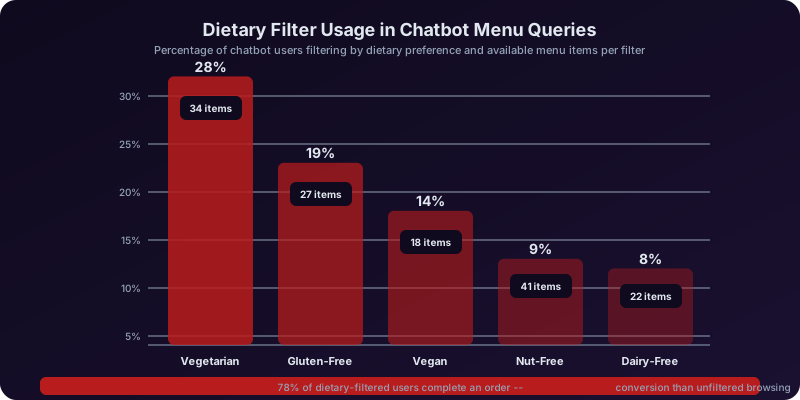
Dietary accommodation is where the chatbot provides the most critical value -- literally life-or-death for guests with severe allergies. When a guest says "I have a tree nut allergy," the chatbot immediately flags every menu item that contains tree nuts, may contain tree nuts through shared equipment, or can be modified to remove tree nuts. The response is specific and thorough: "Here are our dishes that are tree nut-free and prepared safely for nut allergies: [list of items]. The following dishes can be modified to remove nuts: [list with modification details]. Please note that our kitchen does handle tree nuts, and while we take precautions, we recommend informing your server as well for additional care." This detailed allergen communication builds trust with allergy-conscious diners and reduces the liability risk of undisclosed allergens. The supported dietary filters include gluten-free, dairy-free, nut-free, shellfish-free, soy-free, egg-free, vegetarian, vegan, keto, low-sodium, and custom allergen tags.
Wine and Beverage Pairing Suggestions
When guests express interest in wine or cocktails, the chatbot provides pairing recommendations: "For the Short Rib Pappardelle, I would suggest our Barolo ($16/glass) for a bold pairing, or the Pinot Noir ($13/glass) for something slightly lighter. If you prefer cocktails, our Old Fashioned with smoked maple complements the richness of the braised short rib beautifully." These beverage pairing suggestions increase per-guest spend by $8-$15 because they make the selection process feel guided and special rather than overwhelming -- particularly for guests who feel uncertain choosing wine on their own. The chatbot's pairing suggestions are configured by the restaurant based on the sommelier's or bar manager's expertise, ensuring the recommendations are genuine and reflect the restaurant's identity.
Seasonal and Special Menu Promotion
The chatbot promotes current specials, seasonal menu changes, and limited-time offerings at natural points in the conversation: "Before you decide, our chef just launched the Spring Tasting Menu this week -- 5 courses featuring spring vegetables from local farms, paired with wines, for $85 per person. It is only available through the end of April. Would you like to see the full menu?" This promotional capability drives trial of higher-margin special menus and creates urgency around limited-time offerings. Restaurants that use the chatbot to promote prix fixe and tasting menus report that these high-margin options account for 20-30% of covers when actively promoted, compared to 5-10% when listed only on the physical menu.
Pre-Order Capability
For guests who want to maximize their dining experience, the chatbot offers pre-ordering: "Would you like to pre-order any courses for your table? Pre-ordering allows our kitchen to prepare your dishes fresh for your arrival, reducing wait times especially during peak hours." Pre-ordering is particularly valuable for special occasions (birthday dinners where the host wants a seamless experience), business dinners (where the host wants to control timing), and time-constrained lunch guests. Pre-orders also give the kitchen advance visibility into tonight's demand, improving preparation planning and reducing food waste from over-prep of popular items.
Ready to try Restaurant Reservation & Ordering Chatbot?
Deploy this template in under 10 minutes. No coding required.
Use This Template Free →Waitlist Management and Walk-In Optimization
Waitlist management is where restaurants lose the most walk-in revenue. A guest who arrives without a reservation and is told "45-minute wait" will often leave -- especially if they have no way to track their place in line or receive a notification when their table is ready. The chatbot transforms the waitlist from a liability into a revenue-capture tool.
Digital Waitlist Join
Walk-in guests join the waitlist through the chatbot (via a QR code at the host stand or through the restaurant's website) rather than giving their name to a frantic host during the dinner rush: "Welcome! We are currently at full capacity, but I can add you to the waitlist. Party size? Great -- your estimated wait time is approximately 25 minutes. I will send you a notification as soon as your table is ready. You are free to wait at the bar, step outside, or browse the shops nearby -- I will message you when it is time." This digital waitlist provides several advantages over the traditional name-on-a-list approach: the guest can leave the immediate area without losing their place, the estimate updates dynamically based on actual table turns, and the guest receives a proactive notification rather than needing to check with the host repeatedly.
Real-Time Wait Updates
The chatbot sends periodic updates to waiting guests: "Update: Your table is now about 15 minutes away. 2 parties ahead of you." When the table is ready: "Your table is ready! Please head to the host stand within 5 minutes to be seated." If a guest does not respond within the grace period, the chatbot sends a final notice: "We have been holding your table -- are you still joining us? Please respond within 3 minutes or we will need to release your table to the next party." This automated communication eliminates the chaos of a host shouting names, reduces table-hold time (empty tables waiting for guests who stepped too far away), and provides a professional experience that guests appreciate and remember.
Remote Waitlist Joining
The chatbot enables guests to join the waitlist before physically arriving: "Planning to come in for dinner tonight? You can join our waitlist now and time your arrival to minimize your wait. Current estimated wait for a party of 2 is 20 minutes." A couple leaving their hotel at 7 PM can join the waitlist from their room and arrive at the restaurant just as their table opens up. This remote waitlist capability is particularly powerful for restaurants in tourist areas, entertainment districts, and shopping centers where guests may be nearby but not yet at the door. Restaurants offering remote waitlist joining report 25-35% higher walk-in capture rates because they retain guests who would have been deterred by the uncertainty of showing up and waiting.
Waitlist Analytics and Capacity Planning
The chatbot generates waitlist analytics that inform operational decisions through Conferbot's analytics dashboard: average wait times by day and hour, waitlist join-to-seat conversion rates, walkaway rates at different wait time thresholds, and peak demand periods where reservation availability should be adjusted. This data reveals that if your walkaway rate spikes above 40% when the quoted wait exceeds 30 minutes, you might improve revenue by holding more tables for walk-ins during those peak periods rather than filling the entire dining room with reservations. The chatbot's waitlist data provides the real-time demand signal that helps restaurants optimize the balance between reservations and walk-in capacity.
Special Events, Private Dining, and Group Bookings
Private dining and special events represent the highest per-cover revenue for most restaurants, yet these inquiries are notoriously difficult to capture and convert because they require detailed consultations that busy managers struggle to prioritize during service hours. The chatbot's event booking flow captures these high-value opportunities 24/7 with a guided conversation that collects everything the events team needs to prepare a compelling proposal.
Event Type and Scope Capture
When a guest selects "Private Dining" or "Special Events" from the chatbot menu, they enter a structured conversation that identifies the event type and scope: corporate dinner, birthday celebration, anniversary, rehearsal dinner, holiday party, business meeting with dining, wine or cocktail reception, or custom event. Each type triggers appropriate follow-up questions. A corporate dinner asks about company name, presentation or AV needs, and billing arrangements. A birthday celebration asks about the guest of honor, whether a cake or special dessert is desired, and any surprise elements. A wine reception asks about the desired wine selection level and whether hors d'oeuvres or a seated meal is preferred.
Private Dining Room Presentation
The chatbot presents available private dining spaces with details that help the event planner visualize their event: "Our Cellar Room seats up to 24 guests at a single long table, with stone walls, warm lighting, and a curated wine display. Perfect for intimate dinners and wine pairing events. Our Garden Terrace accommodates up to 60 guests for cocktail receptions or 40 for seated dinners, with string lights, an outdoor bar, and garden views. For larger events, our full restaurant buyout accommodates up to 120 guests." Each space includes capacity by event format (seated vs. standing), available dates, room fee if applicable, minimum spend requirements, and photo gallery links. This detailed presentation builds excitement and helps the planner commit before they have contacted competitor venues.
Custom Menu and Pricing
The chatbot presents event dining packages with per-person pricing: "For your corporate dinner of 20 guests in the Cellar Room, here are our event menu options: The Classic Package ($75/person) includes 3-course plated dinner with 2 entree choices, house wine and beer for 2 hours, and coffee/tea service. The Premium Package ($110/person) adds a passed appetizer course, premium wine pairings selected by our sommelier, and a dessert trio. The Custom Package starts at $95/person and allows full menu customization with our executive chef." The chatbot collects dietary restrictions across the guest list, beverage preferences, and any specific menu requests. This detailed package presentation with transparent pricing accelerates the decision process -- event planners comparing venues strongly favor the restaurant that provides clear pricing first.
Event Deposit and Confirmation
For event planners ready to proceed, the chatbot processes the deposit (typically 25-50% of the estimated total) and generates a booking confirmation with all event details: date, time, space, guest count, menu package, dietary accommodations, special arrangements, and payment terms. The complete event brief is sent to the restaurant's events team for execution planning. The chatbot maintains the communication channel for any changes leading up to the event -- guest count updates, dietary additions, AV requests, and timeline adjustments -- creating a single, documented thread that prevents the miscommunications typical of email-and-phone event planning.
Birthday and Anniversary Special Touches
For celebration bookings, the chatbot captures the details that create memorable experiences: "We would love to make this birthday special! Would you like us to prepare a complimentary birthday dessert plate? Should we have it ready at a specific time? Would you like a 'Happy Birthday' message on the dessert? Any other special touches -- flowers, a specific table location, a surprise timing for the dessert course?" These small details, captured automatically through the chatbot and relayed to the service team, create the personalized celebration experience that drives five-star reviews and repeat business. The cost of a complimentary dessert plate is negligible compared to the lifetime value of a guest who celebrates every special occasion at your restaurant because the first experience was flawless.
Key Features and Capabilities
The restaurant reservation and ordering chatbot includes features purpose-built for the operational demands of food service: unpredictable guest volume, complex dietary requirements, real-time capacity management, and the need to deliver hospitality through a digital channel. Here is the complete feature matrix.
| Feature | How It Works | Restaurant Benefit | Guest Benefit |
|---|---|---|---|
| Instant reservation booking | Real-time availability check with party size optimization and time slot suggestions | Captures 100% of reservation requests; eliminates missed calls during service | Books a table in under 60 seconds without calling |
| Interactive menu with dietary filters | Conversational menu browsing with allergen, dietary, and preference filtering | Reduces allergen incidents; builds reputation for dietary accommodation | Finds safe and appealing dishes instantly for any dietary need |
| Digital waitlist | QR code and remote waitlist joining with real-time updates and table-ready notifications | 25-35% higher walk-in capture; reduces host stand chaos | Knows exact wait time and gets notified when table is ready |
| Private dining and events | Guided event inquiry with space presentation, menu packages, and deposit collection | Captures 100% of event inquiries 24/7; 40% faster booking cycle | Gets instant pricing and availability for events without phone tag |
| Online ordering | Takeout and delivery ordering with customization, upselling, and payment | Zero-commission alternative to third-party delivery platforms | Orders directly from the restaurant with full menu access |
| Wine and beverage pairing | Context-aware pairing suggestions based on selected dishes and preferences | Increases per-guest beverage spend by $8-$15 | Feels guided and confident in wine selection |
| Automated reminders | 24-hour and 2-hour pre-reservation reminders with modification option | 30-45% reduction in no-shows; better table utilization | Never forgets a reservation; can easily modify plans |
| Multi-channel deployment | Website, WhatsApp, Instagram, Messenger, Google Business | Captures guests from every discovery channel | Books from wherever they find the restaurant |
| Guest recognition | Returning guest identification with preference history and loyalty tracking | Personalized service builds loyalty; data-driven guest relationship management | Feels recognized and valued on return visits |
| Review and feedback collection | Post-dining satisfaction check with review platform routing for happy guests | 4-6x more Google reviews; catches negative experiences before public review | Easy way to share feedback or praise |
Online Ordering: Takeout and Delivery Without Third-Party Fees
Third-party delivery platforms charge restaurants 15-30% commission on every order, devastating margins that are already thin. The chatbot provides a direct ordering channel where guests order through your branded conversation and you keep 100% of the revenue. The ordering flow supports full menu customization, dietary modification, combo suggestions, and in-conversation payment. For delivery, the restaurant can use its own drivers or integrate with on-demand courier services at a flat per-delivery fee rather than a percentage commission. Restaurants that shift 30-40% of delivery volume from third-party platforms to direct chatbot ordering save $2,000-$8,000 per month in commission fees while maintaining the same order volume.
Post-Dining Feedback and Review Generation
After a reservation is completed (detected through the reservation system or triggered by time), the chatbot sends a follow-up: "Thank you for dining with us tonight! How was your experience on a scale of 1-5?" Guests who respond with 4-5 stars receive: "We are so glad you enjoyed your meal! Would you mind sharing your experience on Google? It really helps us -- here is the link." Guests who respond with 1-3 stars receive: "We are sorry to hear your experience was not perfect. Would you like to share what happened? Your feedback goes directly to our manager, and we would love to make it right." This routing captures negative feedback privately before it becomes a public review, while channeling positive sentiment toward Google and Yelp reviews that drive future reservations. Restaurants using automated post-dining feedback report a 4-6x increase in monthly Google reviews and a measurable improvement in average review rating because problems are caught and resolved privately.
businesses worldwide use Conferbot templates to automate conversations
Revenue Impact and Performance Data
The restaurant chatbot's financial impact flows through multiple revenue channels: increased reservation volume, higher per-guest spend from menu engagement and beverage pairing, reduced no-shows, captured walk-in revenue through waitlist management, and eliminated third-party ordering commissions. Here is the comprehensive data.
Before vs. After: Restaurant Performance Metrics
| Metric | Without Chatbot | With Restaurant Chatbot | Impact |
|---|---|---|---|
| Reservation call capture rate | 55-70% | 95-99% | +30-40 percentage points |
| No-show rate | 15-20% | 5-8% | 55-65% reduction |
| Walk-in waitlist conversion | 50-60% | 78-88% | 30-45% improvement |
| Average per-guest spend | Baseline | +$8-$15 per guest | 12-20% increase from beverage pairing |
| Private event inquiries captured | 60-70% | 95-99% | 40-50% more event leads |
| Third-party delivery commission saved | $0 savings | $2,000-$8,000/month | 15-30% of delivery revenue recovered |
| Google reviews per month | 5-10 | 25-50 | 4-6x increase |
| Phone call volume for host staff | Baseline | 55-65% reduction | Host staff can focus on in-house guests |
Revenue Impact: Captured Reservations
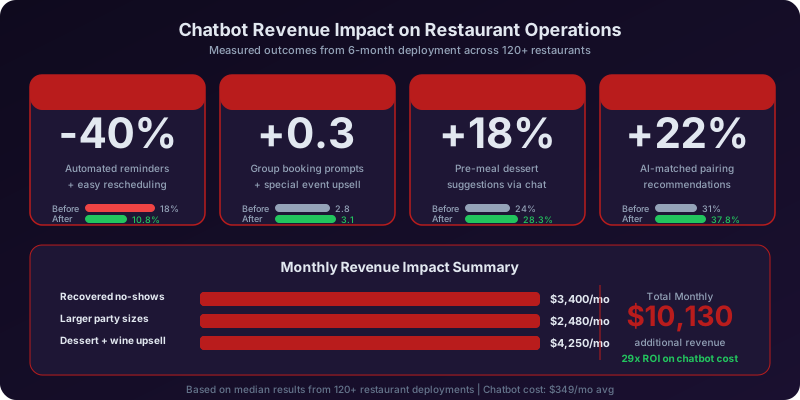
Consider a 100-seat restaurant averaging 180 covers per night. Missed reservation calls during service (estimated at 30-40% of incoming calls) represent approximately 15-25 lost covers per night. At an average check of $65 per guest, each lost cover costs $65. Recovering just 10 covers per night adds $650 in nightly revenue -- approximately $19,500 per month. The chatbot captures these reservations instantly regardless of whether the host is seating a table, answering another call, or managing a waitlist. This recovered revenue alone justifies the chatbot investment many times over.
Revenue Impact: Reduced No-Shows
A 100-seat restaurant with 18% no-show rate loses approximately 32 covers per night -- $2,080 in potential revenue that cannot be recovered because the empty tables could have been filled by walk-ins or other reservations. Reducing the no-show rate to 7% through automated reminders and deposit requirements recovers 20 of those 32 covers, adding approximately $1,300 per night or $39,000 per month in revenue that was previously lost to empty-table waste. Combined with the waitlist system that can quickly fill late cancellations and no-shows, the total no-show revenue recovery is even higher.
Revenue Impact: Per-Guest Spend Increase
When the chatbot's menu browsing and beverage pairing suggestions increase average per-guest spend by $10 (conservatively), that is $10 multiplied by 180 covers per night: $1,800 per night or $54,000 per month in incremental revenue. This increase comes from guests who pre-selected wine pairings through the chatbot, ordered appetizers after reading the chatbot's descriptions, or added a dessert course they discovered during their pre-visit menu exploration. The chatbot's conversational menu experience creates a sense of anticipation that makes guests more willing to explore the full menu rather than defaulting to their safe choices.
Revenue Impact: Private Dining and Events
Private dining events at an average of $3,000-$8,000 per event represent significant revenue, and most restaurants only capture 2-4 event bookings per month due to the difficulty of responding to inquiries promptly. The chatbot's 24/7 event inquiry system, with instant space availability, menu packages, and pricing, typically increases event bookings by 50-100%, adding 2-4 additional events per month. At an average event value of $5,000, that is an additional $10,000-$20,000 per month in high-margin revenue from a customer segment that was previously under-served.
Integrations with Restaurant Technology
The restaurant chatbot connects with the technology ecosystem that modern restaurants depend on, ensuring that every chatbot interaction flows seamlessly into your operational workflow without creating data silos or manual reconciliation requirements.
Reservation and POS System Integration
The chatbot integrates with major reservation platforms (OpenTable, Resy, Yelp Reservations, Tock) and POS systems (Toast, Square for Restaurants, Clover, Lightspeed) to maintain real-time table availability, sync reservations, and connect guest profiles with dining history. When a guest books through the chatbot, the reservation appears in your existing system immediately. Guest preferences (seating location, dietary needs, celebration notes) are attached to the reservation and visible to the host and service team. For restaurants that use OpenTable or Resy as their primary booking platform, the chatbot can serve as a front-end engagement layer that captures more leads and routes them through the existing reservation infrastructure.
Kitchen Display and Ordering System Integration
Online orders placed through the chatbot flow directly to the kitchen display system (KDS) or order printer, appearing in the same queue as POS orders. This integration eliminates the chaos of separate order streams -- the kitchen sees one unified ticket queue regardless of whether the order came from a dine-in table, the phone, or the chatbot. Pre-orders for dine-in guests can be timed to fire when the party is seated, allowing the kitchen to manage preparation timing precisely.
Marketing and Guest Relationship Tools
Guest data from chatbot interactions feeds your marketing platforms. Email addresses collected during reservation booking flow into Mailchimp, Constant Contact, or your CRM for newsletter and promotional campaigns. Guest preferences and dining frequency data enable targeted marketing: "Your guests who have visited 3+ times this year and ordered wine would be the perfect audience for your upcoming wine dinner event." The chatbot's data enriches your guest profiles with information that POS data alone cannot capture -- dietary preferences, celebration occasions, preferred seating, and beverage favorites -- enabling the kind of personalized marketing that drives measurable return visits.
Google Business Profile Integration
The chatbot can be deployed on your Google Business Profile as a messaging channel, capturing guests at the moment they discover your restaurant through Google Search or Google Maps. A diner searching "Italian restaurants near me" who finds your listing can message your chatbot directly from the search results, browse the menu, check availability, and book a table -- all without leaving Google. This integration captures guests at the highest-intent moment of their discovery journey and converts them before they scroll to the next listing.
Payment Processing
Stripe, Square, and PayPal integrations enable in-conversation payment for online orders, event deposits, and reservation deposits for high-demand times. Payment processing within the chatbot conversation eliminates the friction of redirecting guests to a separate payment page, reducing order abandonment. For restaurants that implement a no-show deposit policy, the chatbot collects the credit card hold seamlessly during the booking conversation: "To confirm your reservation for Saturday at 8 PM, we hold a $25 per person deposit that is applied to your bill. The card is only charged in case of a no-show without 24-hour notice." This in-conversation deposit collection is dramatically more effective than asking guests to call the restaurant to provide a credit card -- compliance rates are 85-90% when collected in the chatbot versus 30-40% when requested by phone.
Setup Guide: Deploy Your Restaurant Chatbot Today
Getting your restaurant reservation and ordering chatbot live with Conferbot takes less than a day, and most restaurants begin accepting reservations and orders through the chatbot within hours of starting setup. Here is the step-by-step process.
Step 1: Start with the Restaurant Template
Select Conferbot's restaurant reservation and ordering template, which includes pre-built conversation flows for table booking, menu browsing, dietary filtering, waitlist management, online ordering, event inquiries, and feedback collection. Customize the branding with your restaurant's name, logo, colors, and personality using the no-code visual editor. The chatbot's tone should reflect your restaurant's identity: warm and casual for a neighborhood bistro, polished and formal for fine dining, or fun and energetic for a contemporary concept.
Step 2: Build Your Menu and Dietary Database
Enter your menu items organized by category with descriptions, prices, and comprehensive dietary and allergen tags. For each item, tag all relevant attributes: vegetarian, vegan, gluten-free, dairy-free, nut-free, shellfish-free, and any other relevant allergens. Note which items can be modified to accommodate dietary needs ("can be made gluten-free by substituting pasta for zucchini noodles"). Add wine and cocktail menus with pairing recommendations linked to specific dishes. This menu configuration is the most time-intensive step -- allow 60-90 minutes for a restaurant with 40-60 menu items -- but it is also the highest-impact investment because the dietary intelligence it enables differentiates your chatbot from every competitor.
Step 3: Configure Reservation and Waitlist Settings
Set up your reservation parameters: available time slots by day, party size limits, reservation duration by party size (to manage table turns), blackout dates, and deposit requirements for high-demand periods. Configure the waitlist settings: maximum wait time to quote, grace period for table-ready notifications, and capacity by time slot. If you use an existing reservation platform (OpenTable, Resy, Tock), connect the integration for bidirectional sync. Set up private dining space profiles with capacity, photos, minimum spend requirements, and menu packages for event inquiries.
Step 4: Set Up Online Ordering (Optional)
If you offer takeout or delivery, configure the ordering menu (which may differ from the dine-in menu), pickup time windows, delivery zones and fees, and payment processing. Connect payment processing through Stripe or Square. Configure order confirmation messages, preparation time estimates, and ready-for-pickup notifications. For restaurants replacing third-party delivery platform orders, this direct ordering channel eliminates 15-30% commission fees on every order.
Step 5: Deploy Across Your Channels
Add the chatbot to your restaurant website with a simple embed code. Connect it to WhatsApp Business, Instagram, and Facebook Messenger. Activate Google Business Profile messaging. Generate QR codes for table tents (waitlist joining during busy periods), printed menus, business cards, and window signage. The QR code at the host stand is particularly valuable: walk-in guests who face a wait join the digital waitlist by scanning, immediately improving their experience and your table management.
Step 6: Test, Launch, and Optimize
Test every flow end to end: book a reservation, browse the menu with dietary filters, join the waitlist, place a takeout order, inquire about private dining. Have your front-of-house team test as if they were guests and provide feedback on accuracy and tone. Launch to live guests and monitor the analytics dashboard during the first week: which conversations are most common, where guests drop off, and which features drive the most engagement. Common first-week optimizations include adding menu items that guests ask about but are not yet in the system, adjusting reservation slot availability to better match demand, and refining the chatbot's descriptions of popular dishes based on guest reactions.
Restaurant Reservation & Ordering Chatbot FAQ
Everything you need to know about chatbots for restaurant reservation & ordering chatbot.
Why Use a Template vs Building from Scratch?
Templates give you a proven starting structure instead of a blank canvas.
| Factor | Conferbot Template | Build from Scratch | Hire a Developer |
|---|---|---|---|
| Time to deploy | 10 minutes | 2-8 hours | 2-6 weeks |
| Cost | Free | Your time | Custom dev quote |
| Proven flows | Yes, pre-built | No | Depends |
| Updates included | Automatic | Manual | Paid |
| Multi-channel | 8+ channels | 1 channel | Extra cost |
| Analytics | Built-in | Must build | Extra cost |
Learn More About Chatbots
Go deeper on how food and beverage chatbots work and how to pick the right builder.
Ready to Deploy Restaurant Reservation & Ordering Chatbot?
Start with a free-forever plan. No credit card required.