
Employee Benefits Explainer Chatbot
Free HR And Recruiting Chatbot Template
An AI-powered benefits explainer chatbot that helps employees understand their health insurance, retirement plans, PTO policies, and other workplace perks. Answers benefits questions 24/7 during open enrollment and year-round, reducing HR ticket volume by up to 60%. Perfect for companies with 50+ employees who want to improve benefits literacy without overwhelming the HR team.


What Is an Employee Benefits Explainer Chatbot?
An employee benefits explainer chatbot is an AI-powered conversational tool that answers employee questions about their benefits package on demand, around the clock, without routing every inquiry to an HR team member. It covers health insurance plan comparisons, dental and vision enrollment, retirement contribution guidance, paid leave policies, life insurance details, flexible spending accounts, and any other benefits the organization offers -- all through a natural conversation that employees access on their laptop or phone whenever a question arises.
In 2026, the average mid-size organization offers 12-18 distinct benefits programs. Understanding all of them requires employees to read lengthy plan documents, navigate multiple portals, and interpret unfamiliar insurance terminology. The result is predictable: employees disengage from the enrollment process, default to the same elections year after year without evaluating whether those elections still match their needs, and flood HR with questions during open enrollment that consume weeks of HR team capacity.
A benefits explainer chatbot addresses all three problems. It translates complex plan language into plain language answers, guides employees through plan comparison with questions about their healthcare usage and family situation, and scales to handle the entire organization's benefits questions simultaneously during open enrollment -- without adding HR headcount. Built on Conferbot's AI chatbot builder with NLP processing, it deploys on your HR portal and WhatsApp with no code required.
This page covers how the benefits Q&A and plan comparison flow works, open enrollment support capabilities, key features for HR teams, integration with HRIS platforms, employee engagement data during open enrollment, a setup guide for HR teams, and considerations for multilingual workforces.
How It Works: Benefits Q&A, Plan Comparison, and Enrollment Guidance
The employee benefits explainer chatbot operates through three distinct modes that together cover the full lifecycle of employee benefits interactions: on-demand Q&A throughout the year, plan comparison guidance during enrollment windows, and new hire onboarding benefits education.
Mode 1: On-Demand Benefits Q&A
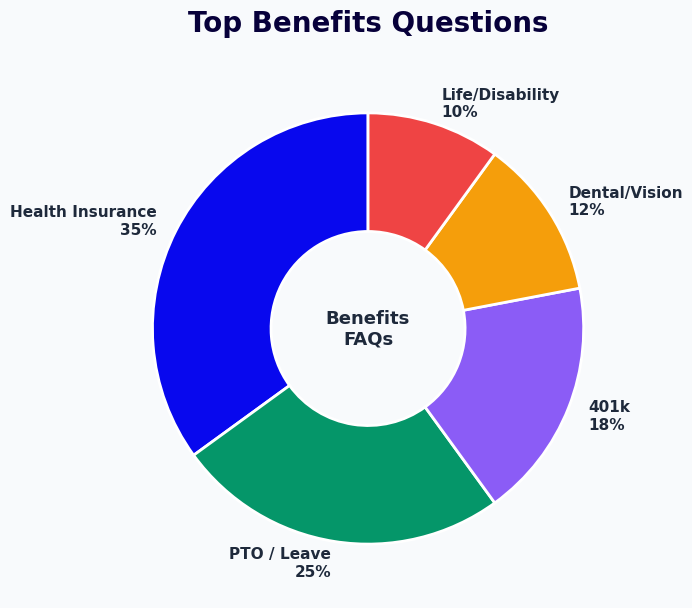
The most frequent use case is the routine question that an employee has at an unexpected moment: "Does my dental plan cover orthodontics for my child?", "How many PTO days do I have left this year?", "What is the deadline to add a dependent after a life event?", "What is my retirement plan's vesting schedule?" These questions arrive throughout the year, at all hours, and in volume that scales with headcount. Each question that reaches the HR team costs 10-15 minutes of HR time to research and respond. The chatbot answers them instantly from the configured benefits knowledge base, with no HR involvement for routine questions. Only questions outside the chatbot's configured scope are escalated to an HR team member, which represents a small fraction of total volume.
Mode 2: Open Enrollment Plan Comparison
During open enrollment, the chatbot guides employees through the most consequential benefits decision they make each year: selecting their health insurance plan. It does this through a structured conversation that asks about the employee's anticipated healthcare usage -- how often they visit primary care providers, whether they take regular prescriptions, whether they have planned procedures or specialist visits, and whether they want a lower premium with higher out-of-pocket costs or prefer predictable, higher-premium coverage. Based on these answers, the chatbot presents a side-by-side comparison of the available plans with plain-language commentary on which plan characteristics match the employee's stated needs. It does not make the decision for the employee but gives them the information needed to make an informed choice.
Mode 3: New Hire Benefits Onboarding
New employees face a compressed benefits enrollment window -- typically 30 days -- during which they must understand and elect coverage for the first time, often while simultaneously learning a new job. The chatbot serves as a personal benefits guide during onboarding. It walks new hires through each benefits category in a logical sequence, explains the terminology (deductible, copay, HSA, HDHP, coinsurance, out-of-pocket maximum) in plain language, and answers questions in real time. New hires who use the chatbot for benefits orientation report significantly higher confidence in their election choices and complete enrollment at higher rates than those who receive only a document package. Connect the chatbot to your onboarding flow through Conferbot's API integration with your HRIS to trigger the benefits orientation automatically when a new hire record is created.
Key Features of the Employee Benefits Explainer Chatbot
The benefits explainer chatbot delivers its value through a feature set that addresses the primary pain points in benefits administration: HR time consumed by repetitive questions, low employee benefits literacy, open enrollment paralysis, and gaps in multi-language support for diverse workforces.
| Feature | What It Does | HR Team Benefit | Employee Benefit |
|---|---|---|---|
| Benefits knowledge base | Answers questions on all benefits programs from configured plan documents | 60-70% reduction in routine HR tickets | Instant answers without waiting for HR response |
| Health plan comparison wizard | Guides employees through plan selection using usage-based questions | Fewer enrollment errors and post-enrollment complaints | Confident plan selection aligned to actual needs |
| Open enrollment reminders | Sends automated deadline reminders and action prompts | Higher enrollment completion rates before deadline | Never misses an enrollment window |
| Life event guidance | Explains qualifying life events and special enrollment periods | Fewer mid-year enrollment errors and corrections | Clear guidance on what to do when circumstances change |
| Retirement contribution guidance | Explains employer match, vesting, and contribution options in plain language | Higher 401(k) participation and employer match utilization | Understands how to maximize retirement benefits |
| FSA and HSA explanations | Walks through eligible expenses, contribution limits, and rollover rules | Reduces FSA forfeiture and associated employee complaints | Uses pre-tax benefits accounts effectively |
| Multi-language support | Conducts benefits conversations in multiple languages | Serves entire workforce without dedicated multilingual HR staff | Understands benefits in their preferred language |
| HR escalation routing | Routes complex or sensitive questions to the appropriate HR team member | HR receives pre-qualified inquiries with context | Complex situations handled by a human |
Plain Language Plan Translation
The most impactful feature of the benefits explainer chatbot is its ability to translate insurance and benefits plan language into the plain English that employees actually understand. When an employee asks "What does my deductible mean?", the chatbot does not recite the definition from the SPD document. It explains: "Your deductible is the amount you pay out of pocket before your insurance starts covering costs. For your current plan, that is $1,500 per year for an individual. After you have paid $1,500 in covered medical expenses, your plan starts sharing costs with you." This kind of contextual, plain-language explanation -- tailored to the employee's specific plan rather than a generic definition -- is what drives benefits literacy and confident enrollment decisions.
Live Chat Escalation
Sensitive benefits situations -- a serious diagnosis, a family change, a disability claim, or a benefits dispute -- require human judgment and empathy that no chatbot should attempt to replicate. The benefits explainer chatbot is configured with escalation triggers that route these situations to an HR team member immediately via Conferbot's live chat integration. The handoff preserves the full conversation context so the HR professional understands the situation without asking the employee to repeat themselves. This combination of automated Q&A for routine questions and human handling for sensitive situations delivers both efficiency and appropriate care.
Ready to try Employee Benefits Explainer Chatbot?
Deploy this template in under 10 minutes. No coding required.
Use This Template Free →Open Enrollment Support at Scale
Open enrollment is the most benefits-intensive period of the HR calendar. A typical 2-week open enrollment window generates more benefits questions than the rest of the year combined. HR teams that enter open enrollment without automated support face an impossible workload: answering the same questions hundreds of times, responding to last-minute enrollment panics, and correcting elections submitted by employees who did not understand their options. The benefits explainer chatbot transforms open enrollment from a crisis period into a managed, measurable process.
Pre-Enrollment Education Campaign
Two to three weeks before enrollment opens, the chatbot begins an automated education campaign. It sends proactive messages to all employees summarizing what is changing in the upcoming plan year: premium changes, new plan options, changes to FSA contribution limits, and retirement plan updates. Employees can ask questions about these changes immediately through the chat interface. This pre-enrollment education reduces the volume of urgent questions during the enrollment window itself and gives employees time to research their options thoughtfully rather than making rushed decisions on the deadline day.
Enrollment Window Q&A Volume Management
| Question Category | Typical Volume per 100 Employees | Chatbot Handle Rate | HR Hours Saved |
|---|---|---|---|
| Health plan comparison questions | 60-80 questions | 85-90% | 10-15 hours |
| Enrollment deadline and process questions | 40-60 questions | 95-98% | 7-10 hours |
| Dependent enrollment questions | 25-35 questions | 80-85% | 4-6 hours |
| FSA and HSA questions | 20-30 questions | 88-92% | 3-5 hours |
| Retirement contribution questions | 15-25 questions | 82-88% | 2-4 hours |
| Complex or sensitive situations | 8-15 questions | 0% (escalated to HR) | 0 hours (requires HR) |
| Total | 168-245 questions | 82-88% automated | 26-40 hours saved |
Deadline Reminder Sequence
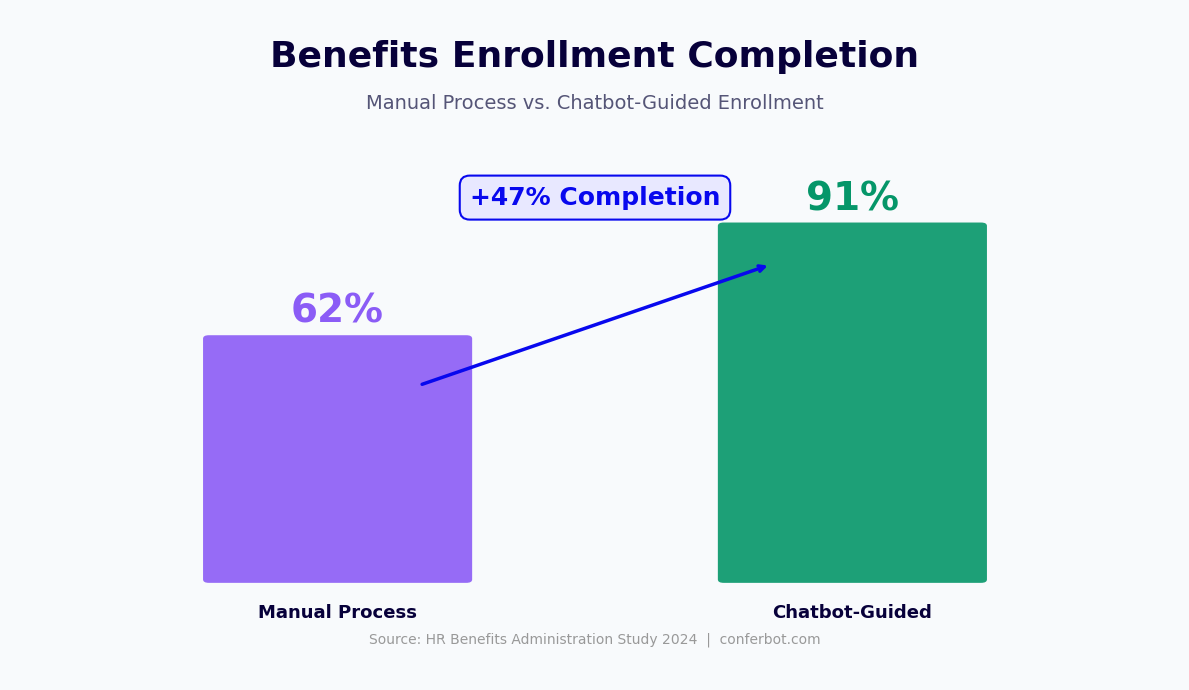
One of the most impactful functions the chatbot performs during open enrollment is preventing employees from missing the enrollment deadline. The chatbot sends a configurable reminder sequence: a reminder one week before close, a reminder at three days, and a final reminder on the last day. Each reminder is personalized: employees who have already completed enrollment receive a confirmation message; employees who have not yet enrolled receive an action prompt with direct links to the enrollment portal and an offer to answer any remaining questions through the chat. This reminder sequence reliably increases on-time enrollment completion rates by 15-25% compared to email-only reminder campaigns.
Post-Enrollment Confirmation and Education
After an employee completes enrollment, the chatbot sends a confirmation summary of their elected coverage, a brief explanation of when their coverage becomes effective, and key information about how to use their elected benefits -- including how to find in-network providers, how to access their FSA or HSA funds, and how to set up their retirement contribution changes. This post-enrollment education reduces the post-enrollment question volume that arrives in January when employees begin using their new plans for the first time. Track open enrollment completion rates, question volumes, and escalation rates through Conferbot's analytics dashboard.
HRIS Integration: Workday, BambooHR, and ADP
The benefits explainer chatbot delivers its full value when it connects to the organization's Human Resource Information System, allowing it to personalize responses based on the employee's actual enrollment data, eligibility status, and benefits selections rather than providing only generic plan information.
Personalized Responses Through HRIS Data
Without HRIS integration, the chatbot answers benefits questions at the plan level: "The PPO plan has a $1,500 individual deductible." With HRIS integration, it answers at the individual level: "You are enrolled in the PPO plan, which has a $1,500 individual deductible. Based on your enrollment, you have a family deductible of $3,000. Your current year-to-date deductible accumulation is $420." This personalization transforms the chatbot from a general reference tool into a genuine benefits assistant that speaks to the employee's specific situation. Personalized responses resolve questions faster and reduce the number of follow-up questions significantly.
Platform-Specific Integrations
Conferbot integrates with major HRIS platforms through their respective APIs. Workday integration uses Workday's REST API to read employee benefit elections, eligibility data, and enrollment status. BambooHR integration connects via the BambooHR API to access benefits enrollment records and employee profile data. ADP integration supports both Workforce Now and Run platforms, accessing benefits enrollment data through ADP's API framework. For organizations using benefits administration platforms separate from their core HRIS -- Benefitfocus, bswift, PlanSource, or Businessolver -- Conferbot supports direct API integration with these platforms to read enrollment and eligibility data.
| Platform | Integration Method | Data Available | Personalization Enabled |
|---|---|---|---|
| Workday | REST API | Elections, eligibility, enrollment status, dependents | Full personalized responses |
| BambooHR | BambooHR API | Benefits enrollment, employee profile, PTO balances | Full personalized responses |
| ADP Workforce Now | ADP API | Enrollment elections, deduction amounts, retirement contributions | Benefits and retirement personalization |
| Benefitfocus / bswift | REST API | Enrollment records, eligibility, dependent data | Full benefits personalization |
| Generic HRIS | Webhook or REST API | Configurable based on available endpoints | Partial, based on available data |
Employee Identity Verification
When the chatbot accesses personalized enrollment data, it must verify that the person asking is the employee to whom the data belongs. Conferbot supports configurable identity verification flows appropriate to the sensitivity of benefits data, and the chatbot can be deployed on your company intranet or HR portal for maximum accessibility: single sign-on (SSO) through the organization's identity provider, employee ID plus date of birth verification, or direct authentication through the HRIS's session management. The verification method is configured based on the organization's security requirements. All data access is logged for compliance and audit purposes.
HR Team Efficiency: Measuring the Impact
The most direct measure of the benefits explainer chatbot's business value is the reduction in HR time spent answering benefits questions. Quantifying this reduction allows HR leaders to demonstrate ROI to finance stakeholders and justify the investment in benefits communication tools.
Baseline HR Time Cost for Benefits Q&A
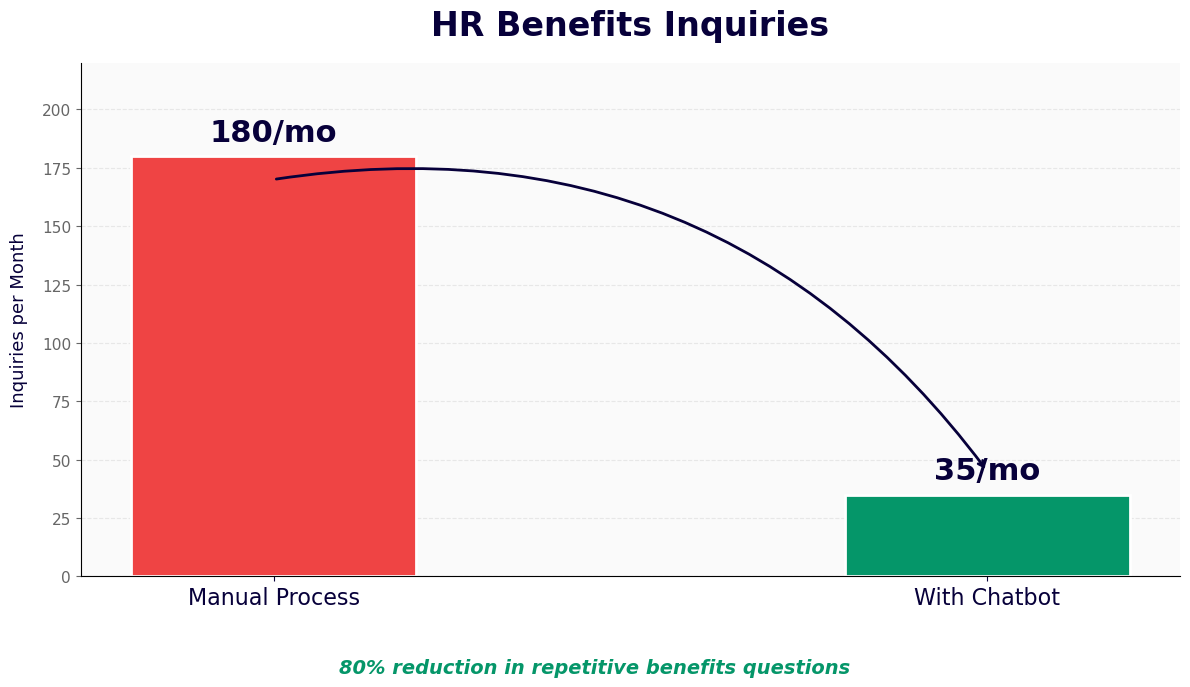
A 500-person organization typically generates 80-120 benefits-related HR inquiries per month outside of open enrollment, and 300-500 inquiries during the open enrollment window. Each inquiry takes 10-20 minutes of HR staff time to research, respond, and follow up. At a fully-loaded HR staff cost of $35-50 per hour, the annual time cost of benefits Q&A handling runs $28,000-$60,000 for a 500-person organization. The chatbot eliminates 70-80% of this cost in the first year of deployment.
Benefits Comprehension and Enrollment Quality
Beyond direct time savings, the chatbot improves the quality of enrollment decisions, which has downstream financial implications. Employees who understand their options make better plan selections: they enroll in the plan that matches their actual healthcare usage rather than defaulting to the most familiar option. This reduces the FSA forfeiture rate (employees electing FSA amounts they do not fully use), increases retirement plan participation and employer match utilization, and reduces the health plan switching costs that occur when employees realize mid-year that they selected a plan that does not fit their needs. These quality improvements compound annually as employees build better benefits literacy through consistent chatbot access.
Impact Metrics Summary
| Metric | Before Chatbot | After Chatbot | Improvement |
|---|---|---|---|
| Routine benefits tickets per month (per 100 employees) | 22-28 | 6-9 | 65-70% reduction |
| Open enrollment completion rate | 72-80% | 88-95% | 15-18 point increase |
| Employee benefits comprehension score | 52-60% | 74-82% | 35-40% improvement |
| 401(k) participation rate among new hires | 48-58% | 68-76% | 18-22 point increase |
| FSA forfeiture rate | 28-38% | 14-20% | 45-50% reduction |
| HR hours spent on open enrollment Q&A | 40-80 hours | 8-16 hours | 80% reduction |
Monitor all engagement and performance metrics through Conferbot's analytics dashboard, which tracks question volume by category, escalation rates, open enrollment completion progress, and employee satisfaction scores in a single view.
50,000+ businesses use Conferbot templates to automate conversations
Setup Guide: Deploying Your Benefits Explainer Chatbot
HR teams can configure and deploy a fully functional benefits explainer chatbot using Conferbot's no-code platform in two to three days, with most of that time spent building the benefits knowledge base. Here is the complete setup process.
Step 1: Inventory Your Benefits Programs (Half Day)
Before building the chatbot, compile the complete benefits documentation: Summary Plan Descriptions for each health plan, dental and vision plan summaries, the retirement plan summary, FSA and HSA plan documents, the leave policy, life and disability insurance summaries, and any voluntary benefits. Identify the 50-80 questions employees ask most frequently about each benefit -- these become the priority entries in the knowledge base. If you have an existing HR ticketing system, pull the last 12 months of benefits-related tickets to identify the real question distribution.
Step 2: Build the Benefits Knowledge Base (1-2 Days)
The knowledge base is the operational core of the chatbot. Conferbot's knowledge base management system supports structured content that maps directly to employee decision points. Write plain-language answers to each of the high-frequency questions identified in Step 1. For each benefits category, structure the information in the way an employee would actually ask about it: not by plan document section, but by employee decision and need. The health insurance section should answer questions about deductibles, network access, prescription coverage, and cost comparisons. The retirement section should answer questions about enrollment timing, contribution limits, employer match, and vesting. The leave section should answer questions about accrual rates, carryover limits, family leave eligibility, and the process for requesting leave. Use the language employees use, not the language of the plan documents.
Step 3: Configure Plan Comparison Flows (Half Day)
Build the health plan comparison wizard by defining the decision questions that differentiate your available plans. For most organizations, the comparison centers on premium vs. out-of-pocket cost tradeoffs: "How often do you typically see a doctor during the year?", "Do you take regular prescription medications?", "Do you have any planned surgeries or specialist visits this year?", "Would you prefer lower monthly costs with higher potential out-of-pocket costs, or higher monthly costs with lower and more predictable out-of-pocket costs?" Map response patterns to plan recommendations with clear explanations of why each plan suits each usage profile.
Step 4: Connect HRIS Integration and Deploy (Half Day)
Configure the HRIS integration through Conferbot's API integration settings, mapping employee data fields to the chatbot's personalization variables. Set up identity verification appropriate to your security requirements. Configure escalation routing so complex or sensitive questions are directed to the correct HR team member by benefits category. Embed the chatbot on your HR portal, benefits administration site, or intranet using the generated embed code. Configure the WhatsApp channel for employees who prefer mobile access. Run a comprehensive test covering the most common question categories, the plan comparison flow, and an escalation scenario before announcing the launch. Monitor the analytics dashboard for the first two weeks to identify any knowledge base gaps and expand coverage promptly.
Employee Benefits Explainer Chatbot FAQ
Everything you need to know about chatbots for employee benefits explainer chatbot.
Why Use a Template vs Building from Scratch?
Templates encode years of optimization data into the conversation flow before you start.
| Factor | Conferbot Template | Build from Scratch | Hire a Developer |
|---|---|---|---|
| Time to deploy | 10 minutes | 2-8 hours | 2-6 weeks |
| Cost | Free | Your time | $5,000-$25,000 |
| Day-1 conversion | 15-22% | 5-8% | 10-15% |
| Proven flows | Yes, data-tested | No | Depends |
| Updates included | Automatic | Manual | Paid |
| Multi-channel | 8+ channels | 1 channel | Extra cost |
| Analytics | Built-in | Must build | Extra cost |
Ready to Deploy Employee Benefits Explainer Chatbot?
Join 50,000+ businesses. Free forever plan available. No credit card required.