
New Employee Onboarding Chatbot
Free HR And Recruiting Chatbot Template
An AI onboarding chatbot that guides new hires through their first days at work. Covers company policies, IT setup, team introductions, benefits enrollment reminders, and compliance training -- all through a friendly conversational interface. Reduces time-to-productivity by 30% and cuts HR onboarding workload by half.



Why Automate Employee Onboarding
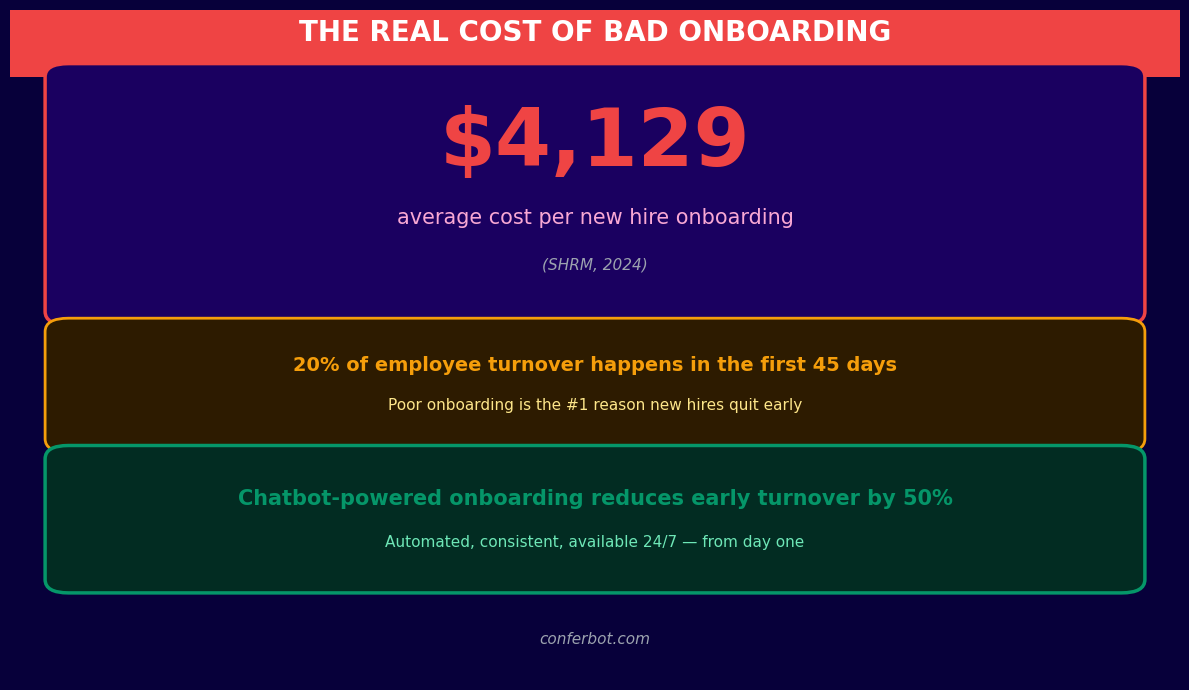
Employee onboarding is one of the most critical yet poorly executed processes in modern organizations. Research from the Brandon Hall Group shows that companies with a strong onboarding process improve new hire retention by 82% and productivity by 70%. Yet 88% of organizations admit they do not onboard well. The culprit is almost always manual processes - HR teams drowning in paperwork, inconsistent information delivery, and the sheer impossibility of giving every new hire a personalized, timely experience when you are onboarding 10, 50, or 200 people per month.
The Cost of Bad Onboarding
| Metric | Poor Onboarding | Automated Onboarding | Impact |
|---|---|---|---|
| Time to productivity | 8-12 months | 4-6 months | 50% faster ramp-up |
| 90-day turnover rate | 20-25% | 8-10% | 60% fewer early exits |
| HR hours per new hire | 15-20 hours | 3-5 hours | 75% time reduction |
| New hire satisfaction | 3.1/5 | 4.4/5 | 42% improvement |
| Compliance completion | 65% | 98% | Near-perfect compliance |
| Cost to replace early leaver | 50-200% of salary | N/A (prevented) | $15,000-$60,000 saved per retained employee |
Where Manual Onboarding Fails
The fundamental problem with manual onboarding is that it depends on humans remembering to do things at the right time. HR must remember to send the welcome email, schedule the orientation, assign the buddy, request the laptop, provision the accounts, distribute the handbook, collect the tax forms, schedule the manager check-in, and follow up on every incomplete item. When you are onboarding one person, this is manageable. When you are onboarding ten people starting on different dates, each in different departments with different requirements, things fall through the cracks constantly.
- Information overload on day one: New hires are bombarded with policies, introductions, and tasks on their first day, retaining only 20% of what they are told.
- Inconsistent experience: Each hiring manager has their own approach, leading to wildly different onboarding quality across departments.
- Ghost period after week one: After the initial orientation flurry, new hires often enter a "ghost period" where they receive little structured support for weeks or months.
- No feedback loop: HR rarely knows how onboarding is going until the exit interview - by which time it is too late.
An employee onboarding chatbot solves all of these problems by delivering the right information at the right time, consistently, to every new hire. Learn how Conferbot's AI chatbot builder makes it easy to create HR automation without any technical skills.
How Onboarding Bots Work: The Day 1 to Day 90 Flow
An employee onboarding chatbot is not a one-time interaction - it is a 90-day companion that guides new hires through every phase of their transition. The bot proactively reaches out at scheduled intervals, answers questions on demand, collects required documents, and escalates issues to HR when human intervention is needed. Here is the complete flow from pre-start to the 90-day milestone.
Pre-Start Phase (Offer Signed to Day 1)
The chatbot engages the new hire immediately after their offer is signed, typically 1-4 weeks before their start date. During this phase, it collects tax forms (W-4, I-9), direct deposit information, and emergency contacts. It sends a welcome packet with the employee handbook, dress code, parking instructions, and first-day agenda. It also builds excitement: "Your team is looking forward to meeting you! Here is a quick intro to the people you will be working with." Pre-start engagement reduces first-day anxiety by 45% and ensures all paperwork is complete before the hire walks through the door.
Week 1: Orientation and Setup
| Day | Chatbot Delivers | New Hire Action | HR Visibility |
|---|---|---|---|
| Day 1 | Welcome message, office tour guide, team introductions, IT setup checklist | Completes profile, meets buddy, sets up workstation | Completion dashboard updated |
| Day 2 | Benefits enrollment walkthrough, company culture content | Enrolls in benefits, reviews policies | Benefits enrollment tracked |
| Day 3 | Department-specific training links, tool access guides | Completes required training modules | Training completion logged |
| Day 4 | First check-in survey: "How is your first week going?" | Provides feedback | Sentiment score generated |
| Day 5 | Week 1 recap, goals for week 2, manager meeting reminder | Reviews goals, meets with manager | Week 1 milestone confirmed |
Weeks 2-4: Deepening Integration
The chatbot shifts from logistics to learning. It delivers role-specific training content in digestible chunks - not a 200-page manual, but a daily 5-minute micro-lesson. It prompts the new hire to schedule coffee chats with cross-functional teammates, tracks completion of compliance training, and conducts a 30-day check-in survey to identify early issues. If the new hire has not completed a required task, the bot sends gentle nudges: "Just a reminder - your cybersecurity training is due by Friday. It takes about 20 minutes."
Days 30-90: Performance and Retention
At the 30, 60, and 90-day marks, the chatbot delivers structured check-in surveys that measure engagement, role clarity, manager relationship quality, and overall satisfaction. These surveys generate sentiment scores that HR can track across cohorts. If a new hire's sentiment drops below a threshold, the bot automatically escalates to their HR business partner. The 90-day mark triggers a comprehensive onboarding completion assessment and transitions the employee from "new hire" to "established team member" status in the system.
See how Conferbot's analytics dashboard gives HR leaders real-time visibility into onboarding progress across the entire organization.
Features: Document Collection, Policy FAQ, IT Setup, and More
A comprehensive employee onboarding chatbot handles far more than simple Q&A. It is a full-service onboarding platform that manages documents, delivers training, provisions accounts, matches mentors, and tracks completion - all through a conversational interface that new hires actually enjoy using. Here is the complete feature set.
Feature Overview
| Feature | What It Does | New Hire Benefit | HR Benefit |
|---|---|---|---|
| Document collection | Collects W-4, I-9, direct deposit, ID photos via conversational upload | Complete paperwork from phone in 10 min | 100% paperwork completion before day 1 |
| Policy FAQ | Answers questions about PTO, benefits, dress code, expenses instantly | No need to hunt through 80-page handbook | 70% fewer repetitive HR questions |
| IT setup automation | Triggers account provisioning, equipment requests, access badge creation | Laptop and accounts ready on day 1 | Zero IT tickets for standard onboarding |
| Buddy matching | Assigns an onboarding buddy based on department, location, interests | Immediate social connection at work | Automated matching saves 30 min per hire |
| Training delivery | Sends micro-learning modules daily with quizzes and progress tracking | Bite-sized learning, not information overload | 98% training completion vs 65% manual |
| Check-in surveys | Delivers sentiment surveys at 7, 30, 60, 90 days with escalation logic | Voice heard early, issues addressed fast | Early warning system for at-risk hires |
| Manager nudges | Reminds managers of key onboarding tasks (1:1s, goal setting, feedback) | Consistent manager engagement | Manager accountability without HR chasing |
| Compliance tracking | Tracks mandatory training, policy acknowledgments, certification deadlines | Clear view of what is required and when | Audit-ready compliance documentation |
Policy FAQ: The Knowledge Base That Never Sleeps
New hires have questions - lots of them. "How many PTO days do I get?" "When is open enrollment?" "What is the expense reimbursement process?" "Can I work from home on Fridays?" These questions come at all hours, especially for remote employees in different time zones. The onboarding chatbot draws from your company's knowledge base to answer instantly, accurately, and consistently. No more waiting for HR to respond to an email the next morning. No more getting different answers from different colleagues.
IT Setup Automation
IT provisioning is one of the biggest day-one friction points. A new hire arrives excited, only to sit idle for hours while IT sets up their laptop, creates email accounts, and grants system access. The onboarding chatbot eliminates this by triggering IT provisioning workflows automatically when the new hire's start date approaches. Equipment orders are placed, accounts are created, access is provisioned - all before the employee walks in. On day one, the chatbot walks the new hire through connecting to WiFi, accessing their email, logging into required tools, and setting up two-factor authentication.
Connect your onboarding bot to existing tools through Conferbot's integrations hub, which supports Slack, Teams, Google Workspace, Okta, BambooHR, Workday, and 50+ other HR platforms.
Ready to try New Employee Onboarding Chatbot?
Deploy this template in under 10 minutes. No coding required.
Use This Template Free →Slack and Teams Deployment: Meet Employees Where They Work
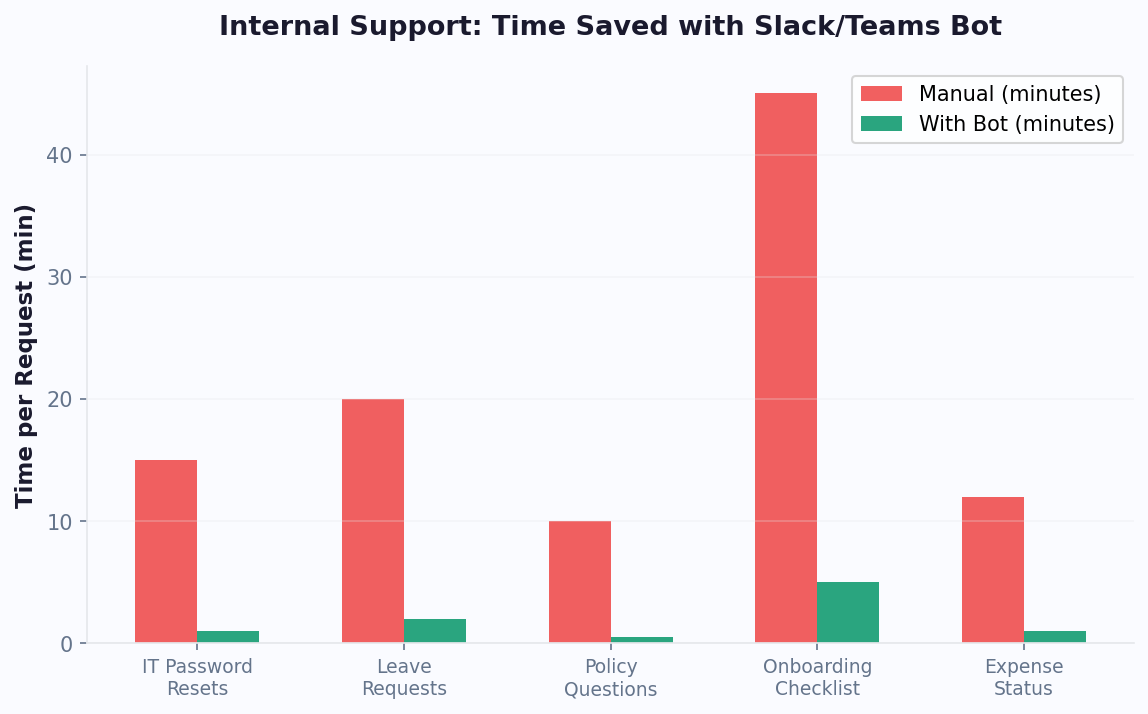
The most effective onboarding chatbot is the one employees do not have to go looking for. By deploying directly inside Slack or Microsoft Teams - the platforms your team already uses every day - you remove 100% of the adoption friction. New hires do not need to bookmark a URL, download an app, or remember a login. The bot simply appears in their Slack DMs or Teams chat on day one, ready to help.
Slack Deployment
Conferbot's Slack integration installs as a native Slack app in your workspace. Once installed, the onboarding bot can DM new hires directly, post in designated channels (like #new-hires or #onboarding-2024), and respond to @mentions. The bot supports Slack's native interactive elements - buttons, dropdown menus, modal forms, and file uploads - so new hires can complete paperwork, answer surveys, and access training without ever leaving Slack. For organizations using Slack Connect with external partners, the bot can also onboard contractors and vendors through shared channels.
Microsoft Teams Deployment
For Teams-centric organizations, the onboarding bot deploys as a Teams app that appears in the new hire's chat sidebar. It supports Teams-native features including adaptive cards, task modules, and tab integrations. The bot can create onboarding channels for each new hire cohort, schedule Teams meetings for orientation sessions, and integrate with SharePoint for document management. Teams deployment also supports guest access, making it ideal for onboarding part-time employees, interns, and contractors who may have limited system access.
Channel Selection Guide
| Factor | Slack | Microsoft Teams | Web Widget | |
|---|---|---|---|---|
| Best for | Tech companies, startups | Enterprise, Microsoft shops | Career site, intranet | Frontline workers, mobile-first |
| Interactive elements | Buttons, modals, file upload | Adaptive cards, task modules | Full chat UI | Quick replies, media |
| Document collection | Native file sharing | SharePoint integration | Upload widget | Photo/document sharing |
| Pre-start access | Requires workspace invite | Guest access available | Public URL | Phone number only |
| Adoption rate | 92% | 89% | 71% | 85% |
Multi-Channel Strategy
The most effective approach combines channels based on the onboarding phase. Use WhatsApp or email for pre-start engagement (before the new hire has system access), then transition to Slack or Teams from day one onward. The web widget serves as a fallback for employees who prefer a browser-based experience. Conferbot's omnichannel platform syncs conversation history across all channels, so a new hire who starts chatting on WhatsApp before their start date can continue the same conversation seamlessly in Slack on day one.
30-60-90 Day Check-in Automation
The first 90 days are the most critical period for employee retention. Gallup research shows that employees who have a positive onboarding experience are 2.6x more likely to be "extremely satisfied" with their workplace. Yet most organizations lose momentum after the first week - structured support drops off, and new hires are left to figure things out on their own. The 30-60-90 day check-in framework, automated through a chatbot, ensures consistent engagement throughout this critical window.
The 30-60-90 Framework
| Milestone | Focus Area | Chatbot Actions | Escalation Triggers |
|---|---|---|---|
| Day 30 | Settling in - logistics, relationships, basic competency | Pulse survey (8 questions), training completion check, buddy feedback request | Satisfaction score below 3.5/5, missing trainings, no buddy meeting logged |
| Day 60 | Contributing - project involvement, skill building, cultural fit | Engagement survey (10 questions), goal progress review, peer connection audit | Engagement drop, goal misalignment flagged, fewer than 3 cross-team connections |
| Day 90 | Thriving - independence, performance trajectory, long-term alignment | Comprehensive assessment (15 questions), manager feedback sync, retention risk score | High retention risk score, unresolved issues from prior surveys, performance concerns |
What the Surveys Measure
Each check-in survey is designed to capture both quantitative metrics and qualitative insights. The chatbot asks a mix of scaled questions ("On a scale of 1-5, how clear are your role expectations?") and open-ended prompts ("What is one thing that would make your onboarding experience better?"). Key dimensions measured across all three milestones include:
- Role clarity: Does the employee understand their responsibilities, success metrics, and how their work connects to company goals?
- Manager relationship: Is the manager providing regular feedback, clear direction, and adequate support?
- Social integration: Has the employee built meaningful connections with colleagues beyond their immediate team?
- Resource access: Does the employee have the tools, training, and information they need to do their job?
- Cultural alignment: Does the employee feel the company's values and work environment match what was described during recruiting?
Automated Escalation Logic
The chatbot does not just collect data - it acts on it. When a new hire's responses indicate risk, the bot triggers automated workflows. A satisfaction score below 3.5 at the 30-day mark generates an alert to the HR business partner with the specific areas of concern. A drop in engagement between the 30 and 60-day surveys triggers a manager notification: "Alex's engagement score dropped from 4.2 to 3.1. Key concern: role clarity. Consider scheduling a 1:1 to discuss project assignments." These early interventions catch retention risks before they become resignations.
Track check-in completion rates and sentiment trends across your entire organization with Conferbot's analytics dashboard.
Metrics and ROI: The Business Case for Onboarding Bots
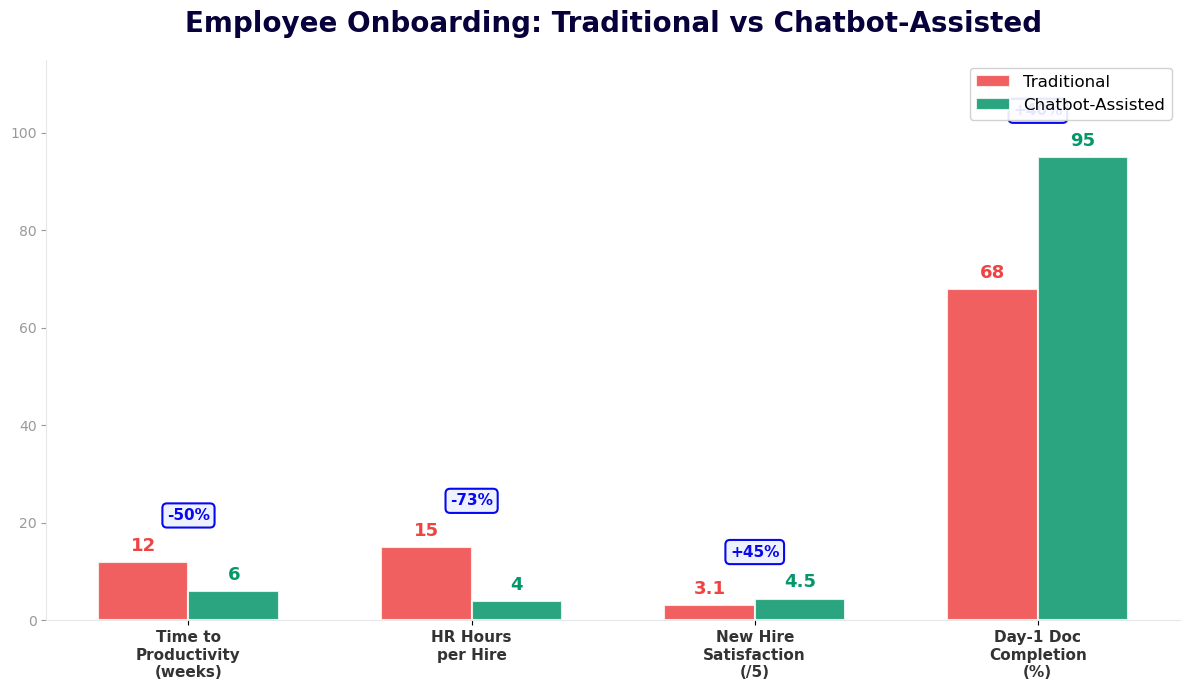
Justifying an onboarding chatbot investment requires hard numbers. HR leaders need to demonstrate measurable impact on time savings, retention, compliance, and employee satisfaction. Here is a comprehensive ROI model based on aggregated data from organizations using automated onboarding systems, benchmarked against a company onboarding 100 new hires per year.
ROI Breakdown for 100 Annual Hires
| Metric | Before Chatbot | After Chatbot | Annual Savings/Impact |
|---|---|---|---|
| HR hours per new hire | 18 hours | 4 hours | 1,400 hours saved ($49,000 at $35/hr) |
| 90-day turnover rate | 22% | 9% | 13 retained employees ($195,000 at $15,000 replacement cost) |
| Time to productivity | 10 months | 5.5 months | 450 productive months gained annually |
| Training completion rate | 65% | 97% | Compliance risk eliminated |
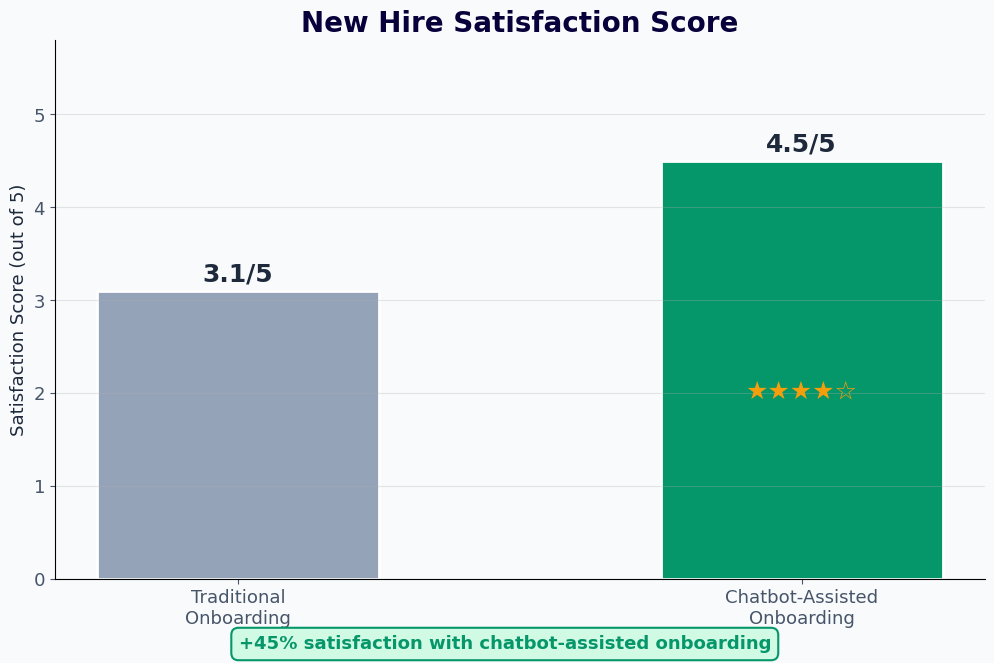
| New hire satisfaction | 3.1/5 | 4.5/5 | 45% improvement in eNPS |
| Paperwork completion (pre-start) | 40% | 95% | Zero day-one paperwork delays |
| IT setup ready on day 1 | 55% | 98% | Eliminates idle first-day hours |
| Total annual savings | $244,000+ |
The Hidden Cost of Early Turnover
The single largest ROI driver is retention. When an employee leaves within 90 days, the organization loses everything invested in recruiting, hiring, and onboarding - plus incurs the cost of starting the process over. For a mid-level role with a $60,000 salary, the total cost of an early departure is $15,000-$30,000 including recruiter fees, interview time, background checks, training, and lost productivity. At a 22% early turnover rate with 100 annual hires, that is 22 early leavers costing $330,000-$660,000 per year. Reducing that to 9% saves $195,000-$390,000 annually - far exceeding the cost of any onboarding technology.
Measuring What Matters
Beyond cost savings, track these leading indicators to demonstrate ongoing chatbot impact:
- Onboarding NPS: Survey new hires at 90 days on their overall onboarding experience. Target: 50+ NPS score.
- Time to first contribution: How quickly does a new hire complete their first meaningful project? Chatbot-onboarded employees typically contribute 40% faster.
- HR ticket volume: Track the reduction in HR help desk tickets related to onboarding questions. Expect a 60-70% decrease.
- Manager satisfaction: Survey hiring managers on onboarding quality. Automated onboarding consistently scores higher because it is standardized and reliable.
Use Conferbot's ROI calculator to model the specific savings for your organization's headcount and turnover rates.
50,000+ businesses use Conferbot templates to automate conversations
Compliance and Documentation: Audit-Ready From Day One
Employee onboarding carries significant legal and regulatory requirements. From I-9 verification timelines to harassment training mandates, compliance failures can result in fines, lawsuits, and audit findings. Manual tracking of compliance tasks is error-prone - HR spreadsheets miss deadlines, paper forms get lost, and training completion goes unverified. An onboarding chatbot creates an automated compliance backbone that ensures every requirement is met, documented, and audit-ready.
Compliance Requirements Automated
| Requirement | Deadline | Manual Completion Rate | Chatbot Completion Rate | Non-Compliance Risk |
|---|---|---|---|---|
| I-9 Employment Verification | 3 business days | 78% | 99% | $252-$2,507 fine per violation |
| W-4 Tax Withholding | First payroll | 85% | 99% | Payroll errors, employee dissatisfaction |
| Harassment prevention training | 30-90 days (varies by state) | 62% | 97% | Liability exposure in harassment claims |
| Safety training (OSHA) | Before starting hazardous work | 71% | 98% | $15,625+ per OSHA violation |
| Data privacy training (GDPR/CCPA) | 30 days | 58% | 96% | Up to 4% of global revenue (GDPR) |
| Employee handbook acknowledgment | First week | 73% | 99% | Policy enforcement challenges |
| Benefits enrollment | 30 days | 80% | 97% | Coverage gaps, employee complaints |
How the Chatbot Ensures Compliance
The onboarding chatbot enforces compliance through three mechanisms. First, proactive delivery: the bot sends compliance tasks to new hires at the right time with clear instructions and deadlines. Second, persistent follow-up: if a task is not completed, the bot sends escalating reminders - polite nudge on day one, firmer reminder on day two, and manager notification on day three. Third, automated documentation: every action is timestamped and logged, creating an audit trail that proves when each requirement was communicated, acknowledged, and completed.
Audit Trail and Reporting
When auditors come knocking, you need to produce documentation instantly. The chatbot maintains a complete digital record for every new hire: when forms were sent, when they were completed, what training was assigned, when it was finished, and what the assessment scores were. This data is exportable in standard formats (CSV, PDF) and can be filtered by date range, department, location, or compliance category. No more scrambling through file cabinets or email chains during an audit - every record is one click away.
- State-specific compliance: Different states have different training requirements. California mandates sexual harassment training within 6 months. New York requires it within 30 days. The chatbot automatically adjusts timelines based on the employee's work location.
- Industry-specific regulations: Healthcare organizations need HIPAA training. Financial services need anti-money laundering training. The chatbot delivers industry-specific compliance modules alongside general onboarding content.
- Recertification tracking: Some compliance training requires annual renewal. The chatbot tracks certification expiration dates and proactively sends recertification reminders - extending its value well beyond the initial onboarding period.
Conferbot's analytics dashboard provides real-time compliance scorecards that show completion rates by department, location, and individual - giving HR leaders instant visibility into organizational compliance posture.
Setup Guide: Launch Your Onboarding Bot in a Day
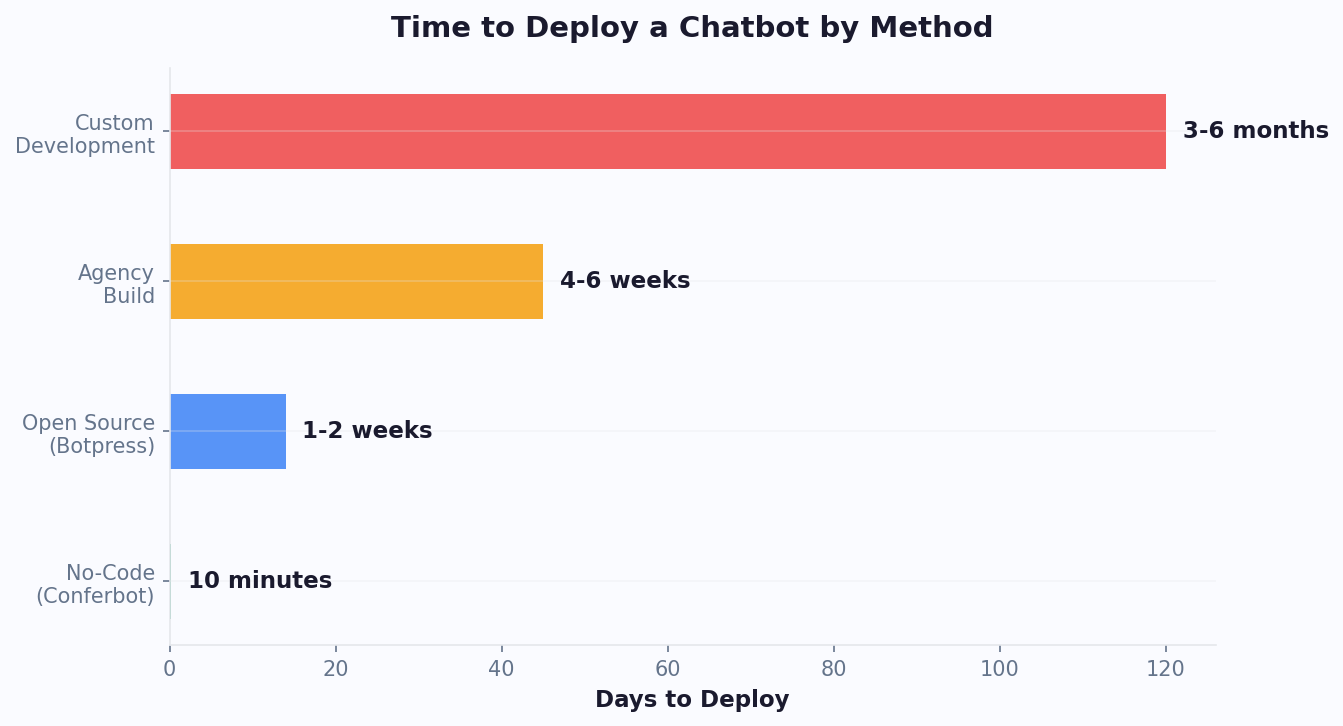
Implementing an employee onboarding chatbot does not require a months-long IT project. With Conferbot's no-code platform, HR teams can build, customize, and deploy a complete onboarding bot in a single day. Here is the step-by-step process from start to launch.
Step 1: Choose Your Template (10 Minutes)
Sign up at app.conferbot.com and select the Employee Onboarding template. The template comes pre-built with a 90-day onboarding flow, document collection workflows, policy FAQ, check-in surveys, and compliance tracking. You can customize every element, but the template gives you a production-ready starting point immediately.
Step 2: Connect Your Knowledge Base (30 Minutes)
Upload your employee handbook, benefits guide, IT policies, and other reference documents to Conferbot's knowledge base. The AI processes these documents and enables the chatbot to answer questions accurately based on your actual policies - not generic information. Common uploads include the employee handbook, PTO policy, expense reimbursement guide, benefits summary, org chart, and office location details.
Step 3: Customize Your Onboarding Flow (2 Hours)
Using the visual flow builder, tailor the onboarding sequence to your organization. Key customizations include:
- Pre-start tasks: Define which documents to collect (W-4, I-9, direct deposit, emergency contacts, NDA) and set deadlines for each.
- Day 1 agenda: Configure the first-day welcome sequence with your office-specific details - building access, parking, WiFi, lunch options, and team introductions.
- Training modules: Link to your existing LMS or upload training content directly. Set completion deadlines and quiz pass rates for compliance training.
- Check-in surveys: Customize the 30-60-90 day survey questions to align with your organization's engagement metrics and values.
- Escalation rules: Define which responses trigger HR alerts and who receives them.
Step 4: Integrate Your Systems (1 Hour)
Connect the chatbot to your existing HR tech stack. Common integrations include HRIS (BambooHR, Workday, ADP), identity management (Okta, Azure AD), project management (Jira, Asana), and communication tools (Slack, Teams). Each integration is configured through Conferbot's integrations hub using OAuth connections - no API coding required.
Step 5: Deploy and Test (30 Minutes)
Choose your deployment channel - Slack, Microsoft Teams, web widget, or WhatsApp - and install the bot. Run through the complete onboarding flow as a test employee: complete pre-start paperwork, experience day one, receive training prompts, and answer check-in surveys. Verify that documents are stored correctly, integrations fire properly, and escalation alerts reach the right people.
Step 6: Pilot With Your Next Cohort
Launch the bot with your next group of new hires. Start with a small cohort (5-10 people) to gather feedback and refine the experience before rolling out company-wide. Most organizations run a 2-week pilot, make minor adjustments based on feedback, then deploy to all new hires. Within 30 days, you will have measurable data on time savings, completion rates, and new hire satisfaction to justify the investment to leadership.
New Employee Onboarding Chatbot FAQ
Everything you need to know about chatbots for new employee onboarding chatbot.
Why Use a Template vs Building from Scratch?
Templates encode years of optimization data into the conversation flow before you start.
| Factor | Conferbot Template | Build from Scratch | Hire a Developer |
|---|---|---|---|
| Time to deploy | 10 minutes | 2-8 hours | 2-6 weeks |
| Cost | Free | Your time | $5,000-$25,000 |
| Day-1 conversion | 15-22% | 5-8% | 10-15% |
| Proven flows | Yes, data-tested | No | Depends |
| Updates included | Automatic | Manual | Paid |
| Multi-channel | 8+ channels | 1 channel | Extra cost |
| Analytics | Built-in | Must build | Extra cost |
Ready to Deploy New Employee Onboarding Chatbot?
Join 50,000+ businesses. Free forever plan available. No credit card required.