
Technical Support Triage Chatbot
Free Support And FAQ Chatbot Template
An AI technical support triage chatbot that classifies incoming issues by type and severity, searches your knowledge base for solutions, and routes unresolved cases to the right team. Deflects 50% of support tickets automatically while ensuring high-severity issues reach engineers without delay. Perfect for SaaS companies, IT helpdesks, and tech product support teams.



What Is a Technical Support Triage Chatbot?
A technical support triage chatbot is an AI-powered front-line tool for IT and SaaS helpdesks that intercepts incoming support requests, classifies the issue type and severity, searches the knowledge base for relevant solutions, and routes unresolved cases to the correct team or individual -- all before a human agent is involved. For engineering organizations and IT departments in 2026, it solves the most expensive problem in technical support: the first-touch cost of processing every ticket regardless of how simple or how frequently that issue has been resolved before.
The triage chatbot is distinct from a simple FAQ bot or a search widget embedded in a help center. It conducts a structured diagnostic conversation, not a keyword lookup. It asks clarifying questions to narrow the issue to a specific system, error condition, and environment configuration. It applies that context to retrieve the most relevant resolution from your knowledge base. And when it cannot resolve the issue itself, it hands off to a human agent with a complete diagnostic summary -- eliminating the redundant back-and-forth that consumes agent time in every manual support intake process.
At the operational level, the value is straightforward: the chatbot handles the support inquiries that should never have required a human agent in the first place -- password resets, known bug workarounds, configuration guides, integration setup questions, billing FAQ, and routine troubleshooting steps for common errors. These requests typically represent 40-60% of total ticket volume at SaaS companies. Automating them reduces the total cost of support while improving response time for the cases that genuinely need human expertise.
Built on Conferbot's AI chatbot builder with NLP processing, the technical support triage template integrates with Zendesk, Freshdesk, Jira Service Management, and custom ticketing systems through Conferbot's API integration framework. It deploys across your website help center, in-app support widget, and communication channels without requiring engineering resources using the no-code builder.
This page covers how the triage system classifies and routes issues, key features, integration with major ticketing platforms, deflection rate benchmarks, ROI analysis for support teams, a setup guide, and escalation best practices that ensure high-severity issues reach the right engineer without delay.
How Triage Works: Issue Classification, Severity Routing, and Knowledge Base Search
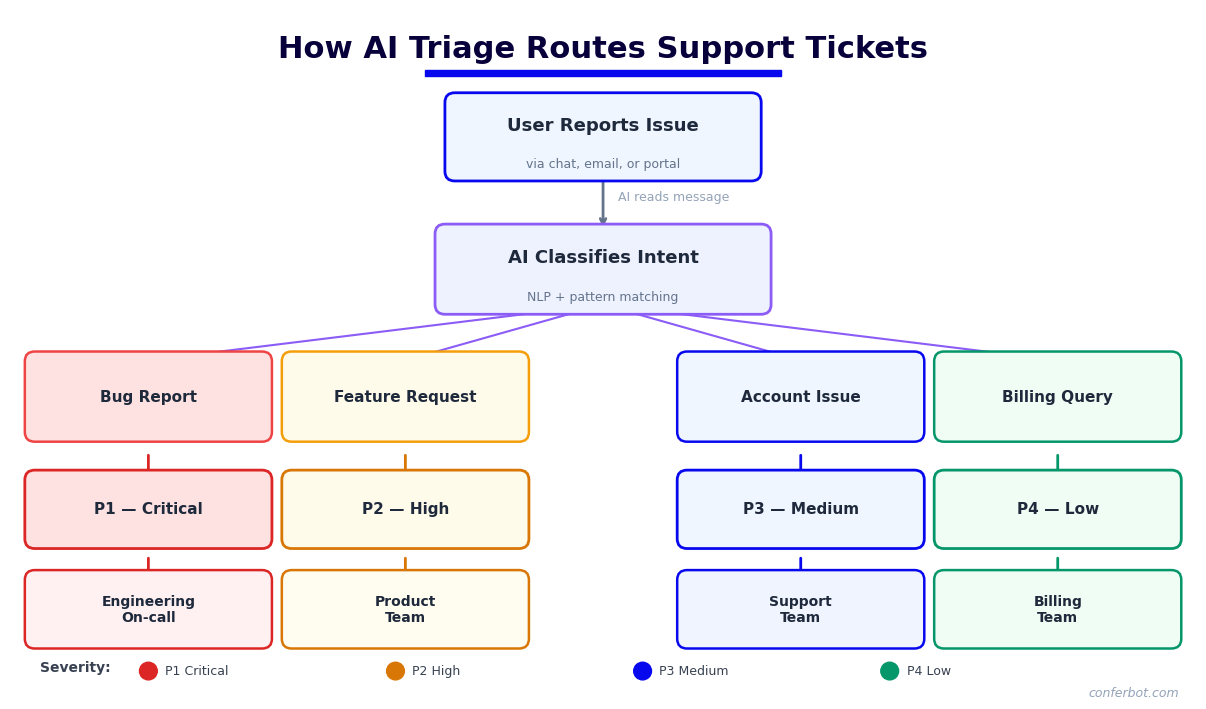
The technical support triage system operates as a four-stage pipeline. Each stage is configurable to match your product's technical domain, support team structure, and escalation protocols. Here is how an incoming support request moves from first contact to resolution or qualified handoff.
Stage 1: Issue Intake and Context Collection
The conversation opens with a structured intake that collects the context required for accurate classification. Rather than asking the user to describe their problem in free text and hoping the description is useful, the chatbot asks targeted questions: which product or feature is affected, what the user was attempting to do when the issue occurred, whether the issue is new or recurring, and which environment the user is in (operating system, browser version, integration, subscription plan). This structured intake takes 60-90 seconds and produces a diagnostic context that would otherwise require a human agent to gather through multiple email exchanges.
Conferbot's NLP engine processes the user's free-text description in parallel with the structured intake, extracting error messages, feature names, and technical terminology. This dual approach -- structured questions plus NLP parsing -- ensures that users who paste an error message or describe their issue technically are understood accurately, while users who describe their problem in non-technical terms are guided to provide the relevant details through the structured flow.
Stage 2: Issue Classification
Using the collected context, the chatbot classifies the issue into a defined taxonomy. Classification categories are fully configurable but typically include: authentication and access issues, performance and latency, integration failures, data or sync errors, feature questions and configuration, billing and account management, and bug reports. The classification drives both the knowledge base search strategy and the routing decision. A billing question routes differently from a production-down incident, and the knowledge base search for an API integration error uses a different index than a search for UI configuration guidance.
The classification model uses a combination of keyword matching, semantic similarity (powered by the OpenAI integration), and rule-based logic to assign the correct category with high confidence. For ambiguous cases, the chatbot asks a single clarifying question to disambiguate rather than making an uncertain classification. This precision is what ensures the right knowledge base content is retrieved and the right team receives escalated tickets.
Stage 3: Knowledge Base Search and Self-Service Resolution
For each classified issue, the chatbot searches your knowledge base using the full diagnostic context -- not just the user's initial description. The search combines keyword relevance, semantic similarity, and category filtering to surface the two or three most relevant articles, troubleshooting guides, or known issue records. Results are presented with a brief summary of the resolution steps rather than a raw link, so users understand immediately whether the content is relevant to their specific situation.
The chatbot walks the user through resolution steps conversationally, confirming at each step whether the action resolved the issue or whether the problem persists. This guided troubleshooting approach resolves a significantly higher proportion of issues than simply linking to a help article, because it ensures the user actually follows the resolution steps and surfaces the next diagnostic step when a step does not resolve the issue.
Stage 4: Severity Scoring and Routing
When self-service resolution is not achieved, the chatbot assigns a severity score and routes the case. Severity tiers are defined based on business impact: Critical (service completely down, data loss risk, security incident), High (major feature unavailable, significant user impact), Medium (feature degraded, workaround available), and Low (question, minor issue, enhancement request). The severity score determines routing priority: Critical and High cases are routed to on-call engineers with immediate notification; Medium cases create standard priority tickets; Low cases are routed to the general support queue or asynchronous channels. The complete diagnostic summary -- issue classification, context collected, steps already attempted, and knowledge base articles presented -- is included in the ticket, eliminating the need for the assigned agent to repeat the intake process.
Key Features of the Technical Support Triage System
The technical support triage template includes a set of capabilities specifically designed for the diagnostic and routing demands of IT and SaaS helpdesks. These features are pre-configured in the template and customizable for your product's technical domain and support structure.
| Feature | What It Does | Impact on Support Operations |
|---|---|---|
| Structured diagnostic intake | Collects environment, error, and context before classification | Eliminates 2-4 round-trip exchanges per ticket |
| NLP issue classification | Categorizes issues using semantic understanding, not just keywords | Routes to correct team on first contact, reduces misrouting by 60-70% |
| Knowledge base search | Retrieves relevant articles using full diagnostic context | Deflects 40-60% of incoming tickets with self-service resolution |
| Guided troubleshooting flows | Walks users through resolution steps conversationally with confirmation | 2-3x higher resolution rate than static help links |
| Severity scoring engine | Assigns Critical/High/Medium/Low based on business impact criteria | Ensures P1 incidents are never delayed in a general queue |
| Automatic ticket creation | Creates pre-populated tickets in Zendesk, Freshdesk, or Jira on escalation | Saves 5-8 min of agent time per ticket on intake documentation |
| Escalation with context handoff | Passes full diagnostic summary to the assigned agent on escalation | Eliminates repeat intake, reduces time-to-resolution by 30-40% |
| Known issue matching | Checks open known issues against classified problem and notifies user if match found | Eliminates duplicate tickets for incidents, reduces noise |
Guided Troubleshooting Flows
Static help articles have a fundamental limitation: users do not consistently follow them, and when the prescribed steps do not resolve the issue, the user has no clear path forward other than filing a ticket. The triage chatbot replaces the passive help article with an active troubleshooting conversation. It presents each resolution step, asks the user to confirm the outcome, and branches to the next diagnostic step based on the result. This structure produces significantly higher deflection rates than link-based help delivery and generates structured diagnostic data for the cases that still require escalation.
Known Issue Matching
When your engineering team identifies a bug or service incident, that known issue can be entered into the chatbot's issue registry with the affected features, symptom description, and status (investigating, fix in progress, resolved). The triage chatbot checks every classified issue against open known issues. If a match is found, the user is immediately informed that the issue is known, given the current status, and provided with any available workaround. This eliminates the wave of duplicate tickets that follows every service incident and keeps users informed without requiring your support team to manually respond to hundreds of identical reports. See also the analytics dashboard for tracking incident-related ticket volume spikes in real time.
Ready to try Technical Support Triage Chatbot?
Deploy this template in under 10 minutes. No coding required.
Use This Template Free →Integration with Zendesk, Freshdesk, and Jira Service Management
The technical support triage system's integration with your ticketing platform is what transforms a conversational experience into an operational workflow. When the chatbot escalates a case, it does not just notify an agent -- it creates a fully populated ticket in your system of record, assigns it correctly, and ensures the agent has everything they need to resolve the issue without starting from scratch.
Zendesk Integration
Conferbot integrates with Zendesk via the Zendesk API v2. When the triage chatbot escalates an issue, it creates a Zendesk ticket pre-populated with: the user's account details (retrieved from Zendesk's user database or your user API), the classified issue category and severity level, the complete diagnostic context collected during triage (environment, error description, affected feature), the troubleshooting steps already attempted and their outcomes, and links to the knowledge base articles that were presented. The ticket is assigned to the correct Zendesk group based on the classification-to-group routing rules you configure. Ticket priority (Urgent, High, Normal, Low) maps from the chatbot's severity score to Zendesk's native priority field.
The integration also reads Zendesk's Help Center articles as a knowledge source, so your Zendesk Help Center content is automatically searchable by the triage chatbot without manual duplication. Article access counts and resolution confirmations from chatbot interactions are written back to Zendesk as article feedback events, informing which articles should be expanded or updated.
Freshdesk Integration
Freshdesk integration uses the Freshdesk API v2. Escalated cases create Freshdesk tickets with the same pre-populated diagnostic data as the Zendesk integration: account information, issue classification, severity, triage context, attempted steps, and referenced knowledge base articles. Freshdesk's agent groups are mapped to the chatbot's routing categories, ensuring cases reach the correct product, platform, or account management team based on the classified issue type.
For companies using Freshdesk's Freddy AI alongside the Conferbot triage chatbot, the two systems are complementary: Conferbot handles pre-ticket triage and structured intake, while Freddy handles in-ticket agent assistance. The chatbot's structured ticket data improves the quality of Freddy's in-ticket suggestions because the issue context is explicit rather than inferred from a vague ticket description. The integrations hub contains the Freshdesk connector configuration guide.
Jira Service Management Integration
For engineering-forward organizations using Jira Service Management (JSM), Conferbot integrates via the Jira REST API. Escalated issues create JSM requests with fields populated according to your configured field mapping. Issue type, priority, component, and label fields are set based on the classification and severity outputs from triage. For organizations using JSM alongside a Confluence knowledge base, the triage chatbot can search Confluence spaces directly, making your existing Confluence documentation the primary knowledge source without requiring content migration.
The Jira integration also supports bidirectional status updates: when an engineer updates the JSM request status (in progress, resolved, waiting for customer), the chatbot sends the user a status notification via the channel they used to initiate support. A user who opened a support request via the website chatbot receives a WhatsApp notification (if configured) when their ticket is resolved, without requiring them to log into a portal to check status.
Custom Ticketing Systems
Organizations using ServiceNow, Salesforce Service Cloud, HubSpot Service Hub, or proprietary ticketing systems can connect via Conferbot's generic REST API integration. You define the ticket creation endpoint, authentication method, and field mapping in the API configuration panel. The triage chatbot's structured output -- classification, severity, diagnostic context -- maps cleanly to any ticketing system's field structure because the data is explicit and typed rather than contained in unstructured text. See Conferbot's API integration documentation for the connector configuration reference.
Deflection Rate Benchmarks for IT and SaaS Support
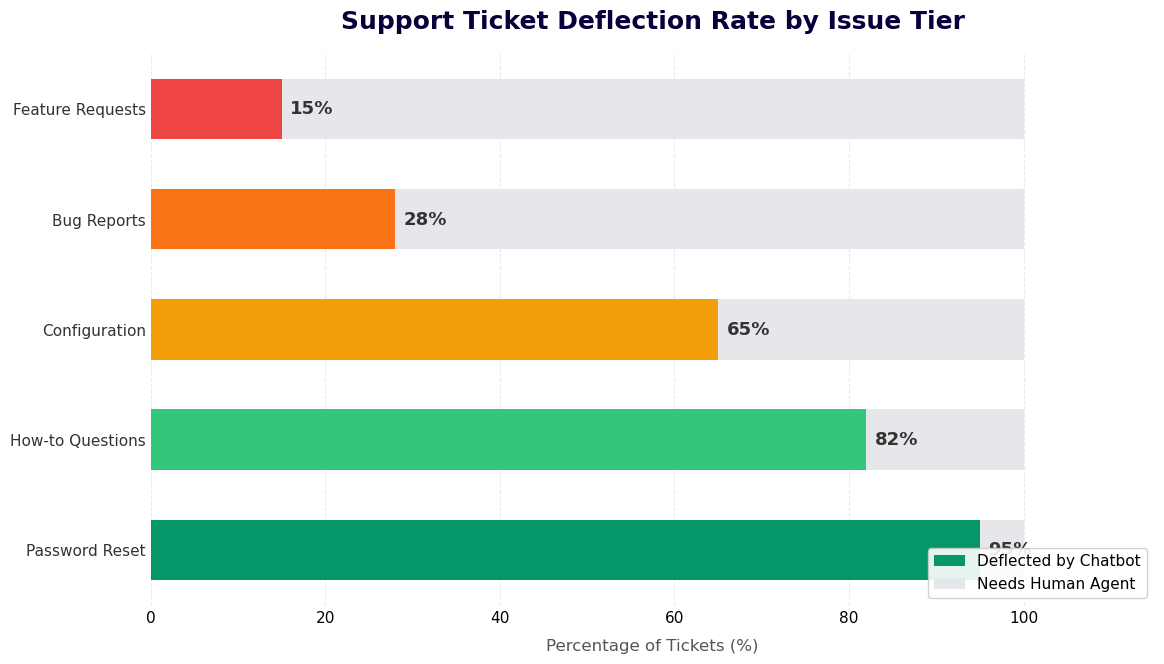
Deflection rate -- the percentage of support requests resolved by the chatbot without human agent involvement -- is the primary operational metric for a technical support triage system. Here are the benchmarks from 2026 across IT and SaaS support contexts, along with the factors that drive variation.
| Support Context | Typical Ticket Volume Distribution | AI Deflection Rate (Industry Benchmark) | Deflection Rate with Optimized Triage Bot |
|---|---|---|---|
| SaaS B2B (mid-market product) | 45% how-to, 30% bug reports, 15% billing, 10% onboarding | 30-40% | 50-65% |
| SaaS B2C (consumer app) | 50% account/access, 25% billing, 15% feature questions, 10% bugs | 40-55% | 60-75% |
| Internal IT helpdesk (enterprise) | 35% password/access, 30% hardware/software setup, 20% connectivity, 15% other | 35-50% | 55-70% |
| API/developer tools support | 40% integration questions, 30% error debugging, 20% documentation, 10% billing | 25-35% | 40-55% |
| E-commerce platform support | 40% order/account, 30% technical integration, 20% billing, 10% other | 40-55% | 60-75% |
Why Deflection Rates Vary
The single largest determinant of deflection rate is knowledge base completeness and quality. A triage chatbot can only resolve issues that are documented somewhere in its knowledge sources. Organizations that invest in comprehensive help documentation -- covering not just "how to use feature X" but also "error message Y means Z and here is how to fix it" -- see deflection rates 15-25 percentage points higher than organizations with sparse documentation. The triage chatbot is a delivery mechanism for your knowledge; the quality of the knowledge is what determines the quality of the outcome.
The second determinant is the accuracy of the issue classification model. Misclassified issues are routed to the wrong knowledge base index, producing irrelevant results and lower resolution rates. Organizations that invest in refining their classification taxonomy and training the model on their specific product vocabulary see significantly more accurate classification and correspondingly higher deflection rates. The classification model improves continuously as more resolved interactions are fed back as training data.
The 40-60% Deflectable Ticket Threshold
Research across SaaS support teams consistently identifies that 40-60% of incoming ticket volume is "deflectable" -- meaning it could be resolved with accurate, accessible self-service if the right information were presented in the right format at the right moment. The gap between the industry benchmark deflection rates (30-40%) and the deflectable threshold (40-60%) represents the quality gap in most self-service implementations: static help centers and keyword search cannot deliver the right information consistently enough to match the deflection potential of the ticket mix. A structured triage chatbot with guided troubleshooting is specifically designed to close this gap.
First Contact Resolution and CSAT Impact
Beyond deflection rate, first contact resolution (FCR) -- the percentage of tickets resolved without a follow-up -- is the key quality metric. Triage chatbots with structured diagnostic intake consistently improve FCR for escalated tickets because the agent receives complete context on the first touch. Agents who can resolve tickets without requesting additional information from the customer achieve FCR rates 20-30 percentage points higher than agents working from vague initial descriptions. Higher FCR correlates directly with higher CSAT scores: customers who have their issue resolved on the first interaction report satisfaction scores 0.8-1.2 points higher (on a 5-point scale) than customers who require follow-up exchanges.
ROI Analysis: Triage Automation for Support Teams
The financial case for technical support triage automation is measurable and predictable. The key variables are current ticket volume, average handling time per ticket, agent labor cost, and the deflection rate the triage system achieves. Here is the full ROI model with typical inputs for SaaS and IT support contexts.
Cost Per Ticket: The Baseline
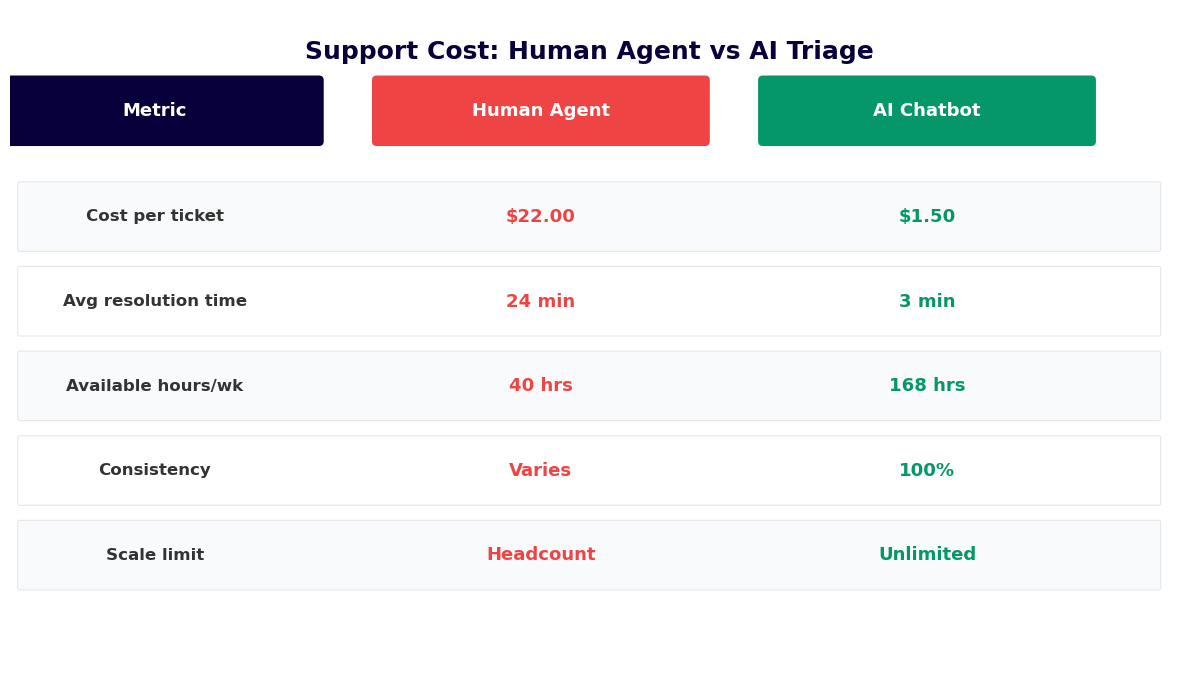
The fully-loaded cost of a support ticket in a SaaS company ranges from $8-25 depending on the organization's size, location of support staff, and complexity of the issue mix. This cost includes agent labor time (typically 15-25 minutes per ticket for first response and resolution for non-trivial issues), tooling costs (Zendesk, Freshdesk, or Jira licensing allocated per ticket), management and QA overhead, and the opportunity cost of agent time not spent on higher-value activities. Password resets and known how-to questions at the low end cost $3-8 to handle manually; complex bug reports or billing disputes cost $20-40.
Deflection Value Calculation
A support team handling 1,000 tickets per week at an average cost of $12 per ticket spends $12,000 weekly on support operations -- $624,000 annually. A triage chatbot deflecting 50% of that volume reduces the weekly ticket burden to 500 agent-handled tickets. At the same average cost, annual support costs drop from $624,000 to $312,000. The $312,000 saving represents the gross return on the chatbot investment before accounting for the platform cost.
| Scenario | Weekly Tickets | Avg Cost/Ticket | Deflection Rate | Annual Savings |
|---|---|---|---|---|
| Small SaaS team | 200 | $15 | 50% | $78,000 |
| Mid-market SaaS | 1,000 | $12 | 55% | $343,200 |
| Enterprise IT helpdesk | 3,000 | $10 | 60% | $936,000 |
| Developer tools company | 500 | $18 | 45% | $210,600 |
Agent Productivity Gains Beyond Deflection
Deflection rate captures only part of the ROI. For the tickets that are escalated to human agents, the pre-populated diagnostic context from the triage chatbot reduces the time-to-resolution significantly. A ticket that arrives with classified issue type, environment details, error messages, and a record of troubleshooting steps already attempted requires 30-50% less agent investigation time than a ticket arriving with a vague one-line description. Across non-deflected tickets, this reduction in handling time represents an additional 15-25% improvement in agent capacity -- meaning the same team can handle higher volume after triage automation without adding headcount.
Scaling Without Headcount Growth
For growing SaaS companies, the most strategically significant ROI element is the ability to scale support coverage without proportional headcount growth. Manual support scales linearly: doubling ticket volume requires roughly doubling the support team. With triage automation deflecting 50-60% of volume, a company can absorb 100% growth in ticket volume with a 40-50% increase in support headcount, significantly improving the support efficiency ratio. Use the chatbot ROI calculator to model the specific impact at your current and projected ticket volumes. For a broader view of automation-driven support cost models, see the analytics platform documentation on support efficiency metrics.
50,000+ businesses use Conferbot templates to automate conversations
Setup Guide: Deploying the Technical Support Triage System
The technical support triage system can be fully operational within three to five business days for most SaaS and IT environments. The timeline depends on the complexity of your knowledge base integration and the depth of customization required for your issue classification taxonomy. Here is the step-by-step deployment process.
Step 1: Load the Template and Configure Product Context
Start from the Technical Support Triage template in the Conferbot template library. Clone it to your workspace. In the product context settings, enter your product name, the primary feature categories users can raise issues about, and any product-specific terminology that the classification model should recognize. This context seeding improves classification accuracy from the first conversation by giving the NLP model your product vocabulary. Customize the bot's name, greeting, and tone -- technical support contexts typically benefit from a professional, concise tone that signals competence without being cold.
Step 2: Configure the Issue Classification Taxonomy
In the classification settings, define the issue categories relevant to your product and support team structure. The template ships with a default taxonomy (authentication, performance, integration, data, billing, feature question, bug report) that you can use as-is, extend, or replace entirely. Map each category to a routing destination: the Zendesk group, Freshdesk team, or Jira project that handles that issue type. Configure severity scoring rules: which issue types and symptom combinations escalate to Critical vs. High vs. Medium. This mapping is the configuration step most directly tied to routing accuracy -- invest time here to ensure categories match how your support team is actually structured.
Step 3: Connect Your Knowledge Base
Connect your existing knowledge base as the primary resolution source. For Zendesk Help Center, authenticate via the Zendesk API and specify which article sections are relevant to each issue category. For Confluence, connect via the Confluence REST API and specify the spaces the chatbot should search. For custom knowledge base systems, configure the search API endpoint and authentication in Conferbot's API integration panel. Run test queries for your five most common ticket types to verify that the knowledge base search is returning relevant articles. If the search results are poor, the issue is usually in the index configuration or article tagging, not the chatbot itself.
Step 4: Connect Your Ticketing System
Use the integrations hub to connect Zendesk, Freshdesk, Jira Service Management, or your custom ticketing system. For each platform, authenticate with the required API credentials and configure the field mapping: how the chatbot's classification, severity, and diagnostic fields map to the ticketing system's native fields. Configure the assignment rules: which ticket categories route to which groups or agents. Test the integration by running the triage flow through to escalation and verifying that a correctly populated ticket is created in your ticketing system with the expected field values and assignment.
Step 5: Build and Test Troubleshooting Flows
For your five to ten most common ticket types, build guided troubleshooting flows in the conversation editor. Each flow consists of a sequence of resolution steps with confirmation checkpoints. Use your existing runbook documentation as the source -- the troubleshooting flow is essentially a conversational version of your internal resolution playbook. Test each flow with realistic user inputs, including inputs that describe the symptom in non-technical language, to verify that the NLP classification routes to the correct flow and that the resolution steps are effective. Measure the completion rate and resolution confirmation rate for each flow during the testing phase.
Step 6: Deploy and Iterate
Deploy the triage system on your help center website and in-app support widget. Monitor the analytics dashboard for the first two weeks: track deflection rate by issue category, classification accuracy (review a sample of conversations to verify categories are correct), knowledge base article utilization, escalation volume by severity, and user satisfaction scores on resolved interactions. Identify the categories with the lowest deflection rates -- these are typically the areas where your knowledge base coverage is thinnest or your troubleshooting flows are incomplete. Expand documentation and refine flows for these categories first. Deflection rate improvements compound as knowledge coverage grows.
Escalation Best Practices: Routing P1 Incidents and Complex Cases
The escalation design of a technical support triage system is as important as its deflection capability. A chatbot that deflects 60% of tickets but mishandles the 40% that need human attention -- particularly the high-severity cases -- creates more problems than it solves. Here are the escalation practices that ensure the triage system makes the right call on critical and complex cases every time.
Zero-Tolerance Rules for Critical Severity
Define a set of zero-tolerance escalation triggers: conditions that always escalate immediately to your on-call engineer, bypassing the standard triage flow. These typically include: service completely unavailable (explicit statement or keywords indicating total outage), data loss or data corruption, security incidents (unauthorized access, potential breach), and production-breaking issues for enterprise customers above a defined contract tier. Configure these triggers as hard rules in the triage system -- they cannot be overridden by other routing logic and they execute regardless of time of day, queue depth, or the outcome of the knowledge base search. Critical incidents should never wait in a queue because the triage bot was still working through the standard flow.
Context-Enriched Handoff to Human Agents
When the chatbot escalates a case to a human agent -- whether through automatic severity routing or because the user requested it -- the quality of the handoff determines how quickly the agent can resolve the issue. The handoff package should include: the complete conversation transcript, the classified issue type and severity score, the diagnostic context collected (environment, error, affected feature, reproduction steps), the knowledge base articles that were presented and whether they were confirmed as unhelpful, and any screenshots or log snippets the user provided. This package should be visible to the agent immediately upon ticket assignment, not buried in the ticket body or attached as an unformatted log. Configure the ticket field mapping to surface the most critical diagnostic information in the ticketing system's primary view.
Live Chat Escalation Path
For high-severity issues where a ticket is not sufficient -- where the user needs immediate human interaction rather than asynchronous resolution -- configure a live chat escalation path. Conferbot's live chat integration allows the triage chatbot to transfer the conversation to an available support engineer in real time, with the full triage context preserved in the chat window. The engineer sees everything the chatbot collected before the conversation was transferred. This path should be triggered automatically for Critical severity issues and available on-demand for any user who explicitly requests to speak with a person. Set availability hours for live chat escalation and configure an out-of-hours fallback for Critical issues (typically an on-call page via PagerDuty, OpsGenie, or Slack).
Escalation to Specialized Teams
Complex technical issues often require escalation not just to any human agent, but to a specific specialist -- a database engineer, a security team member, an integration specialist, or a senior support engineer familiar with a specific customer's environment. Configure category-to-team routing at the classification level: API integration failures route to the integrations engineering team, security-related classifications route to the security team, and enterprise customer issues route to the dedicated customer success engineering team. This precision routing reduces the time-to-resolution for complex issues by eliminating the tier-1 to tier-2 handoff step that adds delay in traditional queue-based support workflows.
Feedback Loop for Continuous Improvement
Escalation quality improves over time if the outcomes of escalated cases feed back into the triage system. When an agent resolves a ticket that the chatbot escalated, the resolution -- the steps taken and the root cause identified -- should be captured and evaluated for knowledge base addition. If the same issue type is escalated repeatedly and the agent applies the same resolution each time, that resolution should become a guided troubleshooting flow in the chatbot. Configure a lightweight post-resolution workflow where agents can flag resolved tickets for knowledge base review. This feedback loop is what drives the deflection rate from the initial deployment benchmark toward the upper end of the achievable range over the first six to twelve months of operation. Track this progress in the analytics dashboard as deflection rate trend by issue category over time.
Technical Support Triage Chatbot FAQ
Everything you need to know about chatbots for technical support triage chatbot.
Why Use a Template vs Building from Scratch?
Templates encode years of optimization data into the conversation flow before you start.
| Factor | Conferbot Template | Build from Scratch | Hire a Developer |
|---|---|---|---|
| Time to deploy | 10 minutes | 2-8 hours | 2-6 weeks |
| Cost | Free | Your time | $5,000-$25,000 |
| Day-1 conversion | 15-22% | 5-8% | 10-15% |
| Proven flows | Yes, data-tested | No | Depends |
| Updates included | Automatic | Manual | Paid |
| Multi-channel | 8+ channels | 1 channel | Extra cost |
| Analytics | Built-in | Must build | Extra cost |
Ready to Deploy Technical Support Triage Chatbot?
Join 50,000+ businesses. Free forever plan available. No credit card required.