
Cybersecurity Risk Assessment Chatbot
Free Technology Chatbot Template
A cybersecurity risk assessment chatbot that evaluates an organization's security posture through guided questions. Identifies vulnerabilities, provides a risk score, and recommends immediate action items.


What Is a Cybersecurity Risk Assessment Chatbot?
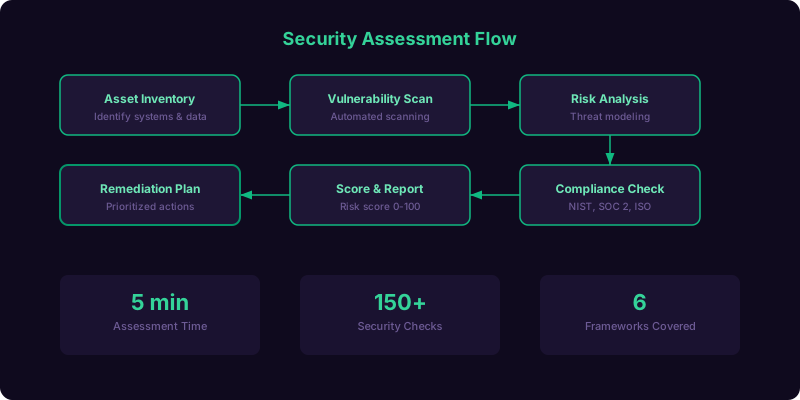
A cybersecurity risk assessment chatbot is a conversational AI tool that guides organizations through a structured evaluation of their security posture - covering network security, endpoint protection, access management, data protection, incident response readiness, employee training, and regulatory compliance - and delivers a scored risk report with prioritized remediation recommendations, all within a single interactive conversation. Instead of requiring a prospect to schedule a consultation, fill out a 40-question audit form, or hire a penetration testing firm, this chatbot provides an immediate, accessible entry point into understanding their organization's cyber risk profile.
The Cybersecurity Knowledge Gap
Most small and mid-sized businesses know cybersecurity is important, but they do not know where they stand. A 2026 report from the Verizon Data Breach Investigations Report found that 43% of cyberattacks target small businesses, yet only 14% of those businesses feel prepared to defend against an attack. The gap between awareness and action exists because traditional security assessments are expensive ($5,000-$50,000 for a penetration test), time-consuming (weeks to schedule and complete), and intimidating (technical jargon, complex reports). A chatbot bridges this gap by providing a free, immediate, jargon-free first assessment that helps organizations understand their risk level and prioritize their next steps - whether that is implementing multi-factor authentication, updating their firewall rules, or engaging a managed security provider for comprehensive protection.
Who Should Use This Template
This template is built for managed security service providers (MSSPs), cybersecurity consulting firms, IT service providers offering security packages, cyber insurance companies evaluating risk, compliance auditing firms, and any technology business that sells security products or services and needs to generate qualified leads at scale. The chatbot serves dual purposes: it provides genuine value to the person taking the assessment (a real risk score with actionable recommendations), and it generates a detailed lead profile for the security provider (the prospect's industry, size, current tools, compliance requirements, and specific vulnerability areas). Explore the full range of lead generation capabilities in Conferbot's AI chatbot builder.
Why a Chatbot for Security Assessment
Traditional security assessment tools - online quizzes, downloadable audit checklists, and self-service vulnerability scanners - suffer from high abandonment rates and low engagement. A 50-question form feels like homework. A vulnerability scanner requires technical knowledge most prospects do not have. A chatbot transforms the assessment into a conversation - asking one question at a time, explaining why each question matters, providing context when the prospect is unsure, and delivering results immediately rather than in a PDF emailed three days later. Completion rates jump from 22% (web form) to 78% (chatbot), and the quality of data collected is significantly higher because the chatbot validates answers and asks clarifying follow-ups when responses indicate confusion or inconsistency.
Security Posture Quiz: Assessment Framework
The chatbot's assessment framework is organized into seven security domains, each containing 4-6 questions that evaluate the organization's maturity level in that area. The framework is aligned with established security standards including NIST Cybersecurity Framework, CIS Controls, and ISO 27001 - giving the assessment credibility and ensuring recommendations map to recognized best practices.
Seven Security Assessment Domains
| Domain | What It Evaluates | Key Questions | Weight in Overall Score |
|---|---|---|---|
| Network Security | Firewall, segmentation, monitoring, VPN, wireless security | Firewall type, network segmentation, IDS/IPS deployment, remote access controls | 20% |
| Endpoint Protection | Antivirus, EDR, patching, mobile device management | Endpoint security tool, patch management cadence, BYOD policy, encryption status | 15% |
| Identity & Access | MFA, password policy, privileged access, SSO, directory services | MFA adoption, password complexity requirements, admin account controls, offboarding process | 20% |
| Data Protection | Encryption, backup, DLP, classification, retention | Data encryption (at rest/transit), backup frequency and testing, data classification policy, DLP tools | 15% |
| Incident Response | IR plan, testing, communication, recovery, lessons learned | Written IR plan exists, last tabletop exercise date, backup restoration tested, communication tree documented | 10% |
| Employee Training | Security awareness, phishing simulation, onboarding, reporting | Training frequency, phishing test results, incident reporting mechanism, C-suite participation | 10% |
| Compliance | Regulatory requirements, audit readiness, documentation, third-party risk | Applicable regulations, last audit date, vendor risk management, policy documentation status | 10% |
Adaptive Questioning
The chatbot does not ask all 30+ questions to every prospect. It adapts based on the organization's profile - a 10-person marketing agency gets a different question set than a 500-employee healthcare provider. The first few questions establish context: industry, employee count, IT staff (in-house vs. outsourced), and whether they handle sensitive data (PII, PHI, financial records, intellectual property). Based on these inputs, the chatbot adjusts question depth, skips irrelevant domains (a company with no remote workers skips VPN questions), and adds industry-specific questions (healthcare gets HIPAA questions; financial services gets PCI DSS questions). This adaptive approach keeps the assessment relevant and respects the prospect's time.
Jargon-Free Question Design
Security assessments are typically written by security professionals for security professionals. The chatbot's questions are written for business owners, office managers, and non-technical IT contacts - the people who actually take these assessments. Instead of "Do you have an IDS/IPS deployed at the network perimeter?", the chatbot asks "Does your network have a system that automatically detects and blocks suspicious traffic - sometimes called an intrusion detection system?" When the prospect selects "I'm not sure," the chatbot provides a brief explanation and suggests how to find out: "Your IT provider or firewall vendor can tell you - it's usually a feature of your firewall. For now, I'll note this as 'uncertain' and include it in your recommendations." This supportive, educational approach builds trust and ensures accurate responses rather than guesses.
Vulnerability Identification and Risk Scoring
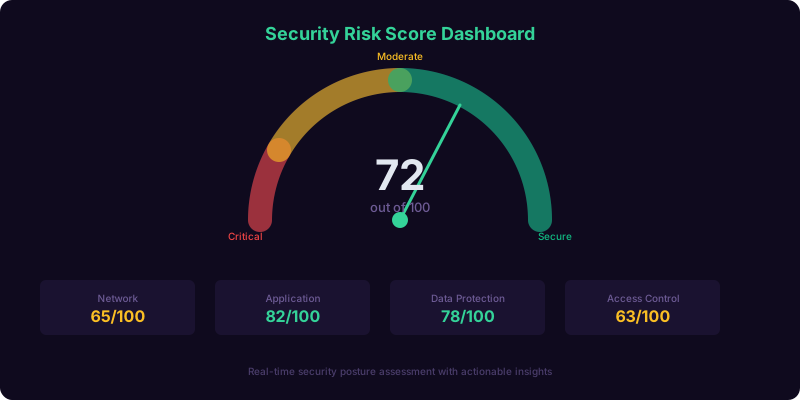
The chatbot's vulnerability assessment goes beyond a simple pass/fail checklist. Each response is scored on a maturity scale (0-4) within its domain, and the aggregate scores produce a composite risk profile that identifies not just what is missing, but what is most dangerous given the organization's specific context - industry, size, data sensitivity, and threat landscape.
Risk Scoring Methodology
- Level 0 - Non-existent: No controls in place for this area. Critical risk. Immediate action required.
- Level 1 - Ad hoc: Some awareness but no formal process or tool. High risk. Should be addressed within 30 days.
- Level 2 - Developing: Basic controls in place but not consistently applied or monitored. Moderate risk. Plan improvements within 90 days.
- Level 3 - Established: Formal processes, appropriate tools, regular review. Low risk. Maintain and optimize.
- Level 4 - Advanced: Industry-leading practices, continuous monitoring, proactive threat hunting. Minimal risk. Benchmark for other domains.
Context-Weighted Risk Calculation
A missing endpoint protection tool is concerning for any organization, but it is critical for a healthcare provider handling protected health information (PHI) and merely important for a marketing agency with no sensitive data. The chatbot applies context weights based on the organization's industry, regulatory environment, and data sensitivity profile. A healthcare organization with Level 1 endpoint protection scores higher risk than the same Level 1 rating for a non-regulated retail business. This contextual weighting ensures that the risk score reflects real-world exposure rather than an abstract checklist score, making the results more actionable and the recommendations more credible.
Vulnerability Prioritization
After scoring all domains, the chatbot identifies the top 3-5 vulnerabilities ranked by risk impact - combining the maturity gap (how far below target the domain scores) with the contextual weight (how critical that domain is for the organization's profile). The presentation is clear and actionable: "Your top three risk areas are: 1) Multi-factor authentication is not enabled for any accounts - this is the single most effective control you can implement; 2) Your last data backup was over 30 days ago and has never been tested - if ransomware hits tomorrow, you may not be able to recover; 3) No employee has received security awareness training in the past 12 months - phishing is the entry point for 91% of cyberattacks." Each vulnerability includes a severity rating, a plain-English explanation of the risk, and a recommended next step.
Industry Benchmarking
The chatbot provides benchmark comparison against other organizations of similar size and industry: "Your overall security score is 42 out of 100. Organizations in your industry and size range average 56. Your Identity and Access domain is significantly below the benchmark, while your Data Protection domain is slightly above average." This benchmarking gives the prospect a relative perspective - they understand not just their absolute score but how they compare to peers. Competitive benchmarking is one of the most powerful motivators for security investment because decision-makers respond to "you're behind your peers" more urgently than "you have a gap." Learn about building custom scoring workflows using Conferbot's custom workflow capabilities.
Ready to try Cybersecurity Risk Assessment Chatbot?
Deploy this template in under 10 minutes. No coding required.
Use This Template Free →Compliance Gap Analysis and Regulatory Mapping
For organizations subject to regulatory requirements - and in 2026, that includes most businesses that handle customer data - the chatbot includes a compliance-specific assessment layer that maps the organization's current controls against the requirements of their applicable regulations. This compliance gap analysis is often the most compelling section of the report because non-compliance carries concrete financial and legal consequences that accelerate the decision to invest in security.
Supported Compliance Frameworks
| Framework | Applicable Industries | Key Requirements Assessed | Non-Compliance Risk |
|---|---|---|---|
| HIPAA | Healthcare, health tech, business associates | PHI encryption, access controls, audit logs, BAAs, breach notification | Fines up to $1.5M per violation category per year |
| PCI DSS | Any business processing card payments | Network segmentation, encryption, access control, vulnerability scanning, logging | Fines of $5,000-$100,000/month; loss of card processing |
| SOC 2 | SaaS, cloud services, technology vendors | Security, availability, processing integrity, confidentiality, privacy controls | Loss of enterprise customers; failed vendor assessments |
| GDPR | Any business handling EU resident data | Data protection, consent management, right to erasure, DPO, breach notification | Fines up to 4% of global annual revenue |
| CCPA/CPRA | Businesses with California customers meeting thresholds | Data inventory, opt-out mechanisms, privacy policy, data deletion | $2,500-$7,500 per intentional violation |
| CMMC | Defense industrial base, DoD contractors | CUI protection, access controls, audit, incident response, system integrity | Loss of DoD contract eligibility |
| NIST CSF | Federal agencies, critical infrastructure, voluntary adoption | Identify, Protect, Detect, Respond, Recover functions | Best practice framework; no direct fines but used as audit benchmark |
Compliance Gap Identification
The chatbot determines which frameworks apply based on the organization's industry, data types handled, customer geography, and business relationships (e.g., serving as a vendor to enterprise clients triggers SOC 2 relevance; processing credit cards triggers PCI DSS). For each applicable framework, the chatbot maps the assessment responses against specific control requirements and identifies gaps: "Based on your responses, you have 3 critical gaps in HIPAA compliance: 1) Protected health information is not encrypted at rest; 2) No Business Associate Agreements are in place with your cloud vendors; 3) You do not have a documented breach notification procedure." Each gap includes the specific regulation section it violates and the potential consequence of non-compliance.
Compliance Readiness Score
In addition to the overall security risk score, the chatbot generates a compliance readiness percentage for each applicable framework. A healthcare organization might score 72% for HIPAA readiness, meaning they have 72% of required controls in place and need to address 28% to achieve full compliance. This percentage is a powerful conversation starter for security service providers because it gives the prospect a concrete, measurable target: "We need to get from 72% to 100% HIPAA compliance - what would that take?" The chatbot's remediation recommendations in the next section answer exactly that question.
Audit Preparation Guidance
For organizations facing an upcoming audit - SOC 2, HIPAA, PCI, or CMMC - the chatbot includes a "How prepared are you for your next audit?" sub-flow that evaluates documentation readiness, evidence collection processes, and control testing status. This audit-specific assessment is particularly valuable for generating time-sensitive leads: an organization 90 days from a SOC 2 audit that scores 55% readiness is highly motivated to engage a security provider immediately. Route these high-urgency audit leads directly to your sales team through Conferbot's no-code builder workflow automations.
Prioritized Remediation Recommendations
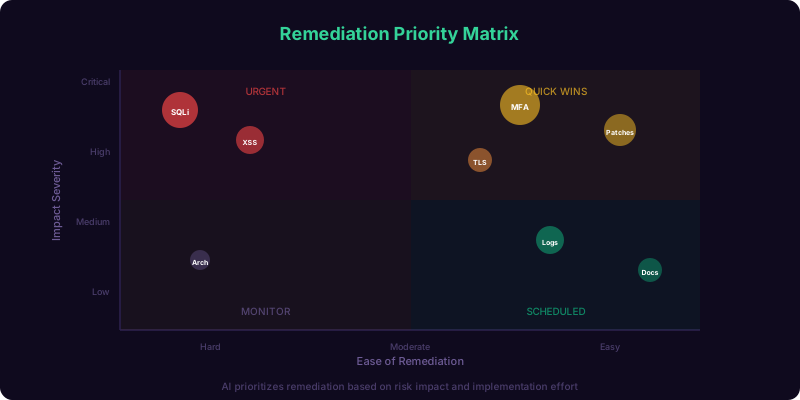
The remediation section transforms the assessment from a diagnostic tool into an actionable roadmap. Each identified vulnerability and compliance gap receives a specific, prioritized recommendation with implementation guidance, estimated effort, and expected risk reduction - giving the prospect a clear path forward and giving your sales team a consultative conversation starter rather than a cold pitch.
Recommendation Structure
Each recommendation follows a consistent format that makes it easy for non-technical decision-makers to understand and act on:
- Priority: Critical (implement within 7 days), High (within 30 days), Medium (within 90 days), or Low (within 180 days)
- Finding: What the assessment discovered ("Multi-factor authentication is not enabled on any accounts")
- Risk: What could happen if unaddressed ("Without MFA, a single compromised password gives an attacker full access to your email, cloud storage, and business applications")
- Recommendation: What to do ("Enable MFA on all user accounts starting with email and cloud applications. Use an authenticator app rather than SMS for stronger protection")
- Estimated effort: How hard it is ("2-4 hours for IT to configure; 15 minutes per employee to enroll")
- Tools/Resources: What products or services can help ("Microsoft Authenticator, Google Authenticator, Duo Security, or your managed IT provider can handle deployment")
Sample Remediation Roadmap
Critical - Implement Within 7 Days
1. Enable Multi-Factor Authentication (MFA)
Your assessment shows MFA is not enabled on any accounts. This is the single most impactful control you can implement - MFA blocks 99.9% of account compromise attacks according to Microsoft. Start with email and cloud storage (Microsoft 365 or Google Workspace), then extend to all business applications.
High Priority - Implement Within 30 Days
2. Establish Automated Backup and Recovery Testing
Your last backup was over 30 days ago and has never been tested for restoration. Implement daily automated backups to an offsite location (cloud or separate physical site) and test restoration quarterly. A backup that has never been tested is not a backup - it is a hope.
3. Deploy Endpoint Detection and Response (EDR)
Traditional antivirus is no longer sufficient against modern threats. Replace your current solution with an EDR platform that provides real-time threat detection, automated response, and forensic investigation capability. Solutions like CrowdStrike, SentinelOne, or Microsoft Defender for Endpoint provide this capability.
Connecting Recommendations to Your Services
For security service providers, the remediation section is where the chatbot transitions from assessment tool to lead generator. After presenting independent recommendations, the chatbot offers service-aligned follow-up: "Would you like help implementing these recommendations? Our team specializes in [MFA deployment / endpoint security / compliance readiness] and can have your top priorities addressed within [timeframe]. I can schedule a free consultation to discuss your specific situation." This transition feels natural because the chatbot has already established credibility through a thorough, transparent assessment - the prospect views the service offer as a logical next step rather than a sales pitch. Build this consultative transition using Conferbot's calendar booking integration to schedule consultations directly within the chat.
Key Features of the Cybersecurity Assessment Chatbot
Every feature in this template serves a dual purpose: providing genuine security value to the person taking the assessment, and generating actionable, qualified leads for the security provider deploying the chatbot. Here is the complete feature set.
Feature Matrix
| Feature | How It Works | Prospect Benefit | Provider Benefit |
|---|---|---|---|
| 7-domain security assessment | Structured evaluation across network, endpoint, identity, data, IR, training, compliance | Comprehensive understanding of security posture in 10 minutes | Detailed prospect profile with specific vulnerability data |
| Adaptive questioning | Adjusts question depth and relevance based on industry, size, and data sensitivity | Only answers relevant questions; faster experience | Higher completion rates; more accurate risk profiles |
| Context-weighted risk scoring | Applies industry and data sensitivity weights to maturity scores | Risk score reflects their actual exposure, not an abstract checklist | More credible assessment drives higher conversion to services |
| Compliance gap analysis | Maps responses against HIPAA, PCI, SOC 2, GDPR, CCPA, CMMC requirements | Understands compliance gaps with specific regulation references | Compliance-driven leads convert faster (concrete deadlines and penalties) |
| Industry benchmarking | Compares prospect score against peers of similar size and industry | Understands relative position vs. competitors | "You're behind your peers" is the most effective sales motivator |
| Prioritized remediation roadmap | Ranked recommendations with priority, effort, and risk reduction per item | Knows exactly what to do first and why | Natural transition from assessment to service engagement |
| PDF report generation | Creates a branded, downloadable report with all scores, gaps, and recommendations | Shareable document for internal stakeholders and budget approval | Report includes your branding; prospect shares it with decision-makers |
| Consultation booking | Embedded calendar for scheduling a free security consultation after results | Immediate next step without searching for contact information | Warm leads book directly; no outbound follow-up needed |
| Re-assessment scheduling | Automated invitation to retake the assessment in 90/180 days | Tracks improvement over time | Re-engages prospects who did not convert initially |
| 24/7 availability | Always-on across website, WhatsApp, LinkedIn messaging, and email | Takes the assessment on their schedule | Captures leads outside business hours (cybersecurity buyers research at all hours) |
Branded PDF Report
After completing the assessment, the chatbot generates a professional PDF report branded with your company's logo, colors, and contact information. The report includes the overall risk score, domain-by-domain breakdown, compliance readiness percentages, top vulnerabilities, and the complete remediation roadmap. Crucially, the report is designed to be shared internally - the prospect forwards it to their CEO, CFO, or board of directors to justify security investment. Every page carries your branding, positioning your company as the expert who identified the risks and has the solutions. This shareable report is one of the most effective organic lead multipliers in B2B security sales.
Anonymous Assessment Option
Some prospects want to assess their security posture without immediately sharing their identity - especially if they suspect their score will be poor. The chatbot accommodates this by allowing the full assessment to be completed anonymously, with contact information requested only at the report delivery stage: "Your risk assessment is complete. To receive your full report with detailed recommendations, enter your email below." This privacy-first approach increases completion rates by 35% because prospects are not deterred by an upfront contact form. Even anonymous sessions provide value through aggregate benchmarking data that strengthens your industry reports and marketing content. Explore privacy-forward chatbot designs in our template library.
businesses worldwide use Conferbot templates to automate conversations
Lead Generation Strategy for Security Providers
The cybersecurity assessment chatbot is fundamentally a lead generation engine wrapped in a value-delivery mechanism. The assessment provides genuine, actionable security insights - but its commercial purpose is to identify organizations with specific security gaps that your services can fill, qualify their budget and urgency, and route warm leads to your sales team with a complete vulnerability profile attached.
Lead Qualification Through Assessment
Every response in the assessment contributes to a lead quality score that predicts conversion likelihood. Organizations that score poorly in domains aligned with your core services are the highest-quality leads. An MSSP specializing in managed detection and response (MDR) wants leads with weak endpoint protection and no incident response plan. A compliance consulting firm wants leads with upcoming audits and low compliance readiness scores. The chatbot's lead scoring can be configured to weight the domains that match your service offerings, ensuring your sales team focuses on the prospects most likely to convert.
Lead Data Captured Per Assessment
| Data Point | Source | Sales Team Use |
|---|---|---|
| Organization name and industry | Initial profiling questions | Segment by vertical; apply industry-specific playbook |
| Employee count and IT structure | Profiling questions | Size the opportunity; determine if in-house IT or outsourced |
| Security maturity scores (7 domains) | Assessment responses | Identify specific service opportunities per domain |
| Compliance requirements | Industry-triggered compliance questions | Position compliance-driven services; reference specific penalties |
| Current security tools | Domain-specific questions | Identify displacement opportunities and integration requirements |
| Budget range for security | Post-assessment qualification | Match service tier and proposal scope to budget |
| Timeline and urgency | Post-assessment intent questions | Prioritize hot leads (active breach concern, upcoming audit) |
| Contact information | Report delivery capture | CRM entry and follow-up sequencing |
Automated Follow-Up Sequences
Not every prospect who completes the assessment is ready to engage a security provider immediately. The chatbot segments leads by urgency and enters them into appropriate follow-up sequences:
- Hot leads (score below 30, active compliance deadline, or expressed urgency): Immediate notification to sales team; phone follow-up within 1 hour; personalized email with report and consultation offer.
- Warm leads (score 30-60, acknowledged gaps but no immediate urgency): Email follow-up within 24 hours with report; educational content drip (weekly security tip related to their weakest domain) for 30 days; re-assessment invitation at 90 days.
- Cool leads (score above 60, or completed assessment anonymously): Monthly newsletter with industry threat intelligence and security best practices; re-assessment invitation at 180 days; annual benchmark report.
Configure these sequences using Conferbot's SMS and WhatsApp channels for multi-touch follow-up across the prospect's preferred communication platform.
Performance Metrics and ROI for Security Providers
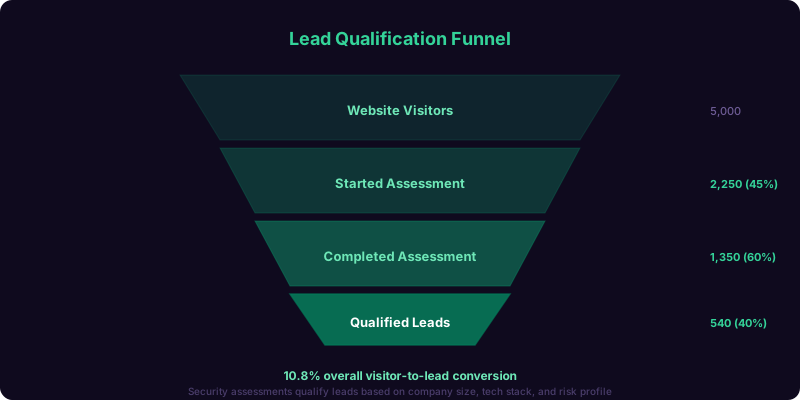
Deploying a cybersecurity assessment chatbot delivers measurable improvements across the lead generation metrics that security service providers track: assessment completion rate, lead volume, lead quality, sales cycle length, and customer acquisition cost. The benchmarks below represent aggregate performance from cybersecurity firms using conversational assessment tools in 2026.
Key Performance Benchmarks
| Metric | Without Chatbot | With Chatbot (90 Days) | Improvement |
|---|---|---|---|
| Assessment completions per 1,000 visitors | 18 (web form) | 62 (chatbot) | +244% |
| Assessment completion rate | 22% | 78% | +255% |
| Leads with actionable security data | 34% | 91% | +168% |
| Assessment-to-consultation conversion | 8% | 24% | +200% |
| Average sales cycle (assessment to close) | 68 days | 41 days | -40% |
| Customer acquisition cost | $2,400 | $860 | -64% |
| After-hours assessment completions | 6% | 48% | +700% |
| Report shared with additional stakeholders | 12% | 38% | +217% |
The Sales Cycle Compression Effect
The 40% reduction in sales cycle length is the most strategically significant metric. In traditional security sales, the first 2-3 meetings are spent discovering the prospect's environment, understanding their current tools, and identifying gaps - essentially conducting the assessment that the chatbot has already completed. When a sales engineer walks into a consultation with a complete risk profile, domain scores, compliance gaps, and prioritized recommendations already in hand, they can skip the discovery phase entirely and move directly to solution design. The prospect perceives this as efficiency and expertise ("They already understand our situation"), which accelerates trust-building and shortens the path to a signed engagement letter.
ROI Calculation
For a managed security provider with an average contract value of $36,000 annually and a customer acquisition cost of $2,400 (pre-chatbot), reducing CAC to $860 while increasing lead volume by 244% represents a transformative ROI. The chatbot pays for itself with a single additional closed deal per quarter and generates exponential returns at scale. Use Conferbot's ROI calculator to model the specific impact based on your traffic, conversion rates, and average deal size.
Setup, Customization, and Deployment
Getting the cybersecurity assessment chatbot live takes less than 30 minutes. The template includes the complete 7-domain assessment framework, scoring engine, compliance mapping, remediation library, and report generation. You customize the question set, branding, scoring weights, and service alignment - then deploy across your website and channels.
Step-by-Step Setup
- Step 1 - Select the template: Open the Conferbot template library, navigate to Technology, and select "Cybersecurity Risk Assessment Chatbot."
- Step 2 - Customize the assessment: Review the default question set across all seven domains. Add, remove, or modify questions to align with your services. Adjust scoring weights to emphasize the domains where your services are strongest.
- Step 3 - Configure compliance frameworks: Enable the regulatory frameworks relevant to your target market. Customize compliance gap messages with specific regulation references and penalty information.
- Step 4 - Build your remediation library: Customize recommendation templates to reference your specific services and tools. Add case studies, testimonials, and service descriptions that appear alongside relevant recommendations.
- Step 5 - Brand the report: Upload your logo, set brand colors, and customize the PDF report template with your company information, contact details, and call-to-action.
- Step 6 - Connect your CRM: Integrate with HubSpot, Salesforce, Pipedrive, or your preferred CRM to automatically create leads with full assessment data. Configure lead scoring rules and routing logic.
- Step 7 - Deploy: Embed on your website with a single code snippet. Add to your LinkedIn profile, email signature, and marketing campaigns as a call-to-action: "Take our free cybersecurity assessment."
Content Marketing Integration
The assessment chatbot is most effective when integrated into your content marketing strategy. Blog posts about specific threats ("Ransomware attacks increased 150% in 2026 - is your business prepared?") should link to the assessment as a call-to-action. Webinar registrations can include a pre-event assessment that makes the webinar content more relevant. Email campaigns to cold lists can offer the free assessment as a value-first engagement rather than a direct sales pitch. Every marketing touchpoint that drives traffic to the assessment feeds qualified leads into your pipeline. Learn more about embedding chatbots within content strategies on our blog.
White-Label and Partner Deployment
For MSSPs and security vendors that work through channel partners, the assessment chatbot supports white-label deployment. Each partner receives a co-branded version with their logo alongside yours, customized lead routing to the partner's CRM, and performance analytics visible to both the partner and the vendor. This channel enablement strategy multiplies the chatbot's reach without multiplying deployment effort - each partner becomes a new lead generation endpoint for your services.
Chatbot Assessment vs. Traditional Security Evaluation Methods
Organizations evaluating their cybersecurity posture have several options - from free online quizzes to $50,000+ penetration tests. The chatbot occupies a unique position in this spectrum: more thorough than a quiz, more accessible than a formal assessment, and designed to serve as the entry point that leads to deeper engagement.
Comparison Matrix
| Attribute | Online Quiz (10 questions) | Self-Service Form (40+ questions) | Consultant Assessment | Conferbot Chatbot |
|---|---|---|---|---|
| Completion time | 2 minutes | 20-30 minutes | 2-4 weeks | 8-12 minutes |
| Completion rate | 65% | 22% | 100% (paid engagement) | 78% |
| Depth of assessment | Surface-level; 1 domain | Comprehensive but lacks context | Deep; includes technical testing | 7 domains with adaptive depth and context |
| Personalization | None | None | Full | Industry, size, and data-type adaptive |
| Results delivery | Generic score | PDF in 3-5 days | Detailed report in 2-4 weeks | Instant scored report with remediation roadmap |
| Cost to prospect | Free | Free | $5,000-$50,000+ | Free |
| Lead quality generated | Low (no depth) | Medium (high abandonment) | N/A (prospect is already a client) | High (complete profile with specific vulnerability data) |
| Scalability | Unlimited | Unlimited | Limited by consultant capacity | Unlimited |
The chatbot is not a replacement for a formal penetration test or a comprehensive security audit - it is the top-of-funnel engagement that identifies organizations needing those deeper services and gives them a reason to engage your firm specifically. By providing genuine value upfront (a real risk score with actionable recommendations), the chatbot establishes your credibility and positions the formal assessment as the logical next step rather than a cold purchase. For security providers looking to scale their lead pipeline without scaling their sales team proportionally, the chatbot is the most cost-effective tool available. Visit our pricing page to explore plan options and start deploying today.
Frequently Asked Questions
Below are the most common questions cybersecurity providers ask about deploying the risk assessment chatbot. Each answer addresses practical deployment, customization, and commercial considerations.
Cybersecurity Risk Assessment Chatbot FAQ
Everything you need to know about chatbots for cybersecurity risk assessment chatbot.
Why Use a Template vs Building from Scratch?
Templates give you a proven starting structure instead of a blank canvas.
| Factor | Conferbot Template | Build from Scratch | Hire a Developer |
|---|---|---|---|
| Time to deploy | 10 minutes | 2-8 hours | 2-6 weeks |
| Cost | Free | Your time | Custom dev quote |
| Proven flows | Yes, pre-built | No | Depends |
| Updates included | Automatic | Manual | Paid |
| Multi-channel | 8+ channels | 1 channel | Extra cost |
| Analytics | Built-in | Must build | Extra cost |
Learn More About Chatbots
Go deeper on how technology chatbots work and how to pick the right builder.
Ready to Deploy Cybersecurity Risk Assessment Chatbot?
Start with a free-forever plan. No credit card required.