6 Free Templates Available

Best Technology Chatbot Templates

Get free, ready-to-use technology chatbot templates that help boost conversions and automate customer interactions. Start building in 2 minutes with no coding required.

100% Free
No Coding Required
Instant Deploy
💻
67%
Higher Conversions
2min
Setup Time
24/7
Automated
6+
Templates

Explore Templates & Resources

Browse templates, learn about the category, or find answers to common questions

Categories29

Technology Templates

Choose from our collection of proven technology chatbot templates

6templates
API Support Chatbot - Technology template preview

API Support Chatbot

A developer-focused API support chatbot that helps troubleshoot integration issues, error codes, rate limits, and authentication problems. Developers can describe their issue type, share error codes and endpoints, specify their programming language, and get tailored code examples or escalation to the engineering team. Perfect for API-first companies, developer platforms, and SaaS products with public APIs looking to reduce developer support tickets and improve DX.

Technology
15uses
10likes
Bug Reporting Chatbot - Technology template preview

Bug Reporting Chatbot

A structured bug reporting chatbot that guides users through submitting detailed, actionable bug reports. Users can select the product module, describe the issue, provide reproduction steps, specify expected vs actual behavior, set severity, and upload screenshots — all in a conversational format. Perfect for software companies, QA teams, and open-source projects looking to standardize bug reports, reduce incomplete submissions, and speed up triage.

Technology
13uses
9likes
IT Helpdesk Chatbot - Technology template preview

IT Helpdesk Chatbot

A comprehensive IT helpdesk chatbot that triages support requests, guides users through common fixes like password resets, and automatically creates tickets for complex issues. Employees can report problems across categories — password, software, hardware, access, and network — get instant self-service resolutions, and track their ticket status. Perfect for IT departments, MSPs, and internal support teams looking to reduce ticket volume and improve first-contact resolution rates.

Technology
18uses
12likes
SaaS Trial Onboarding Chatbot - Technology template preview

SaaS Trial Onboarding Chatbot

A guided SaaS trial onboarding chatbot that personalizes the trial experience based on user role, goals, and feature interests. New trial users are walked through key features — analytics, integrations, API access, and automation — with setup assistance and upgrade guidance. Perfect for SaaS products looking to improve trial-to-paid conversion, reduce time-to-value, and ensure new users discover the features that matter most to them.

Technology
11uses
7likes
Tech Product Recommendation Guide - Technology and IT template preview

Tech Product Recommendation Guide

Discover how the Tech Product Recommendation Guide revolutionizes technology and IT businesses with automated efficiency and 24/7 customer engagement.

Technology and IT
2uses
1likes
IT Support Query Automator - Technology and IT template preview

IT Support Query Automator

Transform your IT support with the IT Support Query Automator. Experience 24/7 availability, faster response times, and improved customer satisfaction.

Technology and IT
7uses
2likes

SaaS Onboarding: Turning Sign-Ups into Active Users

In SaaS, the battle is not won at sign-up -- it is won during onboarding. Industry data shows that 40-60% of free trial users never return after their first session, and even paid customers who fail to achieve their first success within 14 days churn at rates exceeding 80%. The onboarding experience is the single greatest determinant of long-term customer retention and lifetime value. A technology chatbot transforms onboarding from a passive, self-service maze into an active, guided journey that drives users to their first success faster.

The Onboarding Engagement Gap

Most SaaS products rely on a combination of welcome emails, in-app tours, and help documentation for onboarding. The problem is that these tools are passive -- they broadcast information and hope users engage. Email open rates during onboarding average 40-50%, in-app tour completion rates rarely exceed 20%, and documentation is consulted only when users are already stuck. A chatbot flips this dynamic by proactively engaging users in real-time conversation, detecting when they are struggling, and intervening before they give up.

Conferbot's onboarding chatbot deploys on your product website and within your application, providing contextual assistance based on where the user is in their onboarding journey. A new user who has just created an account receives a guided walkthrough of the first essential action. A user who has been inactive for three days receives a re-engagement prompt with a specific, achievable next step.

Guided Activation Workflows

Effective onboarding is about guiding users to their "aha moment" -- the point where they experience the core value of your product. The chatbot creates guided activation workflows that walk users through the specific sequence of actions that lead to first value:

  • Step-by-step setup: The chatbot walks users through account configuration, integration setup, and initial customization, answering questions at each step.
  • Template selection: For products with templates or presets, the chatbot recommends starting configurations based on the user's stated goals and industry.
  • Data import assistance: The chatbot guides users through importing their existing data, handling common errors and format issues conversationally.
  • First success celebration: When the user completes their first meaningful action, the chatbot acknowledges the achievement and suggests the logical next step.
Time to first value with and without chatbot-guided onboarding

📊 Performance Metric

SaaS products with chatbot-guided onboarding see 30-50% faster time-to-first-value and 2-3x higher feature adoption rates compared to static in-app tours and email sequences alone.

Onboarding MethodActivation RateTime to First ValueDay-30 Retention
Email drip only18-25%7-12 days22%
In-app product tour25-35%5-8 days31%
Chatbot-guided onboarding45-60%2-4 days48%
Chatbot + human CSM55-70%1-3 days58%

Reducing Time to Value

SaaS companies deploying Conferbot for onboarding consistently report 30-50% reductions in time-to-first-value and corresponding improvements in trial-to-paid conversion rates. The chatbot does not replace your product team's onboarding UX -- it augments it with a real-time, interactive support layer that catches users who fall through the cracks of your standard onboarding flow.

The analytics reveal exactly where users get stuck, which questions they ask most frequently, and which activation steps have the highest dropout rates. This data feeds directly into your product improvement roadmap, creating a virtuous cycle where the chatbot both solves onboarding problems today and reveals the product changes that will prevent them tomorrow.

Technical Support Automation for Technology Companies

Technical support is the backbone of any technology company, but it is also one of the most expensive and difficult operations to scale. Senior engineers are pulled from development to handle support escalations. Ticket backlogs grow during product launches and updates. And the knowledge gap between your support team and your product's complexity widens with every new feature. A technology chatbot addresses these challenges by automating the resolution of common technical issues, intelligently triaging complex ones, and ensuring that your engineering talent is reserved for problems that genuinely require their expertise.

Tiered Support Automation

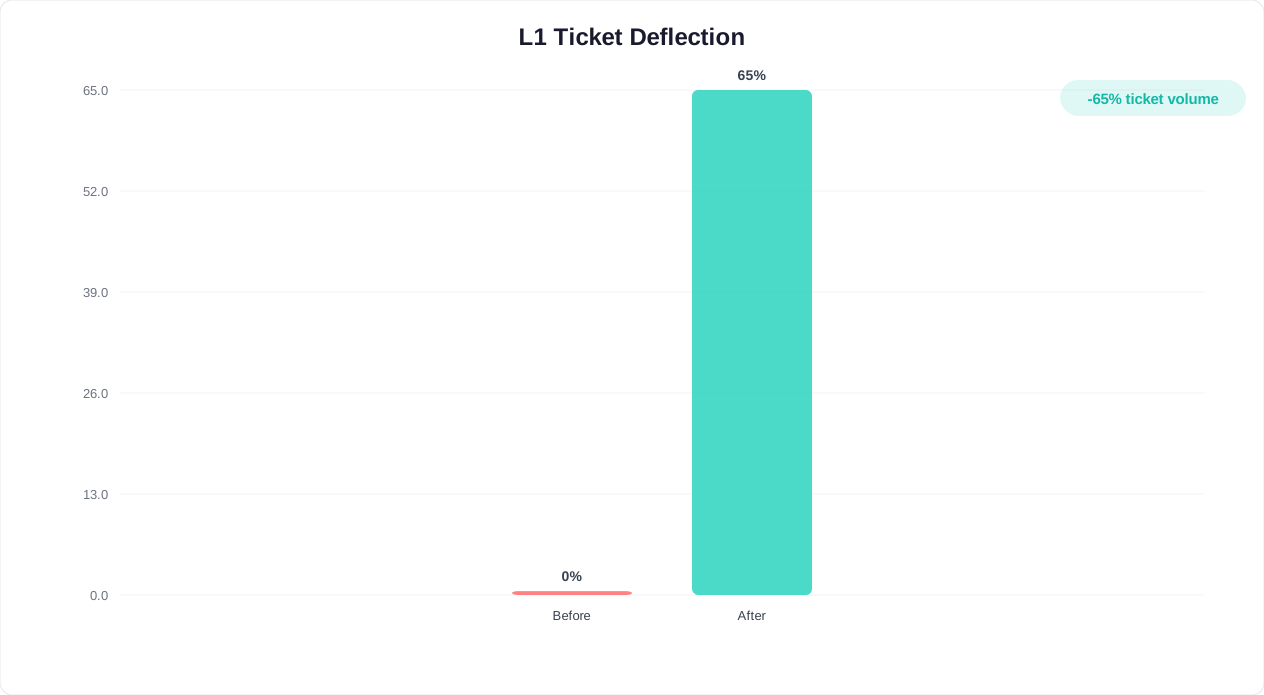
Effective technical support operates in tiers, and a chatbot excels at automating the first two. Tier 1 issues -- password resets, account access, basic configuration questions, and known-issue workarounds -- are resolved entirely by the chatbot, typically handling 50-65% of total support volume. Tier 2 issues -- more complex troubleshooting, integration debugging, and performance optimization -- receive guided diagnostic assistance from the chatbot before escalation to a human agent with full context.

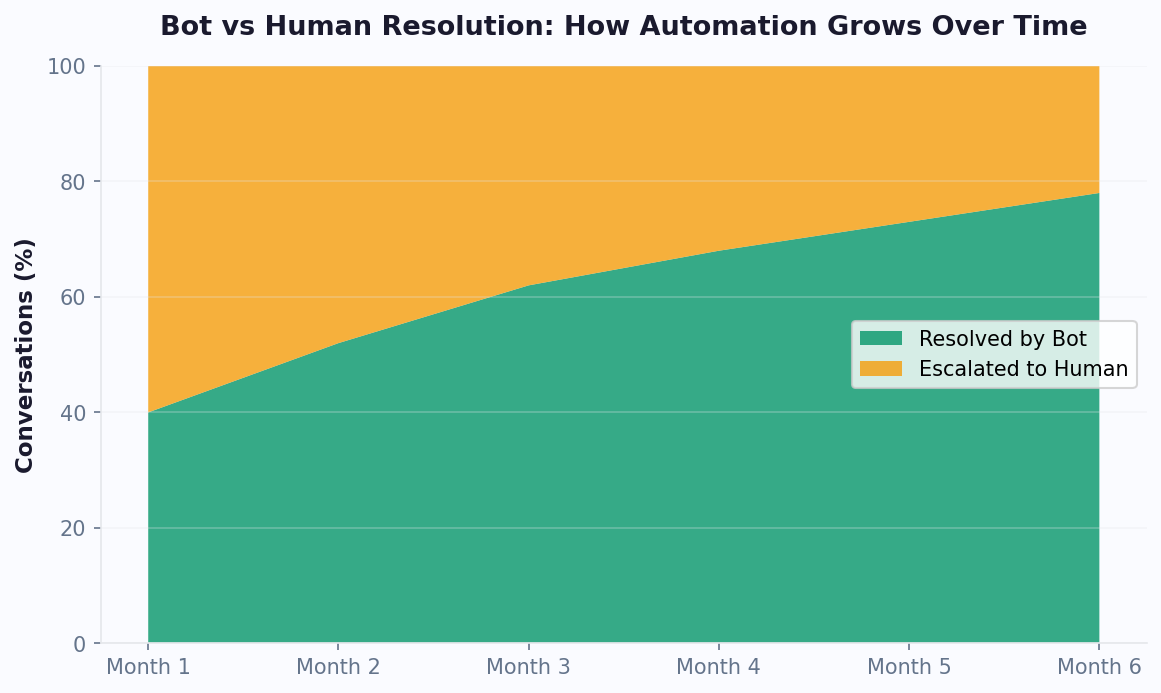
Chatbot autonomous resolution rate improvement over time for tech support

Intelligent Troubleshooting

The chatbot conducts systematic troubleshooting through conversational diagnostic flows. When a user reports an issue, the chatbot asks targeted questions to narrow down the cause: What browser are you using? When did the issue start? Can you reproduce it? Have you made any recent changes? This diagnostic conversation replaces the back-and-forth emails that typically extend resolution times by days.

  • Error code lookup: Users can paste error codes or messages directly into the chat, and the chatbot provides immediate explanations and resolution steps.
  • Screenshot analysis: Users upload screenshots of error states, and the chatbot identifies common UI issues and provides visual guidance for resolution.
  • Environment detection: The chatbot can detect the user's browser, operating system, and application version to provide environment-specific troubleshooting steps.
  • Knowledge base search: The chatbot searches your documentation, known issues database, and community forums to find relevant solutions, presenting them conversationally rather than as a list of links.
Support ticket deflection rates by issue category showing chatbot autonomous resolution performance

💡 Key Insight

Technology companies using Conferbot for support see chatbot resolution rates climb to 70-80% autonomous resolution within six months, reducing average ticket cost from $15-25 to under $2 per interaction.

Support TierIssue TypesChatbot ResolutionAvg. Resolution TimeCost per Ticket
Tier 1 (Routine)Password resets, account access, known issues90-95%45 seconds$0.50
Tier 2 (Complex)Integration debugging, config issues40-55%5-8 minutes$3.50
Tier 3 (Escalated)Bugs, architecture issues, custom needs5-10%Human required$18-25

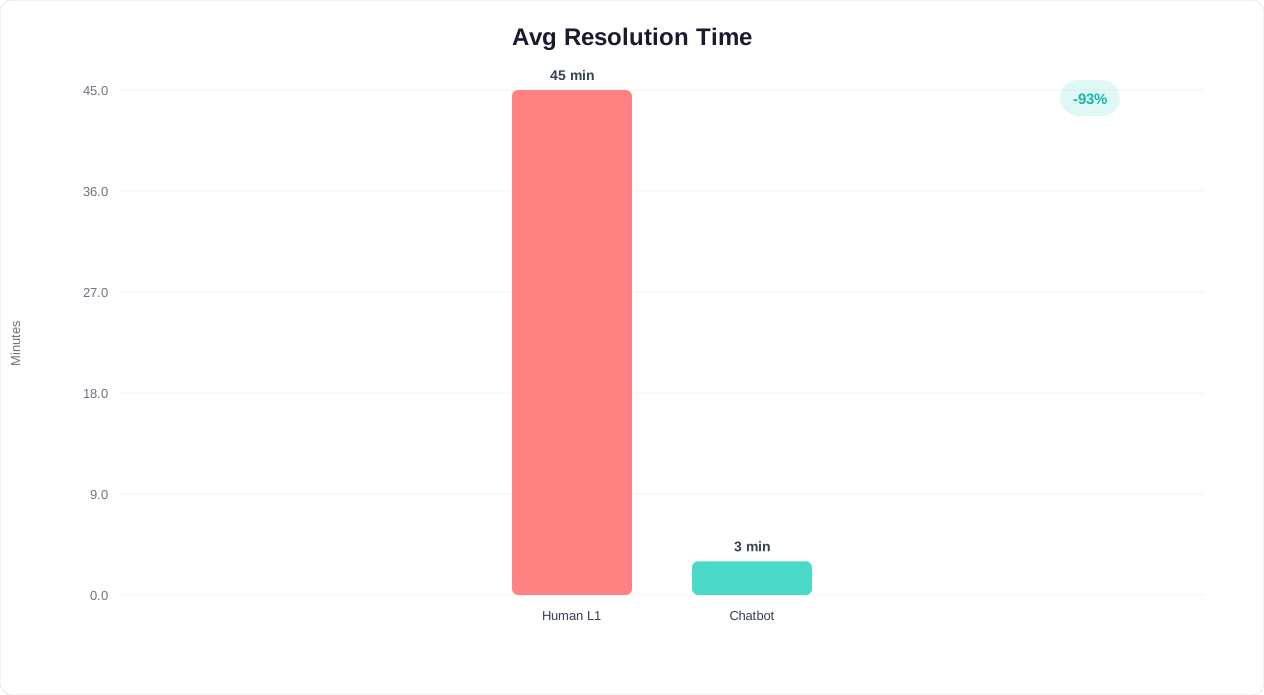
IT Ticket Resolution Comparison by Tier

The chatbot's impact on support operations varies by issue complexity. Here is a detailed breakdown of resolution metrics across support tiers:

MetricTier 1 (Human)Tier 1 (Chatbot)Tier 2 (Human)Tier 2 (Chatbot-Assisted)
Avg. resolution time15-25 minutes45 seconds2-4 hours35-55 minutes
First-contact resolution65-75%90-95%40-55%60-72%
Cost per resolution$15-$22$0.50$35-$65$12-$18
Customer satisfaction3.8/54.2/53.5/54.0/5
AvailabilityBusiness hours only24/7/365Business hours only24/7 triage, business hours resolution

Escalation with Context

When the chatbot cannot resolve an issue autonomously, it escalates to a human agent via live chat handoff with the complete diagnostic context: the user's environment, steps already attempted, error logs, and screenshots. This context-rich escalation reduces the average handle time for human agents by 35-45% because they do not need to re-collect information the chatbot has already gathered.

Continuous Learning

Every support interaction feeds the chatbot's knowledge base. When human agents resolve novel issues, the resolution is captured and added to the chatbot's repertoire, expanding its autonomous resolution capability over time. Technology companies using Conferbot see their chatbot's resolution rate climb steadily, typically reaching 70-80% autonomous resolution within six months of deployment as it learns from every interaction.

Demo Booking and Sales Qualification for Tech Products

For B2B technology companies, the product demo is the pivotal moment in the sales cycle. It is where prospects see the product in action, envision how it solves their problems, and begin to build the business case for purchase. Yet scheduling a demo through traditional channels -- filling out a form, waiting for a sales rep to call back, negotiating availability -- introduces friction that causes 30-50% of demo requests to go unbooked. A technology chatbot eliminates this friction by qualifying prospects and booking demos in real time, directly from the conversation.

Conversational Qualification

Not every demo request is equal. A chatbot qualifies prospects conversationally, distinguishing between enterprise decision-makers ready to buy and students researching for a class project. It asks about company size, role, use case, timeline, and current solution in a natural conversation that feels like a helpful discussion rather than an interrogation. This qualification data feeds directly into your CRM, ensuring your sales team's time is focused on high-value prospects.

Qualification CriteriaHot Lead SignalsWarm Lead SignalsCold Lead Signals
Company Size50+ employees10-50 employeesSolo / student
TimelineEvaluating nowNext quarterJust researching
BudgetBudget approvedBudget plannedNo budget
Decision RoleDecision maker / influencerEvaluatorEnd user only
Current SolutionUsing competitor / outgrownManual processNo need identified
Chatbot ActionImmediate demo bookingDemo + nurtureSelf-serve resources
Average resolution time comparison between chatbot-assisted and traditional demo booking processes

⚡ Efficiency Gain

Chatbot demo booking reduces time from interest to confirmed meeting from 24-72 hours to under 3 minutes, with 60-80% more demos booked and significantly higher show rates.

Instant Calendar Integration

For qualified prospects, the chatbot presents available demo slots from your sales team's calendar in real time. The prospect selects a time, receives a calendar invitation with a video conferencing link, and the sales rep receives the booking with complete qualification context. The entire process takes under three minutes -- compared to the 24-72 hour response time typical of form-based demo requests. Technology companies using chatbot demo booking report 60-80% increases in booked demos and significantly higher show rates.

Pre-Demo Preparation

Between booking and the demo itself, the chatbot continues adding value. It sends the prospect relevant case studies, product overview videos, and preparation materials tailored to their use case. It also collects additional context -- specific features they want to see, questions they want answered, other stakeholders who should attend -- that enables the sales engineer to deliver a customized, compelling demo rather than a generic product tour.

  • Multi-stakeholder coordination: For enterprise deals, the chatbot helps coordinate demo attendance across multiple stakeholders, collecting their individual interests and scheduling a time that works for everyone.
  • Technical requirements: The chatbot confirms that prospects have the necessary setup (browser, bandwidth, permissions) for a smooth demo experience.
  • Reminder sequences: Automated reminders with easy rescheduling options reduce no-show rates by 40-50%.

The demo booking chatbot transforms your website from a passive brochure into an active sales tool that qualifies, books, and prepares prospects around the clock, ensuring your sales team walks into every demo fully informed and facing a genuinely interested buyer.

Developer Support and API Documentation Assistance

Developer experience (DX) has become a critical competitive differentiator for technology companies that offer APIs, SDKs, and developer platforms. Developers evaluate tools quickly, have extremely low tolerance for poor documentation or unresponsive support, and make adoption decisions that influence enterprise purchasing. A technology chatbot trained on your API documentation, code samples, and developer resources provides instant, technically accurate support that keeps developers building with your platform rather than abandoning it for a competitor.

Documentation Navigation

Developer documentation tends to be vast and complex. Even well-organized docs can be difficult to navigate when a developer has a specific question buried somewhere in hundreds of pages. The chatbot serves as an intelligent documentation navigator, understanding natural language questions and returning precise, relevant answers with code examples. Instead of searching through your docs for "how to implement webhook authentication," a developer simply asks the chatbot and receives the exact code snippet, explanation, and relevant caveats.

Conferbot's AI engine understands programming concepts, API conventions, and technical terminology, delivering responses that are technically accurate and contextually appropriate. It distinguishes between a question about REST API authentication and GraphQL authentication, provides language-specific code examples (Python, JavaScript, Java, Go), and adapts its explanation depth based on the developer's apparent experience level.

Code-Level Troubleshooting

Developers frequently encounter issues with API integration -- authentication failures, unexpected response formats, rate limiting, and edge cases. The chatbot handles these common integration issues through guided troubleshooting:

  • Error diagnosis: Developers paste error messages or HTTP response codes, and the chatbot explains the cause and provides the fix, including corrected code snippets.
  • Request debugging: The chatbot reviews API request structures, identifies malformed parameters or missing headers, and suggests corrections.
  • Rate limit guidance: When developers hit rate limits, the chatbot explains the limits, suggests optimization strategies, and helps implement retry logic with exponential backoff.
  • Migration assistance: When API versions change, the chatbot guides developers through the migration process, highlighting breaking changes and providing updated code examples.

Community and Ecosystem Support

The chatbot connects developers with your broader ecosystem: community forums, GitHub repositories, sample applications, and partner integrations. It can recommend relevant third-party libraries, link to community-contributed tutorials, and direct developers to the appropriate channel for feature requests and bug reports.

⚡ Developer Experience

Developer support chatbots handle 60-75% of developer inquiries autonomously, improving API integration completion rates by 25-40% and reducing time-to-first-API-call by half.

API Support Metrics: Chatbot vs. Traditional Channels

Developer support chatbots dramatically outperform traditional support channels for API-related inquiries:

Support MetricEmail / TicketCommunity ForumOffice Hours CallDeveloper Chatbot
Avg. response time4-24 hours12-72 hoursScheduled (weekly)Under 5 seconds
Resolution rate70-80%40-55%85-90%60-75%
Cost per inquiry$18-$30$5-$10 (moderation)$45-$75$0.50-$1.50
Code example accuracyHigh (human-written)VariableHigh (live demo)High (doc-trained)
Developer satisfaction3.5/53.2/54.3/54.1/5

Impact on Developer Adoption

Technology companies that deploy Conferbot for developer support see 25-40% increases in API integration completion rates and measurably faster time-to-first-API-call. Developer satisfaction scores improve because developers get answers in seconds rather than waiting for support tickets to be resolved. The chatbot handles 60-75% of developer inquiries autonomously, allowing your developer relations team to focus on strategic ecosystem development, content creation, and community building rather than answering repetitive setup questions.


Product-Led Growth: Chatbots as a Growth Engine

Product-led growth (PLG) has become the dominant go-to-market strategy for modern technology companies. Instead of relying on sales teams to drive adoption, PLG companies let the product itself acquire, activate, and retain customers. In a PLG model, the technology chatbot becomes a critical growth lever -- it is the always-available guide that helps users discover value, overcome obstacles, and expand their usage, all without requiring human intervention from your sales or customer success teams.

Self-Serve Discovery and Activation

PLG companies need users to discover and adopt features independently. The chatbot accelerates this process by proactively suggesting relevant features based on user behavior. A user who has been manually exporting data might be shown the automation feature. A team that has not yet tried collaboration features receives a contextual suggestion. These in-product nudges, delivered conversationally rather than as static tooltips, drive feature adoption rates 2-3x higher than traditional in-app messaging.

The chatbot also handles the questions that block self-serve progress. When a user encounters a confusing UI element, hits a permission error, or does not understand a feature's purpose, the chatbot provides immediate, contextual help without requiring the user to leave the product, search documentation, or submit a support ticket. This frictionless assistance keeps users in their workflow and moving forward.

Expansion Revenue Through Usage

In PLG models, expansion revenue -- upgrades and add-on purchases from existing users -- often exceeds new customer acquisition revenue. The chatbot identifies expansion opportunities naturally:

  • Limit notifications: When users approach plan limits (storage, API calls, team members), the chatbot explains upgrade options and the additional capabilities they unlock.
  • Feature gating: When users try to access premium features, the chatbot explains the feature's value, shows relevant use cases, and offers a trial or upgrade path.
  • Usage-based recommendations: Based on the user's actual product usage, the chatbot recommends specific plan tiers or add-ons that match their needs, making upgrade decisions feel data-driven rather than salesy.

Viral Loops and Referral

PLG products grow through viral loops -- users invite colleagues, share outputs, and recommend the product organically. The chatbot facilitates these viral moments by making it easy to invite team members ("Would you like to add your colleague to this workspace?"), share content ("Generate a shareable link for this report"), and provide referral incentives at moments of peak satisfaction.

Self-service feature adoption rates with chatbot-driven product-led growth versus traditional onboarding

📊 Growth Metric

PLG companies using chatbot-driven feature discovery see 2-3x higher feature adoption and 15-25% improvements in free-to-paid conversion by surfacing premium capabilities at moments of peak user engagement.

PLG LeverWithout ChatbotWith ChatbotImprovement
Feature discovery rate15-20%40-55%+175%
Free-to-paid conversion8-12%15-22%+80%
Expansion revenue per accountBaseline+25-35%+30%
Team seat adoption2.1 seats avg4.3 seats avg+105%

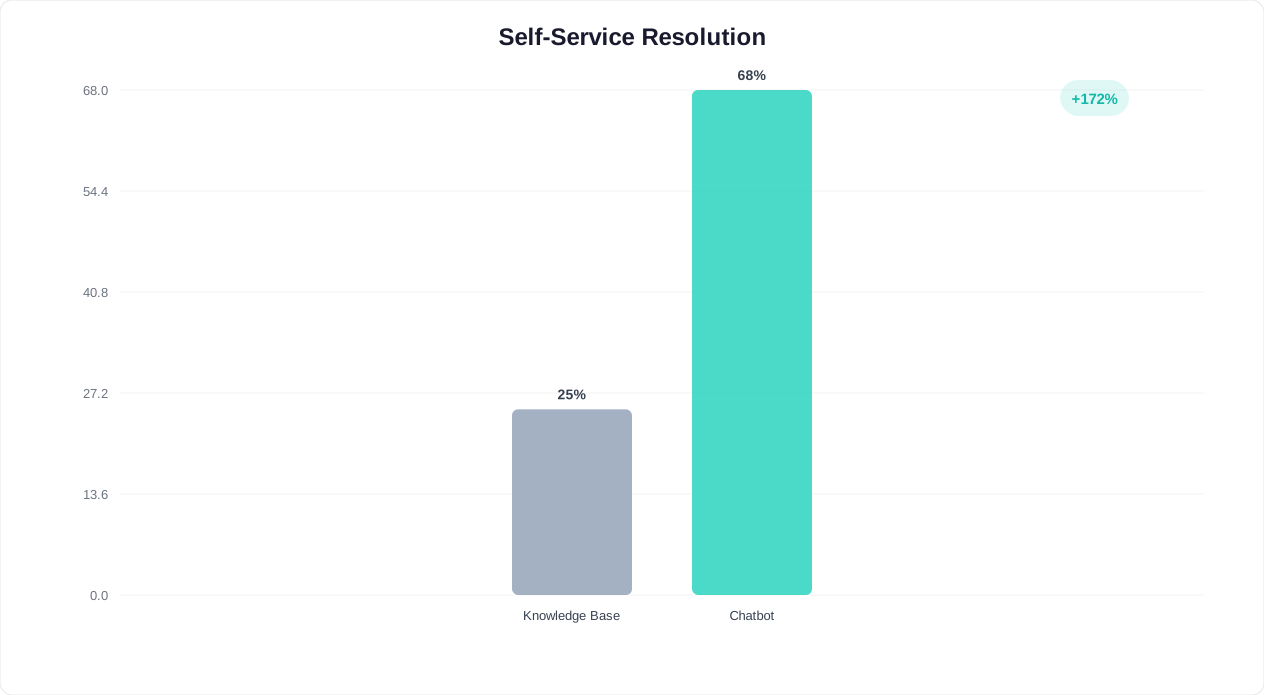
Self-Service Rate Comparison Across Product Types

The effectiveness of chatbot-driven self-service varies by product complexity. Here is how different technology product types compare:

Product TypeSelf-Service Rate (No Bot)Self-Service Rate (With Bot)Support Ticket ReductionTime to Resolution
Simple SaaS tool45-55%80-90%-65%30 sec avg
Enterprise platform20-30%55-70%-48%3 min avg
Developer tool / API35-45%65-80%-55%2 min avg
Mobile app50-60%82-92%-68%25 sec avg
Hardware + software combo15-25%42-55%-38%5 min avg

Data-Driven Product Development

Every chatbot conversation is a product insight. Conferbot's analytics reveal which features users ask about most, where they get confused, what capabilities they wish existed, and why they consider leaving. This conversational data is qualitatively richer than click-stream analytics alone, providing the "why" behind the "what." Technology companies using chatbot interaction data for product decisions report faster iteration cycles and higher feature adoption rates for new releases because they are building what users actually need.

In a PLG world, the chatbot is not just a support tool -- it is a growth engine that drives activation, expansion, and virality while generating the product intelligence that fuels continuous improvement.

IT Helpdesk Bot: Resolve Internal Support Requests Instantly

Internal IT helpdesk teams are overwhelmed. The average IT support team handles 500+ tickets per month per 1,000 employees, and the majority of these requests are routine: password resets, software access requests, VPN troubleshooting, printer issues, and account provisioning. These repetitive tickets consume Tier 1 support bandwidth, create frustrating wait times for employees, and distract skilled IT staff from strategic infrastructure and security work. An IT helpdesk chatbot resolves the most common requests instantly, dramatically reducing ticket volume and freeing your IT team to focus on complex issues that genuinely require human expertise.

Automated Resolution for Common Issues

The chatbot handles the top categories of IT support requests without human intervention. Password resets are guided through self-service identity verification and reset workflows. Software access requests are routed through approval chains and provisioned automatically via integration with your identity management system. VPN and connectivity issues receive step-by-step troubleshooting guides tailored to the user's operating system and location. These automated resolutions typically handle 40-60% of total IT ticket volume, reducing average resolution time from hours to minutes.

Unlike a static FAQ page, the chatbot conducts interactive troubleshooting. When an employee reports that their laptop is running slowly, the chatbot asks targeted diagnostic questions: When did the slowdown start? Is it affecting all applications or just one? Have you restarted recently? How much disk space is remaining? Based on the answers, it provides specific remediation steps rather than a generic troubleshooting article.

Self-Service Request Management

Employees need to request hardware, software licenses, system access, and equipment for new hires. The chatbot handles these requests through structured workflows: collecting the request details, routing for appropriate approval, and providing status updates until fulfillment. Integration with IT service management platforms (ServiceNow, Jira Service Management, Freshservice) ensures that chatbot-handled requests flow into your existing ticketing and asset management systems.

  • New employee IT setup: The chatbot guides managers through new hire IT provisioning: equipment selection, software requirements, access permissions, and setup scheduling, ensuring new employees have everything they need on day one.
  • Incident reporting: When employees encounter system outages or security incidents, the chatbot collects structured incident reports and immediately notifies the appropriate response team with severity classification.
  • Knowledge base integration: The chatbot searches your internal knowledge base and IT documentation to provide answers, and when it resolves a novel issue, the resolution is added to the knowledge base for future reference.
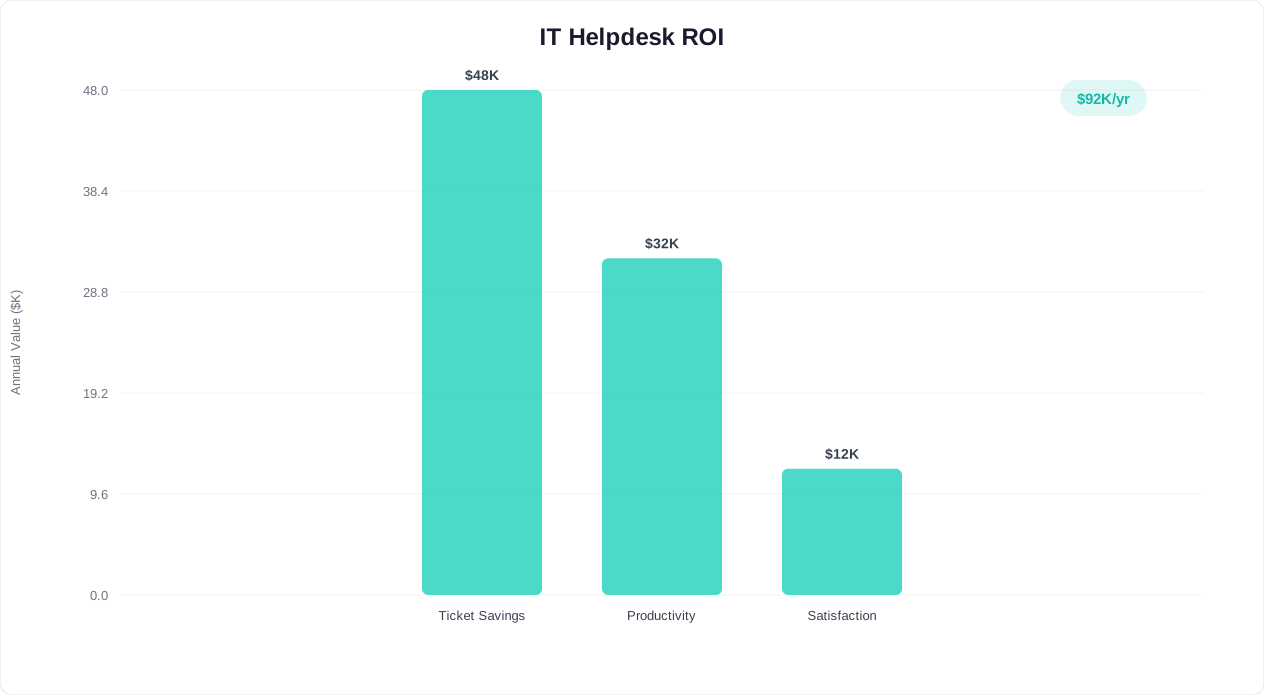
IT helpdesk ROI comparison showing cost per ticket and resolution time with chatbot automation

💰 ROI Impact

A 1,000-employee company generating 500+ IT tickets/month saves $75,000-$150,000 annually by automating 40-60% of Tier 1 support through chatbot, while improving average resolution time from hours to minutes.

Company SizeMonthly IT TicketsTickets AutomatedAnnual Cost SavingsROI
250 employees125-15060-90$18,000-$27,000350%
500 employees250-300125-180$37,500-$54,000520%
1,000 employees500-600250-360$75,000-$108,000680%
5,000 employees2,500-3,0001,250-1,800$375,000-$540,000920%

Helpdesk ROI by Company Size

The financial return of IT helpdesk chatbot automation scales predictably with organizational size:

Company SizeIT Staff Required (Before)IT Staff Required (After)Employee SatisfactionPayback Period
100-250 employees1-2 FTEs0.5-1 FTE3.4 to 4.2/52-3 months
250-500 employees2-4 FTEs1-2 FTEs3.2 to 4.3/56-8 weeks
500-1,000 employees4-8 FTEs2-4 FTEs3.1 to 4.4/54-6 weeks
1,000-5,000 employees8-20 FTEs4-10 FTEs3.0 to 4.5/53-4 weeks
5,000+ employees20-50+ FTEs10-25 FTEs2.9 to 4.5/52-3 weeks

IT Cost Reduction and Employee Satisfaction

The financial impact of IT helpdesk automation is significant. With average IT ticket costs of $15-25 per Tier 1 incident, automating 40-60% of ticket volume delivers measurable cost savings within the first quarter. Equally important, employee satisfaction with IT support improves dramatically when common issues are resolved in minutes rather than hours or days. Companies deploying Conferbot for internal IT support report 35-50% reductions in ticket volume and consistent improvements in employee satisfaction scores for IT services.

Bug Reporting Bot: Structured Issue Collection for Faster Resolution

Unstructured bug reports are one of the biggest productivity drains in software engineering. When users report issues via email, Slack, or free-form support tickets, the reports typically lack critical information: steps to reproduce, expected versus actual behavior, browser and OS details, error messages, and screenshots. Engineering teams spend 30-40% of their triage time requesting missing information before they can even begin investigating. A bug reporting chatbot solves this by collecting complete, structured bug reports through guided conversation, ensuring that every submission arrives with the information engineers need to diagnose and fix the issue.

Guided Report Collection

The chatbot walks users through a structured bug reporting flow that captures all essential fields: a clear description of the issue, step-by-step reproduction instructions, expected behavior, actual behavior, browser and operating system details, screenshots or screen recordings, error messages or console logs, and the frequency of occurrence. This guided approach produces bug reports that are 3-5x more complete than unstructured submissions, dramatically reducing the back-and-forth between QA, support, and engineering.

The chatbot adapts its questions based on the type of issue being reported. A visual bug triggers requests for screenshots and browser details. A performance issue prompts questions about timing, frequency, and data volume. A data accuracy issue asks about specific records, expected values, and comparison sources. This adaptive questioning ensures that each bug type receives the specific diagnostic information that engineers need for that category of issue.

Duplicate Detection and Known Issue Matching

A significant percentage of bug reports describe issues that have already been reported or are already being worked on. The chatbot checks incoming reports against your existing issue tracker (Jira, Linear, GitHub Issues, Azure DevOps) and alerts the reporter if a matching issue exists: "This looks similar to an issue our team is already investigating. Here's the current status and expected fix timeline." This deduplication saves engineering time and provides reporters with immediate answers, reducing frustration on both sides.

  • Severity classification: The chatbot assesses the impact and urgency of each report -- number of users affected, workaround availability, revenue impact -- and assigns an initial severity level that helps engineering prioritize appropriately.
  • Automatic routing: Based on the affected feature area, the chatbot routes the bug report to the correct engineering team or product owner, eliminating manual triage delays.
  • Status updates: Reporters can check the status of their submitted bugs through the chatbot, receiving real-time updates on investigation progress, fix deployment, and verification requests.

Engineering Productivity Impact

Technology companies deploying structured bug reporting chatbots see 40-55% improvements in engineering triage efficiency because reports arrive complete and pre-classified. The reduction in back-and-forth communication alone saves hours of engineering time per week. Additionally, the structured data enables trend analysis: which features generate the most bugs, which releases introduce the most regressions, and which user segments encounter the most issues -- insights that drive quality improvements across the product development lifecycle.

Feature Request Bot: Capture and Prioritize Product Feedback

Every technology company is drowning in feature requests -- from customers, prospects, internal teams, and partners. These requests arrive through dozens of channels: support tickets, sales calls, NPS surveys, social media, community forums, and direct emails to product managers. Most companies lose 60-70% of feature request data because there is no centralized, structured collection process. A feature request chatbot creates a single, always-available channel for structured feature requests, ensuring that every idea is captured, categorized, and available for product planning decisions.

Structured Request Collection

The chatbot collects feature requests with the context that product teams need for prioritization: a description of the desired capability, the business problem it solves, the current workaround, the impact on the user's workflow, and how many users or customers would benefit. This structured collection transforms vague requests like "we need better reporting" into actionable product requirements: "We need the ability to export monthly revenue reports by customer segment as CSV files, which would eliminate our current 3-hour manual reporting process that affects our entire finance team."

The chatbot also collects information about the requester: their role, company size, plan tier, and how long they have been a customer. This context helps product teams weigh requests appropriately -- a feature requested by 50 enterprise customers carries different weight than the same feature requested by 50 free-tier users.

Voting and Community Validation

The chatbot connects to your feature request board or product roadmap tool (Productboard, Canny, Aha!, or custom solutions), enabling users to vote on existing requests rather than creating duplicates. When a user describes a feature that has already been requested, the chatbot presents the existing request: "Great news -- 47 other customers have requested this feature. Would you like to add your vote and any additional context?" This consolidation gives product teams accurate demand signals and gives users visibility into how many others share their needs.

  • Roadmap communication: The chatbot provides users with information about the current product roadmap, upcoming releases, and features under consideration, turning feature request conversations into engagement opportunities.
  • Beta and early access: When requested features enter development, the chatbot notifies interested users and offers beta access, creating an engaged cohort of testers who provide early feedback.
  • Workaround suggestions: When a requested feature is not on the near-term roadmap, the chatbot suggests existing features or integrations that partially address the need, helping users find value in current capabilities.

Product Intelligence at Scale

Aggregated feature request data reveals product strategy insights: which capabilities are most in-demand, which gaps cause the most churn risk, and which features would unlock expansion revenue from existing customers. Technology companies using structured feature request collection report more confident prioritization decisions and higher customer satisfaction with product development responsiveness because customers feel heard and can see their feedback influencing the roadmap.

Developer Onboarding Bot: Get New Engineers Productive Faster

Developer onboarding is one of the most expensive and time-consuming processes in technology companies. The average new engineer takes 3-6 months to reach full productivity, and during that ramp-up period, they consume significant time from senior developers who serve as mentors and guides. Every question about code architecture, development environment setup, deployment processes, and internal tools requires interrupting a productive team member. A developer onboarding chatbot provides new engineers with an always-available resource that answers questions about your codebase, processes, and tools, dramatically reducing ramp-up time and preserving senior developer productivity.

Environment Setup Guidance

The first week of developer onboarding is dominated by environment setup: installing development tools, configuring local environments, cloning repositories, setting up databases, obtaining access credentials, and running the application locally for the first time. The chatbot provides step-by-step guidance for your specific tech stack, with troubleshooting assistance for common setup issues. When a new developer encounters a Docker configuration error or a database connection failure, the chatbot provides the exact resolution rather than requiring them to search through outdated wiki pages or interrupt a colleague.

The chatbot maintains an up-to-date setup guide that reflects the current state of your infrastructure -- not the state it was in when someone last updated the wiki six months ago. When infrastructure changes occur (new service dependencies, updated API keys, changed ports), the chatbot's guidance is updated immediately, ensuring that every new developer gets accurate instructions.

Codebase Navigation and Architecture

Understanding a large codebase is one of the biggest challenges for new developers. The chatbot serves as an interactive guide to your code architecture: "Where does the payment processing logic live?" "How do we handle authentication?" "What's the pattern for adding a new API endpoint?" These questions, which would otherwise require senior developer time, are answered instantly with references to specific files, modules, and documentation.

  • Process documentation: The chatbot explains your development processes: branching strategy, code review requirements, CI/CD pipeline stages, deployment procedures, and incident response protocols.
  • Internal tool guidance: New developers need to learn your internal tools: monitoring dashboards, feature flag systems, A/B testing frameworks, and logging infrastructure. The chatbot provides usage guidance and best practices for each.
  • Team and ownership mapping: When new developers need to collaborate with other teams, the chatbot identifies code ownership, team contacts, and communication channels for each service or component.

Measurable Onboarding Acceleration

Technology companies deploying developer onboarding chatbots report 30-50% reductions in time-to-first-commit and significant decreases in senior developer interruptions. New engineers report higher confidence and satisfaction with the onboarding experience because they can get answers immediately without feeling like they are burdening their teammates. The chatbot also identifies onboarding gaps: frequently asked questions that are not covered in existing documentation reveal missing or outdated content that your engineering team can address systematically.

API Support Bot: Instant Technical Assistance for Integrators

API-first technology companies live and die by their developer experience. When a developer integrating your API hits a problem -- an authentication error, an unexpected response format, a rate limit they did not anticipate -- the speed and quality of support they receive determines whether they persist or abandon your platform for a competitor. Traditional API support channels (email tickets, forum posts, office-hours calls) involve wait times measured in hours or days. An API support chatbot provides instant, technically accurate assistance that keeps developers building, resolving common integration issues in seconds rather than days.

Real-Time Error Diagnosis

The chatbot accepts error messages, HTTP status codes, and error response bodies directly in the conversation and provides immediate, specific guidance. A developer who pastes a 401 authentication error receives step-by-step instructions for verifying their API key, checking token expiration, and confirming scope permissions. A 429 rate limit error triggers an explanation of your rate limiting policy, current usage stats, and code examples for implementing retry logic with exponential backoff. This instant diagnosis resolves 60-75% of API integration issues without human support intervention.

The chatbot understands your API's specific error codes and response formats, providing tailored guidance rather than generic HTTP error explanations. It distinguishes between authentication errors caused by expired tokens versus revoked keys versus incorrect scopes, providing the precise fix for each scenario.

Interactive Code Examples

Developers learn by example, and the chatbot provides code samples in the developer's preferred language. A Python developer asking about webhook verification receives a Python code snippet using your SDK. A JavaScript developer asking about pagination gets a Node.js example with async/await. The chatbot supports code examples in Python, JavaScript, Java, Go, Ruby, PHP, and cURL, adapting to the developer's stated language preference or detected usage patterns.

  • Endpoint discovery: Developers describe what they want to accomplish in natural language, and the chatbot identifies the appropriate API endpoints, required parameters, and expected response formats.
  • SDK guidance: The chatbot provides SDK-specific guidance for your official libraries, including installation, initialization, configuration, and common usage patterns.
  • Migration support: When you release new API versions, the chatbot guides developers through breaking changes, deprecated endpoints, and updated authentication requirements with before/after code comparisons.

Sandbox and Testing Support

The chatbot helps developers work in your sandbox environment: provisioning test accounts, generating test data, explaining test mode behavior differences, and troubleshooting sandbox-specific issues. Developers who receive sandbox support through the chatbot complete their initial integration 40-60% faster because they spend less time debugging environment configuration and more time building actual functionality. The chatbot also facilitates the transition from sandbox to production, walking developers through the go-live checklist and verifying that their integration meets your production requirements.

SaaS Trial Activation Bot: Convert Free Trials into Paying Customers

The free trial is the most critical conversion event in SaaS, and most companies are losing it. Industry benchmarks show that only 15-25% of free trial users convert to paid plans, and the primary reason is not product-market fit -- it is activation failure. Trial users sign up with genuine interest, but they get lost in the product, fail to complete key setup steps, do not experience the core value proposition, and silently abandon before the trial expires. A SaaS trial activation chatbot intervenes at every friction point in the trial journey, guiding users to their first success and building the habit patterns that lead to paid conversion.

Day-by-Day Trial Orchestration

The chatbot orchestrates the trial experience across the full trial period, with different objectives for each phase. Days 1-3 focus on initial setup and first-value delivery. Days 4-7 focus on feature exploration and use case expansion. Days 8-12 focus on team collaboration and workflow integration. Days 13-14 focus on conversion with clear value demonstration and plan selection assistance. This structured approach ensures that trial users progress through the activation milestones that correlate with paid conversion rather than wandering aimlessly through features.

The chatbot monitors trial user behavior in real time and adjusts its guidance accordingly. A user who has completed setup but has not yet performed the core action receives a specific prompt: "You've connected your data source -- nice work! The next step is creating your first dashboard. Would you like me to walk you through it?" A user who has not logged in for two days receives a re-engagement message highlighting a specific benefit they have not yet experienced.

Friction Detection and Intervention

The chatbot identifies behavioral signals that indicate trial users are stuck: repeated visits to the same page, abandoned setup flows, error encounters, and extended inactivity. When these signals appear, the chatbot proactively offers help: "I noticed you started the integration setup but did not complete it. Many users find the OAuth configuration step tricky -- would you like me to walk you through it?" This proactive intervention recovers 20-35% of trial users who would otherwise abandon silently.

  • Personalized success plans: Based on the user's stated goals during trial sign-up, the chatbot creates a personalized activation checklist that focuses on the features most relevant to their use case.
  • Value quantification: The chatbot tracks and communicates the value delivered during the trial: "In your first week, you've automated 12 reports that would have taken 6 hours manually. Upgrading to the Growth plan unlocks unlimited automations."
  • Plan recommendation: As the trial nears expiration, the chatbot recommends the plan tier that best fits the user's actual usage patterns and stated needs, making the upgrade decision straightforward.

Trial Activation Rate by Method

The method used to guide trial users through activation has a decisive impact on conversion. Chatbot-orchestrated trials consistently outperform passive approaches:

Activation MethodSetup CompletionCore Feature UsedTrial-to-Paid RateAvg. LTV of Converted Users
No guidance (self-serve only)28-35%18-22%8-12%Baseline
Email drip sequence38-45%25-32%12-18%+10%
In-app tooltips and tours42-52%30-38%15-20%+15%
Chatbot-guided activation65-78%52-65%25-38%+35%
Chatbot + human CSM hybrid75-88%60-72%32-45%+50%

Trial Extension and Recovery

Not every trial user is ready to convert at the end of the standard trial period. The chatbot identifies high-potential users who need more time and offers targeted trial extensions with specific activation goals. It also re-engages expired trials with compelling reasons to return: new features, special offers, or case studies from similar companies. Companies using trial activation chatbots see 25-40% improvements in trial-to-paid conversion rates and measurably higher customer lifetime values from chatbot-activated accounts because these users achieve deeper product adoption during the trial period.

Technical Documentation Bot: Interactive Knowledge at Your Fingertips

Technical documentation is essential but deeply underutilized. Studies show that developers spend 30-60 minutes per day searching for information across documentation sites, wikis, code comments, and Slack history. Even well-organized documentation becomes hard to navigate as it grows: hundreds of pages across multiple products, versions, and use cases. A technical documentation chatbot transforms your static documentation into an interactive, searchable knowledge assistant that answers questions in natural language, provides contextual code examples, and guides users to exactly the information they need in seconds rather than minutes.

Natural Language Documentation Search

The chatbot understands questions asked in natural language and returns precise answers from your documentation. Instead of searching for "webhook authentication HMAC signature verification" and scanning through multiple pages, a developer asks: "How do I verify that an incoming webhook is actually from your service?" The chatbot returns the specific section explaining HMAC signature verification, including the code example and the relevant header names. This natural language interface makes your documentation accessible to developers at all experience levels, including those who do not know the exact terminology to search for.

The chatbot indexes your entire documentation corpus: API references, guides, tutorials, changelogs, migration documents, and FAQ pages. When content spans multiple pages -- a common scenario for multi-step processes like OAuth implementation -- the chatbot synthesizes information from across pages into a single, coherent answer. This synthesis capability saves developers from the frustrating experience of reading five different pages to understand one complete workflow.

Version-Aware Responses

Technology products evolve rapidly, and documentation must reflect multiple versions simultaneously. The chatbot is version-aware: it asks which version of the product or API the developer is using and provides responses specific to that version. A developer using v2 of your API receives v2-specific endpoints, parameters, and code examples, not the v3 documentation that would lead them astray. When a developer is on an older version, the chatbot also highlights relevant changes in newer versions and provides migration guidance.

  • Code example generation: The chatbot generates code examples tailored to the developer's language and framework, filling in project-specific details like authentication tokens and endpoint URLs from their profile.
  • Troubleshooting guides: When developers ask about errors or unexpected behavior, the chatbot provides step-by-step troubleshooting paths from your documentation, supplemented with common solutions from resolved support tickets.
  • Feedback collection: When the chatbot cannot find an answer in existing documentation, it logs the gap and collects the developer's question for your documentation team, ensuring that coverage improves continuously.

Documentation ROI

Organizations deploying technical documentation chatbots see 45-60% reductions in documentation-related support tickets and measurable improvements in developer self-service resolution rates. The chatbot also provides analytics on documentation usage: most-searched topics, pages with highest bounce rates, and questions that documentation fails to answer. This data helps documentation teams prioritize updates and new content, ensuring that your documentation investment delivers maximum value to your developer community.

System Status Bot: Real-Time Infrastructure Communication

When systems go down, communication becomes critical -- and chaotic. Customers flood support channels asking "Is the service down?" Support agents scramble for information while engineering focuses on resolution. Status pages provide passive updates that users must actively check. A system status chatbot transforms incident communication from a reactive scramble into a proactive, automated process that keeps customers informed in real time, reduces support ticket volume during outages by 60-80%, and frees your team to focus on resolution rather than communication.

Real-Time Status Queries

The chatbot provides instant answers to the question every customer asks during an incident: "Is the service down?" By integrating with your monitoring infrastructure (Datadog, PagerDuty, Statuspage, OpsGenie, or custom monitoring), the chatbot provides real-time status information for each service component. A customer experiencing slow API responses can ask the chatbot and receive an immediate, accurate answer: "Our API service is currently experiencing elevated latency. Our engineering team identified the cause at 2:15 PM and a fix is being deployed. Estimated resolution: 30 minutes." This instant, specific response prevents the support ticket that would otherwise consume agent time.

The chatbot presents status information at the right level of detail for the audience. Technical users can ask about specific services, endpoints, or regions. Non-technical users receive simplified status updates focused on business impact: "Our payment processing service is currently slow, which may cause checkout times to take longer than usual. Our team is working on a fix."

Proactive Incident Notifications

Rather than waiting for customers to discover issues, the chatbot proactively notifies users who are currently in conversation or who have opted into status alerts. When your monitoring system detects a degradation, the chatbot immediately informs affected users: "We've detected a service issue that may affect your experience. Our team is investigating and I'll update you as soon as we have more information." This proactive communication demonstrates transparency and reduces the anxiety that leads to frustrated support contacts.

  • Maintenance scheduling: The chatbot communicates upcoming maintenance windows, explains expected impact, and helps users plan around downtime. Users can subscribe to maintenance notifications for the specific services they rely on.
  • Historical incident data: Users can ask about past incidents, uptime history, and SLA compliance metrics. This transparency builds trust and provides the reliability data that enterprise customers require for vendor evaluations.
  • Escalation for critical issues: When a customer reports an issue that does not match a known incident, the chatbot escalates it to your operations team as a potential new issue, providing early detection that complements automated monitoring.

Post-Incident Communication

After incident resolution, the chatbot distributes post-mortems and root cause analyses to affected customers, explains what preventive measures are being implemented, and collects feedback on the incident communication experience. This post-incident follow-up closes the communication loop and reinforces customer confidence in your team's reliability practices. Technology companies using system status chatbots report 65-80% reductions in support ticket volume during incidents and significantly higher customer satisfaction scores for incident communication compared to status page-only approaches.

FAQ

Technology Templates FAQ

Everything you need to know about chatbots for technology templates.

🔍
Popular:

SaaS onboarding chatbots guide new users through setup steps, feature activation, and first-value milestones via interactive conversation. Companies using onboarding bots see 30-40% higher activation rates and 25% lower churn in the first 90 days because users reach their 'aha moment' faster with guided assistance.

Yes. The chatbot troubleshoots common issues using decision trees and knowledge base articles, resolving 50-65% of technical support tickets without human intervention. For unresolved issues, it collects system details, error logs, and screenshots before escalating — saving tier-1 agents 5-8 minutes per ticket.

The chatbot qualifies prospects with targeted questions — company size, use case, current tools, timeline — then displays available demo slots synced with your sales team's calendars. Chatbot-booked demos show 30% higher attendance rates than form-submitted requests because instant scheduling eliminates back-and-forth emails.

Yes. Conferbot provides REST API access, webhook support, and SDKs for JavaScript, Python, and React. The bot can call external APIs during conversations to fetch data, trigger workflows, or update records. Developer documentation includes code samples, Postman collections, and sandbox environments for testing.

Conferbot's technology templates are free to start. Paid plans with API access, custom integrations, and advanced analytics start at $29/month. Enterprise plans with SSO, custom SLAs, dedicated infrastructure, and unlimited API calls start at $149/month.

Yes. The chatbot searches your documentation, API references, and code samples to answer developer questions instantly. It understands technical queries, provides code snippets, and links to relevant docs. Developer-focused chatbots reduce documentation support tickets by 45-55% and improve developer experience scores.

The chatbot drives self-serve adoption by guiding users to features they haven't discovered, triggering contextual tips based on usage patterns, and nudging free users toward premium features. PLG-focused bots increase free-to-paid conversion by 15-25% and expand seat adoption within existing accounts.

Yes. The chatbot collects structured bug reports — steps to reproduce, expected vs actual behavior, browser and OS details, and screenshots. It checks for known issues and provides workarounds if available. Structured bug collection improves engineering triage time by 40% compared to unstructured email reports.

Yes. Conferbot integrates with Notion, Confluence, GitBook, ReadMe, and custom documentation sites. The bot pulls answers from your existing content, ensuring responses stay current as documentation is updated. Knowledge base integration means no duplicate content maintenance — update once, reflected everywhere.

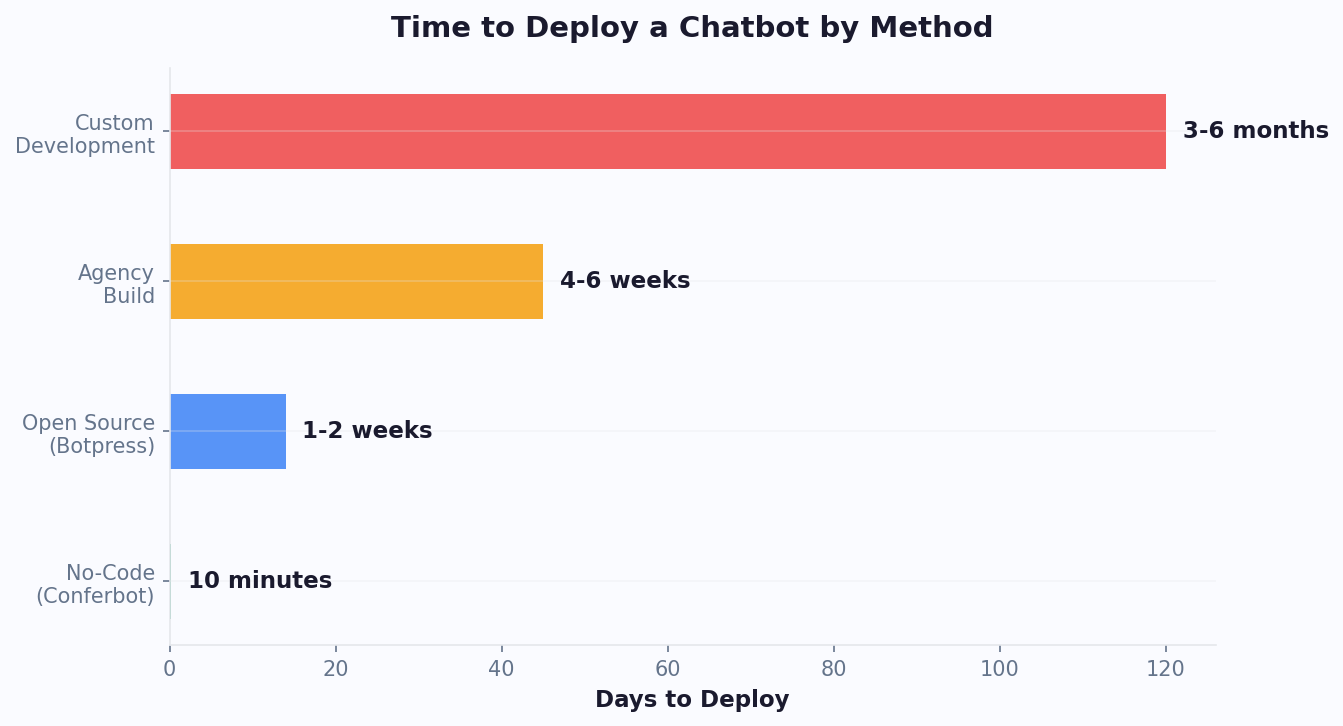
Basic setup takes 15-20 minutes using Conferbot's technology templates. Connect your knowledge base, configure qualification questions, and embed the widget. Full API integration with custom workflows, CRM sync, and developer documentation search typically requires 3-5 days of development and testing.

How to Use Technology Chatbot Templates

Follow these simple steps to get your technology chatbot up and running in minutes

🎯

1. Choose Your Template

Select from high-converting lead generation templates designed for your industry and use case.

📋

2. Customize Qualifying Questions

Modify questions to match your ideal customer profile and lead scoring criteria.

🔄

3. Set Up Lead Routing

Configure automatic lead distribution to your sales team based on qualification scores.

🔗

4. Integrate with Your CRM

Connect to HubSpot, Salesforce, or your preferred CRM for seamless lead management.

📊

5. Deploy and Monitor

Launch your chatbot and track conversion rates, lead quality, and ROI through our analytics dashboard.

Why Choose Our Technology Templates?

Compare the benefits of using professional templates vs. building from scratch

With Conferbot Templates

  • Deploy in 10 minutes
  • Proven conversion patterns
  • Industry best practices included
  • Ready-made integrations
  • Continuous updates & improvements
  • 24/7 expert support
  • Free to start

Building From Scratch

  • Weeks or months to develop
  • Trial and error approach
  • No proven patterns
  • Complex integration setup
  • Ongoing maintenance burden
  • Limited support resources
  • High development costs

Ready to Transform Your Technology?

Join thousands of businesses using our technology templates to automate conversations and boost results