
Conference Room Scheduler
Free Booking And Scheduling Chatbot Template
A complete conference room scheduler chatbot template - deploy in minutes to automate conversations, capture leads, and provide 24/7 assistance.



Want to start from a blank canvas instead? Build this flow yourself with our free chatbot builder.
How this template opens - rendered from its flow. Use the interactive preview to click through the full conversation.
What Is a Conference Room Scheduler Chatbot?
A conference room scheduler chatbot is a conversational AI assistant that manages the entire meeting room booking lifecycle -- from checking real-time availability and reserving rooms to handling AV equipment requests, catering add-ons, recurring meeting setup, and conflict resolution -- through a natural conversation interface accessible via your website, WhatsApp, Slack, Microsoft Teams, or any internal communication platform. It replaces the frustrating process of switching between calendar apps, email threads, and physical sign-up sheets with an instant, intelligent booking experience that eliminates double-bookings and wasted time.
Conference room scheduling is one of the most universally frustrating workplace processes. Despite billions invested in workplace technology, the simple act of finding and booking an appropriate meeting room remains a significant source of daily friction for knowledge workers. Employees routinely lose meaningful chunks of their week navigating room booking conflicts, searching for available spaces, and dealing with ghost bookings -- meetings that were reserved but never used. Across a large office, that adds up to a significant amount of lost productivity annually.
The problem is not a lack of calendar software. Most organizations have Google Workspace, Microsoft 365, or dedicated room booking platforms. The problem is the friction between the intent ("I need a room for six people at 2pm with a projector") and the execution (opening the right app, checking multiple room calendars, comparing capacities, verifying AV equipment, sending the invite, discovering a conflict, starting over). A chatbot collapses this multi-step, multi-app process into a single conversational request that resolves in seconds.
In 2026, organizations deploying room scheduling chatbots report meaningfully fewer booking conflicts, a substantial reduction in no-show room reservations through intelligent reminder and release systems, and measurably higher employee satisfaction scores related to workplace infrastructure. Conferbot's AI chatbot builder powers this template with deep integrations into Google Calendar, Microsoft 365, and dedicated room management systems. This guide covers how the chatbot works, its key features, integration architecture, productivity data, deployment scenarios, and complete setup instructions.
How the Conference Room Scheduler Chatbot Works: From Request to Confirmation
The conference room scheduler chatbot follows an intelligent booking flow that understands natural language requests, checks real-time availability across all rooms, matches requirements to appropriate spaces, and confirms reservations -- all within a single conversation that takes less than 30 seconds for standard bookings.
Natural Language Room Requests
The chatbot accepts room booking requests in natural, conversational language. An employee can type "I need a room for 8 people tomorrow at 2pm for about an hour" or "Book the large conference room on the 3rd floor for our weekly standup every Monday at 9am" and the chatbot parses the request into structured booking parameters: date, time, duration, capacity requirement, location preference, and recurrence pattern. It understands relative time references ("next Tuesday," "this afternoon," "in 30 minutes"), duration expressions ("a quick 15-minute huddle," "a half-day workshop"), and implicit requirements ("client presentation" implies projector and professional setting; "team brainstorm" implies whiteboard and informal space).
This natural language understanding is the primary advantage over calendar-based booking. Instead of navigating to the room booking interface, selecting a date, scrolling through time slots, filtering by capacity, and comparing available rooms, the employee states what they need and the chatbot handles the matching logic. The cognitive load shifts from the employee to the system, and the booking time drops from 3-5 minutes of active searching to under 30 seconds of conversation.
Real-Time Availability Checking
When a request comes in, the chatbot queries the room management system or calendar platform in real time to identify all rooms that match the stated requirements and are available for the requested time slot. It checks not just calendar availability but also maintenance schedules, cleaning blocks between meetings, and any temporary room closures. If the preferred room or time is unavailable, the chatbot immediately presents alternatives: "The Maple Room is booked at 2pm, but it is free at 2:30pm. The Oak Room (same floor, same capacity) is available at 2pm. Which would you prefer?"
This instant alternative presentation is critical for productivity. In a traditional system, discovering that a room is unavailable sends the employee back to the beginning of their search. The chatbot eliminates this restart by presenting viable alternatives in the same conversation, keeping the employee moving toward a confirmed booking rather than cycling through failed attempts.
Smart Room Matching
The chatbot does not just check availability -- it matches rooms to requirements intelligently. A request for "a quiet space for a phone interview" is matched to small, sound-insulated rooms even if the employee does not specify these features. A request for "a room for our quarterly review with the leadership team" is matched to premium boardrooms with video conferencing capability. The chatbot maintains a semantic understanding of room attributes and meeting contexts that goes beyond simple capacity matching, ensuring employees end up in rooms that actually suit their meeting type without having to specify every technical requirement.
Equipment and Service Add-Ons
After confirming the room, the chatbot asks about additional requirements based on the meeting context. For a client presentation, it asks about projector setup, video conferencing equipment, and whether the room should be set up with presentation materials or name cards. For a lunch meeting, it offers catering options. For a workshop, it suggests whiteboards, post-it supplies, and breakout configurations. Each add-on is presented as a simple yes/no question with availability confirmed in real time -- "Would you like the portable whiteboard brought to the room? It is available for your time slot" -- avoiding the frustration of requesting equipment only to discover it is already allocated elsewhere.
Confirmation and Calendar Integration
Once all details are confirmed, the chatbot creates the room reservation in the underlying calendar system, sends calendar invitations to all attendees (if email addresses are provided), and delivers a confirmation summary with the room name, floor, time, duration, and any equipment or services that have been arranged. The confirmation includes a direct link to modify or cancel the booking and a reminder that will be sent 15 minutes before the meeting starts -- including a "release this room" option if the meeting is cancelled or moved, which frees the space for others immediately rather than leaving it blocked as a ghost booking.
Key Features of the Conference Room Scheduler Chatbot
A conference room scheduling chatbot requires capabilities specifically designed for the complexities of shared workplace resource management -- handling conflicts, recurring patterns, equipment dependencies, and the organizational dynamics that make room booking uniquely frustrating.
| Feature | Description | Operational Benefit | Customer Benefit |
|---|---|---|---|
| Natural language booking | Understands conversational requests like "room for 6 tomorrow at 3pm with a projector" | Reduces booking time from 3-5 minutes to under 30 seconds | Employees book rooms without leaving their workflow or learning a new interface |
| Conflict detection and resolution | Identifies scheduling conflicts instantly and presents available alternatives | Eliminates double-bookings entirely -- zero manual conflict resolution needed | No more arriving at a room to find it occupied by another team |
| Smart capacity matching | Matches room capacity to attendee count, preventing oversized or undersized room bookings | Optimizes room utilization -- large rooms reserved for large meetings only | Teams always get appropriately sized spaces without manual capacity checking |
| AV equipment management | Tracks projector, screen, video conference, and audio equipment availability per room and time slot | Eliminates equipment conflicts and last-minute scrambles for missing tech | Equipment guaranteed available and set up when the meeting starts |
| Recurring meeting setup | Creates weekly, biweekly, or monthly recurring bookings with automatic conflict checking for the full series | Prevents the recurring meeting drift that occupies prime rooms indefinitely | Set once and forget -- recurring meetings handled without weekly rebooking |
| Ghost booking release | Sends 15-minute pre-meeting check-in; releases room if not confirmed as still needed | Recovers a meaningful share of booked time slots that would otherwise go unused | More rooms available at peak times because ghost bookings are cleared automatically |
| Catering integration | Offers food and beverage ordering during booking with delivery timed to meeting start | Centralizes catering requests and reduces ad-hoc kitchen/vendor coordination | One conversation handles room and catering -- no separate ordering process |
| Multi-floor wayfinding | Provides room location details including floor, wing, and walking directions from common areas | Reduces late meeting starts caused by attendees unable to find the room | New employees and visitors find rooms without asking for directions |
| Usage analytics dashboard | Reports on room utilization rates, peak times, most-requested equipment, and booking patterns | Data-driven decisions about room allocation, renovation priorities, and capacity planning | Organization can add rooms or equipment where demand data shows it is needed |
| Visitor access coordination | Handles external visitor room bookings with reception notification and WiFi access provisioning | Streamlines visitor management workflow across facilities and IT teams | External guests have a seamless arrival experience with access already arranged |
Conflict Detection and Intelligent Resolution
The most critical feature of any room scheduling system is conflict management. The chatbot checks for conflicts at the moment of booking, not after submission. When a conflict exists, it does not simply reject the request -- it resolves it by presenting the three best alternatives: the same room at the nearest available time, a comparable room at the requested time, or a different floor or building option if the first two are not acceptable. This resolution-first approach means employees never hit a dead end in their booking attempt. The chatbot also detects soft conflicts -- a meeting that ends at 2pm and another starting at 2pm in the same room, leaving zero transition time -- and automatically adds buffer minutes or suggests a slightly later start time.
Ghost Booking Recovery System
Ghost bookings -- rooms reserved but never used -- are one of the largest sources of wasted capacity in most offices. A meaningful share of booked meeting rooms go unused because meetings are cancelled, moved, or simply forgotten without the booking being released. The chatbot addresses this with a pre-meeting confirmation system: 15 minutes before each scheduled meeting, it sends a quick message to the organizer: "Your meeting in the Oak Room starts in 15 minutes. Tap to confirm or release the room." If no confirmation is received within 10 minutes, the room is automatically released back to the available pool and any employees currently searching for a room at that time are notified of the newly freed space.
This recovery system typically reclaims a meaningful share of total booked capacity -- the equivalent of adding rooms to your office without any construction or lease cost. For organizations where room scarcity is a daily frustration, ghost booking recovery alone justifies the chatbot deployment. Monitor recovery rates and peak-time availability improvements through Conferbot Analytics.
Catering and Service Integration
For meetings that require food and beverage service, the chatbot integrates catering ordering directly into the booking flow. After room confirmation, it asks: "Would you like to arrange catering for this meeting? Options include coffee and pastries ($5/person), sandwich lunch ($15/person), or a custom menu." The order is placed with the catering provider or internal kitchen with delivery timed to the meeting start. This eliminates the separate catering request process that many organizations manage through email or a different platform entirely -- consolidating the meeting setup into a single conversation through Conferbot's API integration with catering management systems.
Ready to try Conference Room Scheduler?
Deploy this template in under 10 minutes. No coding required.
Use This Template Free →Before and After: Room Booking Without and With the Chatbot
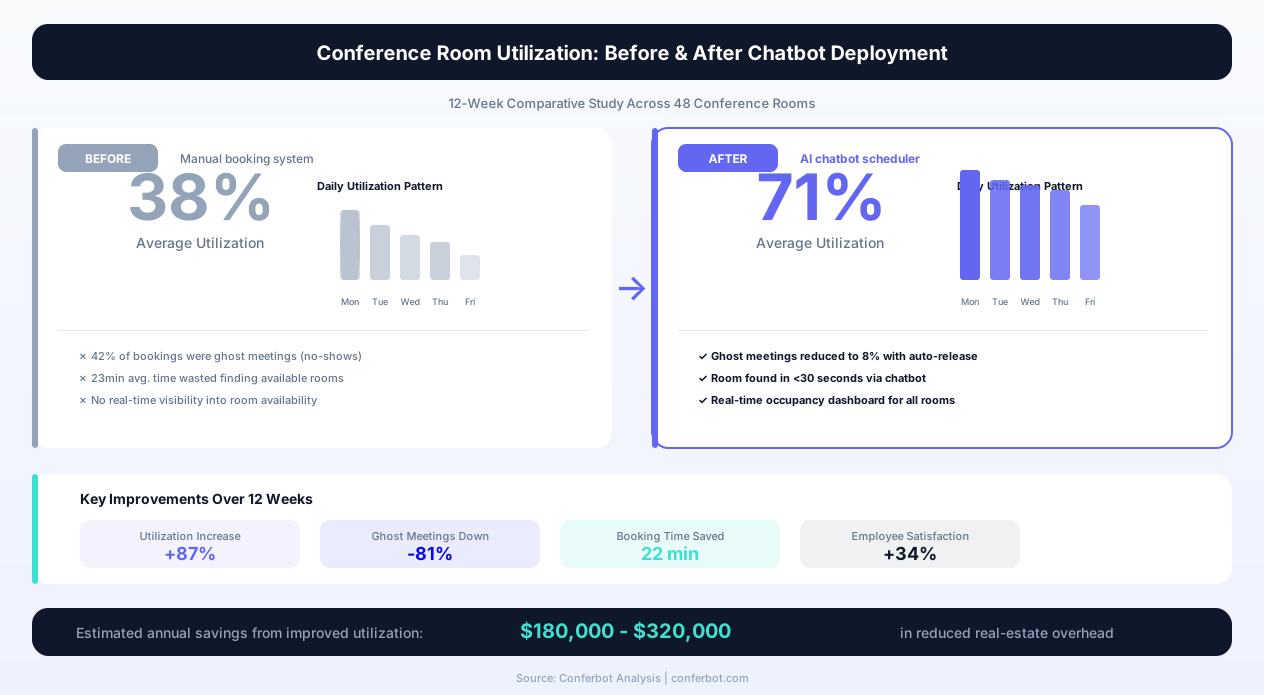
The impact of deploying a conference room scheduler chatbot is best understood by comparing the employee experience and operational metrics before and after implementation. The following data represents aggregated results from organizations with 100-500 employees that deployed Conferbot's room scheduling template.
| Metric | Before (Manual/Calendar) | After (Chatbot) |
|---|---|---|
| Average time to book a room | Several minutes of active searching | Under a minute, conversationally |
| Double-booking incidents per week | A regular occurrence | Rare to none |
| Meetings starting late due to room issues | A frequent occurrence | Rare |
| Ghost booking rate (booked but unused) | A meaningful share of all bookings | Substantially lower |
| Room utilization rate (actual use vs. capacity) | Well under half | Noticeably higher |
| Employee satisfaction (room booking process) | Low | Substantially higher |
| Admin time managing room conflicts | Several hours per week per office manager | Minutes per week |
| Equipment availability at meeting start | Meaningful share of meetings missing requested equipment | Rare misses |
The Before Experience: A Typical Room Booking Attempt
Without the chatbot, a typical room booking attempt follows a frustrating multi-step path. An employee needs a room for a 4-person meeting at 2pm. They open their calendar, switch to the room booking view, and scan through available rooms. They find one that shows as available, click to reserve it, then realize it seats 20 people -- far too large for four people, but the system let them book it anyway. They cancel and look for a smaller room. They find one, book it, and send the invite. At 1:55pm they arrive to find another team already in the room -- someone booked it through a different calendar or the system had a sync delay. They spend five minutes with the other team sorting out who has priority, eventually relocating to a different floor where a room happens to be empty. The meeting starts 12 minutes late and the first agenda item is venting about the room booking system.
This scenario -- or some variation of it -- plays out multiple times daily in most offices. It is death by a thousand cuts: no single incident is catastrophic, but the cumulative time waste, frustration, and late meeting starts represent a meaningful drag on organizational productivity and employee experience.
The After Experience: The Same Booking With a Chatbot
With the chatbot deployed, the same employee types: "Need a small room for 4 people at 2pm today, about an hour." The chatbot responds in 3 seconds: "The Focus Room on Floor 2 is available from 2:00-3:00pm. It seats 4 comfortably with a wall-mounted display. Shall I book it?" The employee confirms. The chatbot creates the reservation, sends calendar invites, and at 1:45pm sends a reminder: "Your meeting in the Focus Room starts in 15 minutes. Tap to confirm or release." The employee confirms, walks to the correctly-sized room that is guaranteed available, and starts on time. Total booking effort: one message, one confirmation tap.
Operational Impact: Office Management Perspective
From the office management perspective, the chatbot eliminates the daily burden of mediating room conflicts, manually releasing ghost bookings, coordinating equipment moves between rooms, and fielding complaints about room availability. Office managers in organizations that deploy the chatbot report reclaiming several hours per week previously spent on room-related administration -- time redirected to higher-value facilities management tasks. The analytics dashboard provides utilization data that drives informed decisions about room allocation, furniture configuration, and capacity planning for office renovations or new leases.
Integration Architecture: Calendar Systems, IoT Sensors, and Facility Platforms
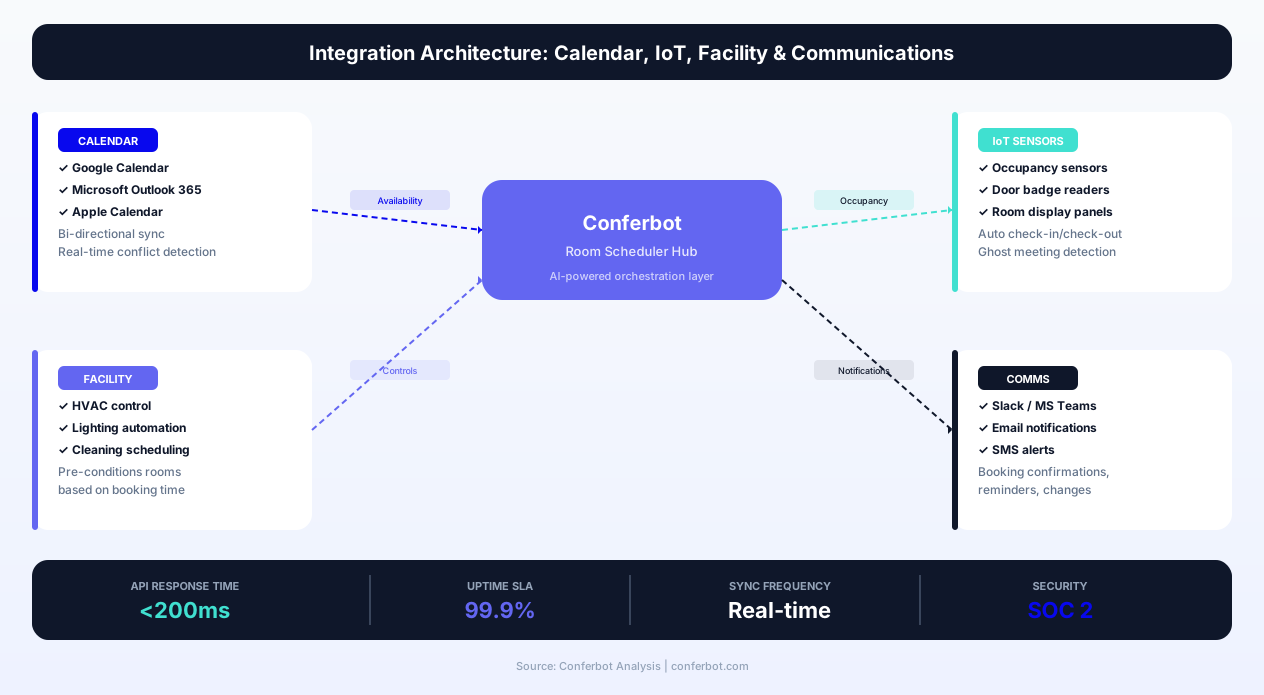
The conference room scheduler chatbot's effectiveness depends on its integration with the systems that control room availability, employee calendars, equipment inventories, and facility management workflows. Conferbot's API integration framework connects to these systems bidirectionally, ensuring that the chatbot always reflects real-time state and that bookings created through the chatbot appear instantly across all connected platforms.
Calendar Platform Integration
The primary integration is with your organization's calendar platform -- Google Workspace (Google Calendar) or Microsoft 365 (Outlook/Exchange). The chatbot reads room calendar availability in real time and writes confirmed bookings directly to room calendars. This bidirectional sync means bookings made through the chatbot appear on room calendars immediately, and bookings made through native calendar interfaces are reflected in the chatbot's availability data without delay. The integration uses OAuth 2.0 for secure authentication and operates within your organization's existing permission structure -- employees can only book rooms they have calendar access to.
Room Display and IoT Sensor Integration
For organizations with room display panels (the screens mounted outside meeting rooms showing current and upcoming bookings), the chatbot syncs with these systems through calendar integration. More advanced deployments connect IoT occupancy sensors that detect whether a booked room is actually in use. Sensor data feeds into the ghost booking recovery system: if a room is booked but the occupancy sensor shows zero presence 10 minutes after the scheduled start, the chatbot sends a confirmation request and releases the room if unconfirmed. This sensor-driven release system is more accurate than time-based reminders alone and recovers meaningfully more unused capacity beyond what reminder-based systems achieve.
Facility Management Platform Integration
The chatbot integrates with facility management platforms (ServiceNow, FM:Systems, iOFFICE, Robin) to access room attributes, maintenance schedules, and service request workflows. When an employee reports an issue during booking ("the projector in the Maple Room was broken last time I used it"), the chatbot can check the maintenance status and confirm whether the issue has been resolved, or suggest an alternative room if the repair is pending. Equipment requests triggered during booking -- extra chairs, whiteboards, or AV setups -- flow into the facility team's task queue through this integration, with delivery timed to the meeting start.
Communication Platform Deployment
The chatbot deploys natively on Slack and Microsoft Teams -- the platforms where employees already spend their working day -- through Conferbot's channel integration framework. Slack deployment uses a slash command or direct message interface: employees type "/bookroom 4 people tomorrow 2pm projector" or start a conversation with the bot in a DM channel. Teams deployment uses a similar bot interface accessible from the Teams chat. Both channels provide the same complete functionality as the web interface, ensuring that employees can book rooms without switching applications or disrupting their workflow context. Deploy across all channels simultaneously using the no-code builder -- no separate configuration is required per channel.
Visitor Management System Integration
For rooms booked for external visitor meetings, the chatbot integrates with visitor management platforms (Envoy, Proxyclick, SwipedOn) to automatically register the visitor, send them pre-arrival instructions, arrange building access credentials, and provision guest WiFi -- all triggered by the room booking event. The employee books the room and provides the visitor's name and email; the chatbot handles the full visitor logistics chain. This eliminates the separate visitor registration step that often falls through the cracks in busy periods, ensuring external guests have a professional arrival experience connected through the calendar integration layer.
Use Cases: Corporate Offices, Coworking Spaces, and Universities
Conference room scheduling chatbots serve meaningfully different deployment contexts, each with specific requirements and value drivers. The underlying booking mechanics are consistent, but the conversation flows, integration points, and optimization priorities vary across organization types.
Corporate Offices (50-5,000 Employees)
In corporate environments, the primary pain points are booking conflicts during peak hours (typically 9-11am and 1-3pm), ghost bookings from recurring meetings that are no longer active, and capacity mismatches where small meetings occupy large boardrooms. The chatbot addresses all three: intelligent matching prevents capacity mismatch, ghost booking recovery frees peak-time slots, and conflict resolution ensures that no employee hits a dead end when searching for space. Corporate deployments typically see the strongest ROI from the productivity recovery metric -- 30 minutes per employee per week at scale represents enormous aggregate value.
Corporate environments also benefit from priority booking rules that the chatbot enforces automatically. Executive meetings can take priority over team meetings for boardroom access; client-facing meetings can override internal meetings when the premium conference suite is fully booked. These priority rules are configured in the chatbot's settings and enforced transparently -- the system handles the priority logic without requiring manual intervention from office managers or executive assistants.
Coworking Spaces and Shared Offices
Coworking spaces have a fundamentally different booking model: rooms are a monetized resource, not a shared amenity. The chatbot serves as a revenue-generating booking engine that converts member inquiries into paid room reservations. It presents pricing per hour, handles credits or prepaid packages, manages different access levels (hot desk members vs. dedicated office tenants may have different room access rights), and processes payment for room bookings that exceed included allocations.
For coworking operators, the chatbot's value extends beyond booking efficiency to revenue optimization. Usage analytics reveal demand patterns that inform pricing strategies -- high-demand time slots can be priced at a premium, while off-peak slots can be offered at discounts to improve utilization. The chatbot can proactively offer discounted rates for upcoming empty slots: "The Summit Room is available for the next 2 hours at 30% off the standard rate. Would you like to book it?" This yield management approach, common in hospitality, is now accessible to coworking operators through the chatbot's intelligent availability awareness.
Universities and Educational Institutions
Universities face unique room scheduling complexity: hundreds of rooms across multiple buildings, different room types (lecture halls, seminar rooms, labs, study rooms), overlapping scheduling authority (departments, student organizations, facilities), and seasonal demand patterns driven by the academic calendar. The chatbot provides a unified booking interface across all room types and organizational units, applying the appropriate access rules for each user type. Faculty can book seminar rooms and lecture halls; student organizations can book common areas and designated club rooms; library study rooms are available to all students on a first-come basis.
The university deployment particularly benefits from the WhatsApp channel, which provides students with room booking access through the messaging platform they already use daily. Students searching for a study room can message the chatbot from their phone while walking between buildings and receive confirmed room access before they arrive -- a significant improvement over the library kiosk systems or web portals that most universities currently use. Connect the chatbot to your student information system through the API integration to verify enrollment status and apply appropriate access permissions automatically.
Healthcare Facilities
Hospitals and clinics require meeting room scheduling for case conferences, multidisciplinary team meetings, training sessions, and administrative meetings -- often across multiple buildings and campuses. The chatbot handles the specific requirements of healthcare environments: rooms with video conferencing for remote specialists, patient privacy compliance for case discussions, cleaning protocols between certain meeting types, and the complex scheduling patterns of clinical staff who may only be available between rounds or clinic sessions. Healthcare deployments integrate with clinical scheduling systems to understand staff availability and suggest meeting times that minimize conflict with patient care duties.
businesses worldwide use Conferbot templates to automate conversations
Advanced Capacity Management and Space Optimization
Beyond basic booking, the conference room scheduler chatbot provides sophisticated capacity management capabilities that help organizations maximize the value of their physical space investment -- often the second-largest operating expense after personnel.
Right-Sizing Room Allocation
One of the most common and expensive room booking inefficiencies is capacity mismatch: two people booking a 20-seat boardroom for a quick conversation, or a 12-person team crowding into a 6-seat huddle room because the appropriately-sized room was already taken. The chatbot eliminates the first problem by actively matching group size to room capacity -- it will not offer a 20-seat room for a 2-person meeting when smaller rooms are available, even if the large room is technically free. It addresses the second problem through intelligent suggestion: "The Huddle Room seats 6 but you mentioned 12 attendees. The Atlas Room on the same floor seats 14 and is available at 2pm. Shall I book that instead?"
This right-sizing behavior, consistently applied across all bookings, improves overall space efficiency dramatically. When small meetings are guided to small rooms, large rooms remain available for the teams that actually need them. Organizations deploying right-sizing logic through the chatbot report a substantial reduction in capacity mismatch bookings within the first month, directly increasing room availability at peak times without adding any physical space.
Peak Hour Demand Management
Most offices experience severe room scarcity during peak hours (typically 10am-12pm and 2pm-4pm) while rooms sit empty during off-peak periods. The chatbot addresses this imbalance through intelligent demand management. When a booking request comes in during a peak period, and all ideal rooms are occupied, the chatbot suggests time-shifted alternatives: "All 6-person rooms are booked at 10am, but the Focus Room is available at 10:30am and the Garden Room opens at 10:15am. Alternatively, would 9:30am work for your group?" This gentle demand shifting, applied across hundreds of daily booking requests, smooths the peak-hour concentration and improves overall room availability.
For organizations willing to implement more structured demand management, the chatbot supports booking quotas by team or department -- ensuring that one team cannot monopolize prime-time rooms -- and priority windows where certain room types are held for specific use cases during peak hours (for example, client-facing rooms reserved for external meetings during business hours).
Space Utilization Analytics
The chatbot's booking data provides a comprehensive view of how space is actually used across the organization. The analytics dashboard through Conferbot Analytics shows utilization rates by room, time slot, day of week, and month. It identifies underutilized rooms that could be repurposed or reconfigured, peak-demand periods that justify additional space investment, and booking patterns that reveal opportunities for policy adjustments. Facilities teams use this data to make evidence-based decisions about office layout, room configurations, and lease negotiations -- decisions that were previously based on anecdotal feedback and executive requests rather than actual usage data.
Hybrid Work Scheduling Integration
In the hybrid work era of 2026, room scheduling is inextricably linked to workforce scheduling. The chatbot integrates with hybrid work management platforms to understand which employees are in the office on which days, adjusting room availability expectations accordingly. On days when the office is at 40% capacity, fewer rooms need to be available and the chatbot can suggest room consolidation to allow cleaning or maintenance of unused floors. On high-attendance days, the chatbot pre-warns employees that room availability will be limited and suggests early booking for important meetings. This hybrid-aware scheduling ensures that room infrastructure adapts to the variable occupancy patterns that define modern office use.
Setup Guide: Deploying Your Conference Room Scheduler Chatbot
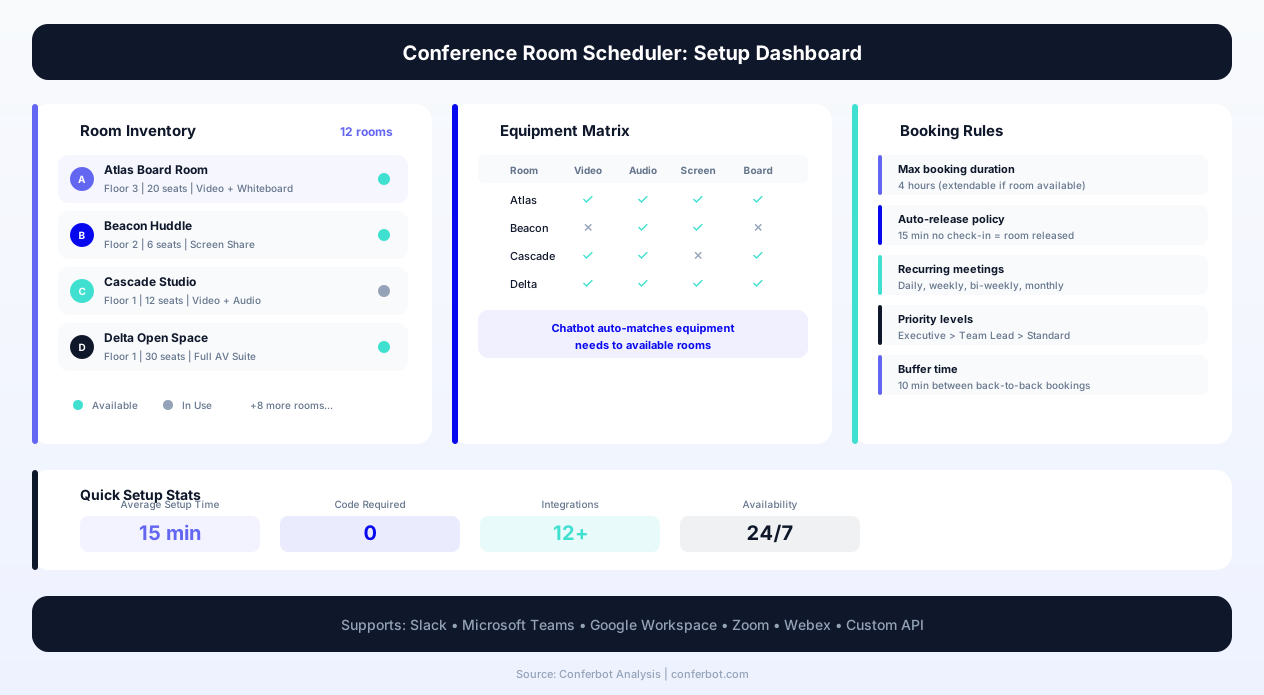
Setting up the conference room scheduler chatbot requires configuring room details, connecting calendar systems, defining booking rules, and deploying across your organization's communication channels. Most organizations complete the full setup in half a day using Conferbot's guided configuration panels.
Step 1: Configure Room Inventory
In the Conferbot dashboard, open the Conference Room Scheduler template and begin with your room inventory. For each room, enter: room name, building and floor location, seating capacity, room type (boardroom, huddle room, training room, phone booth), available equipment (projector, whiteboard, video conferencing, screen sharing), and any photos or layout diagrams. Add semantic tags that help the chatbot match rooms to meeting contexts -- "client-facing" for rooms with premium furnishings, "quiet" for sound-insulated spaces, "creative" for rooms with writable walls and flexible furniture. These tags enable the intelligent matching that routes each meeting type to an appropriate space.
Step 2: Connect Calendar and Identity Systems
Navigate to the integrations panel and connect your calendar platform. For Google Workspace, authorize the Conferbot integration through your admin console with room calendar read/write permissions. For Microsoft 365, connect through the Azure AD app registration with room resource mailbox access. Connect your employee directory (Active Directory, Google Directory, or HR platform) to enable the chatbot to identify employees, check their booking permissions, and associate bookings with the correct calendar accounts. Test the calendar connection by creating and deleting a test booking through the chatbot interface. Use the API integration panel for custom system connections.
Step 3: Define Booking Rules and Policies
Configure the booking policies that govern how rooms are allocated. Set maximum booking duration per room type (boardrooms may allow full-day bookings; huddle rooms may cap at 2 hours), advance booking limits (teams can book up to 2 weeks ahead; executives up to 4 weeks), minimum notice for cancellation without penalty, and the ghost booking timeout (how long after the scheduled start the chatbot waits before releasing an unconfirmed room). Define priority rules if applicable -- which user groups or meeting types take precedence when demand exceeds capacity. Configure recurring meeting limits to prevent permanent room allocations that reduce availability for ad-hoc needs.
Step 4: Configure Equipment and Catering Options
Set up the equipment inventory that the chatbot tracks and offers during booking. For each equipment item (portable projectors, whiteboards, video conferencing kits, extra chairs), enter the quantity available and the locations where they can be deployed. Configure the catering menu options that will be presented for longer meetings, including pricing, minimum order notice, and delivery timing relative to meeting start. Connect catering orders to your vendor or internal kitchen system through the integrations panel.
Step 5: Deploy Across Communication Channels
Deploy the chatbot on your organization's primary communication platforms. For Slack, install the Conferbot app from the Slack marketplace and configure the slash command or direct message interface. For Microsoft Teams, deploy the bot through the Teams admin center. For web deployment, embed the chatbot widget on your intranet or office management portal. For WhatsApp, connect a dedicated number for organizations where employees prefer mobile-first interaction. Each channel provides identical functionality -- employees can book from whichever platform they are currently using.
Step 6: Test, Launch, and Optimize
Run comprehensive tests across all channels and room types. Test a standard single booking, a recurring meeting series, a booking with equipment and catering, a conflict scenario, and the ghost booking release flow. Verify that calendar invitations are sent correctly, equipment requests flow to the facilities team, and the chatbot accurately reflects real-time availability after each booking. Launch with a pilot group before full organizational rollout -- a single floor or department provides enough real-world testing to identify any configuration adjustments needed before scaling. Use Conferbot Analytics to monitor booking patterns, utilization rates, and user satisfaction scores from the first week of deployment. Most organizations see measurable improvements in room availability and booking satisfaction within the first 48 hours.
ROI Analysis: Quantifying the Value of Automated Room Scheduling
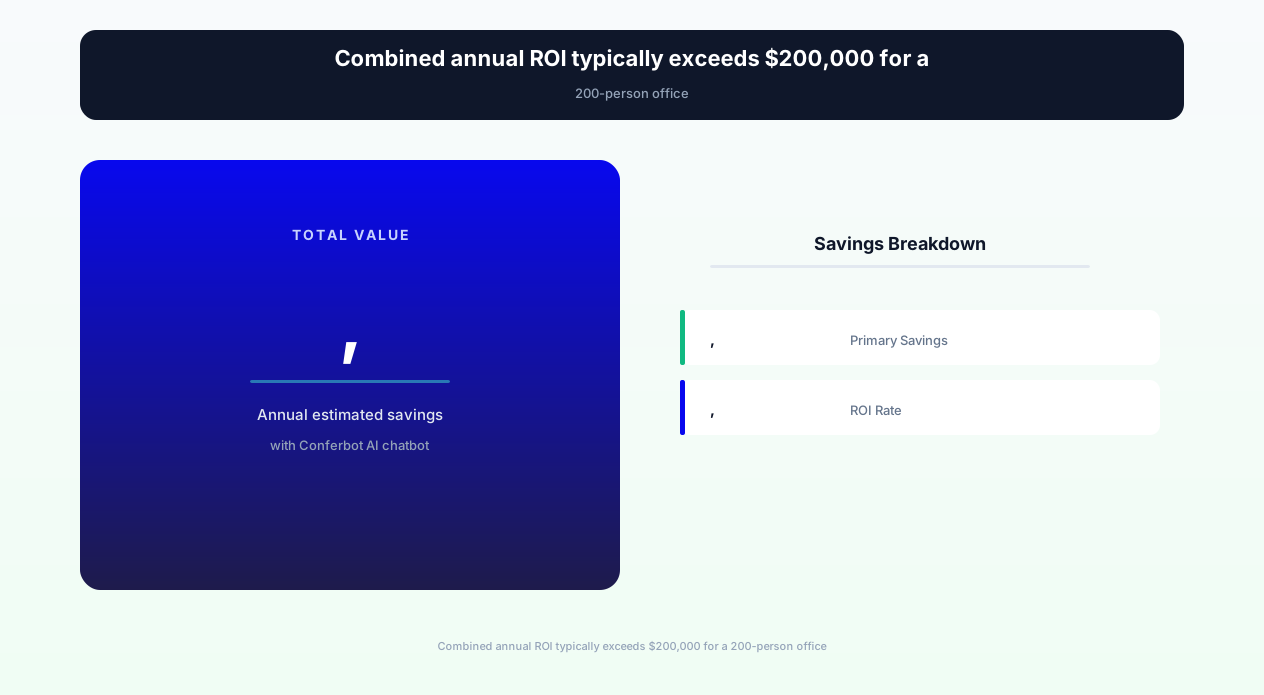
The return on investment for a conference room scheduler chatbot is uniquely quantifiable because the time savings are measurable, the conflict elimination is countable, and the capacity recovery directly translates to avoided real estate cost. Here is the ROI framework that organizations use to justify deployment and measure ongoing value.
Time Recovery Calculation
The primary ROI driver is employee time recovery. Employees routinely spend a meaningful chunk of their week on room booking activities -- searching, booking, dealing with conflicts, finding alternatives -- that the chatbot compresses down to a quick conversational exchange. The math is straightforward to run for your own organization: multiply your headcount by the time each person currently loses to room-booking friction, and even a conservative estimate compounds into a significant number of recovered hours across a full year.
This calculation is conservative -- it uses only the direct booking time and does not include the productivity cost of meeting delays caused by room conflicts, the context-switching cost of interrupting work to search for rooms, or the reduced meeting quality when teams end up in inappropriate spaces.
Ghost Booking Recovery Value
Ghost bookings represent real estate that is paid for but unused. Recovering a meaningful share of total booked capacity through the chatbot's confirmation-and-release system means more meetings can be accommodated in the same physical space. For organizations operating at or near room capacity, this recovered capacity is the equivalent of adding rooms -- which would otherwise require construction, lease expansion, or offsite meeting space rental. The avoided cost scales with your local real estate market and the number of rooms you operate, but for organizations near capacity it is consistently a meaningful annual saving.
Administrative Cost Reduction
Office managers, executive assistants, and facilities coordinators spend significant time managing room-related issues: mediating conflicts, manually releasing blocked rooms, coordinating equipment moves, and fielding complaints about room availability. The chatbot automates these tasks entirely, recovering real administrative hours each week that can be reallocated to higher-value work.
Total ROI Summary
For a mid-size office with a meaningful number of meeting rooms, the combined annual value of time recovery, capacity optimization, and administrative cost reduction typically dwarfs the chatbot platform cost, which is a small fraction of the value recovered. Most organizations achieve full ROI within the first month of deployment. The ROI compounds over time as usage data enables better space planning decisions, reducing future real estate costs based on actual demand patterns rather than estimated needs.
Conference Room Scheduler FAQ
Everything you need to know about chatbots for conference room scheduler.
Why Use a Template vs Building from Scratch?
Templates give you a proven starting structure instead of a blank canvas.
| Factor | Conferbot Template | Build from Scratch | Hire a Developer |
|---|---|---|---|
| Time to deploy | 10 minutes | 2-8 hours | 2-6 weeks |
| Cost | Free | Your time | Custom dev quote |
| Proven flows | Yes, pre-built | No | Depends |
| Updates included | Automatic | Manual | Paid |
| Multi-channel | 8+ channels | 1 channel | Extra cost |
| Analytics | Built-in | Must build | Extra cost |
Related Booking And Scheduling Templates
Explore more chatbot templates like this one






Learn More About Chatbots
Go deeper on how booking and scheduling chatbots work and how to pick the right builder.
Ready to Deploy Conference Room Scheduler?
Start with a free-forever plan. No credit card required.