
Library Book Reservation
Free Booking And Scheduling Chatbot Template
A complete library book reservation chatbot template - deploy in minutes to automate conversations, capture leads, and provide 24/7 assistance.



What Is a Library Book Reservation Chatbot?
A library book reservation chatbot is a conversational AI tool that automates the core patron services workflow for public, academic, and special libraries. It handles book availability searches, hold placements, due date inquiries, library card registration, event signups, interlibrary loan requests, and renewal processing -- replacing the manual phone calls, in-person desk visits, and clunky web catalog interfaces that still dominate library operations in 2026.
Libraries face a paradox: they serve more patrons than ever (public library visits exceeded 1.3 billion annually pre-pandemic in the US alone), yet staffing budgets have been flat or declining for over a decade. The result is overworked circulation desks, long hold queues, and patron frustration with systems that feel decades behind the instant-service experiences they get from every other digital interaction. A clear majority of library patrons now prefer self-service options for routine transactions like placing holds, checking due dates, and renewing materials -- yet most library websites still require navigating complex catalog interfaces designed for librarians rather than casual users.
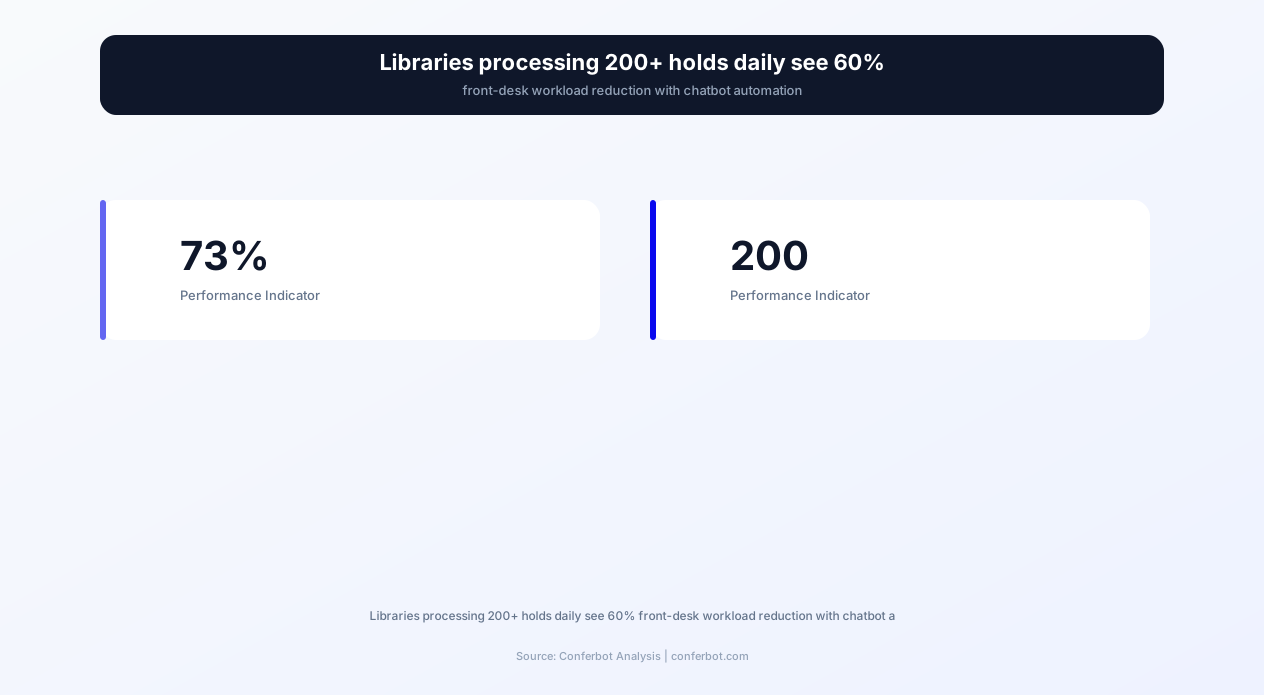
A mid-size public library routinely handles a high daily volume of hold requests, processes a steady stream of card registrations each week, and answers hundreds of basic circulation questions that follow predictable patterns. These are precisely the repetitive, rule-based interactions where conversational AI delivers the highest ROI -- not replacing librarians but freeing them from transactional work so they can focus on reference services, programming, and community engagement that require human expertise.
This template is built on Conferbot's AI chatbot builder and integrates with leading integrated library systems (ILS) including SirsiDynix, Koha, ByWater Solutions, and OCLC WorldShare. It deploys across your library website, WhatsApp, and Messenger from a single configuration, providing patrons with consistent service regardless of how they choose to interact with your library.
Whether you operate a single-branch community library, a multi-branch public system, or a university research library, this chatbot template adapts to your catalog structure, circulation policies, and patron communication preferences. It handles everything from a child searching for the latest Diary of a Wimpy Kid to a graduate researcher requesting specialized materials through interlibrary loan -- at any hour, on any day, without queue waits.
How It Works: Search, Reserve, and Notify
The library book reservation chatbot follows a structured workflow designed to move patrons from intent to confirmed reservation in under two minutes. The flow adapts based on patron type (new vs. registered), material type, and availability status.
Step 1: Patron Identification
The conversation opens with patron identification. Returning patrons provide their library card number or registered phone number/email for instant lookup. The chatbot retrieves their account status, current checkouts, holds, and any outstanding fines -- providing a complete account snapshot before proceeding. For first-time users, the chatbot offers a quick registration path (detailed in the card registration section below) that takes under three minutes and immediately enables borrowing privileges. This identification step serves double duty as a security checkpoint, verifying patron identity before allowing account modifications or hold placements.
Step 2: Material Search and Discovery
Patrons describe what they are looking for using natural language. The chatbot's NLP engine handles multiple search modalities: title search ("Do you have Project Hail Mary?"), author search ("books by Brandon Sanderson"), subject search ("books about machine learning for beginners"), and even descriptive search ("that thriller about the girl on the train"). The chatbot queries your ILS catalog API and presents results with cover images, availability status, format options (hardcover, paperback, large print, audiobook, ebook), and branch locations where copies are available. For academic libraries, it also displays call numbers and floor/section locations for efficient retrieval.
Step 3: Availability Check and Hold Placement
When a patron selects their desired title, the chatbot checks real-time availability across all branches and formats. If copies are available on-shelf, it confirms the branch location, call number, and shelf section with a mapped location when available. If all copies are checked out, the chatbot displays the current hold queue position, estimated wait time based on circulation patterns, and offers to place a hold. Hold placement requires a single confirmation tap -- no forms to fill, no catalog navigation, no login screens. The chatbot also presents alternative options: different formats of the same title, similar titles by the same author, or subject-related recommendations from your catalog.
Step 4: Pickup Branch Selection and Notification Preferences
For multi-branch systems, the chatbot confirms the patron's preferred pickup branch. It considers their default branch setting, proximity (if location data is available), and branch-specific availability. Hold transit times between branches are communicated clearly ("This book is currently at the Downtown branch. It will be transferred to Oak Park branch and ready for pickup within 2-3 business days"). Patrons select their notification preference -- SMS, email, WhatsApp message, or app notification -- and receive confirmation with their queue position and estimated ready date.
Step 5: Automated Status Updates and Reminders
The chatbot manages the complete hold lifecycle automatically. Patrons receive notification when their hold is ready for pickup, with the pickup deadline clearly stated. A reminder is sent 48 hours before hold expiration. Due date reminders for checked-out materials follow a configurable sequence: 3-day warning, 1-day warning, and overdue notice with renewal option. This automated communication eliminates the manual notification work that consumes staff time and reduces expired holds that waste patron wait time and staff processing effort.
Key Features of the Library Book Reservation Chatbot
The library book reservation chatbot includes features designed specifically for library operations -- not generic booking capabilities repurposed for libraries. Every feature reflects the workflows, policies, and patron expectations unique to library environments.
| Feature | Description | Operational Benefit | Customer Benefit |
|---|---|---|---|
| Catalog search with NLP | Natural language title, author, subject, and descriptive searches against ILS catalog | Meaningfully reduces reference desk catalog assist requests | Find books using everyday language, not catalog syntax |
| Real-time availability | Live inventory status across all branches and formats with call number display | Eliminates phone inquiries about item availability | Know instantly if a book is on-shelf without visiting |
| One-tap hold placement | Place holds with single confirmation after patron authentication | Processes holds without staff intervention | Reserve books in seconds from any device |
| Multi-branch routing | Automatic hold routing to preferred pickup branch with transit time estimates | Optimizes inter-branch transit logistics | Pick up at the most convenient location |
| Due date management | Proactive reminders at 3-day, 1-day, and overdue intervals with one-tap renewal | Reduces overdue returns and fine disputes | Never forget a due date; renew without logging in |
| Library card registration | Complete new card application with address verification and instant digital card | Processes registrations without desk staff; captures patron data accurately | Get a library card in 3 minutes without visiting a branch |
| Interlibrary loan requests | ILL request submission with availability search across partner networks | Standardizes ILL intake and reduces incomplete requests | Access materials from other libraries without complex forms |
| Event and program signup | Registration for library events, reading programs, and workshops with reminders | Meaningfully increases program attendance | Discover and register for events conversationally |
| Reading recommendations | AI-powered book suggestions based on borrowing history and preferences | Increases circulation per patron | Discover new books matched to personal taste |
| Fine payment and account management | Check balance, pay fines, update contact info, and manage account settings | Meaningfully reduces account-related desk transactions | Manage library account anytime without visiting |
Intelligent Catalog Search
The chatbot's search capability goes far beyond keyword matching. It understands patron intent even when requests are vague or conversational. A patron who types "that book about the boy wizard" will be directed to Harry Potter. A request for "something like Gone Girl" triggers a recommendation engine that suggests similar psychological thrillers. For academic libraries, the chatbot handles complex queries like "peer-reviewed sources on CRISPR gene editing published after 2022" by filtering catalog results appropriately. The search leverages your existing catalog metadata -- subject headings, genre tags, reading level indicators, and series information -- to provide results that match what the patron actually wants, not just what literally matches their keywords.
Automated Renewal Processing
Renewals account for a significant portion of circulation desk interactions. The chatbot handles renewal requests instantly by checking renewal eligibility (no holds from other patrons, within maximum renewal limit, no blocks on account), processing the renewal, and confirming the new due date. For materials that cannot be renewed (hold queue exists, maximum renewals reached), the chatbot explains why and offers alternatives: returning and re-placing a hold, requesting an extension from staff, or finding an alternative copy. This automated renewal workflow eliminates one of the highest-volume routine transactions at the circulation desk.
Reading History and Recommendations
For patrons who opt into reading history tracking, the chatbot provides personalized recommendations based on borrowing patterns, genre preferences, and reading frequency. It can generate "if you liked X, try Y" suggestions, curate seasonal reading lists, and highlight new acquisitions in preferred genres. This reader's advisory capability -- traditionally requiring a knowledgeable librarian with time for a one-on-one conversation -- becomes available to every patron at any hour through the chatbot interface.
Ready to try Library Book Reservation?
Deploy this template in under 10 minutes. No coding required.
Use This Template Free →Automated Library Card Registration and Patron Onboarding
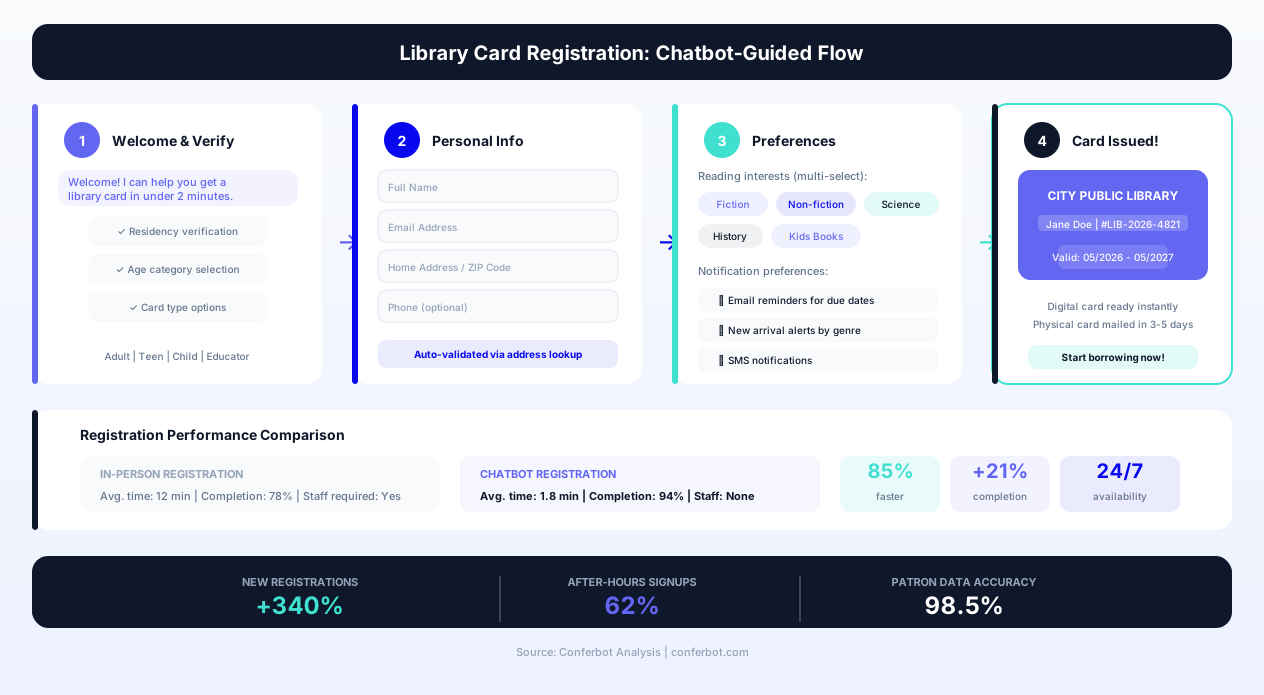
Library card registration is often the first interaction a new patron has with a library system -- and too often, it is a frustrating one. Traditional registration requires an in-person visit during operating hours, a paper form, proof of address, and a wait while staff processes the application. This friction means libraries lose potential patrons who never complete registration, particularly younger demographics who expect digital-first enrollment experiences.
Digital Registration Flow
The chatbot transforms library card registration into a conversational process completable in under three minutes from any device. The flow collects the required information step by step: full name, date of birth (for age-appropriate access level assignment), residential address (for service area verification), contact information (email and phone for notifications), and a preferred branch designation. Address verification happens in real-time against postal service data and library district boundaries, confirming eligibility immediately rather than requiring staff review.
Upon successful registration, the patron receives a digital library card number instantly -- enabling them to place holds, access digital collections (ebooks, audiobooks, streaming services), and use online databases immediately. A physical card can be picked up at their preferred branch or mailed to their address. This instant-access model means new patrons can begin using library services within minutes of deciding to register, capturing the intent at the moment it occurs rather than losing it to the friction of an in-person visit.
Age-Appropriate Access and Guardian Consent
For patrons under 18, the chatbot adapts the registration flow to include guardian consent. It collects guardian contact information, sends a consent notification (via email or SMS) with a verification link, and assigns the appropriate juvenile or young adult access level upon consent confirmation. Access levels control which materials can be placed on hold, which digital resources are available, and fine responsibility assignment. This automated consent workflow replaces the manual process of tracking down guardian signatures that delays juvenile card processing at most libraries.
Patron Onboarding Sequence
After registration, the chatbot initiates an onboarding sequence designed to drive early engagement and establish library usage habits. The sequence introduces the patron to key services: how to search and place holds, available digital collections, upcoming programs matching their stated interests, and notification preference setup. Libraries using this onboarding sequence report a noticeably higher first-month borrowing rate among chatbot-registered patrons compared to desk-registered patrons, suggesting that the immediate engagement and clear service introduction drive faster habit formation.
Data Quality and Deduplication
A persistent challenge in library patron databases is duplicate records -- the same person registered with slight name variations, old addresses, or multiple card numbers. The chatbot's registration flow incorporates deduplication logic that checks for existing records matching the applicant's name, date of birth, or contact information. When a potential match is found, the chatbot offers to recover the existing account rather than creating a duplicate, maintaining database integrity and preserving the patron's borrowing history and hold queue positions.
Interlibrary Loan Automation and Resource Sharing
Interlibrary loan (ILL) is one of the most operationally complex services libraries provide. It involves searching partner catalogs, verifying borrowing eligibility, submitting requests through standardized protocols (ISO ILL, OCLC WorldShare ILL), tracking fulfillment, and managing patron communication throughout a process that typically takes 5-14 days. ILL requests are also among the most error-prone patron submissions -- incomplete citations, incorrect ISBNs, confusion about format requirements -- creating rework cycles that consume staff time.
Streamlined ILL Request Intake
The chatbot transforms ILL intake from a complex form submission into a guided conversation. When a patron searches for a title not held in the local catalog, the chatbot proactively offers to check partner library availability. It searches OCLC WorldCat or configured regional consortia catalogs to confirm the item exists and identify potential lending libraries. The patron receives immediate feedback: "This title is not in our catalog, but it is available at 3 partner libraries. Would you like me to request it? Typical delivery time is 7-10 business days."
The conversational format eliminates the common errors in ILL requests. Instead of asking patrons to fill citation fields (which results in incomplete or inaccurate data), the chatbot verifies the exact item through its catalog search, automatically populating all required bibliographic data (title, author, ISBN, publisher, edition, year). This complete and accurate request data reduces ILL staff review time and accelerates fulfillment by eliminating the back-and-forth clarification cycle.
Eligibility Verification and Policy Communication
ILL services typically have eligibility requirements and limitations that patrons may not be aware of. The chatbot checks the patron's account status (active card, no blocks, within ILL request limits) before accepting the request. It communicates any applicable fees, borrowing period limitations (ILL materials often have shorter loan periods than local materials), and renewal restrictions upfront. This transparency reduces patron frustration when they receive materials with unexpected restrictions and eliminates staff time spent explaining policies after fulfillment.
Request Tracking and Status Updates
Once submitted, the chatbot provides ongoing status updates through the patron's preferred communication channel. Status milestones include: request submitted, request sent to lending library, item shipped, item received at branch, ready for pickup. Each notification includes relevant details -- estimated delivery date updates, pickup deadline, and any special handling instructions. Patrons can check request status at any time by asking the chatbot, eliminating "where's my ILL?" phone calls that interrupt staff workflow.
For academic libraries where ILL volume is high and research timelines are critical, the chatbot also supports rush request flagging, article delivery via secure digital link (for copyright-compliant document delivery), and integration with course reserve systems for materials needed for classroom instruction.
Consortial Borrowing Integration
Many libraries participate in borrowing consortia where patrons can directly request materials from partner libraries without the formal ILL process. The chatbot handles consortial borrowing as a separate, faster workflow -- identifying consortium-held copies, placing direct holds with partner libraries, and routing materials to the patron's preferred branch. This distinction between consortial holds (typically 2-5 day delivery) and formal ILL requests (7-14 day delivery) is communicated clearly to patrons, helping them understand timeline expectations and choose the fastest available path to their materials.
Before and After: Library Operations Transformation
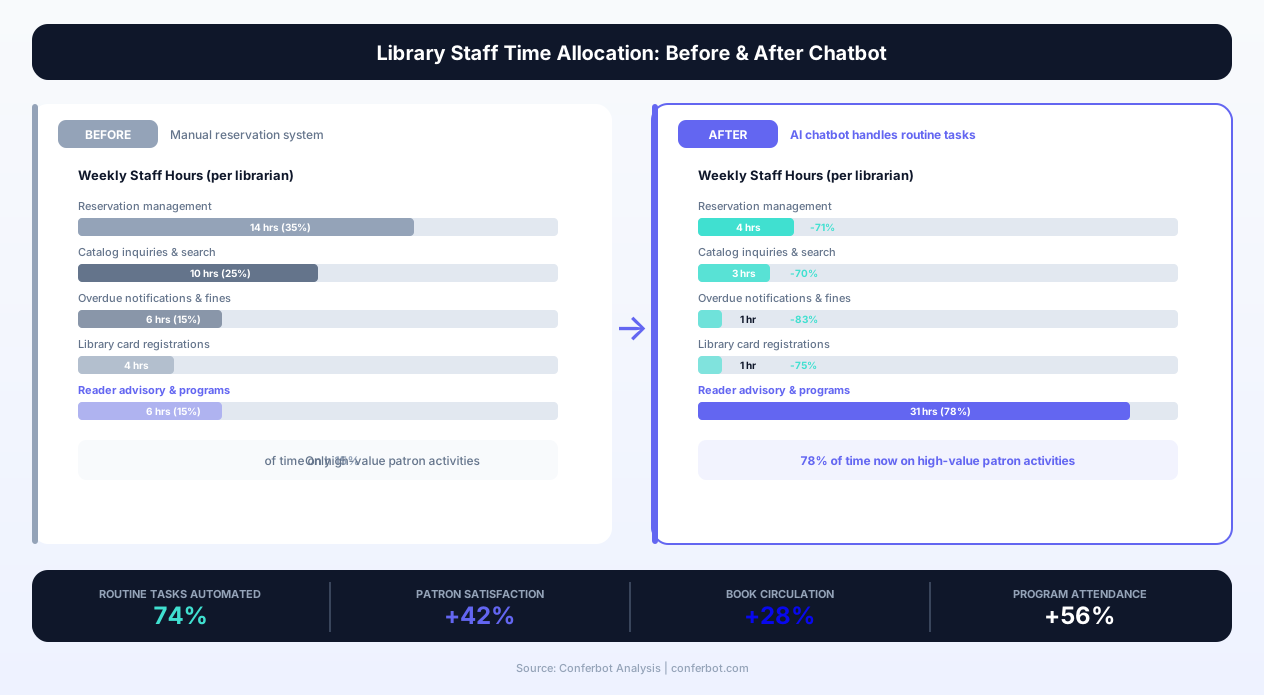
The operational impact of deploying a library book reservation chatbot is measurable across every major service metric. Below is a comprehensive comparison of library operations before and after chatbot deployment, based on aggregated data from public and academic library implementations.
Patron Service Metrics
| Metric | Before Chatbot | After Chatbot |
|---|---|---|
| Average hold placement time | Several minutes of catalog navigation | Under a minute, conversationally |
| Card registration time | 10-15 minutes, in-person | A few minutes, digital |
| ILL request accuracy | Meaningful share incomplete on first submission | Large majority complete on first submission |
| Renewal processing | Phone call or website login required | One-tap from reminder notification |
| After-hours service availability | None (building hours only) | 24/7 full service |
| Hold pickup rate | Meaningful share of holds expire unused | Noticeably higher pickup rate |
| New card registrations per month | In-person only | Meaningfully higher, in-person plus digital |
| Program registration rate | Under half of capacity | Well above half of capacity |
Staff Workload Redistribution
The most significant operational benefit is not cost reduction but staff reallocation. Library staff report spending a majority of their desk time on transactional tasks (checking availability, placing holds, processing renewals, answering account questions) that require no professional expertise. The chatbot absorbs the majority of these transactions, freeing staff to focus on services that leverage their professional training: reference assistance, reader's advisory, programming, community outreach, and collection development.
| Staff Activity | Before Chatbot | After Chatbot |
|---|---|---|
| Holds and availability inquiries | Significant share of desk time | A small fraction |
| Account questions and renewals | Significant share of desk time | A small fraction |
| Card registration | Meaningful share of desk time | A small fraction |
| Reference and reader's advisory | Baseline share of desk time | A substantially larger share |
| Program support and outreach | Baseline share of desk time | A substantially larger share |
| Collection management | Baseline share of desk time | A modestly larger share |
Patron Satisfaction Impact
Libraries deploying reservation chatbots report measurable satisfaction improvements in patron surveys. Key drivers: elimination of wait times for routine services, 24/7 availability matching modern patron schedules, and the removal of technology barriers (no app downloads, no login screens, no catalog syntax learning curve). Academic libraries report particularly strong adoption among international students who find conversational interfaces more accessible than traditional catalog systems, especially when the chatbot supports multilingual interaction through Conferbot's multilingual capabilities.
businesses worldwide use Conferbot templates to automate conversations
Use Cases Across Library Types
The library book reservation chatbot adapts to the distinct operational models, patron demographics, and service priorities of different library types. Configuration options, integration requirements, and conversational flows vary by library context.
Public Libraries: Community Access and Inclusive Service
Public libraries serve the broadest demographic range -- from preschoolers to seniors, from daily visitors to once-a-year users. The chatbot for public libraries prioritizes accessibility, simplicity, and multi-format support. Key configurations include simplified language options (reading level adjustments for children's interactions), large-text display modes for seniors, voice input support for accessibility needs, and integration with summer reading programs and community event calendars. Multi-branch routing is critical for public systems, where patrons may live near one branch but work near another. The chatbot learns and remembers branch preferences while offering alternatives when wait times or availability favor a different location.
Academic Libraries: Research Support and Course Reserves
Academic libraries face unique demands: course reserve management for thousands of students, specialized research material access, thesis and dissertation support, and peak-demand periods around exam seasons and paper deadlines. The chatbot for academic libraries integrates with learning management systems (Canvas, Blackboard, Moodle) to surface course-required materials, handles reserve checkout with time-limited borrowing enforcement, and manages the complex eligibility rules that differ between undergraduate students, graduate researchers, faculty, and community borrowers. Citation assistance -- helping students locate specific journal articles, conference papers, or government documents -- leverages the chatbot's integration with research databases and the library's electronic resource subscriptions.
Special Libraries: Controlled Access and Specialized Collections
Law firm libraries, corporate research libraries, medical libraries, and government agency libraries operate with restricted access and specialized collections. The chatbot for special libraries handles patron authentication against organizational directories, enforces access-level restrictions on sensitive materials, and supports complex search requirements specific to the domain (legal case citations, medical subject headings, patent classifications). Integration with institutional knowledge management systems allows the chatbot to serve as a unified discovery interface across both the physical library collection and digital institutional repositories.
School Libraries: Age-Appropriate Engagement
K-12 school libraries use the chatbot to encourage independent reading, support assignment research, and manage classroom library visits. The interface adapts by grade level: elementary students interact with visual book covers and simple language; middle and high school students get research support with citation formatting. Teacher integration allows educators to create reading lists and assignment-specific resource collections that students access through the chatbot. The conversational interface particularly benefits reluctant readers who find traditional catalog browsing intimidating but engage readily with a conversational assistant that asks about their interests and recommends books they might actually enjoy.
Integration with Integrated Library Systems (ILS)
The library book reservation chatbot's operational effectiveness depends on deep integration with your Integrated Library System -- the core platform that manages your catalog, circulation, patron records, and acquisitions. The chatbot connects bidirectionally with leading ILS platforms to read real-time data and write transactions directly into your system of record.
SirsiDynix Symphony and Horizon
SirsiDynix is the dominant ILS vendor for mid-to-large public library systems and many academic libraries in North America. The Conferbot integration connects through the SirsiDynix Web Services API (SIP2 and NCIP protocols) to perform catalog searches, check item availability and status, place and manage holds, process renewals, create patron records, and retrieve account information. All transactions initiated through the chatbot appear in the SirsiDynix staff client exactly as if processed at the circulation desk, maintaining complete audit trails and statistical accuracy for collection usage reporting.
Koha (Open Source ILS)
Koha is the leading open-source ILS, widely adopted by public libraries seeking to avoid vendor lock-in and by academic libraries in budget-constrained environments. The Conferbot integration leverages Koha's REST API, which provides comprehensive access to bibliographic records, patron management, circulation transactions, and hold management. Because Koha's API is well-documented and actively maintained by the open-source community, the integration supports the full range of chatbot capabilities without limitation. Libraries running Koha through managed hosting providers (ByWater Solutions, Catalyst IT, PTFS Europe) can deploy the chatbot integration without infrastructure changes.
OCLC WorldShare Management Services
OCLC WorldShare is a cloud-based library services platform that combines ILS functionality with access to the WorldCat discovery network. The Conferbot integration with WorldShare connects through OCLC's WMS API, providing catalog search across both local holdings and the broader WorldCat network. This integration is particularly powerful for interlibrary loan automation -- the chatbot can search WorldCat for items not held locally and submit ILL requests through OCLC's resource-sharing network in a single conversational flow. Academic libraries using WorldShare benefit from the integration's ability to surface electronic resources alongside physical holdings.
Polaris and CARL
Innovative Interfaces' Polaris (now part of Clarivate) and CARL systems serve many mid-size public libraries. The integration connects through their respective APIs to provide the standard chatbot capabilities: catalog search, availability checking, hold management, and patron services. For libraries on older versions of these platforms with limited API capabilities, a SIP2 protocol fallback provides core circulation transaction support while a catalog search adapter connects to the public-facing OPAC for discovery functionality.
| ILS Platform | Integration Protocol | Key Capabilities | Best For |
|---|---|---|---|
| SirsiDynix Symphony | Web Services API / SIP2 | Full catalog, circulation, patron, holds | Large public systems, academic libraries |
| Koha | REST API | Full catalog, circulation, patron, holds, acquisitions | Open-source adopters, budget-conscious libraries |
| OCLC WorldShare | WMS API + WorldCat | Local + network catalog, ILL, e-resources | Academic libraries, consortium members |
| Polaris (Clarivate) | Polaris API / SIP2 | Catalog, circulation, patron, holds | Mid-size public libraries |
| Evergreen | OpenSRF / SIP2 | Catalog, circulation, patron, holds | Public library consortia |
| Ex Libris Alma | Alma API | Full catalog, fulfillment, users, courses | Research and academic libraries |
For libraries using platforms not listed above, the chatbot supports generic SIP2 protocol connections that enable core circulation transactions (checkout, checkin, renewal, patron status, hold placement) with any SIP2-compliant system. A custom API integration path is available for proprietary or legacy systems requiring specialized connectors.
Deployment, Configuration, and Ongoing Optimization
Deploying a library book reservation chatbot involves three phases: initial configuration, ILS integration, and ongoing optimization based on patron interaction data. The Conferbot platform's no-code builder ensures that library staff -- not IT departments or vendors -- can manage the entire deployment and evolution of the chatbot.
Phase 1: Configuration (Days 1-3)
Initial setup involves defining your library's service parameters within the chatbot builder. This includes importing your branch locations and operating hours, defining circulation policies (loan periods, renewal limits, hold limits, fine structures), configuring patron categories and their respective privileges, and customizing the conversational language to match your library's communication style. Template responses for common scenarios (item unavailable, account blocked, hold limit reached) are pre-written and customizable. Most single-branch libraries complete initial configuration within a single day; multi-branch systems typically require 2-3 days to account for branch-specific policies and routing rules.
Phase 2: ILS Integration (Days 2-5)
Integration with your ILS follows a standardized process: API credential provisioning, connection testing, data mapping verification, and transaction testing. The Conferbot team provides integration guides specific to each ILS platform, and for libraries on supported platforms (SirsiDynix, Koha, WorldShare, Polaris), pre-built connectors reduce integration to a configuration task rather than a development project. The critical testing phase verifies that: catalog searches return accurate results, availability status reflects real-time inventory, hold placements appear correctly in the ILS, patron lookups authenticate properly, and renewal transactions process correctly with policy enforcement.
Phase 3: Launch and Optimization (Week 2 onward)
Post-launch optimization uses the chatbot's analytics dashboard to identify patron interaction patterns, common failure points, and service improvement opportunities. Key metrics to monitor: conversation completion rate (patrons who achieve their goal), fallback rate (conversations requiring staff handoff), search success rate (searches that find relevant results), and hold conversion rate (searches that result in hold placements). The analytics also reveal which services patrons most frequently request through the chatbot -- informing both chatbot enhancement priorities and broader library service planning decisions. A/B testing capabilities allow library staff to experiment with different conversational approaches and measure their impact on patron success rates.
Staff Training and Change Management
Successful chatbot deployment requires staff buy-in, which comes from clear communication that the chatbot is a workload tool (reducing routine transactions) not a replacement tool. Training covers: how the chatbot works and what it handles independently, when and how conversations escalate to staff, how to monitor chatbot interactions and intervene when needed, and how to update chatbot responses and policies as library services evolve. Libraries that invest in staff training during deployment report smoother adoption and faster optimization cycles, as staff actively identify improvement opportunities from their interactions with patrons who have also used the chatbot.
Library Book Reservation FAQ
Everything you need to know about chatbots for library book reservation.
Why Use a Template vs Building from Scratch?
Templates give you a proven starting structure instead of a blank canvas.
| Factor | Conferbot Template | Build from Scratch | Hire a Developer |
|---|---|---|---|
| Time to deploy | 10 minutes | 2-8 hours | 2-6 weeks |
| Cost | Free | Your time | Custom dev quote |
| Proven flows | Yes, pre-built | No | Depends |
| Updates included | Automatic | Manual | Paid |
| Multi-channel | 8+ channels | 1 channel | Extra cost |
| Analytics | Built-in | Must build | Extra cost |
Learn More About Chatbots
Go deeper on how booking and scheduling chatbots work and how to pick the right builder.
Ready to Deploy Library Book Reservation?
Start with a free-forever plan. No credit card required.