
Product Feedback
Free B2B Services Chatbot Template
A complete product feedback chatbot template - deploy in minutes to automate conversations, capture leads, and provide 24/7 assistance.



How this template opens - rendered from its flow. Use the interactive preview to click through the full conversation.
What Is a Product Feedback Chatbot?
A product feedback chatbot is a conversational AI tool that continuously collects feature feedback, bug reports, satisfaction scores, usage insights, and improvement suggestions from active users through natural, in-product dialogue. Instead of relying on feedback forms that users ignore, support tickets that capture only complaints, or periodic surveys that create quarterly feedback bottlenecks, the chatbot maintains an always-on feedback channel that meets users in the moment they have something to share -- whether that is a feature idea, a frustration, a bug, or praise.
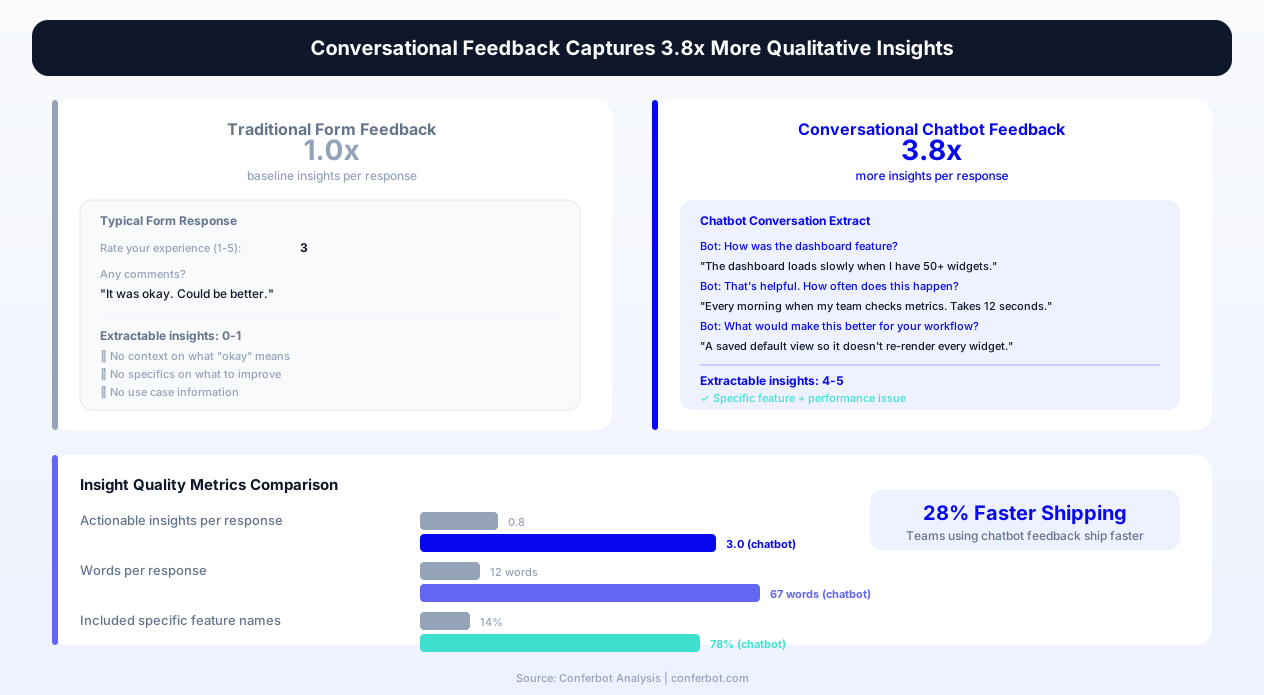
The product feedback problem in 2026 is not a shortage of opinion -- it is a structure problem. Users have feedback; they just lack a frictionless, contextual channel to share it. Feedback forms feel like work. Support tickets feel like complaining. Feature request boards feel like shouting into a void. Email surveys arrive at the wrong time. The result: product teams make roadmap decisions based on a tiny, unrepresentative sample of user voice -- the loudest complainers and the most persistent requesters -- while the silent majority's needs go unheard.
Conversational feedback methods capture meaningfully more qualitative insight per user than form-based alternatives, and product teams using continuous chatbot feedback ship noticeably faster because they spend less time on discovery research and more time building validated solutions. The chatbot format works because it reduces the effort of sharing feedback to nearly zero: a quick chat message instead of navigating to a feedback portal, filling out structured fields, and submitting a formal request.
Conferbot's AI chatbot builder provides a pre-built product feedback template that covers the full spectrum of user input: feature requests with use-case context, bug reports with technical detail capture, satisfaction scoring at the feature level, usage pattern exploration, improvement suggestions with priority signaling, beta testing recruitment, and roadmap voting. The template deploys as an in-product website widget with intelligent triggering and integrates with product management tools (Linear, Jira, Productboard) to feed feedback directly into prioritization workflows.
This page covers the complete product feedback system: collection strategies that maximize both volume and quality, question architecture for different feedback types, integration with product management tools, analysis frameworks that convert raw feedback into prioritized roadmap decisions, beta testing recruitment and management, and deployment best practices for product teams at any stage.
Why Continuous Conversational Feedback Outperforms Periodic Research
The traditional product feedback model -- periodic user research sprints, quarterly surveys, and reactive feature request boards -- creates dangerous gaps between what users experience and what product teams know. Continuous conversational feedback eliminates these gaps.
The Feedback Timing Problem
Users form opinions, encounter frustrations, and imagine improvements during product usage -- not two weeks later when a survey arrives. A user who struggles with a workflow at 2:00 PM has a vivid, specific understanding of what is wrong. By the time a quarterly survey asks "What would you improve?", that specific frustration has merged with dozens of other small experiences into a vague "it could be better" sentiment that provides no actionable direction for the product team.
The chatbot solves the timing problem by being available at the moment of insight. When a user encounters friction, they can immediately share what happened. When they imagine a better workflow, they can describe it while the vision is fresh. When they discover a bug, they can report it with the exact context still on their screen. This immediacy produces feedback that is meaningfully more specific and actionable than retrospective survey responses.
The Volume vs. Quality Tradeoff (Eliminated)
Traditional feedback methods force a tradeoff: you can get high-quality deep insights from a few users (user interviews, usability testing) or low-quality shallow signals from many users (NPS surveys, feature request votes). The chatbot eliminates this tradeoff by collecting rich qualitative feedback at scale. Each individual conversation captures context, use case, severity, and specific detail -- the depth of a user interview -- while the always-on nature collects this from hundreds or thousands of users -- the scale of a survey.
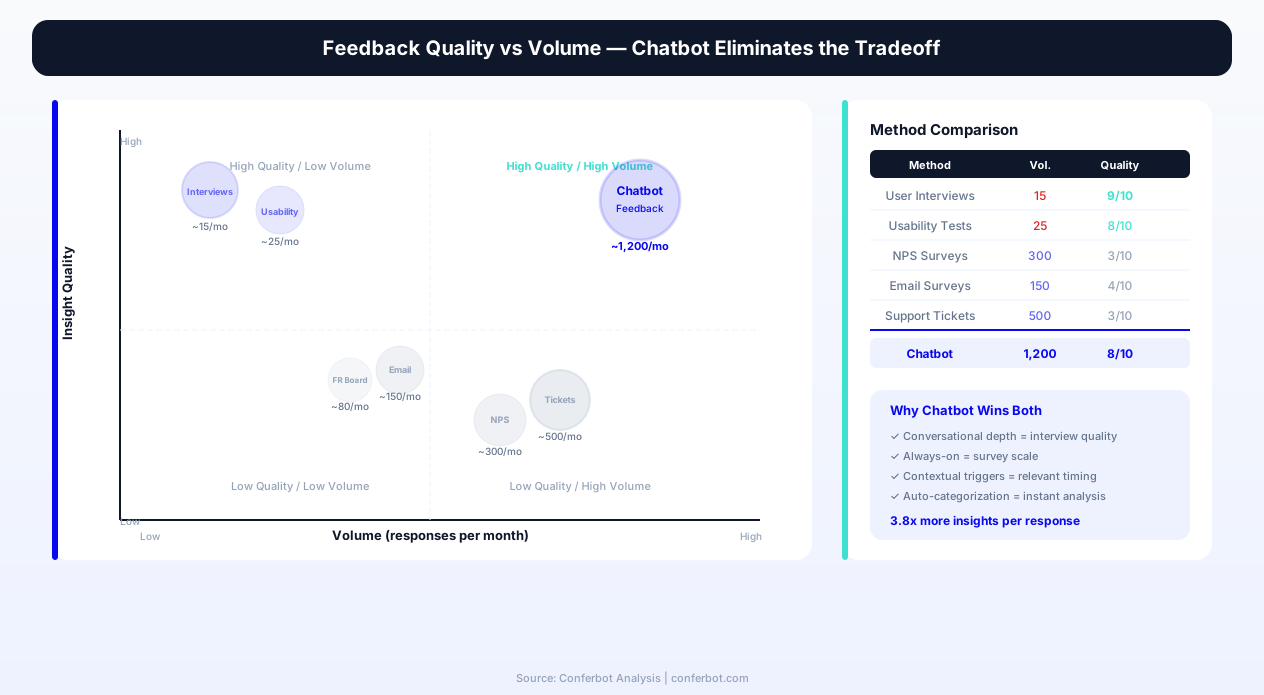
| Feedback Method | Qualitative Depth | Volume Scale | Timing Accuracy | User Effort |
|---|---|---|---|---|
| Product feedback chatbot | High (adaptive follow-up) | High (always-on, all users) | Real-time (in-moment) | Very low (30-60 sec) |
| User interviews | Very high | Very low (5-15/month) | Retrospective | High (30-60 min) |
| Feature request board | Low (titles + votes) | Low (only motivated users) | Disconnected from usage | Medium (navigate, write, submit) |
| In-app feedback form | Low (structured fields) | Low (1-3% interaction rate) | Real-time (but low engagement) | Medium (fill fields, submit) |
| Support tickets | Medium (problem context) | Medium (only issues) | Post-frustration only | High (formal submission) |
| Quarterly surveys | Low (memory decay) | Medium (5-15% response) | Retrospective (weeks/months late) | Medium (5-10 min) |
| Beta testing programs | High | Very low (selected testers) | Pre-release only | High (structured tasks) |
| Session recordings + analytics | Behavioral only (no "why") | Very high (all users) | Real-time | None (passive) |
The Representativeness Problem
Feature request boards and support tickets massively over-represent power users and complainers. The majority of your user base -- the "silent majority" who use the product regularly but never submit formal feedback -- is invisible to these channels. Their needs, frustrations, and desires go unrepresented in roadmap decisions. The chatbot reaches this silent majority by proactively initiating feedback conversations at natural moments (post-task, after feature first-use, after reaching usage milestones) rather than waiting for users to seek out a feedback channel themselves.
The Discovery-Delivery Speed Connection
Product teams using continuous chatbot feedback report shipping noticeably faster -- not because they build faster, but because they spend less time in discovery uncertainty. When you have a continuous stream of user feedback flowing into your prioritization process, you do not need to pause development for 2-week research sprints to understand user needs. The needs are visible in real-time. Teams can move from "we think users want X" to "137 users told us they want X, here is how they describe their use case" within days rather than months.
Key Features of Conferbot's Product Feedback Chatbot Template
Conferbot's product feedback template provides a complete feedback collection and management system designed for product teams practicing continuous discovery. Every feature below is configurable through the no-code builder and deployable via the website widget.
| Feature | What It Does | Product Team Value | Configuration |
|---|---|---|---|
| Multi-type feedback routing | Automatically categorizes incoming feedback as feature request, bug report, improvement suggestion, satisfaction signal, or question | Routes each feedback type to the appropriate workflow and team | AI-powered with manual override |
| Contextual follow-up questions | Asks adaptive follow-up questions based on feedback type to capture use case, severity, frequency, and desired outcome | Transforms vague feedback into actionable product requirements | Customizable question sets per type |
| Feature-level satisfaction scoring | Asks satisfaction questions tied to specific features after feature usage detection | Measures feature-level satisfaction and identifies improvement priorities | Feature list configuration |
| Bug report enrichment | Captures reproduction steps, severity assessment, device/browser context, and optional screenshot | Reduces back-and-forth between support and engineering on bug triage | Automatic context capture |
| Use case documentation | For feature requests, captures the user's job-to-be-done, current workaround, frequency of need, and impact of resolution | Provides the "why" behind feature requests for prioritization | Structured follow-up flow |
| Priority signal capture | Asks users to indicate how important their feedback is to their continued use: critical, important, nice-to-have | Enables prioritization by user-reported urgency alongside volume | Always included |
| Roadmap voting integration | Presents upcoming roadmap items and collects vote/interest signals from active users | Validates roadmap priorities with real user demand data | Dynamic roadmap item list |
| Beta testing recruitment | Identifies engaged users willing to test upcoming features and captures their use case, availability, and testing preferences | Builds a qualified beta pool from actual users rather than external panels | Qualification criteria configurable |
| Feedback deduplication | Uses NLP to identify when new feedback matches existing requests, incrementing count rather than creating duplicates | Provides accurate demand signals without manual merging | Similarity threshold configurable |
| Sentiment trend monitoring | Tracks overall product sentiment and feature-level sentiment trends over time | Detects satisfaction shifts early, often correlated with deployments | Automatic, dashboard-based |
Intelligent Feedback Type Detection
When a user initiates a feedback conversation (either proactively or in response to a chatbot prompt), the system's AI layer automatically detects the feedback type from natural language and routes accordingly:
- "I wish the dashboard showed X" -- Detected as feature request; chatbot asks about use case, frequency of need, current workaround
- "The export button is not working" -- Detected as bug report; chatbot captures steps to reproduce, browser/device, severity assessment
- "The reporting feature would be better if..." -- Detected as improvement suggestion; chatbot asks about the specific change and its impact on workflow
- "I love how easy the onboarding was" -- Detected as satisfaction signal; chatbot acknowledges and asks what specifically worked well
- "How do I do X?" -- Detected as question; chatbot provides help or routes to documentation, then asks if the answer was adequate
This automatic routing eliminates the need for users to categorize their own feedback (which they frequently miscategorize) and ensures each type receives the appropriate follow-up questions for maximum actionability.
Proactive Feedback Collection vs. Reactive
The chatbot operates in two modes that complement each other:
- Reactive mode -- A persistent but unobtrusive "Share feedback" trigger is always available in the product interface. Users who have something to share can initiate a conversation at any time. This captures highly motivated feedback from users with strong opinions.
- Proactive mode -- The chatbot initiates feedback conversations at strategic moments: after first use of a feature, after completing a workflow, after reaching a usage milestone, or after a configurable period of inactivity on a feature. This captures feedback from the silent majority who have opinions but low motivation to seek out a feedback channel.
The combination of reactive and proactive modes ensures comprehensive coverage: strong opinions are captured immediately through the reactive channel, while moderate opinions are surfaced through proactive prompts that make sharing easy.
Ready to try Product Feedback?
Deploy this template in under 10 minutes. No coding required.
Use This Template Free →Feedback Collection Architecture and Conversation Design
Effective product feedback collection requires different conversation designs for different feedback types. The chatbot adapts its question architecture based on the detected feedback type to maximize the actionability of each response.
Feature Request Conversation Flow
Feature requests are the most common feedback type and the most frequently poorly captured. A typical feature request submission -- "Add dark mode" -- tells the product team nothing about why it matters, how often it would be used, what problem it solves, or how important it is relative to other needs. The chatbot transforms these thin requests into rich product requirements through structured follow-up:
- Initial capture -- "What feature or capability would you like to see?" [Open text]
- Use case exploration -- "Can you describe a situation where you would use this? What are you trying to accomplish?" [Open text]
- Current workaround -- "How do you handle this today without the feature?" [Open text -- reveals pain severity]
- Frequency assessment -- "How often do you encounter this need?" [Daily / Weekly / Monthly / Occasionally]
- Impact estimation -- "If we built this, how much would it change your experience?" [Game-changer / Significant improvement / Nice to have / Minor convenience]
- Priority signal -- "How important is this for your continued use of [product]?" [Critical -- might leave without it / Important but not blocking / Would be nice]
This six-question sequence takes under 90 seconds to complete but generates a feature request document that would normally require a 30-minute user interview to produce. The structured output feeds directly into product management tools via API integration.
Bug Report Conversation Flow
Bug reports need technical precision that most users cannot provide unprompted. The chatbot guides users through structured bug documentation:
- Issue description -- "What happened that was unexpected?" [Open text]
- Expected behavior -- "What did you expect to happen instead?" [Open text]
- Reproduction steps -- "Can you describe the steps that led to this? What were you doing right before?" [Open text with numbered step prompting]
- Frequency -- "Does this happen every time or intermittently?" [Every time / Sometimes / First time]
- Severity -- "How much does this block you?" [Cannot proceed / Major inconvenience / Minor annoyance]
- Screenshot option -- "Would a screenshot help? You can attach one here." [Optional upload]
Technical context (browser, OS, device type, current page URL, user account ID) is captured automatically without asking the user, ensuring engineering has the technical context needed for triage without burdening the reporter.
Improvement Suggestion Conversation Flow
Improvement suggestions differ from feature requests -- they describe how an existing feature could work better rather than requesting entirely new functionality:
- Feature identification -- "Which feature or area of [product] could be improved?" [List of key features or open text]
- Current experience -- "What is frustrating or inefficient about how it works now?" [Open text]
- Desired experience -- "How would you like it to work instead?" [Open text]
- Impact on workflow -- "How would this improvement change your daily experience with [product]?" [Open text]
Satisfaction Scoring Conversation Flow
Feature-level satisfaction is captured proactively after detected feature usage:
- Satisfaction rating -- "How well does [feature] work for your needs?" [1-5 scale]
- Conditional follow-up (low score) -- "What could be better about it?" [Open text]
- Conditional follow-up (high score) -- "What do you find most valuable about it?" [Open text, optional]
This brief 1-2 question interaction generates feature-level satisfaction data that reveals which parts of your product delight users and which create friction -- intelligence that feature request volume alone cannot provide.
Integration with Product Management and Development Tools
Product feedback is only valuable when it reaches the people who make product decisions and the systems where priorities are set. Conferbot's product feedback template integrates bidirectionally with the tools product teams already use for planning, building, and shipping.
Product Management Platform Integration
Feedback flows directly into your product management tool, mapped to the appropriate structure:
- Productboard -- Feature requests and improvement suggestions sync as insights linked to features, with user context and priority signals. Productboard's scoring model automatically incorporates chatbot feedback volume and severity into prioritization scores
- Canny -- Requests sync as feature suggestions with automatic vote consolidation when multiple users request the same capability. Users can track the status of their requests through the chatbot
- Aha! -- Feedback maps to ideas with strategic alignment scoring and customer context for enterprise product teams
- Linear / Jira / Asana -- Bug reports create issues with full technical context, priority labels, and reproduction steps pre-formatted for engineering triage
Development Workflow Integration
For engineering teams, bug reports need to land in the right place with the right context:
- GitHub Issues -- Bug reports auto-create issues with severity labels, reproduction steps, and technical context (browser, OS, URL)
- Linear -- Issues are created in the correct team's triage queue with automatic priority mapping based on user-reported severity and frequency
- Jira -- Issues are created with configurable project, issue type, priority, and custom field mapping
- Slack notifications -- High-severity bugs trigger immediate Slack alerts to the on-call engineering team with full context
Analytics and Customer Data Platform Integration
Connecting feedback to user behavior data enables powerful analysis:
- Mixpanel / Amplitude -- Feedback events are sent as user properties, enabling behavioral segmentation of users who provide different feedback types and sentiments
- Segment -- Feedback data flows through your CDP for activation across marketing, support, and product tools
- Intercom / Zendesk -- User satisfaction signals and feature request context enrich the customer profile for support interactions
Bidirectional Communication: Closing the Feedback Loop
One of the most powerful integration capabilities is closing the feedback loop -- notifying users when their requested feature is built or their reported bug is fixed. Through the API integration, when a feature request linked to chatbot feedback moves to "shipped" status in your product management tool, Conferbot can automatically notify the requesting users:
"Hey [name] -- remember when you told us you wanted [feature]? We built it! Check it out here: [link]. We would love your feedback on how it turned out."
This closed-loop communication accomplishes three things simultaneously: it demonstrates that user feedback is valued and acted upon (increasing future feedback willingness), it drives feature adoption (users who requested a feature are primed to use it immediately), and it captures validation feedback (did the implementation actually solve the user's problem?). Organizations that close the feedback loop see substantially higher ongoing feedback participation rates compared to those that collect feedback silently.
Beta Testing Recruitment and Management via Chatbot
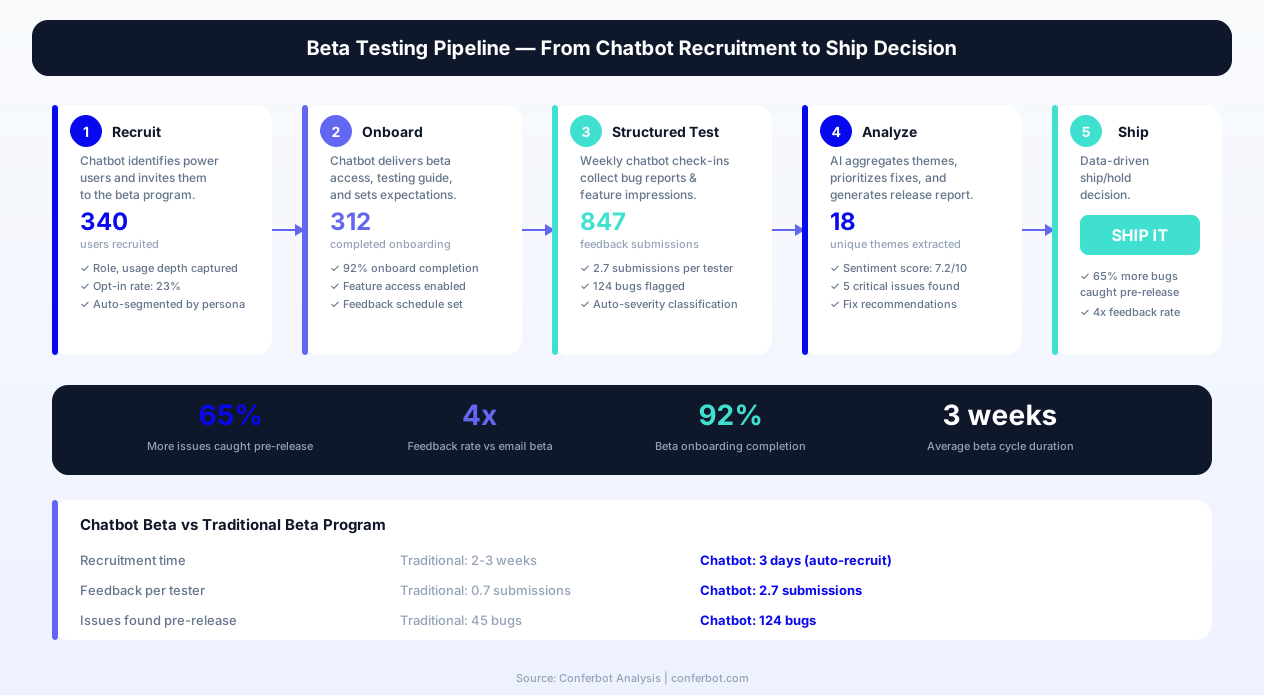
Building a reliable beta testing program is one of the highest-ROI activities for any product team -- yet most teams struggle with recruitment, engagement, and feedback quality from testers. The product feedback chatbot solves all three challenges by leveraging its ongoing relationship with active users.
Recruitment from Active Feedback Providers
The best beta testers are users who already provide quality feedback. The chatbot identifies high-quality feedback providers based on response detail, engagement frequency, and feature coverage breadth, and invites them to join the beta program:
"You have given us incredible feedback about [product] -- we really value your input. Would you be interested in testing new features before they launch? Beta testers get early access and direct influence on how features ship."
Users recruited through this method have meaningfully higher beta participation rates than those recruited through generic email invitations because they are pre-qualified as engaged, articulate, and invested in the product's improvement.
Beta Tester Qualification and Segmentation
The chatbot captures qualification data during recruitment to build a segmented beta pool:
- Use case alignment -- "What do you primarily use [product] for?" -- enables matching testers to features relevant to their workflow
- Technical sophistication -- "How comfortable are you with products that might have rough edges?" -- segments testers by tolerance for instability
- Time availability -- "How much time could you dedicate to testing per week?" -- sets expectations and enables scheduling
- Testing format preference -- "Do you prefer structured test tasks or free exploration?" -- enables differentiated testing approaches
- Communication preference -- "Where should we reach you for beta updates?" -- enables multi-channel beta communication
Beta Feedback Collection
Once beta testers have access to new features, the chatbot facilitates structured beta feedback collection:
- First impression capture -- Triggered after initial interaction with the beta feature: "You just tried [new feature]. Quick first impression -- how was it?"
- Task-specific assessment -- After completing specific tasks with the new feature: "How easy was it to [accomplish specific task] with the new [feature]?"
- Bug and issue reporting -- Dedicated beta bug reporting flow with enhanced context capture and reproduction step guidance
- Comparison assessment -- "How does the new [feature] compare to [previous version/workaround]? Better, worse, or about the same?"
- Ship readiness vote -- Before planned launch: "Based on your testing, do you think [feature] is ready for all users?" [Yes / Not yet, needs X / Not sure]
Beta Program Analytics
The chatbot tracks beta program health metrics:
- Tester engagement rate -- What percentage of recruited testers actually test and provide feedback?
- Feedback quality score -- Are beta testers providing detailed, actionable feedback or superficial responses?
- Issue detection rate -- How many bugs and usability issues does the beta program catch before general release?
- Tester satisfaction -- Are beta testers having a positive experience, or is the program causing frustration?
Product teams using chatbot-facilitated beta programs report catching meaningfully more issues before general release compared to unstructured beta programs, and beta testers in the chatbot program provide feedback at a much higher rate than testers managed through email and forums.
businesses worldwide use Conferbot templates to automate conversations
From Raw Feedback to Prioritized Roadmap Decisions
Collecting feedback is the easy part. The hard part is converting hundreds of individual pieces of feedback into prioritized product decisions. Conferbot's analytics layer provides the frameworks and automation needed to move from raw input to confident action.
Automated Feedback Clustering
The system uses NLP to automatically cluster similar feedback into themes without manual tagging. When 47 users describe variations of the same need ("I want to share reports with clients," "Can I export reports to PDF?", "My team needs to see dashboard data without logging in"), the system recognizes these as a single theme -- "external report sharing" -- and presents them as a cluster with aggregated demand metrics.
Multi-Dimensional Prioritization Scoring
Each feedback cluster receives a prioritization score based on multiple dimensions that together indicate product roadmap priority:
- Volume -- How many unique users have expressed this need? (weighted by user segment value)
- Severity -- How critical is this to users' workflows? (from self-reported priority signals)
- Frequency -- How often do users encounter this need? (daily needs outweigh monthly needs)
- User segment alignment -- Is this need concentrated in your highest-value or fastest-growing segment?
- Retention correlation -- Do users who express this need churn at higher rates?
- Effort estimation -- How complex is the implementation? (manually tagged by product team)
The resulting priority score enables data-driven roadmap decisions: "This feature was requested by 89 users, 67% rate it as critical, 45% encounter the need daily, and it is concentrated in our enterprise segment which drives 60% of revenue. Implementation effort is medium. Priority score: 87/100."
Feedback-to-Feature Validation Loop
The most sophisticated use of the feedback chatbot is as a validation tool for roadmap decisions already under consideration:
- Hypothesis formation -- Product team considers building feature X based on initial feedback signals
- Targeted validation -- Chatbot proactively surveys relevant users: "We are considering building [feature concept]. Would this be valuable for you?" with follow-up on expected usage, willingness to pay, and priority vs. other needs
- Demand quantification -- Aggregate validation responses into a demand confidence score before committing development resources
- Post-ship validation -- After building and shipping, the chatbot surveys users who expressed demand: "We built [feature] based on your feedback -- does it solve your need?"
This loop reduces the risk of building features that users requested in abstract but do not actually use when delivered. In 2026, product teams report that a substantial share of features built from unvalidated feedback fail to achieve expected adoption, while features validated through conversational demand assessment fail at a much lower rate.
Sentiment Trend Correlation with Releases
The chatbot's continuous sentiment monitoring enables automatic correlation of satisfaction changes with product releases. When you deploy a change and feature-level satisfaction scores shift within the following week, the system flags the correlation -- positive shifts are confirmed improvements, negative shifts indicate regressions that need immediate attention. This real-time feedback-on-deployments is dramatically faster than waiting for support ticket volume changes or user churn data to signal problems.
Before and After: Product Feedback Chatbot Impact on Shipping Speed
Product teams implementing Conferbot's feedback chatbot consistently report improvements across feedback quality, roadmap confidence, and shipping velocity within 90 days of deployment.
| Product Team Metric | Before Chatbot Feedback | After Chatbot Feedback (90 Days) |
|---|---|---|
| Monthly feedback volume | Low (support tickets + feature board) | Substantially higher (chatbot + reactive channels) |
| Qualitative detail per feedback item | 1-2 sentences average | 4-6 sentences with use case context |
| User representation in feedback | A small minority of active users ever provide feedback | A meaningfully larger share provide feedback within 6 months |
| Time from need identification to validated priority | Weeks (research sprint required) | Much shorter (continuous signal) |
| Feature adoption rate (30-day post-ship) | Lower (built from unvalidated requests) | Meaningfully higher (built from validated demand) |
| Discovery research time per quarter | Substantial | Meaningfully reduced (focused on deep exploration) |
| Bug reports with reproduction steps | A minority of bug reports | The large majority of bug reports |
| Average time to resolve reported bugs | Baseline | Meaningfully faster (better initial context) |
| Product team confidence in roadmap priorities | Low-medium (opinion-driven) | High (data-backed from continuous signal) |
| Sprint velocity (features shipped/quarter) | Baseline | Meaningfully higher |
The Shipping Speed Improvement Explained
The improvement in shipping speed comes from three compounding factors:
- Reduced discovery overhead -- With continuous feedback providing validated problem understanding, product teams spend less time running research sprints to understand what to build. They already know because users have told them, with context, use cases, and priority signals.
- Higher first-attempt success rate -- Features built from rich, contextual feedback with use case documentation are more likely to solve the actual problem on the first attempt, reducing the need for post-launch revisions and iteration cycles.
- Faster bug resolution -- Bug reports with structured reproduction steps, technical context, and severity assessment require less engineering investigation time, meaningfully shortening the average bug lifecycle.
Cumulatively, these time savings enable product teams to ship more features per quarter while actually reducing total work hours -- they are not shipping faster by working more, but by working on the right things with better information.
Step-by-Step Deployment Guide for Product Teams
Deploying Conferbot's product feedback chatbot is straightforward technically, but benefits from strategic configuration decisions that align the system with your product team's existing workflows and priorities.
Phase 1: Strategic Setup (1 Hour -- Product Manager-Led)
- Define your feedback goals -- What is the primary intelligence gap on your product team? Feature discovery? Bug detection? Satisfaction monitoring? Roadmap validation? This determines trigger strategy
- Map your feature taxonomy -- List the 10-20 key features/areas of your product that should be tracked individually for satisfaction and feedback routing
- Identify trigger moments -- When should the chatbot proactively solicit feedback? After first feature use? After task completion? After reaching usage milestones?
- Define integration targets -- Where should feature requests go? (Productboard, Canny, Linear) Where should bugs go? (GitHub, Linear, Jira) Who should receive alerts? (Slack channels, email)
Phase 2: Technical Deployment (30-45 Minutes)
- Create Conferbot account and select the Product Feedback template from the Surveys category
- Install the website widget in your product via JavaScript snippet, React component, or tag manager
- Configure user identification -- Connect user account data (name, email, plan tier, signup date) via API for conversation personalization and feedback attribution
- Set up product management tool integration -- Connect Productboard, Linear, Jira, or your tool for automatic feedback routing
- Configure Slack notifications -- Set up alert channels for high-severity bugs and high-demand feature requests
- Customize branding and tone -- Align the chatbot's visual style and conversational tone with your product's design language
Phase 3: Trigger Configuration (45 Minutes)
- Enable reactive mode -- Add the persistent "Share Feedback" button/trigger in your product interface (recommended: bottom-right widget, accessible from all pages)
- Configure proactive triggers -- Set up 2-3 proactive trigger conditions:
- After first use of any tracked feature (feature satisfaction prompt)
- After 5+ sessions in a 7-day period (engaged user general feedback prompt)
- After detected friction signals (rage clicks, feature abandonment patterns)
- Set frequency caps -- Maximum one proactive prompt per 14-day period per user; no cap on reactive submissions
- Configure the beta recruitment trigger -- Set criteria for users who receive beta program invitations (engagement level, feedback quality, segment)
Phase 4: Team Workflow Integration (Ongoing)
- Weekly triage ritual -- Product team reviews new feedback clusters, validates priorities, and routes to sprint planning
- Sprint planning input -- Use chatbot feedback demand data alongside other inputs (analytics, strategy, technical debt) for sprint prioritization
- Post-ship validation -- After shipping features, configure feedback loops to measure whether the implementation solved the expressed need
- Monthly beta program check -- Review beta pool health, recruit new testers from qualified feedback providers, and plan upcoming beta releases
Avoiding Common Pitfalls
- Do not over-trigger proactive prompts -- More than once per 14 days causes fatigue; start conservative and expand only if engagement remains high
- Do not skip the feedback loop closure -- Users who never hear back about their feedback stop providing it; close the loop when you ship their requests
- Do not treat all feedback equally -- Weight feedback by user segment value, retention correlation, and self-reported priority rather than raw volume alone
- Do not ignore positive feedback -- Understanding what works well is as strategically valuable as understanding what is broken; track satisfaction signals alongside complaints
For product teams seeking deeper guidance, Conferbot's product advisory team offers a complimentary feedback system design workshop covering trigger strategy, integration architecture, and analysis workflows tailored to your product type and team structure.
Product Feedback FAQ
Everything you need to know about chatbots for product feedback.
Why Use a Template vs Building from Scratch?
Templates give you a proven starting structure instead of a blank canvas.
| Factor | Conferbot Template | Build from Scratch | Hire a Developer |
|---|---|---|---|
| Time to deploy | 10 minutes | 2-8 hours | 2-6 weeks |
| Cost | Free | Your time | Custom dev quote |
| Proven flows | Yes, pre-built | No | Depends |
| Updates included | Automatic | Manual | Paid |
| Multi-channel | 8+ channels | 1 channel | Extra cost |
| Analytics | Built-in | Must build | Extra cost |
Related B2B Services Templates
Explore more chatbot templates like this one






Learn More About Chatbots
Go deeper on how b2b services chatbots work and how to pick the right builder.
Ready to Deploy Product Feedback?
Start with a free-forever plan. No credit card required.