Why E-commerce Stores Without Chatbots Are Leaving Money on the Table
The average e-commerce conversion rate in 2026 is 2.8%. Statista's online shopping data confirms this persistent challenge: despite billions spent on traffic acquisition, the vast majority of visitors leave without purchasing. That means 97 out of every 100 visitors leave without buying. Cart abandonment sits at 70.2% globally, according to Baymard Institute research. And customer support ticket volume grows 15-20% year-over-year while margins get squeezed by rising ad costs.
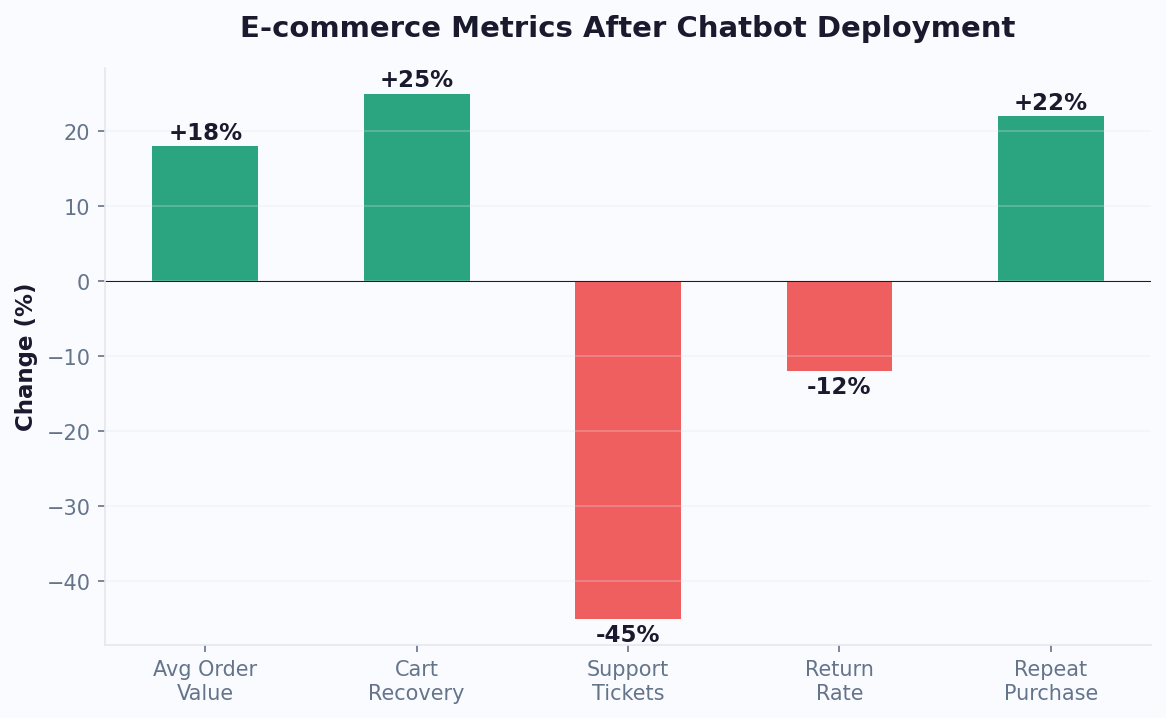
An e-commerce chatbot attacks all three problems simultaneously. Here is what the data shows for stores that deploy one:
E-commerce Chatbot Impact: Hard Numbers from 2026
| Metric | Without Chatbot | With Chatbot | Impact |
|---|---|---|---|
| Conversion rate | 2.8% | 3.5-4.2% | +25-50% |
| Cart abandonment rate | 70.2% | 55-60% | -15-22% |
| Average order value (AOV) | $85 | $98-$110 | +15-30% |
| Support ticket volume | 100% | 30-40% | -60-70% deflection |
| Customer satisfaction | 72% | 87% | +21% |
| Time to first response | 4-12 hours (email) | Instant | -99% |
| Return/refund processing | 24-48 hours | 5 minutes (automated) | -98% |
For a store doing $500,000 in annual revenue, a chatbot that increases conversion and reduces support costs typically adds $125,000+ in incremental revenue while saving $30,000-50,000 in support costs. Use our chatbot ROI calculator to model your specific numbers.
The ROI is not theoretical. It is measurable within the first 30 days. For platform-specific implementation, see our general chatbot for e-commerce guide and the WooCommerce chatbot setup tutorial. To understand the ROI calculation methodology, read How to Calculate Chatbot ROI. Let us break down exactly how an e-commerce chatbot generates these results.
5 Revenue-Generating E-commerce Chatbot Use Cases
1. Product Recommendation Engine
Visitors browsing a catalog of 500+ products often suffer from choice paralysis. A chatbot acts as a personal shopping assistant:
- "What occasion are you shopping for?" (narrows category)
- "What's your budget range?" (filters price)
- "Any preferences for color or style?" (personalizes results)
Based on responses, the bot presents 3-5 curated recommendations with images, prices, and quick "Add to Cart" buttons. Stores using product recommendation chatbots see 15-35% higher AOV because the bot cross-sells and upsells based on the customer's stated needs - not random "you might also like" widgets.
Build this using Conferbot's visual builder with conditional logic and product catalog integration.
2. Abandoned Cart Recovery
When a visitor adds items to their cart and shows exit intent (or leaves the site), the chatbot triggers a recovery sequence:
- On-site (exit intent): "Looks like you have items in your cart. Have any questions about shipping or returns before you go?"
- WhatsApp follow-up (1 hour later): "Hi [Name], you left [Product] in your cart. It's selling fast - want to complete your order?"
- Messenger follow-up (24 hours later): "Still thinking about [Product]? Here's 10% off to sweeten the deal: [discount code]"
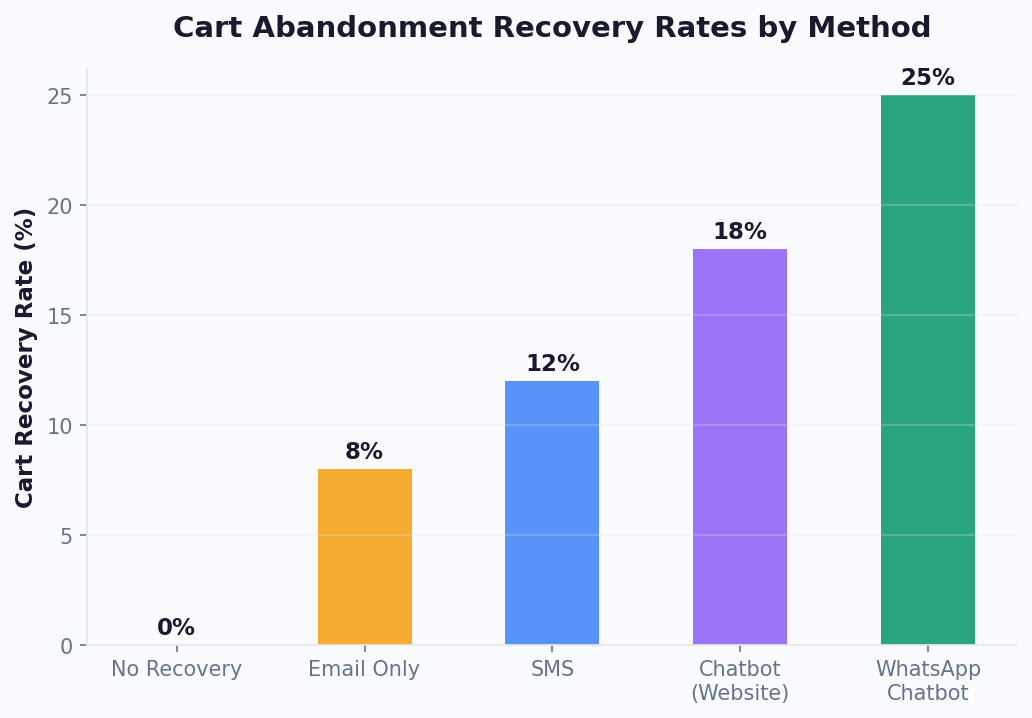
This multi-channel recovery approach recaptures 18-25% of abandoned carts. Read our detailed chatbot abandoned cart recovery guide for full implementation steps.
3. Instant Size and Fit Guidance
Sizing uncertainty causes 40% of fashion e-commerce returns. A chatbot that asks height, weight, and preferred fit (slim, regular, relaxed) and cross-references your size chart eliminates the guesswork. Result: 25-35% reduction in size-related returns, which directly improves margins.
4. Order Status and Tracking
"Where is my order?" accounts for 30-40% of e-commerce support tickets. A chatbot integrated with your fulfillment system provides instant tracking updates without human involvement. The customer types their order number or email, and the bot returns real-time status, carrier link, and estimated delivery date.
5. Upsell and Cross-Sell at Checkout
At the checkout page, the chatbot suggests complementary products: "Add [matching accessory] for just $15 more - 80% of customers who buy [main product] also grab this." Social proof combined with relevant suggestions at the point of purchase increases AOV without feeling pushy because the recommendation is contextual and helpful.
Automating 70% of E-commerce Support With Chatbots
E-commerce support teams drown in repetitive questions. Here is the breakdown of typical ticket types and which ones a chatbot handles autonomously.
Support Ticket Automation Matrix
| Ticket Type | % of Volume | Bot Automatable? | How Bot Handles It |
|---|---|---|---|
| Where is my order? | 30-35% | Yes (100%) | API lookup → tracking link + ETA |
| Return/exchange request | 15-20% | Yes (90%) | Policy check → generate return label → email instructions |
| Product questions | 10-15% | Yes (85%) | Knowledge base lookup → answer with product specs |
| Shipping cost/time | 8-10% | Yes (100%) | Calculate based on location → display shipping options |
| Discount/promo codes | 5-8% | Yes (100%) | Validate code → apply or explain restrictions |
| Account issues | 5-7% | Yes (80%) | Password reset → email verification → resolve |
| Billing disputes | 3-5% | No → Agent | Collect details → escalate to live agent with context |
| Complex complaints | 2-3% | No → Agent | Empathy message → priority escalation to senior agent |
Total automatable: 68-75% of all tickets. The remaining 25-32% get routed to human agents with full context - the customer's order history, conversation transcript, and the bot's assessment of the issue.
The Support Cost Equation
Assume your store handles 3,000 support tickets per month:
- Without chatbot: 3,000 tickets x $8 average cost per ticket = $24,000/month
- With chatbot (70% automation): 900 human-handled tickets x $8 + platform cost $300 = $7,500/month
- Monthly savings: $16,500
- Annual savings: $198,000
And the bot-handled tickets have higher satisfaction scores because customers get instant answers instead of waiting 4-12 hours for an email response. Track everything through your analytics dashboard to prove ROI to stakeholders.
Proactive Support: Preventing Tickets Before They Happen
The most cost-effective support ticket is the one that never gets created. Proactive chatbot interventions prevent common support scenarios before they escalate:
- Shipping expectation setting: After purchase, the chatbot sends a message explaining typical delivery timeline, how to track, and what to do if delayed. This prevents 30-40% of "where is my order" inquiries.
- Pre-emptive FAQ on product pages: Display common questions about the product (sizing, compatibility, care instructions) directly in the chatbot widget on the product page. Customers who read these are 50% less likely to open a support ticket post-purchase.
- Automated post-delivery check-in: "Hi [Name], your order was delivered yesterday. Everything look good? [Yes, perfect!] [I have an issue]" - this catches problems early, before frustration builds and negative reviews are written.
- Return policy clarity: Before checkout, the chatbot can proactively mention: "Free 30-day returns on all orders. No questions asked." This reduces post-purchase anxiety and pre-empts return policy inquiries.
E-commerce stores implementing proactive support chatbots see 20-30% fewer inbound support tickets compared to purely reactive support. The investment is minimal (configuring a few proactive messages) but the impact on support team workload and customer satisfaction is substantial.
Setting Up E-commerce Chatbot on Shopify, WooCommerce, and Custom Stores
Shopify Integration
Shopify's e-commerce blog identifies chatbots as one of the top conversion optimization tools for online stores. Shopify is the most popular e-commerce platform, and chatbot integration is straightforward:
- Install the Conferbot app from the Shopify App Store or use the Shopify installation guide
- The chatbot automatically imports your product catalog, categories, and policies
- Configure order tracking by connecting your Shopify admin API key
- Enable abandoned cart recovery with webhook triggers
- Deploy the chat widget - it appears on all pages automatically
Time to deploy: 15-20 minutes including product catalog sync.
For stores already on Shopify, also read our complete Shopify chatbot guide with advanced configuration tips.
WooCommerce (WordPress) Integration
- Install the chatbot plugin from the WordPress plugin guide
- Connect WooCommerce REST API for product and order data access
- Map product categories to chatbot recommendation flows
- Configure order status webhooks for tracking automation
- Test the full purchase flow including checkout-page triggers
Time to deploy: 20-30 minutes including API configuration.
Custom E-commerce Stores
For stores built on custom platforms (headless commerce, custom React/Next.js, etc.):
- Add the universal JavaScript widget snippet to your site
- Connect your order management system via webhook API
- Import product catalog via CSV or API to the knowledge base
- Configure webhook integrations for real-time data (inventory, pricing, tracking)
Time to deploy: 30-60 minutes depending on API complexity.
Multi-Channel E-commerce Deployment
| Channel | E-commerce Use Case | Setup Time | Expected Impact |
|---|---|---|---|
| Website widget | Product guidance, cart recovery, support | 5 minutes | Primary conversion driver |
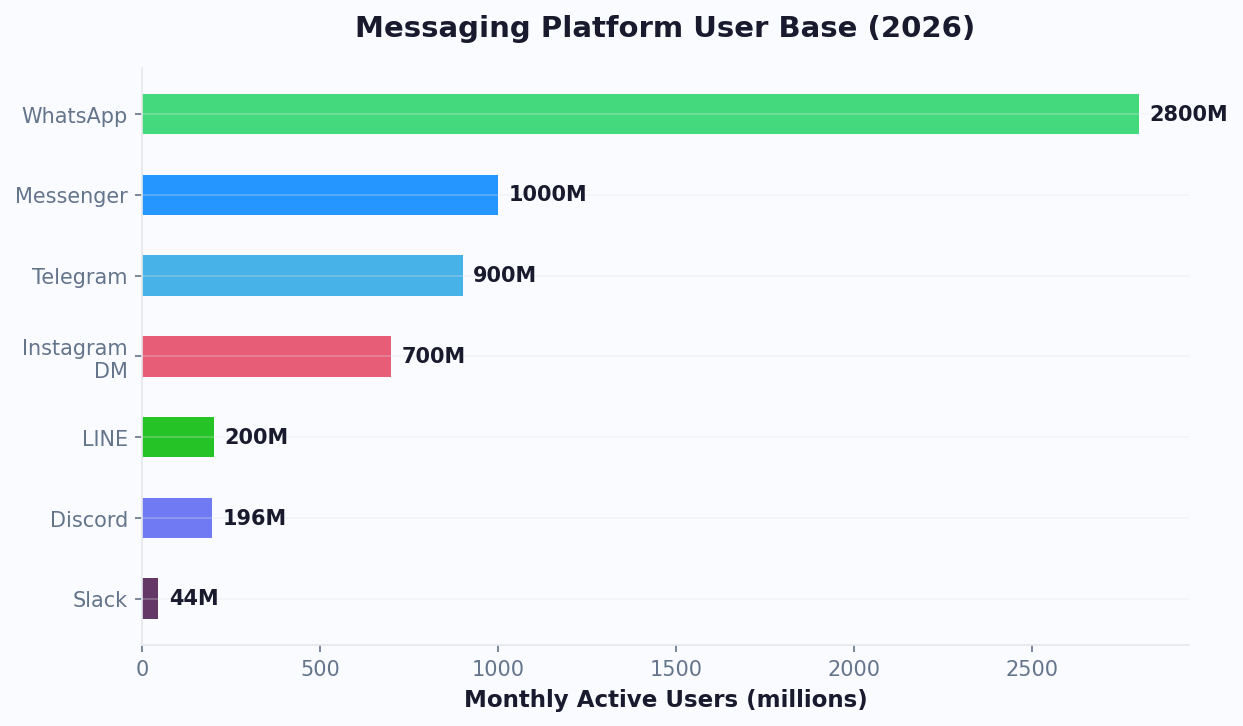
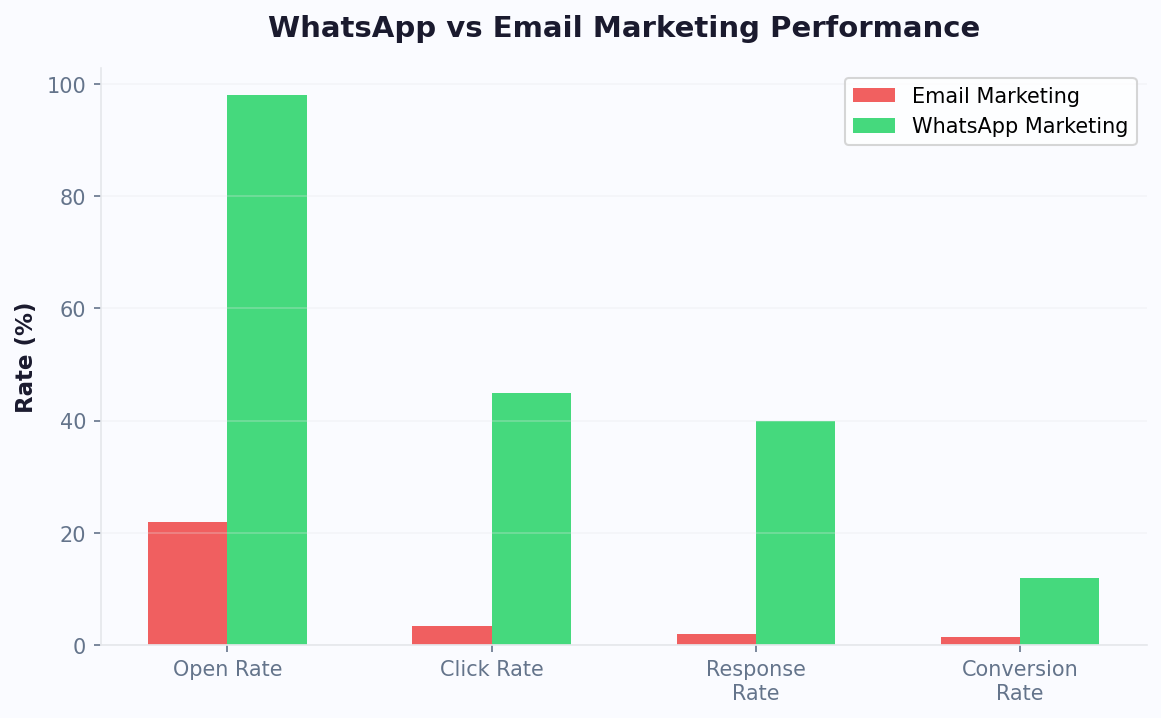
| Order updates, cart recovery, promotions | 15 minutes | 35% open rate on recovery messages | |
| Messenger | Click-to-Messenger ads, product browse | 10 minutes | far lower CPL than landing pages |
| Instagram DM | Product inquiries from posts/stories | 10 minutes | Automate 80% of "how much?" DMs |
Deploy on all channels simultaneously. Your product data, conversation flows, and AI training carry across every channel - build once, sell everywhere.
High-Converting E-commerce Chatbot Conversation Flows
The conversation design determines whether your chatbot generates revenue or frustrates customers. Here are battle-tested flows for the five primary e-commerce scenarios.
Flow 1: Product Discovery (New Visitor)
Trigger: Visitor lands on homepage or category page, 15 seconds dwell time
- Bot: "Welcome! Looking for something specific, or want me to help you find the perfect [product type]?" [Button: Browse bestsellers] [Button: Help me choose] [Button: Just browsing]
- If "Help me choose": Ask 2-3 qualifying questions (occasion, budget, preferences)
- Bot: Displays 3 curated product cards with images, prices, and "View" buttons
- Follow-up: "Want me to compare any of these, or add one to your cart?"
Conversion impact: 18-25% of visitors who engage with this flow add a product to cart.
Flow 2: Cart Recovery (Exit Intent)
Trigger: Visitor has items in cart + exit intent detected
- Bot: "Hey! Before you go - is something holding you back? I can help with shipping, returns, or sizing questions." [Button: Shipping info] [Button: Return policy] [Button: Just saving for later]
- If concern addressed: "Great! Ready to complete your order?" [Button: Checkout now]
- If "saving for later": "No problem! Want me to send you a reminder with a special offer?" → Capture email
Flow 3: Order Tracking
Trigger: Visitor types "where is my order" or clicks support
- Bot: "I can look that up for you! What's your order number or the email you used?"
- Bot: Queries fulfillment API → "Your order #[X] is [status]. Estimated delivery: [date]. Here's your tracking link: [URL]"
- Follow-up: "Anything else I can help with?" [Button: Change delivery address] [Button: Report issue] [Button: All good, thanks!]
Flow 4: Return/Exchange
Trigger: Visitor asks about returns
- Bot: "I can help with that. What's the reason for the return?" [Button: Wrong size] [Button: Defective/damaged] [Button: Changed my mind] [Button: Other]
- Bot: Checks return eligibility (order date, policy rules) → "Your order qualifies for a return. Here's your prepaid shipping label: [link]. Drop it off at any [carrier] location."
- If exchange: "What size would you like instead?" → Process exchange automatically
Flow 5: Post-Purchase Upsell
Trigger: 3 days after delivery confirmation
- Bot (via WhatsApp): "Hi [Name]! How are you liking your [product]? Customers who bought this also love [complementary product] - want 15% off?"
- If interested: Direct link to product page with discount auto-applied
These flows are available as pre-built chatbot templates that you can customize for your store in the Conferbot builder.
Advanced Personalization: Turning Browsers Into Buyers
Generic chatbot messages convert at 2-3%. Research from BigCommerce and McKinsey's personalization research shows that personalization drives a 10-15% revenue increase for stores that implement it effectively. Personalized messages convert at 8-15%. The difference is context awareness. Here is how to implement advanced personalization in your e-commerce chatbot.
Behavioral Personalization Triggers
| Visitor Behavior | What It Signals | Chatbot Action | Expected Lift |
|---|---|---|---|
| Viewed 3+ products in same category | Active shopping, comparing | Offer comparison or best-seller suggestion | +20% conversion |
| Visited product page 2+ times | High interest, possible objection | Address common objections proactively | +15% conversion |
| Spent 60+ sec on sizing guide | Sizing uncertainty | Offer personalized size recommendation | -30% returns |
| Cart value over $200 | High-value customer | Offer free shipping threshold or bundle deal | +25% AOV |
| Returning customer (3rd+ visit) | Loyal but undecided | Show new arrivals in previously viewed categories | +35% conversion |
| Arrived from email campaign | Engaged subscriber | Reference the email offer specifically | +40% click-through |
Dynamic Product Recommendations
Move beyond static "bestsellers" lists. Your chatbot should recommend products based on:
- Browsing history: "Based on what you've been looking at, you might love [product]"
- Cart contents: "[Product in cart] pairs perfectly with [accessory]. Add it for $X?"
- Purchase history: "Customers who bought [previous purchase] are loving [new product]"
- Stated preferences: Use data collected during conversation to filter recommendations
- Seasonal context: Adjust recommendations based on season, holidays, or events
Segmented Messaging by Customer Type
First-time visitor: Focus on trust-building - reviews, return policy, security badges. "We offer free returns within 30 days. No questions asked."
Returning visitor (no purchase): Address objections and create urgency. "Back for another look? [Product] is down to the last 5 in your size."
Existing customer: Personalize with order history. "Hi [Name]! Your last order of [product] was 30 days ago - time for a refill?"
VIP customer (3+ orders): Exclusive treatment. "As a valued customer, you get early access to our spring collection. Want a preview?"
Implement these segments using visitor data from your analytics system combined with CRM data synced through integrations. The more data the chatbot has, the more personalized - and profitable - each conversation becomes.
AI-Powered Visual Search Integration
Advanced e-commerce chatbots in 2026 support visual search - customers send a photo of a product they like (from social media, a magazine, or real life) and the AI identifies similar products in your catalog. This is particularly powerful for fashion, home decor, and accessories where customers often know the aesthetic they want but not the specific product name.
Implementation is straightforward with modern AI: the chatbot accepts image uploads in the conversation, processes them through a visual similarity model, and returns matching products from your inventory. Stores offering visual search through their chatbot see 25% higher engagement on product discovery flows and far higher conversion rates on visually-matched recommendations compared to text-only search.
Configure visual search capabilities through the Conferbot integrations hub by connecting your product image database to the AI model. Customers simply send a photo and the bot responds with "Here are similar items from our collection" along with product cards for the closest matches.
Measuring E-commerce Chatbot ROI: The Metrics That Matter
E-commerce chatbot ROI is directly measurable - unlike many marketing investments, you can tie chatbot interactions to revenue with precision.
Revenue Metrics
| Metric | How to Calculate | Benchmark | Optimization Lever |
|---|---|---|---|
| Chat-assisted revenue | Revenue from orders where chatbot was used in session | 8-15% of total revenue | Improve product recommendations |
| Cart recovery revenue | Revenue from recovered abandoned carts | $3-8 per recovered cart | Optimize recovery timing and messaging |
| AOV lift | (Chat AOV - Non-chat AOV) / Non-chat AOV | +15-30% | Better upsell/cross-sell flows |
| Incremental conversion rate | Chat conversion rate - site average | +1-3 percentage points | More proactive engagement |
Cost Savings Metrics
| Metric | How to Calculate | Benchmark | Optimization Lever |
|---|---|---|---|
| Ticket deflection rate | Bot-resolved / total tickets | 60-75% | Expand knowledge base |
| Cost per resolution | Total support cost / total resolutions | $1-3 (bot) vs $8-15 (human) | Automate more ticket types |
| Agent time saved | Deflected tickets x avg handle time | 150-300 hours/month | Add more automation flows |
| Return reduction savings | Return rate decrease x avg return cost | $2-5 per prevented return | Better size guidance flows |
Calculating Total ROI
Here is a realistic ROI calculation for a mid-size e-commerce store:
- Store revenue: $1,000,000/year
- Chatbot subscription: $300/month ($3,600/year)
- Incremental revenue from conversion lift (+25%): $250,000
- Cart recovery revenue (22% of abandoned carts recovered): $85,000
- AOV increase (+15%): $150,000
- Support cost savings (70% deflection): $120,000
- Total annual value: $605,000
- ROI: 16,705%
Even conservative estimates (half these numbers) produce extraordinary returns. The chatbot pays for itself within the first week of operation. Calculate your specific numbers with our ROI calculator.
Track these metrics from day one using Conferbot's e-commerce analytics, which automatically attributes revenue to chatbot-assisted sessions and calculates deflection rates in real time. For context on what happens when stores delay chatbot deployment, read about the true cost of not having a chatbot.
Getting Started: Launch Your E-commerce Chatbot Today
Here is your action plan to go from zero to a revenue-generating e-commerce chatbot in under an hour.
Week 1: Deploy Core Functionality
| Day | Task | Time | Expected Outcome |
|---|---|---|---|
| Day 1 | Create account, install widget (Shopify or WordPress) | 15 min | Chat widget live on site |
| Day 1 | Upload product catalog and policies to knowledge base | 15 min | Bot can answer product and policy questions |
| Day 2 | Build product recommendation flow | 30 min | Guided shopping experience active |
| Day 3 | Configure abandoned cart triggers | 20 min | Exit intent and follow-up recovery active |
| Day 4 | Connect order tracking API | 20 min | "Where is my order?" fully automated |
| Day 5 | Set up live chat handoff for complex issues | 10 min | Hybrid bot + human support operational |
Week 2: Expand Channels
- Deploy on WhatsApp for order updates and cart recovery
- Deploy on Messenger for Click-to-Messenger ad campaigns
- Deploy on Instagram DM for product inquiry automation
- Connect CRM and email marketing via integrations hub
Week 3-4: Optimize
- Review analytics - identify top questions the bot cannot answer
- Add answers and expand knowledge base content
- A/B test product recommendation flows
- Optimize cart recovery messaging and timing
- Launch post-purchase upsell campaigns
Resources to Help You Build
- How to build a chatbot without coding - complete no-code guide
- E-commerce chatbot templates - pre-built flows ready to customize
- Abandoned cart recovery guide - detailed recovery strategy
- Shopify chatbot setup - platform-specific instructions
- Pricing plans - find the right plan for your store volume
The stores that deploy chatbots in 2026 gain a compounding advantage: every conversation trains the AI to sell better, every recovered cart adds revenue, and every automated support ticket frees your team to focus on growth. Start today - the ROI begins on day one. Every week of delay represents thousands in lost conversions and unrecovered carts.
For additional strategies on maximizing your e-commerce chatbot's impact, read our guides on chatbot personalization and conversational marketing. If you are evaluating platforms, our chatbot pricing comparison breaks down costs across the leading solutions.
Seasonal E-commerce Chatbot Strategies: Maximizing Peak Season Revenue
E-commerce revenue is highly seasonal, with 30-40% of annual sales concentrated in Q4 (Black Friday, Cyber Monday, holiday season). Your chatbot strategy should adapt to seasonal patterns, scaling engagement and optimizing for the specific buying behaviors each season brings.
Pre-Season Preparation Checklist
4-6 weeks before any major sales event, prepare your chatbot:
- Update knowledge base: Add information about upcoming sales, shipping deadlines, extended return policies, and gift-specific FAQ
- Build holiday-specific flows: Gift finder quiz ("Who are you shopping for?"), holiday bundle recommendations, countdown-to-deadline urgency messages
- Configure increased capacity: Ensure your chatbot platform can handle 3-5x normal conversation volume during peak days
- Test cart recovery messaging: Holiday shoppers are more receptive to recovery messages with holiday urgency ("Order by Dec 15 for guaranteed Christmas delivery")
- Prepare fallback messages: When products sell out, the bot should immediately suggest alternatives rather than dead-ending the conversation
Black Friday / Cyber Monday (BFCM) Chatbot Tactics
| Tactic | When to Deploy | Expected Impact |
|---|---|---|
| VIP early access DM | 24 hours before public sale | 20-30% of VIP list purchases before public launch |
| Flash deal countdown | During sale event | 15-25% higher conversion on limited-time offers |
| Stock urgency alerts | When inventory drops below 20 units | 30-40% faster sell-through on low-stock items |
| Bundle upsell at cart | When customer adds BFCM item to cart | +18% AOV through holiday bundles |
| Shipping deadline reminder | Final 48 hours for guaranteed delivery | 2-3x spike in last-day orders |
Holiday Season Gift-Finding Flow
The gift finder is the highest-converting seasonal chatbot flow. It works because holiday shoppers often do not know exactly what to buy:
- "Who are you shopping for?" [Partner] [Parent] [Friend] [Child] [Colleague]
- "What are their interests?" [Tech] [Fashion] [Home] [Sports] [Food & Drink] [Self-care]
- "What's your budget?" [Under $25] [$25-$50] [$50-$100] [$100-$200] [$200+]
- Bot presents 3-5 curated gift suggestions with images, descriptions, and "Add to Cart" buttons
- "Want me to gift-wrap this?" Upsell gift wrapping and personal message card
Stores deploying gift finder chatbots during holiday season see 40-60% engagement rates on gift-specific landing pages (vs 8-12% for standard product pages) because the conversation format eliminates the overwhelm of browsing hundreds of gift options.
Post-Holiday Strategies
January presents unique chatbot opportunities:
- Gift card activation: "Got a gift card for the holidays? I can help you find something perfect. What are you into?"
- Returns and exchanges: Streamline the post-holiday returns surge with automated return label generation and exchange processing
- New Year resolution products: "Starting the new year with fitness goals? Here are our bestselling wellness products" targeted to health/fitness category browsers
- Clearance recommendations: "Looking for deals? Here are this week's clearance items in your favorite categories" sent to bargain-hunting segment
The key principle across all seasonal strategies: your chatbot should feel like a helpful holiday shopping assistant, not a promotional spam machine. The stores that see the highest seasonal chatbot ROI are those that prioritize helping customers find the right gift over pushing promotional messages.
Seasonal Chatbot Performance Benchmarks
To measure whether your seasonal strategies are working, track these benchmarks during peak periods versus off-season performance:
| Metric | Off-Season Benchmark | Peak Season Target |
|---|---|---|
| Chatbot engagement rate | 8-12% | 15-25% |
| Cart recovery rate | 18-22% | 25-35% |
| Average order value lift | +15% | +25-40% |
| Gift finder completion rate | N/A | 40-60% |
| Support ticket deflection | 60-70% | 75-85% |
Use these benchmarks with your analytics dashboard to identify underperforming flows and optimize them before the next peak season arrives. Track week-over-week changes starting 30 days before peak events and maintain a playbook of successful tactics to replicate each year. The stores that systematically measure and improve their seasonal chatbot performance see compounding gains year over year, with each holiday season outperforming the last as the AI learns from past customer interactions and the team refines their messaging strategies.
Was this article helpful?
Build and deploy in 10 minutes. No coding needed.
E-commerce Chatbot FAQ
Everything you need to know about chatbots for e-commerce chatbot.
About the Author
The Conferbot team writes about building, deploying, and improving AI chatbots.
View all articles