What Is a Restaurant Chatbot?
A restaurant chatbot is an AI-powered conversational assistant that handles customer interactions for restaurants, cafes, and food service businesses. It sits on your website, WhatsApp, Facebook Messenger, or Instagram and takes on tasks that normally tie up your host stand, phone line, or front-of-house staff: accepting reservations, answering menu questions, processing takeaway orders, collecting feedback, and promoting specials. If you are exploring how chatbots fit into the broader food service landscape, our complete chatbot for restaurants overview covers the strategic foundations.
Unlike a static online form or a generic FAQ page, a restaurant chatbot carries on a natural conversation. A customer can ask "Do you have a table for four this Friday at 7 PM?" and the bot instantly checks availability, confirms the booking, and sends a reminder -- all without a single phone call. Guests can browse the menu, ask about allergens, customize their order, and pay, 24 hours a day.
Modern restaurant chatbots built on platforms like Conferbot combine rule-based flows for structured tasks (reservation booking, order placement) with natural language processing for open-ended questions ("What's your best dish for someone who doesn't eat gluten?"). This hybrid approach gives restaurants the reliability of scripted interactions and the flexibility of AI-driven conversation.
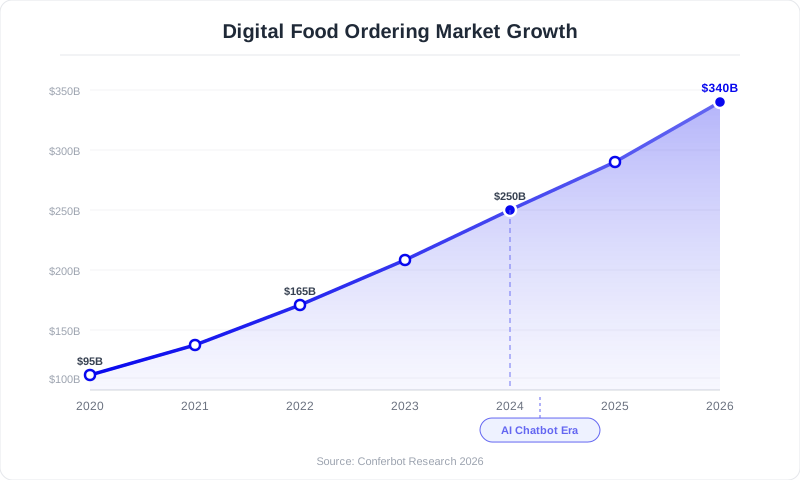
The restaurant industry is in the middle of a digital transformation. According to the National Restaurant Association's 2026 State of the Industry report, 67% of diners now prefer to book tables digitally rather than by phone. For takeaway and delivery, the number is even higher: 82% of off-premise orders start online. A restaurant chatbot is no longer a novelty; it is the front door to your business for the majority of your customers.
Whether you run a single-location bistro or a multi-unit franchise, this guide walks you through everything: why chatbots matter for restaurants, the features that drive results, how to build one step by step, integration with your existing systems, real-world examples, cost analysis, and best practices to maximize return on investment.
Why Restaurants Need Chatbots in 2026
The modern restaurant faces a paradox: customer expectations are rising while labor is harder to find and more expensive to retain. Chatbots resolve this tension by handling high-volume, repetitive interactions so your team can focus on in-house hospitality. This is especially true for independent operators -- our guide on chatbots for small businesses explains how even single-location restaurants can compete with chains using automation.
The Numbers Tell the Story
- 67% of diners prefer digital reservation channels over phone calls (National Restaurant Association)
- 82% of off-premise orders originate online, not by phone or walk-in
- 35-50% of restaurant phone calls go unanswered during peak hours, costing potential revenue
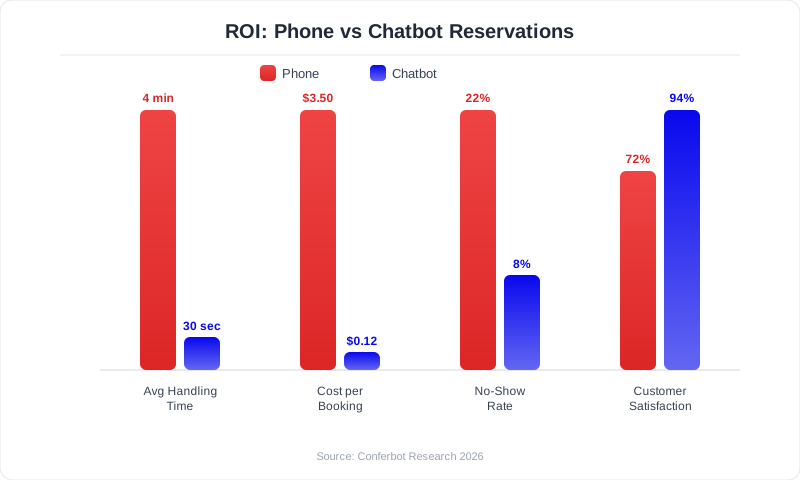
- $8-12 per call is the average cost of handling a phone reservation when staff time is factored in
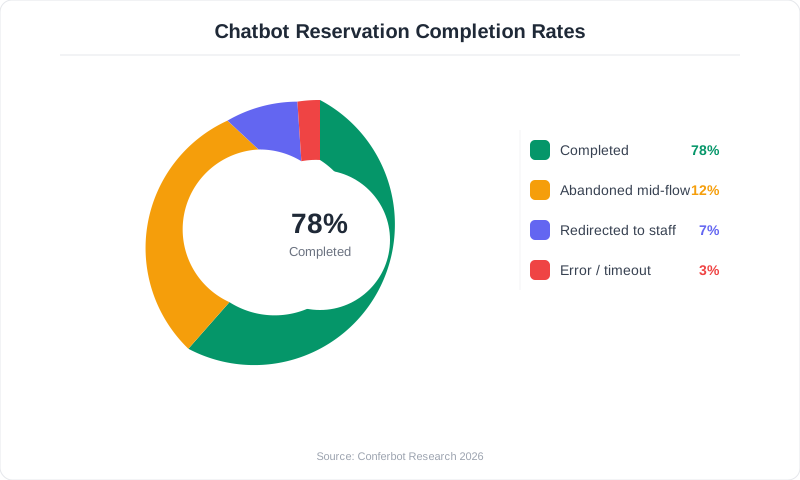
- Restaurants using chatbots report 25-40% increases in online reservation completion rates
Problem 1: Missed Phone Calls Equal Missed Revenue
During the lunch rush and dinner service, your staff is focused on guests in the dining room -- as they should be. But that means the phone rings unanswered. Industry data shows that 35-50% of restaurant calls during peak hours go to voicemail. Each missed call could be a reservation for a party of six, a catering inquiry, or a large takeaway order. A chatbot never puts customers on hold. It handles unlimited simultaneous conversations, 24 hours a day, 7 days a week.
Problem 2: Labor Costs Are Climbing
The average cost of a front-of-house employee in the US has risen 22% since 2020. Dedicating a staff member to answer phone calls and manage online inquiries is expensive and takes them away from serving guests. A chatbot handles the equivalent of 2-3 full-time employees worth of phone and online interactions at a fraction of the cost -- typically $50-200 per month versus $3,000-5,000 per month per employee.
Problem 3: Online Ordering Expectations Have Changed
Post-pandemic, customers expect to order digitally. Consumers increasingly prefer ordering directly from a restaurant's own website or app rather than through third-party delivery platforms. A chatbot on your website captures those orders directly, keeping the full margin instead of paying 15-30% commission to delivery platforms.
Problem 4: Customer Feedback Goes Uncollected
Most restaurants only hear from customers who had an extremely good or extremely bad experience -- the silent majority leaves without sharing feedback. A chatbot can proactively ask for feedback at the right moment (after a meal, after a delivery), capturing insights that help you improve operations and catch issues before they become negative reviews on Google or Yelp.
Key Features of an Effective Restaurant Chatbot
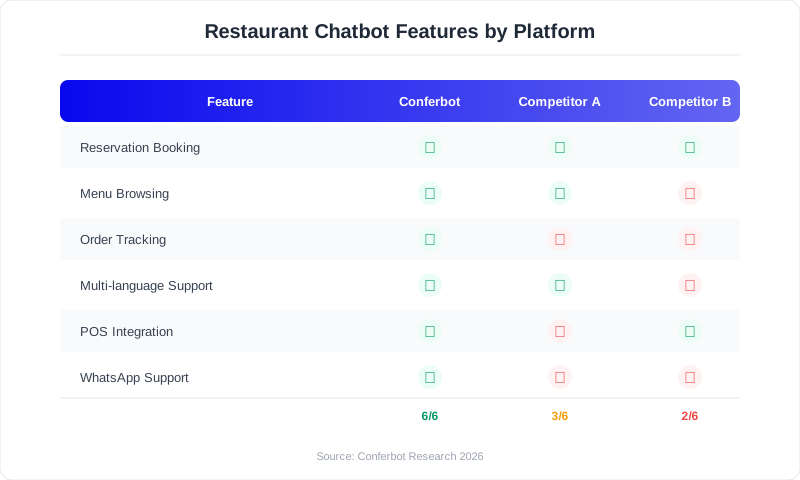
Not every chatbot feature matters equally for restaurants, as the National Restaurant Association's State of the Industry report confirms. Here are the capabilities that drive the most value, ranked by impact on revenue and operational efficiency.
1. Automated Reservation Booking
The highest-impact feature for full-service restaurants. The chatbot shows available time slots, accepts party size and date preferences, handles special requests (high chair, wheelchair access, patio seating), and sends confirmation plus reminders. Integration with your reservation system (OpenTable, Resy, or your own POS) ensures real-time availability accuracy. For a deeper look at how chatbots streamline scheduling across industries, see our chatbot for appointment booking guide.
Key capabilities to look for:
- Real-time availability checking against your table management system
- Waitlist management when preferred times are full
- Automatic SMS/email confirmation and 24-hour reminders
- Cancellation and modification handling without staff involvement
- Special occasion tagging (birthdays, anniversaries) for personalized service
2. Online Ordering and Menu Browsing
For takeaway, delivery, and quick-service restaurants, this is the primary revenue driver. The chatbot presents your menu in a conversational format, handles customizations ("no onions, extra cheese, gluten-free bun"), calculates totals, and processes payment -- all within the chat window. This eliminates the friction of navigating a separate ordering website and reduces order abandonment.
3. Menu Inquiry and Allergen Information
"Do you have vegan options?" "Is the pad thai nut-free?" "What's the calorie count on the Caesar salad?" These are among the most common questions restaurants receive. A chatbot trained on your full menu data, including ingredients, allergens, nutritional information, and preparation methods, answers these instantly and accurately. This is not just a convenience feature; for customers with food allergies, it is a safety feature.
4. Customer Feedback Collection
The chatbot proactively asks for feedback after dining or delivery experiences. Unlike email surveys that get 5-10% response rates, conversational feedback within a chat channel achieves 30-45% response rates. The chatbot can route negative feedback directly to the manager for immediate follow-up, turning potential bad reviews into service recovery opportunities.
5. Promotions and Loyalty Integration
Push happy hour specials, new menu launches, seasonal promotions, and loyalty rewards through the chatbot. Because the interaction is conversational rather than broadcast, engagement rates are 3-5x higher than email marketing. The chatbot can also track loyalty points, redeem rewards, and encourage repeat visits based on order history. Restaurants looking to maximize revenue per customer should explore proven AI chatbot upselling and cross-selling strategies that work particularly well in food service.
6. Multilingual Support
Restaurants in tourist-heavy areas or diverse communities benefit enormously from a chatbot that communicates in multiple languages. AI-powered chatbots can detect the customer's language and respond accordingly, eliminating language barriers that prevent bookings.
How to Build a Restaurant Chatbot with Conferbot
Building a restaurant chatbot does not require a developer, a large budget, or months of setup. With a no-code chatbot builder, you can have a fully functional bot live on your website, WhatsApp, and social channels in under an hour. Here is the step-by-step process.
Step 1: Define Your Primary Use Case (5 Minutes)
Start with the single interaction that drives the most value for your restaurant. For full-service restaurants, this is usually reservations. For quick-service and takeaway businesses, it is online ordering. For catering-focused operations, it is quote requests. Pick one, launch, optimize, then expand.
Step 2: Choose a Template or Build From Scratch (10 Minutes)
Conferbot's template library includes pre-built restaurant chatbot flows for reservations, ordering, and feedback collection. Starting with a template saves time and gives you a proven conversation structure that you can customize to your brand, menu, and operating hours.
Step 3: Configure Your Conversation Flow (15 Minutes)
For a reservation chatbot, the core flow looks like this:
- Greeting: "Welcome to [Restaurant Name]! Would you like to make a reservation, see our menu, or place a takeaway order?"
- Date and time: "What date and time would you like to dine with us?" (Show available slots)
- Party size: "How many guests will be joining?"
- Special requests: "Any special requests? High chair, outdoor seating, birthday celebration?"
- Contact info: "Please share your name and phone number for the reservation."
- Confirmation: "Your table for [X] is confirmed for [date/time]. We'll send a reminder 24 hours before. See you soon!"
For each step, add fallback paths: what happens if the requested time is unavailable? The chatbot should offer alternatives ("That time is full, but we have openings at 7:30 PM and 8:15 PM. Would either work?").
Step 4: Train the AI on Your Menu and FAQs (10 Minutes)
Upload your menu (PDF or text), your FAQ answers (parking, dress code, corkage policy, private dining options), and any other frequently requested information to the knowledge base. The AI indexes this content and uses it to answer open-ended questions naturally.
Step 5: Set Up Integrations (10 Minutes)
Connect the chatbot to your existing tools:
- Reservation system: Sync with OpenTable, Resy, or your POS reservation module
- POS system: Connect to Toast, Square, Clover, or Lightspeed for order processing
- Payment gateway: Enable in-chat payment via Stripe, Square, or PayPal
- Google Business Profile: Sync hours, location, and menu data
- Email/SMS: Configure confirmation and reminder notifications
Step 6: Deploy Across Channels (5 Minutes)
Install the chatbot on your website (single JavaScript snippet), connect it to WhatsApp Business (QR code on your tables and receipts), and link it to Facebook Messenger and Instagram. Customers can reach you wherever they are, and all conversations funnel into a single dashboard.
Step 7: Test and Go Live
Run through every conversation path: successful reservation, unavailable time slot, menu inquiry, order placement, feedback submission. Test on both desktop and mobile. Then go live and monitor the first 48 hours closely using analytics.
Integration with POS Systems and Restaurant Technology
A restaurant chatbot delivers maximum value when it connects to your existing technology stack. Isolated chatbots that cannot check real-time table availability or push orders to your kitchen display system create more problems than they solve. Here is how integration works and what to prioritize.
POS System Integration
Your point-of-sale system is the central nervous system of your restaurant. Chatbot integration with your POS enables real-time menu sync (prices, item availability, 86'd items), direct order injection into the kitchen workflow, payment processing through your existing merchant account, and unified reporting across in-house and chatbot orders.
The major POS platforms all support API-based integration:
- Toast: Full API for menu sync, order creation, and payment processing
- Square: Open API with robust catalog management and order endpoints
- Clover: REST API supporting menu, orders, and inventory
- Lightspeed Restaurant: API access for menu and order management
- Revel Systems: Enterprise API with real-time inventory tracking
Reservation System Integration
If you use a dedicated reservation platform, your chatbot must sync bidirectionally: chatbot reservations appear in OpenTable/Resy, and reservations made through those platforms update the chatbot's availability view. This prevents double-booking and ensures your host stand always has the accurate picture.
Delivery Platform Coordination
For restaurants on DoorDash, UberEats, and Grubhub, the chatbot can serve as the direct ordering alternative that saves you commission fees. When a customer asks about delivery, the chatbot offers to process the order directly through your own system, keeping the 15-30% margin you would otherwise pay to a third-party platform. Over the course of a year, redirecting even 20% of delivery orders from platforms to your chatbot can save a mid-volume restaurant $15,000-$40,000.
CRM and Marketing Integration
Every chatbot interaction generates customer data: contact information, dining preferences, order history, feedback scores. Integrating with a CRM (HubSpot, Mailchimp, or your POS's built-in marketing tools) allows you to build customer profiles, send personalized offers ("It's been 30 days since your last visit -- here's 15% off your next dinner"), and segment audiences for targeted campaigns. Restaurants using CRM-integrated chatbots report 18-25% higher repeat visit rates compared to those without personalized follow-up. If you want to turn website visitors into diners before they even arrive, a lead generation chatbot can capture contact details and dining preferences from first-time visitors.
Real-World Restaurant Chatbot Examples
The best way to understand what a restaurant chatbot can do is to see how real businesses are using them. Here are examples across different restaurant types and sizes.
Example 1: Fast-Casual Chain with 12 Locations
A fast-casual chain deployed a chatbot across their website and WhatsApp to handle online ordering. Before the chatbot, 60% of their takeaway orders came through third-party delivery apps at a 25% commission rate. After deploying the chatbot with a direct ordering flow and promoting the WhatsApp number on receipts, they shifted 35% of delivery platform orders to direct orders within 4 months. Annual savings: $87,000 in commission fees. The chatbot also reduced phone orders by 70%, freeing staff to focus on food preparation and in-house service.
Example 2: Fine Dining Restaurant
A single-location fine dining restaurant used a chatbot to manage reservations, special event bookings, and pre-order wine selections for large parties. Their host was spending 2-3 hours per day on the phone handling bookings and answering questions about the menu, dress code, and parking. The chatbot took over 85% of these interactions. No-show rates dropped from 15% to 6% thanks to automated reminders. The restaurant also saw a 22% increase in weeknight reservations because the chatbot was available to accept bookings at 11 PM and 6 AM when prospective diners were planning their week.
Example 3: Food Truck with Rotating Locations
A food truck used a chatbot on Instagram and their website to share daily location updates, take pre-orders, and build a mailing list. Customers could ask "Where are you today?" and get an instant answer with a map link. Pre-orders increased average ticket value by 28% (customers ordered more when they had time to browse the full menu) and reduced wait times at the truck by 40%.
Example 4: Restaurant Group with Catering Division
A restaurant group used chatbots for both their dine-in locations and their catering business. The catering chatbot qualified leads by collecting event date, guest count, dietary requirements, and budget range before passing qualified inquiries to the catering manager. This reduced the catering team's time on initial qualification calls by 60% and increased the qualified lead-to-booking conversion rate from 22% to 41% because the chatbot filtered out inquiries that did not match minimum order requirements.
Cost vs. ROI Analysis for Restaurant Chatbots
Restaurant owners are pragmatic. Before investing in any technology, you want to know exactly what it costs and what it returns. Here is a transparent breakdown.
Costs
| Cost Category | Range | Notes |
|---|---|---|
| Chatbot platform subscription | $0-200/month | Most restaurants need mid-tier plans ($50-100/month). Conferbot pricing starts with a free tier. |
| Setup and configuration | $0 (DIY) to $500 (agency) | No-code platforms eliminate development costs |
| POS integration | $0-100 one-time | Most integrations are included; custom API work may cost extra |
| Ongoing optimization | 1-2 hours/month | Reviewing analytics, updating menus, refining flows |
Total first-year cost: $600-$3,000 for most restaurants.
Returns
| Revenue/Savings Source | Estimated Annual Value |
|---|---|
| Reduced phone handling labor | $8,000-$24,000 |
| Increased online reservations (after-hours bookings) | $12,000-$36,000 |
| Reduced no-shows (automated reminders) | $5,000-$15,000 |
| Direct ordering margin savings (vs. delivery platforms) | $15,000-$40,000 |
| Higher average order value (upsell prompts) | $6,000-$18,000 |
| Repeat visit revenue (personalized marketing) | $4,000-$12,000 |
Total estimated annual return: $50,000-$145,000 for a mid-volume restaurant.
The ROI calculation is heavily skewed in favor of the chatbot. Even a conservative estimate -- capturing just 10 additional reservations per week that would have been lost to unanswered phone calls and converting 15% of delivery platform orders to direct orders -- generates returns that are 10-20x the platform cost. Use our ROI calculator to model your specific numbers based on your average check size, reservation volume, and current no-show rate.
Best Practices for Restaurant Chatbots
Drawing from data across hundreds of restaurant chatbot deployments and industry benchmarks from the FDA Food Code for compliance considerations, these are the practices that separate high-performing bots from ones that collect dust.
1. Keep the Menu Current
Nothing frustrates customers more than ordering an item through the chatbot only to be told it is unavailable. Sync your chatbot menu with your POS in real time, or establish a process to update the chatbot menu whenever your kitchen 86's an item. If real-time sync is not possible, update the chatbot at the start of each service period.
2. Match Your Restaurant's Personality
A casual taco truck should not have a chatbot that sounds like a Michelin-starred fine dining establishment, and vice versa. Write your chatbot's messages in the same voice and tone as your in-house hospitality. If your servers say "Hey! Welcome in!" then your chatbot should greet customers the same way.
3. Offer Quick-Reply Buttons for Common Actions
Do not make customers type everything. Offer buttons for the most common actions: "Make a Reservation," "See Today's Specials," "Order Takeaway," "Ask a Question." This speeds up the interaction and reduces errors. According to chatbot UX research, button-based interactions have 3x higher completion rates than open-text-only interfaces for transactional tasks.
4. Set Expectations for Wait Times
If takeaway orders need 20-30 minutes for preparation, tell the customer in the confirmation message. If a reservation request needs manual confirmation (e.g., for a private dining room), tell the customer within how many minutes they will receive a response. Clear expectations prevent frustration.
5. Use After-Hours to Your Advantage
Most restaurants are closed for at least 8-12 hours per day. Your chatbot is open 24/7. Promote the chatbot on your Google Business Profile, social media, and voicemail greeting ("For fastest service, chat with us at [website]"). Restaurants report that 30-40% of chatbot reservations are made outside business hours -- revenue you would otherwise lose entirely.
6. Follow Up After the Experience
Send an automated follow-up message 2-4 hours after the dining experience or delivery: "How was your meal at [Restaurant]? We'd love your feedback." Include a simple rating scale (1-5 stars) followed by an optional comment field. This captures actionable feedback while the experience is fresh and creates an opportunity to invite satisfied customers to leave a Google review.
7. Promote Direct Ordering Over Third-Party Platforms
Use your chatbot to offer an incentive for ordering directly: 10% off the first direct order, a free appetizer, or loyalty points. The margin you save on delivery platform commissions more than covers the promotion cost, and you build a direct relationship with the customer for future marketing.
Common Mistakes to Avoid
These are the mistakes that derail restaurant chatbot projects. Learn from others' failures to ensure your deployment succeeds from day one.
Mistake 1: Overcomplicating the First Version
Trying to handle reservations, ordering, feedback, loyalty, catering inquiries, event bookings, and job applications in a single chatbot from day one is a recipe for a confusing user experience. Start with one primary use case, get it working flawlessly, then expand. A chatbot that does one thing perfectly is infinitely more valuable than one that does ten things poorly.
Mistake 2: Not Providing a Human Fallback
No chatbot handles every scenario perfectly. A customer asking about a complex dietary restriction, a large-party special arrangement, or an event with unusual requirements needs a human touch. Always include a live chat handoff option and display your phone number prominently. The chatbot should make reaching a human easier, not harder.
Mistake 3: Ignoring Mobile Experience
Over 75% of restaurant chatbot interactions happen on mobile devices. If your chatbot widget covers the entire mobile screen, has tiny buttons, or takes too long to load, mobile users will abandon it. Test your chatbot on actual mobile devices -- not just a browser's mobile emulator -- before going live.
Mistake 4: Stale Information
A chatbot that advertises last week's specials, shows yesterday's menu prices, or offers reservation times when you are closed for a private event destroys trust. Assign ownership of chatbot content to a specific team member (usually the general manager or marketing manager) and build a weekly review into their workflow.
Mistake 5: No Follow-Up or Data Utilization
Every chatbot interaction generates valuable data: customer preferences, popular menu items, peak inquiry times, common complaints. If you collect this data but never act on it, you are leaving money on the table. Review chatbot analytics weekly and use insights to inform menu changes, staffing decisions, and marketing campaigns.
Mistake 6: Setting It and Forgetting It
A chatbot is not a one-time setup. Your menu changes seasonally. Your hours shift for holidays. Your specials rotate weekly. Build a monthly maintenance routine: update menu items, refresh promotional content, review unanswered questions and add them to the knowledge base, and analyze conversion funnels for drop-off points.
Future Trends: AI and Restaurant Technology
The restaurant chatbot space is evolving rapidly, driven by AI trends that are transforming the dining experience. Here are the trends that will shape the next 2-3 years and how forward-thinking restaurants can prepare.
Voice-Enabled Ordering
Voice AI is crossing from novelty to utility. Drive-through chains are already testing AI voice ordering systems that understand natural speech, handle accents and background noise, and integrate directly with kitchen display systems. For full-service and fast-casual restaurants, voice-enabled chatbots on smart speakers and phone assistants will become a new ordering channel. "Hey Google, order my usual from [Restaurant]" is not far off from mainstream adoption.
Predictive Personalization
AI chatbots will move beyond reactive responses to proactive engagement. By analyzing order history, time patterns, and preferences, chatbots will predict what a customer wants before they ask. "It's Thursday at 5 PM -- would you like your usual: a large pepperoni pizza with garlic knots, for pickup at 6:30?" This level of personalization drives repeat business and increases average order values by 15-25%.
Kitchen Integration and Real-Time Updates
The next generation of chatbots will provide real-time order tracking by connecting directly to kitchen management systems. Customers will receive updates: "Your order is being prepared," "Your order is ready for pickup," "Your table is now available." This transparency reduces customer anxiety and phone calls asking "Is my order ready yet?"
Visual Menu Interaction
AI-powered visual recognition will allow customers to interact with menus in new ways. Customers will be able to take a photo of a dish they enjoyed elsewhere and ask, "Do you have something like this?" The chatbot will match it to similar items on your menu, complete with customization options.
Multi-Location Intelligence
For restaurant groups, chatbots will provide cross-location intelligence: routing customers to the nearest location with availability, sharing loyalty points across locations, and providing management with comparative analytics across the portfolio. This unified view transforms a chatbot from a single-location tool to a brand-wide engagement platform.
The restaurants that invest in chatbot technology today will be best positioned to adopt these advanced capabilities as they mature. The conversational interface -- text or voice -- is becoming the primary way customers interact with food service businesses, and that trend will only accelerate.
Getting Started with Your Restaurant Chatbot
You do not need a technology background, a development team, or a large budget to launch a restaurant chatbot that drives real results. Here is your action plan.
If You Are a Single-Location Restaurant
- Start with reservations or ordering -- whichever drives more revenue for your business model
- Use a pre-built template from Conferbot's template library and customize it with your menu, hours, and brand voice
- Deploy on your website and WhatsApp -- these two channels cover 80%+ of your digital interactions
- Add a QR code on your tables and receipts linking to the chatbot for ordering, feedback, and loyalty
- Review analytics weekly and add answers for common unanswered questions
If You Are a Multi-Location or Franchise
- Pilot at one location for 30 days to establish benchmarks and refine the flow
- Standardize the core flow across locations while allowing location-specific customization (hours, menu variations, specials)
- Integrate with your POS for real-time menu sync and centralized order management
- Roll out to remaining locations with training for GMs on chatbot management and analytics review
- Measure ROI at the portfolio level -- track aggregate savings and revenue attribution
Quick Wins in the First Week
- Update your Google Business Profile to mention chatbot availability for bookings
- Add a "Chat with us" button to your Instagram bio and Facebook page
- Record a new voicemail greeting: "For fastest service, chat with us at [website]. Or leave a message and we'll call you back."
- Train your host team to mention the chatbot for future reservations: "Next time, you can book instantly through our website chat -- it's available 24/7."
The restaurant industry runs on hospitality, speed, and consistency. A well-built chatbot enhances all three. It does not replace human interaction -- it handles the repetitive, transactional tasks so your team can focus on what they do best: creating memorable dining experiences. Start with one use case, see the results, and expand from there. Every day you wait is a day of missed reservations, lost orders, and wasted staff time on tasks a chatbot handles better.
Was this article helpful?
Build and deploy in 10 minutes. No coding needed.
Restaurant Chatbot FAQ
Everything you need to know about chatbots for restaurant chatbot.
About the Author
The Conferbot team writes about building, deploying, and improving AI chatbots.
View all articles