
Legal Document Drafter
Free B2B Services Chatbot Template
A complete legal document drafter chatbot template - deploy in minutes to automate conversations, capture leads, and provide 24/7 assistance.


How this template opens - rendered from its flow. Use the interactive preview to click through the full conversation.
What Is a Legal Document Drafter Chatbot?
A legal document drafter chatbot is a conversational AI tool that guides users through the creation of legal documents by asking structured questions, offering clause selections, and assembling professionally drafted documents based on the user's answers. Instead of requiring users to understand legal template syntax, fill out complex forms, or hire an attorney for routine documents, the chatbot conducts an interactive dialogue that feels like speaking with a knowledgeable legal assistant -- collecting the information needed to produce a complete, properly formatted legal document.

The demand for accessible legal document creation has never been higher. In 2026, small businesses spend an average of $3,000 to $10,000 annually on routine legal documents -- NDAs, service agreements, employment contracts, lease amendments, and partnership agreements that follow standard patterns but require customization for each specific situation. Solo entrepreneurs and freelancers often forgo these protections entirely because the cost of attorney-drafted documents exceeds their budget for what feels like "paperwork." The result is businesses operating without proper contractual protections, exposing themselves to disputes that could have been prevented by a well-drafted agreement.
But traditional document automation tools -- rule-based templates with fill-in fields -- still require users to understand legal terminology, know which clauses to include, and navigate complex conditional logic trees. A chatbot interface removes these barriers by translating legal requirements into plain-language questions and explaining the implications of each choice in terms a non-lawyer can understand.
Conferbot's AI chatbot builder enables law firms, legal technology companies, corporate legal departments, and legal aid organizations to deploy document drafting chatbots that handle the full workflow from information gathering through document assembly to review scheduling and e-signature execution. The platform's NLP engine understands natural language descriptions of business relationships and legal needs, translating them into appropriate document types and clause configurations. Integration with API systems enables connection to document management platforms, e-signature services, and practice management tools.
How the Legal Document Drafter Works: From Conversation to Signed Agreement
The document drafting chatbot transforms what is traditionally a multi-day, multi-party process into a guided conversation that produces a complete draft in minutes. Here is the complete workflow from initial engagement to executed document.
Step 1: Document Type Identification
The conversation begins with understanding what the user needs. Sometimes users know exactly what they want ("I need an NDA for a potential business partner"), but often they describe a situation and need help identifying the appropriate document type ("I am hiring a contractor and want to make sure they cannot share our proprietary information with competitors"). The chatbot's AI integration interprets natural language descriptions and maps them to specific document types, sometimes recommending multiple documents to fully address the described situation.
Step 2: Party Information Collection
The chatbot collects information about all parties to the document: legal names, addresses, entity types (individual, LLC, corporation, partnership), and relationships. For business entities, it confirms jurisdiction of formation and authorized signatories. For individuals, it captures necessary identification details. This information populates the document's preamble and signature blocks, and determines which jurisdiction's law governs the agreement.
Step 3: Guided Clause Selection
This is where the chatbot delivers its primary value. Rather than presenting users with a menu of legal clauses (confidentiality, non-solicitation, non-compete, indemnification, limitation of liability -- terms that mean little to most business owners), it asks plain-language questions that determine which clauses to include:
- "Will confidential information flow one way or both ways?" -- Determines mutual vs. unilateral NDA structure
- "Do you want to prevent the other party from hiring your employees?" -- Includes non-solicitation clause
- "What is the maximum amount you would be willing to pay if something goes wrong?" -- Configures limitation of liability cap
- "How long should the agreement remain in effect?" -- Sets term and determines whether auto-renewal is appropriate
- "What state are you located in?" -- Determines governing law and ensures enforceability under local rules
Step 4: Customization and Detail Filling
Once the structural decisions are made, the chatbot collects specific details needed for each selected clause: dollar amounts for liability caps, specific definitions of confidential information, lists of restricted activities for non-compete provisions, payment schedules for service agreements, property descriptions for leases. Each question includes context explaining why the information is needed and what implications different choices carry.
Step 5: Document Assembly and Preview
The chatbot assembles the complete document from its clause library, inserting all collected information into the appropriate positions. The assembled document is presented to the user in a readable preview format with each section clearly labeled. Users can review the document, ask questions about specific clauses ("What does this indemnification paragraph actually mean for me?"), and request changes to any section they want modified.
Step 6: Review Recommendation
For documents above a configurable complexity threshold or dollar value, the chatbot recommends professional review before execution. It can schedule a review session with a qualified attorney through Conferbot's calendar integration, providing the attorney with the complete draft and conversation context so the review is focused and efficient. For routine, low-stakes documents (simple NDAs, basic freelancer agreements), the chatbot notes that professional review is available but not necessarily required.
Step 7: E-Signature and Execution
Once the user approves the document (with or without attorney review), the chatbot initiates the signature process. Integration with e-signature platforms enables all parties to sign electronically with legally binding effect. The chatbot can send signature requests to counterparties, track signature status, send reminders for unsigned documents, and notify the user when execution is complete. The fully executed document is stored securely and accessible for future reference.
Key Features of the Legal Document Drafter Template
The template includes features specifically designed for legal document generation -- where precision matters, customization is essential, and the output must be professionally formatted and legally sound.
| Feature | Description | Operational Benefit | Customer Benefit |
|---|---|---|---|
| Clause library | Pre-drafted, attorney-reviewed clause variants for every document type, with plain-language explanations | Ensures legal accuracy and consistency across all generated documents | Users get professionally drafted language without legal expertise |
| Plain-language questioning | Translates legal requirements into business-language questions with contextual explanations | Eliminates the need for legal literacy in client intake | Users understand what they are choosing and why it matters |
| Conditional logic engine | Dynamic clause inclusion/exclusion based on conversation answers and jurisdiction rules | Prevents inappropriate clauses (e.g., non-competes in non-enforceable jurisdictions) | Documents are tailored to specific situations, not one-size-fits-all |
| Multi-party support | Handles agreements involving two or more parties with distinct obligations and rights | Supports complex commercial arrangements beyond simple bilateral agreements | Partnership agreements, multi-party NDAs, and joint ventures are supported |
| Jurisdiction awareness | Adapts language, enforceability standards, and required provisions based on governing law selection | Reduces risk of unenforceable provisions due to jurisdictional non-compliance | Users get documents that work in their specific legal jurisdiction |
| Version tracking | Maintains complete revision history from first draft through negotiation to final execution | Provides audit trail for dispute resolution and compliance | Users can review what changed during negotiation and why |
| E-signature integration | Direct connection to DocuSign, HelloSign, and Adobe Sign for electronic execution | Eliminates manual signature coordination and tracking | Documents go from draft to signed in hours rather than days or weeks |
| Document explanation mode | AI-powered plain-language explanation of any clause or provision within the generated document | Reduces client questions that consume attorney time | Users understand their agreements without hiring an attorney for explanation |
| Template management | Save and reuse configured document templates for recurring needs (same vendor type, same client onboarding) | Reduces time for repeat document types to seconds | Businesses with recurring agreement needs save significant time per document |
| Compliance checking | Validates generated documents against jurisdiction-specific requirements and recent legal changes | Prevents deployment of non-compliant documents that create liability | Users can trust that documents meet current legal standards |
Clause Library: Depth and Quality
The clause library is the foundation of document quality. Each clause exists in multiple variants -- standard protective, balanced, counterparty-favorable -- allowing the chatbot to recommend the appropriate variant based on the user's bargaining position and risk tolerance. Clauses are drafted by practicing attorneys and reviewed for enforceability across major US jurisdictions. The library covers the complete taxonomy of commercial contract provisions, from boilerplate (severability, entire agreement, force majeure) to substantive terms (payment, performance, representations and warranties, IP assignment, dispute resolution).
Jurisdiction-Aware Document Assembly
Legal enforceability varies dramatically by jurisdiction. Non-compete clauses are unenforceable in California but standard in Texas. Liquidated damages provisions face different reasonableness tests in different states. Force majeure clauses require specific pandemic language after COVID-19 litigation. The chatbot's jurisdiction awareness means it includes only enforceable provisions, formats them according to local convention, and warns users when their desired terms face legal constraints in their jurisdiction. This prevents the common and costly error of using generic templates that contain unenforceable provisions.
Ready to try Legal Document Drafter?
Deploy this template in under 10 minutes. No coding required.
Use This Template Free →Supported Document Types: NDAs, Contracts, Wills, and Leases
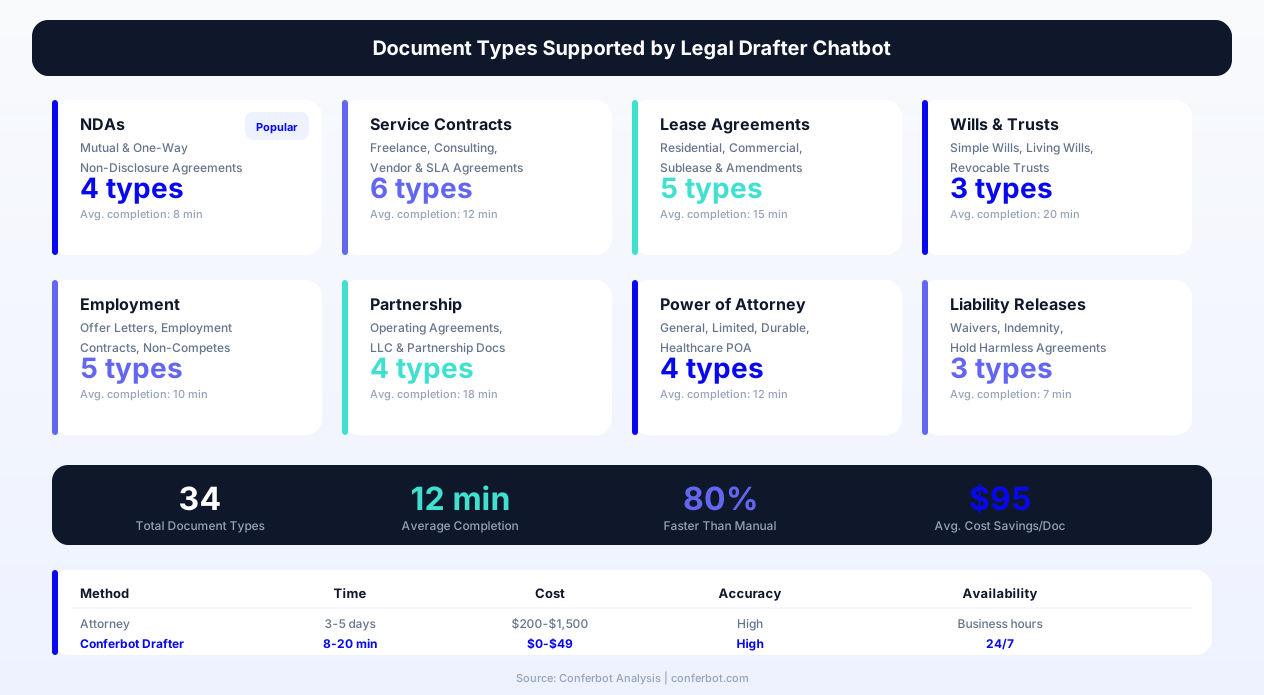
The template supports generation of multiple document categories, each with specialized conversation flows, clause libraries, and compliance requirements. Here are the primary document types and their specific features.
Non-Disclosure Agreements (NDAs)
NDAs are the most frequently generated business document and the ideal starting point for legal document automation. The chatbot handles mutual NDAs (both parties share confidential information), unilateral NDAs (one-way disclosure), employee NDAs, investor NDAs, and specialized variants for specific contexts (technology evaluation, joint venture exploration, M&A due diligence). Key configuration points include definition of confidential information (broad vs. narrow), exclusions from confidentiality, permitted disclosures (to employees, advisors, subcontractors), term length, and remedies for breach.
Service Agreements and Contracts
Service agreements cover the majority of business-to-business relationships -- consulting engagements, software development, marketing services, professional services, maintenance contracts. The chatbot guides users through scope definition, payment terms (hourly, fixed-fee, milestone-based, retainer), intellectual property ownership (who owns work product), limitation of liability, termination rights, and dispute resolution mechanisms. For recurring service relationships, it supports master service agreement (MSA) structures with statement of work (SOW) attachments.
Employment Documents
Employment document generation covers offer letters, employment agreements, independent contractor agreements, non-compete/non-solicitation agreements, and separation agreements. The chatbot collects compensation details, benefit descriptions, performance expectations, termination provisions, and post-employment restrictions. Jurisdiction awareness is critical here -- employment law varies dramatically by state, and provisions that are standard in one state may be void and unenforceable in another.
Lease Agreements
Residential and commercial lease generation requires property-specific details, term definitions, rent calculations, maintenance responsibilities, permitted uses, and compliance with local landlord-tenant law. The chatbot handles fixed-term leases, month-to-month agreements, lease renewals, lease amendments, and sublease permissions. For commercial leases, it addresses CAM charges, tenant improvement allowances, use restrictions, and assignment/subletting provisions. Local law compliance is automated -- for example, California leases must include specific disclosures about pest control, mold, and flood zones that other states do not require.
Wills and Estate Planning Documents
Simple will generation guides users through asset identification, beneficiary designation, executor appointment, guardianship nominations (for users with minor children), and specific bequests. The chatbot clearly communicates the limitations of chatbot-generated wills versus comprehensive estate plans prepared by estate planning attorneys, and recommends professional counsel for complex situations (blended families, taxable estates, business succession, special needs beneficiaries). For straightforward estates, a chatbot-guided simple will provides essential protection that most people lack entirely -- only 33% of American adults have any estate planning documents.
Partnership and Operating Agreements
Multi-owner business structures require agreements that define ownership percentages, capital contributions, profit/loss allocation, management authority, decision-making processes, and exit mechanisms. The chatbot guides partners through these often-difficult conversations by framing them as neutral questions rather than adversarial negotiations: "If one partner wants to leave, how should their share be valued?" This conversational approach surfaces potential conflicts early, before they become disputes, and produces agreements that address them proactively.
Before and After: Measurable Impact on Legal Operations
Organizations deploying document drafting chatbots report transformative improvements in speed, cost, accuracy, and client satisfaction. The following metrics represent composite results from legal practices and corporate legal departments using Conferbot's template.
| Metric | Before Chatbot | After Chatbot | Improvement |
|---|---|---|---|
| Average time to produce first draft | 3-5 business days | 12 minutes | -99% |
| Cost per routine document (NDA, simple contract) | $500-$2,000 | $0-$50 (platform fee only) | -95% |
| Documents generated per month | 15-25 (capacity limited) | 150-400 (demand limited) | +900% |
| Error rate in party information | 12% (manual entry errors) | 2% (validated input) | -83% |
| Time from draft to signature | 8-14 days | 1-3 days | -80% |
| Client satisfaction with document process | 3.1/5 | 4.7/5 | +52% |
| Businesses operating without proper agreements | 60% of small businesses | 15% after chatbot access | -75% |
| Attorney hours spent on routine drafting | 40% of billable time | 8% of billable time | -80% |
The Economics of Document Automation
For law firms, the value proposition is counterintuitive at first: why automate billable work? The answer is that routine document drafting is increasingly price-compressed -- clients will not pay $300/hour for an associate to fill in blanks on a template. By automating routine documents, firms can offer competitive fixed-fee packages that attract volume, generate revenue from work that was previously unprofitable, and free attorney time for high-value advisory work that commands premium rates. A firm charging $500 for an automated NDA package (which takes the chatbot 10 minutes to produce) generates more profit per hour than an associate spending 2 hours on the same document at $300/hour.
Impact on Access to Justice
Perhaps the most significant impact is on access to legal services. Small businesses that cannot afford $1,500 for an attorney-drafted service agreement often proceed without one -- until a dispute arises and the lack of documentation costs them far more. Legal aid organizations deploying document drafting chatbots report that previously unserved populations now have access to basic legal documents: residential leases that comply with local law, simple wills that prevent intestacy issues, power of attorney documents that enable healthcare decision-making, and separation agreements that protect vulnerable parties. This democratization of legal document access represents a meaningful improvement in access to justice.
Corporate Legal Department Efficiency
For in-house legal teams, document drafting chatbots address the chronic problem of legal being a bottleneck for business operations. When sales teams need NDAs for every new prospect, when HR needs employment agreements for every new hire, and when procurement needs service agreements for every new vendor -- and all of these require legal involvement -- the legal department becomes the slowest link in every operational chain. A chatbot that handles standard-form documents with appropriate guardrails (dollar value limits, clause deviation alerts, mandatory review triggers) enables self-service for routine needs while preserving legal oversight for non-standard situations.
Use Cases: Who Benefits from Document Drafting Chatbots
The document drafting chatbot serves distinct user populations with different needs, technical sophistication, and use patterns. Here is how the template adapts to each primary use case.
Small Business Owners and Entrepreneurs
Entrepreneurs need legal documents at every stage: co-founder agreements at inception, NDAs for early conversations with potential partners, service agreements for first clients, employment agreements for first hires, and lease agreements for first office space. They typically cannot afford $500-$2,000 per document at a stage when revenue is uncertain. The chatbot provides affordable access to properly drafted documents while educating business owners about what these documents contain and why they matter. Deployment on the firm's website makes access frictionless for this time-constrained audience.
Law Firms Offering Fixed-Fee Packages
Increasingly, clients demand transparent pricing for routine legal work. Law firms that offer fixed-fee document packages use the chatbot as their delivery mechanism -- clients pay a fixed price, engage with the chatbot to produce a draft, and receive attorney review on the output. This model is profitable because the chatbot handles many work (information gathering, clause selection, assembly), leaving the attorney to add value through targeted review and customization rather than blank-page drafting. The firm scales document volume without proportionally scaling headcount.
Corporate Legal Departments (Self-Service Portals)
In-house legal teams deploy the chatbot as an internal self-service tool for business teams. Sales representatives can generate NDAs without emailing legal. HR can produce offer letters without waiting for legal review of standard terms. Procurement can issue standard-form vendor agreements for low-dollar-value engagements. The chatbot enforces approved terms and clause configurations, escalating to legal only when requests deviate from standard parameters. This dramatically reduces legal's administrative workload while maintaining governance over the company's contractual commitments.
Legal Aid Organizations
Legal aid organizations serve populations that cannot afford private attorneys but need legal documents for housing stability (leases, roommate agreements), family protection (simple wills, powers of attorney, advance healthcare directives), employment (contractor agreements, severance negotiations), and personal safety (protective order applications, divorce documentation). The chatbot extends the reach of limited legal aid budgets by automating document production while preserving attorney time for cases that require representation in court. Deployment on WhatsApp reaches populations who access the internet primarily through mobile devices.
Freelancers and Independent Contractors
Freelancers need contracts for every client engagement but rarely have legal budgets. The chatbot helps them create service agreements that define scope (preventing scope creep), establish payment terms (preventing late payment), assign intellectual property (protecting their portfolio rights), and limit liability (preventing disproportionate risk). A freelancer who uses the chatbot to generate a standard engagement agreement and sends it to every new client is professionally protected at minimal cost -- and signals professionalism that helps win better clients.
Real Estate Professionals
Agents, property managers, and landlords need lease agreements, amendments, renewal notices, and lease termination letters on a regular basis. Each must comply with local landlord-tenant law, which varies dramatically by jurisdiction. The chatbot generates jurisdiction-compliant lease documents with all required disclosures, proper notice periods, and legally mandated terms, reducing the risk of non-compliant leases that expose landlords to penalties and lease invalidation. Integration with property management software through API connections enables automated document generation triggered by tenant events.
businesses worldwide use Conferbot templates to automate conversations
Security, Privacy, and Ethical Compliance
Legal document creation involves sensitive personal and business information that requires rigorous data protection. The template addresses security, privacy, and professional ethics requirements specific to legal technology applications.
Data Security Architecture
All document data -- party information, clause selections, financial details, and generated documents -- is encrypted in transit (TLS 1.3) and at rest (AES-256). Document storage is isolated per user account with access controls that prevent cross-account data exposure. For enterprise deployments, dedicated infrastructure options ensure complete data isolation. Regular penetration testing and security audits verify the integrity of these protections.
Privacy Compliance
The chatbot collects personal information (names, addresses, financial details) necessary for document creation. This collection complies with applicable privacy regulations including GDPR (for users in EU/UK), CCPA (for California residents), and state-specific privacy laws. Users are informed of what data is collected, why it is needed, how it is stored, and how long it is retained. Data minimization principles ensure the chatbot collects only information required for the requested document type.
Unauthorized Practice of Law (UPL) Compliance
Document assembly tools must operate within UPL boundaries. The chatbot provides document drafting based on user-provided information and user-selected options -- it does not advise users on what choices to make or whether the resulting document is appropriate for their legal situation. Disclaimers clearly communicate that the chatbot is a document assembly tool, not a legal advisor. When document complexity or stakes exceed appropriate thresholds, the system recommends professional legal review and facilitates attorney connections.
Professional Responsibility for Attorney-Deployed Chatbots
Attorneys and law firms deploying document chatbots retain professional responsibility for the output. The template supports this by maintaining complete audit trails of all clause selections and user responses, enabling attorneys to verify that generated documents are appropriate before final approval. Quality assurance workflows route all documents through attorney review when deployed by law firms, ensuring that professional standards are maintained regardless of the automation level.
Document Retention and Destruction
Configurable retention policies determine how long generated documents and associated data are stored. Default retention follows industry best practices for legal documents (typically 7-10 years for executed agreements), but organizations can configure shorter or longer retention based on their policies and applicable regulatory requirements. Secure deletion processes ensure that expired documents are permanently removed from all storage systems, including backups, within the configured destruction timeframe.
Setup, Customization, and Deployment Guide
Getting from template to production deployment requires configuration of the clause library, document templates, integration points, and compliance settings. Here is the implementation path.
Step 1: Clause Library Configuration
The template includes a comprehensive baseline clause library covering common document types. Customize by adding your firm's preferred language for key provisions, jurisdiction-specific variants, and industry-specific clauses relevant to your client base. Each clause needs a plain-language explanation that the chatbot will present to users, making legal concepts accessible without requiring legal training.
Step 2: Document Template Setup
Define the structure of each document type: which sections are mandatory, which are optional, what order they appear in, and what triggers conditional inclusion. Set formatting preferences (numbering style, heading format, font, margins) to match your firm's document standards. Configure metadata fields that will be attached to generated documents for filing and retrieval.
Step 3: Conversation Flow Design
Each document type has a conversation flow that determines what questions are asked, in what order, and how answers map to clause selections. The template provides pre-built flows for all supported document types, but customization allows you to add questions specific to your practice (e.g., "Is this for a technology company?" might trigger inclusion of IP assignment and source code escrow provisions). Use Conferbot's visual flow builder to modify question sequences without coding.
Step 4: Integration Configuration
Connect the chatbot to your operational systems:
- E-signature: DocuSign, HelloSign, or Adobe Sign for electronic execution
- Document storage: Google Drive, Dropbox, SharePoint, or dedicated document management systems
- CRM/Practice management: Push completed matters to Clio, MyCase, or Salesforce
- Calendar: Calendar booking for scheduling attorney review sessions
- Payment: Stripe or PayPal integration for fixed-fee document services
Step 5: Compliance Configuration
Set jurisdictional defaults, configure UPL disclaimers, define attorney review thresholds (by document type, dollar value, or complexity score), and establish data retention policies. For law firm deployments, configure attorney approval workflows that ensure professional oversight of all generated documents.
Step 6: Channel Deployment
Deploy on your website for direct client access, on WhatsApp for mobile-first users, and through API integration for embedding in partner platforms. Configure channel-specific greetings and document type menus based on the typical needs of users arriving through each channel. Monitor usage analytics to identify the most popular document types and optimize those flows for maximum efficiency.
Step 7: Testing and Quality Assurance
Before launch, generate test documents for every supported type across every supported jurisdiction. Have qualified attorneys review output for legal accuracy, formatting quality, and completeness. Test edge cases: what happens when a user selects an unenforceable clause combination? When they provide inconsistent information? When they abandon the conversation midway and return later? Ensure every scenario produces either a correct document or an appropriate error handling response.
Integrations and Technology Ecosystem
The document drafter chatbot operates within a broader legal technology ecosystem. Effective integration with adjacent tools multiplies its value by eliminating manual handoffs and ensuring documents flow seamlessly from creation through execution to storage and management.
E-Signature Platform Integration
The most critical integration is with e-signature platforms. Once a document is generated and approved, the chatbot automatically prepares it for electronic signing: adding signature fields in the correct positions, configuring signing order for multi-party documents, setting expiration dates for signature requests, and enabling signing reminders. Supported platforms include DocuSign (enterprise), HelloSign (small business), Adobe Sign, and PandaDoc. The integration handles the complete lifecycle from signature request through completion notification and executed document retrieval.
Document Management and Storage
Generated documents need secure, organized storage with metadata tagging for retrieval. Integration with document management systems (NetDocuments, iManage, SharePoint) automatically files executed agreements with appropriate metadata: document type, parties, effective date, expiration date, dollar value, and status. For firms without dedicated DMS platforms, integration with Google Drive or Dropbox provides organized storage with folder structures that mirror the firm's filing system.
Calendar and Scheduling
When documents require attorney review before execution, calendar integration enables users to schedule review sessions directly from the chat interface. The attorney receives the draft document and conversation summary in advance, enabling focused, efficient review rather than starting from scratch. Post-review, the chatbot incorporates attorney changes and re-presents the revised document to the user for approval.
Payment Processing
For firms and platforms that charge for document services, payment integration enables fee collection before or after document generation. Subscription models (unlimited documents per month), per-document fees, and tiered pricing (basic template vs. attorney-reviewed) are all supported. Payment triggers document release -- the chatbot generates the document upon engagement but releases the final, formatted version only after payment confirmation.
CRM and Client Management
Every document interaction represents a client touchpoint with data value. Integration with CRM platforms (Salesforce, HubSpot, Clio Grow) creates or updates contact records based on chatbot interactions, tracks which documents each client has generated, and identifies upsell opportunities (a client who generates an NDA today may need a full service agreement next month). For law firms, this integration feeds the business development pipeline with qualified prospects who have already demonstrated a legal need.
Analytics and Reporting
The chatbot generates operational analytics including document volume by type, average completion time, abandonment rates at each conversation step, most frequently selected clauses, jurisdiction distribution, and revenue per document type. These analytics inform business decisions about which document packages to promote, which conversation flows need optimization, and which new document types to add based on demand patterns observed in incomplete conversations.
Legal Document Drafter FAQ
Everything you need to know about chatbots for legal document drafter.
Why Use a Template vs Building from Scratch?
Templates give you a proven starting structure instead of a blank canvas.
| Factor | Conferbot Template | Build from Scratch | Hire a Developer |
|---|---|---|---|
| Time to deploy | 10 minutes | 2-8 hours | 2-6 weeks |
| Cost | Free | Your time | Custom dev quote |
| Proven flows | Yes, pre-built | No | Depends |
| Updates included | Automatic | Manual | Paid |
| Multi-channel | 8+ channels | 1 channel | Extra cost |
| Analytics | Built-in | Must build | Extra cost |
Related B2B Services Templates
Explore more chatbot templates like this one

Learn More About Chatbots
Go deeper on how b2b services chatbots work and how to pick the right builder.
Ready to Deploy Legal Document Drafter?
Start with a free-forever plan. No credit card required.