
Mortgage Calculator
Free Real Estate Chatbot Template
A complete mortgage calculator chatbot template - deploy in minutes to automate conversations, capture leads, and provide 24/7 assistance.



What Is a Mortgage Calculator Chatbot?
A mortgage calculator chatbot is a conversational AI tool embedded on a real estate website, brokerage portal, or lender platform that walks prospective buyers through loan affordability estimates, monthly payment breakdowns, and pre-qualification assessments - all in real time and without requiring a loan officer to be present. Unlike a static mortgage calculator widget, a chatbot version adapts its questions to each user's situation, explains results in plain language, and captures qualified lead data simultaneously.
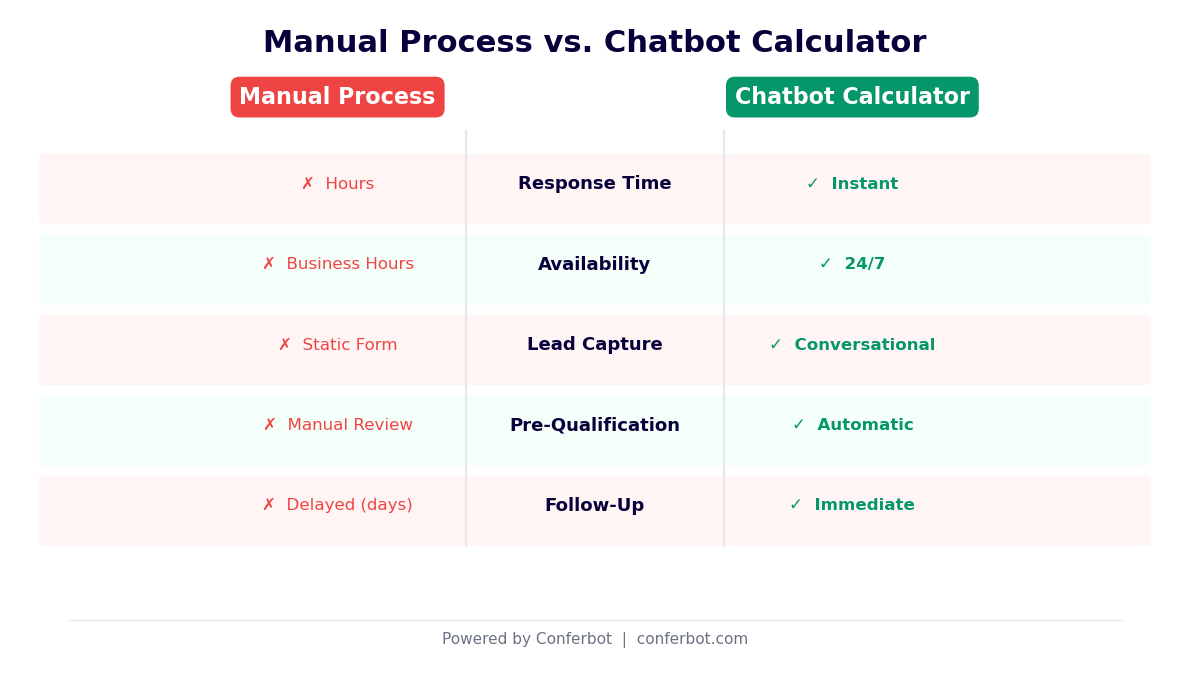
Static Calculator vs. Chatbot Calculator
Static mortgage calculators have been a staple of real estate websites since the early 2000s. Users input loan amount, interest rate, and term, and receive a monthly payment figure. The problem is that static calculators have a low completion rate - most users abandon them because they do not know which inputs to use, they receive a number with no context, and there is no pathway to ask a follow-up question or speak with an agent. A chatbot eliminates each of these failure points.
When a buyer types "Can I afford a $450,000 home?" the chatbot does not ask them to fill a form. It asks about their down payment, annual income, existing debt, and credit score range conversationally, then calculates their estimated monthly payment, debt-to-income ratio, and the loan programs they are likely to qualify for - before asking if they would like to connect with a loan officer or schedule a property tour. This guided approach meaningfully increases completion rates and converts far more visitors into actionable leads compared to static calculators.
Core Calculation Capabilities
- Monthly payment estimation: Principal, interest, property tax, homeowners insurance, and PMI broken down separately so buyers understand what they are actually paying.
- Affordability range: Based on income and debt inputs, the chatbot calculates the price range the buyer can realistically afford rather than making them guess.
- Amortization snapshot: Shows how much of early payments goes to interest vs. principal - a critical insight that often surprises first-time buyers and builds trust.
- Rate comparison: Side-by-side payment comparison for different interest rates, helping buyers understand the cost of waiting vs. buying now in 2026.
- Pre-qualification signal: Based on stated income, debt, and credit range, the bot indicates likely loan program eligibility (conventional, FHA, VA, USDA) without making binding commitments.
Who Uses This Template
This template is built for real estate agents and teams, mortgage brokers, real estate investment firms, new home builders, and property listing platforms. Any business where a buyer's first question is "What can I afford?" benefits from deploying a mortgage calculator chatbot. Explore the full range of chatbot capabilities available through Conferbot's AI chatbot builder and see how calculation flows can be embedded into broader lead generation sequences.
How the Mortgage Calculator Chatbot Works
The mortgage calculator chatbot operates as a structured conversation engine that collects financial inputs, runs calculations in the background, and presents results with context and a clear next step. Every question asked serves a dual purpose: gathering the data needed for an accurate estimate and qualifying the lead for agent follow-up. Here is the complete flow from first message to lead handoff.
Step-by-Step Conversation Flow
| Step | Chatbot Question | User Input | Backend Calculation |
|---|---|---|---|
| 1. Intent | "Are you buying a home, refinancing, or exploring investment property?" | Selects purchase type | Sets calculation mode (purchase vs. refi) |
| 2. Property price | "What is the approximate purchase price you are considering?" | $450,000 | Sets principal base |
| 3. Down payment | "How much are you planning to put down - do you know the percentage or dollar amount?" | 20% / $90,000 | Calculates LTV, determines PMI applicability |
| 4. Loan term | "Are you thinking 30-year fixed, 15-year fixed, or an adjustable rate?" | 30-year fixed | Retrieves current rate range for term |
| 5. Income | "What is your approximate annual household income before taxes?" | $95,000 | Calculates front-end DTI ratio |
| 6. Monthly debts | "What are your total monthly debt payments - car loans, student loans, credit cards?" | $850/mo | Calculates back-end DTI ratio |
| 7. Credit range | "Roughly where does your credit score fall? (Excellent 760+, Good 700-759, Fair 640-699, Below 640)" | Good (700-759) | Adjusts rate estimate for credit tier |
| 8. Results | Displays payment breakdown with explanation | Reviews results | Generates amortization summary |
| 9. Next step | "Would you like to speak with a loan officer, see available listings in this price range, or get a pre-approval letter started?" | Selects action | Routes to CRM with full lead profile |
Rate Feed Integration
Static calculators show outdated or generic rates. The mortgage chatbot can integrate with live rate feeds from sources like the Freddie Mac Primary Mortgage Market Survey, lender rate APIs, or your own internal rate sheet. When a buyer asks about rates in 2026, the bot presents current market context rather than a placeholder number - building credibility and setting accurate expectations before the buyer speaks with a loan officer.
Multi-Scenario Comparison
After delivering the primary calculation, the chatbot automatically offers a comparison: "Want to see how your payment changes at 15% down instead of 20%? Or how much you would save with a 15-year term?" These comparison scenarios keep buyers engaged, build financial literacy, and naturally extend the conversation - giving the bot more opportunities to qualify the lead and identify the buyer's readiness to act. Connect the full flow to Conferbot's no-code chatbot builder to customize every calculation step without developer involvement.
Key Features of the Mortgage Calculator Chatbot Template
A mortgage calculator chatbot does far more than arithmetic. The right feature set turns it into a lead qualification engine, a buyer education tool, and a CRM feeder - all working simultaneously in the background while the buyer focuses on the conversation. Here is a detailed breakdown of every major capability in this template.
Feature Overview
| Feature | Description | Agent Benefit | Buyer Benefit |
|---|---|---|---|
| Live payment calculation | PITI breakdown (principal, interest, taxes, insurance) in real time | Sets buyer expectations before showing homes | Understands true monthly cost, not just mortgage payment |
| DTI ratio analysis | Front-end and back-end debt-to-income calculation with explanation | Flags buyers who may not qualify for requested amount | Learns why DTI matters and how to improve it |
| PMI calculator | Estimates private mortgage insurance cost for LTV above 80% | Explains hidden cost that often surprises buyers | Understands when PMI drops off and how to avoid it |
| Loan program matching | Suggests FHA, VA, USDA, or conventional based on inputs | Pre-qualifies buyers for specific programs | Discovers options they did not know about |
| Rate scenario comparison | Shows payment difference across multiple rate assumptions | Demonstrates value of rate shopping | Makes informed decision on timing and lender choice |
| Amortization insight | Year-1 and Year-5 equity snapshot | Builds long-term investment case | Understands equity building timeline |
| Lead capture with scoring | Collects name, email, phone with purchase timeline and readiness signals | Receives scored, pre-qualified leads directly in CRM | Gets personalized follow-up rather than a generic email |
| Calendar booking | Books consultation call or property tour within the chat | Converts chat leads to meetings without phone tag | Schedules next step immediately while engaged |
Intelligent Lead Scoring
Not all mortgage inquiries are equal. A buyer who enters a 20% down payment, has a 760+ credit score, and selects "within 60 days" as their purchase timeline is a very different lead from someone exploring with no down payment saved and no timeline. The chatbot automatically scores each lead based on financial inputs, purchase timeline, and engagement depth - so your agents spend their time on buyers who are genuinely ready to move. High-score leads can trigger instant agent notifications via SMS or email.
Multi-Channel Delivery
The mortgage calculator chatbot deploys on your website, on WhatsApp, through Facebook Messenger, and via Instagram DM. A buyer who sees an Instagram post about a $500,000 listing can tap "DM to calculate payments," run the full mortgage calculation in the DM thread, and schedule a showing - all without leaving Instagram. This channel flexibility meets buyers where they are already browsing rather than requiring them to navigate to a separate tool.
Explore the full integration options available through Conferbot's integrations hub to connect the chatbot to your existing CRM, email platform, and calendar systems.
Ready to try Mortgage Calculator?
Deploy this template in under 10 minutes. No coding required.
Use This Template Free →Benefits for Real Estate Agents and Brokerages
Real estate agents face a persistent qualification problem. Every week brings a mix of serious buyers, early explorers, and window-shoppers, but without a structured intake process, agents spend the same amount of time on all three. A mortgage calculator chatbot solves this by qualifying every website visitor against objective financial criteria before an agent ever makes contact - ensuring that when you pick up the phone, you are speaking with someone who can actually buy.
The Lead Quality Problem
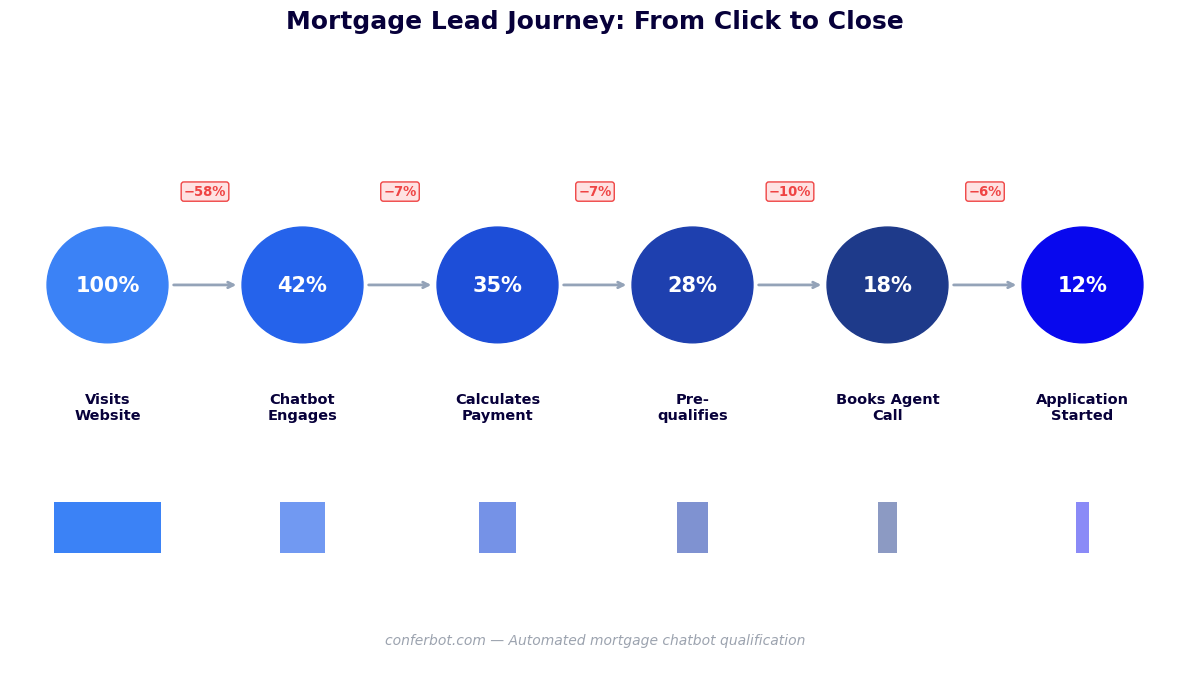
The average real estate agent receives a steady flow of website leads every month but converts only a small fraction into transactions. The primary reason is not poor follow-up; it is that the majority of those leads are not ready to buy. They are researching the process, testing affordability with unrealistic numbers, or are years away from a purchase decision. Without a qualification layer, agents invest the same energy in a buyer who needs 3 more years of savings as they do in someone with 20% down and a 760 credit score ready to close in 45 days.
How the Chatbot Improves Agent Productivity
- Pre-qualified lead delivery: Every lead arrives in your CRM with a complete financial profile - purchase price, down payment, income, debt load, credit range, and purchase timeline. You know before making the first call whether this buyer is a realistic match for your listings.
- 24/7 lead capture: Real estate browsing peaks between 8pm and 11pm, when most agents are unavailable. The chatbot captures and qualifies leads around the clock, ensuring that a buyer who runs numbers on a Friday night at 10pm is still in your pipeline Saturday morning with a full lead profile.
- Listing price alignment: The chatbot calculates the buyer's realistic affordability range and can surface listings that match - a buyer who thought they were looking at $600K homes may discover their budget is $480K, and the chatbot can immediately redirect them to available inventory in that range.
- Automated nurture sequences: Leads not yet ready to buy are enrolled in automated educational sequences - monthly payment updates as rates change, neighborhood market reports, and down payment milestone messages - keeping the brokerage top of mind until they are ready to act.
- Meeting scheduling within the chat: Instead of a lead form submission that waits in an inbox, interested buyers can book a consultation call or property tour directly through the chatbot using Conferbot's calendar booking feature. The appointment lands in your calendar with all financial context attached.
Team-Level Benefits for Brokerages
For brokerages managing 10-50 agents, the mortgage calculator chatbot solves a distribution problem: how to route incoming leads to the right agent fairly and intelligently. The chatbot collects buyer location preference, price range, and property type, then routes each lead to the agent with matching inventory expertise and availability. This eliminates the common complaint of high-performing agents getting the same lead volume as new agents - routing logic is based on match quality, not rotation order.
Use our chatbot ROI calculator to estimate exactly how much incremental closed business a mortgage calculator chatbot would generate for your team based on your current lead volume and conversion rates.
CRM and MLS Integration for Real Estate Teams
A mortgage calculator chatbot generates only as much value as the systems it feeds. Without tight integration into your CRM and property data sources, you end up with a lead qualification tool that creates a parallel data silo - agents have to manually copy chatbot data into their CRM, and the listing recommendations the chatbot makes are disconnected from real-time inventory. Proper integration eliminates this friction and turns the chatbot into a seamlessly connected component of your existing real estate tech stack.
CRM Integration Capabilities
Conferbot connects natively to the leading real estate CRMs including Salesforce, HubSpot, Follow Up Boss, BoomTown, LionDesk, and Kvcore. When a buyer completes the mortgage calculation flow, their full profile is pushed to the CRM in real time: contact information, calculated affordability range, DTI ratio, loan program eligibility, purchase timeline, and the specific properties they expressed interest in during the conversation. The lead record includes a transcript of the chatbot conversation so agents have complete context from the first touchpoint.
Data Fields Passed to CRM
| Data Field | Source | CRM Usage |
|---|---|---|
| Name, email, phone | Chatbot capture | Contact record creation, follow-up sequencing |
| Target purchase price | Buyer input | Listing match filter, agent routing |
| Calculated affordability range | Bot calculation | Reality-checks buyer's stated price target |
| Down payment amount and % | Buyer input | Loan program eligibility, urgency signal |
| Estimated monthly payment | Bot calculation | Included in agent follow-up messaging |
| Front/back-end DTI ratios | Bot calculation | Pre-qualification confidence score |
| Credit score range | Buyer selection | Loan program matching, rate estimate tier |
| Purchase timeline | Buyer selection | Lead priority scoring, nurture sequence selection |
| Preferred neighborhoods | Buyer input | Agent routing, listing alert setup |
| Lead score | Bot calculation | Agent task priority, notification threshold |
MLS Data Integration
For teams with MLS data API access, the chatbot can cross-reference a buyer's calculated affordability range against active listings in real time. After delivering the mortgage calculation, the bot says: "Based on your budget of $420,000-$460,000, there are 14 active listings in your preferred neighborhoods. Want me to send you the top matches?" The buyer confirms, and a curated listing report is sent to their email while the agent receives a notification with the buyer's financial profile attached. This shortens the path from anonymous website visitor to engaged buyer with a specific listing interest.
Chatbot API Integration for Custom Stacks
Real estate technology stacks vary enormously. Teams using proprietary listing platforms, custom CRMs, or specialized transaction management tools can connect through Conferbot's chatbot API integration layer, which supports webhook delivery, REST API calls, and Zapier/Make automation flows. Any data collected by the chatbot can be routed to any system that accepts an HTTP request - giving tech-forward teams complete flexibility in how they process and act on chatbot-generated leads.
ROI Data: What Real Estate Teams Are Achieving in ${year}
Real estate is one of the highest-leverage industries for chatbot deployment because the average transaction value is enormous - a single closed deal on a median-priced home represents a substantial commission. That means a chatbot that generates even one additional closed transaction per month can return many times its own cost in gross commission income. The math is compelling. Here is the data on what real estate teams are actually achieving with mortgage calculator chatbots.
Performance Benchmarks
| Metric | Without Chatbot | With Mortgage Chatbot |
|---|---|---|
| Website lead capture rate | Low, from a static form | Much higher, with guided conversation |
| Lead-to-consultation conversion | Low | Meaningfully higher |
| After-hours leads captured | A small share of monthly volume | A much larger share, captured around the clock |
| Agent time per lead qualification | Substantial hands-on time | Mostly review time |
| Unqualified lead rate | High, without a qualification layer | Lower, thanks to upfront financial screening |
| Time from lead to first agent contact | Hours | Instant bot response, fast agent follow-up |
| Listings visited per lead | Fewer, from less-informed browsing | More, once the buyer knows their real budget |
Revenue Impact Model
Consider a mid-sized real estate team generating a steady volume of website leads each month with a modest baseline conversion rate. With a mortgage calculator chatbot, the same website traffic generates a meaningfully larger pool of captured leads, a higher share of them pre-qualified, and more of them converting to closings - even a conservative close rate on that larger, better-qualified pool adds up to real incremental gross commission income over a year.
Cost Context
Against this revenue impact, the fully-loaded cost of deploying a Conferbot mortgage calculator chatbot - including platform fee, integration setup, and ongoing optimization - is a small fraction of a single commission check. The payback period is typically measured in days, not months. Verify the calculation for your specific team parameters using the chatbot ROI calculator, and see how the mortgage template compares to other lead generation approaches in the lead generation templates library.
businesses worldwide use Conferbot templates to automate conversations
Setup Guide: Deploying Your Mortgage Calculator Chatbot
Getting a mortgage calculator chatbot live on your real estate website does not require a developer, an IT department, or a lengthy implementation project. The Conferbot mortgage calculator template is pre-built with all calculation logic, conversation flows, and CRM routing built in. You configure your specifics - your branding, your CRM credentials, your agents' calendars - and deploy. Here is the complete setup process.
Pre-Launch Checklist
- CRM credentials: Have your CRM API key or login credentials ready. Conferbot connects to most real estate CRMs via OAuth - no developer action required.
- Agent calendar access: For in-chat appointment booking, connect each agent's Google or Outlook calendar. Buyers can book calls or tours directly from the chatbot.
- Local tax rate: Input the approximate property tax rate for your market so the PITI calculation reflects realistic total payments.
- Insurance estimate: Set a default homeowners insurance estimate as a percentage of home value (0.5%-1.2% annually, market-dependent).
- HOA messaging: If your listings frequently have HOA fees, configure a question that captures this and adds it to the monthly payment estimate.
- Agent routing rules: Define how leads are assigned - by price range, neighborhood, agent specialty, or round-robin distribution.
Step-by-Step Configuration
Start by loading the Mortgage Calculator template from the Conferbot template library and giving your bot a name and avatar matching your brokerage brand. Customize the greeting message to match your voice - "Hi, I am Alex, the mortgage calculator assistant for Sunrise Realty" outperforms generic "Hello! I am here to help" greetings on engagement rate.
Next, configure the calculation engine. Set your default rate range to current market levels - you can either hardcode a rate or connect to a live rate feed if your lender partnership provides one. Set your market's average property tax rate, default insurance cost, and PMI rate (typically 0.5%-1.5% of loan amount annually for LTV above 80%). These defaults ensure that when a buyer sees a monthly payment figure, it reflects the real cost of ownership in your market, not a national average that may be significantly different.
Connect your CRM using Conferbot's integrations hub. Map each chatbot data field to the corresponding CRM field - most real estate CRMs have standard fields for purchase price, down payment, income, and purchase timeline. If your CRM uses custom fields, the mapping interface handles those as well.
Deployment Options
Embed the chatbot on your website homepage and all individual listing pages using a single line of embed code. For listing pages, pre-populate the property price field with the listing price - when a buyer opens the chatbot on a $485,000 listing, the mortgage calculator starts with that property already loaded rather than asking them to enter a price. This context-aware deployment noticeably increases chatbot engagement on listing pages compared to the same chatbot opened from the homepage without pre-populated data.
After deployment, monitor performance through Conferbot's chatbot analytics dashboard. Track completion rate by conversation step to identify where buyers drop off, measure lead quality score distribution over time, and compare conversion rates across different traffic sources.
Best Practices for Mortgage Chatbot Performance
Deploying a mortgage calculator chatbot is straightforward. Optimizing it to generate maximum qualified leads requires attention to conversation design, placement strategy, and ongoing refinement based on real user behavior. These best practices come from analyzing thousands of real estate chatbot deployments and identifying the patterns that consistently drive higher engagement, completion rates, and lead quality.
Conversation Design Principles
The most important design decision is question ordering. Ask for low-commitment information first - the property price they are considering - before asking for personal data like income and phone number. Buyers who have already invested time answering several questions are far more likely to complete the flow and provide contact information than buyers who are asked for their phone number as the second question. This progressive commitment approach meaningfully increases completion rates compared to forms that ask for contact information upfront.
Avoid financial jargon without explanation. Many first-time buyers do not know what DTI means, what PMI is, or why their LTV ratio matters. The chatbot should define every term it uses: "Your debt-to-income ratio is 38% - lenders typically prefer this below 43%, so you are in a good range. Here is how that affects your loan options..." This educational approach builds trust and positions your team as knowledgeable advisors rather than salespeople running numbers.
Placement Strategy
| Placement Location | Engagement Rate | Lead Quality | Best Use Case |
|---|---|---|---|
| Homepage (sticky widget) | Lower | Medium | General affordability exploration |
| Individual listing pages (pre-populated price) | Higher | High | Specific property interest |
| Blog post: "How much house can I afford?" | Higher still | High | Early-stage research buyers |
| Landing page (paid traffic destination) | High | Very high | Bottom-of-funnel ad campaigns |
| WhatsApp (link from Instagram/Facebook) | Highest | Very high | Social media buyer engagement |
Lead Follow-Up Timing
Speed of follow-up is the single most important factor in converting chatbot leads to consultations. Research consistently shows that contacting a lead within 5 minutes of submission produces a dramatically higher conversion rate than contacting them after 30 minutes. Configure your CRM automation to send an immediate personalized SMS from the assigned agent as soon as a chatbot lead is scored and routed - not a generic autoresponder, but a message that references the specific property or price range the buyer was researching: "Hi Sarah, I saw you were exploring payments on homes around $450K in the Riverside area - I have three listings that match your budget perfectly. When is a good time to talk?"
Monthly Rate Updates
Mortgage rates change weekly. If your chatbot uses hardcoded rate assumptions that are 60 or 90 days old, the monthly payment calculations it delivers are inaccurate - and buyers who subsequently speak with a lender and get a different number will distrust your team. Set a monthly calendar reminder to update the default rate in your chatbot configuration. Consider also deploying rate change notifications to buyers in your CRM nurture sequence: "Rates moved to 6.8% this week - here is how that changes the monthly payment on the $450K homes we discussed." This demonstrates expertise and keeps your brokerage top of mind through the buying cycle. See the full channel strategy in our omnichannel deployment guide and learn how to synchronize the chatbot across website, WhatsApp, and social channels.
Mortgage Calculator FAQ
Everything you need to know about chatbots for mortgage calculator.
Why Use a Template vs Building from Scratch?
Templates give you a proven starting structure instead of a blank canvas.
| Factor | Conferbot Template | Build from Scratch | Hire a Developer |
|---|---|---|---|
| Time to deploy | 10 minutes | 2-8 hours | 2-6 weeks |
| Cost | Free | Your time | Custom dev quote |
| Proven flows | Yes, pre-built | No | Depends |
| Updates included | Automatic | Manual | Paid |
| Multi-channel | 8+ channels | 1 channel | Extra cost |
| Analytics | Built-in | Must build | Extra cost |
Learn More About Chatbots
Go deeper on how real estate chatbots work and how to pick the right builder.
Ready to Deploy Mortgage Calculator?
Start with a free-forever plan. No credit card required.