
Why LINE Is Essential for Asia-Pacific Business in 2026
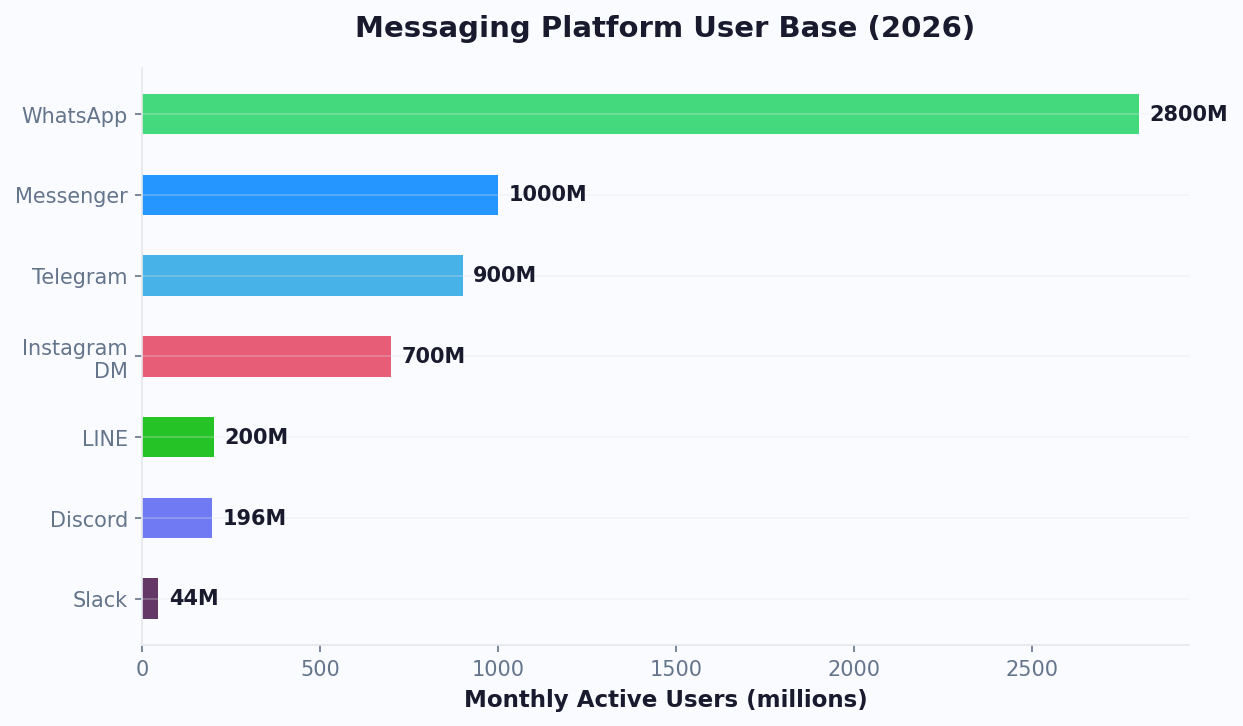
LINE is much more than a messaging app in Asia-Pacific — it's a super app that serves as the primary digital platform for over 200 million monthly active users across Japan, Taiwan, Thailand, and Indonesia. In these markets, LINE isn't just popular — it's dominant, often surpassing WhatsApp, Messenger, and every other platform.
Market penetration tells the story:
| Market | Monthly Active Users | Population Penetration | Primary Use |
|---|---|---|---|
| Japan | 96 million | 78% | Personal + Business communication |
| Thailand | 56 million | 79% | Commerce + Social |
| Taiwan | 22 million | 92% | Daily communication |
| Indonesia | 30 million | Growing | Youth + Urban markets |
For businesses targeting these markets, LINE isn't an optional channel — it's the channel. Consumers in Japan, Thailand, and Taiwan expect businesses to have a LINE presence, and they prefer to interact with brands through LINE over any other platform.
LINE's ecosystem extends far beyond messaging:
- LINE Pay: Mobile payment used by tens of millions for daily transactions, connectable via the integrations hub
- LINE Shopping: Integrated ecommerce marketplace
- LINE Points: Loyalty program with broad merchant acceptance
- LINE Ads: Advertising platform with precise targeting
- LINE Official Accounts: Business accounts with CRM and messaging tools
A LINE chatbot connects your business to this vast ecosystem. It automates customer interactions, drives ecommerce sales, and builds brand loyalty in markets where LINE is the default communication layer. Businesses deploying LINE chatbots report 40% higher engagement rates and 25% lower customer acquisition costs compared to web-only strategies in these markets.
Built using a no-code chatbot builder, your LINE bot can be deployed in hours, not weeks. If you're serious about Asia-Pacific expansion, a LINE chatbot isn't a nice-to-have — it's your market entry strategy.
Understanding the LINE Messaging API
LINE's Messaging API is the foundation for building chatbots on the platform. It provides a rich set of tools for creating interactive, visually engaging bot experiences.
LINE Official Account Types
Before building a chatbot, you need a LINE Official Account:
| Feature | Free Plan | Light Plan | Standard Plan |
|---|---|---|---|
| Monthly Messages | 500 | 5,000 | 30,000 |
| Additional Messages | Not available | ~$0.015 each | ~$0.008 each |
| Messaging API | Yes | Yes | Yes |
| Rich Menus | Yes | Yes | Yes |
| Analytics | Basic | Full | Full |
| Monthly Cost | Free | ~$35/mo | ~$140/mo |
Message Types
LINE supports a diverse set of message formats:
- Text Messages: Standard text with emoji support
- Sticker Messages: LINE's iconic stickers — culturally important in Japan and Thailand
- Image Messages: Product photos, infographics, promotional visuals
- Video Messages: Product demos, tutorials, brand content
- Flex Messages: Highly customizable card layouts with CSS-like styling (LINE's most powerful UI tool)
- Template Messages: Buttons, carousels, confirms, and image carousels
- Quick Replies: Tappable suggestion buttons below messages, often powered by NLP processing to suggest contextually relevant options
- Imagemaps: Clickable image regions for interactive visual menus
- Location Messages: Map pins for store locations and delivery tracking
Rich Menus
Rich Menus are a signature LINE feature — a persistent visual menu displayed at the bottom of the chat screen:
- Custom-designed image divided into tappable regions (up to 20 areas)
- Each area triggers a different bot action, URL, or message
- Can be swapped dynamically based on user segment or conversation state
- Effectively turns the chat screen into a mini-app interface
Webhooks and Reply/Push Messaging
LINE distinguishes between two messaging patterns:
- Reply Messages: Sent in response to a user's message (free, no limits)
- Push Messages: Proactively sent to users (counts toward monthly quota)
Understanding this distinction is critical for cost management. Design your chatbot to maximize reply messages (free) and use push messages strategically for high-value notifications like order updates and promotions.
Building Your LINE Chatbot With Conferbot
Setting up a LINE chatbot through Conferbot gives you the visual builder experience while leveraging LINE's full Messaging API capabilities.
Step 1: Create a LINE Official Account
- Go to LINE Official Account Manager
- Sign in with your LINE account (or create one)
- Click "Create Account" and fill in your business details
- Choose your plan (start with Free for testing, upgrade for production)
- Verify your business to unlock additional features
Step 2: Enable the Messaging API
- In the LINE Official Account Manager, go to Settings > Messaging API
- Click "Enable Messaging API"
- Create or link a LINE Developers provider
- A channel is automatically created in the LINE Developers Console
- Copy your Channel Access Token and Channel Secret
Step 3: Connect to Conferbot
- In your Conferbot dashboard, navigate to Channels > LINE
- Enter your Channel Access Token and Channel Secret
- Conferbot automatically configures the webhook URL
- Verify the connection by sending a test message to your LINE Official Account
Step 4: Design Your Rich Menu
Create a visually appealing Rich Menu that serves as your chatbot's home screen:
- Design a menu image (2500x1686 pixels for full-size, or 2500x843 for compact)
- Define tappable areas and link each to a bot flow or URL
- Common menu items: Shop, Support, My Orders, Promotions, Contact Us
Step 5: Build Conversation Flows
Design your chatbot flows using Conferbot's visual builder:
- Welcome Flow: Greet new followers with a warm message and introduce your brand
- Product Browsing: Flex Message carousels showing products with images, prices, and buy buttons
- Order Management: Order tracking, returns, and support via API integration
- FAQ & Support: Knowledge base search with omnichannel consistency
- Promotions: Coupon distribution, flash sale notifications, loyalty rewards
Step 6: Test and Launch
Add your LINE Official Account as a friend using the QR code and test every flow. Check Rich Menu rendering on different phone sizes, verify Flex Messages display correctly, and confirm API integrations return accurate data. Once testing is complete, promote your LINE Official Account on your website, social media, and physical locations. Browse our chatbot templates for ready-made LINE flows you can customize for your market.
Ecommerce and Commerce Through LINE Chatbots
LINE has become a major ecommerce channel in Asia-Pacific. A well-built LINE chatbot can drive the entire purchase journey from discovery to delivery — all within the chat interface.
Product Discovery
Use Flex Messages to create rich product showcase experiences:
- Product Carousels: Swipeable product cards with images, descriptions, prices, and "Buy" buttons
- Category Browsing: Menu-driven or NLP-powered product search
- Personalized Recommendations: Based on purchase history and browsing behavior
- New Arrivals & Best Sellers: Automated push messages with curated product selections
Purchase Flow
Enable in-chat purchasing with a streamlined checkout process:
- Customer selects a product from a Flex Message carousel
- Bot confirms selection and asks for quantity
- Bot presents order summary with total price
- Customer confirms and proceeds to payment
- Payment via LINE Pay (one-tap for users who have it set up) or redirects to a checkout webview
- Bot sends order confirmation with tracking details
LINE Pay Integration
LINE Pay is critical for conversion in LINE's core markets:
| Market | LINE Pay Users | Transaction Volume (2025) |
|---|---|---|
| Japan | 50M+ | $18B+ |
| Taiwan | 12M+ | $8B+ |
| Thailand | 20M+ | $5B+ |
LINE Pay reduces checkout friction dramatically — users pay with a single tap using their stored payment method. This one-click experience delivers 30-40% higher conversion rates compared to external checkout pages.
Post-Purchase Automation
Keep customers engaged after the sale:
- Order Confirmation: Immediate Flex Message with order details and estimated delivery
- Shipping Updates: Proactive push messages at each shipping milestone
- Delivery Confirmation: Notification with return policy and support link
- Review Request: 3 days after delivery, ask for a product review with a one-tap rating
- Re-engagement: 30 days later, recommend related products or offer a loyalty discount
Loyalty Programs
Integrate LINE's points ecosystem for retention:
- Award LINE Points for purchases, reviews, and referrals
- Create VIP tiers with exclusive Rich Menus showing premium features
- Send personalized offers based on purchase history and loyalty tier
- Gamify the experience with challenges and streak rewards
Brands using LINE chatbots for ecommerce in Japan and Thailand report 2-3x higher repeat purchase rates compared to web-only stores. The convenience of in-chat shopping combined with LINE Pay's frictionless payments creates a buying experience that customers return to repeatedly. For customers outside LINE's core markets, consider adding WhatsApp commerce to cover global audiences.
Market-Specific Strategies: Japan, Thailand, Taiwan, Indonesia
Each LINE market has distinct cultural norms, consumer behaviors, and business practices. A successful LINE chatbot adapts to these differences rather than applying a one-size-fits-all approach.
Japan
Japan is LINE's largest and most mature market. Key considerations:
- Politeness Level: Use keigo (formal Japanese) for business communications. Casual language can damage trust.
- Sticker Culture: Japanese users send 4.5 billion stickers per day. Create branded sticker packs to increase account visibility and follower growth.
- Seasonal Campaigns: Align promotions with key Japanese seasons and holidays: Golden Week, Obon, New Year (Oshogatsu), Cherry Blossom season.
- Rich Menu Design: Japanese users expect polished, detailed visual design. Invest in professional Rich Menu graphics.
- LINE Pay Priority: LINE Pay adoption is very high in Japan. Prioritize LINE Pay integration over other payment methods.
Thailand
Thailand has the highest LINE penetration rate relative to population. Key strategies:
- Visual Communication: Thai users respond strongly to images, stickers, and video. Minimize text-heavy bot responses.
- Social Commerce: Thailand's LINE commerce market is driven by social selling. Enable person-to-person style interactions in your bot.
- Promotions and Discounts: Thai consumers are highly promotion-driven. Feature deals prominently in your Rich Menu.
- Bilingual Support: Major brands should support both Thai and English, especially in tourist-heavy areas.
- LINE Shopping Integration: Leverage LINE's integrated shopping features popular among Thai users.
Taiwan
Taiwan has the highest LINE penetration per capita at 92%. Key approaches:
- Traditional Chinese: Use Traditional Chinese (not Simplified) for all content.
- News and Information: Taiwanese users rely heavily on LINE for news. Position your chatbot as a value-add information source in your industry.
- Government and Enterprise: LINE is widely used by Taiwanese government agencies and enterprises. B2B chatbots perform well on LINE in Taiwan.
- Compact Rich Menus: Taiwanese users prefer efficient, information-dense interfaces.
Indonesia
Indonesia is LINE's growth market, especially among younger demographics:
- Youth Targeting: LINE's Indonesian audience skews younger (18-34). Adapt tone and content accordingly.
- Bahasa Indonesia: Content must be in Bahasa Indonesia for mass-market reach.
- Price Sensitivity: Indonesian consumers are price-conscious. Feature pricing, deals, and value propositions prominently.
- Mobile-First Design: Almost all LINE usage in Indonesia is on mobile. Optimize every interaction for small screens, and consider deploying via a mobile SDK for native app integration.
For markets where LINE penetration is lower, complement your strategy with Messenger chatbots to maintain broad reach. Success on LINE requires cultural fluency, not just translation. Work with local teams or consultants to ensure your chatbot's tone, imagery, and offers resonate with each market's unique expectations.
Customer Support Automation on LINE
LINE is increasingly becoming the preferred customer support channel in Asia-Pacific markets. Consumers in Japan, Thailand, and Taiwan expect to reach businesses through LINE just as naturally as they'd call a support hotline.
Support Bot Architecture
Structure your LINE support bot with clear entry points and escalation paths:
- Rich Menu: Prominent "Support" button in the Rich Menu that opens the FAQ/support flow
- Keyword Detection: Bot recognizes support-related keywords in free-text messages
- Category Selection: Quick reply buttons for common support categories
- FAQ Resolution: Automated answers from a structured knowledge base covering the top 50 most common questions
- Ticket Creation: Structured information collection for issues requiring human follow-up
- Agent Handoff: Seamless transfer to live chat support agents
Common Support Flows
| Support Category | Bot Capability | Escalation Trigger |
|---|---|---|
| Order Status | Pull real-time tracking data via API | Delivery delays, missing items |
| Returns/Exchanges | Eligibility check, return instructions | Damaged goods, exceptions |
| Product Information | Specs, availability, pricing | Custom/bulk orders |
| Account Issues | Password reset, profile updates | Account recovery, security |
| Billing Questions | Invoice lookup, payment status | Disputes, refunds |
| Store Locations | Nearest store finder via location sharing | Rarely needed |
Multilingual Support
LINE's markets span multiple languages. Configure your bot for multilingual support:
- Auto-detect language from the user's LINE profile settings
- Offer language selection at the start of the conversation
- Maintain separate FAQ databases per language
- Route to language-appropriate human agents when escalation is needed
Rich Menu Switching for Support Context
Use LINE's dynamic Rich Menu feature to change the menu based on support context:
- Default Menu: Shop, Promotions, Support, My Account
- Support Mode: FAQ, Track Order, Return Item, Contact Agent, Back to Main
- Post-Purchase: Track My Order, Reorder, Leave Review, Get Support
This context-aware approach makes the chatbot feel like a native application rather than a simple chat interface.
Support Performance Metrics
- Resolution Rate: Target 70-80% bot resolution without human handoff
- First Response Time: Under 3 seconds for all automated responses
- Customer Satisfaction: Post-interaction survey via quick reply (target: 4.2+/5)
- Cost Per Interaction: Target under $0.15 per bot-resolved query
A well-built LINE support bot provides instant, consistent support in the local language — a significant competitive advantage in markets where many businesses still rely on slow, email-based support.
LINE Official Account Types: Which Level Does Your Business Need?
Choosing the right LINE Official Account type is one of the most consequential decisions you will make before building your chatbot. LINE offers three distinct plan tiers, but the differences go far beyond message quotas. Each tier unlocks different API capabilities, analytics depth, and customer engagement tools that directly impact your chatbot's effectiveness and your cost per interaction.
Detailed Plan Comparison
| Capability | Free (Communication) | Light | Standard |
|---|---|---|---|
| Monthly push messages | 500 | 5,000 | 30,000 |
| Additional push cost | Not available | ~$0.015/msg | ~$0.008/msg |
| Reply messages (bot responses) | Unlimited | Unlimited | Unlimited |
| Rich Menu | 1 default | Multiple + per-segment | Multiple + per-segment + A/B test |
| Audience segmentation | Basic (age, gender, region) | Advanced (behavior, tag-based) | Full (custom + API-driven) |
| Messaging API access | Yes | Yes | Yes |
| Webhook events | All | All | All |
| Audience match (phone/email) | No | Yes | Yes |
| Conversion tracking API | No | No | Yes |
| LINE Tag analytics | Basic | Full | Full + attribution |
| Broadcast filtering | Limited | Yes | Yes + predictive |
| Monthly cost (JPY approx.) | Free | ~5,000 JPY (~$35) | ~15,000 JPY (~$140) |
How to Choose the Right Tier
The decision framework depends on three variables: your follower count, your push message volume, and whether you need advanced targeting.
Start with Free if: you are testing the LINE channel for the first time, have fewer than 500 active followers, and your chatbot primarily uses reply messages (responses to user-initiated conversations, which are always free). Most businesses should start here and upgrade only when they hit the 500 push message ceiling. Since reply messages have no limit, a well-designed chatbot that encourages users to initiate conversations can operate effectively on the Free tier for months.
Upgrade to Light when: you have 500-5,000 engaged followers and need to send promotional broadcasts, seasonal campaigns, or re-engagement messages. The Light plan's audience segmentation tools let you target messages to specific user groups, which keeps relevance high and block rates low. At ~$0.015 per additional message, overage costs are manageable for occasional spikes. This tier pairs well with a no-code chatbot builder for mid-sized deployments.
Move to Standard when: you exceed 5,000 monthly push messages regularly, need conversion tracking to measure chatbot-driven sales, or require predictive broadcast filtering to optimize delivery timing. The Standard plan's per-message overage drops to ~$0.008, making it cheaper per message at scale. For ecommerce businesses processing more than 200 orders per month through LINE, the Standard plan typically pays for itself through lower per-message costs alone.
Cost Optimization Strategy
The single most effective cost strategy on LINE is maximizing reply messages and minimizing push messages. Design your chatbot to prompt users to start conversations (through Rich Menu taps, QR code scans, or keyword triggers) rather than relying on outbound push messages. A chatbot handling 10,000 reply-based conversations per month costs zero in messaging fees regardless of your plan tier. Combine this approach with analytics tracking to monitor your push-to-reply ratio and optimize accordingly.
For businesses operating across multiple LINE markets (Japan, Thailand, Taiwan), note that each market requires its own LINE Official Account. Consider pairing your LINE presence with a website chatbot to capture visitors who discover your brand through search. Budget accordingly: a three-market deployment on the Light plan runs approximately $105/month in LINE fees, plus your chatbot platform subscription. Use the chatbot ROI calculator to model your expected return against these costs before committing to higher tiers.
Best Practices for LINE Chatbot Success
Building a successful LINE chatbot in Asia-Pacific requires understanding both the platform's technical capabilities and the cultural expectations of each market. Here are the best practices from brands that have achieved strong results on LINE.
1. Invest in Rich Menu Design
The Rich Menu is the most important UX element of your LINE chatbot. Treat it like a mobile app home screen:
- Hire a professional designer who understands LINE's visual standards
- Use clear, localized iconography and text labels
- Limit to 4-6 menu areas for clean, easy navigation
- Create seasonal or campaign-specific Rich Menus to keep the experience fresh
- Test on multiple phone sizes and LINE versions
2. Master Flex Messages
Flex Messages are LINE's most powerful UI tool. Use them for:
- Product cards with images, prices, and CTA buttons
- Order confirmation receipts with structured layout
- Comparison tables for plans, products, or features
- Interactive surveys and feedback forms
Flex Messages support CSS-like styling, giving you near-complete control over layout and design.
3. Manage Push Message Costs
Push messages count toward your monthly quota and can get expensive at scale:
- Segment your audience and only push relevant content to each segment
- Use reply messages (free) as much as possible by encouraging users to initiate conversations
- Set frequency caps (no more than 2-3 push messages per user per week)
- Track unblock rates — too many push messages lead to user blocks
4. Create Branded Sticker Packs
In Japan and Thailand, branded stickers are one of the most effective follower acquisition tools:
- Users follow your account to download free stickers
- Stickers get shared in daily conversations, creating organic brand exposure
- Sticker download campaigns consistently outperform ad-driven follower growth in cost per follower
5. Leverage LINE's Full Ecosystem
Don't treat LINE as just a messaging channel. Integrate with the broader ecosystem:
- LINE Pay: Enable frictionless in-chat payments
- LINE Points: Reward purchases and engagement with redeemable points
- LINE Ads: Drive targeted traffic to your chatbot with LINE's ad platform
- LINE VOOM: Share content on LINE's social feed to drive chatbot engagement
6. Measure and Iterate
Track these KPIs monthly:
| KPI | Target |
|---|---|
| Follower growth rate | 10-20% monthly |
| Block rate | Under 3% |
| Message open rate | 60-80% |
| Conversation completion rate | 65-80% |
| Revenue per follower | Varies by industry |
| Support resolution rate | 70-80% |
7. Comply with LINE's Platform Policies
- Don't send promotional push messages more than the recommended frequency
- Provide clear opt-out instructions in every promotional message
- Avoid misleading content or false urgency in promotional messages
- Comply with local data protection laws (APPI in Japan, PDPA in Thailand, PDPA in Taiwan)
Success on LINE requires a long-term commitment to the platform. Brands that invest in quality Rich Menus, culturally appropriate content, and consistent value delivery through their chatbot build loyal follower bases that drive revenue for years. Leverage Conferbot's ecommerce chatbot solutions alongside LINE integration for maximum impact in Asia-Pacific markets.
LINE Chatbot ROI Benchmarks and Performance Data
Understanding the financial returns from LINE chatbot deployments helps businesses build a compelling internal case and set realistic expectations. Data from Statista's LINE usage research and platform partner case studies reveal clear ROI patterns across industries and markets.
Revenue Impact by Business Type
| Business Type | Primary Revenue Driver | Avg. Monthly Revenue from LINE Bot | Payback Period |
|---|---|---|---|
| Ecommerce (apparel) | In-chat purchases + re-engagement | $8,000-25,000 | 2-4 weeks |
| Restaurant chain | Reservations + loyalty coupons | $3,000-12,000 | 3-6 weeks |
| Beauty/cosmetics | Product recommendations + flash sales | $5,000-18,000 | 2-4 weeks |
| Financial services | Lead gen + appointment booking | $10,000-40,000 | 4-8 weeks |
| Healthcare clinic | Appointment scheduling + follow-up | $4,000-15,000 | 3-5 weeks |
Cost Per Acquisition Comparison: LINE vs Other Channels
According to Gartner's digital marketing benchmark data, customer acquisition costs through LINE chatbots in Asia-Pacific are significantly lower than traditional channels. In Japan specifically, LINE advertising paired with chatbot engagement delivers CPAs lower than Google Ads for similar industries.
| Channel (Japan Market) | Avg. CPA | Conversion Rate | Retention at 90 Days |
|---|---|---|---|
| LINE chatbot (organic followers) | $3-8 | 12-22% | 65-75% |
| LINE Ads + chatbot | $8-18 | 8-15% | 55-65% |
| Google Ads (search) | $15-40 | 3-8% | 25-35% |
| Facebook/Instagram Ads | $12-30 | 2-6% | 20-30% |
| Email marketing | $5-15 | 1-3% | 40-50% |
Follower Acquisition Strategies That Work
Building your LINE follower base is the foundation of long-term chatbot success. The most effective strategies in order of cost-effectiveness:
- Branded sticker campaigns (Japan and Thailand): Cost $5,000-15,000 to create, but deliver 50,000-200,000 followers per campaign at $0.03-0.10 per follower. These are by far the most cost-effective acquisition method in LINE's core markets.
- QR code placement (all markets): Print LINE QR codes on product packaging, receipts, in-store signage, and business cards. Cost: nearly zero. Conversion: 5-15% of scans become followers.
- LINE Ads friend-add campaigns: Targeted advertising specifically designed to grow your Official Account followers. Cost per friend: $0.50-2.00 depending on targeting precision.
- Website integration: Add LINE follow buttons to your website with an incentive (coupon, exclusive content). This pairs particularly well with a chatbot for ecommerce strategy.
- Cross-channel promotion: Promote your LINE account through email, Instagram, and other existing channels. Offer exclusive LINE-only deals to incentivize follows.
Common Mistakes That Destroy LINE ROI
Brands that fail on LINE typically make one or more of these errors:
- Over-messaging: Sending too many push messages leads to blocks. Keep push frequency to 2-3 times per week maximum. G2's chatbot platform research confirms that the optimal push frequency for retention is 1-2 messages per week for most industries.
- Ignoring reply message optimization: Since reply messages are free, the biggest cost-saving lever is designing flows that encourage user-initiated conversations. Yet many brands build push-heavy strategies that balloon their messaging costs.
- Generic content across markets: A strategy that works in Thailand may fail in Japan due to cultural differences in communication style, humor, and promotional expectations.
- Neglecting Rich Menu updates: A stale Rich Menu signals an inactive account. Update it monthly with seasonal content, new promotions, and fresh visual design.
For businesses expanding into Asia-Pacific, LINE represents not just a messaging channel but an entire commerce ecosystem. Combined with strategies for omnichannel chatbot deployment and analytics-driven optimization, a LINE chatbot becomes the cornerstone of your APAC growth strategy. Use the chatbot ROI calculator guide to model your expected returns before committing budget.
Was this article helpful?
Build and deploy in 10 minutes. No coding needed.
LINE Chatbots for Asia-Pacific Markets FAQ
Everything you need to know about chatbots for line chatbots for asia-pacific markets.
About the Author
The Conferbot team writes about building, deploying, and improving AI chatbots.
View all articlesRelated Articles


From the reference shelf
Fact-checked reference pages and free tools for the platform this article covers.