
The $18 Billion Opportunity: Why Shopify Stores Need Chatbots
Shopify hosts over 4.6 million active stores generating $235 billion in annuof total GMV. Yet the average Shopify store converts just a small share of visitors into buyers based on Shopify's own benchmark data. That means 98.6% of your paid traffic leaves without purchasing.
A well-configured chatbot changes that equation dramatically:
| Metric | Without Chatbot | With Chatbot | Impact |
|---|---|---|---|
| Conversion rate | 1.4% | 2.1-2.8% | +50-100% |
| Cart abandonment rate | 69.8% | 57-62% | Recover 12-18% of carts |
| Average order value | $85 | $98-106 | +15-25% |
| Support tickets/day | 45 | 15-20 | -55-67% |
| Customer satisfaction | 72% | 86% | +14 points |
For a Shopify store doing $50,000/month in revenue, these improvements translate to $12,500-25,000 in additional monthly sales - from cart recovery alone, before counting the lift in AOV and conversion rate.
Why Shopify Stores Specifically Benefit
Shopify merchants face unique challenges that chatbots solve elegantly:
- Product discovery friction: Stores with 100+ products overwhelm visitors. A chatbot acts as a personal shopping assistant: "What are you looking for today?" narrows the catalog instantly.
- Shipping anxiety: "When will it arrive?" and "Do you ship to [country]?" are the #1 and #3 most common pre-purchase questions. A bot answers these in 2 seconds.
- Return policy uncertainty: Many shoppers check the return policy before buying. A chatbot that proactively addresses this at the right moment reduces hesitation.
- Post-purchase support load: "Where is my order?" accounts for 40% of all Shopify support tickets. Full automation is possible via the Shopify Orders API.
The best part: you do not need to be technical. Modern AI chatbot builders connect to Shopify in minutes and start working immediately. Conversational commerce adoption among e-commerce brands has grown quickly in recent years, with Shopify stores leading the shift. For merchants comparing chatbot solutions, G2's chatbot platform rankings provide peer reviews filtered by e-commerce use cases.
Abandoned Cart Recovery: Reclaim 12-18% of Lost Sales
Abandoned carts represent the single largest revenue leak for Shopify stores. The global average cart abandonment rate is 69.8% - nearly 7 out of 10 shoppers add items but never complete checkout. For a $50K/month store, that is roughly $115,000 in monthly abandoned carts.
How a Chatbot Recovers Abandoned Carts
A cart recovery chatbot works at three critical moments:
1. Exit-Intent Intervention (On-Site)
When a visitor with items in their cart moves their cursor toward the browser tab (desktop) or pauses for 30+ seconds on mobile, the chatbot triggers:
- "Still thinking about the [Product Name]? I can help with sizing, shipping, or any questions."
- If the visitor engages, the bot addresses their specific concern and guides them back to checkout
- Recovery rate: 8-12% of exit-intent visitors complete purchase
2. WhatsApp/Email Follow-Up (1 Hour After Abandonment)
For visitors who left contact information or are returning customers:
- Automated WhatsApp message: "Hey [Name], you left [Product] in your cart. Still interested? Here is your cart: [link]"
- WhatsApp open rate: 98% vs 20% for email - more effective
- Recovery rate: 15-22% of contacted abandoners return to buy
3. Smart Discount Escalation (24-48 Hours)
If the first message did not convert:
- 24h: "Still thinking about [Product]? Get free shipping with code FREESHIP"
- 48h: "Last chance! 10% off your cart - expires in 12 hours"
- Progressive discounting avoids training customers to always wait for discounts while still recovering high-intent abandoners
Cart Recovery Results by Channel
| Recovery Channel | Open Rate | Click Rate | Recovery Rate | Revenue per 1,000 Carts |
|---|---|---|---|---|
| Email only | 20-25% | 3-5% | 5-8% | $4,250-6,800 |
| SMS only | 90-95% | 12-15% | 8-12% | $6,800-10,200 |
| WhatsApp chatbot | 98% | 25-35% | 12-18% | $10,200-15,300 |
| WhatsApp + Email combo | 98%/20% | 28-38% | 15-22% | $12,750-18,700 |
The clear winner: WhatsApp chatbot recovery combined with email as a backup channel. The conversational nature of WhatsApp lets the bot answer objections in real time, unlike one-way email or SMS.
AI Product Recommendations That Increase AOV by 15-25%
The most profitable Shopify chatbot feature is not support automation - it is product recommendation. When a chatbot acts as a personal shopping assistant, average order value climbs 15-25% because the bot understands intent and cross-sells naturally.
How AI Product Recommendations Work
The chatbot connects to your Shopify product catalog via API and uses customer signals to recommend products:
- Explicit intent: "I need a gift for my mom" → bot asks budget, interests, occasion → recommends 3-5 products
- Browsing behavior: Visitor viewed 3 dresses → bot suggests matching accessories
- Purchase history: Returning customer bought running shoes last month → bot recommends replacement insoles or socks
- Collaborative filtering: "Customers who bought this also bought..." based on order data
Recommendation Strategies by Store Type
| Store Type | Strategy | Example Prompt | AOV Lift |
|---|---|---|---|
| Fashion/Apparel | Complete the outfit | "This top pairs perfectly with these jeans and this belt" | +22-30% |
| Beauty/Skincare | Build a routine | "For oily skin, here's a 3-step routine: cleanser + serum + moisturizer" | +25-35% |
| Electronics | Essential accessories | "Don't forget a case and screen protector for your new phone" | +15-20% |
| Food/Beverage | Bundle builder | "Build a coffee sampler - pick 4 for 15% off" | +18-25% |
| Home/Garden | Project-based | "Remodeling your bathroom? Here's everything you'll need" | +20-28% |
Setting Up Product Recommendations
- Sync your catalog: Connect Shopify via integrations hub to import products, descriptions, prices, and images
- Define recommendation rules: Set cross-sell and upsell associations (or let AI learn from order history)
- Create conversation flows: Build guided shopping flows - "What's the occasion?" → "What's your budget?" → show 3 options
- Add product cards: Display products with image, price, and "Add to Cart" button directly in the chat
- Test and optimize: Monitor chatbot analytics to see which recommendation flows convert best
The key insight: chatbot recommendations outperform static "Related Products" sections because they are conversational and contextual. A visitor who says "I have dry skin" gets targeted recommendations, not a generic product grid.
Automate Order Tracking & Customer Support (Save 30+ Hours/Week)
Post-purchase support consumes more time than any other activity for Shopify merchants. Here is the breakdown of typical support tickets for a mid-size Shopify store:
| Ticket Type | % of Total | Avg Handle Time | Automatable? |
|---|---|---|---|
| Where is my order? | 38% | 5 min | 100% automated |
| Return/exchange request | 18% | 8 min | 80% automated |
| Product questions | 15% | 4 min | 90% automated |
| Shipping policy | 12% | 2 min | 100% automated |
| Payment/billing issues | 9% | 10 min | 50% automated |
| Complex complaints | 8% | 15 min | 0% - escalate to human |
A chatbot connected to Shopify's API can fully automate many of these tickets.
Order Tracking Automation
The flow is simple and powerful:
- Customer asks "Where is my order?" (or clicks a menu button)
- Bot asks for order number or email address
- Bot queries Shopify Orders API in real time
- Bot responds: "Your order #1234 shipped on April 2 via USPS. Tracking: [link]. Estimated delivery: April 6."
- If delayed: "It looks like your shipment is running 2 days behind schedule. Would you like me to connect you with our team?"
This eliminates the #1 support ticket category entirely - saving roughly 15-20 hours per week for stores handling 100+ tickets daily.
Returns and Exchanges
Automate the returns process:
- Bot verifies the order is within the return window
- Asks for return reason (helps with product improvement data)
- Generates return shipping label (via Shopify + shipping API)
- Sends label via email or WhatsApp
- For exchanges: shows available alternatives and processes the swap
Live Chat Handoff for Complex Issues
Not everything should be automated. Configure live chat handoff for: billing disputes, high-value customer complaints, custom order requests, and situations where the AI detects frustration. The bot handles the routine 85%, your team focuses on the 15% that actually needs a human touch.
Step-by-Step: Set Up a Shopify Chatbot in 15 Minutes
Step 1: Choose Your Platform (2 min)
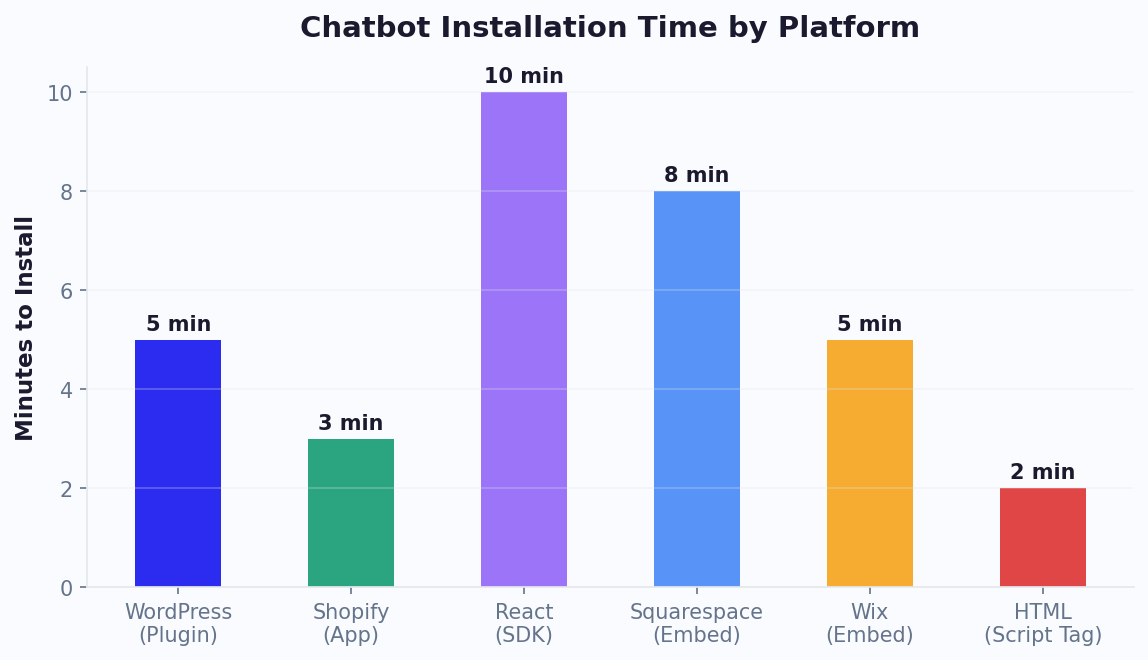
You have three installation methods for Shopify:
- Shopify App Store: Install directly from Shopify's marketplace
- Embed code: Paste a script into your theme - full Shopify install guide
- Third-party integration: Connect via Zapier or the integrations hub
We recommend starting with the embed code method for maximum flexibility and fastest setup.
Step 2: Connect Shopify Data (3 min)
Grant the chatbot access to your Shopify store data:
- Product catalog: Sync products so the bot can search, recommend, and display items with images and prices
- Order data: Connect the Orders API for real-time tracking
- Customer data: Link customer profiles for personalized interactions (returning customers skip info collection)
Step 3: Train on Your Store Content (3 min)
Feed the AI knowledge base with your store-specific information:
- Shipping policy and delivery times by region
- Return and exchange policy
- Size guides and product specifications
- FAQs from your existing help center
- Brand voice guidelines (casual, professional, luxury)
Step 4: Configure Cart Recovery (3 min)
Set up the abandoned cart recovery sequence:
- Enable exit-intent trigger for visitors with items in cart
- Configure WhatsApp/email follow-up at 1 hour, 24 hours, and 48 hours
- Set discount escalation rules (free shipping → 5% off → 10% off)
- Define excluded products (already on sale, low-margin items)
Step 5: Set Up Product Recommendations (2 min)
Configure AI recommendations:
- Enable "Customers also bought" suggestions on product pages
- Create guided shopping flows for top product categories
- Set cross-sell rules (e.g., phone case with every phone)
Step 6: Deploy and Test (2 min)
Before going live:
- Test order tracking with a real order number
- Test cart recovery by abandoning a cart yourself
- Test product recommendations by simulating a shopping conversation
- Verify mobile experience - the widget must not overlap checkout buttons
- Check page speed with Google PageSpeed Insights
Deploy across your store and optionally extend to WhatsApp, Messenger, and Instagram for omnichannel coverage.
Advanced Shopify Chatbot Strategies for 2026
Strategy 1: Conversational Commerce on WhatsApp
WhatsApp has 2.7 billion monthly active users. For Shopify stores, WhatsApp is becoming a full sales channel - not just a support tool. Set up:
- WhatsApp catalog: Share product cards directly in WhatsApp chat
- Click-to-WhatsApp ads: Run Facebook/Instagram ads that open a WhatsApp conversation with your bot
- Broadcast campaigns: Send new product announcements to opted-in customers (98% open rate vs 20% for email)
Stores using WhatsApp commerce report higher conversion rates compared to email campaigns. For a comprehensive WhatsApp setup walkthrough including business API approval and template message configuration, see our WhatsApp chatbot for e-commerce guide.
Strategy 2: Post-Purchase Upsell Sequences
The moment after purchase is the highest-trust point in the customer relationship. Use it:
- Order confirmation + "Here's 15% off your next order" (via chatbot message)
- Day 3: "Your order ships tomorrow! While you wait, check out these matching items"
- Day 7: Delivery confirmation + review request
- Day 30: Replenishment reminder (for consumables) or new arrivals
The key is timing: messages sent too early feel pushy, while messages sent too late miss the window of customer excitement about their new purchase. The chatbot's automated timing ensures every customer receives the optimal sequence without manual intervention from your team.
Strategy 3: VIP Customer Detection
Configure the chatbot to identify high-value customers (based on order history or cart value) and provide elevated service:
- Skip the bot queue - instant live chat connection
- Exclusive discount offers
- Early access to new products
- Personalized recommendations based on full purchase history
Strategy 4: Pre-Launch Hype Campaigns
Use the chatbot to build excitement before a product launch:
- "Want early access to our new collection? Join the waitlist" → collect WhatsApp opt-ins
- Send countdown messages: 7 days, 3 days, 1 day, live
- Offer 10-minute early access to waitlist members via chatbot link
This creates urgency and guarantees an audience for launch day. Stores report higher launch-day sales with chatbot waitlists.
Strategy 5: Multi-Language Support
If you sell internationally, deploy a multilingual chatbot that auto-detects the visitor's language and responds accordingly. Shopify stores selling in 3+ languages see higher conversion from non-English visitors when support is available in their language.
Shopify Plus vs Standard: Chatbot Feature Differences
Shopify Plus merchants and standard Shopify merchants have different chatbot capabilities, not because of the chatbot platform itself, but because Shopify Plus exposes more APIs, customization hooks, and checkout control. Understanding these differences helps you maximize your chatbot's effectiveness based on your Shopify tier.
Feature Availability by Shopify Plan
| Chatbot Feature | Shopify Basic ($39/mo) | Shopify Standard ($105/mo) | Shopify Plus ($2,300+/mo) |
|---|---|---|---|
| Website chat widget | Full support | Full support | Full support |
| Product catalog sync | Full support | Full support | Full support + Multipass |
| Order tracking automation | Full support | Full support | Full support |
| Cart recovery (on-site) | Full support | Full support | Full support |
| Checkout customization | Limited | Limited | Full (checkout extensibility) |
| Checkout chat widget | Not possible | Not possible | Supported via checkout UI extensions |
| Script-based discounts | Not available | Not available | Shopify Scripts for dynamic pricing |
| Multi-storefront bots | Not available | Not available | Separate bots per expansion store |
| B2B wholesale chatbot | Not available | Not available | B2B channel with company-specific pricing |
| Advanced customer segments | Basic | Standard | Custom metafields + advanced segments |
| API rate limits | 2 requests/sec | 2 requests/sec | 20 requests/sec |
The Checkout Advantage (Plus Only)
The biggest chatbot difference between Shopify Plus and standard plans is checkout access. Standard Shopify plans lock down the checkout page - you cannot add a chat widget, run scripts, or customize the experience. Shopify Plus unlocks checkout extensibility, enabling:
- In-checkout support: A chat widget directly on the checkout page answers last-second questions about shipping, returns, or sizing without the customer navigating away from checkout. This alone can reduce checkout abandonment.
- Dynamic discount application: The chatbot can apply Shopify Scripts-based discounts that are calculated dynamically ("Spend $20 more to get free shipping" with a button that adds a recommended product).
- Post-purchase upsell: After the order confirmation, display a one-click upsell offer through the chatbot: "Add this matching accessory for 25% off? One click to add it to your order."
What Standard Shopify Merchants Should Do
Even without Plus checkout access, standard Shopify merchants can maximize their chatbot ROI:
- Focus on pre-checkout engagement: The chatbot engages visitors on product pages and cart pages, answering questions and building confidence before they reach checkout
- Use WhatsApp for cart recovery: Since you cannot customize checkout, recover abandoned carts through WhatsApp follow-ups (98% open rate) instead of on-page intervention
- Leverage product page recommendations: AI-powered product suggestions on product and collection pages drive AOV increases without needing checkout customization
- Automate support on all non-checkout pages: Order tracking, returns, FAQ - all the high-volume support queries work identically on standard and Plus plans
When to Upgrade to Plus for Chatbot ROI
The Plus upgrade ($2,300+/month) pays for itself when your checkout abandonment rate is high (above 75%) and your average order value exceeds $100. At those numbers, even an improvement in checkout completion from in-checkout chatbot support generates enough additional revenue to cover the Plus subscription. For a store doing $200K/month with 78% checkout abandonment, recovering an additional 5% equals $10,000+/month - far exceeding the Plus cost. Calculate your specific numbers with our ROI calculator.
Holiday Season Strategy: Scaling Your Chatbot for Black Friday
Black Friday, Cyber Monday (BFCM), and the holiday season represent 25-40% of annual revenue for most Shopify stores. Your chatbot strategy during these peak periods can mean the difference between record-breaking sales and overwhelmed support queues. Here is a comprehensive playbook for scaling your chatbot to handle the holiday rush.
Pre-Season Preparation (4-6 Weeks Before BFCM)
Update your knowledge base. Your AI knowledge base needs to reflect holiday-specific information:
- Updated shipping deadlines: "Order by December 15 for guaranteed Christmas delivery"
- Holiday return policy extensions: "Holiday purchases can be returned through January 31"
- Gift card availability and purchase process
- Gift wrapping options and pricing
- Bundle deals and limited-edition holiday products
Build holiday-specific flows. Create dedicated conversation paths for seasonal needs:
- Gift finder: "Who are you shopping for?" → Recipient type → Budget → Interests → Curated gift recommendations. This flow alone can drive 20-30% of holiday chatbot revenue.
- Deal navigator: "Want to see our best Black Friday deals?" → Category filter → Show top deals with countdown timers
- Gift card flow: Streamline gift card purchases for last-minute shoppers: "Need a last-minute gift? Send a digital gift card instantly."
Traffic Surge Readiness
BFCM traffic spikes 3-10x compared to normal periods. Unlike human agents, chatbots scale automatically - but you need to prepare the surrounding systems:
| Preparation Area | Action Required | Why It Matters |
|---|---|---|
| Chatbot capacity | No action (auto-scales) | Chatbots handle unlimited simultaneous conversations |
| Live agent availability | Schedule 2-3x normal staffing | Escalated conversations will increase proportionally with traffic |
| Cart recovery timing | Shorten follow-up to 30 min | Holiday shoppers make faster decisions - a 24-hour delay loses them to competitors |
| Discount strategy | Pre-load BFCM codes | Bot should know and apply current promotions automatically |
| Inventory sync frequency | Increase to real-time | Popular items sell out fast; the bot must not recommend out-of-stock products |
BFCM Week Chatbot Strategy (Day by Day)
Monday-Wednesday (build anticipation): The chatbot promotes early access and VIP deals. "Black Friday starts Friday - want early access? Share your email for a 2-hour head start." Build a WhatsApp broadcast list of customers who want BFCM notifications.
Black Friday: Switch the chatbot to deal-focused mode. The welcome message becomes: "Happy Black Friday! Want to see our best deals or need help finding the perfect gift?" Enable aggressive cart recovery - any cart abandoned for 15+ minutes triggers a message: "Your Black Friday deals are still in your cart - but stock is going fast!"
Saturday-Sunday: Shift to gift-focused messaging. "Still shopping? Let me help you find the perfect gift for anyone on your list." Promote gift cards for hard-to-shop-for recipients.
Cyber Monday: Highlight online-exclusive deals. Final push on urgency: "Cyber Monday ends at midnight. These prices won't be back until next year."
Post-Holiday Support Scaling
The week after Christmas brings a flood of support inquiries: returns, exchanges, gift card redemptions, and "where is my order" queries. Pre-configure your chatbot to handle:
- Return initiation: Streamlined holiday return flow with extended deadlines clearly communicated
- Gift receipt lookups: "Received a gift? Enter the gift receipt code to start an exchange."
- Gift card balance checks: Instant balance lookup via the Shopify API
- Order tracking surge: WISMO queries spike 3-5x after Christmas as gift recipients check their shipments
Holiday Season Revenue Impact
Shopify stores with optimized holiday chatbots report:
- higher BFCM conversion rates from proactive engagement and gift finder flows
- more cart recoveries during BFCM (urgency messaging is more effective during sales events)
- 40% reduction in support response time despite 3-5x traffic spikes
- higher AOV from gift bundle recommendations vs. non-holiday periods
The stores that plan their chatbot holiday strategy 4-6 weeks early consistently outperform those that scramble to update their bot the week before BFCM. Start early, test your holiday flows with real traffic during smaller sales events (Halloween, Singles' Day), and be ready to deploy with confidence when the big weekend arrives. For step-by-step setup, see our complete chatbot building guide.
Post-BFCM Optimization Checklist
After the holiday dust settles, review your chatbot's performance to prepare for next year:
| Review Area | What to Analyze | Action Item |
|---|---|---|
| Cart recovery rate | Did holiday messaging outperform normal? By how much? | Save winning messages as templates for next year |
| Gift finder performance | Which gift categories had highest engagement and conversion? | Prioritize those categories in next year's holiday flow |
| Support volume patterns | When did support queries peak? Which topics dominated? | Pre-build FAQ content for those topics next season |
| Live chat escalation rate | Did escalations spike beyond agent capacity? | Hire seasonal support staff earlier next year |
| Return rate by chatbot flow | Did chatbot-recommended products have higher or lower return rates? | Refine recommendation logic if returns were high |
Document everything in a holiday playbook. The businesses that improve year-over-year are the ones that treat each holiday season as a learning opportunity, not just a sales sprint. Your analytics dashboard holds the data - schedule a 2-hour review session in January to capture insights while they are fresh.
7 Shopify Chatbot Mistakes That Kill Conversions (And How to Fix Them)
After analyzing chatbot deployments across hundreds of Shopify stores, these are the mistakes that most commonly destroy conversion potential. Avoiding them is the difference between a chatbot that generates $10,000+/month and one that annoys visitors.
Mistake 1: Triggering the Chat Too Aggressively
A chatbot that pops open within 2 seconds of page load feels like a pushy salesperson. Baymard Institute's UX research shows that unsolicited pop-ups within the first 5 seconds increase bounce rate by 12%. Instead, trigger based on behavior: time on page (15+ seconds), scroll depth, or cart page engagement. Let visitors browse before offering help.
Mistake 2: Blocking the Checkout Button on Mobile
On mobile, a chat widget that overlaps the "Add to Cart" or "Checkout" button is a conversion killer. Always test your widget placement on mobile devices at 375px width. Position the launcher in the bottom-right corner with sufficient margin from action buttons. Many stores lose 5-8% of mobile conversions to widget overlap they never noticed.
Mistake 3: Generic Greetings That Add No Value
"Hi! How can I help you?" is wasted space. Context-aware greetings outperform generic ones by 3-4x in engagement. On a product page: "Have questions about the [Product Name]? I can help with sizing, shipping, or compatibility." On the cart page: "Ready to check out? I can check if there are any discounts available." The greeting should match the visitor's current intent.
Mistake 4: Not Syncing Inventory in Real-Time
Nothing damages trust faster than a chatbot recommending a product that is out of stock. Ensure your product catalog sync runs at minimum hourly (real-time for high-volume stores). The chatbot should never display or recommend products with zero inventory. This is especially critical during Black Friday and holiday sales when popular items sell out quickly.
Mistake 5: No Handoff Path for Complex Questions
Custom orders, bulk pricing, and product compatibility questions often exceed chatbot capabilities. Without a clear live chat handoff, these high-intent visitors leave frustrated. Configure escalation for order values above $200, custom product inquiries, and any conversation where the visitor expresses frustration. These are your highest-value prospects.
Mistake 6: Ignoring Post-Purchase Support
Most Shopify chatbots focus exclusively on pre-purchase interactions and ignore post-purchase entirely. But "Where is my order?" accounts for 38% of all support tickets. Automating order tracking via the Shopify Orders API turns your chatbot from a sales tool into a full customer support solution, reducing ticket volume.
Mistake 7: Never Updating the Knowledge Base
Stores add new products, change shipping policies, and run seasonal promotions. A chatbot trained 6 months ago gives outdated answers. Schedule monthly knowledge base reviews: update shipping times, add new products, refresh return policies, and remove discontinued items. Stale answers erode trust faster than having no chatbot at all. Use analytics to identify questions the bot answers incorrectly and prioritize those fixes weekly. For more guidance on maintaining chatbot quality over time, our chatbot best practices guide covers ongoing optimization strategies that apply to all Shopify stores.
Shopify Chatbot ROI: Calculate Your Expected Revenue Lift
Let us calculate the realistic ROI for a Shopify store at three revenue levels:
Revenue Impact Breakdown
| Revenue Source | $25K/mo Store | $50K/mo Store | $200K/mo Store |
|---|---|---|---|
| Cart Recovery | |||
| Abandoned cart value (69.8%) | $57,800 | $115,600 | $462,400 |
| Recovery rate (15%) | $8,670 | $17,340 | $69,360 |
| AOV Increase | |||
| AOV lift (18%) | $4,500 | $9,000 | $36,000 |
| Conversion Rate Lift | |||
| Additional conversions | $3,750 | $7,500 | $30,000 |
| Support Savings | |||
| Hours saved/month | 40 hrs | 80 hrs | 200 hrs |
| Value at $25/hr | $1,000 | $2,000 | $5,000 |
| Total Monthly Value | $17,920 | $35,840 | $140,360 |
| Chatbot cost | $49/mo | $99/mo | $199/mo |
| ROI | 365x | 362x | 705x |
Even at conservative estimates (halving every number), the ROI exceeds 150x. The chatbot pays for itself with a single recovered cart.
Time to Value
- Day 1: Install and configure (15 minutes)
- Week 1: First cart recoveries and automated support responses
- Week 2: Enough data to optimize recommendation flows
- Month 1: Full ROI visible in Shopify analytics
Use our Chatbot ROI Calculator to plug in your specific store numbers and see your projected returns. Most Shopify stores reach positive ROI within the first 48 hours of deployment.
Ready to get started? Build your first chatbot in 10 minutes or browse Shopify-specific templates to launch even faster. For a broader view of e-commerce chatbot strategies beyond Shopify, see our complete e-commerce chatbot guide.
Was this article helpful?
Build and deploy in 10 minutes. No coding needed.
Shopify Chatbot FAQ
Everything you need to know about chatbots for shopify chatbot.
About the Author
The Conferbot team writes about building, deploying, and improving AI chatbots.
View all articles

