The ChatGPT Appeal: Why Businesses Are Tempted
ChatGPT took the world by storm when it launched in late 2022, and by 2026 it has become the default reference point for AI in business. With over 200 million weekly active users and a brand name synonymous with "AI assistant," it is no wonder that business owners ask: Why can't I just use ChatGPT for my customer support?
The appeal is understandable. ChatGPT demonstrates remarkable language understanding, can answer questions across virtually any domain, and provides responses that feel genuinely conversational. For a monthly subscription of $20-200 per seat, or through the OpenAI API at per-token pricing, it seems like an affordable path to AI-powered customer service.
But there is a fundamental problem with this reasoning: ChatGPT is a general-purpose conversational AI, not a customer support system. The gap between "can hold a conversation" and "can reliably handle business customer interactions" is vast, expensive, and often invisible until you are already deployed and losing customers.
The Demo vs. Reality Gap
In demos, ChatGPT looks magical. You paste in your FAQ document, ask it questions, and it responds intelligently. But production customer support is not a demo. It requires:
- Persistent memory of customer history across sessions
- Integration with your CRM, order system, and knowledge base
- Analytics on resolution rates, customer satisfaction, and escalation patterns
- Multi-channel deployment (website, WhatsApp, Messenger, Slack)
- Brand-consistent responses with your voice and tone
- Compliance with data privacy regulations (GDPR, HIPAA, SOC 2)
- Graceful escalation to human agents when needed
- Guardrails against hallucination, off-topic responses, and competitor mentions
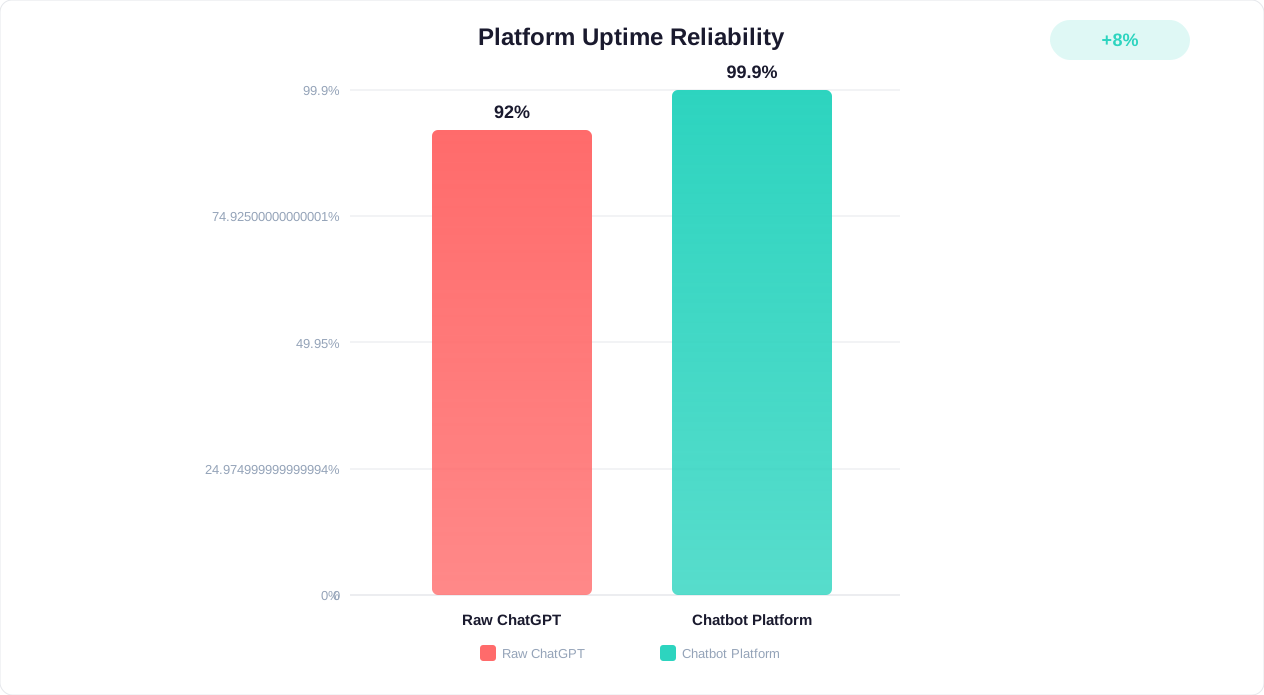
None of these are native ChatGPT capabilities. Each one requires custom engineering, third-party tools, or both. According to Gartner's 2026 research, organizations that deploy raw LLMs without purpose-built orchestration layers run into more failures than those using dedicated customer service AI platforms.
This article breaks down exactly where ChatGPT falls short for business support, what dedicated chatbot platforms solve, and how to make the right choice for your organization in 2026.
The 7 Critical Limitations of Using Raw ChatGPT for Business Support
After analyzing hundreds of businesses that attempted to use ChatGPT (either via the web interface or the API) as their primary customer support channel, seven consistent failure points emerge. Each one individually degrades customer experience; together, they make raw ChatGPT unviable for production support.
1. No Persistent Customer Memory
ChatGPT has no concept of a "customer." Every conversation starts from zero. If a customer contacted you yesterday about a billing issue and returns today for a follow-up, ChatGPT has no idea who they are, what they discussed previously, or what resolution was offered.
Dedicated platforms like Conferbot maintain full conversation histories tied to customer profiles, enabling continuity across sessions, channels, and agents. A returning customer is immediately recognized, their history is loaded, and the bot can reference previous interactions naturally.
2. No CRM or Business System Integration
Raw ChatGPT cannot look up order status, check inventory, verify account details, process refunds, update records, or perform any action in your business systems. It can only generate text based on its training data and whatever context you manually provide in the prompt.
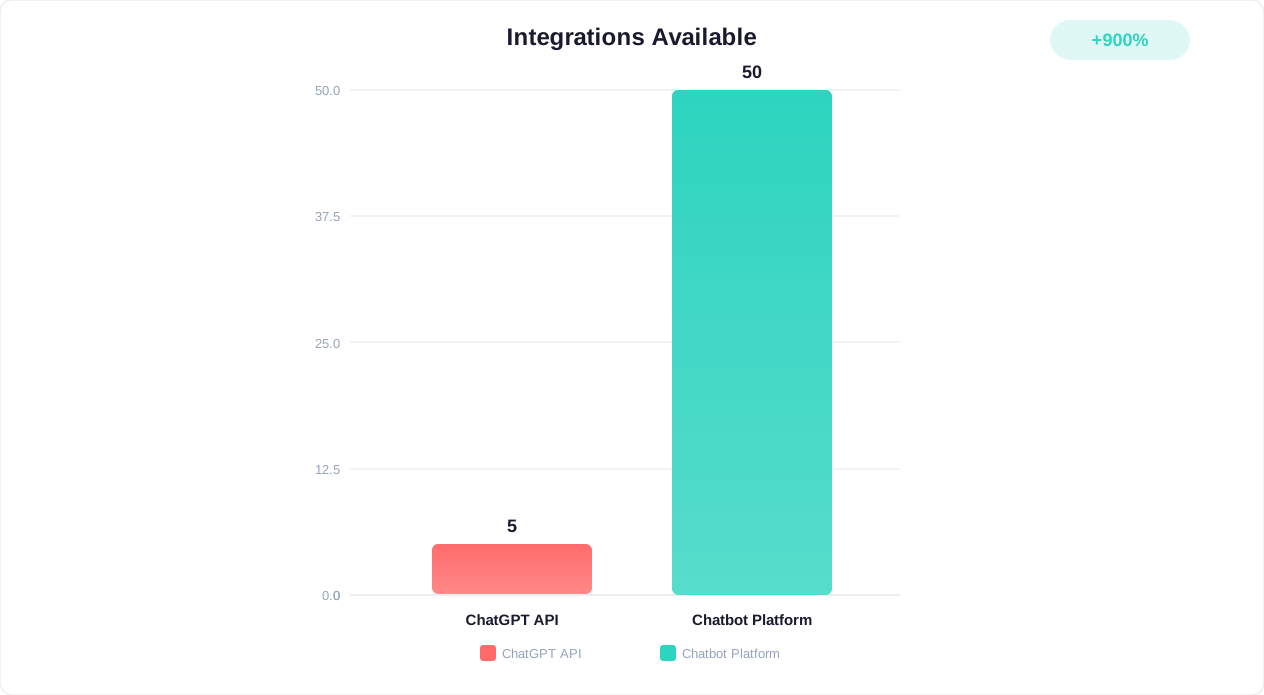
Building API integrations between ChatGPT and your business systems requires custom development: webhook handlers, authentication layers, error handling, rate limiting, and ongoing maintenance as your systems evolve. Dedicated platforms provide pre-built integrations with popular CRMs (Salesforce, HubSpot, Zoho), e-commerce platforms (Shopify, WooCommerce), payment systems (Stripe), and helpdesk tools (Zendesk, Freshdesk) that work out of the box.
Business impact: Without system access, the bot cannot resolve 60-80% of common support requests (order status, account changes, billing inquiries) without escalating to a human.
3. No Analytics or Performance Tracking
ChatGPT provides no visibility into your customer support performance. You cannot measure:
- Resolution rates (what percentage of queries were actually solved?)
- Customer satisfaction scores per conversation
- Common topics and trending issues
- Drop-off points where customers abandon the conversation
- Average handling time and first-response time
- Escalation patterns and reasons
Dedicated platforms include comprehensive analytics dashboards that surface these metrics automatically, enabling data-driven optimization of your support experience. You cannot improve what you cannot measure, and ChatGPT gives you nothing to measure.
Business impact: Teams flying blind on chatbot performance miss 40-60% of optimization opportunities, resulting in higher costs and lower customer satisfaction than necessary.
4. No Multi-Channel Deployment
ChatGPT lives on chat.openai.com (or your custom API integration). Your customers live on your website, WhatsApp, Facebook Messenger, Instagram, Slack, Telegram, SMS, and email. Deploying ChatGPT across these channels requires building separate integration layers for each one, each with its own authentication, message formatting, media handling, and session management.
Dedicated platforms deploy your bot across all channels from a single configuration. Build once, deploy to website, WhatsApp, Messenger, Slack, and more with consistent behavior and unified analytics across every channel.
Business impact: Most customers now use multiple channels during a single support journey. Without unified multi-channel presence, you miss many customer touchpoints.
5. No Brand Voice or Response Control
ChatGPT has its own voice: polite, somewhat verbose, and distinctly "AI-sounding." While system prompts can nudge its tone, you cannot enforce strict brand guidelines, approved terminology, specific response formats, or compliant language. ChatGPT may:
- Mention competitor products by name
- Provide pricing information that is outdated or incorrect
- Use casual language when your brand is formal (or vice versa)
- Include unnecessary caveats and disclaimers that confuse customers
- Volunteer information about its own limitations ("As an AI, I cannot...")
Dedicated platforms provide fine-grained control over bot personality, approved responses, restricted topics, and brand voice consistency. Conferbot's AI chatbot builder lets you set tone, vocabulary restrictions, forbidden topics, and mandatory disclaimers at the platform level.
Business impact: Inconsistent brand voice erodes trust. Many consumers say brand consistency makes them more likely to stay loyal (Lucidpress Brand Consistency Report).
6. Hallucination Risk Without Guardrails
ChatGPT confidently generates plausible-sounding but factually incorrect information. In a customer support context, this means it might:
- Invent product features that do not exist
- Quote prices that are wrong
- Promise policies (refunds, warranties, SLAs) that your company does not offer
- Provide outdated information about your services
- Make up order numbers, tracking links, or account details
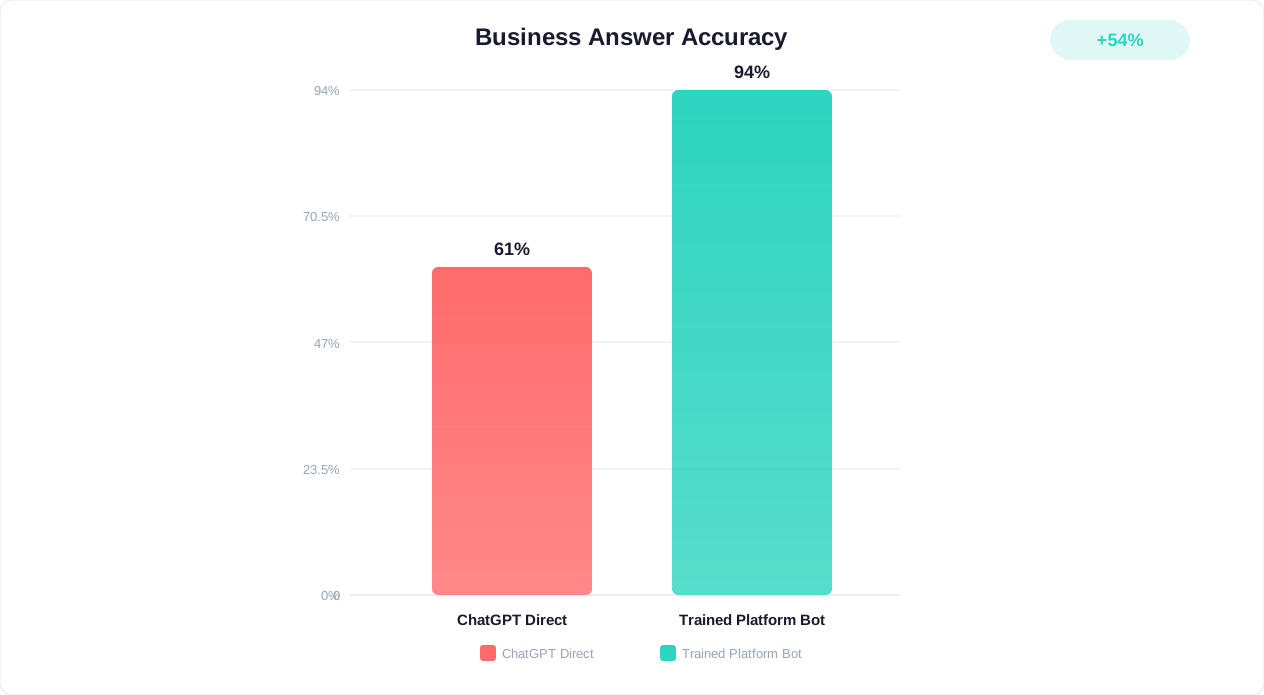
These hallucinations create real liability. A customer who receives a fabricated refund promise from your "AI support agent" has a legitimate grievance when you cannot honor it. Dedicated platforms mitigate hallucination through retrieval-augmented generation (RAG) that grounds every response in your verified knowledge base, confidence thresholds that trigger escalation when the AI is unsure, and response validation layers that check answers against approved content before delivery.
Business impact: A single hallucinated promise about pricing, warranty, or policy can cost thousands in customer compensation and reputation damage. According to G2's enterprise chatbot reviews, hallucination-related incidents are the #1 reason businesses abandon raw GPT deployments.
7. No Human Handoff Capability
When ChatGPT encounters a question it cannot answer, it either halluccinates an answer or says "I cannot help with that." There is no mechanism to:
- Detect when a conversation needs human intervention
- Route to the right agent based on topic, language, or priority
- Transfer conversation history seamlessly to the agent
- Allow the agent to take over mid-conversation without the customer noticing a jarring transition
- Return the conversation to the bot after human resolution
Dedicated platforms include sophisticated human handoff systems with intelligent routing, queue management, agent availability detection, and seamless transitions. Conferbot's live chat integration enables smooth bot-to-human-to-bot transitions without losing context.
Business impact: Without graceful escalation, frustrated customers either leave (lost revenue) or flood your email/phone channels (higher cost). Businesses with proper handoff see higher customer satisfaction scores than those without.
What Dedicated Chatbot Platforms Actually Solve
A dedicated chatbot platform is not just "ChatGPT with extra features." It is a complete customer interaction system purpose-built for business communications. Understanding the architectural differences explains why the gap between raw GPT and a proper platform cannot be bridged with prompting alone.
Purpose-Built Architecture
Dedicated platforms are designed from the ground up for business customer interactions. This means:
- Customer identity management: Every visitor is tracked, identified (via cookies, login, or channel identity), and associated with their full interaction history
- Session management: Conversations have proper start/end states, timeout handling, and resumption logic
- State machines: Complex multi-step workflows (returns, onboarding, troubleshooting) maintain state correctly even if the customer leaves and returns
- Audit trails: Every interaction is logged for compliance, training, and dispute resolution
Conferbot's Platform Advantages
As a dedicated chatbot platform, Conferbot addresses every limitation of raw ChatGPT with purpose-built solutions:
| Capability | Raw ChatGPT | Conferbot Platform |
|---|---|---|
| Customer memory | None (resets per session) | Full history across all sessions and channels |
| Business integrations | Custom dev required | Pre-built connectors (CRM, e-commerce, helpdesk) |
| Analytics | None | Real-time dashboard with 20+ metrics |
| Multi-channel | API only (build each channel) | One-click deploy to 8+ channels |
| Brand control | System prompt (limited) | Full personality, topic, and response control |
| Hallucination prevention | None | RAG + confidence thresholds + validation |
| Human handoff | None | Intelligent routing with full context transfer |
| No-code setup | API coding required | Visual drag-and-drop builder |
| Knowledge base | Manual prompt stuffing | AI-powered knowledge base with auto-sync |
| Compliance (GDPR/SOC2) | Your responsibility | Built-in compliance controls |
The Orchestration Layer
The most important thing a dedicated platform provides is the orchestration layer between the AI model and the customer. This layer handles:
- Intent classification: Determining what the customer actually wants before generating a response
- Context assembly: Pulling in relevant customer data, order history, and previous conversations to inform the response
- Response validation: Checking AI output against your knowledge base before delivering it to the customer
- Action execution: Performing actual business operations (updating records, triggering workflows, sending notifications) based on the conversation
- Escalation logic: Monitoring conversation quality in real-time and routing to humans when needed
- Feedback loops: Using customer satisfaction data and agent corrections to improve the AI over time
This orchestration layer is what transforms raw AI text generation into reliable business support. Without it, you are shipping an uncontrolled language model directly to your customers and hoping for the best.
Time to Value
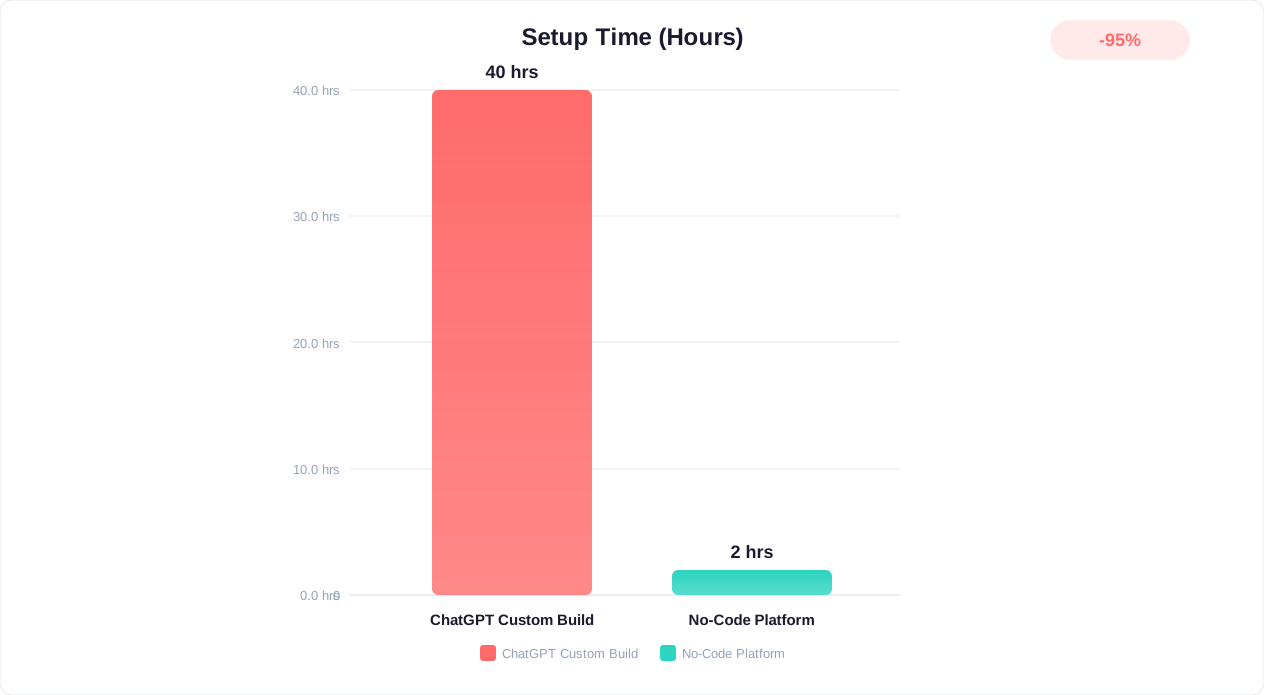
Perhaps the most practical advantage of a dedicated platform is time to value. Building equivalent functionality on top of raw ChatGPT API requires:
- 3-6 months of custom development
- Ongoing engineering maintenance (15-25% of initial build effort annually)
- Infrastructure management (servers, databases, monitoring)
- Security audits and compliance certification
With a platform like Conferbot, the same capabilities are available in days, not months, with maintenance and infrastructure handled by the platform. For most businesses, the engineering cost of building on raw GPT exceeds 10x the cost of a dedicated platform subscription.
Feature-by-Feature Comparison: ChatGPT API vs. Dedicated Chatbot Platform
This detailed comparison examines every critical capability across four deployment approaches: ChatGPT web interface (Team/Enterprise), ChatGPT API with custom development, and a dedicated chatbot platform like Conferbot.
| Feature | ChatGPT Web (Team) | ChatGPT API (Custom Build) | Conferbot (Dedicated Platform) |
|---|---|---|---|
| Setup time | Minutes | 3-6 months | Hours to days |
| Technical skill required | None | Full-stack engineering team | None (no-code builder) |
| Website widget | No | Custom build required | One-line embed code |
| WhatsApp integration | No | Build + WhatsApp Business API | Native one-click setup |
| Facebook Messenger | No | Build + Meta API approval | Native integration |
| Slack / Teams | No (separate product) | Build required | Native integration |
| Customer identification | Login-based only | Build required | Automatic (cookies + channel ID) |
| Conversation history | Per-user threads | Build + database required | Full CRM-style customer profiles |
| Knowledge base management | File uploads (limited) | Build RAG system from scratch | Visual KB with auto-sync, URL crawling |
| CRM integration | No | Custom API work | Pre-built (Salesforce, HubSpot, Zoho) |
| E-commerce integration | No | Custom API work | Pre-built (Shopify, WooCommerce) |
| Analytics dashboard | Basic usage stats | Build + data warehouse | 20+ metrics, real-time dashboard |
| A/B testing | No | Build required | Built-in flow testing |
| Human handoff | No | Build + helpdesk integration | Native with intelligent routing |
| Lead capture forms | No | Build required | Built-in with CRM push |
| Appointment booking | No | Build + calendar integration | Native calendar integration |
| Custom branding | No (OpenAI branding) | Full control (you build it) | Full white-label customization |
| Response guardrails | System prompt only | Build validation layer | Topic restrictions, approved responses, confidence thresholds |
| GDPR compliance | Via DPA with OpenAI | Your responsibility to build | Built-in (data residency, consent, deletion) |
| Uptime SLA | 99.9% (Enterprise only) | Depends on your infrastructure | 99.9% with status monitoring |
| Ongoing maintenance | None (but limited features) | 15-25% of build cost annually | Included in subscription |
The Hidden Complexity of Custom API Builds
The "ChatGPT API (Custom Build)" column deserves special attention. Many businesses start this path thinking "we will just call the API and wrap a UI around it." In reality, the engineering requirements compound rapidly:
- Week 1-2: Basic API call + simple UI. "This is easy!"
- Week 3-4: Add conversation history, handle rate limits, implement retry logic
- Month 2: Build knowledge base (RAG), vector database, document ingestion pipeline
- Month 3: Add user authentication, session management, multi-tenant architecture
- Month 4: Build analytics, logging, error handling, monitoring
- Month 5: Integrate with business systems (CRM, helpdesk, e-commerce)
- Month 6: Security audit, GDPR compliance, penetration testing
- Ongoing: Model updates, API changes, knowledge base maintenance, bug fixes, feature requests
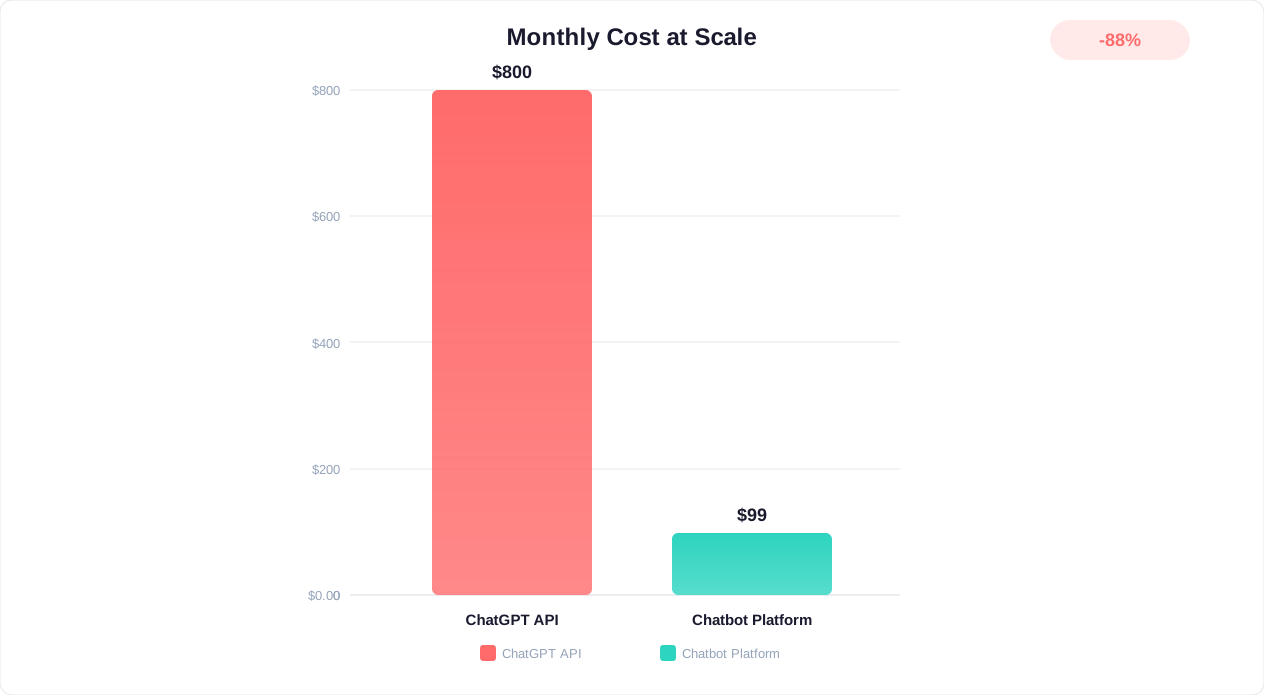
By month six, you have spent $100,000-500,000 in engineering time to build what a dedicated platform offers for $99-299/month. Unless your requirements are genuinely unique and cannot be served by existing platforms, the custom build path is almost always the wrong economic decision.
Cost Comparison: The True Economics of ChatGPT vs. a Chatbot Platform
Cost is often the primary argument for using ChatGPT directly. "Why pay for a platform when the API is cheap?" The answer becomes clear when you account for all costs, not just API tokens.
ChatGPT Direct Costs (2026 Pricing)
Based on OpenAI's current pricing page:
| Option | Monthly Cost | What You Get | Limitations |
|---|---|---|---|
| ChatGPT Team | $25/user/month | GPT-4o, file uploads, shared workspace | No API, no website embed, no integrations |
| ChatGPT Enterprise | Custom pricing (~$60/user) | Advanced security, admin controls, analytics | Still no customer-facing deployment |
| GPT-4o API | $2.50/1M input + $10/1M output tokens | Raw model access | Everything else is your responsibility |
| GPT-4o-mini API | $0.15/1M input + $0.60/1M output tokens | Cheaper, slightly less capable | Same limitations as above |
True Total Cost of Ownership: ChatGPT API Custom Build
For a business handling 5,000 customer conversations per month (a mid-size e-commerce or SaaS company):
| Cost Category | Monthly Cost | Annual Cost |
|---|---|---|
| API tokens (GPT-4o, ~2000 tokens/conversation) | $125 | $1,500 |
| Vector database (Pinecone/Weaviate) | $70-200 | $840-2,400 |
| Cloud infrastructure (AWS/GCP) | $200-500 | $2,400-6,000 |
| Engineering time (initial build, 3-6 months) | Amortized: $2,000-4,000 | $24,000-48,000 |
| Ongoing maintenance (0.5-1 FTE) | $4,000-8,000 | $48,000-96,000 |
| Monitoring and logging tools | $50-200 | $600-2,400 |
| Security and compliance audits | Amortized: $500-1,000 | $6,000-12,000 |
| TOTAL | $7,000-14,000 | $83,000-168,000 |
Dedicated Platform Cost (Conferbot)
| Cost Category | Monthly Cost | Annual Cost |
|---|---|---|
| Platform subscription (Pro or Business plan) | $39-59 | $468-708 |
| Setup and configuration time (internal) | One-time: 10-40 hours | $500-2,000 (at $50/hr) |
| Ongoing optimization (2-4 hrs/month) | $100-200 (internal time) | $1,200-2,400 |
| Additional channels (if applicable) | $0-50 | $0-600 |
| TOTAL | $139-309 | $2,168-5,708 |
Cost Comparison Summary
| Approach | Year 1 Total Cost | Ongoing Annual Cost | Break-Even vs. Platform |
|---|---|---|---|
| ChatGPT API Custom Build | $83,000-168,000 | $55,000-110,000 | Never (platform is always cheaper) |
| Dedicated Platform (Conferbot) | $2,168-5,708 | $1,668-3,708 | Immediate ROI |
| Savings with platform | $77,000-165,000 | $51,000-108,000 | - |
The math is stark: a dedicated platform costs less than building equivalent functionality on raw ChatGPT API. The only scenario where custom builds make economic sense is at extreme scale (100,000+ conversations/month) with genuinely unique requirements that no existing platform serves. For the other many businesses, the platform path wins decisively on cost.
The Hidden Cost of "Free" ChatGPT
Some businesses try to use the ChatGPT web interface (Team plan) directly for support by having agents copy-paste customer queries. This approach appears cheap ($25/user/month) but creates hidden costs:
- Agent time waste: Copy-pasting between ChatGPT and your support tool costs 30-60 seconds per interaction
- No automation: Every conversation still requires a human to mediate
- No scalability: As volume grows, you need proportionally more agents
- Compliance risk: Customer data is being pasted into a third-party AI without proper data processing agreements
This is not AI-powered customer support. It is human support with an AI copilot, and it does not solve the fundamental scalability problem that chatbots address.
Security and Compliance: The Enterprise Deal-Breaker
For businesses handling sensitive customer data (which is most businesses), security and compliance are not optional nice-to-haves. They are legal requirements that ChatGPT alone cannot satisfy.
Data Processing Concerns with Raw ChatGPT
When you use ChatGPT (web or API) for customer interactions, customer data flows through OpenAI's infrastructure. Key concerns:
- Data residency: Where is your customer data stored? OpenAI processes data in the US. For EU businesses subject to GDPR, this creates legal complexity around international data transfers.
- Training data usage: By default, OpenAI may use API data to improve models (opt-out available for API, automatic for Enterprise). Your customer conversations potentially training a model used by competitors is a legitimate concern.
- Data retention: OpenAI retains API data for 30 days for abuse monitoring. Your customers' personal data sits on OpenAI's servers for a month regardless of your own data deletion policies.
- Subprocessor risk: OpenAI uses its own subprocessors (cloud providers, monitoring tools). Your data privacy chain extends through all of them.
Compliance Requirements by Regulation
| Regulation | Requirement | ChatGPT API Status | Dedicated Platform Status |
|---|---|---|---|
| GDPR | Data minimization, right to deletion, consent management | Partial (DPA available, but implementation is your responsibility) | Built-in consent flows, deletion automation, data minimization |
| HIPAA | PHI protection, BAA requirement, access controls | BAA available for Enterprise API only | HIPAA-ready with BAA, encryption at rest and transit, audit logs |
| SOC 2 Type II | Security controls, availability, processing integrity | OpenAI is SOC 2 certified (for their services) | Platform-level SOC 2 covering your specific deployment |
| PCI DSS | Payment card data protection | Not PCI compliant (cannot handle card data) | PCI-compliant integrations for payment workflows |
| CCPA | California consumer data rights | Partial (depends on your implementation) | Built-in consumer rights management |
The Compliance Cost Gap
Making a raw ChatGPT deployment compliant requires:
- Legal review: $5,000-15,000 for DPA review, privacy impact assessment, and terms of service analysis
- Technical controls: $10,000-30,000 for data anonymization, encryption layers, access controls, and audit logging that satisfies regulators
- Ongoing audits: $3,000-10,000 annually for compliance verification and documentation updates
- Incident response planning: $2,000-5,000 for breach notification procedures that account for the AI layer
Total compliance cost for DIY ChatGPT: $20,000-60,000 initial + $3,000-10,000 annually.
A dedicated platform includes compliance controls in the subscription price. The compliance infrastructure is already built, audited, and maintained by the platform team. This is not merely a cost saving; it is a risk reduction. Building your own compliance layer means accepting the risk that you missed something, and in regulated industries, that risk has real financial penalties (GDPR fines up to 4% of global revenue).
Enterprise Security Features Comparison
- Single Sign-On (SSO): Dedicated platforms support SAML/OIDC SSO for agent access. ChatGPT Enterprise has SSO, but it does not extend to your customer-facing deployment.
- Role-Based Access Control (RBAC): Platform agents can have different permission levels (view-only, respond, configure, admin). ChatGPT has basic team management.
- IP Whitelisting: Restrict admin access to corporate networks. Not available with ChatGPT.
- Data Encryption: Dedicated platforms encrypt data at rest with customer-managed keys (BYOK). ChatGPT uses OpenAI-managed encryption.
- Audit Logs: Complete audit trail of every configuration change, access event, and data operation. ChatGPT provides limited activity logs.
When ChatGPT IS the Right Choice (And When It's Not)
This article is not arguing that ChatGPT is a bad product. It is an extraordinary general-purpose AI. The argument is that it is the wrong tool for production customer support. But there are legitimate business uses where ChatGPT excels.
ChatGPT IS Appropriate For:
1. Internal knowledge assistant. Helping employees find information in internal documents, summarize meeting notes, or draft communications. Internal use has lower stakes (no customer-facing hallucination risk) and the team plan's shared workspace is designed for this.
2. Content creation and marketing. Drafting blog posts, social media content, email campaigns, and marketing copy. The output is reviewed by humans before publishing, so hallucination risk is caught in review.
3. Research and analysis. Summarizing market research, analyzing competitor positioning, extracting insights from large documents. Again, internal use with human review.
4. Prototyping and proof of concept. Testing whether AI can handle your specific customer questions before committing to a platform. Use ChatGPT to validate the concept, then deploy on a proper platform.
5. Personal productivity. Individual employees using ChatGPT to code faster, write better emails, or solve problems. This is productivity tooling, not customer-facing infrastructure.
ChatGPT IS NOT Appropriate For:
1. Customer-facing support. Any scenario where AI responses go directly to customers without human review. The hallucination risk, lack of guardrails, and absence of business context make this dangerous.
2. Regulated industries. Healthcare, financial services, insurance, and legal contexts where incorrect AI responses create liability. Dedicated platforms with compliance controls are mandatory.
3. High-volume automated interactions. When you need to handle thousands of customer conversations without human mediation, you need the orchestration layer that platforms provide.
4. Multi-channel customer engagement. If your customers reach you through website, WhatsApp, Messenger, and other channels, a unified platform is essential.
5. Sales and lead qualification. When AI conversations directly impact revenue (qualifying leads, recommending products, processing orders), the stakes demand purpose-built tooling with analytics and optimization capabilities.
The Decision Matrix
| Scenario | Best Tool | Why |
|---|---|---|
| Internal team knowledge base | ChatGPT Team/Enterprise | Low stakes, reviewed by humans, team collaboration features |
| Customer FAQ bot on website | Dedicated Platform | Customer-facing, needs branding, analytics, multi-channel |
| Complex support with escalation | Dedicated Platform | Requires integrations, handoff, conversation history |
| Lead qualification chatbot | Dedicated Platform | Needs CRM integration, lead scoring, form capture |
| E-commerce product advisor | Dedicated Platform | Needs product catalog integration, cart actions, order lookup |
| Content drafting workflow | ChatGPT | Internal, reviewed before publishing, creative use case |
| Prototype testing AI capability | ChatGPT | Quick validation, no production deployment needed |
| Developer coding assistant | ChatGPT / Copilot | Internal productivity, not customer-facing |
The pattern is clear: ChatGPT for internal, human-reviewed, low-stakes use. Dedicated platform for customer-facing, automated, high-stakes interactions. Mixing these up in either direction wastes money. Using a full platform for internal brainstorming is overkill. Using raw ChatGPT for customer support is reckless.
Migration Guide: Moving from ChatGPT to a Proper Chatbot Platform
If you have been using ChatGPT (or the API) for customer interactions and are ready to upgrade to a purpose-built platform, here is a structured migration path that minimizes disruption while maximizing improvement.
Phase 1: Audit Current State (Week 1)
Before migrating, document what you have:
- Map all current use cases. What questions does your ChatGPT setup handle? What are the most common topics? What does it fail on?
- Export conversation data. If using the API, pull conversation logs. If using web ChatGPT, document the most common Q&A patterns manually.
- Identify integration needs. What business systems should the chatbot connect to? CRM, order management, knowledge base, helpdesk?
- Document current costs. Total API spend, engineering time, tool subscriptions, and agent time spent managing the ChatGPT workflow.
- Define success metrics. What does "better" look like? Resolution rate targets, customer satisfaction goals, response time requirements?
Phase 2: Platform Setup (Week 2-3)
- Create your knowledge base. Upload your FAQ documents, product information, policies, and any content the AI should draw from. Conferbot's AI knowledge base can ingest URLs, PDFs, and text documents automatically.
- Configure AI personality. Set your brand voice, tone, approved terminology, and topic restrictions. Define what the bot should never say (competitor mentions, unauthorized promises, speculation about unreleased features).
- Build conversation flows. For structured interactions (booking, lead capture, order lookup), create visual flows in the no-code builder. For open-ended support questions, configure the AI to handle them with knowledge base grounding.
- Set up integrations. Connect your CRM, helpdesk, and business systems. Configure API integrations for custom data sources.
- Configure human handoff. Define escalation triggers (low confidence, frustrated language, high-value customers, specific topics), routing rules, and agent availability schedules.
Phase 3: Testing and Validation (Week 3-4)
- Internal testing. Have your support team interact with the new bot as if they were customers. Test the 50 most common questions and verify correct responses.
- Regression testing. Take your exported ChatGPT conversations and replay the customer questions through the new platform. Compare response quality, accuracy, and completeness.
- Edge case testing. Deliberately try to break the bot: off-topic questions, abusive language, complex multi-turn scenarios, requests for competitor information.
- Integration testing. Verify that CRM data flows correctly, order lookups return accurate information, and human handoff routes to the right agents.
Phase 4: Gradual Rollout (Week 4-6)
- Shadow mode (Week 4): Deploy the new bot alongside your existing solution. Route 10% of traffic to the new bot while the rest continues through your current process. Monitor closely.
- Expand (Week 5): If shadow metrics look good (resolution rate, satisfaction, no critical failures), increase to 50% traffic. Compare performance between old and new.
- Full deployment (Week 6): Route all traffic to the new platform. Keep your old setup available as a fallback for one week.
- Decommission (Week 7): Once you are confident in the new platform's performance, shut down the old ChatGPT-based system and redeploy engineering resources elsewhere.
Phase 5: Optimization (Ongoing)
With your dedicated platform's analytics dashboard, you now have visibility into performance that raw ChatGPT never provided:
- Weekly: Review unresolved conversations. Add missing knowledge base content. Adjust flows based on drop-off data.
- Monthly: Analyze satisfaction trends. A/B test response variants. Expand to new channels based on customer demand.
- Quarterly: Review ROI metrics. Plan feature expansion (new use cases, additional integrations, advanced workflows).
Expected Results After Migration
What typically changes when you move from raw ChatGPT/API to a dedicated platform:
| Area | Before (ChatGPT) | After (Dedicated Platform) | Improvement |
|---|---|---|---|
| Answer source | Prompt only | Your website and documents | Fewer guessed answers |
| Human handoff | Build it yourself | Built in | No dead ends for customers |
| Analytics | Build it yourself | Dashboard included | See what to fix |
| Engineering maintenance | Ongoing in-house work | Handled by the platform | Less effort |
The improvements are dramatic because you are not just changing the AI model; you are adding the entire orchestration layer (knowledge base grounding, integrations, analytics, handoff) that makes AI actually useful for customer support rather than a lottery ticket on response quality.
Real Business Case Studies: ChatGPT Failures and Platform Wins
These case studies illustrate common patterns we see when businesses attempt raw ChatGPT for support and then migrate to a dedicated platform.
Case Study 1: E-Commerce Brand (DTC Fashion, 15K Orders/Month)
ChatGPT approach: Built a custom GPT-4 API integration with product data embedded in system prompts. Took 4 months and $85,000 in engineering costs.
What went wrong:
- The bot hallucinated sale prices that did not exist, leading to 23 customer complaints in the first week
- Could not look up order status in real-time (required engineering a separate integration)
- No way to hand off to a human when customers were upset about shipping delays
- Return policy responses were inconsistent across conversations
- Zero visibility into which product categories generated the most questions
After migrating to a dedicated platform:
- Resolution rate jumped from 28% to 72% in the first month
- Order lookup integrated in 2 hours (pre-built Shopify connector)
- Human handoff triggered automatically on negative sentiment, reducing CSAT complaints
- Product-grounded responses eliminated pricing hallucinations entirely
- Analytics revealed that 40% of questions were about sizing, leading to a sizing guide chatbot flow that reduced returns
ROI: Platform cost $199/month vs. previous $7,100/month (API + engineering maintenance). Saved $82,800 annually while improving customer satisfaction.
Case Study 2: SaaS Company (B2B Project Management Tool, 8K Users)
ChatGPT approach: Used ChatGPT Team plan with custom GPTs for different support tiers. Support agents would paste customer questions into ChatGPT, get a suggested response, review it, and paste it back into Zendesk.
What went wrong:
- Agents spent 45 seconds per interaction copy-pasting between tools (accumulated to 3+ hours daily across the team)
- No consistency between responses because different agents used different prompting strategies
- Customer data (emails, account details, error logs) was being pasted into ChatGPT without a proper DPA
- No analytics on which questions could be fully automated vs. requiring human judgment
- Custom GPTs had a 40-message cap in Team plan, causing mid-shift disruptions
After migrating to a dedicated platform:
- 70% of Tier-1 questions handled automatically without agent involvement
- Remaining 30% routed to agents with full context and suggested responses (no copy-pasting)
- Zendesk integration provided seamless ticket creation for complex issues
- GDPR-compliant data handling with proper data processing agreement
- Analytics identified that 60% of support volume was about 12 specific feature questions, enabling targeted knowledge base optimization
ROI: Reduced support team from 5 agents to 3 (reassigned 2 to customer success). Saved $120,000 annually in agent salary costs while handling more tickets with better satisfaction scores.
Case Study 3: Healthcare Practice (Multi-Location Dental Group, 12 Locations)
ChatGPT approach: Explored using ChatGPT API for patient appointment scheduling and FAQ. Abandoned after legal review identified HIPAA compliance gaps that would cost $40,000+ to address.
Key blockers:
- Patient health information (PHI) could not be processed through standard ChatGPT API without a BAA
- Even with Enterprise API BAA, building HIPAA-compliant logging, access controls, and encryption would require 6+ months of specialized development
- No audit trail for patient interactions as required by HIPAA regulations
- Liability concerns around AI providing medical information without proper guardrails
Dedicated platform solution:
- Deployed in 2 weeks with HIPAA-compliant infrastructure (BAA included, encryption at rest, audit logging)
- Appointment booking flow handled scheduling without exposing PHI to the AI model
- FAQ responses limited to pre-approved medical information (no AI generation for clinical topics)
- Automatic escalation to staff for any question touching clinical advice
- Integrated with their practice management software for real-time availability
ROI: Reduced front-desk call volume by 40% across 12 locations. Staff time savings of $180,000 annually. Zero HIPAA compliance incidents in 14 months of operation.
The Pattern
Across all three cases (and dozens more we have observed), the pattern is consistent:
- ChatGPT looks promising in initial testing with sample questions
- Production reality reveals gaps in integrations, guardrails, compliance, and analytics
- Costs escalate as engineering patches mount to address each gap individually
- Migration to a platform resolves all issues simultaneously at a fraction of the cost
- ROI materializes within 30-60 days of proper deployment
The lesson is not that AI is wrong for customer support. It is that raw AI without business orchestration is wrong for customer support. The AI model is one component of a successful chatbot. The platform provides the other 80%: integrations, guardrails, analytics, multi-channel delivery, compliance, and human handoff. For more case studies on chatbot ROI, see our chatbot ROI analysis and cost savings case studies.
How to Choose the Right Chatbot Platform (Evaluation Criteria)
If you are convinced that a dedicated platform is the right path (as it is for most businesses), here are the evaluation criteria that matter most when selecting one.
Essential Capabilities Checklist
Any platform you consider should offer all of the following. If it is missing any, keep looking:
- AI + Rule-Based Hybrid: The ability to use AI for open-ended conversations AND structured flows for predictable interactions. See our AI vs rule-based comparison for why hybrid matters.
- No-Code Builder: Your marketing and support teams should be able to create and modify chatbot flows without engineering involvement. Read our best no-code chatbot builders comparison for detailed platform evaluations.
- Knowledge Base Management: Easy upload and management of your business content that the AI draws from. Look for URL crawling, PDF upload, and automatic sync capabilities.
- Multi-Channel Deployment: Deploy to website, WhatsApp, Messenger, Slack, and other channels from a single configuration.
- Human Handoff: Seamless escalation to live agents with full conversation context. See handoff best practices for what good looks like.
- Analytics Dashboard: Resolution rates, satisfaction scores, topic analysis, and optimization recommendations.
- Integrations: Pre-built connectors to your CRM, helpdesk, and e-commerce platform.
- Compliance Controls: GDPR, SOC 2, and industry-specific compliance built into the platform.
Differentiating Capabilities
Beyond the essentials, these features separate good platforms from great ones:
- AI training from conversations: The platform improves its AI based on successful resolutions and agent corrections, reducing the need for manual knowledge base updates.
- Proactive messaging: Trigger bot conversations based on user behavior (time on page, cart abandonment, specific page visits) rather than only responding to user-initiated conversations.
- A/B testing: Test different response approaches, flow variations, and AI personalities to optimize conversion and satisfaction.
- Custom AI models: The ability to fine-tune or choose different AI models for different use cases within the same platform. Check our guide to training chatbots on business data.
- Revenue attribution: Track which chatbot conversations lead to purchases, signups, or other revenue events.
- Multilingual AI: Native support for multiple languages without separate bot configurations.
Why Conferbot for the ChatGPT Migration
For businesses specifically migrating from ChatGPT or GPT API, Conferbot is an ideal landing platform because:
- Uses the same AI models: Conferbot's GPT integration uses the same underlying language models (GPT-4o, GPT-4o-mini) but wraps them in the business orchestration layer that raw API lacks.
- No-code transition: Non-technical team members can manage the chatbot day-to-day without engineering support.
- Progressive complexity: Start with simple FAQ automation and layer in advanced features (integrations, flows, analytics) as you grow.
- Transparent pricing: Clear plans without per-conversation charges or hidden API cost pass-through. See our chatbot pricing comparison for how we compare to alternatives.
- Migration support: Dedicated onboarding that helps you recreate your ChatGPT prompts and knowledge base within the platform's structured format.
Evaluation Timeline
A realistic evaluation process should take 2-3 weeks:
- Week 1: Shortlist 2-3 platforms based on feature requirements. Sign up for free trials. Build a basic bot with your top 10 FAQ questions on each platform.
- Week 2: Test integrations, analytics, and multi-channel deployment. Evaluate ease of use for non-technical team members. Have your support team interact with each bot as if they were customers.
- Week 3: Compare pricing for your specific volume. Check compliance certifications. Make a decision and begin proper implementation.
Do not spend months evaluating. The cost of delay (every day without a proper chatbot is a day of missed automation, lost leads, and overworked agents) exceeds the risk of choosing a slightly imperfect platform. All good platforms offer the ability to export your data and migrate if needed. Start fast, measure results, and optimize from there.
The Future: Will ChatGPT Evolve into a Business Platform?
A fair question: is OpenAI building these capabilities into ChatGPT? Will the gap between raw ChatGPT and dedicated platforms close over time?
What OpenAI Is Building
OpenAI has signaled interest in business use cases through:
- Custom GPTs: Allowing configuration of specialized ChatGPT behaviors (launched 2023, expanded 2026-2026)
- GPT Store: A marketplace for pre-configured GPTs (though adoption has been limited)
- ChatGPT Enterprise: Security, admin controls, and longer context for business teams
- Assistants API: A more structured API for building conversational applications with file search and code execution
Why the Gap Will Persist
Despite these moves, the gap between ChatGPT and dedicated chatbot platforms will persist for structural reasons:
1. Different core mission. OpenAI's mission is advancing general AI. Building CRM integrations, multi-channel deployment, and industry compliance is not their core focus. They will always prioritize model capability over business tooling.
2. Platform agnosticism. Dedicated chatbot platforms can use ANY AI model (GPT-4o, Claude, Gemini, Llama, or custom models) and switch as the landscape evolves. Tying your business to one model provider (OpenAI) is a strategic risk that platforms eliminate.
3. Business logic depth. The orchestration layer that platforms provide (customer profiles, workflow engines, integration ecosystems, compliance frameworks) represents years of specialized development that AI labs have no incentive to replicate.
4. Speed of iteration. Dedicated platforms iterate weekly on business features (new integrations, workflow capabilities, analytics views) because it is their core product. OpenAI iterates on model capabilities. These are different roadmaps serving different needs.
The Convergence Point
What is converging: the underlying AI models are becoming commoditized. GPT-4o, Claude Sonnet, and Gemini all perform at similar levels for customer support use cases. This actually strengthens the platform argument: if the AI model is a commodity, the value is in the orchestration, integrations, and business logic that wrap around it. The platform layer becomes more important, not less, as models commoditize.
For businesses making a decision today: do not wait for ChatGPT to become a business platform. It will not happen in the timeframe that matters to your customers and your bottom line. Choose a dedicated platform now, deploy in days, and benefit from the full business orchestration layer while OpenAI continues focusing on what they do best (building smarter models) and platforms do what they do best (making those models useful for business).
Bottom Line
ChatGPT is an incredible technology. But using it directly for customer support is like using a jet engine to power a bicycle. The raw power is there, but without the airframe, controls, navigation system, and landing gear, that engine is dangerous rather than useful. A dedicated chatbot platform is the airframe that makes AI safe, reliable, and productive for business customer interactions. Explore Conferbot's platform to see how purpose-built AI chatbot infrastructure delivers results that raw ChatGPT simply cannot match.
Was this article helpful?
Build and deploy in 10 minutes. No coding needed.
ChatGPT vs Dedicated Chatbot Builder FAQ
Everything you need to know about chatbots for chatgpt vs dedicated chatbot builder.
About the Author
The Conferbot team writes about building, deploying, and improving AI chatbots.
View all articles