
Why Every Business Running Slack Needs an Internal Chatbot
Slack has become the central nervous system of modern businesses. Over 750,000 organizations use Slack daily (Slack for Enterprise, 2025), and the average knowledge worker spends 90+ minutes per day in Slack. It is where questions are asked, decisions are made, and work gets coordinated.
But Slack also has a hidden productivity problem: internal support requests. Every day, employees DM the IT team about password resets, ask HR about PTO balances, ping finance about expense policies, and message ops about tool access. These requests are repetitive, predictable, and — critically — answerable by a machine.
The numbers are staggering:
- The average IT help desk receives 500+ tickets per month per 1,000 employees (HDI, 2025). The Slack API platform makes it straightforward to build integrations that handle these workflows natively within Slack.
- 40-60% of internal IT tickets are password resets, access requests, and basic troubleshooting
- HR teams spend 40% of their time answering repetitive policy and benefits questions
- Each internal support interaction costs $15-$25 in labor time (agent research + response + follow-up)
- Average resolution time for an internal ticket: 24-48 hours for non-urgent issues
The cumulative impact of these inefficiencies is staggering. For a 500-person company, routine internal support interactions consume the equivalent of 3-5 full-time employees' worth of productivity annually. A Slack chatbot eliminates the majority of this friction. Deployed directly in the Slack workspace where employees already work, it provides instant answers to routine questions, automates common workflows (password resets, access requests, PTO lookups), and escalates complex issues to the right human — all without the employee leaving Slack.
Companies deploying internal Slack chatbots report 60-75% reduction in routine IT/HR tickets, 80%+ employee satisfaction with self-service, and 200-400 hours saved per month across IT, HR, and operations teams. This guide shows you how to build and deploy a Slack chatbot for your business using Conferbot's no-code platform, covering the three highest-impact use cases: IT support, HR automation, and team productivity.
Use Case 1: IT Support Chatbot - Resolve 70% of Tickets in Slack
IT support is the highest-ROI use case for a Slack chatbot because IT tickets are high-volume, highly repetitive, and often have straightforward solutions that a bot can execute.
Top IT Issues Handled by Slack Chatbot
| Issue Type | % of IT Tickets | Bot Resolution Rate | Avg Human Resolution Time | Bot Resolution Time |
|---|---|---|---|---|
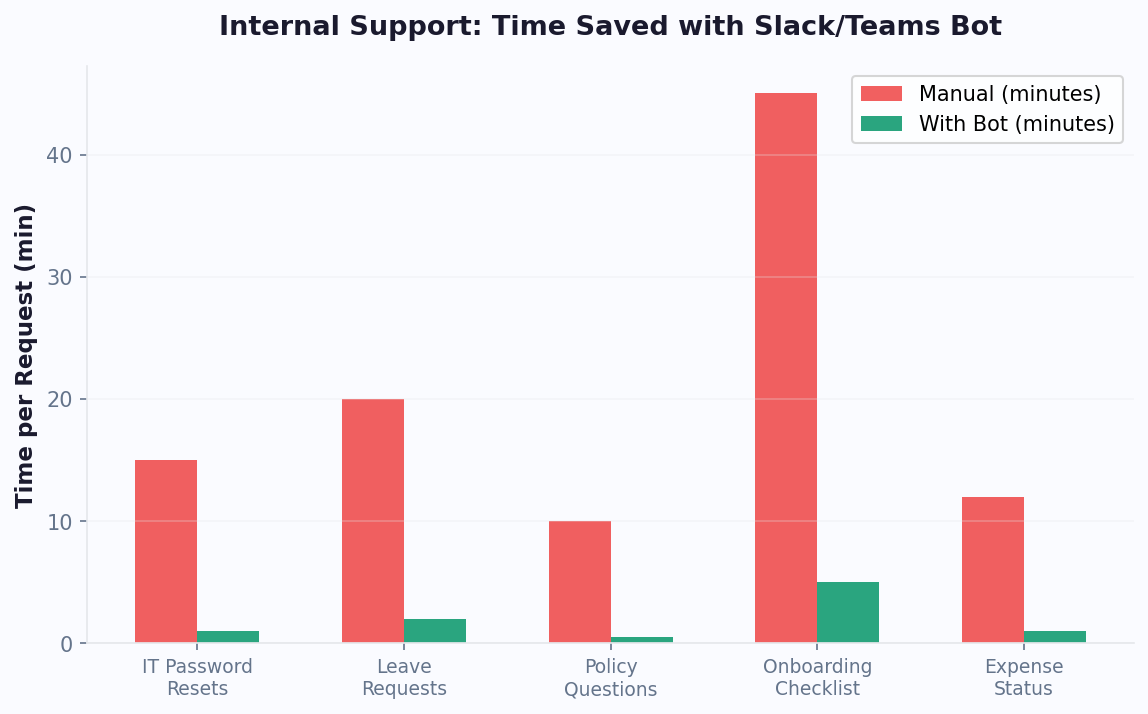
| Password reset | 25-30% | 95% | 45 minutes | 30 seconds |
| Software access request | 15-20% | 85% | 2-4 hours | 2 minutes |
| VPN/connectivity issues | 10-15% | 60% | 1-2 hours | 3 minutes |
| Printer/device setup | 5-10% | 70% | 1-3 hours | 5 minutes |
| Account unlock | 8-12% | 90% | 30 minutes | 15 seconds |
| Software how-to questions | 10-15% | 75% | 30-60 minutes | 1 minute |
| Hardware requests | 5-8% | 40% (triage only) | 1-5 days | 5 min (triage) |
Building the IT Support Flow
Using Conferbot's visual builder, create these core capabilities:
1. Knowledge Base Q&A
Upload your IT documentation, troubleshooting guides, and FAQ pages to the AI knowledge base. The chatbot answers questions by searching this content and delivering relevant answers in natural conversation. "How do I connect to VPN?" returns step-by-step instructions without the employee searching through a wiki.
2. Self-Service Workflows
- Password reset: Employee types "reset my password" → chatbot verifies identity (employee ID + email) → triggers password reset via API → sends temporary password via secure DM
- Software access: Employee requests access to a tool → chatbot collects justification and manager name → routes approval request to manager in Slack → on approval, triggers provisioning API
- Account unlock: Employee reports locked account → chatbot verifies identity → triggers unlock → confirms resolution
3. Smart Ticket Escalation
When the chatbot cannot resolve an issue, it creates a structured ticket with full context: employee name, department, issue description, troubleshooting steps already attempted, and screenshots. This eliminates the back-and-forth that typically adds 2-3 exchanges to every IT ticket. Tickets are routed to the right specialist based on issue category via help desk integration (Jira Service Management, Zendesk, ServiceNow).
Results From Real Deployments
Organizations deploying IT chatbots in Slack report:
- 68-75% of routine tickets resolved without human intervention
- Average resolution time drops from 24 hours to under 5 minutes for bot-handled issues
- IT team reclaims 150-250 hours per month (for a 1,000-person company) to focus on strategic projects, security, and infrastructure
- Employee satisfaction with IT support increases by 35-50% because responses are instant and available 24/7
Use Case 2: HR Automation - Employee Self-Service in Slack
HR teams face the same problem as IT: a flood of repetitive questions that consume time better spent on strategic work. A Slack chatbot transforms HR from a reactive question-answering service into a proactive employee experience platform.
Top HR Queries Handled by Chatbot
| Query Category | % of HR Inquiries | Bot Resolution Rate | Example Questions |
|---|---|---|---|
| PTO / Leave balance | 25-30% | 95% | "How many vacation days do I have left?" |
| Benefits questions | 15-20% | 80% | "Does our dental plan cover orthodontics?" |
| Policy inquiries | 15-20% | 85% | "What is our remote work policy?" |
| Payroll questions | 10-15% | 70% | "When is the next payday?" "How do I update my W-4?" |
| Onboarding tasks | 10-15% | 90% | "What do I need to complete in my first week?" |
| Expense policy | 5-10% | 85% | "What is the meal expense limit for travel?" |
| Sensitive/complex HR | 5-10% | 0% (escalate) | Harassment, accommodation, termination |
Building the HR Chatbot Flow
1. HRIS Integration for Real-Time Data
Connect the chatbot to your HRIS (BambooHR, Workday, Gusto, Rippling) via a webhook or Zapier. This allows the chatbot to pull real-time, personalized data:
- "How many PTO days do I have?" → Bot checks HRIS → "You have 12 vacation days and 3 sick days remaining for 2026."
- "When is my next review?" → Bot checks performance cycle → "Your next performance review is scheduled for April 15, 2026."
2. Policy Knowledge Base
Upload your employee handbook, benefits guides, and policy documents to the AI knowledge base. The chatbot answers policy questions by searching these documents and delivering concise, conversational answers — not links to 50-page PDFs.
3. Onboarding Automation
New hire onboarding is one of the most impactful HR chatbot use cases. Instead of a static checklist email, the chatbot proactively guides new employees through each onboarding step:
- Day 1: Welcome message, IT setup instructions, first-day schedule, office tour video
- Day 2-3: Benefits enrollment reminder with step-by-step guidance
- Week 1: Introduction to key team members, company culture resources, and first project context
- Day 30: Check-in survey and any remaining onboarding tasks
Businesses using chatbot-driven onboarding report onboarding completion rates jumping from 65% to 92% and time-to-productivity decreasing for new hires.
4. Sensitive Topic Escalation
The chatbot must recognize sensitive topics (harassment, discrimination, accommodation requests, termination inquiries) and immediately route them to a human HR partner. Configure keyword and intent detection to trigger instant escalation with a message like: "I want to make sure you get the best possible help with this. I am connecting you with [HR Partner Name] who will follow up within 2 hours." Never attempt to automate responses for sensitive HR matters.
Use Case 3: Team Productivity - Workflows, Reminders & Knowledge Access
Beyond IT and HR, a Slack chatbot amplifies team productivity by automating everyday workflows that consume cumulative hours across the organization.
Productivity Workflows
1. Meeting Preparation Bot
Before recurring meetings (standups, sprint planning, 1:1s), the chatbot DMs participants to collect updates or agenda items. At the meeting time, it posts a compiled summary to the meeting channel. This eliminates the first 10-15 minutes of "going around the room" in every meeting.
- "What did you accomplish yesterday?"
- "What are you working on today?"
- "Any blockers?"
For a 10-person team with daily standups, this saves 50+ hours per month in meeting time.
2. Knowledge Search Assistant
Employees waste an average of 1.8 hours per day searching for information (McKinsey, 2025). With tools like Zapier's Slack integrations, connecting knowledge sources is straightforward. A Slack chatbot connected to your knowledge base, Confluence, Notion, or Google Drive surfaces answers instantly. "Where is the brand guidelines doc?" gets an answer in 3 seconds instead of 15 minutes of searching.
3. Approval Workflows
Route approval requests through Slack instead of email:
- Expense approvals: Employee submits via chatbot → manager gets Slack notification with details → approves/rejects with one click
- Time-off requests: Employee asks chatbot for time off → bot checks team calendar for conflicts → routes to manager → updates HRIS on approval
- Purchase requests: Employee submits via chatbot → routes based on amount (under $500: auto-approve, $500-$5000: manager, $5000+: VP)
The chatbot helps schedule meetings across time zones, find available conference rooms, and send agenda reminders. "Find 30 minutes for me and @sarah next week" checks both calendars and suggests optimal slots.
Productivity Impact Summary
| Workflow | Time Saved Per Employee/Month | For 500-Person Company |
|---|---|---|
| Standup automation | 2 hours | 1,000 hours |
| Knowledge search | 5 hours | 2,500 hours |
| Approval workflows | 1.5 hours | 750 hours |
| Scheduling assistance | 1 hour | 500 hours |
| IT self-service | 1.5 hours | 750 hours |
| HR self-service | 1 hour | 500 hours |
| Total | 12 hours | 6,000 hours/month |
At an average fully-loaded employee cost of $50/hour, 6,000 hours represents $300,000 per month in productivity gains for a 500-person company. Even conservative estimates (50% of projected savings) represent a massive ROI on a chatbot platform costing $500-$2,000 per month.
Measuring Productivity Gains Accurately
Productivity gains are harder to measure than ticket deflection, but no less real. Tracking these proxy metrics helps quantify the impact:
- Time between question and answer: Measure the average elapsed time from when an employee asks a question to when they receive a usable answer. Pre-chatbot baseline versus post-deployment gives you a clear improvement metric.
- Help channel message volume: Track messages in #it-help, #hr-questions, and similar channels before and after deployment. A reduction in volume indicates employees are getting answers from the bot instead of posting publicly.
- Meeting time reduction: If standup automation is active, compare total meeting minutes per team per week before and after. Even a 10-minute reduction per daily standup saves 50 minutes per team per week.
- New hire time-to-productivity: Track how quickly new employees complete onboarding milestones (tool access, training completion, first contribution) with and without chatbot assistance.
Present these metrics alongside cost savings in your monthly ROI report. Leadership responds to productivity metrics because they translate directly to capacity gains without additional headcount. For organizations building the business case, our chatbot ROI calculator guide provides a framework for projecting productivity gains specific to your company size and industry.
Setting Up Your Slack Chatbot: Technical Guide
Here is the step-by-step process to deploy a Slack chatbot for your organization. The no-code approach takes under an hour from start to live deployment.
Step 1: Create Your Conferbot Account and Slack Integration (10 Minutes)
- Sign up at Conferbot and select a plan that includes Slack integration
- Navigate to the integrations hub and click "Connect Slack"
- Authorize Conferbot in your Slack workspace (requires Slack admin permissions)
- Select which Slack channels the chatbot should monitor and respond in
Step 2: Build Your Core Flows (20 Minutes)
Using the visual flow builder, create your primary use case flows:
For IT Support:
- Create a "Password Reset" flow with identity verification and API trigger
- Create a "Software Access Request" flow with approval routing
- Upload IT documentation to the knowledge base for Q&A
- Configure escalation rules to create tickets in your help desk system
For HR:
- Connect your HRIS via API for real-time PTO and benefits data
- Upload employee handbook and policy documents to the knowledge base
- Create onboarding flow with day-by-day proactive messaging
- Configure sensitive topic detection and human escalation
For Productivity:
- Set up standup collection bot with scheduled DMs and channel posting
- Connect knowledge base sources (Confluence, Notion, Google Drive)
- Build approval workflow templates for expenses, time-off, and purchases
Step 3: Configure Channel Behavior (10 Minutes)
Define how the chatbot operates in different Slack contexts:
- DMs: Full chatbot functionality — IT support, HR queries, knowledge search
- #it-help channel: IT-focused responses, auto-triage and ticketing
- #hr-questions channel: HR-focused responses, policy lookups
- #general: Lightweight mode — only respond when directly @mentioned
Step 4: Test and Roll Out (15 Minutes)
- Test each flow in a private Slack channel with your team
- Verify integrations (HRIS data pull, help desk ticket creation, approval routing)
- Run a pilot with one department for 1-2 weeks
- Collect feedback, adjust flows, and expand to the full organization
Step 5: Announce to the Organization
A good internal launch message makes the difference between adoption and abandonment. Post in #general:
"We have launched [Bot Name] to help with IT, HR, and common questions. DM the bot or ask in #it-help and #hr-questions. It can reset passwords, check your PTO balance, answer policy questions, and more. Try asking it something now!"
Include 3-5 example questions employees can try immediately. First impressions drive adoption.
Security, Permissions, and Compliance Considerations
Deploying a chatbot that handles internal company data requires careful attention to security and compliance. Here are the key considerations and best practices.
Data Security Checklist
| Requirement | Why It Matters | How to Implement |
|---|---|---|
| Encryption in transit | Protects data between Slack and chatbot platform | Verify platform uses TLS 1.3 |
| Encryption at rest | Protects stored conversation data | Verify AES-256 encryption on platform |
| Role-based access | Limits who can see sensitive data | Configure roles: admin, agent, viewer |
| Data retention policies | Comply with privacy regulations | Set auto-delete after 90 days (or per policy) |
| Audit logging | Track who accessed what data | Enable comprehensive audit logs |
| SSO integration | Secure authentication for admin access | Connect SAML/OIDC provider |
Permission Boundaries
Not every employee should have access to the same chatbot capabilities. Configure permission tiers:
- All employees: Knowledge base Q&A, PTO lookup (own data only), policy questions, basic IT troubleshooting
- Managers: All of the above + team PTO overview, approval workflows, team analytics
- HR team: All of the above + employee data lookup, onboarding management, sensitive topic queue
- IT admins: All of the above + password reset capability, access provisioning, system status
Compliance Considerations
GDPR (EU employees): Ensure the chatbot platform stores data in GDPR-compliant regions. Implement data subject access requests (DSARs) so employees can request their chatbot interaction history. Include a privacy notice in the bot's first interaction.
SOC 2: If your organization requires SOC 2 compliance, verify the chatbot platform has SOC 2 Type II certification. This covers data security, availability, processing integrity, confidentiality, and privacy.
HIPAA (healthcare organizations): If the chatbot handles any health-related information (even benefits inquiries that reference medical conditions), ensure the platform is HIPAA-compliant with a signed Business Associate Agreement (BAA).
Data residency: Some organizations require data to remain within specific geographic regions. Verify the chatbot platform offers data residency options that match your requirements.
For external-facing chatbot security considerations, including GDPR compliance for customer-facing bots, see our GDPR compliance guide.
Measuring ROI: Proving the Business Case for Your Slack Chatbot
To justify the investment and secure continued funding, you need clear ROI metrics. Here is the framework for measuring and reporting your Slack chatbot's impact.
ROI Calculation Framework
| Cost Component | Before Chatbot | After Chatbot | Monthly Savings |
|---|---|---|---|
| IT ticket handling (routine) | 350 tickets x $18/ticket = $6,300 | 105 tickets x $18 = $1,890 | $4,410 |
| HR inquiry handling | 1,200 inquiries x $15/inquiry = $18,000 | 360 inquiries x $15 = $5,400 | $12,600 |
| Employee time searching for info | 5 hrs/employee x 500 x $50 = $125,000 | 2 hrs x 500 x $50 = $50,000 | $75,000 |
| Meeting prep overhead | 2 hrs/employee x 500 x $50 = $50,000 | 0.5 hrs x 500 x $50 = $12,500 | $37,500 |
| Chatbot platform cost | $0 | $1,500/month | -$1,500 |
| Net Monthly Savings | $128,010 |
Example based on a 500-person company. Scale proportionally for your organization size.
Key Metrics to Track
- Ticket deflection rate: % of inquiries resolved by bot without human intervention. Target: 60-75%
- Average resolution time: Time from question to answer. Target: under 2 minutes for bot-handled issues
- Employee adoption rate: % of employees who have used the bot at least once. Target: 80%+ within 3 months
- Employee satisfaction: Periodic survey asking "How satisfied are you with [Bot Name]?" Target: 4.0+/5
- Escalation rate: % of conversations requiring human agent. Lower is better, but 25-30% is healthy (some issues genuinely need humans)
- Knowledge gap identification: Number of unanswered questions per week. Each one is an opportunity to expand the knowledge base
Reporting Template
Present ROI to leadership monthly using this format:
- Volume: X conversations handled, Y tickets deflected, Z approvals automated
- Savings: $X in labor savings, $Y in productivity gains
- Quality: Employee satisfaction score, resolution time, adoption rate
- Opportunities: Top 5 unanswered questions (expansion targets), new workflow candidates
The Conferbot analytics dashboard provides most of these metrics automatically. For financial modeling, use our ROI calculator to project savings based on your organization's specific numbers.
Getting Started: Launch Your Slack Chatbot This Week
A Slack chatbot is one of the highest-ROI investments a growing business can make. It reduces internal friction, frees up specialist teams, and improves employee experience — all from a platform your team already uses every day.
Quick-Start Priorities by Company Size
| Company Size | Start With | Expand To | Expected Monthly Savings |
|---|---|---|---|
| 50-200 employees | HR FAQ + policy bot | IT support + onboarding | $5,000-$15,000 |
| 200-500 employees | IT support + HR self-service | Productivity workflows | $15,000-$50,000 |
| 500-2000 employees | IT + HR + onboarding | Full productivity suite | $50,000-$200,000 |
| 2000+ employees | IT helpdesk automation | Organization-wide self-service | $200,000+ |
Your First Week Roadmap
Day 1: Sign up for Conferbot, connect Slack integration, and upload your IT FAQ and employee handbook to the knowledge base.
Day 2: Build core flows: password reset, PTO lookup, and top 10 FAQ answers using the visual builder.
Day 3: Configure integrations: HRIS for employee data, help desk for ticket escalation, analytics for reporting.
Day 4: Pilot with your IT and HR teams in a test channel. Collect feedback and refine.
Day 5: Launch to one department. Announce with example questions.
Week 2: Roll out organization-wide. Monitor adoption and address gaps.
Recommended Reading
- Slack Chatbot for IT Support — deep dive on IT automation for Slack
- Microsoft Teams Chatbot for HR — alternative for Teams-first organizations
- Chatbot for Employee Onboarding — detailed onboarding automation strategies
- Chatbot Analytics Metrics — measure and optimize your internal bot performance
- How to Build a Chatbot Without Coding — step-by-step building guide
- 10 Chatbot Case Studies With Real ROI — proven results from real deployments
- Customer Support Chatbot Guide — for external-facing support automation
The businesses that gain the most from Slack chatbots are those that start focused (one use case), measure rigorously (weekly analytics review), and expand deliberately (add new flows based on data). Start with IT or HR support, prove the ROI, and build from there. The combination of immediate cost savings, productivity gains, and employee experience improvements makes a Slack chatbot one of the highest-return technology investments available to growing organizations in 2026.
Driving Adoption: How to Get Employees to Actually Use the Slack Chatbot
Deploying a Slack chatbot is the easy part. Getting 80%+ of employees to adopt it as their primary self-service tool is the real challenge. Low adoption means low ROI, wasted investment, and continued pressure on IT and HR teams. Here are the proven strategies for driving internal chatbot adoption.
The 3 Barriers to Internal Chatbot Adoption
- Awareness: Employees do not know the bot exists or what it can do (most common barrier, accounting for 50% of non-adoption)
- Trust: Employees tried the bot once, got a poor answer, and never came back (accounts for 30%)
- Habit: Employees know the bot exists but default to their old behavior of DMing the IT person directly (accounts for 20%)
Solving Awareness: The Launch Campaign
A single #general announcement is not enough. Effective launch campaigns include:
- Executive sponsorship: Have a VP or C-level post about the bot and visibly use it ("Just asked @BotName about our PTO policy - got my answer in 3 seconds!")
- Channel pinning: Pin a bot capabilities message in every relevant channel (#it-help, #hr-questions, #general)
- Demo video: Create a 60-second Loom video showing 3 example interactions. Post in #general and share in team meetings.
- Drip reminders: Week 1, 2, and 4 follow-up posts with new use cases and "did you know" tips
Solving Trust: First Impressions and Recovery
The chatbot must deliver a great experience on first interaction. If an employee asks their first question and gets "I do not have information about that," they label the bot as useless and never return. To prevent this:
- Pre-load the top 50 questions employees ask (pull from IT and HR ticket history)
- Set confidence thresholds conservatively - better to say "Let me connect you with someone who can help" than to give a wrong answer
- Monitor first-time user interactions for the first 30 days and immediately fix any gaps that appear
Solving Habit: Redirection Strategy
When employees DM the IT team directly instead of using the bot, have IT team members respond with: "Great question! @BotName can answer this instantly - try asking it directly. For future reference, the bot handles [password resets, PTO lookups, software access, etc.] in seconds." This gentle redirection, done consistently for 2-3 weeks, breaks the old habit and establishes the new behavior. Within 6-8 weeks of consistent redirection, most organizations see 70-85% of routine inquiries flowing through the bot instead of direct DMs.
Advanced Integrations: Connecting Your Slack Chatbot to the Full Tech Stack
The true power of a Slack chatbot emerges when it connects to your organization's full technology stack. Each integration multiplies the bot's value by automating another manual workflow.
Essential Integrations by Priority
| Priority | Integration | What It Enables | Time Saved |
|---|---|---|---|
| 1 | HRIS (BambooHR, Workday, Gusto) | PTO lookup, org chart, benefits data | 5 min per query |
| 2 | Help desk (Jira, ServiceNow, Zendesk) | Ticket creation, status updates, escalation | 10 min per ticket |
| 3 | Knowledge base (Confluence, Notion) | Instant document search and answers | 15 min per search |
| 4 | IAM (Okta, Azure AD) | Password resets, account unlocks, access grants | 20 min per reset |
| 5 | Calendar (Google, Outlook) | Meeting scheduling, room booking | 5 min per booking |
| 6 | Expense (Expensify, Brex) | Expense submission, policy lookup, approvals | 10 min per submission |
Building Custom Integrations
For internal tools that do not have pre-built connectors, use webhook-based integrations. The chatbot sends structured data to your internal APIs when triggered by specific user actions. Common custom integrations include:
- Internal employee directory: "Who is responsible for marketing in APAC?" pulls from your org chart API
- Office/facility management: "Is the NYC office open tomorrow?" checks your facilities calendar
- Customer lookup: "What is the status of account #12345?" checks your CRM (for authorized roles only)
- Release status: "When is v2.4 shipping?" checks your project management tool
Integration Security Best Practices
Each integration expands the chatbot's access to sensitive systems. Implement these safeguards:
- Least privilege: Grant the bot read-only access where possible. Only enable write access for specific, approved workflows (like password resets).
- Role-based data access: An employee should only see their own PTO balance, not their colleagues'. Implement per-user data scoping.
- Audit trail: Log every integration action the bot takes, including who triggered it and what data was accessed.
- Rate limiting: Prevent abuse by limiting the number of sensitive operations (password resets, access grants) any single user can trigger per day.
Compliance Frameworks and Certifications to Verify
When selecting a chatbot platform for internal Slack deployment, verify these compliance certifications based on your industry. G2's chatbot platform reviews include compliance data for most major vendors:
| Industry | Required Certifications | Key Data Considerations |
|---|---|---|
| Technology / SaaS | SOC 2 Type II | API security, token management, data encryption |
| Healthcare | SOC 2 + HIPAA BAA | PHI handling, minimum necessary standard, audit trails |
| Financial Services | SOC 2 + PCI DSS (if payments) | Data residency, transaction logging, regulatory reporting |
| Education | SOC 2 + FERPA | Student data protection, parental consent, data minimization |
| Government | FedRAMP or equivalent | Data sovereignty, clearance requirements, air-gapped options |
The NIST Cybersecurity Framework provides a useful baseline for evaluating chatbot platform security postures regardless of industry. For organizations with GDPR obligations, our chatbot GDPR compliance guide covers the specific requirements for conversation data handling across borders. Organizations using both Slack and Teams can deploy the same chatbot on both platforms; see our Microsoft Teams chatbot for HR guide for Teams-specific deployment considerations.
Was this article helpful?
Build and deploy in 10 minutes. No coding needed.
Slack Chatbot for Business FAQ
Everything you need to know about chatbots for slack chatbot for business.
About the Author
The Conferbot team writes about building, deploying, and improving AI chatbots.
View all articlesRelated Articles

From the reference shelf
Fact-checked reference pages and free tools for the platform this article covers.