
Why Every Business Needs a WhatsApp Chatbot in 2026
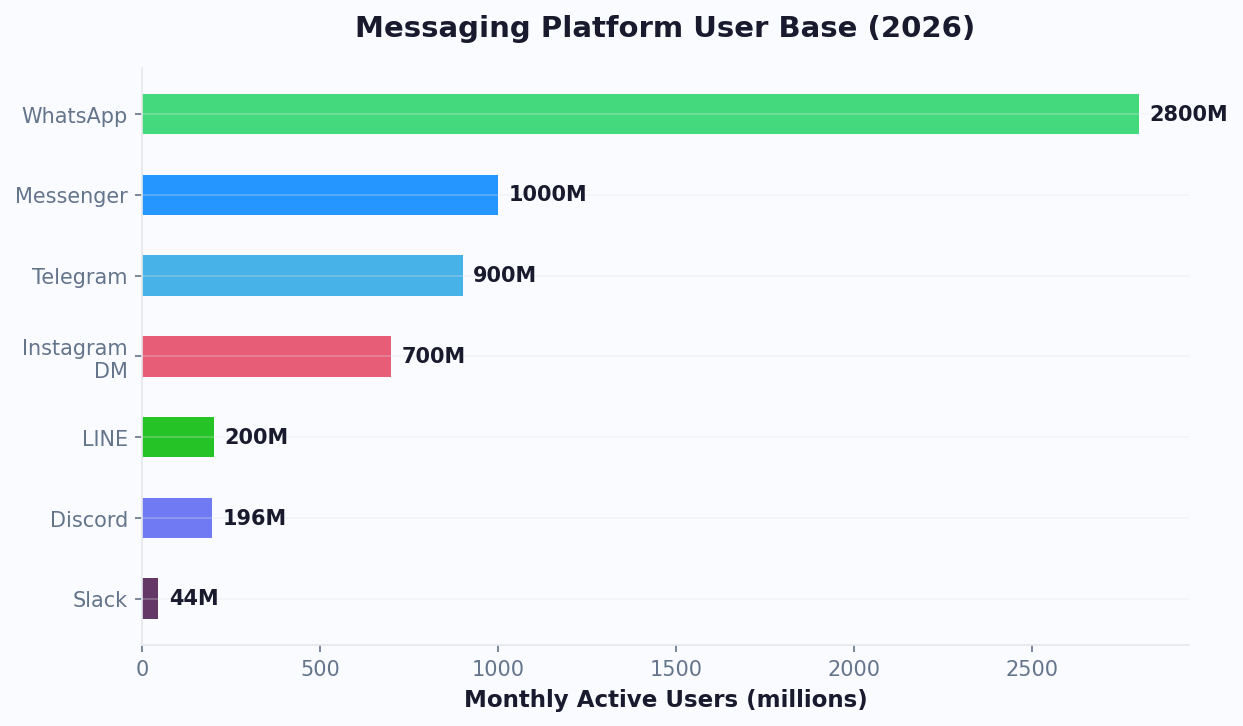
WhatsApp has 2.8 billion active users as of 2026 - that is more than Instagram, TikTok, and Twitter combined. In markets like India, Brazil, Indonesia, and across Europe, WhatsApp is not just a messaging app. It is THE way people communicate with businesses.
The Numbers That Matter
- 98% open rate on WhatsApp messages (compared to 20% for email)
- 45-60% click-through rate on WhatsApp campaigns (compared to 2-3% for email)
- Many consumers prefer messaging a business over calling
- Many consumers have messaged a business on WhatsApp in the past year
- higher conversion rates from WhatsApp conversations compared to website forms
Yet most businesses still rely on email and phone. The gap between customer preference and business adoption is enormous - and it is an opportunity for anyone who moves now.
What a WhatsApp Chatbot Actually Does
A WhatsApp chatbot is an automated assistant that handles conversations on your WhatsApp Business number. It can:
- Answer FAQs instantly: Business hours, pricing, product details, shipping info
- Capture leads: Qualify prospects, collect contact details, route to sales
- Book appointments: Show available slots, confirm bookings, send reminders
- Process orders: Product browsing, cart management, payment collection
- Provide support: Order tracking, returns, troubleshooting, ticket creation
- Send notifications: Order confirmations, shipping updates, appointment reminders
It runs 24/7, handles unlimited simultaneous conversations, and costs a fraction of a human support team. When it encounters something it cannot handle, it seamlessly hands off to a human agent with full context.
WhatsApp Business App vs WhatsApp Business API: Which Do You Need?
This is where most guides lose people. There are two different WhatsApp Business products, and they serve very different purposes.
WhatsApp Business App (Free)
What it is: A free mobile/desktop app for small businesses. Download from app stores, set up a business profile, and use basic automation features.
Features:
- Business profile (hours, address, description, catalog)
- Quick replies (saved responses for common messages)
- Labels for organizing chats
- Away messages and greeting messages
- Product catalog display
Limitations:
- Manual operation - someone must reply to each message
- Can only be used on one device at a time (or up to 4 linked devices)
- No chatbot automation (only canned quick replies)
- No integration with CRM, calendars, or other tools
- Cannot send bulk messages or notifications
- Does not scale beyond 100 messages/day without being flagged
Good for: Sole proprietors handling fewer than 20 messages per day
WhatsApp Business API (Required for Chatbots)
What it is: An API that lets you connect WhatsApp to chatbot platforms, CRM systems, and custom software. This is what powers every WhatsApp chatbot you have interacted with.
Features:
- Automated chatbot conversations (no human required)
- Unlimited simultaneous conversations
- CRM and tool integrations
- Message templates for outbound notifications
- Rich media (images, documents, buttons, lists)
- Multi-agent access (entire team can manage conversations)
- Analytics and reporting
Cost: The API itself is free to access through a Business Solution Provider (BSP). Meta charges per delivered message, at rates set by the recipient's country and the message category. The chatbot platform (like Conferbot) handles the integration.
Good for: Any business receiving more than 20 messages/day or wanting automation
The Verdict
If you want a chatbot (which is why you are reading this), you need the WhatsApp Business API. The Business App does not support automation. The good news: connecting to the API is now painless - platforms like Conferbot handle the entire setup process for you.
Step-by-Step: Set Up Your WhatsApp Chatbot for Free
Here is the exact process to go from zero to a working WhatsApp chatbot. Total time: approximately 30 minutes.
Step 1: Create a Meta Business Account (5 Minutes)
WhatsApp is owned by Meta. You need a Meta Business account to access the WhatsApp Business API.
- Go to business.facebook.com and create an account (or log in if you have one)
- Add your business details: name, address, website
- Verify your business (Meta may require documentation for some industries)
If you already run Facebook or Instagram ads, you likely have a Meta Business account already.
Step 2: Choose a Chatbot Platform and Connect WhatsApp (10 Minutes)
You need a chatbot platform that supports WhatsApp Business API integration. Options include Conferbot, Twilio, MessageBird, and others.
On Conferbot, the process is:
- Sign up for a free account
- Go to Channels > WhatsApp
- Click "Connect WhatsApp Business"
- Authorize the connection with your Meta Business account
- Select or create a WhatsApp Business phone number
- Verify the number via SMS or voice call
The platform handles the API connection, webhook configuration, and message routing automatically. No developer needed.
Step 3: Get Your Number Approved (5-15 Minutes)
Meta reviews new WhatsApp Business numbers. For most businesses, approval is near-instant. Some industries (healthcare, finance, gambling) may require additional verification.
While waiting for approval, you can build your chatbot flows.
Step 4: Build Your Chatbot Flow (5-10 Minutes)
Using the AI chatbot builder, describe what you want:
"Build a WhatsApp chatbot for a dental clinic. Greet patients, offer options: book appointment, check hours, ask about insurance accepted, or speak to reception. For appointments, show available time slots from our calendar and confirm the booking."
The AI generates the complete flow. Customize any part you want to change.
Step 5: Set Up Message Templates (5 Minutes)
WhatsApp requires pre-approved templates for outbound messages (messages you initiate, not replies). Common templates:
- Appointment reminder: "Hi {{name}}, your appointment is tomorrow at {{time}}. Reply 1 to confirm or 2 to reschedule."
- Order update: "Your order #{{order_id}} has shipped! Track it here: {{tracking_link}}"
- Welcome message: "Welcome to {{business}}! How can I help you today?"
Submit templates through your chatbot platform. Meta typically approves them within 1-24 hours. If the number gets stuck before that point - an OTP that never arrives, a two-step PIN error, a display name in review - our guide to WhatsApp number registration failed covers each stage and its fix.
Step 6: Test and Go Live (2 Minutes)
- Send a test message to your WhatsApp Business number from your personal phone
- Verify the chatbot responds correctly
- Test each conversation path
- Check that calendar bookings, form submissions, and integrations work
- Go live - share your WhatsApp number on your website, social media, and marketing materials
10 High-Impact WhatsApp Chatbot Use Cases (With Message Examples)
1. Appointment Booking
Industries: Healthcare, salons, real estate, consulting, legal
Bot: "Hi! I'd like to book an appointment. When works for you?"
Customer chooses from time slot buttons
Bot: "Perfect! You're booked for Thursday at 2 PM with Dr. Smith. I'll send a reminder tomorrow. Need anything else?"
Reduces phone calls by 50-70% and no-shows by 25-40% through automated reminders.
2. Order Tracking
Industries: E-commerce, food delivery, logistics
Customer: "Where's my order?"
Bot: "Let me check! What's your order number or the email you used?"
Customer provides info
Bot: "Order #4821 shipped yesterday via FedEx. Tracking: [link]. Estimated delivery: April 29. Want me to notify you when it arrives?"
Deflects 40-60% of "where is my order" support tickets.
3. Product Recommendations
Industries: E-commerce, beauty, fashion, electronics
The bot asks about preferences (style, budget, occasion) and suggests products from your catalog with images and direct purchase links. Stores using WhatsApp product recommendation bots see higher average order values.
4. Lead Qualification
Industries: B2B SaaS, agencies, real estate, financial services
The bot asks qualifying questions (company size, budget, timeline, primary need), scores the lead, and routes hot leads to sales immediately while nurturing warm leads with automated follow-up sequences.
5. Customer Support FAQ
Industries: Any business with recurring questions
Train the bot on your knowledge base and it answers product questions, policy questions, and how-to questions instantly. Handles 60-80% of common queries without human involvement.
6. Restaurant Ordering
Industries: Restaurants, cafes, food trucks, catering
Share your menu via WhatsApp catalog, let customers order through conversational flow, confirm orders, and send preparation/delivery updates. Eliminates commission fees from delivery apps for direct orders.
7. Abandoned Cart Recovery
Industries: E-commerce
Bot: "Hi Sarah! You left some items in your cart - the Blue Running Shoes (Size 8). Still interested? I can answer any questions about sizing or shipping."
WhatsApp abandoned cart messages recover 15-25% of carts (vs 5-10% for email).
8. Event Registration and Updates
Industries: Event organizers, conferences, workshops, webinars
Handle registrations, send ticket confirmations, provide event day logistics, send schedule updates, and collect post-event feedback - all through WhatsApp.
9. Insurance Claims
Industries: Insurance companies, brokers
Guide customers through claim filing step-by-step, collect photos and documents via chat, provide status updates, and escalate complex claims to adjusters with full context attached.
10. Tenant Communication
Industries: Property management, real estate
Handle maintenance requests (with photo uploads), rent payment reminders, lease renewal notifications, and community updates.
WhatsApp Chatbot Best Practices: What Works and What Gets You Banned
What Gets You Banned (Seriously)
WhatsApp is aggressive about protecting user experience. Violating their policies can get your number permanently banned. Avoid these:
- Spamming: Sending unsolicited promotional messages to people who have not opted in. This is the #1 reason for bans.
- Buying contact lists: Only message people who explicitly gave you their WhatsApp number and consented to receive messages.
- Ignoring opt-outs: If someone says "stop" or "unsubscribe," you must honor it immediately.
- Exceeding rate limits: New numbers start with low sending limits. Sending too many messages too fast triggers blocks.
- Misleading templates: Message templates must accurately describe their content. Bait-and-switch gets templates rejected and accounts flagged.
What Works Best
1. Get consent before messaging: Add a WhatsApp opt-in checkbox to your website forms. Use click-to-WhatsApp ads on Facebook/Instagram. Include your WhatsApp number on your website with a "Message us" CTA.
2. Respond fast to user-initiated messages: WhatsApp gives you a 24-hour "conversation window" when a user messages you first. During this window, you can send any messages (no template approval needed). After 24 hours, you can only send pre-approved templates. Make the most of that window.
3. Use rich media: WhatsApp supports images, videos, documents, location pins, contact cards, interactive buttons, and list menus. Conversations with rich media have higher engagement than text-only. Use interactive elements wherever possible.
4. Keep messages concise: WhatsApp is a chat platform, not email. Messages should be 1-3 short paragraphs max. Break longer content into multiple messages. Use bullet points and emojis sparingly to improve readability.
5. Personalize everything: Use the customer's name, reference their previous interactions, and tailor recommendations based on their history. WhatsApp conversations feel personal - generic broadcasts feel spammy.
6. Always offer a human option: Even the best bot cannot handle everything. Include a clear "Talk to a human" option at every stage. Live chat handoff should preserve the full conversation so the customer never repeats themselves.
7. Set expectations: Let users know they are chatting with a bot. "Hi! I'm the [Business Name] assistant. I can help with appointments, product info, and order tracking. Type 'agent' anytime to reach a human." Transparency builds trust.
WhatsApp Chatbot Costs Breakdown: What You Actually Pay
"Free WhatsApp chatbot" needs context. There are two separate bills: the chatbot platform, and Meta's charges for the messages you send.
Meta's WhatsApp Business API pricing: per message
Since 1 July 2025 Meta charges per delivered message, not per 24-hour conversation, and there is no longer a monthly allowance of free conversations. Since 1 October 2026 your replies inside the 24-hour customer service window are billed too. What stays free: every message customers send you, and conversations opened from a Click-to-WhatsApp ad or a Facebook Page button, which are free for 72 hours.
| Category | What it is | US / Canada | India | Brazil |
|---|---|---|---|---|
| Marketing template | Offers, announcements, re-engagement | $0.0250 | $0.0118 | $0.0625 |
| Utility template | Order updates, reminders, receipts | $0.0040 | $0.0014 | $0.0080 |
| Authentication template | One-time passcodes | $0.0135 | $0.0014 | $0.0315 |
| Service reply | Your free-form replies inside the 24-hour window | Billed at the market's utility rate since 1 October 2026 (free until 30 September 2026) | ||
| Inbound message | Anything the customer sends you | Always free | ||
Per delivered message, USD, Meta's July 2026 entry-tier rate card, verified 19 August 2026. Rates follow the recipient's country and Meta revises them periodically - check your own rate card in WhatsApp Manager or use the WhatsApp API cost calculator.
Chatbot platform costs
| Conferbot plan | Price | Conversations / month | WhatsApp included? |
|---|---|---|---|
| Free | $0 | 600 | Yes |
| Starter | $19/mo | See pricing | Yes |
| Pro | $39/mo | See pricing | Yes |
| Business | $59/mo | 10,000 | Yes |
Channels are not locked to paid plans, so the WhatsApp channel works on the Free plan. Meta's message charges are separate and billed by Meta.
Example monthly bills
| Business | What it sends each month (US) | Meta | Conferbot | Total |
|---|---|---|---|---|
| Salon answering questions | 400 service replies, 200 utility reminders | $2.40 | $0 (Free) | $2.40 |
| Online shop | 4,000 service replies, 3,000 order updates, 1,000 marketing | $53.00 | $39 (Pro) | $92.00 |
| High-volume support | 20,000 service replies, 10,000 utility, 2,000 authentication | $147.00 | $59 (Business) | $206.00 |
Volumes are illustrative; plug in your own with the cost calculator.
What "free" actually means
You can build a WhatsApp chatbot and connect it for $0: Conferbot's Free plan includes the WhatsApp channel, and Meta does not charge for API access or for messages customers send you. What you pay for is what the bot sends - a fraction of a cent per reply in many countries, more for marketing. For a small business answering questions, that is usually a few dollars a month. Read what is actually free on the WhatsApp Business API for the full breakdown.
WhatsApp Business API vs Cloud API: Which to Choose in 2026
One of the most confusing decisions when setting up a WhatsApp chatbot is choosing between the On-Premises Business API and the Cloud API. Meta offers both, and the right choice depends on your volume, compliance requirements, and technical capacity. Here is a clear breakdown to eliminate the confusion.
What Are the Two Options?
The On-Premises API (also called the "client API") requires you to host the WhatsApp API on your own servers or through a Business Solution Provider (BSP) like Twilio, MessageBird, or 360dialog. You manage the infrastructure, scaling, and updates.
The Cloud API (introduced by Meta in 2022 and now the default) is hosted entirely on Meta's servers. You connect via Meta's Graph API - no server management, no Docker containers, no scaling worries.
Head-to-Head Comparison
| Factor | On-Premises API | Cloud API | Winner |
|---|---|---|---|
| Hosting | Self-hosted or BSP-hosted | Meta-hosted | Cloud (zero infrastructure) |
| Setup time | Days to weeks (server provisioning) | Minutes (API key + webhook) | Cloud |
| Cost | BSP fees + hosting + per-message fees | Per-conversation fees only (no BSP markup) | Cloud (30-50% cheaper) |
| Message throughput | 80 messages/second (default) | 80 messages/second (default), scalable on request | Tie |
| Media message size | Up to 64 MB | Up to 100 MB | Cloud |
| Feature availability | Delayed (new features hit Cloud first) | First to receive new features (Flows, reactions, etc.) | Cloud |
| Data residency | Your choice of data center location | Meta's data centers (US/EU) | On-Premises (for strict compliance) |
| Uptime responsibility | You manage uptime and failover | Meta manages (99.9%+ SLA) | Cloud |
| Webhook reliability | Depends on your infrastructure | Meta-managed, highly reliable | Cloud |
| Multi-number management | Separate instance per number | Multiple numbers per account | Cloud |
When to Choose Cloud API (Most Businesses)
For many businesses, the Cloud API is the correct choice in 2026. Choose Cloud API if:
- You want the fastest and cheapest setup
- You do not have strict data residency requirements (e.g., data must remain in a specific country)
- You use a chatbot platform like Conferbot that handles the Cloud API connection for you
- You want access to the latest features immediately (WhatsApp Flows, interactive messages, rich media)
- Your volume is under 100,000 conversations per month
The cost advantage is significant. On-Premises API through a BSP typically adds $0.005-0.02 per message in BSP markup on top of Meta's conversation fees. Cloud API eliminates this entirely, saving 30-50% on messaging costs for most businesses.
When to Choose On-Premises API
Choose On-Premises only if you have specific regulatory or technical requirements:
- Data sovereignty: Regulated industries (healthcare, finance, government) in certain countries that require data to remain within national borders
- Custom encryption: Need to add additional encryption layers beyond Meta's end-to-end encryption
- Extreme volume: Sending millions of messages daily and need custom throughput optimization
- Legacy integration: Existing systems already built around the On-Premises API that would be costly to migrate
Migration Path: On-Premises to Cloud
Meta actively encourages migration to Cloud API and has made the process straightforward. You can migrate your existing phone number from On-Premises to Cloud without losing your display name, quality rating, or messaging limits. The migration typically takes 15-30 minutes of downtime. If you are currently on On-Premises through a BSP, talk to your chatbot platform about migrating - most platforms, including Conferbot, handle the migration process for you.
How Chatbot Platforms Abstract the Choice
The good news: if you use a no-code chatbot platform, the API choice is largely invisible. Platforms like Conferbot connect to the Cloud API by default, handle authentication, webhook management, and message routing behind the scenes. You build your chatbot flows in the visual builder, and the platform manages the API layer. Whether you are on Cloud or On-Premises, your chatbot flows, calendar bookings, and integrations work identically. Focus on the customer experience, not the plumbing.
WhatsApp Compliance and Policy Changes for 2026
WhatsApp's business messaging policies change frequently, and violations can result in permanent account bans. Understanding the 2026 compliance landscape is essential for any business deploying a WhatsApp chatbot. Here are the key rules and recent changes you must follow.
2026 Policy Updates
Meta introduced several significant policy changes effective January 2026:
- Utility message templates now free for 72 hours - previously 24 hours. This means post-purchase updates, shipping notifications, and appointment confirmations can continue for three days without incurring per-conversation charges.
- Marketing message opt-in verification - Meta now requires documented proof of opt-in for marketing templates. Random broadcasting without evidence of consent results in account restriction within 48 hours.
- Quality rating enforcement - Accounts with "Low" quality ratings for 7+ consecutive days face sending limits reduced to 250 messages/day. Recovery requires maintaining "Medium" or higher for 14 days.
Compliance Checklist for WhatsApp Chatbots
| Requirement | What It Means | How to Comply |
|---|---|---|
| Explicit opt-in | Users must actively consent to receive messages | Checkbox on forms, click-to-WhatsApp ads, or keyword opt-in |
| Easy opt-out | Users can stop messages at any time | Honor STOP keyword, provide unsubscribe button in every broadcast |
| Template accuracy | Templates must match their approved category | Do not submit utility templates containing promotional content |
| 24-hour window | Free-form messages only within the conversation window | Use approved templates for messages outside the 24-hour window |
| No sensitive content | Health, finance, political content restricted | Review Meta's restricted content list before template submission |
For detailed privacy compliance guidance beyond WhatsApp-specific rules, read our GDPR compliance guide. According to G2's conversational marketing category, compliance-related account bans affected 12% of businesses using WhatsApp chatbots in 2025 - almost always due to sending marketing messages without proper opt-in documentation.
Businesses maintaining strict opt-in processes tend to achieve higher engagement rates on WhatsApp than those with loose consent practices. Quality over quantity applies to messaging channels as much as email. User-initiated conversations (where customers message you first) tend to have meaningfully higher satisfaction scores than business-initiated outreach.
For a broader understanding of chatbot rules across messaging platforms, see our guide on WhatsApp chatbot rules for 2026. Understanding these rules before deployment prevents costly account suspensions and ensures your chatbot investment delivers sustained results. Use the latest chatbot statistics to benchmark your WhatsApp engagement against industry averages.
Seven Build Mistakes That Keep a Free WhatsApp Bot From Performing
Most free WhatsApp chatbots that fail do not fail because they are free. They fail on execution details that cost nothing to fix. These are the seven that come up most often, and each one is a build decision rather than a plan limitation.
1. Too many options in one menu
WhatsApp permits three reply buttons on an interactive message, and list messages support up to ten rows. Beginners try to cram every path into the first menu, and the result is a wall of choices nobody reads. Fix: limit the main menu to three or four top actions and nest the rest. Most users only ever need two or three paths.
2. No fallback for unrecognised messages
People type free-form text even when you have given them buttons. If the bot ignores anything that is not a button tap, those users are lost silently. Fix: add a fallback that acknowledges the message, re-presents the menu, and - on platforms with natural language understanding - matches common phrasings to the nearest intent.
3. Designing flows that ignore the 24-hour window
An elaborate multi-day flow will hit the free-form messaging window and stop. Fix: design flows to resolve inside a single session, and use approved templates for anything that has to reach the customer later. This is a structural decision, not something you can patch after launch.
4. No path to a human
A bot that cannot escalate frustrates exactly the customers who matter most. On a free tier you may not have a full team inbox, but you still need a route. Fix: add a "Talk to a person" option that forwards the conversation to a designated number, emails your team, or logs a callback request. Our live chat handoff guidance covers how to make the transition feel continuous.
5. A welcome message that asks the customer to do the thinking
"Hi! How can I help you today?" puts the entire cognitive load on the user. Fix: lead with the two or three things the bot can actually do - book an appointment, check an order, answer a pricing question - so the first tap is obvious.
6. Building on desktop and never testing on a phone
You design in a browser dashboard; your customers read on a phone. Button labels truncate, long paragraphs collapse behind a "read more", and images crop differently. Fix: walk every flow on a real handset before launch. Keep reply button labels short - WhatsApp truncates them - and keep individual messages to a few lines.
7. Never reading the data after launch
Drop-off points, unanswered questions and dead ends are all visible, and all invisible if nobody looks. Fix: book fifteen minutes a week with your chatbot analytics. Ask three questions: where do people leave, what do they type into the fallback, and which path completes least often. Fix the worst one each week.
None of these seven requires a paid plan. They are the difference between a free WhatsApp bot that sits idle and one that carries real conversations, and they are worth working through before you conclude that the free tier is the constraint.
Advanced WhatsApp Chatbot Features Most Businesses Miss
Click-to-WhatsApp Ads
Run Facebook and Instagram ads that open a WhatsApp conversation when clicked. Instead of sending ad traffic to a landing page, the visitor lands straight in a conversation with your chatbot, and Meta does not charge for messages in the 72-hour window that the ad opens.
Setup: Create an ad in Meta Ads Manager, select "Messages" as the objective, choose WhatsApp as the destination, and connect it to your chatbot flow. The bot qualifies leads automatically from ad clicks.
WhatsApp Catalog Integration
Display your product catalog directly in WhatsApp. Customers browse products, view images and prices, and add items to cart without leaving the chat. Perfect for retail, food delivery, and service menus.
Interactive Buttons and List Menus
Instead of asking customers to type responses, use interactive buttons (up to 3 options) and list menus (up to 10 options with descriptions). These reduce friction, prevent typos, and increase completion rates.
Flows (WhatsApp Flows)
WhatsApp Flows is Meta's native form builder within WhatsApp. Create multi-screen forms for lead capture, feedback collection, or data gathering that feel native to WhatsApp. The data flows directly into your chatbot and CRM.
Multi-Agent Inbox
When the chatbot escalates to a human, multiple agents can handle conversations from a shared inbox. Features like assignment rules, internal notes, and conversation tags keep your team organized. Team management features let you route conversations based on topic, language, or agent availability.
Broadcast Messages with Segmentation
Send promotional messages to opted-in customers segmented by purchase history, location, or behavior. Unlike email blasts with high open rates, WhatsApp broadcasts see high open rates. Use for: flash sales, new product launches, event invitations, and seasonal promotions.
WhatsApp + Your Entire Stack
Connect WhatsApp to everything: your CRM gets updated when a lead converts, your calendar gets booked when an appointment is confirmed, your help desk creates a ticket when the bot escalates, and your analytics dashboard tracks the entire customer journey from first message to purchase.
Maximizing Free-Tier Performance
Keep costs predictable by putting each message to work. Answer in one complete message rather than several fragments, send marketing templates only to people who opted in and are likely to act, and route campaigns through Click-to-WhatsApp ads so the first 72 hours are free. Track sends by category in your analytics and WhatsApp Manager. For platform costs at different volumes, see our chatbot pricing comparison.
Was this article helpful?
Build and deploy in 10 minutes. No coding needed.
How to Create a WhatsApp Chatbot for Free FAQ
Everything you need to know about chatbots for how to create a whatsapp chatbot for free.
About the Author
The Conferbot team writes about building, deploying, and improving AI chatbots.
View all articlesRelated Articles


From the reference shelf
Fact-checked reference pages and free tools for the platform this article covers.