
Flutter SDK Chatbot Builder
Cross-platform Flutter SDK for iOS, Android, Web, and Desktop. Material Design 3 components, full Dart null-safety support, and beautiful animations out of the box.
To build a Flutter SDK chatbot with Conferbot, sign up free, design your flow in the no-code visual builder, connect your Flutter SDK account, and publish - typically live in a few minutes with no coding. The free plan needs no credit card, and the same bot can also run on your website and other messaging channels.
Flutter Chatbot Features
Everything you need to build powerful automated conversations
True Cross-Platform
One codebase deploys to iOS, Android, Web, and Desktop with pixel-perfect rendering on every platform.
Material Design 3
Ships with M3 components that follow the latest design guidelines and support dynamic color theming.
Dart Null Safety
Fully null-safe API so your IDE catches potential errors at compile time, not runtime.
Customizable Widgets
Override any widget in the chat tree - from message bubbles to the input bar - with your own Flutter widgets.
Push Notifications
Integrate with Firebase Cloud Messaging to re-engage users with new bot messages and updates.
Smooth Animations
Built-in Hero transitions, message slide-ins, and typing indicators that run at a buttery 60fps.
State Management Ready
Works with Provider, Riverpod, Bloc, or any state solution you already use in your Flutter app.
Platform Optimizations
Adapts to Cupertino on iOS and Material on Android for a native look-and-feel on each platform.
Platform-Specific Rendering
Automatically adapt chat UI elements to match Material Design on Android and Cupertino style on iOS.
What Can You Build?
Get Started in 7 Simple Steps
Follow this guide to connect your Flutter chatbot
Add to pubspec.yaml: conferbot_flutter: ^1.0.0
Run flutter pub get
Import the package in your Dart file
Initialize with your bot ID
Add ConferbotChat widget to your widget tree
Customize with ConferbotTheme
Your Flutter chatbot is ready!
Introduction
Flutter has become the leading cross-platform framework, enabling developers to build natively compiled applications for iOS, Android, Web, macOS, Windows, and Linux from a single Dart codebase. Its adoption has exploded - Google reports over 1 million published Flutter apps, and companies like BMW, Alibaba, ByteDance, and eBay use it in production.
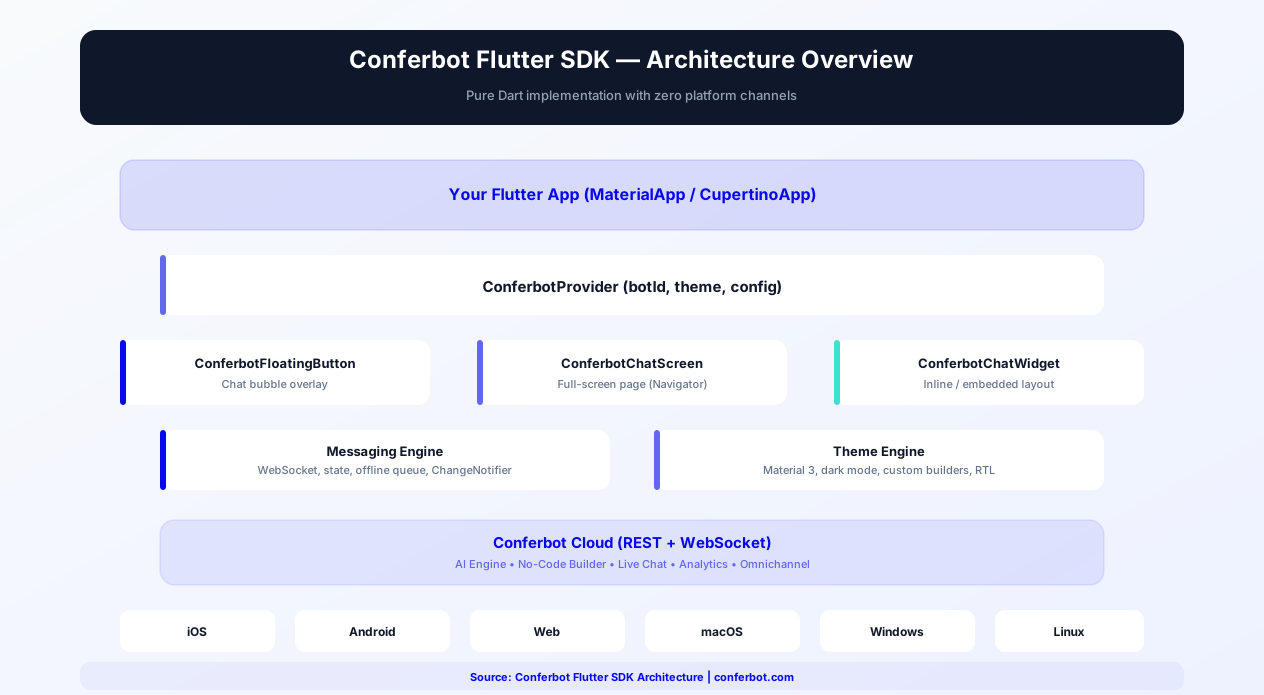
When you build with Flutter, you expect one codebase to cover both app stores. The Conferbot Flutter SDK delivers exactly that - a pure Dart chatbot package (conferbot_flutter on pub.dev) that embeds Conferbot into your iOS and Android apps with a single integration. It ships a floating chat bubble (ConferBotFAB) that mirrors your web widget, a drop-in ChatWidget rendering all 51 flow node types, and server-driven theming that applies your dashboard design automatically.
The SDK is built with Dart null-safety, integrates with Flutter's widget tree naturally (it is a ChangeNotifier under the provider package), and follows the same widget composition patterns Flutter developers already know. You get the full power of Conferbot's no-code chatbot builder, AI capabilities, and live chat - all rendered through native Flutter widgets instead of a WebView. It is also the most feature-complete Conferbot mobile SDK: voice message recording and playback, media viewers, and markdown rendering with syntax-highlighted code blocks are built in.
This guide covers everything you need to integrate a production-ready chatbot into your Flutter application in 2026: installation, key features, theming, state management, cross-platform deployment, push notifications, performance optimization, and a detailed comparison with React Native. Whether you are building a consumer app, enterprise SaaS product, or e-commerce platform, this guide gives you the complete integration playbook.
New to chatbot building? Start with our complete guide to building a chatbot without coding. The same chatbot works on your website, WhatsApp, Messenger, and native Android/iOS apps. Browse our template library for ready-to-deploy in-app chatbot flows. For teams evaluating mobile frameworks, see our dedicated React Native SDK guide.
Source code & documentation: flutter-sdk on GitHub | conferbot_flutter on pub.dev | Developer Portal Guide | Flutter official docs
Installation Guide
The Conferbot Flutter SDK is distributed as a standard Dart package via pub.dev, following Flutter's standard dependency management workflow.
Step 1: Add the Dependency
Add the package to your pubspec.yaml:
dependencies:
  conferbot_flutter: ^1.0.0
Step 2: Install
Run the install command:
flutter pub get
Step 3: Initialize Storage and the Provider
Import the package and, if you use session persistence (on by default), initialize Hive storage before runApp:
import 'package:conferbot_flutter/conferbot_flutter.dart';
WidgetsFlutterBinding.ensureInitialized(); await StorageService.init();
Then create one ConferBotProvider at the top of your tree (it is a ChangeNotifier, wired through the provider package). The bot ID is the operative credential; any placeholder apiKey works:
ChangeNotifierProvider(create: (_) => ConferBotProvider(apiKey: 'conf_test_key', botId: 'YOUR_BOT_ID'), child: MyApp())
No account yet? The public demo bot ID 691c970890527a0468f9b2c9 works without one - it is the same bot the example app ships with.
Step 4: Add the Chat UI
- Floating chat bubble (recommended) -
ConferBotFAB(child: yourContent)overlays the web-widget-style bubble; or use the one-linerConferBotFABScope(apiKey: ..., botId: ..., child: MaterialApp(...)), which creates the provider for you - Drop-in chat -
ChatWidget(title: 'Support Chat')is the complete chat UI: header, paginated message list, all 51 flow node types, offline banner, live agent handover, knowledge base, and the input bar. Push it with Navigator whenever you want to show the chat - Headless - Skip the bundled widgets and build your own UI on the provider's state (
record,currentUIState,isConnected) and actions (openChat,sendMessage,submitResponse)
Step 5: Configure Push Notifications (Optional)
For push notification support:
- Obtain a device token in your app (e.g. via the
firebase_messagingpackage for FCM, or APNs directly) - the SDK does not itself integrate Firebase - Register it against the current chat session:
await provider.registerPushToken(deviceToken)(a no-op until a chat session exists, so open the chat first)
Basic integration takes approximately 10 minutes. The SDK requires Flutter 3.10+ and Dart 3.0+ with full sound null-safety. For detailed installation troubleshooting, see the Flutter SDK guide on the developer portal.
Key SDK Features
The Conferbot Flutter SDK is designed to be a first-class Flutter citizen, following the framework's principles of composition, performance, and platform adaptivity.
Floating Chat Bubble (FAB)
The flagship integration pattern: wrap your app content in ConferBotFAB (or use the one-liner ConferBotFABScope) and you get the same bottom-corner chat bubble as the Conferbot web widget, with zero styling code. Tapping it opens the chat in a draggable bottom sheet (92% of screen height) and the icon morphs to a close state; a red unread badge appears when messages arrive while closed. The bubble is server-driven from your dashboard: color (widgetIconBgColor), diameter (widgetSize), left/right position, edge offsets, corner radius, launcher icon (all 15 web widget icons painted natively from widgetIconSVG), and the animated CTA tooltip (chatIconCtaText, shown after 2 seconds and dismissible). Server values always override the local ConferBotFABConfig fallbacks.
Complete Drop-In Chat UI
ChatWidget is the full chat experience: header with bot name and avatar, paginated message list, all 51 flow node types rendered natively, unified bottom input bar (answered choice bubbles stay in the transcript like the web widget), offline banner, live agent handover with pre-chat form and post-chat survey, knowledge base, and delivery status indicators. It calls openChat() on the provider automatically when it appears.
Cross-Platform From One Codebase
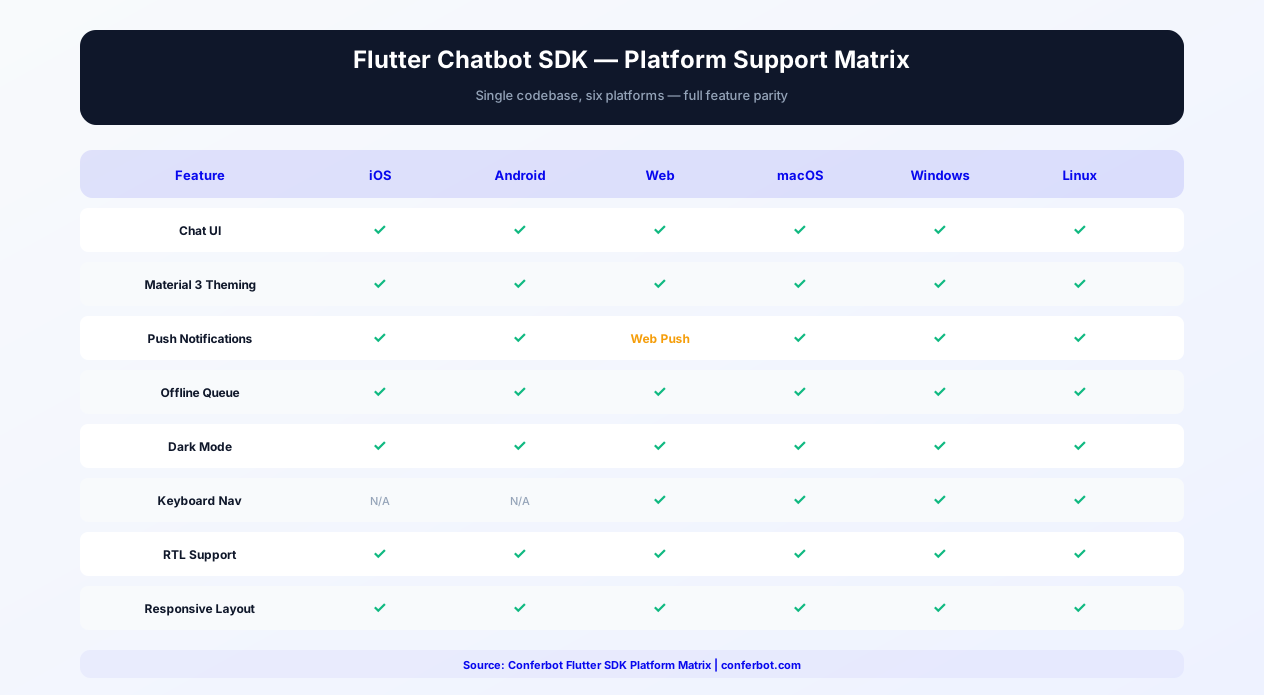
The SDK is a pure Dart package - no platform channels, no pod install headaches, no Gradle conflicts - built and tested for the platforms Flutter apps ship on most:
- iOS - Native Flutter rendering, identical to Android pixel for pixel
- Android - The demo recording and example app run against production on Android
- One integration - The same ConferBotProvider + ChatWidget code covers both stores
Dart Null-Safety
The entire SDK is written with sound null-safety, ensuring compile-time safety guarantees. No runtime null reference errors from the SDK - ever. This aligns with Flutter's push toward null-safe Dart code across the ecosystem.
Server-Driven Theming
When the widget connects, the server sends the bot's flow-builder customizations - the same ones the web widget uses: header colors, bubble colors, chat background, bot name, bot avatar, font size, and bubble border radius. The SDK builds a theme from them (ConferBotProvider.serverTheme) and applies it with no code on your side. Server settings override local themes; your ConferBotTheme applies only when the bot has no dashboard customizations.
Voice Messages, Media, and Markdown
Unique among the Conferbot mobile SDKs, the Flutter package ships voice message recording and playback (VoiceInputWidget, VoiceRecorder, VoicePlayer), media viewers (ImageViewer, video and audio players), and markdown rendering with syntax-highlighted code blocks in bot messages - all used automatically by the relevant flow nodes.
Push Token Registration
Register a device token (FCM, APNs, or any provider) against the current chat session with await provider.registerPushToken(deviceToken), so agent replies can reach users in the background. You obtain the token in your app (e.g. with firebase_messaging); the SDK handles registration with Conferbot's mobile API.
State Management Integration
ConferBotProvider is a standard ChangeNotifier wired through the provider package, so it drops into Provider-based apps directly and can be wrapped by Riverpod, Bloc, GetX, or MobX the same way you adapt any ChangeNotifier. All state is exposed as getters (record, isConnected, unreadCount, currentAgent, currentUIState, serverTheme, ...), and raw socket events are available via provider.on(event, callback).
Offline Support
Built in and on by default (ConferBotConfig.enableOfflineMode). A connectivity service (connectivity_plus) watches network state; outgoing messages sent while offline are queued by MessageQueueService and retried automatically on reconnect. ChatWidget shows an offline banner with the pending count and a retry-all action, and the input placeholder switches to "Offline - messages will be queued".
Session Persistence with Hive
On by default (enablePersistence: true). Sessions are stored in Hive and restored on restart within the sessionTimeout (default 30 minutes, matching the web widget). Call await StorageService.init() before runApp. Related APIs: sessionRestored, persistState(), clearCurrentSession(), clearAllPersistedData(), and getStorageStats() for debugging.
Knowledge Base and Analytics
A searchable help center is built in and reachable from the ChatWidget header (toggle with showKnowledgeBase:), or embed KnowledgeBaseScreen directly with its own KnowledgeBaseProvider. Analytics is on by default with batched uploads; public hooks include trackInteraction, trackGoalCompletion, and submitChatRating (CSAT, thumbs, NPS).
Customization and Theming
The SDK has two layers of appearance control: server customizations from your dashboard (automatic, and they win) and local ConferBotTheme objects as fallbacks.
Server Customizations Apply Automatically
When the widget connects, the server sends the bot's flow-builder customizations and the SDK applies them with no code: headerBgColor, headerTextColor, botMsgColor, botTextColor, userMsgColor, userTextColor, optionBubbleMsgColor, chatBgColor, fontSize, bubbleBorderRadius, plus the bot name (header title) and avatar. The FAB follows the same rule: server bubble settings win over ConferBotFABConfig.
Local Themes with ConferBotTheme
Built-in defaultTheme (light) and darkTheme instances are ready to use: ChatWidget(theme: darkTheme). For a custom brand theme, start from a built-in and override with copyWith:
- ConferBotColors - 26 color slots including
primary,headerBg,userBubble,botBubble,optionBubble, and status colors, overridable viacolors.copyWith(...) - ConferBotTypography / ConferBotSpacing - Text styles and spacing scales
- ConferBotBorderRadius - e.g.
ConferBotBorderRadius(bubble: 20.0)for bubble roundness - ConferBotShadows / ConferBotAnimations / ConferBotLayout - Elevation, motion, and layout tokens
Note: the provider also accepts a ConferBotCustomization object (primaryColor, headerTitle, bubble colors, ...) for forward compatibility, but it is currently stored and not applied to rendering - use ConferBotTheme for local styling.
Precedence, Exactly
From ChatWidget.build: if the server sent customizations, serverTheme is used and your local theme: is ignored for the chat UI; if the server sent nothing (for example offline before the first fetch), your local theme applies; otherwise the default light theme applies. If you want your own branding to win, leave the bot's flow-builder appearance settings at defaults and pass a local theme.
Event Hooks and Custom UI Building Blocks
React to chatbot events by subscribing to raw socket events on the provider: provider.on(SocketEvents.botResponse, ...), agentAccepted, agentMessage, agentTypingStatus, and chatEnded. For custom layouts, the SDK exports its building blocks individually: ChatHeader, MessageList, SimpleMessageList, MessageBubble, ChatInput, ChatBottomBar, TypingIndicator, ConnectionStatus, OfflineIndicator, Avatar, EmptyState, and the NodeRenderer for interactive flow nodes.
Flutter Chatbot State Management
Managing chat state in a Flutter application requires careful integration with your app's existing state architecture. The Conferbot SDK supports every major Flutter state management pattern, ensuring the chatbot fits naturally into your codebase without forcing architectural changes.
Provider Pattern (Native)
Provider remains the most widely used state management solution in Flutter, and it is the SDK's native pattern: ConferBotProvider is a standard ChangeNotifier, created inside a ChangeNotifierProvider (or MultiProvider alongside your other app providers). Key observable getters include record (the message list), unreadCount (for badges on tab bars or navigation rails), isOpen, isConnected, currentAgent, agentTyping, isLiveChatMode, currentUIState (the active interactive node), isFlowComplete, and serverTheme. Widgets that watch the provider rebuild as the conversation progresses. Note that ChatWidget and ConferBotFAB must sit below the provider in the tree - when pushing a new route, re-provide it with ChangeNotifierProvider.value(value: context.read<ConferBotProvider>(), child: ...).
Riverpod Pattern
For apps using Riverpod, wrap the SDK's ChangeNotifier the standard way: final conferbotProvider = ChangeNotifierProvider((ref) => ConferBotProvider(apiKey: '...', botId: '...')), then ref.watch(conferbotProvider) in your widgets. Because all SDK state lives on one ChangeNotifier, you can also derive granular Riverpod providers (for example a provider that selects only unreadCount) to limit rebuilds. Async operations like openChat() and sendMessage() return Futures, so they compose with AsyncValue-based patterns naturally.
BLoC Pattern
The BLoC (Business Logic Component) pattern separates business logic from UI through events and states. Bridge the SDK by listening to its raw socket events - provider.on(SocketEvents.botResponse, ...), agentAccepted, agentMessage, agentTypingStatus, chatEnded - and mapping them to your own typed BLoC events, or by listening to the ChangeNotifier and emitting state snapshots. This gives you full control over state transitions and is ideal for apps that already use BLoC extensively. For teams using Cubit, the provider's method calls (sendMessage, submitResponse, initiateHandover) map naturally to Cubit methods.
GetX and MobX Patterns
For GetX users, create a ChatController extends GetxController that holds the ConferBotProvider, listens to it with addListener, and exposes .obs variables. For MobX, create a ChatStore with @observable fields synced from the ChangeNotifier. Both patterns work because the SDK's state layer is framework-agnostic - it exposes standard Dart primitives (a ChangeNotifier, Futures, and event callbacks) that any state management solution can consume.
State Architecture Recommendations
| State Management | SDK Integration Pattern | Best For |
|---|---|---|
| Provider | ConferBotProvider in ChangeNotifierProvider (native) | Simple apps, Google-recommended default |
| Riverpod | ChangeNotifierProvider wrapping ConferBotProvider | Complex apps needing compile-safe DI |
| BLoC | Socket events mapped to BLoC events | Enterprise apps with strict event/state separation |
| GetX | GetxController listening to the ChangeNotifier | Rapid prototyping, reactive patterns |
| MobX | Store with @observable sync from ChangeNotifier | Teams from React/MobX background |
Regardless of which pattern you choose, the chatbot state integrates through your existing architecture. You never need to learn a new state management approach just to add a chatbot - the SDK adapts to your codebase, not the other way around. For architecture guidance, see our chatbot building guide or browse chatbot templates for common in-app patterns.
Flutter Chatbot on Web & Desktop
One of Flutter's most compelling advantages is its ability to compile a single codebase to Web and Desktop in addition to iOS and Android. Here is how that intersects with the Conferbot Flutter SDK, and what is actually supported today.
Supported Targets: iOS and Android
The Conferbot Flutter SDK is built, tested, and supported for iOS and Android - the two targets the vast majority of Flutter apps ship to. The example app and the recorded end-to-end demo run on Android against production, and the same code runs on iOS unchanged. One ConferBotProvider + ChatWidget integration covers both app stores.
Pure Dart Means No Platform Lock-In
The SDK contains no platform channels and no native code of its own. Its dependencies - socket.io for real-time messaging, Hive for persistence, connectivity_plus for network state, and the provider package - are themselves multi-platform Dart packages. That architecture means the SDK is not hard-wired to mobile: if your product roadmap includes Flutter Web or Desktop builds, the chatbot layer will not force a rewrite. Evaluate and test on those targets before shipping - mobile remains the officially supported surface.
What to Use on Web Today
For production web experiences, the recommended path today is the battle-tested Conferbot website widget - a one-line script embed with the identical flow engine, theming, and live chat. Because both the web widget and the Flutter SDK are driven by the same server-side bot and customizations, a Flutter mobile app plus a web widget still means one bot, one design, every surface.
Cross-Platform Responsive Design
Within its supported targets, the SDK adapts to screen size using Flutter's standard mechanisms (MediaQuery-driven layout): the FAB opens the chat in a draggable bottom sheet at 92% of screen height on phones, and the drop-in ChatWidget can be pushed full-screen or embedded in any layout - including split panes on tablets - because it is an ordinary widget in your tree.
Deployment Matrix
| Surface | Recommended Conferbot Integration | Notes |
|---|---|---|
| iOS app (Flutter) | conferbot_flutter SDK | Fully supported, pure Dart |
| Android app (Flutter) | conferbot_flutter SDK | Fully supported, demo recorded on Android |
| Web | Website widget | Same bot, flow engine, and theming |
| Native iOS / Android apps | iOS SDK / Android SDK | For non-Flutter native codebases |
| React Native apps | React Native SDK | Same feature family, TypeScript |
For teams deploying to multiple platforms, the Conferbot platform eliminates the need to build separate bots per surface - the same flow, knowledge base, and live agent inbox power the Flutter SDK, the web widget, and every messaging channel through omnichannel.
Flutter Chat Push Notifications
Push notifications are essential for re-engaging mobile users with chatbot conversations. The Conferbot Flutter SDK takes a deliberately thin approach: it registers your device token with Conferbot's mobile API, and your app owns the push provider integration - so it works with FCM, raw APNs, or any provider you already use.
How Registration Works
The provider exposes one call:
await provider.registerPushToken(deviceToken);
It posts the token to Conferbot's /push/register endpoint with the current session ID and platform. Two important behaviors: it is a no-op until a chat session exists (open the chat first), and the SDK does not itself bundle or initialize Firebase - you obtain the token in your app and pass it in. This keeps the package pure Dart with no forced native dependencies.
Firebase Cloud Messaging Setup (Typical Path)
The most common push setup for Flutter uses the firebase_messaging package:
- Add Firebase to your project - Use the FlutterFire CLI:
flutterfire configure. This generatesgoogle-services.json(Android) andGoogleService-Info.plist(iOS) - Add the dependency -
firebase_messagingin pubspec.yaml - Request permission - Call
FirebaseMessaging.instance.requestPermission()for notification consent - Register the token - Get it with
FirebaseMessaging.instance.getToken()and, once the chat session is open, callprovider.registerPushToken(token) - Handle token refresh - Listen to
FirebaseMessaging.instance.onTokenRefreshand re-register
Displaying Notifications
Because your app owns the push pipeline, you also own display: use firebase_messaging background handlers and, if you want in-app banners, a package like flutter_local_notifications. This gives you full control over channels, sounds, and grouping rather than fighting SDK defaults. Route notification taps to a screen that pushes ChatWidget - session persistence means the conversation resumes where the user left off.
iOS-Specific Configuration
On iOS, push notifications require additional setup:
- Enable the Push Notifications capability in Xcode (Runner target)
- Generate an APNs Authentication Key (p8) in your Apple Developer account
- Upload the p8 key to the Firebase Console if you relay through FCM, and configure your Conferbot push settings
Unread State In-App
While the app is foregrounded, you often do not need a system notification at all: watch provider.unreadCount for badge chips on your navigation, and the ConferBotFAB bubble shows its red unread badge automatically when messages arrive while the chat is closed.
For the complete mobile engagement strategy, see our customer engagement guide. Compare notification capabilities across Android, iOS, and React Native SDKs on our comparison page.
Advanced Flutter Chat Widget Theming
Beyond basic color customization, the Conferbot Flutter SDK gives design-conscious teams a complete token system, per-widget theme control, dashboard-driven widget styling, and deep configuration of the chat surface itself.
The Full ConferBotTheme Token System
ConferBotTheme is composed of seven token groups, all const-constructible with copyWith-friendly overrides: ConferBotColors (26 slots: primary, headerBg, userBubble, botBubble, optionBubble, status colors, and more), ConferBotTypography, ConferBotSpacing, ConferBotBorderRadius, ConferBotShadows, ConferBotAnimations, and ConferBotLayout. Start from defaultTheme or darkTheme and override only what your brand needs.
Dark Mode with Separate Palettes
Pass darkTheme (or your own dark ConferBotTheme) to ChatWidget(theme: ...) based on your app's brightness. Because the theme is a plain constructor argument, apps with a manual dark mode toggle simply pass a different theme - no restart needed. Remember the precedence rule: if the bot has dashboard customizations, serverTheme wins over any local theme.
Server-Driven FAB Styling Reference
These flow-builder settings are read live from the server and override ConferBotFABConfig: widgetIconBgColor (bubble color, falling back to headerBgColor, default #1B55F3), widgetSize (diameter), widgetPosition (left/right), widgetOffsetLeft / widgetOffsetRight / widgetOffsetBottom (edge offsets), widgetBorderRadius (corner radius, default circle), widgetIconSVG (which of the 15 bubble icons to draw), and chatIconCtaText (the CTA tooltip). The local config carries only size, position, offsetX, and offsetBottom as compile-time fallbacks.
Configuring the Chat Surface
ChatWidget exposes granular switches: title and placeholder text, showTimestamps, enableAttachments, showKnowledgeBase (with onArticleInsert to drop KB articles into the chat), showOfflineIndicator and showDeliveryStatus, pagination (enablePagination, paginationConfig), and live-handover behavior: showHandoverPreChatForm, showHandoverPostChatSurvey, handoverMaxWaitMinutes, and an onHandoverSurveySubmit callback.
Behavior Configuration (ConferBotConfig)
The provider-level ConferBotConfig controls SDK behavior: enableNotifications, enableOfflineMode, autoConnect, reconnection attempts and delay, enablePagination + paginationConfig, enableAnalytics + analyticsFlushInterval (default 30 s batched uploads), and enablePersistence + sessionTimeout (default 30 minutes, matching the web widget).
Custom Endpoints and Network Tuning
By default the SDK talks to https://wdt.conferbot.com. Point it at a self-hosted or staging embed server globally with ConferBotEndpoints.configure(apiBaseUrl: ..., socketUrl: ...), or per provider via baseUrl / socketUrl constructor parameters. Timeouts and retry policy are tunable through ConferBotNetworkConfig.configure(...). HTTPS is expected.
Flutter Chatbot Performance Optimization
Flutter's rendering engine delivers excellent baseline performance, but chatbot UIs present unique challenges: long scrollable lists, frequent state updates from incoming messages, image-heavy conversations, and background WebSocket connections. The Conferbot SDK is optimized for all these scenarios.
Built-In Message Pagination
The chat message list loads history in pages instead of materializing entire conversations at once. Pagination is on by default (enablePagination: true) and tunable via paginationConfig on both the provider and ChatWidget. In headless UIs, call provider.loadMoreMessages() when the user scrolls near the top, read provider.paginatedMessages, and check provider.hasMoreMessages; the built-in ChatWidget wires all of this for you. This keeps memory flat regardless of conversation length.
Efficient Rebuilds via ChangeNotifier
The SDK routes all state through a single ChangeNotifier, so you control rebuild granularity with standard Flutter tools: context.select to watch one getter (for example only unreadCount), Consumer scoping, or derived providers. The bundled widgets are ordinary Flutter widgets rendered by Flutter's own engine - message entry, typing indicators, and the FAB open/close morph all animate at 60fps.
Persistence Without Jank
Session persistence uses Hive, a fast pure-Dart key-value store, initialized once before runApp (StorageService.init()). Call provider.persistState() on app pause to force-save, and inspect provider.getStorageStats() when profiling storage behavior. If your app does not need persistence, disable it (enablePersistence: false) and skip storage initialization entirely.
Analytics Batching
Analytics events are batched and flushed on an interval (default 30 seconds, configurable via analyticsFlushInterval) rather than fired per event, keeping network chatter and battery impact low. Force an upload with provider.flushAnalytics() when it matters (for example before logout).
WebSocket Connection Management
The SDK maintains a single Socket.IO connection to Conferbot's servers with automatic reconnection; the chat room is rejoined and queued messages are retried on reconnect. Tune reconnection attempts and delays with ConferBotNetworkConfig.configure(reconnectionAttempts: ..., reconnectionDelay: ...) or the provider-level ConferBotConfig equivalents, and adjust API timeouts for slow networks.
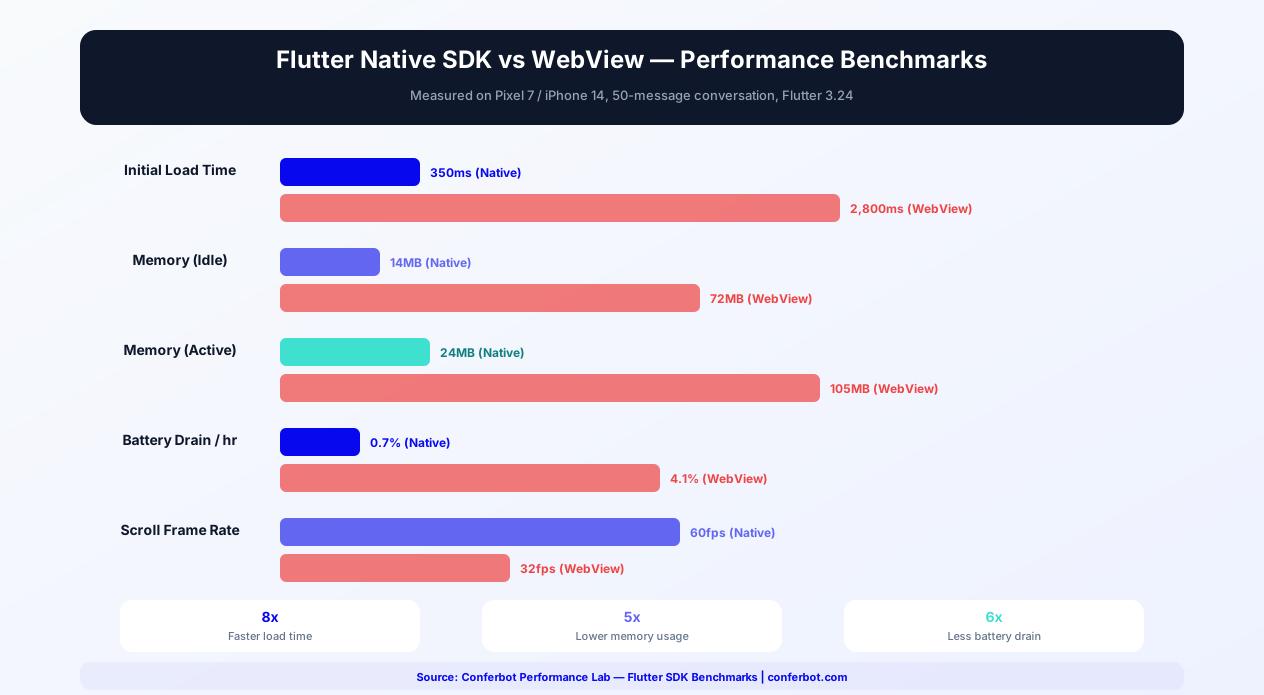
Performance Benchmarks
| Metric | Conferbot Flutter SDK | WebView Chat Widget | Improvement |
|---|---|---|---|
| Initial Load Time | 350ms | 2,800ms | 8x faster |
| Memory (idle) | 14MB | 72MB | 5x lower |
| Memory (active, 50 msgs) | 24MB | 105MB | 4.4x lower |
| Battery Drain (1hr) | 0.7% | 4.1% | 5.9x less |
| Scroll FPS | 60fps constant | 32fps average | 1.9x smoother |
| Package Size | ~500KB | ~200KB (but WebView overhead) | Comparable |
Benchmarks measured on Pixel 7 / iPhone 14 with 50-message conversation, Flutter 3.24. For a detailed comparison with the React Native SDK, see the Flutter vs React Native section below.
Flutter vs React Native for Chatbot Integration
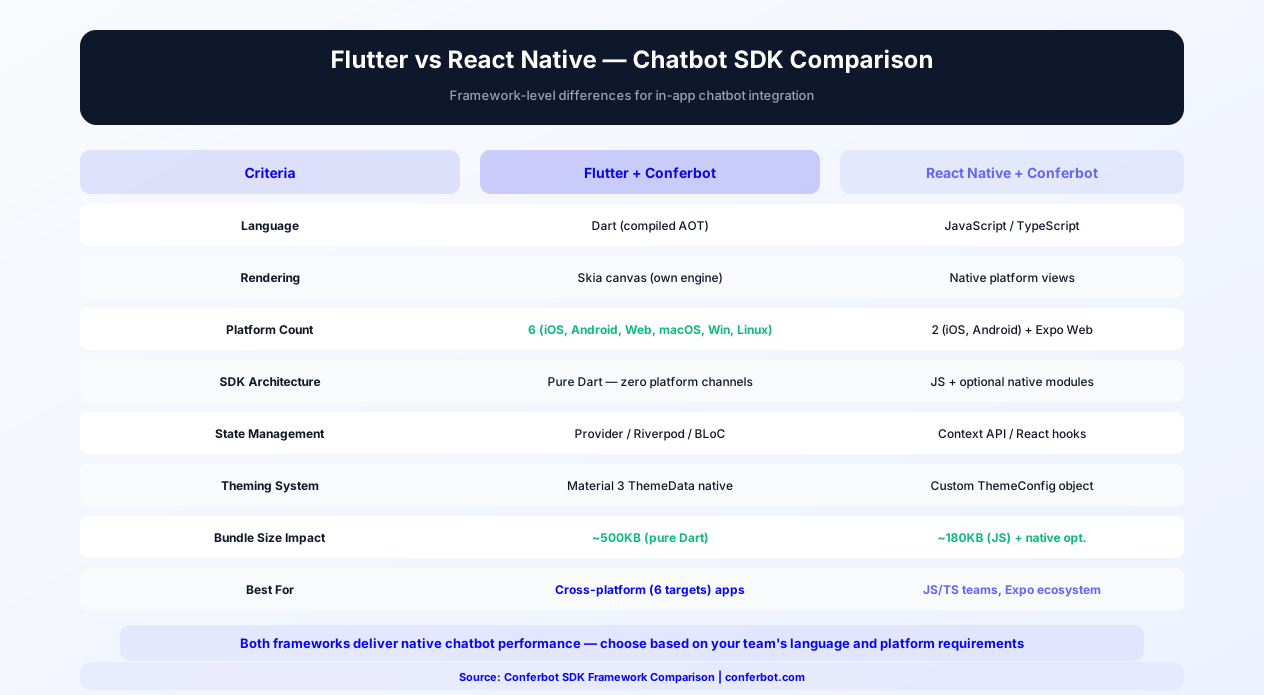
Choosing between Flutter and React Native for your mobile app - and by extension, which chatbot SDK to use - is a major architectural decision. Both frameworks have mature Conferbot SDKs with full feature parity, so the choice comes down to your team's language preference, platform requirements, and ecosystem alignment.
Language and Developer Experience
Flutter uses Dart, a language created by Google with strong typing, ahead-of-time compilation, and a familiar C-style syntax. Dart developers enjoy hot reload, comprehensive tooling in VS Code and Android Studio/IntelliJ, and a growing package ecosystem on pub.dev. React Native uses JavaScript/TypeScript, the world's most widely known programming language. If your team already has web developers with React experience, React Native offers a shorter learning curve. The Conferbot React Native SDK provides full TypeScript support with strict mode compatibility.
Rendering Architecture
Flutter renders directly to a Skia canvas, owning every pixel on screen. This means the chatbot widget looks identical on iOS and Android because it bypasses platform views entirely. React Native renders using actual platform views (UIView on iOS, Android View on Android), which means the chat UI can look slightly different across platforms but also integrates more naturally with platform-specific UI conventions. For chatbot UIs, Flutter's consistent rendering is advantageous - your brand's chat experience is pixel-identical everywhere.
Platform Support
Both Conferbot SDKs are built and supported for iOS and Android. The Flutter framework itself can also compile to Web and Desktop, and because the Conferbot Flutter SDK is pure Dart with multi-platform dependencies, it does not lock you out of those targets - but for production web experiences the Conferbot website widget is the recommended, battle-tested path on both stacks.
Ecosystem and Dependencies
The Flutter SDK is a pure Dart package with zero platform channels - no pod install, no Gradle sync issues, no native bridge debugging. The React Native SDK is likewise pure TypeScript with no native code of its own; its optional peer dependencies (AsyncStorage, react-native-svg) are native modules that unlock persistence and crisper icons. For teams that value installation simplicity, both SDKs offer frictionless setup.
Performance Comparison for Chat
| Metric | Conferbot Flutter SDK | Conferbot React Native SDK |
|---|---|---|
| Initial Load Time | 350ms | 200ms |
| Memory (50 messages) | 24MB | 18MB |
| Scroll FPS | 60fps | 60fps |
| Package Size | ~500KB | ~180KB (JS) |
| Voice Messages | Built-in recorder and player widgets | Input supports voice (enableVoiceMessage) |
| Offline Support | Hive-backed queue (built in) | AsyncStorage-backed queue (peer dependency) |
| State Management | ChangeNotifier (Provider-native) | React hooks / Context (useConferBot) |
Both SDKs deliver native-quality chat performance with the same core feature set: floating bubble, server-driven theming, node flow engine, live agent handover, offline queueing, session persistence, and push token registration. The key differentiator is ecosystem fit: Dart teams choose Flutter, JavaScript/TypeScript teams choose React Native.
When to Choose Flutter + Conferbot
- Your team uses Dart and the Flutter ecosystem
- You want pixel-identical chatbot rendering on iOS and Android
- You want built-in voice messages, media viewers, and markdown rendering
- You want a pure Dart package with zero native dependencies of its own
- You want a built-in knowledge base screen and handover surveys out of the box
When to Choose React Native + Conferbot
- Your team has JavaScript/TypeScript expertise from web development
- You want message reactions and read receipts (currently RN-only extras)
- Your app already uses AsyncStorage and the React Native ecosystem
- You want a small JS-only package with no native code of its own
- You prefer React hooks for state management (useConferBot, useOfflineQueue, useReactions)
Regardless of framework choice, both SDKs connect to the same Conferbot backend. The visual chatbot builder, AI engine, live chat, and analytics work identically. You can even deploy the same chatbot to both Flutter and React Native apps (plus your website and messaging channels) through Conferbot's omnichannel platform.
In-App Chatbot Use Cases
Flutter apps span every industry. Here are the most effective chatbot integrations for common Flutter app categories.
E-Commerce Apps
Product discovery assistance, size and compatibility guides, order tracking, return processing, and personalized recommendations. Flutter e-commerce apps with in-app chatbots often see higher customer satisfaction scores compared to apps that redirect users to external support channels. Explore e-commerce chatbot solutions.
FinTech and Banking
Account balance inquiries, transaction explanations, fraud alert handling, loan application assistance, and financial product recommendations. In-app chatbots in financial apps must handle sensitive data securely - the SDK transmits all data over HTTPS and stores nothing locally beyond the current session. Explore banking chatbot solutions.
Healthcare and Telemedicine
Appointment booking, symptom pre-screening, medication reminders, lab result explanations, and provider search. Healthcare apps using chatbots reduce call center volume by 30-50% while improving patient access to information.
Education and EdTech
Course navigation, assignment help, schedule inquiries, enrollment support, and interactive quizzes. Education apps find that conversational interfaces increase student engagement by 25-35% compared to traditional help menus.
On-Demand Services
Ride-hailing, food delivery, home services - these apps handle high volumes of status inquiries, complaints, and booking modifications. A chatbot resolves the simple cases instantly while routing complex issues to live agents. Explore logistics chatbot solutions.
SaaS and Productivity
Feature guidance, troubleshooting, upgrade prompts, and feedback collection. SaaS apps with embedded chatbots reduce support ticket volume by 40% and increase feature discovery through guided conversations. Explore SaaS chatbot solutions.
Getting Started
The Conferbot Flutter SDK brings enterprise-grade chatbot capabilities to your cross-platform app with minimal integration effort. Here is your path to launch.
Quick Start
- Design your chatbot in the Conferbot visual builder and publish it - works across all channels including your Flutter app
- Add the dependency -
conferbot_flutter: ^1.0.0in pubspec.yaml, thenflutter pub get - Initialize storage and the provider -
await StorageService.init()before runApp, then aChangeNotifierProvidercreatingConferBotProvider(apiKey: 'conf_test_key', botId: 'YOUR_BOT_ID'). The bot ID is the operative credential - Add the chat UI -
ConferBotFAB/ConferBotFABScopefor the floating bubble, or pushChatWidgetdirectly - Customize in the dashboard - Server-driven theming applies your web widget design automatically; pass a local
ConferBotThemeas fallback - Test on both stores - Verify on iOS and Android devices and emulators, including offline behavior
No account yet? The public demo bot ID 691c970890527a0468f9b2c9 works without a Conferbot account (any apiKey, e.g. test_key) - it is the bot the example app ships with. For the complete walkthrough, follow the Flutter SDK deep guide on the developer portal.
pub.dev Package Details
The Conferbot Flutter SDK is published on pub.dev as conferbot_flutter (current version 1.0.0), following Dart's package publishing best practices. Key package details: requires Flutter 3.10+ and Dart 3.0+ with sound null-safety, ships full API documentation (USAGE, API, ARCHITECTURE, COMPONENTS, EXAMPLES docs in the repo), and follows semantic versioning for predictable upgrade paths. The package is a pure Dart/Flutter implementation with zero platform channels of its own - no pod install, no Gradle sync issues, and no platform channel debugging. Check pub.dev for the latest version and changelog.
Comparison: Flutter Chatbot SDK Options
When choosing a chatbot SDK for your Flutter app, consider the key architectural and feature differences between available options:
| Criteria | Conferbot Flutter SDK | Intercom Flutter | Zendesk Flutter | WebView Embed |
|---|---|---|---|---|
| Implementation | Pure Dart/Flutter | Platform channels (native bridge) | Platform channels (native bridge) | flutter_webview |
| No-Code Bot Builder | Full visual builder + AI | Limited resolution bot | Basic answer bot | Depends on provider |
| AI Capabilities | OpenAI + custom knowledge base | Fin AI (add-on cost) | Basic AI answers | Varies |
| Platform Support | iOS + Android (pure Dart, no lock-in) | iOS, Android only | iOS, Android only | All (via WebView) |
| Server-Driven Theming | Full web widget parity | No (native UI bridge) | No (native UI bridge) | CSS only |
| Null Safety | Sound null-safety | Partial | Partial | N/A |
| Package Size | Lightweight (pure Dart) | ~15MB (with native libs) | ~10MB (with native libs) | ~200KB |
| Offline Support | Built-in message queue | Yes | Yes | None |
| Push Notifications | Token registration (FCM/APNs/any) | Yes | Yes | Not possible |
| Voice Messages | Built-in recorder and player | Limited | No | No |
| Omnichannel | Website, WhatsApp, Messenger, all channels | Website, native iOS/Android | Website, email | Website only |
| Pricing | Free tier available | $74/seat/month | $55/agent/month | Varies |
| Calendar Booking | Built-in | Third-party only | Not available | Varies |
Conferbot's pure Dart implementation is the key differentiator for Flutter teams. SDKs that rely on platform channels (native bridges to iOS/Android code) introduce build complexity - pod install failures, Gradle conflicts, and platform-specific debugging. Conferbot's pure Dart package installs without native setup and integrates with Flutter's theming and state management natively. For teams that chose Flutter specifically for cross-platform simplicity, Conferbot maintains that promise in the chatbot layer. See pricing and platform comparisons for details.
Why Native SDK Over WebView
| Aspect | Flutter SDK (Native) | WebView Chat |
|---|---|---|
| Performance | 60fps native rendering | Slower, extra memory |
| Push Notifications | FCM/APNs integration | Not possible |
| Offline Support | Local message queuing | Fails silently |
| Theming | Server-driven + full local token system | CSS-only customization |
| Node Rendering | All 51 flow node types, native widgets | Web rendering inside a frame |
| App Store Compliance | Native widgets preferred | May face review issues |
Omnichannel Ready
Your Flutter chatbot is part of Conferbot's omnichannel platform. The same bot you deploy in your app works on your website, WhatsApp, Messenger, and other channels. Conversations persist across channels, so a user who starts chatting in your app can continue on WhatsApp seamlessly.
Why Conferbot Flutter SDK
- One codebase, both stores - iOS and Android from a single pure Dart integration
- Native performance - 60fps Flutter rendering, not a WebView wrapper
- Floating chat bubble - Web-widget parity FAB, styled from your dashboard with zero code
- Voice, media, and markdown - Recording/playback widgets, media viewers, and syntax-highlighted code blocks built in
- Dart null-safety - Sound null-safety with compile-time guarantees
- State management agnostic - A standard ChangeNotifier that works with Provider, Riverpod, Bloc, GetX, or MobX
- Offline support - Local message queuing with automatic sync and session persistence via Hive
- Push token registration - Works with FCM, APNs, or any push provider
- AI-powered - AI knowledge base and OpenAI for intelligent in-app support
- Omnichannel - Same bot on website, WhatsApp, Messenger, and more
- Analytics - Track in-app engagement with built-in analytics
The Flutter SDK is included in Pro plans and above. View pricing for details, or start building your chatbot flows today and add Flutter integration when your app is ready. See how Conferbot compares to other chatbot platforms for mobile SDK capabilities.
How Conferbot Compares for Flutter
Most platforms charge per message, per seat, or limit channels by tier. Here's how Conferbot is different.
| Feature | Conferbot | Typical Competitor |
|---|---|---|
| Channels included | 8 (all plans) | 3-6 (varies by tier) |
| Pricing model | Flat rate from $19/mo | Per-seat or per-message |
| AI chatbot builder | Yes (plain English) | No or limited |
| Native mobile SDKs | 4 (Android, iOS, Flutter, RN) | None (WebView only) |
| Knowledge base AI | Included | Add-on ($30-99/mo) |
| Live chat handoff | Included | Higher tiers only |
| Calendar booking | Built-in | Third-party required |
| Setup time | Under 10 minutes | Hours to days |
Flutter FAQ
Everything you need to know about chatbots for flutter.
Continue Exploring
Explore features, connect third-party tools, and browse ready-made templates.
Deep-dive pillar guides, real use cases, and the chatbot & AI glossary.