
iOS SDK Chatbot Builder
Native iOS SDK with SwiftUI and UIKit support. Follows Apple Human Interface Guidelines, supports iOS 13+, and includes beautiful native animations.
To build a iOS SDK chatbot with Conferbot, sign up free, design your flow in the no-code visual builder, connect your iOS SDK account, and publish - typically live in a few minutes with no coding. The free plan needs no credit card, and the same bot can also run on your website and other messaging channels.
iOS Chatbot Features
Everything you need to build powerful automated conversations
SwiftUI Native Views
Built with SwiftUI for seamless integration into modern iOS apps - compose chat views like any native component.
UIKit Compatibility
Full UIKit support via ChatViewController so legacy codebases can integrate without a SwiftUI migration.
Apple HIG Compliant
Follows Apple Human Interface Guidelines for spacing, typography, and interactions that feel at home on iOS.
APNs Push Notifications
Deliver new message alerts through Apple Push Notification service, even when the app is closed.
Dark Mode Support
Automatically adapts to the user's system appearance preference with polished light and dark themes.
Dynamic Type
Respects the user's preferred text size setting for full accessibility across all chat elements.
VoiceOver Accessibility
Every chat element is fully labeled for VoiceOver, making your bot usable by visually impaired users.
iOS 13+ Support
Compatible with iOS 13 and above, covering 99%+ of active iPhones and iPads.
SiriKit Integration
Enable voice-activated chatbot interactions through Siri shortcuts for hands-free customer engagement.
What Can You Build?
Get Started in 7 Simple Steps
Follow this guide to connect your iOS chatbot
Add via Swift Package Manager or CocoaPods
Import ConferbotSDK in your Swift file
Initialize with your bot ID in AppDelegate
Present ChatViewController or use ChatView (SwiftUI)
Customize appearance with ConferbotTheme
Configure push notifications (optional)
Your iOS chatbot is ready!
Introduction
iOS users are among the most valuable customers in the mobile ecosystem. With over 1.5 billion active Apple devices and an audience that spends significantly more on in-app purchases and subscriptions than any other platform, delivering an exceptional in-app experience on iOS is critical for revenue and retention.
Apple users also have the highest expectations. They notice when an interface does not follow the Human Interface Guidelines, when animations stutter, when dark mode is not supported, or when accessibility features are missing. A chatbot that looks and feels like a native iOS experience is not optional - it is the baseline for user acceptance.
The Conferbot iOS SDK is built from the ground up for Apple's ecosystem. It offers native SwiftUI views and UIKit compatibility, ships a floating chat bubble (FAB) that mirrors your web widget with one view modifier, follows the Apple Human Interface Guidelines, supports iOS 14+ with Swift 5.7+, and adapts to dark mode automatically through dynamic system colors. The result is a chatbot that feels like it was built by your iOS team - because the SDK components integrate seamlessly with your existing Swift codebase.
Behind the native interface, the SDK connects to the same no-code chatbot builder, AI engine, and live chat system that powers all Conferbot channels. Build your conversational flows once, and the iOS SDK renders them with Apple-native polish. This guide covers installation, SwiftUI and UIKit integration, accessibility, App Clips, privacy compliance, Siri Shortcuts, and best practices for 2026.
New to chatbot building? Start with our complete guide to building a chatbot without coding. The same chatbot works on Android, your website, WhatsApp, and Messenger. Browse our template library for pre-built in-app chatbot flows. For cross-platform alternatives, see the Flutter SDK and React Native SDK guides.
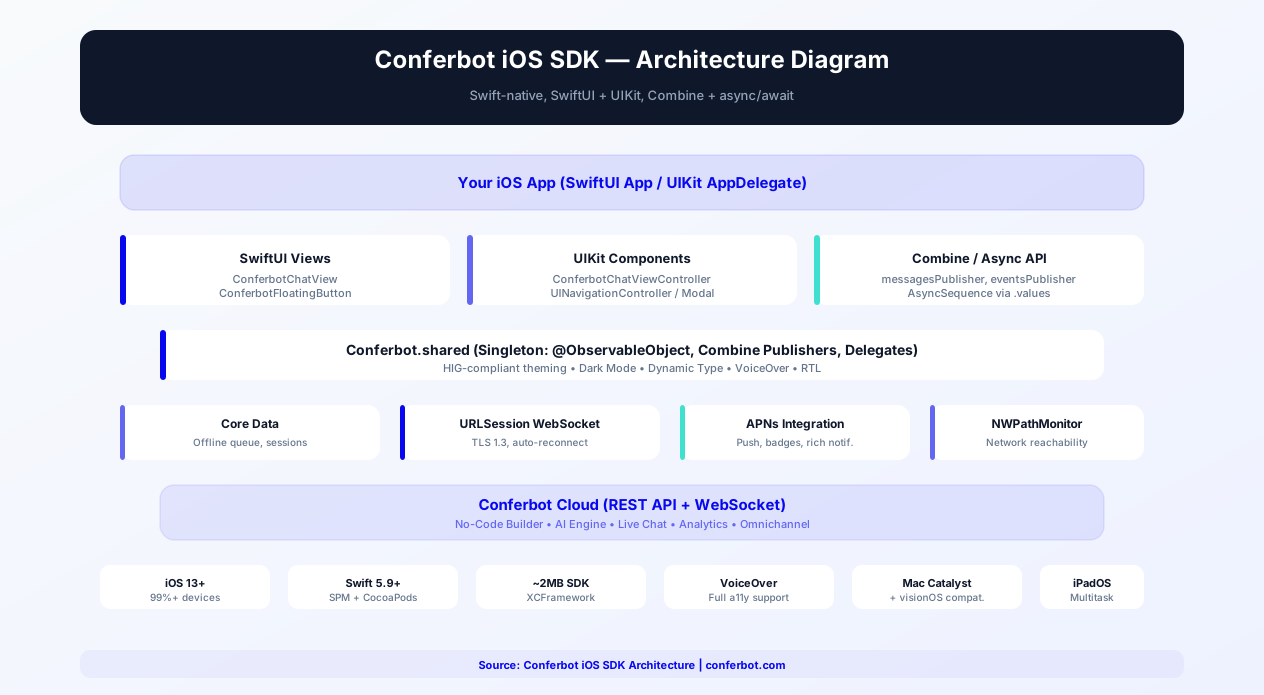
Source code & documentation: conferbot-ios on GitHub | Available via Swift Package Manager and CocoaPods (pod "Conferbot") | Developer Portal Guide | Human Interface Guidelines
Installation Guide
The Conferbot iOS SDK supports both Swift Package Manager and CocoaPods, integrating into your Xcode project through standard dependency management workflows. The package product is named Conferbot and pulls in socket.io-client-swift 16.x automatically.
Option A: Swift Package Manager (Recommended)
- In Xcode, go to File > Add Packages
- Enter the repository URL:
https://github.com/conferbot/conferbot-ios - Select the version rule (e.g., "Up to Next Major Version" from 1.0.0)
- Click "Add Package" and select the
Conferbotlibrary
Option B: CocoaPods
Add to your Podfile (targets iOS 14.0):
pod 'Conferbot', '~> 1.0'
Then run:
pod install
Step 2: Initialize the SDK
The SDK is a singleton, ConferBot.shared (the module is Conferbot, the class is ConferBot). Initialize once, as early as possible - it connects the socket, loads your dashboard customizations, and silently restores any persisted session. The bot ID is the operative credential; any non-empty apiKey works (e.g. conf_test_key):
import Conferbot
ConferBot.shared.initialize(apiKey: "conf_test_key", botId: "YOUR_BOT_ID")
No account yet? The public demo bot ID 691c970890527a0468f9b2c9 works without one.
Step 3: Add the Chat UI
Floating chat bubble (recommended - same as the web widget):
MyAppContent().conferBotWidget()
SwiftUI: use the built-in ChatView in a sheet or any container (it starts the session itself):
.sheet(isPresented: $showChat) { ChatView() }
UIKit: one line opens a full-screen chat modal:
ConferBot.shared.present(from: self)
Step 4: Configure Push Notifications (Optional)
- Enable the Push Notifications capability in your Xcode project
- Configure APNs keys in your Apple Developer account and upload them to the Conferbot dashboard
- Forward the device token to the SDK:
ConferBot.shared.registerPushToken(token) - Route incoming payloads with
ConferBot.shared.handlePushNotification(userInfo)- it claims only Conferbot payloads and returns false for everything else
Basic integration takes approximately 15 minutes. The SDK supports iOS 14+ (Xcode 14+, Swift 5.7 to 5.9), covering 99%+ of active iPhone and iPad devices. For a full walkthrough, see the iOS SDK guide on the developer portal.
Key SDK Features
The Conferbot iOS SDK is designed to meet Apple's quality bar and integrate naturally with the iOS development ecosystem.
Floating Chat Bubble (FAB)
The flagship integration pattern: attach .conferBotWidget() to any SwiftUI view (or wrap content in ConferBotWidgetOverlay) and you get the same bottom-corner chat bubble as the Conferbot web widget, with zero styling code. Tapping the bubble opens ChatView in a sheet; the icon morphs to a close state. The bubble reads your dashboard customizations automatically: background color, size, corner radius, left/right position, edge offsets, launcher icon (all 15 web widget icons), the CTA tooltip text, and an unread-count badge. The FAB is styled entirely from the server - change it once in the dashboard and web and iOS update together.
SwiftUI Native Views
The SDK provides native SwiftUI views that compose naturally with your existing SwiftUI code. ChatView is the drop-in chat screen (with an optional knowledge base tab), KnowledgeBaseView is a standalone help center browser, and MessageBubble is available for custom layouts. ChatView starts the session itself on first appearance, so it works inside a sheet, navigation destination, or any SwiftUI container with no extra wiring.
UIKit Compatibility
For apps built with UIKit (or those migrating to SwiftUI), ConferBot.shared.present(from: viewController) opens a full-screen chat modal wrapped in a navigation controller with one line - it uses the SDK's ChatViewController under the hood. You can also embed the SwiftUI ChatView in UIKit using UIHostingController for hybrid architectures.
Observable State and Delegate Callbacks
ConferBot.shared is an ObservableObject: observe published properties like messages, isConnected, unreadCount, currentAgent, isAgentTyping, isLiveChatMode, isOnline, queuedMessageCount, and serverCustomizations directly from SwiftUI or through Combine. For imperative code, implement ConferBotDelegate - callbacks cover message receipt, agent join/leave, session start/end, unread count, connection status, flow completion, goals, queued-message count, and network status. Core operations use Swift concurrency: try await ConferBot.shared.startSession() and try await ConferBot.shared.sendMessage("Hello").
Apple Human Interface Guidelines Compliance
Every visual element follows the HIG. Navigation patterns, button sizes, spacing, typography, and interaction patterns match what iOS users expect. The SDK uses system fonts (SF Pro) by default, respects safe areas, and follows iOS conventions for sheet presentations and gesture-based dismissal.
Dark Mode
Full dark mode support using iOS's semantic colors and adaptive color system. The chat UI automatically adapts when the user toggles between light and dark appearance, matching your app's dark mode implementation. No separate configuration needed - it works out of the box.
Node Flow Engine
The SDK renders the full flow-builder node set natively - choices, buttons, ratings, dates, file uploads, and more. Text questions (ask-name, ask-email, ...) are answered by typing in the single unified bottom input bar, and answered choice pills stay in the transcript with the selection highlighted - exactly like the web widget. Bot identity and all flow content come from the server on every connect, so flow-builder changes appear without an app update.
Live Agent Handover
Call ConferBot.shared.initiateHandover(message:) to bring in a human. Agent lifecycle arrives via agentDidJoin / agentDidLeave delegate callbacks plus isAgentTyping and currentAgent, and sendTypingIndicator(isTyping:) forwards visitor typing to the agent console during live chat.
Push Notifications via APNs
When the bot or an agent sends a message while the app is backgrounded, users receive a native iOS push notification via Apple Push Notification service. Forward your APNs device token with registerPushToken(_:) and route payloads with handlePushNotification(_:) - the SDK claims only its own payloads and returns false for everything else. Read and reset the unread counter with getUnreadCount() / resetUnreadCount().
Offline Support and Session Persistence
Messages sent while offline are queued locally and replayed automatically when connectivity returns, and the chat room is rejoined after every socket reconnection. Observe isOnline and queuedMessageCount, or take manual control with flushMessageQueue(), retryFailedMessages(), and clearMessageQueue(). Sessions, messages, answers, and the transcript are persisted automatically and restored on the next launch while still valid - tune the window with configureSessionStorage(expiryMinutes:).
Knowledge Base
ChatView includes a knowledge base tab by default, and KnowledgeBaseView() can be presented standalone. For custom UIs, async APIs cover categories, articles, search, article detail, ratings, and engagement tracking (views, scroll depth, related articles).
Headless Custom UIs
Use the SDK as a messaging transport layer and render everything yourself: set ConferBot.shared.delegate, start the session with try await startSession(), and render from the published properties. For flow-builder bots, render currentUIState and answer through the typed handlers - handleNodeInput, handleButtonClick, handleChoiceSelection, handleMultipleChoiceSelection, handleRatingSelection, handleDateSelection, and handleFileUpload.
App Store Review Guidelines
Apple's App Store review team evaluates chatbot integrations against specific guidelines. The Conferbot iOS SDK is designed to pass review smoothly:
- Guideline 4.0 (Design) - The SDK follows Apple's Human Interface Guidelines for layout, typography, and interaction patterns
- Guideline 2.5.1 (Software Requirements) - The SDK uses only public Apple APIs, no private frameworks
- Guideline 5.1.1 (Privacy) - The SDK does not collect personal data beyond what is needed for the conversation. Include chatbot data collection in your app's privacy nutrition label
- Guideline 4.2 (Minimum Functionality) - The chatbot enhances your app's primary function; it should not be the only feature
- Guideline 2.1 (App Completeness) - Ensure the chatbot responds correctly in review and is not in a broken or placeholder state
If your app targets regulated industries (health, finance), ensure your chatbot flows comply with the additional category-specific guidelines. The SDK itself has been validated against Apple's current review criteria and is actively maintained to stay compliant with guideline updates.
APNs Push Notification Configuration
Setting up push notifications for the iOS SDK involves three steps: (1) Enable the Push Notifications capability in your Xcode project's Signing & Capabilities tab, (2) Generate an APNs Authentication Key (p8 file) in your Apple Developer account under Certificates, Identifiers & Profiles > Keys, and (3) Upload the p8 key to the Conferbot dashboard under Settings > Push Notifications. In your app, forward the device token with ConferBot.shared.registerPushToken(token) (call it again after startSession() if no session existed yet) and route incoming payloads with ConferBot.shared.handlePushNotification(userInfo) - it returns true only for Conferbot payloads (those with type "conferbot_message"), so your other notifications flow to your existing handler untouched.
SwiftUI Chatbot Integration
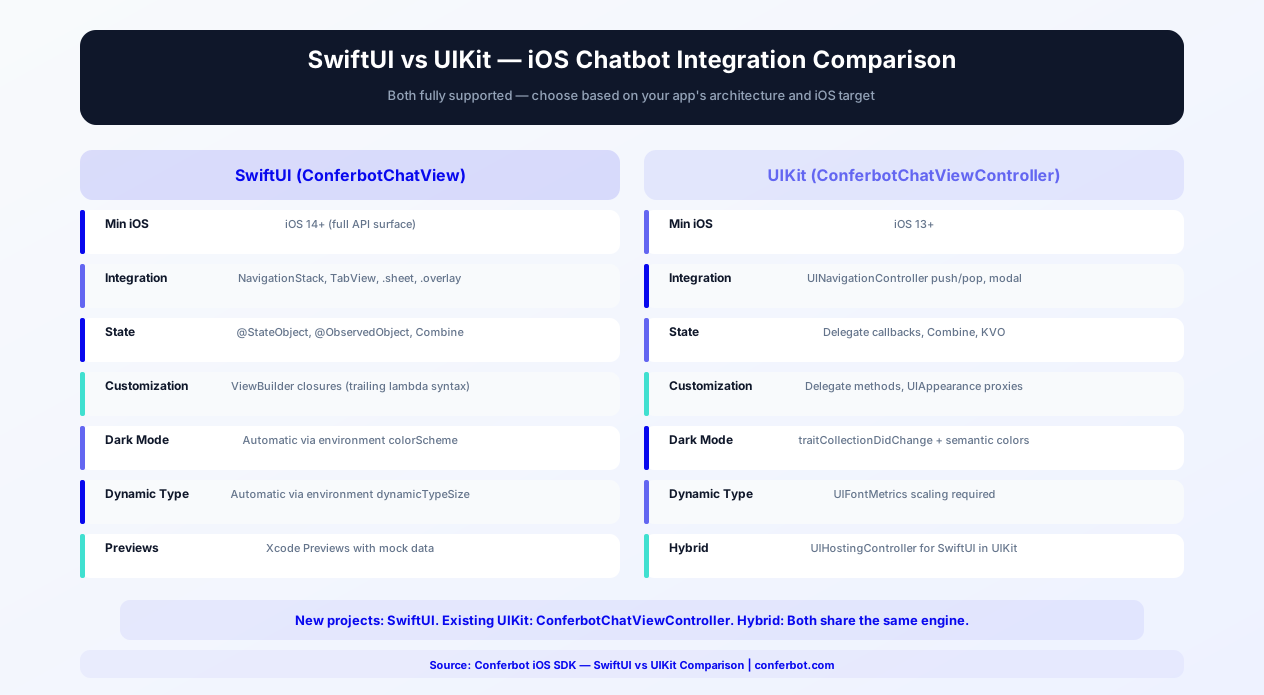
SwiftUI is Apple's modern declarative UI framework and the future of iOS development. The Conferbot iOS SDK provides native SwiftUI views with property wrappers, async/await support, and Combine integration designed for modern Swift codebases.
Observing State with SwiftUI
ConferBot.shared is an ObservableObject, so SwiftUI integration is direct - no wrapper models needed:
- @ObservedObject -
@ObservedObject var bot = ConferBot.sharedgives your views reactive access tobot.messages,bot.isConnected,bot.unreadCount,bot.currentAgent, and more - Published properties - include
isConnected,currentSession,messages,unreadCount,isAgentTyping,isLiveChatMode,currentAgent,hasRestoredSession,serverCustomizations,currentUIState,isProcessingNode,isFlowComplete,isOnline, andqueuedMessageCount - Combine - because these are @Published, they compose with
.onReceive,sink, and any Combine pipeline you already have
Async/Await API
Core operations use Swift concurrency:
try await ConferBot.shared.startSession()- Start (or resume a restored) chat session;startSession(forceNew: true)forces a fresh conversationtry await ConferBot.shared.sendMessage("Hello")- Send a text message (auto-queued while offline)try await ConferBot.shared.fetchKnowledgeBaseCategories()/searchKnowledgeBaseArticles(query:)- Async knowledge base APIs
Floating Widget in SwiftUI
The .conferBotWidget() view modifier overlays the floating chat bubble on any view - typically your root NavigationView or TabView - exactly like the web widget's launcher. ConferBotWidgetOverlay { MyAppContent() } is the same overlay as a container view. The bubble's color, icon, size, position, offsets, CTA tooltip, and unread badge are all driven by your dashboard settings with no client code.
NavigationStack and TabView Integration
Embed the chat view in your app's navigation hierarchy:
- NavigationStack - Use
NavigationLinkor.navigationDestinationto pushChatView()as a screen - TabView - Add ChatView as a tab with a badge:
.badge(bot.unreadCount) - .sheet / .fullScreenCover - Present the chat modally with gesture-based dismissal; ChatView starts the session itself on first appearance
- .conferBotWidget() - The floating bubble as a persistent overlay across all screens
Headless Flow Engine (Fully Custom UIs)
For a completely custom chat surface, set ConferBot.shared.delegate (or observe the published properties) and render everything yourself. Flow-builder responses arrive as typed node states in currentUIState; answer them with the typed handlers - handleNodeInput(_:forNodeId:), handleButtonClick, handleChoiceSelection, handleMultipleChoiceSelection, handleRatingSelection, handleDateSelection, and handleFileUpload. Helpers like getCurrentNodeId(), nodeRequiresInteraction(_:), and resetFlow() round out the engine, and the SDK's MessageBubble view is exported for reuse in custom layouts.
iOS App Clips with Chatbot
App Clips are lightweight versions of your iOS app that users can access instantly without downloading the full app - from QR codes, NFC tags, Safari links, or Messages. Integrating a chatbot into an App Clip creates a powerful instant-support experience for businesses with physical locations, events, or products.
App Clip Chatbot Use Cases
- Restaurant ordering - Scan a QR code on the table, and an App Clip opens with a chatbot that takes your order, handles modifications, and processes payment. No app download required
- Hotel concierge - NFC tag in the hotel room launches an App Clip with a chatbot for room service, housekeeping requests, restaurant reservations, and local recommendations
- Retail support - Product QR codes launch an App Clip chatbot for size guides, compatibility checks, warranty registration, and purchase assistance
- Event help desk - Conference badges with NFC trigger an App Clip chatbot for schedule inquiries, speaker info, venue navigation, and networking
- Service booking - A shared link or Safari banner opens an App Clip chatbot for appointment scheduling, service selection, and cost estimates
Technical Integration
Adding the Conferbot SDK to an App Clip target uses the same integration as the full app:
- Add a new App Clip target to your Xcode project (File > New > Target > App Clip)
- Add the
ConferbotSPM package product to the App Clip target (same dependency, just check the App Clip target; socket.io-client-swift resolves automatically) - Initialize
ConferBot.sharedin the App Clip's entry point with the same bot ID as your main app - Use
ChatView()as the App Clip's primary interface, or.conferBotWidget()over lightweight content
App Clip Size Constraints
App Clips must stay small to launch instantly. The Conferbot SDK is a source SPM package whose main dependency is socket.io-client-swift, keeping its size contribution modest and well within Apple's App Clip budget. To minimize size further, keep the App Clip's own assets lean and use asset catalogs with on-demand resources for any images.
Context Transfer to Full App
When a user transitions from the App Clip to the full app (via the App Store banner), keep the conversation attributable by calling ConferBot.shared.identify(user:) with the same user ID in both targets before startSession(). Conversations live server-side, so agents in the Conferbot dashboard see the full history for that user either way. Note that the SDK's local session store is per-app-container, so treat the App Clip conversation as the same visitor rather than expecting on-device session files to move across.
App Clip Invocation URLs
Configure your App Clip experience in App Store Connect with invocation URLs that include context parameters. For example, https://yourapp.com/chat?location=lobby&topic=checkin tells your App Clip which context it launched from. Parse the parameters in your App Clip and pass them into the conversation as user metadata via identify(user:), or route to a bot flow designed for that touchpoint - enabling location-specific greetings and pre-configured flows.
For businesses with physical locations, App Clip chatbots replace the need for dedicated support staff at every touchpoint. A single chatbot handles inquiries across all locations while the App Clip removes the friction of app downloads. Explore hospitality chatbot solutions and retail chatbot solutions for industry-specific flows.
iOS Privacy, ATT & Chatbot Data Collection
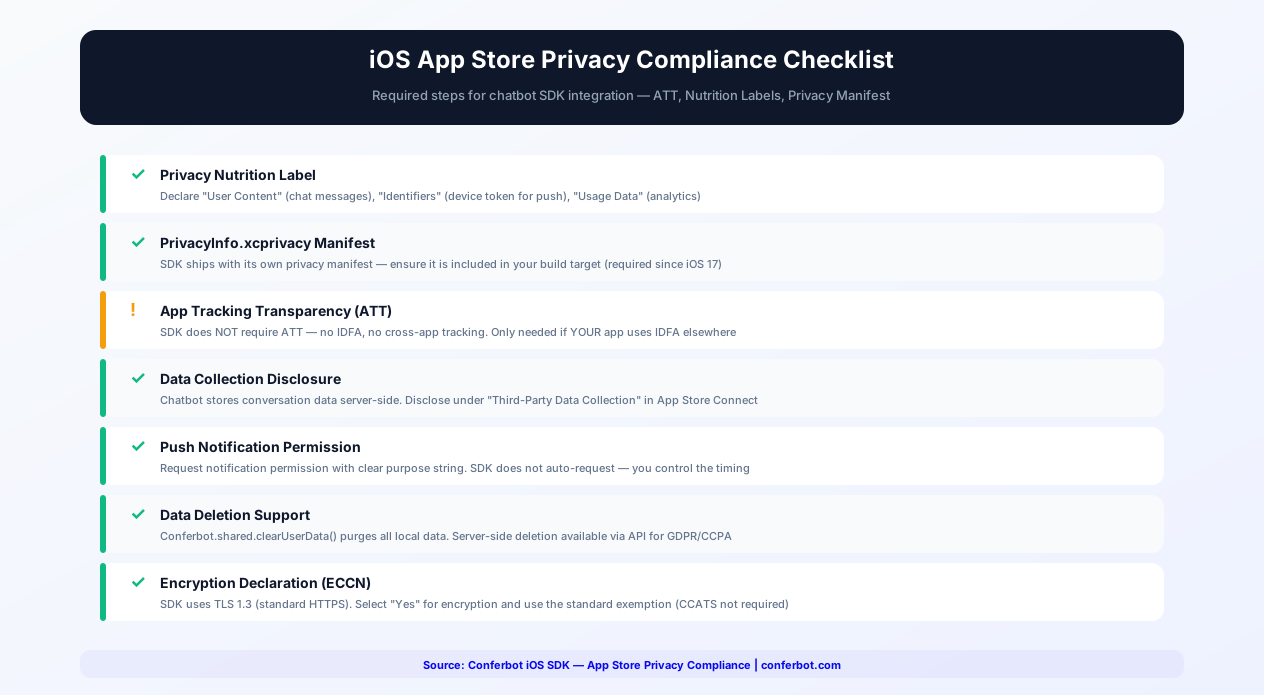
Apple's privacy framework is the most stringent in the mobile industry. iOS apps must comply with App Tracking Transparency (ATT), privacy nutrition labels, privacy manifests, and data minimization principles. The Conferbot SDK is designed for full compliance with minimal developer effort.
App Tracking Transparency (ATT)
The Conferbot SDK does not require App Tracking Transparency permission. It does not access the IDFA (Identifier for Advertisers), does not track users across apps or websites owned by other companies, and does not share data with data brokers. If your app uses ATT for other purposes (advertising SDKs, analytics), the chatbot SDK operates independently and is not affected by the user's ATT choice.
Privacy Nutrition Labels
When completing the App Store privacy nutrition label in App Store Connect, declare the following for the Conferbot SDK:
| Data Type | Collection | Linked to Identity | Used for Tracking | Purpose |
|---|---|---|---|---|
| User Content (chat messages) | Yes | Optional (if user provides name/email) | No | App Functionality |
| Identifiers (device token) | Optional (only if push enabled) | No | No | Push Notifications |
| Usage Data (chat interactions) | Yes | No | No | Analytics, Product Improvement |
The SDK does not collect: precise location, coarse location, contacts, photos/videos, audio, browsing history, search history, health data, fitness data, financial data, email address (unless user provides it in chat), phone number (unless user provides it in chat), or advertising data.
Privacy Manifest (PrivacyInfo.xcprivacy)
Starting with iOS 17, Apple requires privacy manifest declarations covering the data your app and its SDKs handle. When completing yours for the Conferbot SDK, the relevant declarations are:
- NSPrivacyAccessedAPITypes - UserDefaults-backed session persistence and URL session networking; the SDK does not read file timestamps, disk space, or active keyboards
- NSPrivacyCollectedDataTypes - Match the nutrition label declarations above (user content, optional push token, usage data)
- NSPrivacyTracking -
false. The SDK does not track users across apps or websites
Data Minimization
The SDK follows Apple's data minimization principles:
- Chat messages are transmitted to Conferbot's servers for processing; locally the SDK stores only the session, transcript, queued messages, and device token in the app's sandbox
- Session storage has a configurable expiry (
configureSessionStorage(expiryMinutes:)), after which persisted sessions are no longer restored - No data is shared with third parties beyond Conferbot's own servers for processing the conversation
ConferBot.shared.clearHistory()andclearStoredSession()purge locally stored chat data on demand (for GDPR/CCPA "right to deletion" requests)
GDPR and CCPA Compliance
For apps serving EU (GDPR) or California (CCPA) users, the SDK provides the compliance controls required:
- Data deletion -
ConferBot.shared.clearHistory()plusclearStoredSession()delete all local chat data. Server-side deletion is available through Conferbot - Data export - Conversation history export is available through the Conferbot dashboard
- Consent management - The SDK does nothing until you call
ConferBot.shared.initialize(), so you can gate initialization behind a consent dialog - Data processing agreement - Available for business plans. See our data security guide
Apple's review team increasingly scrutinizes privacy claims. The Conferbot SDK's clean privacy posture - no IDFA, no tracking, minimal data collection - keeps privacy-related review checks straightforward.
Siri Shortcuts + Chatbot Integration
Siri Shortcuts enable users to trigger actions in your app using voice commands or the Shortcuts app. Because the Conferbot SDK exposes its full messaging engine as a headless Swift API, you can wire chatbot interactions into Apple's App Intents framework and create a voice-activated chat experience - users can start a conversation, ask a question, or check on a previous interaction using just their voice.
Shortcut Actions You Can Build
Pair your own App Intents with the SDK's async API for common chatbot interactions:
- "Open Chat" - An intent that deep-links into your app and presents
ChatView(or callsConferBot.shared.present(from:)). Users can configure a Siri phrase: "Hey Siri, open support chat in [YourApp]" - "Ask a Question" - An intent that calls
try await startSession()thentry await sendMessage(text), and reads the bot's next message (delivered viadidReceiveMessage) back through Siri. Ideal for hands-free scenarios like driving or cooking - "Check Last Message" - An intent that reads the most recent item from
ConferBot.shared.messagesaloud, useful for checking on pending support conversations without opening the app - "Unread Count" - An intent that reports
getUnreadCount()so users can ask whether support replied
Integration Steps
- Add Siri capability - Enable the Siri capability in your Xcode project's Signing & Capabilities tab
- Define App Intents - Create
AppIntenttypes in your app target that call the SDK's async methods (startSession,sendMessage) or navigate to your chat screen - Donate interactions - Donate the intents when users open the chat or send messages, so Siri suggests them on the lock screen, in Search, and on the Siri watch face
- Return responses - Use the SDK's delegate callback or published
messagesto compose the spoken response for question-style intents
Shortcuts App Integration
Users can find your chatbot shortcuts in the Shortcuts app and combine them with other actions. Example automations:
- "When I arrive at work, open the IT support chat" - Combines location trigger with chatbot open action
- "Every morning at 9am, ask the chatbot for today's schedule" - Combines time trigger with question action
- "When I open [YourApp], check for unread chat messages" - Combines app open trigger with status check
Voice-First Design Considerations
When designing chatbot flows for Siri integration, consider that the interaction is voice-first:
- Keep bot responses concise (under 40 words) so Siri's speech feels natural
- Avoid responses that require visual elements (images, buttons, forms) - provide a text summary with an option to "open in app" for visual content
- Use the bot's conditional logic to detect Siri-originated conversations and adapt the response style
- Test with VoiceOver enabled - Siri Shortcuts and VoiceOver share accessibility infrastructure
Siri Shortcuts make your chatbot accessible beyond the app interface. For businesses in healthcare (voice-activated appointment scheduling), e-commerce (hands-free order status), and hospitality (voice concierge), Siri integration adds a premium engagement channel that differentiates your app.
Customization and Theming
There are two sources of appearance settings, and they apply to different parts of the UI: server customizations from your dashboard (automatic) and a local ConferBotCustomization for the chat surface.
Server Customizations (Automatic)
Whenever the socket connects, the SDK fetches your bot's configuration - the same customizations object the web widget uses - and applies it with no client code: the entire floating widget styling (bubble color, size, corner radius, position, offsets, launcher icon, CTA tooltip), the "Powered by Conferbot" branding flag, the bot name injected into flow state, and all flow content (messages, choices, node styling). Server settings win over local ones for the FAB and branding.
ConferBotCustomization (Local Chat Surface)
The built-in chat UI (header, bubbles, avatar) is styled with a local ConferBotCustomization passed at initialization:
- primaryColor - Send button and accent color
- botBubbleColor / userBubbleColor - Separate bubble colors (system colors adapt to dark mode automatically)
- fontFamily - Custom font (defaults to the system SF font for native feel)
- bubbleCornerRadius - Message bubble corner radius
- headerTitle - Chat header title (default "Support Chat")
- showAvatar / avatarURL - Bot avatar visibility and image
- hideBrand - Hide the footer branding (the server-side flag takes precedence)
Precedence, Precisely
For the FAB and hideBrand, server settings win over local ones. For the chat header title, avatar, and bubble colors, the local ConferBotCustomization applies today - the iOS chat surface does not yet remap dashboard theme colors onto bubbles the way the Flutter SDK does. Dark mode follows the system appearance automatically via dynamic system colors.
Delegate Callbacks
Implement the ConferBotDelegate protocol for event handling:
- didReceiveMessage - A bot or agent message arrived
- agentDidJoin / agentDidLeave - Live agent lifecycle
- didStartSession / didEndSession - Session lifecycle
- didUpdateUnreadCount / didChangeConnectionStatus - Badge and connectivity updates
- didUpdateUIState / didCompleteFlow / didReachGoal / didUpdateQueuedMessageCount / didChangeNetworkStatus - Optional callbacks with default empty implementations
For SwiftUI, the same state is available as @Published properties on ConferBot.shared, and custom UIs can reuse the exported MessageBubble view.
In-App Chatbot Use Cases
iOS users have the highest lifetime value in mobile. Keeping them engaged and supported within your app directly impacts revenue and retention.
Premium Customer Support
iOS users expect premium experiences. An in-app chatbot provides instant, branded support without the jarring context switch of leaving the app for email or a website. The bot handles routine questions while seamlessly escalating to live agents for complex issues. In-app support can help reduce App Store complaints about customer service.
Subscription Management
Help users understand subscription tiers, manage their plans, troubleshoot payment issues, and handle cancellation requests. For subscription-based iOS apps, proactive chatbot engagement during the trial period can help improve conversion. The chatbot can explain features, offer personalized onboarding, and present upgrade options at optimal moments.
Concierge and Personalization
Luxury brands, travel apps, and premium services use the chatbot as a digital concierge. Personalized recommendations, preference management, exclusive access coordination, and VIP support create the white-glove experience that premium iOS users expect and are willing to pay for. Explore hospitality chatbot solutions.
Health and Wellness
Appointment scheduling, health data inquiries, medication reminders, and symptom assessment. Healthcare apps on iOS must balance helpful automation with medical accuracy and privacy compliance. The chatbot handles administrative tasks while directing clinical questions to qualified professionals.
Educational Assistance
Course navigation, study material recommendations, deadline reminders, and interactive learning exercises. Education apps with in-app chatbots often see higher daily active usage as students engage with conversational content more frequently than traditional menus.
In-App Commerce
Product recommendations, order tracking, returns, and personalized promotions. For iOS e-commerce apps, the chatbot bridges the gap between browsing and buying with personalized, conversational guidance that converts browsers into buyers.
Getting Started
The Conferbot iOS SDK brings AI-powered chatbot capabilities to your iOS app with a native experience that meets Apple's quality standards. Here is your integration path.
Quick Start
- Design your chatbot in the Conferbot visual builder and publish it - the same bot powers your app, website, and messaging channels
- Add the SDK via Swift Package Manager (
https://github.com/conferbot/conferbot-ios) or CocoaPods (pod 'Conferbot') - Initialize -
ConferBot.shared.initialize(apiKey: "conf_test_key", botId: "YOUR_BOT_ID")in your AppDelegate or App struct. The bot ID is the operative credential; any non-empty apiKey works - Add the chat UI -
.conferBotWidget()for the floating bubble,ChatView()(SwiftUI), orConferBot.shared.present(from:)(UIKit) - Customize in the dashboard - The FAB and flow content are server-driven; style the chat surface locally with ConferBotCustomization
- Test accessibility - Verify VoiceOver, text scaling, and dark mode in your app
- Configure push notifications for background messaging
No account yet? The public demo bot ID 691c970890527a0468f9b2c9 works without a Conferbot account - the example app in the repo ships pre-configured with it. Recorded demo videos for the iOS SDK are pending (capturing an iOS Simulator recording requires a Mac); run the SwiftUI example app to see the widget, modal, and embedded patterns live. For the complete walkthrough, follow the iOS SDK deep guide on the developer portal.
Accessibility Checklist
Apple requires and expects accessibility support. The SDK handles most of this automatically, but verify these items before App Store submission:
- VoiceOver navigates through all chat elements correctly
- Dynamic Type scales text to all sizes including accessibility sizes
- Dark mode renders all elements with proper contrast
- The chat interface works in landscape orientation on iPad
- Keyboard avoidance works correctly on all screen sizes
Conferbot iOS SDK vs Intercom vs Zendesk
Choosing an in-app chat SDK for iOS involves evaluating multiple factors beyond feature lists. Here is how Conferbot compares to the two most popular alternatives:
| Criteria | Conferbot iOS SDK | Intercom iOS SDK | Zendesk iOS SDK |
|---|---|---|---|
| SwiftUI Support | Native SwiftUI views + FAB modifier | UIKit with SwiftUI wrapper | UIKit only |
| No-Code Bot Builder | Full visual builder with AI | Limited flow builder | Basic answer bot |
| AI Capabilities | OpenAI + custom knowledge base | Fin AI (proprietary, add-on cost) | AI-assisted answers (limited) |
| SDK Size Impact | Lightweight source SPM package | ~12MB | ~8MB |
| Minimum iOS Version | iOS 14+ | iOS 15+ | iOS 14+ |
| Server-Driven Theming | Full FAB + flow theming from dashboard | Limited | Limited |
| Dark Mode | Automatic (dynamic system colors) | Partial | Partial |
| Offline Message Queue | Built-in with automatic replay | Yes | Yes |
| App Clips Support | Yes (lightweight SPM package) | No (too large) | No (too large) |
| Siri Shortcuts | Buildable via headless async API + App Intents | Not available | Not available |
| Omnichannel Deployment | Website, WhatsApp, Messenger, Android, Flutter, React Native | Website, Android, some channels | Website, Android, email |
| Pricing (Starter) | Free tier available | $74/seat/month | $55/agent/month |
| Calendar Booking | Built-in | Third-party integration | Not available |
| Custom UIs | Full headless ObservableObject + delegate API | Limited customization | Theme-based only |
Conferbot's key advantage is the combination of a powerful AI chatbot builder with a lightweight, fully native iOS SDK. While Intercom and Zendesk are established support platforms, they carry larger SDK footprints, higher per-seat pricing, and less flexible bot building capabilities. For businesses that want to deploy the same chatbot across iOS, Android, website, and messaging channels like WhatsApp and Messenger - all from one visual builder - Conferbot delivers the most complete omnichannel solution at the most accessible price point. See pricing details for a full plan comparison.
Omnichannel Integration
Your iOS chatbot is part of Conferbot's omnichannel platform. The same bot powers your Android app, website, WhatsApp, and other channels. Build the conversational logic once and reach users on every device and platform they use. Conversations persist across channels - a user who starts in your iOS app can continue on WhatsApp or your website.
Why Conferbot iOS SDK
- Apple-native experience - SwiftUI and UIKit views following Human Interface Guidelines
- Floating chat bubble - One-line
.conferBotWidget()overlay with web widget parity, styled from your dashboard - Dark mode - Automatic light/dark adaptation using iOS dynamic system colors
- App Store ready - Public Apple APIs only, designed to pass review without issues
- App Clips support - Lightweight SPM package fits instant chatbot experiences
- Siri Shortcuts - Voice-activated chatbot interactions via the headless async API and App Intents
- Privacy first - No IDFA, no tracking, minimal data collection
- APNs push - Native push notifications with unread badge management
- Offline support - Automatic message queuing and replay, with session persistence and configurable expiry
- AI-powered - AI knowledge base and OpenAI for intelligent in-app support
- Omnichannel - Same bot on Android, website, WhatsApp, and more
- Analytics - Track in-app engagement with built-in analytics
The iOS SDK is included in Pro plans and above. View pricing for details, or start building your chatbot flows today with the visual builder and add iOS integration when your app is ready. See how Conferbot compares to other chatbot platforms for mobile SDK capabilities.
SwiftUI vs UIKit: Which to Use
Choosing between SwiftUI and UIKit for your Conferbot integration depends on your project's architecture, minimum deployment target, and team expertise. The Conferbot iOS SDK supports both approaches fully, so the choice is about what works best for your codebase.
Comparison Table
| Criteria | SwiftUI (ChatView) | UIKit (present(from:)) |
|---|---|---|
| Minimum iOS Version | iOS 14+ | iOS 14+ |
| Integration Approach | SwiftUI View in NavigationStack, TabView, or sheet | One-line modal: ConferBot.shared.present(from: self) |
| Floating Bubble (FAB) | .conferBotWidget() modifier or ConferBotWidgetOverlay | Trigger openChat from your own UIButton |
| Customization Model | ConferBotCustomization + server customizations | Same ConferBotCustomization applies |
| Dark Mode | Automatic via dynamic system colors | Automatic via dynamic system colors |
| Knowledge Base | Built-in ChatView tab or KnowledgeBaseView | Included in the presented chat |
| State Management | @ObservedObject on ConferBot.shared, Combine | ConferBotDelegate callbacks |
| Navigation Integration | NavigationStack, NavigationLink, sheets | UINavigationController modal wrapping (built in) |
| Session Start | ChatView starts the session on first appearance | present(from:) handles it for you |
| Hybrid Apps | Works inside UIHostingController | Works alongside SwiftUI screens |
Migration Path: UIKit to SwiftUI
If your app is migrating incrementally from UIKit to SwiftUI, the SDK supports a smooth transition. Start with ConferBot.shared.present(from:) in your UIKit screens. As you migrate screens, switch to the native ChatView in sheets or navigation destinations, and add .conferBotWidget() to your SwiftUI root for the floating bubble. Both approaches use the same underlying ConferBot.shared messaging engine and share conversation state, so switching UI layers does not affect ongoing conversations. The SDK's SwiftUI views also work correctly inside UIHostingController - environment values propagate as expected.
Recommendation by Project Type
New projects: Use SwiftUI with .conferBotWidget() or ChatView. Apple's direction is clear - SwiftUI is the future of iOS UI development, and the SDK's ObservableObject state plus async/await API fit it naturally. Existing UIKit projects: Use ConferBot.shared.present(from:) for immediate one-line integration. When your team begins adopting SwiftUI for new screens, the native SwiftUI chat view is ready without re-integration work. Hybrid projects: Either approach works. Choose based on which framework the screen hosting the chatbot uses. The SDK handles both seamlessly.
For detailed integration examples, see the iOS SDK repository on GitHub and the developer portal guide. Browse our template library for chatbot flows optimized for mobile in-app experiences.
App Store Optimization with In-App Chat
Adding a chatbot to your iOS app can significantly improve your App Store metrics, but it must be implemented correctly to pass Apple's review process. This section covers App Store guidelines, common rejection reasons, and optimization strategies.
Apple Review Guidelines for Chat SDKs
Apple's review team evaluates chat SDK integrations against several specific guidelines. Understanding these upfront prevents rejection delays:
- Guideline 4.0 (Design) - The SDK must follow Apple's Human Interface Guidelines. Conferbot's SDK uses SF Pro system fonts, SF Symbols for icons, standard iOS navigation patterns, and Apple's semantic color system - meeting HIG requirements out of the box
- Guideline 2.5.1 (Software Requirements) - Only public APIs are permitted. The Conferbot SDK uses exclusively public Apple frameworks (UIKit, SwiftUI, Combine, Foundation networking) plus the open-source socket.io-client-swift, with no private API calls
- Guideline 5.1.1 (Data Collection and Storage) - You must accurately disclose the chatbot's data collection in your App Store privacy nutrition label. The Conferbot SDK collects: user-provided content (chat messages), device identifier (for push notifications if enabled), and usage data (conversation analytics). Include these categories in your privacy manifest
- Guideline 4.2 (Minimum Functionality) - The chatbot should enhance your app's primary function, not be the sole feature. Apple rejects "thin wrapper" apps where a chatbot is the only content
- Guideline 2.1 (App Completeness) - Ensure the chatbot responds correctly during review. Apple's reviewers will test the chatbot - if it returns errors, shows placeholder content, or is clearly non-functional, the app will be rejected
Common Rejection Reasons and How to Avoid Them
| Rejection Reason | Guideline | How to Avoid |
|---|---|---|
| Chatbot returns errors during review | 2.1 | Test thoroughly before submission. Ensure bot flows handle all inputs gracefully |
| Privacy label does not include chat data | 5.1.1 | Add "User Content" and "Identifiers" categories to your privacy nutrition label |
| Chat UI does not match iOS design patterns | 4.0 | Use the SDK's default UI (HIG-compliant) or follow HIG when customizing |
| Missing privacy manifest (PrivacyInfo.xcprivacy) | 5.1.1 | The SDK ships with its own privacy manifest; ensure it is included in your build |
| Push notifications without clear user benefit | 5.6 | Only send notifications for messages the user is expecting (bot replies, agent responses) |
App Store Metric Improvements
Apps with well-implemented in-app chat support can see meaningful improvements in App Store performance: fewer 1-star reviews related to unresolved support issues (users resolve problems in-app instead of leaving negative reviews), stronger average ratings within the first months of chatbot deployment, better early retention (users who get help during onboarding are more likely to keep the app), and faster response to App Store review complaints (the chatbot handles the same questions users raise in reviews). Include "24/7 in-app support" and "instant chat assistance" in your App Store description to improve discoverability for support-related searches. Use the Keywords field to add terms like "customer support," "chat help," and "live assistance" relevant to your category.
For detailed analytics on how your chatbot impacts app performance, use Conferbot's analytics dashboard. Track user satisfaction scores, resolution rates, and correlation with your App Store rating over time.
Push Notifications with APNs
Push notifications are essential for re-engaging iOS users with their chatbot conversations. The Conferbot iOS SDK integrates with Apple Push Notification service (APNs) for reliable, native notification delivery.
Certificate vs Key-Based Authentication
Apple supports two methods for authenticating push notification requests. The Conferbot dashboard supports both:
| Method | APNs Authentication Key (p8) | APNs Certificate (p12) |
|---|---|---|
| Recommended | Yes (Apple's preferred method) | Legacy - still supported |
| Expiration | Never expires | Expires annually (requires renewal) |
| Scope | Works for all apps under your team | One certificate per app + environment |
| Setup Complexity | Simple (one key, one upload) | Complex (separate dev/prod certs) |
| Environment Support | Both sandbox and production | Separate certificates needed |
| Where to Generate | Apple Developer > Keys | Apple Developer > Certificates |
Recommendation: Use the APNs Authentication Key (p8). It never expires, works across all your apps, and covers both sandbox and production environments with a single key. Generate it at Apple Developer > Keys > Create a Key > Enable "Apple Push Notifications service (APNs)." Download the .p8 file (Apple only lets you download it once), note your Key ID and Team ID, and upload all three to the Conferbot dashboard under Settings > Push Notifications > iOS.
Token Registration and Payload Routing
In didRegisterForRemoteNotificationsWithDeviceToken, hex-encode the token and call ConferBot.shared.registerPushToken(token). If no chat session exists yet, the token is held in memory - call registerPushToken again after startSession() to guarantee server-side registration. In didReceiveRemoteNotification, call ConferBot.shared.handlePushNotification(userInfo): the SDK claims only its own payloads (those with type == "conferbot_message") and returns false for everything else, so your existing notification handling is untouched.
Coexisting with Your Own Notifications
Because handlePushNotification returns a Bool, routing is explicit and safe: branch on the return value and pass non-Conferbot payloads to your existing handlers. This makes the SDK a well-behaved citizen in apps that already run marketing pushes, transactional notifications, or third-party messaging SDKs.
Badge and Unread Management
The SDK tracks unread messages and exposes the count through the published unreadCount property, getUnreadCount(), and the didUpdateUnreadCount delegate callback - ideal for tab bar badges. Call resetUnreadCount() when the user opens your chat surface. For apps that use the app icon badge for other purposes (e.g., pending orders), combine the SDK's unread count with your own badge logic in your notification handling.
Notification Privacy
For apps handling sensitive information (healthcare, finance), keep push payload content generic ("New message from support") rather than including message text, and rely on iOS's built-in "Show Previews: When Unlocked" setting for lock-screen privacy. Users can still see full content after authenticating with Face ID or Touch ID, and the conversation itself stays inside the app.
For the complete mobile engagement strategy, see our engagement optimization guide. Compare iOS push capabilities with Android FCM and other channels on the platform comparison page.
How Conferbot Compares for iOS
Most platforms charge per message, per seat, or limit channels by tier. Here's how Conferbot is different.
| Feature | Conferbot | Typical Competitor |
|---|---|---|
| Channels included | 8 (all plans) | 3-6 (varies by tier) |
| Pricing model | Flat rate from $19/mo | Per-seat or per-message |
| AI chatbot builder | Yes (plain English) | No or limited |
| Native mobile SDKs | 4 (Android, iOS, Flutter, RN) | None (WebView only) |
| Knowledge base AI | Included | Add-on ($30-99/mo) |
| Live chat handoff | Included | Higher tiers only |
| Calendar booking | Built-in | Third-party required |
| Setup time | Under 10 minutes | Hours to days |
iOS FAQ
Everything you need to know about chatbots for ios.
Continue Exploring
Explore features, connect third-party tools, and browse ready-made templates.
Deep-dive pillar guides, real use cases, and the chatbot & AI glossary.