Why Nonprofits Cannot Afford to Ignore Chatbot Automation
Nonprofits operate under a paradox that no other sector faces quite as acutely: the demand for their services keeps growing while the resources to meet that demand remain stubbornly limited. According to the Giving USA 2025 Annual Report, total charitable giving in the United States reached $557 billion in 2024 -- an encouraging headline figure that obscures a troubling reality. The number of individual donors has declined for six consecutive years. The organizations that thrive are those that make every donor interaction count, respond to every volunteer inquiry promptly, and turn every website visit into a meaningful engagement. In 2026, that requires automation.
The staffing math is unforgiving. The average small-to-midsize nonprofit operates with fewer than 10 full-time employees, yet manages relationships with hundreds or thousands of donors, volunteers, beneficiaries, and community partners. A single development director may be responsible for donor communications, grant writing, event planning, and board reporting simultaneously. When a potential donor visits the website at 9 PM with a question about whether their contribution is tax-deductible, there is no one available to answer. When a prospective volunteer fills out an interest form on a Saturday morning, the follow-up email might not go out until Tuesday. Every delayed response is a missed opportunity -- and in the nonprofit world, missed opportunities translate directly into lost funding for the communities being served.
The data on AI adoption in the sector tells a revealing story. But here is the critical finding: only 7% of those organizations report that AI has produced major improvements in their outcomes. The gap between adoption and impact is enormous, and it exists because most nonprofits are applying AI to internal processes rather than to the donor and volunteer-facing interactions where it can create the most value.
A chatbot addresses this gap directly. It sits at the front door of your organization -- on your website, your WhatsApp, your Facebook Messenger, and your Instagram -- and handles the high-volume, time-sensitive interactions that staff cannot cover around the clock. Donor questions about tax receipts, matching gift eligibility, and fund allocation. Volunteer inquiries about upcoming opportunities, scheduling, and onboarding requirements. Event RSVPs, multilingual support for diverse communities, and first-touch engagement with new supporters who have never interacted with your organization before.
The impact on operational capacity is significant. Nonprofits using conversational AI for donor and volunteer engagement report 35-45% reductions in routine inquiry volume to their staff, faster response times to supporter questions, and 20-30% increases in volunteer sign-up completion rates. For an organization with three staff members handling all external communications, that translates to the equivalent of adding a part-time employee without adding a salary to the budget.
Consider the economics. The average donor retention rate across the nonprofit sector is 43%, according to the Fundraising Effectiveness Project. That means for every 100 new donors acquired, 57 will not give again the following year. The primary driver of lapse is not dissatisfaction with the organization's mission but a lack of ongoing engagement and communication. Donors feel forgotten. A chatbot that proactively answers questions, provides impact updates, and makes recurring giving frictionless addresses the engagement deficit that causes donor attrition -- at a fraction of the cost of additional staff.
This guide walks through every major chatbot use case for nonprofits: donor FAQ automation, donation flow design, volunteer management, event promotion, multilingual support, data privacy, and a step-by-step implementation plan for organizations on tight budgets. Whether you run a food bank, an animal rescue, an environmental advocacy group, or a community health clinic, the principles and flows in this guide apply directly to your work.
Donor FAQ Automation: Tax Deductions, Matching Gifts, and Fund Allocation
Donors have questions. Many of the same questions, asked repeatedly, across every channel your organization monitors. Email, phone, social media DMs, website contact forms -- the inquiries pour in, and each one requires a staff member's time to compose a thoughtful, accurate response. A donor FAQ chatbot eliminates this cycle by providing instant, reliable answers to the questions your team answers most often, freeing staff to focus on high-touch relationship building with major donors and strategic cultivation.
The Top Donor Questions Every Nonprofit Receives
Based on analysis of thousands of donor interactions across nonprofit organizations of all sizes, the most common question categories break down as follows:
Tax deductibility and receipts
- "Is my donation tax-deductible?" -- The chatbot confirms your organization's 501(c)(3) status, explains the general deductibility of contributions, and provides the appropriate disclaimers. "Yes, [Organization Name] is a registered 501(c)(3) nonprofit. Your donation is tax-deductible to the extent allowed by law. You will receive a receipt for your records within 24 hours of your gift."
- "Can I get a copy of my donation receipt?" -- The chatbot verifies the donor's email, resends the receipt, or explains how to access their giving history through your donor portal.
- "What is your EIN / tax ID number?" -- Immediate response with your organization's EIN, saving a phone call or email exchange.
- "How do I claim my donation on my taxes?" -- General guidance on using receipts for tax filing, with a clear disclaimer to consult a tax professional for specific advice.
Matching gifts
- "Does my employer match donations?" -- The chatbot can integrate with a matching-gift database (such as Double the Donation) to check whether a donor's employer offers a matching program. "Great news -- [Company Name] matches employee charitable contributions. Here is how to submit your match request..."
- "How do I submit a matching gift?" -- Step-by-step instructions tailored to the donor's employer, or general guidance if the employer is not in the database.
- "What is the deadline for submitting a match?" -- Employer-specific deadlines when available, or general timeframe guidance.
Matching gifts represent an enormous untapped revenue source. An estimated $4-7 billion in matching gift funds go unclaimed every year simply because donors do not know their employer offers a match or find the submission process confusing. A chatbot that proactively asks "Does your employer offer a matching gift program? Many companies will double your donation at no extra cost to you" after every contribution can significantly increase match submissions.
Fund allocation and impact
- "Where does my money go?" -- Donors increasingly want transparency. The chatbot provides a clear breakdown: "For every dollar donated, 82 cents goes directly to programs, 12 cents to fundraising, and 6 cents to administration. Here is a detailed breakdown of our program spending..." Reference your organization's profile on Charity Navigator for credibility.
- "Can I designate my gift to a specific program?" -- Explain restricted vs. unrestricted giving options and list the specific funds or programs donors can direct their contributions to.
- "What impact did my donation have?" -- Personalized impact statements: "Your $50 monthly contribution provided 150 meals to families in need last quarter. Thank you for making that possible."
Recurring giving and account management
- "How do I update my payment method?" -- Direct link to the donor portal or step-by-step instructions for updating billing information.
- "Can I change my recurring donation amount?" -- Guide the donor through the modification process.
- "How do I cancel my recurring donation?" -- Handle cancellation requests with grace and an optional exit survey to understand why: "We understand, and we are grateful for every gift you have given. Before I process the cancellation, may I ask what prompted this change? Your feedback helps us serve our donors better."
Building Your Nonprofit FAQ Knowledge Base
Compile answers to your 30-40 most common donor questions into Conferbot's knowledge base. Start by reviewing your email inbox, phone logs, and social media messages from the past six months to identify patterns. For each question, write an answer that is accurate, warm, and aligned with your organization's voice. The natural language processing engine handles variations in phrasing, so donors can ask in their own words and still receive the right answer.
Monitor the analytics dashboard weekly to identify questions the chatbot could not answer. These gaps reveal donor concerns you may not have anticipated and content opportunities for your website and communications. Organizations that continuously refine their FAQ knowledge base typically reach 85-90% automated resolution within 60 days of launch, meaning fewer than one in ten donor questions requires human intervention.
Related: Chatbot Lead Qualification: Score, Route, and Convert Leads Automatically
Simplifying the Donation Process With Conversational Flows
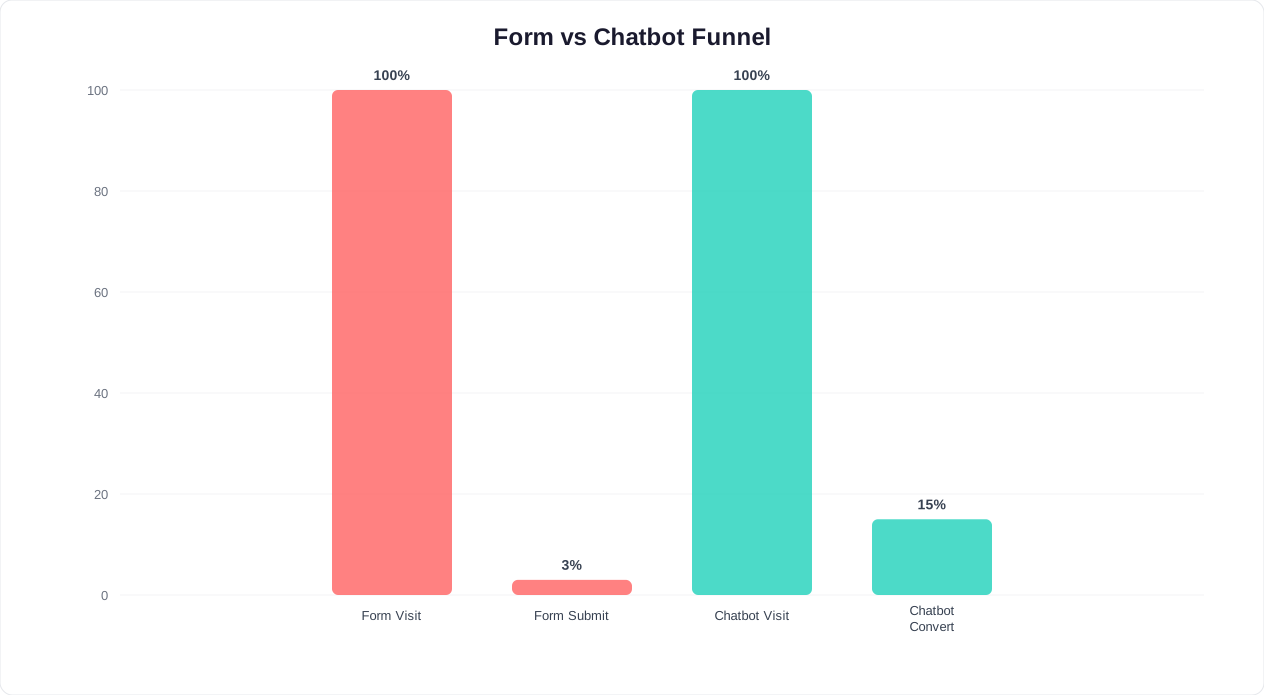
The donation page is the most important page on any nonprofit website -- and it is often the most poorly designed. Donors arrive with the intention to give, encounter a long form, get confused by too many options, or simply lose momentum clicking through multiple pages. A conversational donation flow replaces the static form with a guided dialogue that walks the donor through each decision one step at a time, reducing friction and increasing completion rates.
Designing the Donation Conversation
The most effective nonprofit chatbot donation flows follow a simple, linear structure that mirrors how a human fundraiser would guide a conversation:
Step 1: Welcome and intent confirmation
"Thank you for your generosity. I can help you make a donation right now. Would you like to make a one-time gift or set up a monthly recurring donation?"
This single question accomplishes two things: it confirms the donor's intent and introduces the recurring giving option. Nonprofits that present the recurring option prominently see a small share of new donors choose monthly giving -- donors who generate more lifetime value than one-time givers.
Step 2: Amount selection with impact anchoring
"How much would you like to give?" Present 4-5 suggested amounts with impact statements:
- $25 -- Provides school supplies for one child for a semester
- $50 -- Feeds a family of four for one week
- $100 -- Covers one hour of legal aid for a domestic violence survivor
- $250 -- Funds a full scholarship for one youth summer camp participant
- Other amount -- Enter a custom amount
Impact-anchored giving amounts consistently outperform generic dollar figures. When donors understand exactly what their money accomplishes, average gift sizes increase compared to forms that simply present dollar amounts without context.
Step 3: Fund designation (optional)
If your organization accepts directed gifts, present the options simply: "Would you like to direct your gift to a specific program, or would you prefer it go where it is needed most?" Options might include: General Fund, Education Programs, Emergency Relief, Capital Campaign, or a specific initiative. Keep the list to 5-7 options maximum -- too many choices create decision paralysis.
Step 4: Donor information and payment
Collect the minimum information required: name, email, and payment details. The chatbot links to a secure payment page powered by Stripe or your existing payment processor. For returning donors, the chatbot recognizes their email and pre-fills saved information: "Welcome back, Sarah. Would you like to use the same card ending in 4821?"
Step 5: Confirmation and stewardship
After the donation is complete, the chatbot delivers an immediate thank-you with a receipt and an impact preview: "Thank you, Sarah. Your $100 monthly gift will provide 300 meals every quarter to families in our community. You will receive a receipt at [email protected] within minutes. Is there anything else I can help you with?"
Recovering Abandoned Donations
For donors who start the conversation but do not complete the payment, the chatbot can send a gentle follow-up after 24 hours: "Hi Sarah, I noticed you started a donation yesterday but did not get a chance to finish. No pressure at all -- if you would like to pick up where you left off, I am here to help. Your gift of $100 to the Education Fund is still ready to go."
Donation recovery messages like this typically bring back 8-15% of abandoned donations. For a nonprofit processing 500 online donations per month with an average gift of $75 and a 60% abandonment rate, recovering even 10% of abandonments adds $22,500 in annual revenue that would otherwise be lost.
Peer-to-Peer and Campaign Integration
For fundraising campaigns, galas, and peer-to-peer initiatives, the chatbot serves as the donation hub. A supporter shares a campaign link on social media, and the recipient arrives at a chatbot-powered donation page that explains the campaign, shows progress toward the goal, and completes the gift in under 60 seconds. This conversational approach outperforms traditional campaign pages because it maintains the personal, story-driven energy of peer-to-peer fundraising rather than dumping the donor onto a generic form.
Use Conferbot's integrations hub to connect your donation chatbot to your CRM (Bloomerang, Salesforce Nonprofit, Little Green Light, or DonorPerfect) so that every gift is automatically recorded, receipted, and attributed to the correct campaign. For a deeper look at optimizing your donation funnel, see our guide on how to calculate chatbot ROI.
Volunteer Recruitment, Scheduling, and Onboarding
Volunteers are the backbone of the nonprofit sector. Yet volunteer management is one of the most administratively intensive functions in any organization. Recruiting, screening, scheduling, communicating, and retaining volunteers consumes staff hours that could be spent on program delivery. A volunteer management chatbot automates the repetitive elements of this process while preserving the personal connection that keeps volunteers engaged.
Recruitment: Converting Interest Into Action
The journey from "I want to volunteer" to actually showing up for a shift involves multiple steps where prospective volunteers drop off. They visit your website, browse a volunteer page, maybe fill out an interest form -- and then wait. And wait. By the time a staff member follows up three or four days later, the initial enthusiasm has cooled. Organizations that respond to volunteer interest within one hour are far more likely to convert that interest into active participation. A chatbot eliminates this gap by engaging prospective volunteers the moment they express interest and guiding them through the entire onboarding process in a single conversation.
The recruitment flow begins with a warm welcome and interest assessment:
"Thank you for your interest in volunteering with [Organization Name]. We have several ways you can make a difference. What area interests you most?"
Present options as buttons mapped to your volunteer needs:
- Direct service (food distribution, tutoring, mentoring)
- Event support (setup, registration, coordination)
- Administrative help (data entry, filing, phone calls)
- Skilled volunteering (graphic design, legal, accounting, IT)
- Board or committee service
After the volunteer selects an area, the chatbot collects essential information: name, email, phone, availability (weekdays/weekends, morning/afternoon/evening), any relevant skills or certifications, and whether they have volunteered with your organization before. For roles requiring background checks (working with children, vulnerable populations, or financial data), the chatbot explains the requirement and provides a link to begin the process.
Scheduling: Matching Volunteers to Opportunities
Once a volunteer is onboarded, the ongoing challenge is matching them to specific shifts and opportunities. The chatbot handles this through a scheduling flow that presents available opportunities based on the volunteer's stated preferences:
"Here are upcoming volunteer opportunities that match your availability and interests:"
| Opportunity | Date | Time | Spots Remaining |
|---|---|---|---|
| Food Bank Distribution | Saturday, June 14 | 8:00 AM - 12:00 PM | 6 of 20 |
| Youth Tutoring Program | Tuesday, June 17 | 3:30 PM - 5:30 PM | 3 of 8 |
| Annual Gala Setup | Friday, June 20 | 2:00 PM - 6:00 PM | 12 of 15 |
The volunteer selects a shift, and the chatbot confirms instantly with calendar details and an add-to-calendar link. Automated reminders go out 48 hours and 2 hours before the shift, reducing no-show rates compared to organizations that rely on a single confirmation email. When a volunteer cancels, the chatbot immediately reaches out to alternates on the roster -- a process that typically secures a replacement within 15-30 minutes, far faster than any phone tree or group text.
Onboarding: Training and Orientation
For new volunteers, the chatbot delivers orientation materials directly within the conversation -- welcome packets, training videos, safety protocols, dress codes, parking instructions, and emergency contact information. Instead of emailing a 15-page PDF that few people read, the chatbot breaks onboarding into digestible segments with confirmation checkpoints:
"Before your first shift, there are a few things to review. Let me walk you through them one at a time. First, here is our volunteer code of conduct..."
After each section, the chatbot confirms understanding: "Got it? Any questions about that before we move to the next topic?" This interactive approach increases onboarding completion rates to 85-90% compared to the 40-50% typical of emailed materials.
Retention: Keeping Volunteers Engaged
Volunteer retention is as important as recruitment. The national volunteer retention rate is only 65% (Corporation for National and Community Service), meaning one-third of volunteers do not return after their first engagement. The chatbot supports retention through automated check-ins after each shift ("How was your experience today? Anything we could improve?"), milestone celebrations ("You have now completed 50 hours of service -- thank you for your incredible commitment"), and personalized notifications about new opportunities matching their interests. Volunteers who receive regular, personalized engagement are more likely to continue serving than those who only hear from the organization when a shift needs filling.
Deploy your volunteer chatbot on WhatsApp for high engagement rates, your website for new recruit capture, and Facebook Messenger for community reach. Use calendar booking to let volunteers self-schedule shifts and analytics to monitor volunteer engagement trends and identify supporters at risk of disengagement.
Related: How to Calculate Chatbot ROI: Formula, Benchmarks, and Free Calculator
Event Promotion and RSVP Management
Events are the lifeblood of nonprofit fundraising and community engagement. Galas, walkathons, benefit concerts, awareness campaigns, town halls, workshops, volunteer appreciation dinners -- every nonprofit runs a packed event calendar, and every event requires promotion, registration, communication, and follow-up. The administrative burden compounds rapidly when staff are managing multiple events simultaneously. A chatbot streamlines the entire event lifecycle from announcement to post-event stewardship.
Event Discovery and Promotion
The chatbot serves as a dynamic event calendar that presents upcoming opportunities based on the supporter's interests and history:
"Here are some upcoming events you might enjoy based on your involvement with [Organization Name]:"
Rich cards display event name, date, time, location, description, and a compelling image. For major events like annual galas or signature fundraisers, the chatbot can deliver multi-message campaigns that build anticipation over several weeks -- sharing speaker announcements, auction previews, sponsor highlights, and early-bird pricing deadlines.
The chatbot also powers event promotion through shareable conversations. When a supporter RSVPs, the chatbot asks: "Would you like to invite a friend? I can send them the event details with your personal message." This peer-to-peer promotion generates 20-35% additional registrations beyond what the organization's own marketing channels produce, because personal invitations carry far more weight than mass emails.
RSVP and Registration Flows
The registration conversation is designed to minimize friction while capturing all necessary information:
- Event selection: The supporter chooses the event they want to attend
- Ticket type: "Would you like a general admission ticket ($75), a VIP table seat ($250), or a corporate table for 10 ($2,000)?"
- Guest information: For ticketed events, collect names of guests for name tags and seating assignments
- Dietary and accessibility needs: "Do any attendees have dietary restrictions or accessibility requirements we should know about?"
- Add-ons: "Would you like to add a raffle ticket bundle ($25 for 10 tickets) or make an additional donation to be recognized at the event?"
- Payment: Secure payment link for paid events, or simple confirmation for free events
- Confirmation: Instant confirmation with event details, parking information, agenda, and an add-to-calendar link
Registration completion rates through chatbot conversations are higher than traditional form-based registration, because the conversational format addresses confusion and hesitation in real time rather than letting the donor abandon a half-completed form.
Pre-Event Communication
The chatbot manages all pre-event touchpoints automatically:
- One week before: Event reminder with logistics -- parking, dress code, what to bring
- Day before: Final reminder with any last-minute updates (weather contingency, schedule changes)
- Day of: Morning message with venue details, check-in instructions, and a personal welcome
For larger events, the chatbot can handle real-time questions during the event itself: "Where is the silent auction?" "What time does the keynote start?" "Is there parking validation?" This reduces the burden on event staff and volunteers who would otherwise field these questions individually. Organizations using chatbot-enabled live giving during events report higher event fundraising totals compared to traditional paddle-raise-only methods, because donors can give through the chat interface at any moment they feel inspired rather than waiting for a designated ask.
Post-Event Follow-Up and Conversion
The chatbot's role does not end when the event does. Within 24 hours, it sends a personalized follow-up:
"Thank you for joining us at [Event Name] last night. We raised $47,000 for [cause] -- and your presence helped make that possible. Here are a few ways to stay involved..."
Follow-up options include: making an additional donation, signing up for volunteer opportunities mentioned at the event, joining a mailing list for future events, sharing event photos on social media, or providing feedback through a quick NPS survey. Post-event chatbot follow-ups generate 15-25% more post-event donations than email-only follow-ups because the conversational format encourages immediate action rather than passive reading.
Connect your event chatbot to your CRM through the integrations hub so that attendance records, donation amounts, and engagement data flow into your donor profiles automatically. For organizations managing complex event programs, see our guide on small business chatbot strategies for additional event management patterns that translate well to the nonprofit context.
Related: After-Hours Customer Support: How to Set Up a Chatbot That Works While You Sleep
Multilingual Support for Diverse Communities
Nonprofits serve some of the most linguistically diverse communities in the world. Immigrant services, refugee resettlement agencies, community health centers, food banks, legal aid organizations, and faith-based groups all work with populations that speak dozens of languages. Providing information and services in only one language is not just a missed engagement opportunity -- it is a barrier that prevents the people who need help most from accessing it.
Traditional multilingual support is expensive. Hiring bilingual staff, contracting with translation services, and maintaining parallel websites in multiple languages requires resources that most nonprofits simply do not have. A multilingual chatbot solves this problem at scale by supporting real-time conversations in 100+ languages without requiring any additional staff or translation contracts.
How Multilingual Chatbot Support Works
Conferbot's multilingual chatbot capabilities operate on three levels:
Automatic language detection: The chatbot detects the language of the user's first message and responds in that language automatically. A Spanish-speaking donor who types "Quiero hacer una donacion" receives the entire donation flow in Spanish. A Mandarin-speaking volunteer who asks about opportunities in Chinese gets volunteer information in Chinese. No language selection menu is needed -- the experience is seamless.
Content translation: Your FAQ answers, event descriptions, donation flows, and volunteer onboarding materials are translated in real time. The chatbot maintains the meaning and tone of your carefully crafted content across languages, ensuring that a donor interacting in Somali receives the same warmth and clarity as a donor interacting in English.
Cultural sensitivity: Effective multilingual support goes beyond word-for-word translation. The chatbot adapts communication style to cultural norms -- formality levels, greeting conventions, and response structures that feel natural to speakers of each language.
Use Cases for Multilingual Nonprofit Chatbots
Immigration and refugee services: Organizations serving immigrant and refugee communities need to provide intake information, appointment scheduling, document requirement lists, and referral services in the languages their clients speak. A chatbot that handles these interactions in Arabic, Dari, Pashto, Swahili, Ukrainian, and Spanish (among others) dramatically increases access to services. Consider the impact: a refugee family that arrives at your website at 11 PM, anxious and uncertain, can access the information they need in their native language without waiting for business hours or a bilingual staff member to be available.
Community health: Health education, appointment reminders, prescription information, and eligibility screening for programs like Medicaid or CHIP often fail to reach non-English-speaking populations. A multilingual health chatbot ensures that critical health information reaches everyone in the community, regardless of language proficiency.
Food banks and social services: Eligibility questions, distribution schedules, required documentation, and location information should be available in every language spoken by the communities served. A chatbot removes the language barrier that prevents families from accessing food assistance and other vital services.
Donor outreach to diaspora communities: Many nonprofits have potential donors within diaspora communities who are more comfortable giving in their native language. A chatbot that supports donation flows in Hindi, Tagalog, Korean, or Haitian Creole opens new donor segments that were previously unreachable without bilingual development staff. The Giving USA data consistently shows that immigrant and diaspora communities are generous givers when approached in culturally appropriate ways -- the barrier has always been communication, not willingness.
Implementation Considerations
When deploying a multilingual chatbot, consider these best practices:
- Prioritize your top languages. Review your community demographics and identify the 3-5 languages most commonly spoken by your stakeholders. Ensure that your knowledge base content is especially thorough for these languages.
- Test with native speakers. Automated translation is excellent but not perfect. Have native speakers of your priority languages test the chatbot and flag any awkward phrasing or cultural missteps.
- Offer human handoff in key languages. For complex or sensitive conversations (legal advice, crisis support, medical information), configure human handoff to bilingual staff members when available.
- Track language analytics. Use chatbot analytics to monitor which languages are most used, which conversations have the highest drop-off rates by language, and where translation quality may need improvement.
- Include language-specific resources. For high-priority languages, add links to translated documents, forms, and external resources (government websites, legal aid in specific languages) that the chatbot can share during conversations.
Multilingual chatbot support is not a luxury feature for nonprofits -- it is an equity imperative. Every person your organization serves deserves to access information and services in a language they understand. A chatbot makes that possible without multiplying your staff or your budget, ensuring that language is never the reason someone cannot access the help they need.
Related: Collect Customer Feedback With a Chatbot: NPS, CSAT, and Survey Guide
Data Privacy and Compliance for Donor Information
Nonprofits hold some of the most sensitive data of any sector: donor financial information, beneficiary personal records, volunteer background check results, health data for social service clients, and immigration status details for refugee programs. The responsibility to protect this data is both an ethical obligation and, increasingly, a legal one. A chatbot that collects donor payment details, stores personal information, and processes transactions must be built on a foundation of robust data privacy and compliance.
PCI DSS Compliance for Donation Processing
Any organization that processes credit card payments must comply with the Payment Card Industry Data Security Standard (PCI DSS). For nonprofits using chatbots to facilitate donations, this means:
- No card data in chat: The chatbot should never ask a donor to type their credit card number directly into the conversation. Instead, it generates a secure payment link that redirects to a PCI-compliant payment processor (Stripe, PayPal, or your organization's payment gateway). The payment is processed on the secure platform, and the chatbot receives a confirmation token -- never the card details themselves.
- Tokenized transactions: For returning donors who want to use a saved payment method, the chatbot references a tokenized representation ("card ending in 4821") without storing or transmitting actual card data.
- Secure transmission: All chatbot communications are encrypted using TLS (Transport Layer Security), ensuring that donor information in transit cannot be intercepted.
GDPR and International Donor Privacy
If your nonprofit has donors, volunteers, or beneficiaries in the European Union, the General Data Protection Regulation (GDPR) applies to your data practices. Key requirements for chatbot interactions include:
- Explicit consent: The chatbot must obtain clear consent before collecting personal data. "Before we continue, I want to let you know that we will collect your name and email to process your donation and send you a receipt. We will also use your email to share impact updates unless you opt out. Is that okay?"
- Data minimization: Collect only the information you genuinely need. If you do not need a phone number to process a donation, do not ask for it.
- Right to deletion: Donors have the right to request that their data be deleted. The chatbot should be able to process these requests or route them to the appropriate staff member.
- Data portability: Upon request, you must be able to provide donors with a copy of all personal data you hold about them in a machine-readable format.
US State Privacy Laws
Several US states have enacted their own data privacy laws -- California (CCPA/CPRA), Colorado (CPA), Connecticut (CTDPA), Virginia (VCDPA), and Texas (TDPSA) -- with more following every legislative session. For nonprofits with supporters across multiple states, the chatbot should include appropriate disclosures and honor opt-out requests regardless of the donor's location. While most current state privacy laws include nonprofit exemptions, the trend is clearly toward broader applicability, and proactive compliance builds donor trust that pays dividends in retention.
CAN-SPAM and Communication Consent
When the chatbot collects email addresses for follow-up communication (donation receipts, impact updates, newsletters, event invitations), ensure compliance with the CAN-SPAM Act and similar regulations:
- Include a clear opt-in for marketing communications separate from transactional messages like donation receipts
- Honor unsubscribe requests within 10 business days (best practice is immediately)
- Include your organization's physical address in email communications triggered by chatbot interactions
- Identify the message as an advertisement if it contains promotional content
Internal Data Governance
Beyond regulatory compliance, nonprofits should establish internal data governance policies for chatbot-collected information:
| Data Type | Access Level | Retention Period |
|---|---|---|
| Donor contact information | Development team + Executive Director | Active relationship + 7 years |
| Donation amounts and history | Development team + Finance | 7 years (IRS requirement) |
| Payment tokens | System only (no human access) | Until donor requests deletion |
| Volunteer background checks | Volunteer coordinator + HR | Duration of service + 3 years |
| Beneficiary personal data | Program staff only (need-to-know) | Active service + 5 years |
| Chat conversation transcripts | Chatbot admin + relevant team lead | 90 days (then anonymized) |
Conferbot's platform supports role-based access controls, data encryption at rest and in transit, automatic data retention policies, and audit logging -- all critical features for nonprofits handling sensitive supporter information. For organizations subject to HIPAA (health-focused nonprofits), SOC 2 compliance, or other regulatory frameworks, the API integration capabilities allow connection to your existing compliance infrastructure.
Transparency builds trust -- and trust is the currency of nonprofit fundraising. Consider adding a brief privacy notice to your chatbot's welcome message: "Your privacy matters to us. Any information you share in this conversation is protected and used only for the purposes described in our privacy policy. You can ask me to delete your data at any time." This upfront transparency increases donor comfort with sharing information and demonstrates the organizational values that distinguish well-run nonprofits.
Getting Started: Free Chatbot Setup for Nonprofits
Budget constraints are a reality for every nonprofit, and the thought of adding another technology expense can feel daunting. The good news is that getting started with a chatbot does not require a large investment. Many platforms, including Conferbot, offer free tiers and nonprofit discounts that make it possible to launch a fully functional chatbot at little or no cost. Here is a practical, step-by-step implementation plan designed specifically for resource-constrained organizations.
Phase 1: Start With One High-Impact Flow (Week 1)
Do not try to automate everything at once. Choose the single use case that will save the most staff time or capture the most value. For most nonprofits, this is one of three options:
- Donor FAQ chatbot: If your team spends significant time answering repetitive donor questions about tax deductions, matching gifts, and fund allocation, start here. Compile your top 20-30 FAQs and load them into the knowledge base.
- Donation flow chatbot: If your online donation page has high abandonment rates, deploy a conversational donation flow that guides donors through the process step by step with impact-anchored giving amounts.
- Volunteer sign-up chatbot: If you struggle to convert volunteer interest into actual participation, build an onboarding flow that captures information and schedules first shifts immediately.
Use Conferbot's no-code chatbot builder to design your first flow. No coding is required. The drag-and-drop interface lets anyone on your team -- development staff, volunteer coordinators, or program managers -- build a functional chatbot in under an hour. For a detailed walkthrough, see our guide on how to build a chatbot without coding.
Phase 2: Deploy on Your Primary Channel (Week 2)
Deploy your chatbot on the channel where your supporters are most active. For most nonprofits, the priority order is:
- Website: Your website is the hub of all digital engagement. A chatbot on your homepage and donation page captures the highest-intent visitors. Deploy using Conferbot's website widget -- a single line of embed code added to your site.
- Facebook Messenger: If your organization has an active Facebook presence, deploying on Messenger extends your chatbot to the platform where many supporters already interact with your content.
- WhatsApp: For organizations serving communities where WhatsApp is the primary communication platform, WhatsApp deployment reaches supporters where they already are.
Phase 3: Monitor, Refine, and Expand (Weeks 3-4)
Once your chatbot is live, use the analytics dashboard to monitor performance daily for the first two weeks:
- Engagement rate: What percentage of visitors interact with the chatbot? Target 15-25%.
- Resolution rate: What percentage of conversations are fully resolved without human intervention? Target 70-80% initially, improving to 85-90% as you refine the knowledge base.
- Conversion rate: For donation and volunteer flows, what percentage of conversations result in a completed donation or sign-up?
- Drop-off points: Where in the conversation do supporters disengage? These are optimization opportunities.
- Unanswered questions: What are supporters asking that the chatbot cannot answer? Add these to your knowledge base immediately.
Review conversation transcripts to identify patterns. If multiple donors ask about stock donations and your chatbot does not cover that topic, add it. If volunteers consistently drop off at the background check step, simplify the language and process. Continuous refinement is what separates a good chatbot from a great one.
Phase 4: Scale to Multiple Use Cases (Month 2+)
Once your first flow is performing well, add additional use cases one at a time:
| Month | Add This Flow | Expected Impact |
|---|---|---|
| Month 2 | Event RSVP and promotion | 20-35% increase in event registrations |
| Month 3 | Multilingual support for top 3-5 languages | Access for non-English-speaking communities |
| Month 4 | Recurring giving and stewardship campaigns | 15-25% increase in monthly donor conversions |
| Month 5 | Impact reporting and donor retention flows | Improved donor retention above 43% sector average |
| Month 6 | Year-end giving and tax receipt automation | Staff time savings during busiest fundraising season |
Budget-Friendly Tips for Nonprofits
- Start with a free plan. Conferbot and many other platforms offer free tiers that support basic chatbot functionality with limited conversation volume. This is enough to test the concept and demonstrate value to your board before requesting budget for a paid plan.
- Apply for nonprofit discounts. Many SaaS platforms offer 20-50% discounts for registered 501(c)(3) organizations. Ask about nonprofit pricing when evaluating any tool -- the savings are almost always available but not always advertised.
- Leverage volunteers. If you have tech-savvy volunteers or board members, invite them to help build and maintain the chatbot. No-code builders make this accessible to anyone with basic computer skills.
- Use grant funding. Technology and capacity-building grants from foundations like the Knight Foundation, Google.org, and local community foundations often cover chatbot implementation costs. Frame your proposal around the efficiency gains, expanded reach, and equity improvements the chatbot will enable.
- Measure and communicate ROI. Track time saved, donations captured, volunteer hours gained, and new supporters engaged. Present these metrics to your board and major donors to justify continued investment in automation. Our chatbot ROI calculator guide provides the framework for quantifying these returns.
- Integrate with existing tools. Use the integrations hub to connect your chatbot to the CRM, email platform, and payment processor you already use. This avoids duplicate data entry and maximizes the value of your existing tech stack.
The Chatbot as a Force Multiplier for Mission
For nonprofits, every dollar and every hour must be stretched as far as possible in service of the mission. A chatbot is not a replacement for the human relationships that drive mission-driven work -- it is a force multiplier that handles the routine so your team can focus on the extraordinary. It answers the 2 AM question about tax deductions so your development director can spend tomorrow building a relationship with a major donor. It onboards a new volunteer at 7 AM on a Saturday so your volunteer coordinator can focus on supporting the team already in the field. It processes a donation from a supporter who was moved by your social media post at midnight, without requiring anyone on your staff to be awake.
The numbers tell a compelling story. A nonprofit with 2,000 monthly website visitors, a 20% chatbot engagement rate, and even modest improvements in donation completion (15% lift) and volunteer conversion (20% lift) can expect to generate tens of thousands of dollars in additional annual revenue and hundreds of hours of recovered staff time. Against a chatbot cost of $50-150 per month, the return on investment is measured in multiples, not percentages.
The nonprofits that will thrive in the years ahead are those that embrace automation not as a cost-cutting measure but as a capacity-building strategy. A chatbot built on Conferbot's AI chatbot builder gives your organization the ability to be present for every supporter, in every language, at every hour -- without burning out the dedicated humans who make your mission possible. Explore our after-hours support chatbot guide for additional patterns that ensure no supporter interaction goes unanswered, and our feedback collection strategies for approaches that turn every conversation into an opportunity to improve your programs and deepen supporter relationships.
Was this article helpful?
Build and deploy in 10 minutes. No coding needed.
AI Chatbot for Nonprofits FAQ
Everything you need to know about chatbots for ai chatbot for nonprofits.
About the Author
The Conferbot team writes about building, deploying, and improving AI chatbots.
View all articles