
The Fundamental Difference: Scale vs Empathy
According to Gartner's 2026 customer service research, 62% of consumers prefer chatbots for simple queries but switch to preferring human agents for complex issues. The chatbot vs live chat debate misses the point. They are not competitors - they solve fundamentally different problems.
Chatbots solve the scale problem. How do you handle 500 simultaneous conversations at 2 AM with a 3-person support team? You cannot. A chatbot can.
Live chat solves the empathy problem. How do you comfort a frustrated customer whose $5,000 order was lost? A chatbot cannot do this well. A human can.
The question is not "which is better" but "which conversations should each handle?"
Head-to-Head Comparison
| Factor | AI Chatbot | Live Chat (Human) |
|---|---|---|
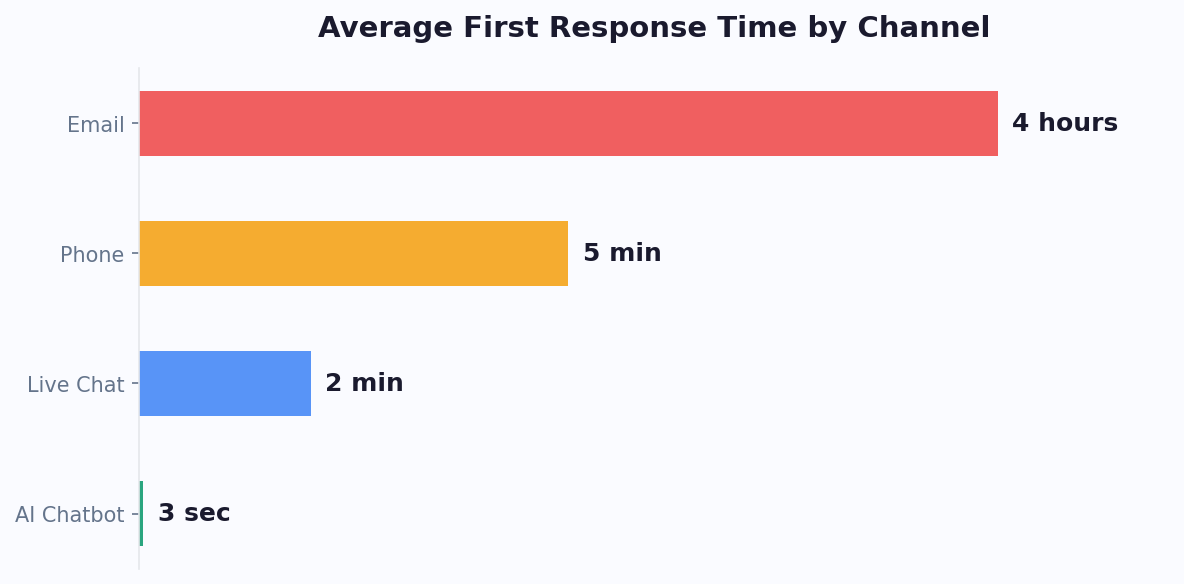
| Response time | Under 3 seconds | 1-5 minutes average |
| Availability | 24/7/365 | Business hours only (unless staffed) |
| Simultaneous conversations | Unlimited | 3-5 per agent |
| Cost per conversation | $0.10-0.50 | $5-15 |
| Emotional intelligence | Improving but limited | High |
| Complex problem solving | Medium (for trained topics) | High |
| Consistency | 100% consistent | Varies by agent, mood, workload |
| Scalability | Instant (no hiring) | Slow (hiring + training takes weeks) |
| Data collection | Automatic, structured | Depends on agent discipline |
| Customer preference (simple queries) | 62% prefer chatbot | 38% prefer human |
| Customer preference (complex issues) | 23% prefer chatbot | 77% prefer human |
Research from Zendesk's CX Trends Report and HubSpot's State of Service confirms this pattern consistently. The data is clear: customers want fast answers for simple questions (chatbot wins) and human empathy for complex issues (live chat wins). The magic happens when you combine both.
When a Chatbot Is the Right Choice (9 Scenarios)
1. After-Hours Coverage
No contest. When your office is closed, a chatbot is infinitely better than silence. 40-60% of website traffic arrives outside business hours. Without a chatbot, all of those visitors leave without engaging.
2. Repetitive FAQ Handling
If your support team answers "What are your hours?" 30 times a day, that is 30 conversations a chatbot handles in seconds. Train the bot on your knowledge base and it answers accurately every time, freeing agents for complex work.
3. Lead Qualification
A chatbot asks qualifying questions (budget, timeline, company size, specific needs) without the social awkwardness of a human asking "What's your budget?" early in the conversation. Chatbot-qualified leads close at higher rates because the qualification data is consistently captured.
4. Appointment Booking
Showing calendar availability and confirming bookings is a data operation, not an empathy operation. Chatbot booking eliminates the back-and-forth emails and works when human agents are unavailable.
5. Order Tracking and Status Updates
"Where is my order?" is the most common e-commerce support query. It requires looking up data, not exercising judgment. A chatbot retrieves order status instantly from your system.
6. Initial Triage
Before routing to a human agent, a chatbot can collect: customer name, email, account number, and a summary of their issue. This saves 2-3 minutes per conversation and means the agent already has context when they take over.
7. High-Volume Events
Product launches, flash sales, or marketing campaigns that spike traffic 10x. You cannot hire 10x agents for one day. A chatbot absorbs the spike without breaking.
8. Multi-Language Support
Hiring agents fluent in 10 languages is expensive and operationally complex. An AI chatbot handles 95+ languages with automatic detection. No additional cost per language.
9. Data Collection and Surveys
Post-purchase surveys, NPS scores, feedback collection - conversational chatbot surveys get 3-5x higher completion rates than email surveys because the format feels more natural.
When Live Chat Is the Right Choice (6 Scenarios)
1. Angry or Frustrated Customers
A customer whose $2,000 order arrived damaged does not want to talk to a bot. They want a human who acknowledges their frustration, apologizes sincerely, and takes immediate action. Emotional escalation requires human empathy - this is where AI still falls short.
2. High-Value Sales Conversations
When a prospect is evaluating your $50,000/year enterprise plan, they expect a human conversation. The chatbot should qualify and route these prospects to a sales agent immediately. The sale happens in the human conversation, but the chatbot ensured it happened by responding instantly instead of letting the prospect wait until morning.
3. Complex Technical Troubleshooting
Multi-step debugging that requires asking clarifying questions, interpreting screenshots, and adapting the approach based on responses. AI chatbots handle the first 2-3 steps well, but when the issue requires creative problem-solving, a human agent is more effective.
4. Policy Exceptions and Negotiations
"I'm a 10-year customer and I want you to waive this fee." A chatbot cannot evaluate loyalty context, make discretionary decisions, or negotiate. These conversations require human judgment and authority.
5. Sensitive Topics
Healthcare symptoms, financial difficulties, legal situations, or any conversation where the customer needs to feel heard and safe. A human agent provides the empathy and discretion these situations require.
6. Relationship Building with Key Accounts
For account management, onboarding calls, and strategic discussions with your top 20% of customers, personal human interaction builds the loyalty that retains high-value accounts.
The Hybrid Approach: How to Combine Chatbot + Live Chat for Best Results
The winning strategy is not chatbot OR live chat. It is chatbot AND live chat working together in a seamless handoff system.
How the Hybrid Model Works
- Chatbot handles first contact. Every conversation starts with the AI. It greets the visitor, understands their intent, and routes accordingly.
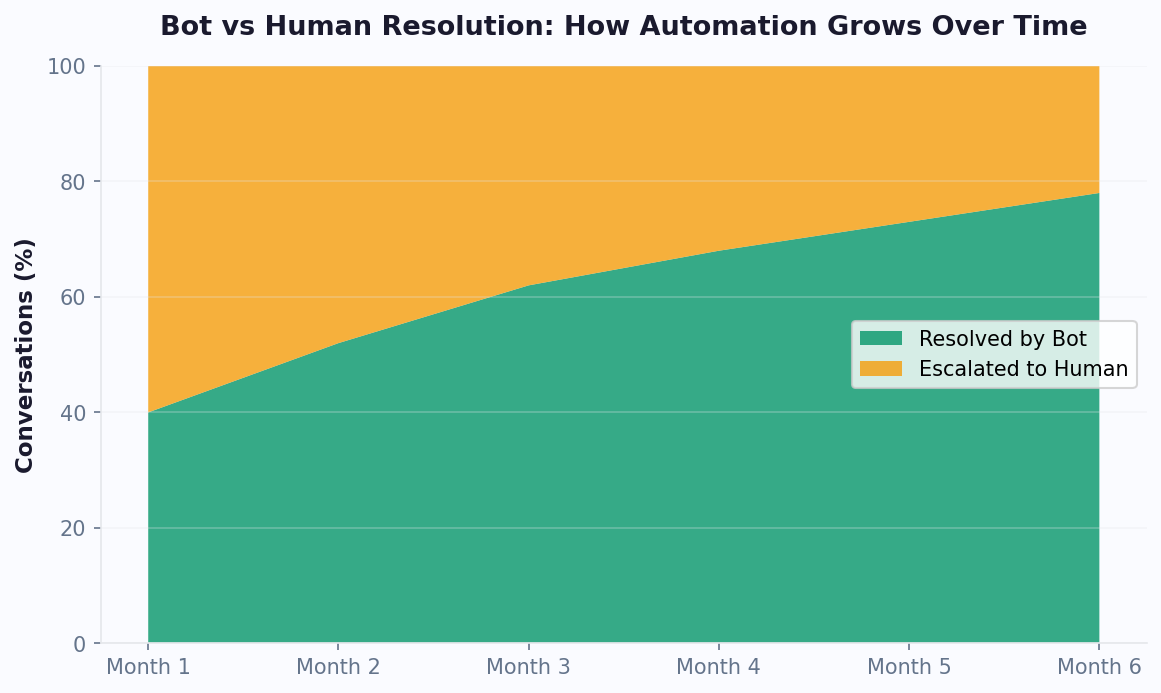
- Simple queries stay with the bot. FAQs, order tracking, appointment booking, lead capture - the chatbot resolves these without human involvement. This handles 60-80% of all conversations.
- Complex queries escalate to humans. When the chatbot detects complexity (frustrated language, billing issues, high-value opportunities), it hands off to a live agent with full conversation context.
- The agent sees everything. No "Can you repeat that?" The agent gets the complete chatbot conversation, customer information, and the chatbot's assessment of the issue.
- After hours, the bot captures and queues. When no agents are available, the chatbot handles what it can and collects detailed context for everything else. Agents start their shift with pre-organized, pre-triaged conversations.
Handoff Triggers That Work
Configure your chatbot to escalate when:
- The customer explicitly asks for a human ("talk to someone", "real person", "agent")
- The chatbot fails to answer the same question twice
- Sentiment analysis detects frustration or anger
- The conversation involves billing, payments, or account-specific issues
- The lead score exceeds a threshold (high-value prospect detected)
- The conversation exceeds a certain length without resolution
The Cost Impact of Hybrid
| Model | Monthly Cost (5,000 conversations) | Customer Satisfaction |
|---|---|---|
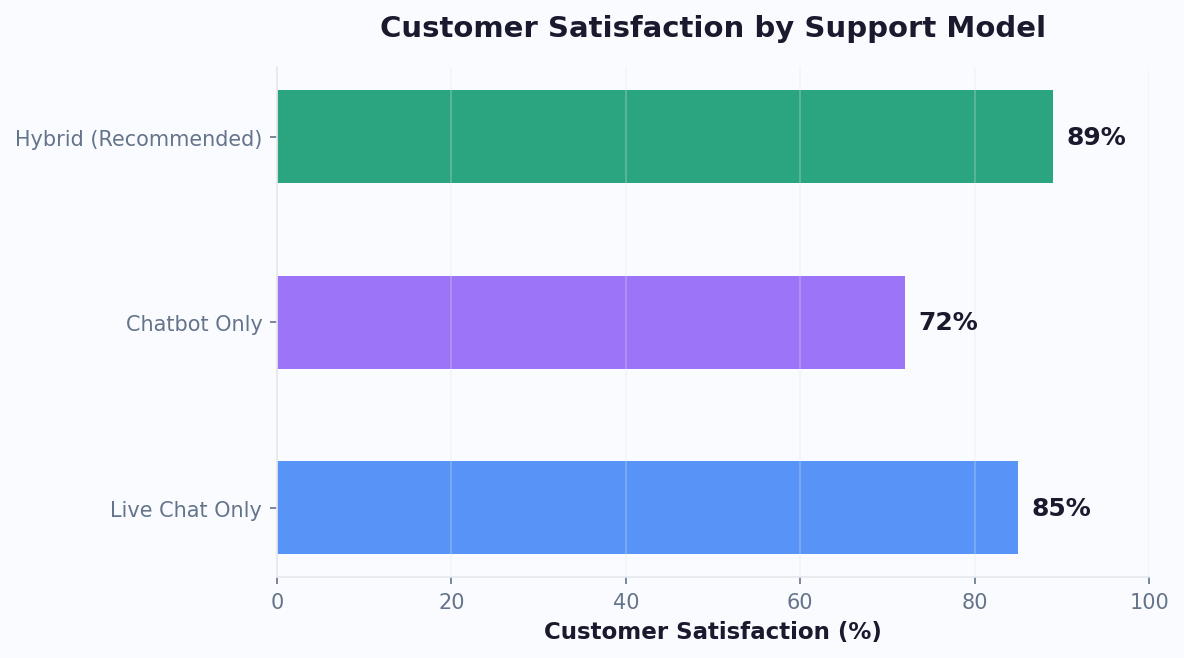
| Live chat only | $25,000-75,000 (5-15 agents) | 85% |
| Chatbot only | $100-500 | 72% |
| Hybrid (bot + 2 agents) | $7,000-12,000 | 89% |
The hybrid model costs 60-85% less than live-chat-only while achieving HIGHER customer satisfaction. Why? Because the chatbot handles routine queries instantly (no wait time), and agents focus entirely on complex issues where they add real value (better resolution quality).
Setup with Conferbot
Conferbot's live chat feature is built specifically for hybrid operation: For the richer escalation routes a hybrid setup can offer - voice, video and co-browse from within the same conversation - see our chatbot escalation guide.
- Chatbot conversations escalate with one click or automatic triggers
- Agents see full chatbot conversation history
- Team management routes to the right agent based on topic, language, or availability
- When all agents are offline, the bot continues handling what it can and queues the rest
- Agents can "whisper" to the chatbot in real time - teaching it new answers during live conversations
Cost Analysis: Chatbot vs Live Chat at Scale
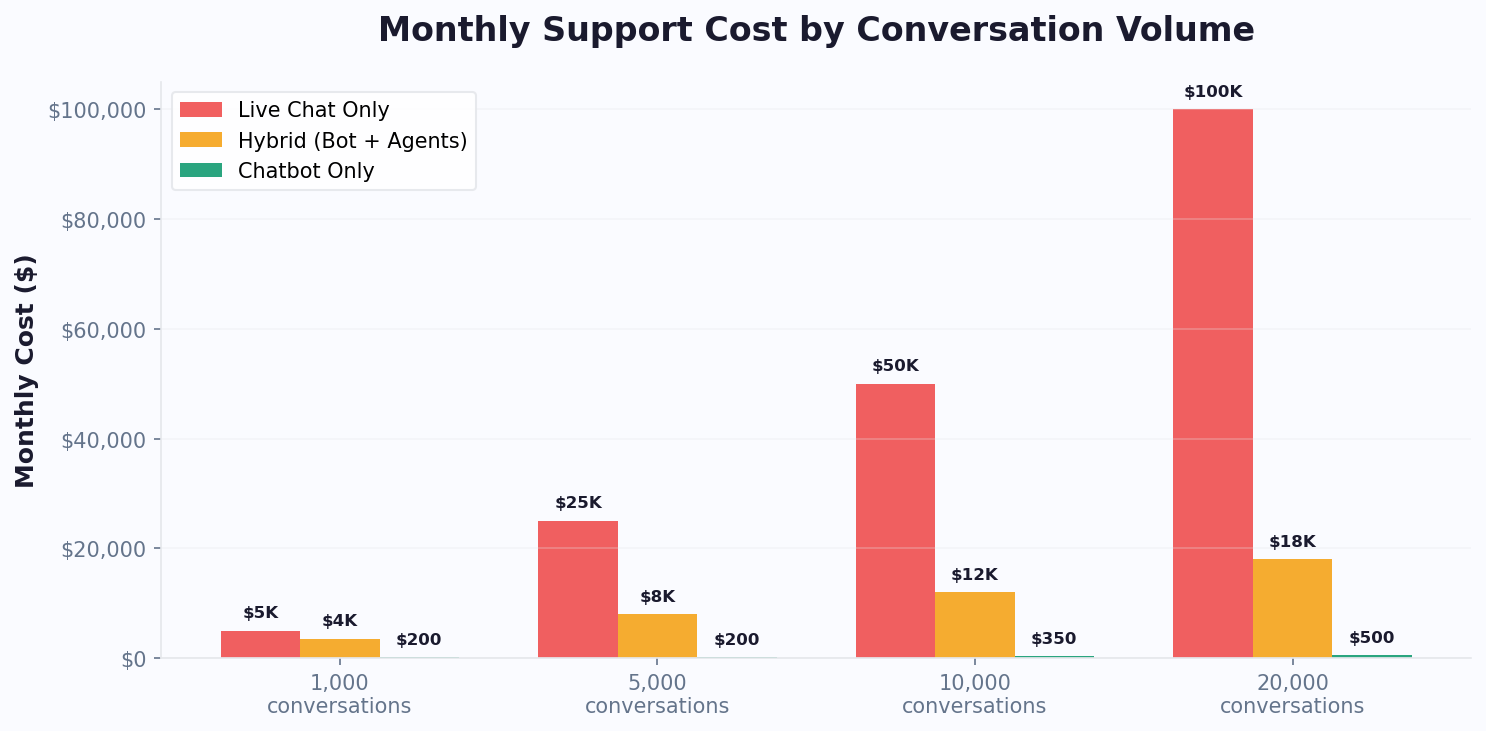
The cost comparison between chatbots and live chat changes dramatically as conversation volume increases. At 100 conversations per month, the difference is modest. At 20,000 conversations per month, the gap becomes a chasm that determines whether your support operation is a profit center or a cost center.
Total Cost of Ownership by Volume
This table includes all costs: platform fees, agent salaries, training, management overhead, and infrastructure.
| Cost Component | 1,000 Conversations/mo | 5,000 Conversations/mo | 20,000 Conversations/mo |
|---|---|---|---|
| Live Chat Only | |||
| Agents needed (5 convos/hr avg) | 2 full-time | 6 full-time | 22 full-time |
| Agent salaries | $6,000 | $18,000 | $66,000 |
| Management overhead (15%) | $900 | $2,700 | $9,900 |
| Training and turnover (20% annual) | $400 | $1,200 | $4,400 |
| Software (per-seat) | $200 | $600 | $2,200 |
| Total Live Chat | $7,500/mo | $22,500/mo | $82,500/mo |
| Chatbot Only | |||
| Platform fee | $49-99 | $99-199 | $199-399 |
| Setup and optimization (amortized) | $50 | $100 | $200 |
| Total Chatbot | $99-149/mo | $199-299/mo | $399-599/mo |
| Hybrid Model (Bot + Agents) | |||
| Chatbot handles (70%) | $99 | $149 | $299 |
| Agents for escalations (30%) | $3,000 (1 agent) | $6,000 (2 agents) | $18,000 (6 agents) |
| Software | $149 | $249 | $599 |
| Total Hybrid | $3,248/mo | $6,398/mo | $18,898/mo |
Cost Per Conversation Comparison
| Model | At 1K Convos | At 5K Convos | At 20K Convos |
|---|---|---|---|
| Live chat only | $7.50 | $4.50 | $4.13 |
| Chatbot only | $0.12 | $0.05 | $0.03 |
| Hybrid | $3.25 | $1.28 | $0.94 |
At 20,000 monthly conversations, a chatbot-only approach costs 99.6% less than live-chat-only. Even the hybrid model, which maintains human agents for complex issues, costs 77% less than staffing live chat exclusively. For growing businesses, this is not a marginal optimization - it is the difference between scaling profitably and hemorrhaging cash on support costs. Use our Chatbot ROI Calculator to model your specific volume and cost structure.
The inflection point is clear: once you exceed 500 conversations per month, a hybrid chatbot-plus-live chat model becomes dramatically more cost-effective than either approach alone. And the savings compound as you grow - every additional 1,000 conversations costs roughly $50 more with a chatbot versus $7,500 more with live agents.
Hidden Costs Most Businesses Miss
The tables above capture direct costs, but several hidden expenses make live-chat-only support even more expensive than it appears:
- Recruitment costs: According to Statista's hiring cost data, hiring a single support agent costs $3,000-5,000 in recruiting fees, job board postings, and interview time. With 30-40% annual turnover in support roles, you are repeating this investment every year.
- Ramp-up time: New agents need 2-4 weeks of training before they reach full productivity. During that period, they handle conversations slowly and often escalate issues a veteran would resolve independently.
- Quality variance: A chatbot delivers 100% consistent answers. Human agents vary in quality by shift, mood, experience, and workload. The cost of a bad support interaction - lost customers, negative reviews, refunds - does not appear in staffing budgets but impacts revenue directly.
- Coverage gaps: Even with shifts, live-chat-only operations have gaps - shift changes, breaks, sick days, holidays. Each gap is a window where customers wait or leave. A chatbot has zero gaps.
When you factor in these hidden costs, the true cost of live-chat-only support is 20-30% higher than the direct salary and software calculations suggest. This makes the hybrid model even more compelling - you get the consistency and availability of a chatbot with the empathy and problem-solving of humans, at a fraction of the all-human cost. See our detailed cost analysis for more on the financial impact of not automating support.
Implementation Timeline: From Zero to Hybrid Support
Deploying a hybrid chatbot and live chat system does not require a multi-month project plan. With modern no-code chatbot builders, you can go from zero to a fully operational hybrid support system in under 30 days. Here is the realistic week-by-week timeline based on hundreds of successful implementations.
Week 1: Chatbot Foundation (Days 1-7)
Day 1-2: Setup and configuration. Sign up for a chatbot platform, select a support template, and customize it with your business information. Connect your knowledge base by uploading FAQs, support docs, and product information. This takes 2-4 hours for most businesses.
Day 3-4: Test internally. Have your team test the chatbot across every scenario they can think of. Note where the bot fails or gives incomplete answers. Update the knowledge base to fill gaps. Test on mobile and desktop.
Day 5-7: Soft launch. Deploy the chatbot on your website in chatbot-only mode. Monitor every conversation for the first 48 hours. Identify the top 10 questions the bot handles poorly and fix them immediately.
Week 2: Live Chat Integration (Days 8-14)
Day 8-9: Configure handoff triggers. Set up automatic escalation rules: customer asks for human, bot fails twice on same question, negative sentiment detected, billing or account issues, or high-value lead identified. Connect your live chat system so agents receive escalated conversations with full context.
Day 10-12: Train your agents. Agents need to understand the hybrid workflow: what the bot handles, when they receive escalations, and how to use the conversation context provided by the bot. Train them to let the bot handle routine follow-ups after they resolve the complex issue.
Day 13-14: Launch hybrid mode. Switch on live chat alongside the chatbot. Start with business-hours-only agent availability. The chatbot covers after-hours independently.
Week 3-4: Optimization (Days 15-30)
Days 15-21: Analyze and adjust. Review chatbot analytics for: bot resolution rate (target 65-75% in week one), unnecessary escalations (bot handing off conversations it could have handled), missed escalations (bot attempting conversations that needed a human), and average handling time for escalated conversations.
Days 22-30: Fine-tune. Adjust handoff triggers based on data. Add knowledge base content for the top recurring escalation topics. Optimize agent workflows based on real conversation patterns. By day 30, your bot should resolve 70-80% of conversations independently.
What Success Looks Like at 30 Days
| Metric | Target at Day 30 |
|---|---|
| Bot resolution rate | 70-80% |
| Average first response time | Under 5 seconds |
| Customer satisfaction (CSAT) | 85%+ |
| Agent workload reduction | 60-70% |
| After-hours coverage | 100% (bot-handled) |
| Cost per conversation (blended) | $1.50-3.00 |
The most common mistake is over-planning. Do not spend weeks designing the perfect conversation flow before deploying. Start with a basic no-code chatbot, get real data from real conversations, and iterate rapidly. The businesses that reach 80%+ bot resolution fastest are the ones that launch quickly and optimize weekly, not the ones that plan for months before going live.
Tool Checklist for Implementation
Here is a complete checklist of what you need to go from zero to hybrid support:
- Chatbot platform: An AI chatbot builder with live chat handoff capability - this is non-negotiable for hybrid operation
- Knowledge base content: Your FAQs, product docs, support articles, and policies in a format the bot can learn from (PDF, URL, or text). Upload these to your AI knowledge base
- Live chat agent access: At least one person designated to handle escalated conversations during business hours
- Analytics dashboard: A way to measure bot resolution rate, escalation rate, and customer satisfaction - any good platform includes built-in analytics
- Communication channel: At minimum, deploy on your website. For maximum coverage, add WhatsApp and Messenger
- Escalation protocol: A documented process for what happens when the bot escalates - who gets notified, response time expectations, and what information the agent should review before responding
Total investment: 1-2 days of setup time plus $49-199/month for the platform. Compare this to the weeks of hiring and thousands in costs for a live-chat-only approach. The hybrid model wins on every dimension - speed, cost, quality, and scalability. If you are starting from scratch, our guide to building a chatbot without coding walks you through the entire process step by step, from choosing a template to going live on your first channel.
Industry-Specific Recommendations: Which Model Works Best for You
The optimal mix of chatbot and live chat varies significantly by industry. A SaaS company's support profile looks nothing like a healthcare provider's or an e-commerce store's. Here are data-backed recommendations for the most common business types.
SaaS and Technology Companies
Recommended model: Chatbot-first with technical escalation
Optimal split: 75% chatbot, 25% human
SaaS support conversations fall into two distinct categories: how-to questions that are perfectly suited for AI (account setup, feature usage, integration guides) and complex technical troubleshooting that requires human expertise. Deploy a chatbot trained on your knowledge base and documentation to handle the how-to category. Configure automatic escalation to technical agents when the conversation involves bug reports, multi-step debugging, or API issues.
Key metric to watch: First-contact resolution rate. SaaS chatbots should resolve 70-80% of conversations without escalation. If it is lower, your knowledge base needs more content. If it is higher, check whether the bot is incorrectly resolving complex issues that need human attention.
E-commerce and Retail
Recommended model: Hybrid with proactive engagement
Optimal split: 80% chatbot, 20% human
E-commerce has the highest automation potential because the most common queries - order tracking, shipping status, return policies, product availability - are purely data-driven. A chatbot connected to your store's API resolves these instantly. Human agents should focus on: high-value customer complaints, complex return negotiations, and VIP customer service. Read our customer support chatbot guide for e-commerce-specific strategies.
Key metric to watch: Cart recovery rate. The chatbot should not just answer questions - it should proactively engage visitors showing exit intent and recover abandoned carts.
Healthcare and Medical Practices
Recommended model: Chatbot for scheduling, human for clinical
Optimal split: 60% chatbot, 40% human
Healthcare requires a clear boundary: the chatbot handles all administrative tasks (appointment booking via calendar integration, insurance verification, hours and location info, prescription refill requests) while human staff handle anything clinical (symptom questions, treatment concerns, test results). The chatbot must never provide medical advice - instead, it triages and routes appropriately.
Key metric to watch: Appointment completion rate. The chatbot's primary value is converting website visitors into booked patients and reducing no-shows through automated reminders.
Financial Services
Recommended model: Conservative chatbot with rapid escalation
Optimal split: 55% chatbot, 45% human
Financial conversations carry higher stakes and regulatory requirements. The chatbot excels at: account balance inquiries, transaction history, branch locations, product information, and lead qualification for new accounts. But any conversation involving account disputes, fraud reports, investment advice, or regulatory compliance must route to a licensed human agent immediately. Build trust by making the escalation seamless - customers should never feel stuck with a bot when money is on the line.
Professional Services (Law, Consulting, Accounting)
Recommended model: Chatbot for intake, human for consultation
Optimal split: 50% chatbot, 50% human
Professional services firms benefit most from chatbot-driven lead intake. The bot qualifies prospects (practice area, urgency, budget range), books initial consultations, and collects preliminary information. The human lawyer, consultant, or accountant then enters the conversation fully briefed. This model increases consultation booking rates by 40-60% while ensuring professionals spend their billable time on actual consulting, not intake screening.
Quick-Reference Decision Table
| Industry | Bot % | Human % | Bot Handles | Human Handles |
|---|---|---|---|---|
| SaaS | 75% | 25% | How-to, docs, account | Bugs, complex debug |
| E-commerce | 80% | 20% | Orders, tracking, returns | VIP, complaints |
| Healthcare | 60% | 40% | Scheduling, admin, FAQ | Clinical, sensitive |
| Financial | 55% | 45% | Accounts, info, leads | Disputes, compliance |
| Professional | 50% | 50% | Intake, booking, FAQ | Consultation, advice |
| Hospitality | 70% | 30% | Reservations, info | Complaints, custom |
These splits are starting points. After 30 days of real data from your analytics dashboard, adjust based on your actual conversation patterns. The goal is to maximize bot resolution rate without sacrificing customer satisfaction on complex issues. Most businesses find their optimal split within 60-90 days of deployment. Compare platforms that offer this hybrid flexibility in our chatbot builder comparison.
5 Common Mistakes When Combining Chatbot and Live Chat
Even businesses that adopt the hybrid model can undermine their results with common implementation errors. Here are the five mistakes we see most often and how to avoid them.
Mistake 1: Making the Handoff Feel Like Starting Over
The number one frustration customers report with hybrid support is having to repeat their issue to the human agent. When the chatbot escalates a conversation, the agent must receive the complete transcript, customer details, and the bot's assessment of the problem. With Conferbot's live chat, this context transfer happens automatically. For best practices on seamless escalation, see our chatbot-to-human handoff guide.
Mistake 2: Setting the Chatbot Confidence Threshold Too High
If your chatbot only attempts answers when it is 95% confident, it escalates too many conversations and your agents are overwhelmed with routine queries. A confidence threshold of 70-80% is optimal for most businesses. The bot may occasionally provide an imperfect answer, but the post-answer feedback loop ("Did that help?") catches errors without burdening agents.
Mistake 3: Not Tracking Unnecessary Escalations
Review escalated conversations weekly. If the human agent resolves the issue using the same information available in the chatbot's knowledge base, the escalation was unnecessary. Every unnecessary escalation represents a gap in your knowledge base that should be filled.
Mistake 4: Hiding the Human Option
Some businesses make it deliberately difficult to reach a human agent, hoping to force more chatbot interactions. This backfires. Customers who feel trapped by a bot leave frustrated and may churn entirely. Always provide a visible "Talk to a person" option. Paradoxically, the availability of human backup increases chatbot satisfaction because customers feel less anxious about being stuck.
Mistake 5: Ignoring the Analytics Feedback Loop
The hybrid model improves over time only if you use conversation analytics to continuously train the chatbot on new topics and refine escalation triggers. Businesses that review analytics weekly improve their bot resolution rate by 5-10% per month. Those that set and forget plateau quickly and never reach the 80%+ resolution rates that drive meaningful cost savings.
Making the Decision: A Data-Driven Framework
Use this framework to decide your approach based on your actual business data.
Step 1: Categorize Your Conversations
Pull your last 100 support conversations (or customer inquiries). Categorize each as:
- Category A (Bot-ready): FAQ, order status, hours/pricing, appointment booking, basic product questions
- Category B (Human-needed): Complaints, complex troubleshooting, policy exceptions, high-value sales
- Category C (Could go either way): Product recommendations, account changes, moderate complexity questions
Step 2: Calculate Your Split
For most businesses, the split is approximately:
- 60-70% Category A (automate with chatbot)
- 15-20% Category B (keep human)
- 15-20% Category C (start with bot, escalate if needed)
Step 3: Choose Your Model
| If Your Split Is... | Recommended Model |
|---|---|
| 80%+ Category A | Chatbot-first with occasional human escalation |
| 50-80% Category A | Hybrid (chatbot + live chat) |
| Less than 50% Category A | Live chat with chatbot for after-hours only |
Step 4: Start and Iterate
Do not over-plan. Deploy a chatbot for your Category A conversations this week. Monitor for two weeks. Review which conversations the bot handles well and which need human intervention. Adjust the handoff triggers. Add knowledge base content for common bot failures. Within 30 days, you will have real data to optimize further.
The businesses that succeed with chat support are the ones that start, measure, and iterate - not the ones that spend months planning the perfect system. As Forrester's research on digital CX confirms, speed of deployment correlates more strongly with success than perfection of initial design.
Was this article helpful?
Build and deploy in 10 minutes. No coding needed.
Chatbot vs Live Chat FAQ
Everything you need to know about chatbots for chatbot vs live chat.
About the Author
The Conferbot team writes about building, deploying, and improving AI chatbots.
View all articles

