
The short answer
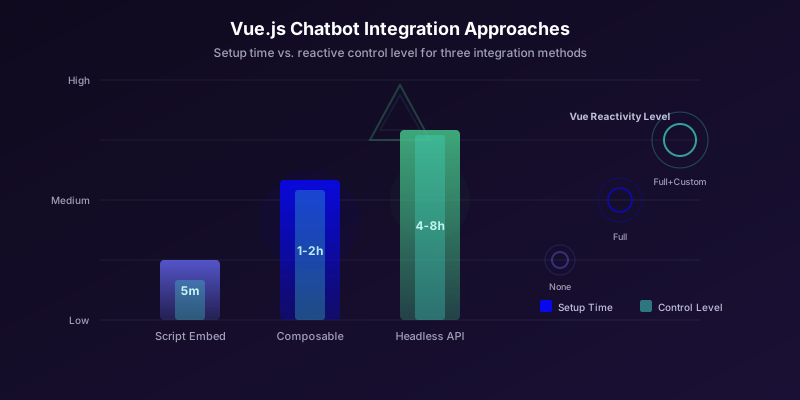
To embed a chatbot in a Vue.js app, add the Conferbot widget script once - either as a script tag in index.html or from a small composable - and start the bot in the script's onload callback. Load it from your root component so it stays on the page across Vue Router navigation, and pass the signed-in user when it starts so the bot greets them by name.
The widget is a self-contained web component, so Vue does not render it and your reactivity system does not need to manage it. That keeps the integration to a few lines, safe with server rendering in Nuxt, and easy to test.
Two Ways to Add the Chatbot to Vue
The simplest option is the script tag in index.html; it works in any Vue 3 app built with Vite or the Vue CLI:
<!-- index.html, before </body> -->
<script src="https://cdn.conferbot.com/dist/v1/widget.min.js" async
  onload="ConferbotWidget('YOUR_BOT_ID', 'live_chat')"></script>
If you want to pass the signed-in user or load the bot only after something happens in your app, load it from code instead, using the small composable below.
| Embed type | What it shows |
|---|---|
live_chat | A launcher bubble that opens the chat window (the usual choice) |
popup_chat | The chat opens as a popup |
fullpage_chat | The chat fills the page, for a dedicated chat or support page |
A useConferbot Composable
This composable adds the script once and starts the bot when it loads, so it is safe to call from any component and on every mount:
// useConferbot.js - load once, from any component
const SRC = 'https://cdn.conferbot.com/dist/v1/widget.min.js';

export function useConferbot(botId, { embedType = 'live_chat', user } = {}) {
  if (typeof window === 'undefined') return; // skip during SSR
  if (document.getElementById('conferbot-js')) return;
  const script = document.createElement('script');
  script.id = 'conferbot-js';
  script.src = SRC;
  script.async = true;
  script.onload = () => window.ConferbotWidget(botId, embedType, user ? { user } : undefined);
  document.body.appendChild(script);
}
Call it from your root component after auth has resolved, so the bot knows who the visitor is:
<!-- App.vue -->
<script setup>
import { onMounted } from 'vue';
import { useConferbot } from './useConferbot';
import { useAuth } from './auth';

const { user } = useAuth();

onMounted(() => {
  useConferbot(import.meta.env.VITE_CONFERBOT_BOT_ID, {
    user: user.value ? { id: user.value.id, name: user.value.name, email: user.value.email } : undefined,
  });
});
</script>

<template>
  <RouterView />
</template>
The widget's public interface is deliberately small: one call, ConferbotWidget(botId, embedType, options), where options can carry user (id, name, email and other fields) and customData. Appearance, greeting, which pages it appears on and whether it shows on desktop, phones or both are set in the Conferbot dashboard, not in code. There are no JavaScript methods to open, close or send messages programmatically, so build your integration around loading it once and passing identity at load time.
Showing the Chat on Some Pages Only
The simplest and most reliable way to keep the chat off certain pages is the hidden pages setting in the Conferbot dashboard: list the URLs (optionally including their sub-pages) and the widget will not appear there, with no code changes. The same settings show it on desktop only, phones only, or both.
If you would rather not load the script at all until a visitor reaches a relevant page, start it from a router hook. Once loaded it stays for the rest of the visit:
// router.js - start the bot the first time the visitor reaches a page that should have chat
import { useConferbot } from './useConferbot';

const CHAT_ROUTES = ['/pricing', '/support', '/contact'];

router.afterEach((to) => {
  if (CHAT_ROUTES.some((p) => to.path.startsWith(p))) {
    useConferbot(import.meta.env.VITE_CONFERBOT_BOT_ID);
  }
});
Performance Optimization: Lazy Loading and Core Web Vitals
A chatbot widget adds JavaScript, CSS, and network requests to your page. Without optimization, this can degrade Core Web Vitals -- particularly Largest Contentful Paint (LCP) and Interaction to Next Paint (INP). Google uses these metrics for search ranking, so performance is not just a UX concern; it is an SEO concern. See our chatbot page speed and SEO guide for the full impact analysis.
The Performance Cost of Chatbot Widgets
A typical chatbot widget loads 80-200KB of JavaScript (gzipped) plus 10-30KB of CSS. On a 4G mobile connection, this adds 200-500ms to page load. The impact on Core Web Vitals:
| Metric | Without Chatbot | Chatbot on Page Load | Chatbot Lazy-Loaded |
|---|---|---|---|
| LCP | 1.8s | 2.3s (+500ms) | 1.8s (no impact) |
| INP | 85ms | 120ms (+35ms) | 85ms (no impact) |
| CLS | 0.02 | 0.05 (+0.03) | 0.02 (no impact) |
| Total Blocking Time | 150ms | 280ms (+130ms) | 150ms (no impact) |
The difference between eager and lazy loading is significant. Lazy loading eliminates all performance impact during initial page load.
Lazy Loading Strategy for Vue
The most effective lazy loading strategy defers the chatbot SDK until one of three events occurs: (1) the user scrolls past the fold, (2) the user shows interaction intent (mouse movement toward the chat area), or (3) the page has been idle for a specified duration.
// composables/useLazyChat.ts
import { onMounted, onUnmounted, ref } from 'vue'
import { useChatStore } from '@/stores/chat'

export function useLazyChat(
  botId: string,
  delay = 3000
) {
  const chat = useChatStore()
  const hasInitialized = ref(false)

  function initOnce() {
    if (hasInitialized.value) return
    hasInitialized.value = true
    chat.initialize(botId)
  }

  let idleTimer: ReturnType<typeof setTimeout>
  let observer: IntersectionObserver | null = null

  onMounted(() => {
    // Strategy 1: Idle timeout
    idleTimer = setTimeout(initOnce, delay)

    // Strategy 2: User interaction
    const events = ['mousemove', 'touchstart', 'scroll',
      'keydown']
    function onInteraction() {
      initOnce()
      events.forEach(e =>
        document.removeEventListener(e, onInteraction)
      )
    }
    events.forEach(e =>
      document.addEventListener(e, onInteraction,
        { once: true, passive: true })
    )

    // Strategy 3: requestIdleCallback
    if ('requestIdleCallback' in window) {
      (window as any).requestIdleCallback(initOnce,
        { timeout: delay })
    }
  })

  onUnmounted(() => {
    clearTimeout(idleTimer)
    observer?.disconnect()
  })

  return { hasInitialized }
}
Preconnect and DNS Prefetch
Even with lazy loading, you can speed up the eventual widget load by adding preconnect hints to your HTML <head>. This resolves DNS and establishes TLS connections before the user triggers the chatbot, saving 100-300ms when the widget actually loads:
<!-- In index.html or nuxt.config head -->
<link rel="preconnect"
  href="https://widget.conferbot.com" crossorigin />
<link rel="dns-prefetch"
  href="https://widget.conferbot.com" />
Bundle Size Audit
If you are using the headless API approach with a custom chat UI, audit your chat-related dependencies. Common size traps include:
- Markdown rendering:
marked(38KB) vsmarkdown-it(85KB). For chat messages,markedis sufficient. - Date formatting:
date-fns/formatDistanceToNow(2KB) vs importing all ofdate-fns(75KB). Use tree-shaking. - Emoji rendering: Native emojis (0KB) vs emoji-mart (300KB). Use native unless you need a picker.
- Animation: CSS transitions (0KB) vs Framer Motion (50KB). For chat open/close animations, CSS is sufficient in Vue thanks to the built-in
<Transition>component.
Every kilobyte matters for mobile users. According to Google's performance budget guidelines, third-party widgets should add no more than 100KB to your page's JavaScript budget. Most Conferbot embed scripts come in under 45KB gzipped, well within this budget.
Testing and Debugging
Unit-test the composable by mocking window.ConferbotWidget:
// useConferbot.test.js (Vitest + jsdom)
import { test, expect, vi } from 'vitest';
import { useConferbot } from './useConferbot';

test('adds the script once and starts the bot on load', () => {
  window.ConferbotWidget = vi.fn();
  useConferbot('test-bot');
  useConferbot('test-bot'); // second call is a no-op
  const scripts = document.querySelectorAll('#conferbot-js');
  expect(scripts.length).toBe(1);
  scripts[0].onload();
  expect(window.ConferbotWidget).toHaveBeenCalledWith('test-bot', 'live_chat', undefined);
});
In end-to-end tests, wait for the conferbot-widget element. If the bubble does not appear, check the console for a Content Security Policy that blocks cdn.conferbot.com, confirm the bot ID, and check that the page is not on the dashboard's hidden pages list.
Nuxt and a Reusable Plugin
In Nuxt 3, register the composable in a client-only plugin so it never runs during server rendering:
// plugins/conferbot.client.js (Nuxt 3 - the .client suffix keeps it out of SSR)
import { useConferbot } from '~/composables/useConferbot';

export default defineNuxtPlugin(() => {
  const config = useRuntimeConfig();
  useConferbot(config.public.conferbotBotId);
});
In a plain Vue app you can wrap the same call in a plugin with an install function and pass the bot ID as an option, which keeps the configuration in one place across several apps.
Production Checklist
| Check | Why it matters |
|---|---|
Script tag has async, or is added from code after mount | Keeps it off the critical rendering path |
| The script is added once (ID check in the composable) | Prevents duplicate widgets on remount or hot reload |
| Loaded from the root component or a client-only Nuxt plugin | Keeps the conversation across route changes and out of SSR |
| Signed-in user passed in the start call | Agents and the bot see who they are talking to |
Content Security Policy allows cdn.conferbot.com | Otherwise the browser blocks the widget |
| Hidden pages and device rules set in the dashboard | Controls where the chat appears without code |
| Lighthouse run before and after | Confirms there is no performance regression |
Was this article helpful?
Build and deploy in 10 minutes. No coding needed.
How to Embed a Chatbot in a Vue.js App FAQ
Everything you need to know about chatbots for how to embed a chatbot in a vue.js app.
About the Author
The Conferbot team writes about building, deploying, and improving AI chatbots.
View all articles