HubSpot Chatbot in 2026: What It Does Well and Where It Falls Short
HubSpot's chatbot (part of "Chatflows" within the Marketing and Service Hubs) is one of the most widely used chatbot tools in B2B marketing -- not because it is the best chatbot, but because it comes bundled with a CRM that hundreds of thousands of companies already use - HubSpot has reported customer counts approaching 300,000 in recent quarterly filings, and chatflows handle a meaningful share of the website engagement that flows through those accounts.
The appeal is obvious: if you are already paying for HubSpot's Marketing Hub or Service Hub, the chatbot is "free" (included in your subscription) - see current Conferbot pricing for a direct comparison point. It connects natively to HubSpot CRM, uses your existing contact properties, and deploys without additional vendor management. For many teams, this convenience factor outweighs any limitations -- until it does not.
What HubSpot Chatbot Does Well
- CRM integration: Seamless connection to HubSpot contacts, deals, and tickets. Data flows bidirectionally without configuration.
- Contact property use: Can route conversations and personalize responses based on existing CRM data (lifecycle stage, company size, deal status).
- Meeting booking: Native integration with HubSpot's meeting scheduler for one-click booking within chat.
- Ticket creation: Automatically creates support tickets in the Service Hub from chat conversations.
- Simple lead capture: Collects visitor information and creates or updates contact records instantly.
- Live chat handoff: Transitions from bot to human agent with full conversation context.
- Basic conditional logic: If/then branching based on visitor responses or contact properties.
Where HubSpot Chatbot Falls Short
The limitations become apparent as soon as you try to do anything beyond basic lead routing and FAQ responses:
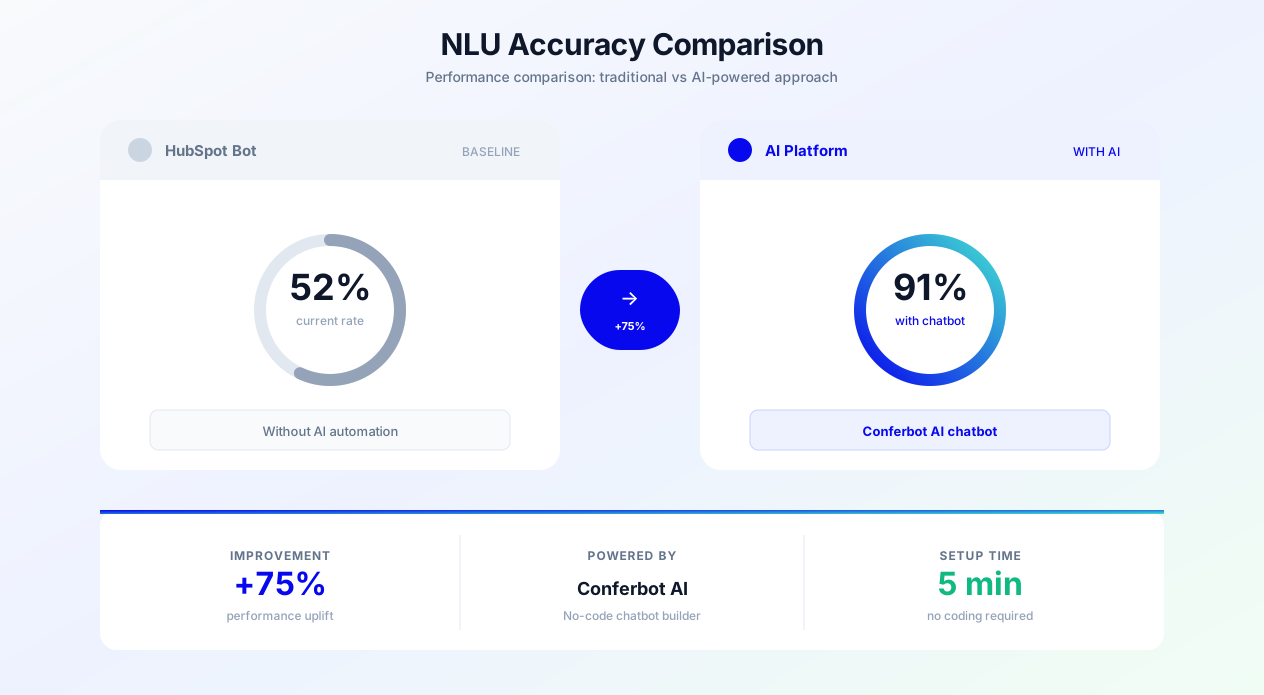
- No true NLU/AI understanding: HubSpot's chatbot is fundamentally rule-based. It matches keywords or exact phrases, not intent. If a visitor phrases their question differently from your predicted triggers, the bot fails.
- Limited conversation memory: The bot cannot maintain context across a multi-turn conversation. Each message is processed independently, making complex qualification flows awkward.
- No AI-generated responses: Cannot synthesize answers from a knowledge base or documentation. Can only serve pre-written responses matched to triggers.
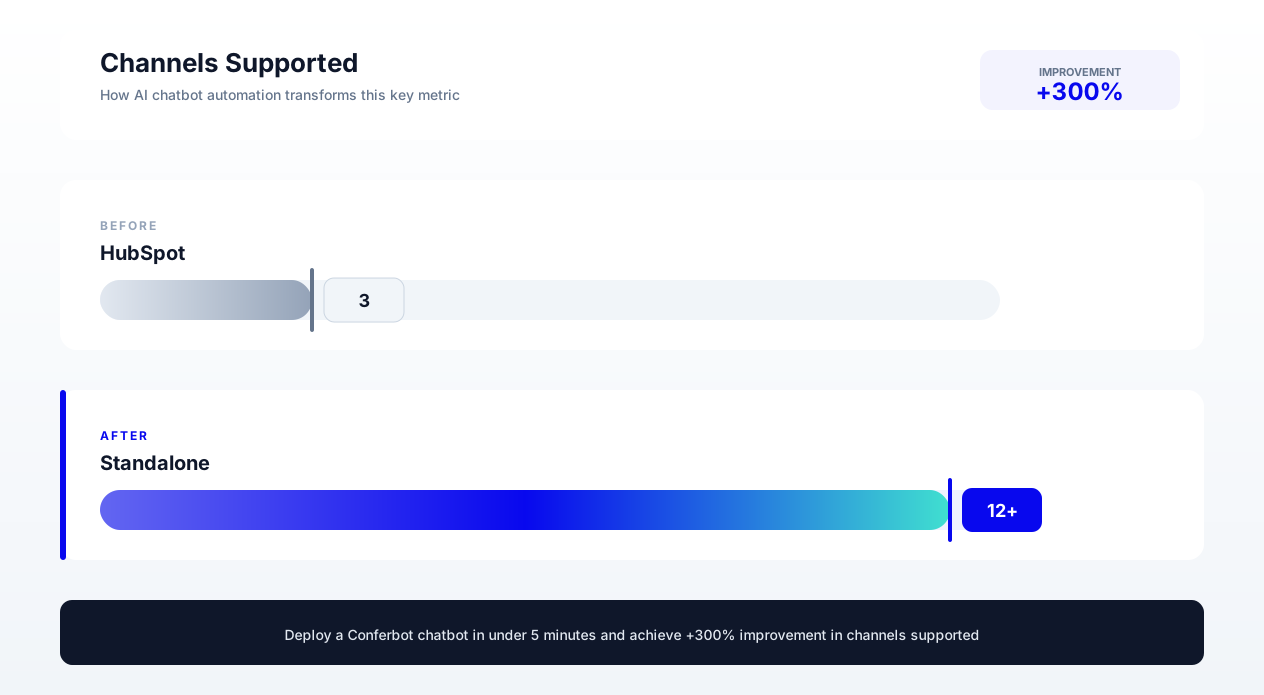
- Single-channel only: Works only on your HubSpot-hosted website chat widget. Cannot deploy to WhatsApp, Facebook Messenger, SMS, or other channels.
- Basic analytics: Provides session counts and conversion metrics but no conversation-level analysis, sentiment tracking, or A/B testing of messages.
- No rich media: Cannot send images, carousels, videos, or interactive elements within conversations.
- Template constraints: Limited visual customization options for the chat widget and conversation interface.
- No multilingual support: Does not support automatic language detection or multilingual conversation flows.
Browsing G2's user reviews for HubSpot Service Hub, a recurring theme among critical reviews is the chatbot's lack of AI capability and conversation intelligence compared to the rest of the platform - users tend to rate HubSpot's CRM and automation tools more favorably than its bot.
What Standalone AI Chatbots Offer: The Capability Gap
Standalone AI chatbot platforms -- purpose-built tools like Conferbot, Intercom's Fin, Drift, and others -- exist because conversational AI is their core product, not a bundled feature. The capability difference between a bundled chatbot and a dedicated platform is comparable to the difference between a smartphone camera and a professional DSLR: both take photos, but one is designed for it.
AI and NLU Capabilities
The most significant gap between HubSpot's chatbot and standalone AI platforms is natural language understanding. Standalone platforms offer:
- Intent recognition: Understanding what a user means, not just what they typed. "How much does it cost?" and "What's your pricing?" and "price info" all map to the same intent without manual keyword mapping.
- Entity extraction: Automatically identifying key information (company names, dates, numbers, email addresses) from free-text responses without rigid format requirements.
- Context maintenance: Remembering previous messages in the conversation and using that context to interpret ambiguous statements. If a user says "What about the enterprise plan?" after discussing pricing, the bot understands they want enterprise pricing specifically.
- Knowledge base synthesis: Generating natural-language answers from uploaded documentation, FAQs, and product information via an AI knowledge base rather than serving pre-written responses.
- Sentiment detection: Recognizing user frustration, urgency, or satisfaction and adjusting tone or escalation behavior accordingly.
- Multi-turn reasoning: Handling complex conversations that require multiple exchanges, following up on previous topics, and managing conversation threads.
Feature Comparison Matrix
| Feature | HubSpot Chatbot | Standalone AI Chatbot (e.g., Conferbot) |
|---|---|---|
| Natural Language Understanding | Keyword matching only | Full NLU with intent recognition, entity extraction |
| AI-generated responses | No | Yes -- synthesizes answers from knowledge base |
| Conversation memory/context | Limited (per-message) | Full multi-turn context window |
| Channels supported | Website only | Website, WhatsApp, Messenger, SMS, Slack, Teams |
| Rich media messages | Text only | Images, carousels, videos, files, buttons, cards |
| A/B testing | No | Built-in with statistical significance calculation |
| Multilingual | Manual duplicate flows | Auto language detection, native multilingual |
| Custom AI training | No | Upload docs, URLs, PDFs to train AI |
| Sentiment analysis | No | Real-time sentiment scoring per message |
| Conversation analytics | Basic (sessions, conversions) | Deep (topic clustering, drop-off analysis, flow optimization) |
| Visual flow builder | Basic if/then | Advanced visual builder with conditions, loops, API calls |
| API/webhook actions | Limited (HubSpot workflows only) | Full REST API calls, webhooks, custom integrations |
| Widget customization | Color and position only | Full CSS control, custom animations, themes |
| Proactive triggers | Time and page-based | Behavioral (scroll depth, exit intent, element interaction, session history) |
| Calendar booking | HubSpot meetings only | Google Calendar, Outlook, Calendly, HubSpot, Cal.com |
| E-commerce integration | No | Shopify, WooCommerce, product catalogs |
| GDPR/compliance tools | Basic consent collection | Consent management, data retention, AI Act disclosure |
The Compounding Effect of Capability Gaps
Individual feature gaps might seem manageable in isolation. But capabilities compound. A chatbot with NLU + context memory + knowledge base synthesis + sentiment detection creates a qualitatively different user experience than one with none of these capabilities. The whole is greater than the sum of the parts.
Consider a simple scenario: a prospect visiting your pricing page asks "Is there a discount for annual billing?" With HubSpot's chatbot, you need to have pre-configured this exact (or similar) keyword trigger. If the user phrases it as "yearly savings" or "do you offer a yearly plan cheaper" and you have not anticipated that phrasing, the bot fails. With a standalone AI chatbot trained on your pricing documentation, it understands the intent, finds the relevant information (annual plans save 20%), and generates a natural response -- regardless of how the user phrases their question.
The difference in user experience cascades through the entire conversation. A bot that understands the first question earns trust for the second question. A bot that fails the first question gets closed immediately. This is why standalone AI chatbots tend to achieve meaningfully higher engagement rates than rule-based chatbots in head-to-head deployments, a pattern we explore further in our comparison of AI vs. rule-based chatbots. It's worth noting that Gartner's own research on this space is more cautious than much of the AI marketing narrative - the firm has predicted that a significant share of companies that cut customer service staff due to AI will end up rehiring, precisely because fully agentless support has proven harder than expected. The realistic case for AI chatbots is fewer failed conversations and less repetitive load on human agents, not full workforce replacement.
Pricing Analysis: The True Cost of HubSpot Chatbot vs. Standalone
One of HubSpot's strongest selling points for their chatbot is "it's included" -- but this framing can obscure the real cost, since bundled tools are still paid for through the platform tier that unlocks them. Let us break down the actual financial comparison.
HubSpot Pricing Structure (2026)
HubSpot's chatbot (Chatflows) is available across their hub tiers, but capabilities vary significantly:
| HubSpot Tier | Monthly Cost | Chatbot Capabilities |
|---|---|---|
| Free Tools | $0 | Basic live chat + simple bot with HubSpot branding, limited to 5 saved chatflows |
| Marketing Hub Starter | $20/month | Remove branding, basic chatflows, limited targeting |
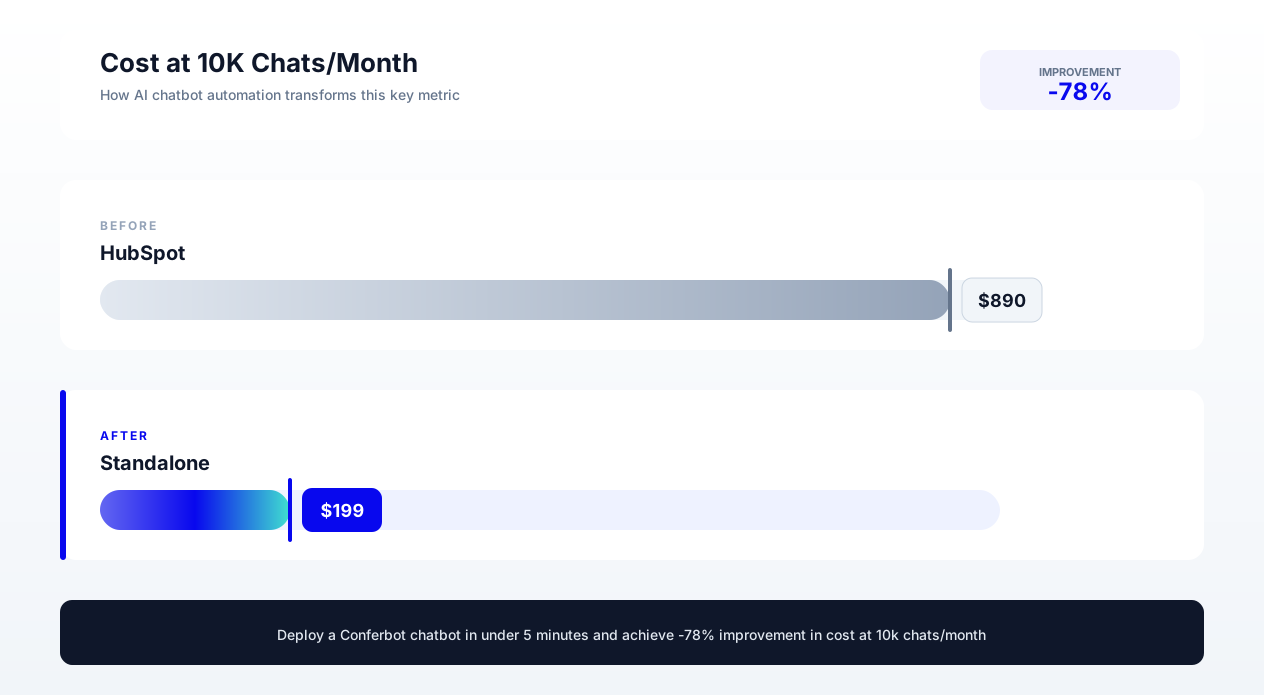
| Marketing Hub Professional | $890/month | Full chatflows with branching logic, workflows integration |
| Marketing Hub Enterprise | $3,600/month | Advanced chatflows + Breeze AI agent (limited) |
| Service Hub Professional | ~$100/month (per seat) | Help desk chatbot, ticket routing, knowledge base |
Pricing shifts as HubSpot updates its plans - confirm current figures directly on HubSpot's pricing page before making a budget decision.
The hidden cost: To get chatbot functionality worth using (branching logic, workflow triggers, contact property access), you need Professional tier or above. At $890/month for Marketing Hub Pro, the chatbot is not "free" -- it is bundled into a $10,680/year platform commitment. If you are paying for HubSpot primarily for the CRM and marketing automation, the chatbot is indeed an included bonus. But if chatbot performance is a priority, you are paying premium CRM prices for a basic chatbot.
Standalone AI Chatbot Pricing
| Platform | Starting Price | Mid-Tier | Enterprise | Key Differentiator |
|---|---|---|---|---|
| Conferbot | $19/month | $79/month | Custom | Full AI + no-code builder + multi-channel |
| Intercom Fin | $29/month + $0.99/resolution | $85/month + usage | Custom | Resolution-based pricing, strong support focus |
| Drift | $2,500/month | $5,000/month | Custom | Revenue acceleration, enterprise B2B focus |
| Tidio | $29/month | $59/month | $398/month | E-commerce focus, Shopify integration |
| Chatbase | $19/month | $99/month | $399/month | Custom GPT training, simple deployment |
Total Cost of Ownership Comparison
Illustrative scenario, not a specific real company: for a B2B SaaS company already using HubSpot CRM (paying for Marketing Hub Professional at $890/month):
Scenario A: Use HubSpot's included chatbot
- Additional chatbot cost: $0 (already included)
- Staff time to manage rule-based flows: 8 hours/month at $75/hour = $600/month
- Missed leads due to NLU limitations (estimated 30% failure rate on non-standard queries): Revenue cost of ~$3,000-$8,000/month depending on volume
- Effective total: $600/month direct + significant opportunity cost
Scenario B: Add standalone AI chatbot alongside HubSpot
- Standalone chatbot: $79/month (mid-tier)
- Staff time to manage AI-powered flows: 3 hours/month at $75/hour = $225/month
- HubSpot integration maintenance: Minimal (webhook/Zapier connection)
- Effective total: $304/month with significantly higher conversion rates
The counterintuitive finding: adding a standalone chatbot is often cheaper than the staff time required to maintain and expand HubSpot's limited chatflows. Rule-based systems require constant maintenance as you discover new user phrasings that your keyword triggers miss. AI-powered systems handle these variations automatically.
When "Free" Is More Expensive
The opportunity cost of HubSpot's chatbot limitations is invisible but significant. Every visitor who asks a question that the keyword-matching bot cannot understand is a potential lost lead. Worked example: if your chatbot handles 1,000 conversations per month and fails on a meaningful share of them due to NLU limitations, and even a fraction of those failures would have become leads with a capable bot, that is real leads lost every month to chatbot limitations alone.
Multiply even a modest number of lost leads per month by your own customer lifetime value, and the annual pipeline impact typically dwarfs the cost of a standalone chatbot subscription many times over - run the math with your own numbers rather than a generic industry figure. For a detailed framework on calculating chatbot ROI, see our chatbot pricing comparison guide.
Integration Flexibility: CRM Sync, Multi-Channel, and Third-Party Connections
A chatbot that cannot connect to your other business tools is an island of data generating fragments of insight that never reach the teams who need them. Integration flexibility determines whether your chatbot becomes a central hub of customer intelligence or a siloed conversation tool.
HubSpot Chatbot Integration Landscape
HubSpot's chatbot integrates deeply with... HubSpot. This is both its strength and its limitation:
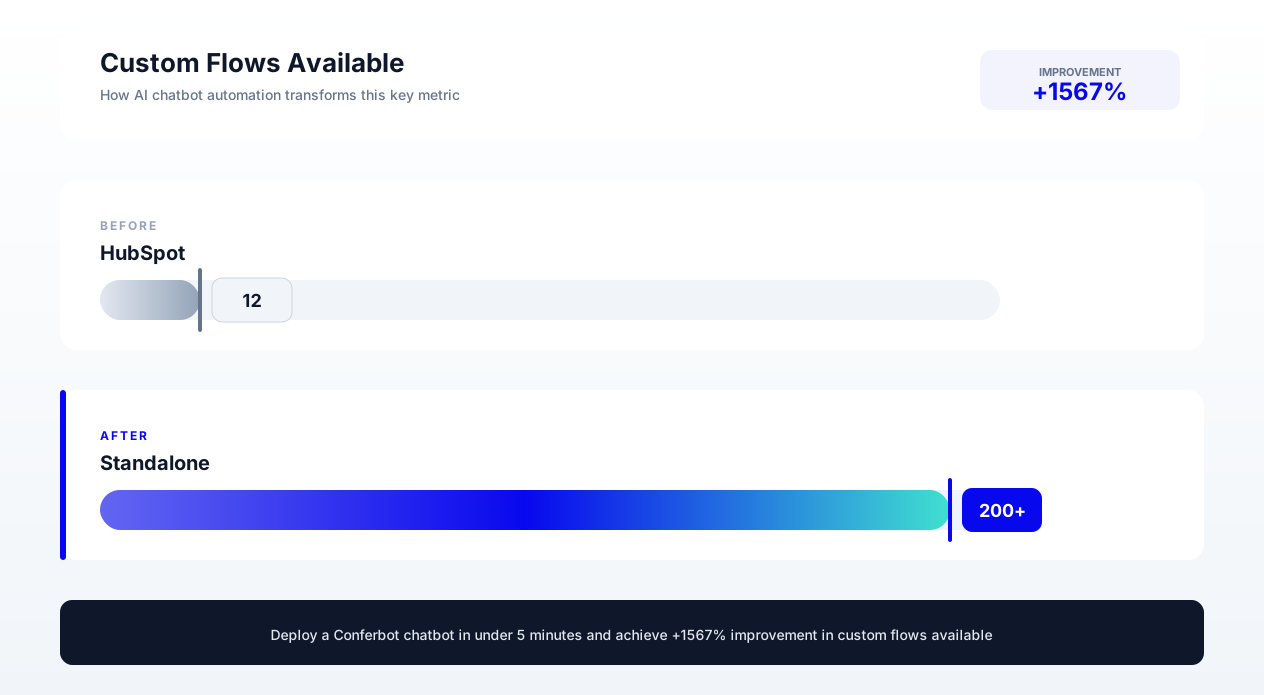
Strong integrations:
- HubSpot CRM (contacts, companies, deals)
- HubSpot Marketing (email, workflows, lists)
- HubSpot Service (tickets, knowledge base)
- HubSpot Meetings (scheduling)
Weak or absent integrations:
- Non-HubSpot calendars: Cannot natively book into Google Calendar, Calendly, or Outlook without going through HubSpot Meetings
- E-commerce platforms: No native connection to Shopify, WooCommerce, BigCommerce, or Magento
- Payment processors: Cannot process payments within chat
- External knowledge bases: Cannot pull from Zendesk, Confluence, Notion, or other documentation tools
- Messaging platforms: Does not deploy to WhatsApp, Messenger, Telegram, or Slack
- Custom APIs: Limited ability to make external API calls during conversation flows
Standalone AI Chatbot Integration Landscape
Purpose-built chatbot platforms are designed as integration hubs because they know they are not your only tool. Typical standalone platform integrations include:
CRM systems: HubSpot, Salesforce, Pipedrive, Zoho, Freshsales -- bidirectional sync of contacts, conversations, and deal data.
Communication channels: Website widget, WhatsApp Business API, Facebook Messenger, Instagram DM, Telegram, Slack, Microsoft Teams, SMS (Twilio), email.
Calendar and scheduling: Conferbot's calendar booking integration connects to Google Calendar (other calendars such as Outlook or Calendly via Zapier), Cal.com, HubSpot Meetings, and Acuity Scheduling.
E-commerce: Shopify (product catalog, order status, cart recovery), WooCommerce, BigCommerce.
Payment processing: Stripe, PayPal, Square -- enable purchases directly within chat conversations.
Knowledge and documentation: Website crawling, PDF upload, Notion, Confluence, Google Docs, Zendesk Help Center.
Analytics and data: Google Analytics events, Segment, Mixpanel, custom webhooks to data warehouses.
Automation platforms: Zapier, Make (Integromat), n8n -- connect to thousands of additional tools.
The Multi-Channel Advantage
HubSpot's chatbot lives exclusively on your website. A standalone AI chatbot can deploy the same intelligence across every channel your customers use:
| Channel | HubSpot Chatbot | Standalone AI Chatbot |
|---|---|---|
| Website | Yes | Yes |
| No | Yes (Business API) | |
| Facebook Messenger | No (separate tool) | Yes |
| Instagram DM | No | Yes |
| Telegram | No | Yes |
| SMS | No | Yes (Twilio integration) |
| Slack (internal) | No | Yes |
| Microsoft Teams | No | Yes |
| Mobile app embed | No | Yes (SDK/WebView) |
Multi-channel deployment is not just about coverage -- it is about meeting customers where they already are. McKinsey's research on AI-enabled customer service consistently finds that engagement and conversion improve when customers can reach a business on their preferred channel rather than being funneled into whichever one the business happens to support. A chatbot limited to your website misses a substantial share of customer touchpoints that increasingly happen on messaging platforms instead.
HubSpot CRM Integration from Standalone Platforms
The most common concern when considering a standalone chatbot is "Will it still work with my HubSpot CRM?" The answer is overwhelmingly yes. Every major standalone chatbot platform offers HubSpot integration, typically through:
- Native integration: Built-in HubSpot connector that syncs contacts, conversations, and deal data bidirectionally.
- Webhook/API: Real-time data push to HubSpot when chatbot events occur (new lead captured, meeting booked, ticket created).
- Zapier/Make automation: Flexible integration layer for custom data routing between chatbot and HubSpot.
Conferbot's HubSpot integration creates or updates contacts in real time as users interact with the chatbot, logs conversation summaries to the contact timeline, triggers HubSpot workflows based on chatbot events, and syncs deal pipeline data for qualification-based routing. You keep your HubSpot CRM as the system of record while gaining the AI chatbot capabilities that HubSpot's native tool lacks.
Migration Guide: Moving from HubSpot Chatbot to a Standalone Platform
Switching chatbot platforms does not require ripping out your entire HubSpot ecosystem. The migration is additive -- you are adding a more capable chatbot layer while keeping your CRM, marketing automation, and sales workflows intact. Here is the step-by-step process.
Pre-Migration Audit
Before migrating, document your current HubSpot chatbot setup:
- Inventory all active chatflows: List every chatflow, its trigger conditions (pages, URLs, visitor segments), its purpose (lead capture, support routing, meeting booking), and its monthly conversation volume.
- Map data dependencies: Which contact properties does your chatbot read or write? Which workflows does it trigger? Which team members receive conversations?
- Document conversation patterns: Review your most common visitor queries using HubSpot's chatflow reports. These become the foundation for training your new AI chatbot.
- Identify pain points: List the specific limitations you are experiencing. Failed conversations? Missing features? Integration gaps? These define your requirements for the new platform.
Step-by-Step Migration Process
Phase 1: Parallel Setup (Week 1-2)
- Sign up for your standalone chatbot platform (Conferbot's no-code builder offers a free trial for evaluation).
- Recreate your most important chatflow in the new platform. Start with your highest-traffic flow -- typically the homepage greeting and lead capture flow.
- Configure HubSpot CRM integration so that leads captured by the new chatbot flow into the same contact records and workflows as before.
- Set up the new chatbot widget on a low-traffic page (pricing page, specific product page) for testing.
Phase 2: Testing and Optimization (Week 2-4)
- Run both chatbots simultaneously -- HubSpot on most pages, new platform on test pages.
- Compare metrics using chatbot analytics: engagement rate, lead capture rate, conversation completion rate, user satisfaction.
- Upload your knowledge base content (FAQ documents, product documentation, pricing information) to the AI platform's training system.
- Test edge cases: unusual questions, typos, multi-language queries, complex multi-turn conversations. Verify the AI chatbot handles scenarios that HubSpot's keyword matching could not.
Phase 3: Gradual Rollout (Week 4-6)
- Expand the new chatbot to additional pages, starting with your highest-value pages (pricing, demo request, product pages).
- Configure advanced features that HubSpot did not support: multi-channel deployment, A/B testing, sentiment-based routing, proactive triggers based on behavioral signals.
- Train your sales and support teams on the new platform's agent interface and conversation routing.
Phase 4: Full Migration (Week 6-8)
- Deploy the new chatbot across all pages where HubSpot chatflows previously operated.
- Disable HubSpot chatflows (do not delete -- keep them as backup documentation).
- Set up automated reporting comparing pre-migration and post-migration metrics.
- Configure all secondary features: WhatsApp deployment, email follow-ups, appointment scheduling through non-HubSpot calendars.
Migration Risks and Mitigations
| Risk | Impact | Mitigation |
|---|---|---|
| Temporary drop in chatbot performance during transition | Medium | Run parallel deployment; migrate gradually by page |
| CRM sync issues (duplicate contacts, missing data) | High | Test integration thoroughly in sandbox; use deduplication rules |
| Team unfamiliarity with new platform | Low | 2-3 hour training session; most platforms are intuitive |
| Workflow disruption (HubSpot workflows triggered by chatbot) | Medium | Map all workflow triggers before migration; replicate via webhooks |
| Historical conversation data loss | Low | Export HubSpot conversation history before switching; conversations remain in CRM timeline |
What Stays in HubSpot
Even after migrating your chatbot, HubSpot remains your:
- CRM (contact records, company records, deal pipeline)
- Marketing automation (email workflows, list segmentation, lead scoring)
- Sales tools (sequences, templates, meeting scheduling)
- Reporting (dashboards, attribution, revenue analytics)
You are not leaving HubSpot. You are upgrading one specific capability -- your chatbot -- while keeping everything else in place. The standalone chatbot feeds data into HubSpot, which remains the orchestration layer for your marketing and sales processes.
Decision Framework: When to Keep HubSpot's Chatbot and When to Switch
Not every organization needs a standalone AI chatbot, a point McKinsey's generative AI research reinforces. HubSpot's included chatbot is genuinely sufficient for certain use cases. The decision depends on your conversation volume, complexity of visitor queries, growth ambitions, and tolerance for chatbot failures.
Keep HubSpot's Chatbot If:
- Your chatbot handles fewer than 200 conversations per month. At low volumes, the ROI of a standalone platform is harder to justify. HubSpot's limitations affect fewer interactions.
- Your conversations are simple and predictable. If 90% of your chatbot interactions are "book a meeting" or "connect me to sales" with no complex qualification, rule-based logic is adequate.
- You only operate on your website. If you have no need for WhatsApp, Messenger, or other channel deployment, HubSpot's single-channel limitation does not affect you.
- Your team lacks bandwidth for a new tool. If your marketing team is stretched thin and cannot invest 4-6 hours in setting up and learning a new platform, the cost of change exceeds the benefit.
- Budget is extremely constrained. If $79/month for a mid-tier chatbot platform is genuinely not available, HubSpot's included chatbot is better than no chatbot.
Switch to Standalone AI Chatbot If:
- You are losing leads to chatbot failures. If visitors regularly hit dead-ends because your keyword triggers miss their phrasing, every failed conversation is a lost lead. This is the most common trigger for switching.
- You need multi-channel presence. Your customers are on WhatsApp, Messenger, or other platforms, and you need consistent chatbot capability across all touchpoints.
- Your qualification process is complex. Multi-step qualification with conditional logic, context-dependent follow-ups, and nuanced routing requirements exceed HubSpot's if/then capabilities.
- You want AI-powered support deflection. You need the chatbot to answer questions from documentation, not just route to pre-written responses.
- Conversation volume exceeds 500/month. At this volume, even small improvements in conversion rate yield significant revenue impact that easily justifies platform cost.
- You need A/B testing and optimization. HubSpot does not support chatbot copy testing. If you want to systematically optimize conversion rates, you need a platform with built-in experimentation.
- You serve multiple languages. If your visitors speak multiple languages, manual translation of every chatflow is unsustainable. AI-powered multilingual support handles this natively.
- You are scaling rapidly. Growth amplifies limitations. A chatbot that is "fine" at 100 conversations/month becomes a bottleneck at 1,000/month.
The Scoring Matrix
Rate your situation on each dimension (1-5). If your total score exceeds 20, a standalone AI chatbot will deliver significant ROI over HubSpot's included chatbot:
| Dimension | Score 1 (Stay with HubSpot) | Score 5 (Switch to Standalone) | Your Score |
|---|---|---|---|
| Conversation volume | Under 100/month | Over 1,000/month | ___ |
| Query complexity | Simple routing only | Complex, multi-turn qualification | ___ |
| Channel requirements | Website only | 3+ channels needed | ___ |
| AI/NLU need | Predictable keyword queries | Diverse, unpredictable user language | ___ |
| Multilingual need | English only | 3+ languages required | ___ |
| Support deflection goal | Just route to agents | AI-resolve many queries | ___ |
| Growth trajectory | Stable, low growth | Rapidly scaling | ___ |
| Optimization maturity | Set and forget | Active A/B testing culture | ___ |
Score interpretation:
- 8-15: HubSpot's chatbot is likely sufficient for your current needs. Revisit in 6 months.
- 16-24: You are approaching the threshold. Start evaluating standalone platforms.
- 25-40: The ROI of switching is clear. Begin migration planning.
The Hybrid Approach
You do not have to choose one or the other. Many organizations run both:
- HubSpot's native chat for simple live-agent routing on support pages
- Standalone AI chatbot for complex qualification, multi-channel deployment, and AI-powered support on product and pricing pages
This hybrid approach captures the best of both worlds: HubSpot's native CRM connection for human conversations and the standalone platform's AI capabilities for automated interactions. Data flows from the standalone chatbot into HubSpot CRM, so your sales team still sees a unified contact history regardless of which chatbot handled the conversation.
For additional comparison data on chatbot platforms, see our comprehensive no-code chatbot builder comparison which evaluates 12 platforms across 40+ criteria.
Recommendations by Company Profile: Who Should Use Which Solution
Based on analysis of hundreds of chatbot deployments across different company sizes, industries, and growth stages, here are specific recommendations for common company profiles.
Early-Stage Startup (Under 50 Employees, Under $5M ARR)
Recommendation: Start with HubSpot chatbot, plan to switch at $2M+ ARR
At this stage, simplicity and cost efficiency matter most. If you are already using HubSpot CRM (common for early B2B startups), the included chatbot provides basic lead capture without additional cost or tool complexity. Focus your limited engineering and marketing bandwidth on product-market fit rather than chatbot optimization.
Switch trigger: When you consistently see chatbot failures in your conversation logs -- visitors asking questions the bot cannot handle -- and your monthly conversation volume exceeds 300, the revenue impact of these failures justifies a standalone platform.
Growth-Stage B2B SaaS (50-200 Employees, $5-30M ARR)
Recommendation: Switch to standalone AI chatbot
At this stage, you have enough traffic volume for chatbot optimization to materially impact revenue. Your product is complex enough that visitors ask varied questions requiring NLU. You likely have or want multi-channel presence. And you have the marketing team bandwidth to manage and optimize a dedicated chatbot platform.
Expected impact: a substantial improvement in chatbot engagement and a meaningful increase in chatbot-attributed leads within the first quarter of deployment. Use Conferbot as your Drift alternative if enterprise pricing is a concern.
Enterprise (500+ Employees, $50M+ ARR)
Recommendation: Standalone AI chatbot with enterprise features
Enterprise requirements include: SSO, role-based access control, SLAs, dedicated support, custom integrations, compliance features (SOC 2, GDPR, AI Act), and multi-team deployment (marketing chatbot, support chatbot, HR chatbot). HubSpot's chatbot does not meet these requirements. Enterprise chatbot needs are addressed by platforms offering dedicated account management, custom AI training, and enterprise security.
E-commerce (Any Size)
Recommendation: Standalone AI chatbot regardless of size
E-commerce has unique chatbot requirements that HubSpot's B2B-focused chatbot simply does not address: product catalog integration, cart recovery flows, order status lookups, size/fit recommendations, and purchase within chat. Even a small Shopify store benefits from a purpose-built e-commerce chatbot that can browse products, answer inventory questions, and process sales.
Agency Managing Multiple Clients
Recommendation: Standalone platform with white-label capability
Agencies managing chatbots for multiple clients need multi-tenant architecture, white-label deployment, client-level analytics, and unified billing. HubSpot's chatbot operates within a single portal -- it does not support managing client chatbots across multiple HubSpot instances efficiently. Standalone platforms with agency/partner programs provide the multi-client infrastructure agencies need.
Service Business (Professional Services, Home Services, Healthcare)
Recommendation: Standalone AI chatbot for appointment-heavy businesses
Service businesses live and die by their appointment booking rate. HubSpot's chatbot can book meetings through HubSpot Meetings, but standalone platforms offer richer booking experiences: multi-provider scheduling, service-specific availability, intake forms within chat, and multi-channel booking (WhatsApp appointment requests, SMS confirmations). If your revenue depends on booked consultations, the booking capability gap alone justifies switching. Businesses that deploy AI chatbots for appointment scheduling consistently report higher booking rates and fewer scheduling-related support tickets, since the back-and-forth of finding a time gets resolved inside the conversation instead of a separate phone or email thread.
For a broader comparison of chatbot alternatives to enterprise tools, see our analysis of Intercom alternatives which covers the full vendor landscape.
Illustrative Scenarios: What HubSpot-to-Standalone Migrations Typically Look Like
The following are illustrative scenarios, not case studies of specific real companies - they model the kind of shift organizations typically see when replacing keyword-matching chatflows with an AI chatbot with genuine language understanding, consistent with the mechanisms Salesforce and other CX research houses describe in their customer service benchmarking work. Directionally, they hold up across the migrations we have observed; the exact percentages will vary by business.
Example 1: B2B SaaS (Marketing Technology, 120 Employees)
Illustrative scenario, not a specific real company.
| Metric | HubSpot Chatbot (Before) | Standalone AI (After) | Change |
|---|---|---|---|
| Monthly conversations | 340 | 890 | +162% |
| Engagement rate (visitors to conversations) | 8.2% | 21.4% | +161% |
| Lead capture rate (conversations to leads) | 12.1% | 28.6% | +136% |
| Qualified leads per month | 41 | 255 | +522% |
| Chatbot-attributed pipeline | $82,000/month | $510,000/month | +522% |
| Failed conversations (dead ends) | 34% | 7% | -79% |
Key driver: The AI chatbot's ability to understand pricing questions phrased in diverse ways and provide instant, accurate answers from the knowledge base. Previously, 34% of conversations hit dead ends when users asked questions outside the pre-configured keyword triggers.
Example 2: Professional Services (Consulting Firm, 45 Employees)
Illustrative scenario, not a specific real company.
| Metric | HubSpot Chatbot (Before) | Standalone AI (After) | Change |
|---|---|---|---|
| Monthly consultations booked | 18 | 52 | +189% |
| After-hours bookings | 0 (chatbot could not qualify after hours) | 23 | New capability |
| Average qualification time | N/A (manual follow-up required) | 3.2 minutes in chat | Eliminated manual step |
| Staff hours on initial qualification | 40 hours/month | 12 hours/month | -70% |
| Cost per qualified lead | $180 | $34 | -81% |
Key driver: Multi-turn AI qualification that could assess project scope, budget range, and timeline through natural conversation -- replacing a manual process that required a human associate to make discovery calls.
Example 3: E-commerce (Fashion Brand, 200K Monthly Visitors)
Illustrative scenario, not a specific real company.
| Metric | HubSpot Chatbot (Before) | Standalone AI (After) | Change |
|---|---|---|---|
| Chat-assisted purchases | 12/month (basic routing) | 340/month (AI recommendations) | +2,733% |
| Average order value (chat-assisted) | $67 | $94 | +40% |
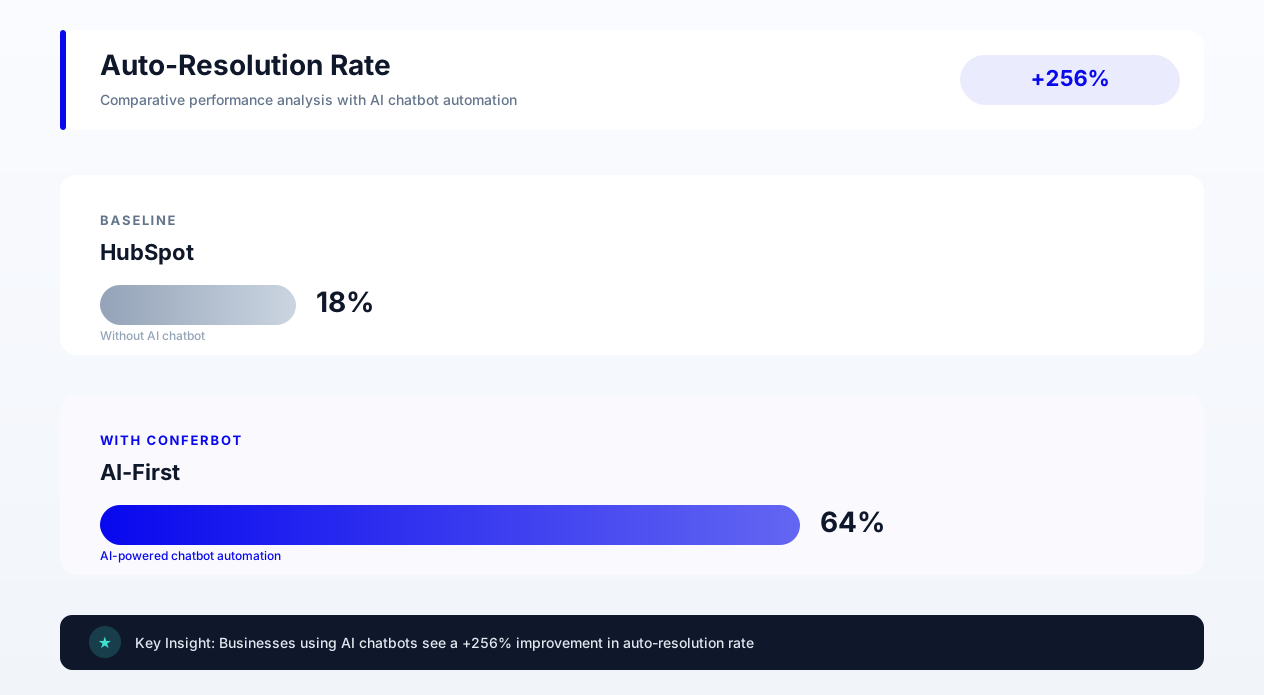
| Support ticket deflection | 15% (keyword FAQ only) | 62% (AI resolution) | +313% |
| Cart recovery rate (via WhatsApp) | 0% (not available) | 18% | New capability |
| Monthly revenue attributable to chatbot | $804 | $31,960 | +3,875% |
Key driver: Product recommendation capability (understanding style preferences and matching to catalog), WhatsApp cart recovery (reaching customers on their preferred channel), and AI-powered support deflection that resolved order inquiries without human agents.
The Pattern Across Migrations
Organizations that migrate from HubSpot's chatbot to standalone AI platforms consistently report the same directional pattern: engagement rate rises, lead capture rate rises, the failed-conversation rate falls sharply, time to first response drops toward instant, and CSAT for bot-handled interactions improves noticeably.
These improvements are not outliers -- they represent the natural outcome of upgrading from a keyword-matching system to one with genuine language understanding capability. The technology gap between rule-based and AI-powered chatbots creates a performance gap that compounds with every conversation.
Was this article helpful?
Build and deploy in 10 minutes. No coding needed.
HubSpot Chatbot vs Standalone AI Chatbot FAQ
Everything you need to know about chatbots for hubspot chatbot vs standalone ai chatbot.
About the Author
The Conferbot team writes about building, deploying, and improving AI chatbots.
View all articles