Why Black Friday Breaks Customer Support Teams
Black Friday is no longer a single day. It is a 5-day pressure test that starts on Thanksgiving and runs through Cyber Monday, with ripple effects extending across the entire November-December holiday season. For customer support teams, this period represents the most intense, highest-stakes window of the year -- and most are not equipped to handle it. (source: Adobe Analytics Digital Economy Index).
The Numbers Tell the Story
In 2025, Black Friday online sales in the United States reached $9.8 billion, according to Adobe Analytics holiday shopping data. Cyber Monday added another $12.4 billion. Across the full BFCM weekend, online spending topped $38 billion -- a 7.5% increase over 2024. (source: Salesforce Holiday Shopping Report).
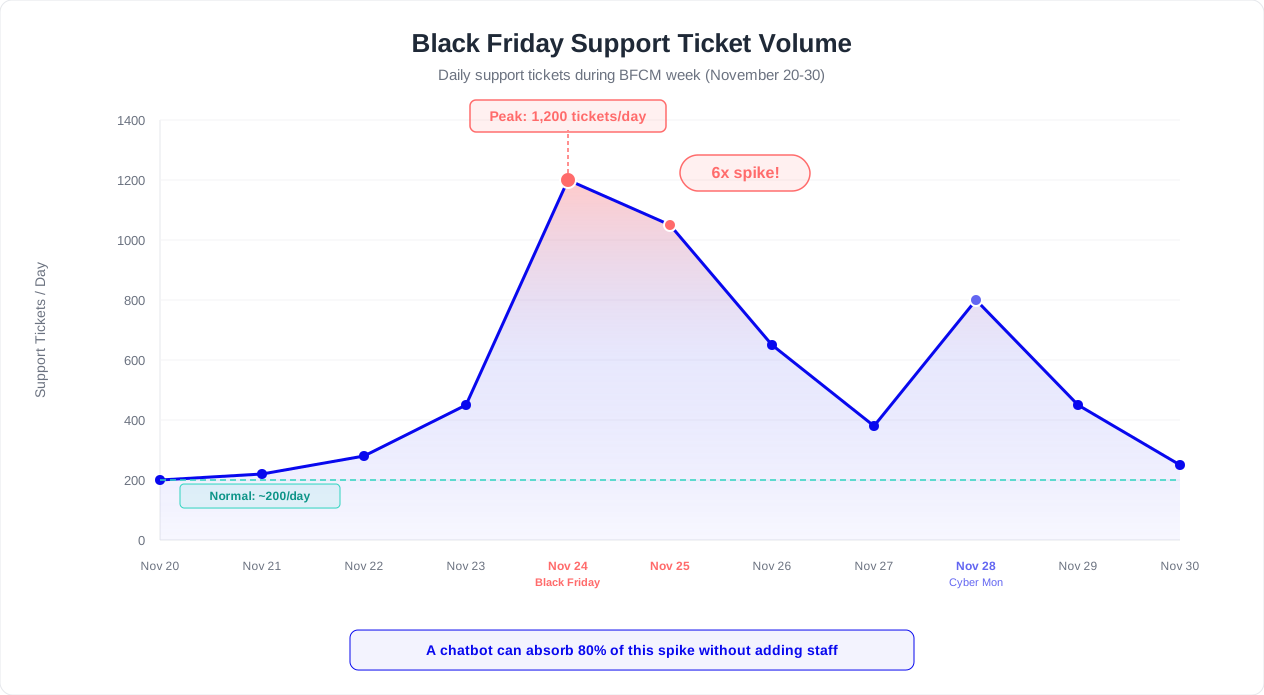
But here is the number that matters for your support team: customer support ticket volume increases 80-200% during BFCM compared to a normal week. For many retailers, the spike is even sharper -- some see 5x their average daily volume compressed into a 72-hour window. (source: National Retail Federation holiday spending data).
| Metric | Normal Week | BFCM Week | Change |
|---|---|---|---|
| Daily support tickets | 200 | 600-1,000 | +200-400% |
| Average response time | 2.4 hours | 8-14 hours | +233-483% |
| Cart abandonment rate | 70% | 77% | +10% |
| Customer satisfaction (CSAT) | 85% | 62% | -27% |
| Revenue per support agent/hour | $180 | $420 | +133% |
| Cost per support ticket | $8 | $15-22 | +88-175% |
The Domino Effect of Slow Responses
When response times balloon from 2 hours to 12+ hours during BFCM, a cascade of problems follows:
- Abandoned carts multiply: 53% of shoppers abandon a purchase if they cannot get a question answered quickly. During BFCM, when deals are time-limited, this percentage climbs even higher. Every unanswered pre-sale question is lost revenue.
- Social media escalations spike: Frustrated customers take to Twitter/X, Instagram, and TikTok to publicly complain. A single viral complaint during BFCM can cost more in brand damage than the entire holiday promotional budget.
- Return rates increase: When customers cannot get sizing, compatibility, or feature questions answered before purchasing, they buy anyway (the deal is too good to miss) and return later. Post-holiday return rates for retailers average 16.5%, according to the National Retail Federation, and inadequate pre-sale support is a leading driver.
- Agent burnout compounds: Overworked support agents make more errors, provide shorter (less helpful) responses, and experience higher turnover. Replacing a support agent costs $4,000-$7,000 in recruiting and training -- a hidden BFCM cost that hits in Q1.
Why Hiring Seasonal Staff Is Not the Answer
The traditional solution -- hiring temporary support agents -- has fundamental limitations:
| Challenge | Reality |
|---|---|
| Training time | 2-4 weeks to become competent on product catalog and policies |
| Cost per agent | $18-25/hour fully loaded, plus $1,500-3,000 training cost |
| Availability | Seasonal labor market is tight; competitors are hiring from the same pool |
| Quality | Temporary agents handle 40% fewer tickets/hour than experienced staff |
| Coverage hours | Most seasonal hires work standard shifts; BFCM demand is 24/7 |
| Ramp-down | You pay for the last 2 weeks of December when volume drops back to normal |
According to Shopify's BFCM data report, merchants using automated customer support tools during BFCM 2025 saw 34% higher customer satisfaction scores than those relying solely on human agents. Statista's Black Friday statistics further confirm that retailers with AI-assisted customer support retain 28% more revenue during peak periods. The reason is simple: chatbots never sleep, never queue, and never get overwhelmed.
The Cost of Inaction
A mid-size ecommerce store processing 500 daily orders during BFCM loses an estimated $47,000 in revenue for every 4-hour increase in average support response time. That is $47,000 in abandoned carts, cancelled orders, and customers who chose a competitor with faster answers.
This is where a properly prepared chatbot changes the equation. Not as a replacement for your human team, but as the first line of defense that handles the 60-70% of inquiries that are repetitive, predictable, and automatable -- freeing your agents to focus on the complex, high-value conversations that actually require a human touch. For proven conversation flow structures that handle these repetitive queries, see our chatbot conversation flow templates. To understand the full financial impact of chatbot automation, check our chatbot cost savings case studies.
Audit Your Chatbot 30 Days Before Black Friday
Launching a chatbot on Black Friday morning is like cramming for an exam the night before -- technically possible, but the results will reflect the preparation. The ideal preparation window starts 30 days before BFCM, giving you time to audit, update, test, and iterate. (source: Shopify Black Friday Cyber Monday data).
The 30-Day Audit Framework
Break your preparation into four weekly sprints. Each week focuses on a different layer of chatbot readiness.
Week 1: Content Audit (Days 30-23)
Your chatbot is only as good as the information it has. Start by reviewing every piece of content your bot references.
| Audit Item | What to Check | Common Issues Found |
|---|---|---|
| Product information | Prices, descriptions, availability, variants | Outdated prices from last season, discontinued items still listed |
| Shipping policies | Holiday cutoff dates, expedited options, international shipping | Missing holiday shipping deadlines, no mention of extended times |
| Return/exchange policies | Holiday return windows, gift receipt policies | Standard 30-day window not extended for holiday purchases |
| Promotional details | Discount codes, bundle deals, loyalty program offers | Last year's promotions still in the bot's responses |
| Store hours / contact info | Holiday hours, extended support availability | Regular hours listed instead of holiday schedule |
| FAQ accuracy | All answers current and correct | Policy changes not reflected in automated responses |
Export your chatbot's knowledge base and review it line by line. Flag anything that references dates, prices, or policies that will change during the holiday season. Create a "Holiday Content" version that you can activate on the appropriate date and deactivate in January.
Week 2: Flow Optimization (Days 22-16)
Review your chatbot's conversation flows with a holiday lens. The questions customers ask during BFCM are different from the rest of the year.
- Map the top 20 BFCM questions: Pull last year's support tickets from the BFCM period (or from a similar peak period). Categorize them. The top 20 questions typically account for 80% of volume.
- Build dedicated holiday flows: Create specific conversation paths for the most common BFCM scenarios: order tracking, delivery estimates, discount code issues, out-of-stock alternatives, and gift-related queries.
- Update escalation paths: During BFCM, your human agents will be stretched thin. Adjust your escalation criteria so that only truly complex issues reach a human. Set clear expectations in the bot's messaging: "Our team is experiencing higher than normal volume. Current wait time for a human agent is approximately 25 minutes."
- Add holiday-specific greetings: Update your chatbot's welcome message to acknowledge the season: "Welcome! Looking for Black Friday deals, need help with an order, or have a question about holiday shipping? I can help with all of the above."
Week 3: Integration Testing (Days 15-9)
Your chatbot does not operate in isolation. It connects to your order management system, CRM, inventory database, and payment processor. Each integration must be tested under load.
- Order lookup speed: Test how quickly your bot can retrieve order status. If it takes 8 seconds during normal load, it may take 30+ seconds during peak. Work with your development team to optimize API response times.
- Inventory sync accuracy: During BFCM, inventory changes by the minute. Ensure your chatbot's product availability data refreshes frequently enough to avoid recommending out-of-stock items.
- Payment and discount code validation: Test that your bot correctly validates and applies discount codes. A bot that says "Your code BFCM25 is valid" when the code has expired will generate more support tickets, not fewer.
- CRM data flow: Verify that leads and customer interactions captured during BFCM are properly logged in your CRM via your integration hub. You do not want to lose high-intent holiday leads to a broken integration.

Week 4: Load Testing and Rehearsal (Days 8-1)
The final week is about stress-testing everything under realistic BFCM conditions.
- Simulate peak volume: If your chatbot typically handles 200 conversations per day, test it at 1,000. Identify bottlenecks in response time, API calls, and message queuing.
- Run a dress rehearsal: Have your team play the role of customers, throwing every possible BFCM scenario at the bot. Time how long each interaction takes. Identify flows that are confusing, slow, or lead to dead ends.
- Prepare your fallback plan: What happens if the chatbot goes down? Define a clear escalation path: automated email response, social media redirect, or a simplified chat flow that handles only the top 5 questions.
- Brief your human agents: Your support team needs to know exactly what the chatbot can and cannot handle during BFCM. Create a one-page reference document that outlines: what the bot handles autonomously, when it escalates, and how agents should pick up a conversation that the bot transferred.
Pro Tip: Start Early
The biggest mistake retailers make is waiting until November to prepare their chatbot. The brands that perform best during BFCM start their chatbot audit in early October, giving themselves 8 full weeks to test, iterate, and optimize before the first deal drops.
Use Conferbot's analytics dashboard to establish baseline metrics before the holiday season. You need to know your current average response time, resolution rate, and escalation rate so you can measure improvement -- and spot problems quickly -- during BFCM.
Related: After-Hours Customer Support: How to Set Up a Chatbot That Works While You Sleep
10 Holiday-Specific Questions to Pre-Program
During BFCM and the broader holiday season, the questions your customers ask shift dramatically. Your chatbot's regular FAQ coverage is not enough. You need to pre-program responses to the specific questions that surge during November and December.
Here are the 10 questions that generate the highest volume during the holiday season, along with the ideal chatbot response strategy for each.
| # | Question | Volume Increase During BFCM | Ideal Response Strategy |
|---|---|---|---|
| 1 | "Where is my order?" / "Track my order" | +300% | Automated order lookup via order number or email; real-time tracking link |
| 2 | "When will my order arrive before Christmas?" | +250% | Dynamic shipping calculator based on order date, method, and destination |
| 3 | "Is this item still in stock?" | +180% | Real-time inventory check; suggest alternatives if out of stock |
| 4 | "My discount code is not working" | +400% | Validate code, check expiry/conditions, apply manually if system error |
| 5 | "Can I return a holiday gift?" | +200% | Holiday return policy summary; link to return initiation; gift receipt flow |
| 6 | "Do you offer gift wrapping?" | +500% | Gift wrapping options, pricing, and add-on instructions |
| 7 | "What are your holiday hours?" | +150% | Store/support hours for Thanksgiving through New Year's |
| 8 | "Can I change or cancel my order?" | +220% | Order modification window, cancellation policy, process steps |
| 9 | "Do you price-match if it goes on sale later?" | +175% | Price protection policy; how to request adjustment; timeframe |
| 10 | "Help me find a gift for [person/occasion]" | +350% | Gift finder flow: recipient, budget, interests; curated suggestions |
How to Build Each Response
Question 1-2: Order Tracking and Delivery Estimates
These two questions alone account for 40-50% of all BFCM support volume. We cover these in depth in the Order Tracking and Shipping Status Automation section below. The key principle: your chatbot should be able to answer these without any human involvement by pulling data directly from your order management system.
Question 3: Stock Availability
Connect your chatbot to your inventory system so it can provide real-time stock status. When an item is out of stock, the response should not just say "Sorry, this item is unavailable." Instead, program your bot to:
- Suggest 2-3 similar in-stock alternatives
- Offer to notify the customer when it is back in stock
- Check if the item is available at a nearby physical store (if applicable)
Question 4: Discount Code Issues
This is the highest-spike question during BFCM (+400%). Common causes: codes that are case-sensitive, codes with minimum purchase requirements the customer has not met, codes that exclude sale items, and codes that have expired. Program your chatbot to diagnose the specific issue:
- "Let me check that code for you. Can you tell me the exact code you are trying to use?"
- Validate the code against your promotional database
- If the code is valid but not applying, check: minimum cart value, excluded products, one-per-customer limits, expiration date
- Provide the specific reason it is not working and the action needed to fix it
- If it is a legitimate system error, apply the discount manually or escalate with priority
Question 5-6: Returns and Gift Services
Gift-related questions are unique to the holiday season. Your bot needs a dedicated "gift" flow that covers: gift wrapping options and pricing, gift receipt generation, gift card purchases, and the extended holiday return window. See the Returns and Exchange Policy section for detailed flow design. (source: Gartner on customer service during peak periods).
Question 7: Holiday Hours
This seems simple, but it trips up many chatbots. Create a dedicated holiday hours response that covers every relevant date from Thanksgiving through January 2. Include: physical store hours (if applicable), customer support hours (phone, email, chat), last day to order for Christmas delivery by shipping method, and any service disruptions or closures.
Question 8: Order Modifications
The window to modify or cancel an order shrinks during BFCM because fulfillment centers process orders faster to manage volume. Your chatbot should clearly communicate: how long after ordering a change is possible (e.g., 1 hour vs 24 hours), how to request a modification, what to do if the modification window has passed, and how to initiate a return instead.
Question 9: Price Protection
If you offer price matching or price protection, your chatbot should clearly explain the policy. If you do not, your bot should say so directly and offer an alternative: "We do not offer retroactive price adjustments, but our Black Friday deals are our best prices of the year. Would you like to see what is on sale right now?"
Question 10: Gift Finder
This is where a chatbot can genuinely outperform a human agent. Build a guided gift recommendation flow:
- "Who are you shopping for?" (Partner, Parent, Friend, Child, Coworker)
- "What is your budget range?" (Under $25, $25-50, $50-100, $100+)
- "What are they interested in?" (Show category-relevant options)
- Present 3-5 curated product recommendations with images, prices, and "Add to Cart" links
A well-built gift finder flow can increase average order value by 15-25% because customers discover products they would not have found browsing on their own.
Automation Impact
Pre-programming responses to these 10 questions can automate 60-70% of your total BFCM support volume. For a store that receives 1,000 tickets per day during peak, that is 600-700 conversations resolved instantly without human involvement.
Related: Recover Abandoned Carts With a Chatbot: Timing, Channels, and Conversion Playbook
Scaling From 100 to 10,000 Simultaneous Conversations
The difference between a chatbot that works during normal traffic and one that survives BFCM is capacity planning. A chatbot that handles 100 concurrent conversations effortlessly may buckle at 1,000 -- not because of the AI, but because of the supporting infrastructure: API calls, database queries, webhook deliveries, and third-party integrations.
Understanding Your Capacity Requirements
Start by calculating your expected peak concurrent conversations:
| Variable | Normal Day | BFCM Peak | How to Calculate |
|---|---|---|---|
| Daily website visitors | 5,000 | 25,000 | Last year's BFCM traffic or 3-5x current daily |
| Chatbot engagement rate | 8% | 12% | Higher during BFCM due to urgency and questions |
| Daily conversations | 400 | 3,000 | Visitors x engagement rate |
| Average conversation duration | 4 min | 3 min | Shorter during BFCM (more transactional queries) |
| Peak hour concentration | 15% | 25% | BFCM traffic clusters around deal launch times |
| Peak hour conversations | 60 | 750 | Daily conversations x peak concentration |
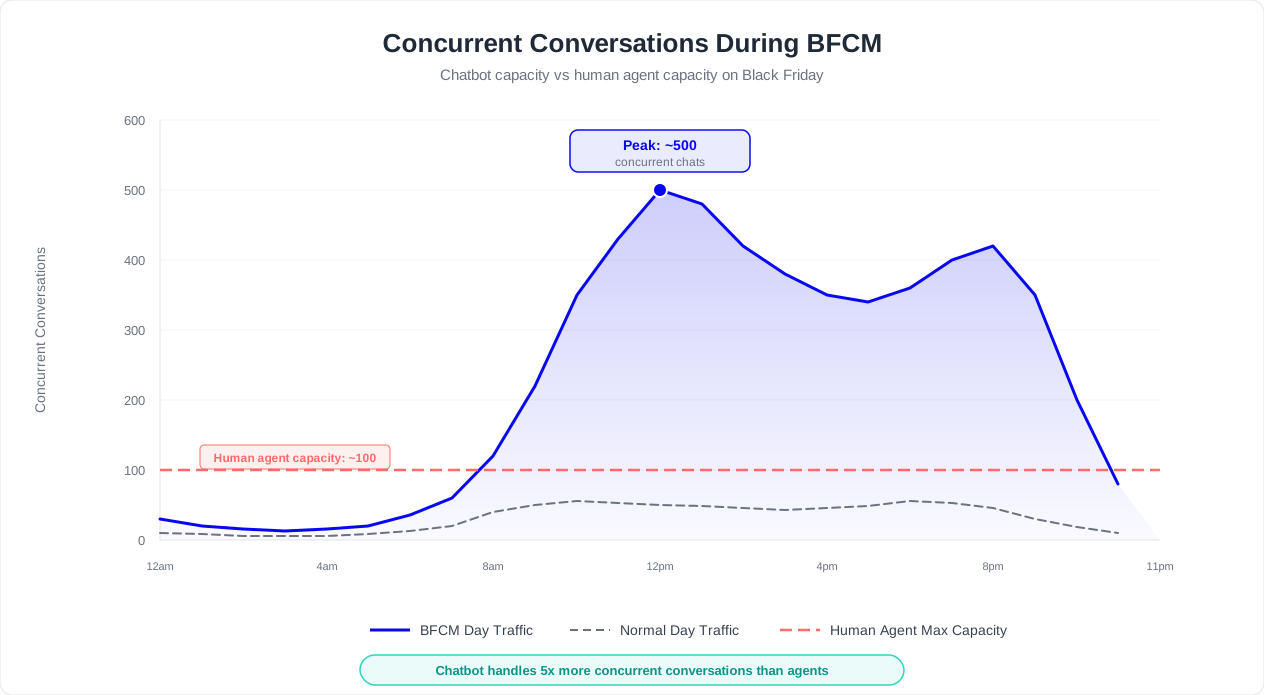
| Peak concurrent conversations | 15 | 188 | Peak hour conversations x (avg duration / 60) |
For a store with 25,000 daily BFCM visitors, peak concurrent conversations reach approximately 188. But that is the average peak -- individual spikes (like a flash sale announcement or a social media post going viral) can push concurrent conversations to 2-3x the calculated peak. Plan for 3x your calculated peak as your capacity target.
The 5 Bottlenecks That Break Chatbots at Scale
Bottleneck 1: Third-Party API Rate Limits
Your chatbot queries external systems -- order management, inventory, shipping carriers, payment processors. Each of these has API rate limits. If your order tracking integration allows 100 requests per minute, and 200 customers simultaneously ask "Where is my order?", half of them will see an error or timeout.
Solution: Identify every external API your chatbot calls. Document the rate limits. Request temporary limit increases from providers for the BFCM period. Implement request queuing and caching so repeated queries for the same order do not trigger duplicate API calls.
Bottleneck 2: Webhook Delivery Delays
If your chatbot sends data to your CRM, email platform, or analytics system via webhooks, high volume can cause delivery backlogs. A 2-second webhook delay during normal traffic becomes a 30-second delay when volume spikes 10x.
Solution: Use asynchronous webhook processing. The chatbot conversation continues immediately; the webhook fires in the background. If a webhook fails, implement retry logic with exponential backoff rather than blocking the conversation.
Bottleneck 3: Knowledge Base Query Latency
AI-powered chatbots that search a knowledge base to generate responses can slow down when the knowledge base is large and queries are complex. Response generation that takes 1 second normally may take 4-5 seconds under load.
Solution: For BFCM, pre-compute responses to your top 50 most common questions. Serve these from cache rather than generating them dynamically. Reserve AI-generated responses for unusual or complex queries only.
Bottleneck 4: Conversation State Storage
Each active conversation requires state storage -- the context of the conversation, user data, and interaction history. At 500+ concurrent conversations, database read/write operations for state management can become a bottleneck.
Solution: Use in-memory caching (Redis or similar) for active conversation state. Only persist to your primary database when a conversation ends or at defined checkpoints. This reduces database load by 80-90% during peak periods.
Bottleneck 5: Human Handoff Queue Management
When the chatbot escalates to a human agent, the handoff itself can become a bottleneck. If 30% of 750 peak-hour conversations escalate, that is 225 handoff requests in an hour -- far more than most support teams can absorb.
Solution: Implement tiered escalation. Before connecting to a human: attempt to resolve with a more detailed automated response, offer a callback option ("Our team will call you within 2 hours"), and provide self-service alternatives (help center links, video tutorials). Only the truly unresolvable issues should reach a human queue.
Conferbot's Auto-Scaling Architecture
When you use Conferbot for your holiday support, capacity planning is handled for you. The platform automatically scales to handle traffic spikes, with built-in features designed for peak season performance:
- Elastic conversation handling: No hard limits on concurrent conversations. The system scales horizontally as traffic increases.
- Response caching: Frequently asked questions are served from cache, with sub-second response times regardless of volume.
- Integration queuing: Webhook deliveries and API calls are queued and processed asynchronously, ensuring conversation flow is never blocked by external system latency.
- Real-time monitoring: The analytics dashboard shows live concurrent conversations, response times, and resolution rates so you can spot issues immediately.
Capacity Planning Rule of Thumb
Plan for 3x your calculated peak concurrent conversations. If your math says you will hit 200 concurrent conversations during BFCM, your systems should comfortably handle 600. The cost of over-provisioning is trivial compared to the revenue lost when your chatbot goes down during a flash sale.
Related: Chatbot vs Phone Support: A Complete Cost and Performance Comparison
Order Tracking and Shipping Status Automation
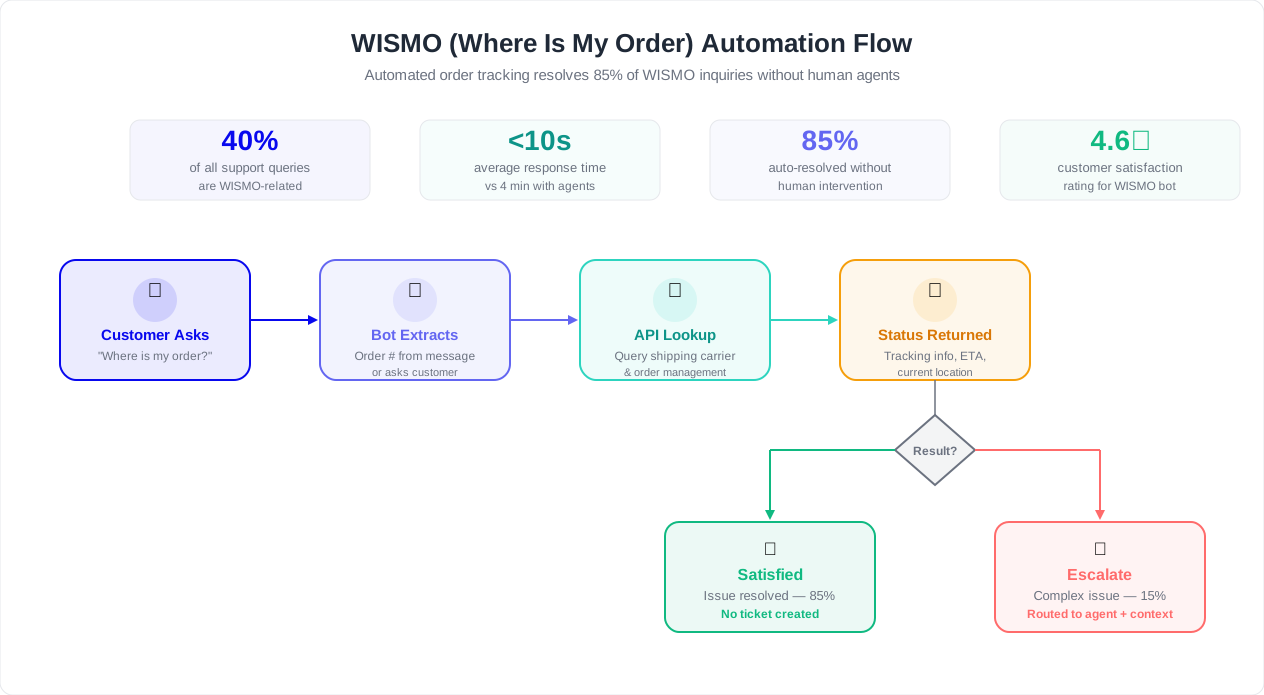
"Where Is My Order?" -- known in the industry as WISMO -- is the single most common customer support inquiry during the holiday season. It accounts for 40-50% of all inbound support contacts during BFCM and the weeks that follow. Automating WISMO is the highest-impact action you can take to reduce support load during peak season.
Why WISMO Explodes During BFCM
During normal periods, customers check their order status once or twice. During the holidays, anxiety multiplies every inquiry:
- Gift deadlines create urgency: "Will it arrive by December 24th?" is an emotionally charged question that a delayed email response cannot adequately answer.
- Carrier delays are expected: Major carriers like UPS, FedEx, and USPS experience their own volume surges, leading to tracking updates that lag 24-48 hours behind actual package movement.
- Multiple orders per customer: Holiday shoppers place 2-5x more orders than usual. Each order generates its own stream of tracking inquiries.
- Confirmation anxiety: "Did my order go through?" spikes during flash sales when sites experience slowdowns. Customers are not sure if their payment processed or if they secured the deal price.
The Automated WISMO Flow
Here is the complete conversation flow for handling order tracking via chatbot:
Step 1: Identification
"I can look up your order status right away. Can you provide your order number? You will find it in your confirmation email. If you do not have your order number, I can look it up with the email address you used to place the order."
Step 2: Retrieval
Connect to your order management system (Shopify, WooCommerce, or custom OMS) to pull the order details. Display a structured status card:
- Order number and date
- Items ordered (with images if possible)
- Current status: Processing / Shipped / In Transit / Out for Delivery / Delivered
- Tracking number with clickable carrier tracking link
- Estimated delivery date
Step 3: Proactive Information
Do not just answer the question -- anticipate the follow-up. Based on the order status, proactively provide:
| Order Status | Proactive Information | Next Action Offered |
|---|---|---|
| Processing | "Your order is being prepared. Most orders ship within 24-48 hours during peak season." | "Want me to notify you when it ships?" |
| Shipped | "Your order shipped on [date] via [carrier]. Tracking: [link]" | "Tracking may take 24 hours to update. Want delivery notifications?" |
| In Transit | "Your package is currently in [city]. Estimated delivery: [date]." | "Want to update your delivery instructions?" |
| Delayed | "Your package is experiencing a carrier delay. New estimated delivery: [date]." | "Would you like to speak with our team about options?" |
| Delivered | "Your package was delivered on [date] at [time] to [location]." | "Did you receive it? If not, I can help investigate." |
Handling Edge Cases
"My tracking has not updated in 3 days"
This is the most anxiety-inducing WISMO variant. During BFCM, carrier scanning systems are overwhelmed, and tracking gaps of 2-4 days are common -- but that does not reduce customer concern. Your chatbot should:
- Acknowledge the concern: "I understand the lack of updates is frustrating, especially during the holiday shipping rush."
- Provide context: "During peak season, carrier tracking systems can lag 1-3 days behind actual package movement. Your package is likely further along than the last scan indicates."
- Set expectations: "If tracking does not update within [X more days], we will automatically investigate with the carrier."
- Offer a safety net: "Would you like me to flag this order for priority follow-up? Our team will proactively contact you with an update within 48 hours."
"My order says delivered but I did not receive it"
This requires careful handling because it has fraud and liability implications. Your chatbot should:
- Verify the delivery details: "According to tracking, your package was delivered on [date] at [time] to [location description from carrier]."
- Suggest common resolutions: "Sometimes packages are left with a neighbor or in a secure location. Can you check with neighbors and around your property?"
- If unresolved, escalate with full context: "I am going to connect you with our team to investigate this further. They will have your full order details and tracking history ready."
Never program your chatbot to automatically issue refunds or replacements for "delivered but not received" claims. This must involve human judgment due to fraud risk.
Shipping Cutoff Communication
One of the most valuable things your chatbot can do during the holiday season is clearly communicate shipping deadlines. Build a dedicated flow that, when triggered by any question about holiday delivery, presents:
| Shipping Method | Order By Date | Guaranteed Delivery By Dec 24 | Cost |
|---|---|---|---|
| Standard Shipping | December 13 | Yes (if ordered by cutoff) | Free over $50 |
| Expedited Shipping | December 18 | Yes | $12.99 |
| Express / Overnight | December 22 | Yes | $24.99 |
| Digital Gift Card | December 24 | Instant delivery | Free |
Update this table as cutoff dates pass. Once standard shipping is no longer available for Christmas delivery, your chatbot should automatically remove it from the options and highlight the remaining methods -- along with the digital gift card as a last-resort option.
WISMO Automation Impact
Retailers who automate WISMO through chatbots report a 45-55% reduction in total support ticket volume during BFCM. For a team handling 1,000 daily tickets, that is 450-550 fewer conversations requiring human attention -- equivalent to eliminating the need for 5-6 seasonal support hires.
Related: How to Calculate Chatbot ROI: Formula, Benchmarks, and Free Calculator
Returns and Exchange Policy During Peak Season
The holiday return wave begins the moment Christmas morning ends. Between December 26 and January 15, return requests surge by 150-300% compared to a normal period. According to the National Retail Federation, consumers returned an estimated $171 billion worth of holiday merchandise in the 2025 season -- representing 16.5% of total holiday sales.
Your chatbot's ability to handle returns efficiently during this period directly impacts customer retention. A frustrating return experience does not just lose one sale -- it loses a lifetime customer.
Holiday Return Policy: What Your Chatbot Must Know
Before building any return flows, ensure your chatbot has accurate, up-to-date answers to every return policy question:
| Policy Element | Standard Policy | Holiday Extension (Typical) | Chatbot Must Communicate |
|---|---|---|---|
| Return window | 30 days from purchase | Items purchased Nov 1 - Dec 31 can be returned through Jan 31 | Exact dates and any exceptions |
| Gift returns | Requires receipt | Gift receipt or order number from gift-giver | How gift recipients initiate returns without the purchaser's info |
| Sale items | Final sale / no returns | BFCM purchases may be exempt from "final sale" restrictions | Which promotional items are returnable and which are not |
| Return shipping | Customer pays return shipping | Free return shipping on holiday purchases (common promotion) | Whether return label is included or must be generated |
| Refund method | Original payment method | Gift returns receive store credit | How long refund processing takes (longer during peak) |
| Exchange option | Available | Popular items may be out of stock for exchange | Alternative options if the desired exchange item is unavailable |
The Automated Return Initiation Flow
Design your chatbot's return flow to handle the process end-to-end:
Step 1: Identify the order
"I can help you start a return. Can you provide your order number or the email address associated with your purchase?"
For gift recipients: "If this was a gift, I can look it up using the gift receipt number or the gift-giver's email address. You can also use the order number from the packing slip."
Step 2: Select items to return
Display the order items and let the customer select which ones to return. For each item, ask: "What is the reason for the return?" with options like:
- Wrong size / does not fit
- Damaged or defective
- Not as described
- Changed my mind
- Received the wrong item
- Bought as a gift -- recipient wants something different
Step 3: Determine the resolution
Based on the return reason and product type, offer appropriate options:
- Wrong size: "Would you like to exchange for a different size? I can check availability right now."
- Damaged/defective: "I am sorry about that. We will send a prepaid return label and ship a replacement immediately -- no need to wait for us to receive the return."
- Changed mind: "Would you prefer a refund to your original payment method or store credit? Store credit is available immediately and includes a bonus 10% for holiday returns."
Step 4: Generate the return
If your chatbot is integrated with your OMS, it can generate the return label, provide the return instructions, and set expectations: "Your prepaid return label has been emailed to [email]. Please ship the item within 14 days. Your refund will be processed within 5-7 business days of us receiving the return."
Turning Returns Into Revenue
A return does not have to be a loss. Train your chatbot to use the return interaction as an opportunity:
- Suggest exchanges over refunds: "Instead of a refund, would you like to exchange for [alternative product]? You will get the same great price you paid."
- Offer store credit with a bonus: "If you choose store credit instead of a refund, we will add an extra 10% to the value. Your $50 return becomes $55 in store credit."
- Recommend complementary products: If someone is returning a gift, suggest alternatives: "Since [product] was not quite right, based on what you have told me, you might prefer [alternative]. Would you like to see it?"
- Capture feedback for future improvement: Every return reason is data. Your chatbot should log return reasons in your analytics system so you can identify product issues, sizing problems, and listing inaccuracies.
Return-to-Exchange Conversion
Chatbots that proactively suggest exchanges and store credit during the return process convert 25-35% of refund requests into retained revenue. On $100,000 in holiday returns, that is $25,000-$35,000 in revenue saved through conversational return handling.
The key principle for holiday return flows: make it easy. The faster and more painless the return process, the more likely the customer is to shop with you again. A customer who has a seamless return experience is 2.5x more likely to make another purchase within 90 days than one who had to fight for their return.
Post-Holiday Follow-Up: Turn Buyers Into Repeat Customers
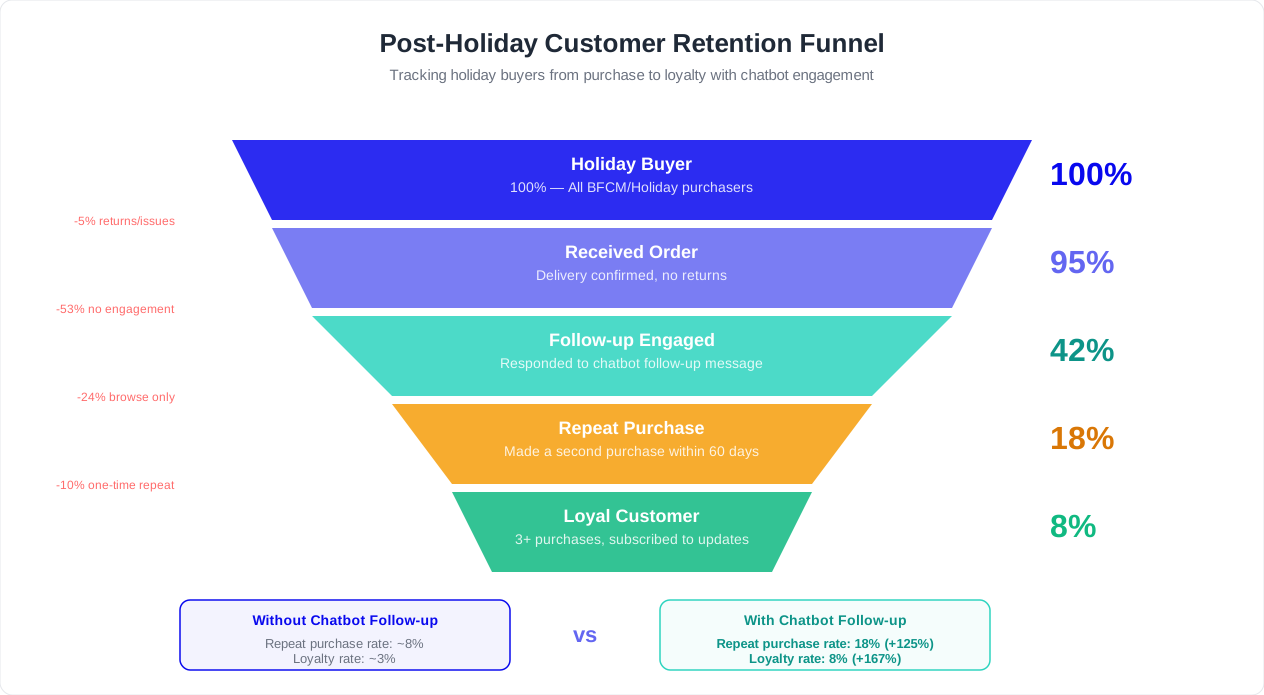
The holiday season brings a massive influx of first-time buyers. For most retailers, 40-60% of BFCM customers are purchasing from the brand for the first time. The critical question is: how many of them come back?
Industry data shows that only 13% of first-time holiday buyers make a second purchase within the next 12 months. But retailers who implement structured post-holiday engagement see that number climb to 25-35%. Your chatbot plays a central role in that retention strategy.
The Post-Holiday Engagement Timeline
| Timeframe | Chatbot Action | Goal | Expected Impact |
|---|---|---|---|
| Dec 26 - Jan 5 | Proactive return/exchange support; gift card activation assistance | Reduce friction, demonstrate service quality | 15% reduction in support escalations |
| Jan 6 - Jan 15 | "How is your [product]?" satisfaction check; review request | Gather feedback, generate social proof | 3-5x more product reviews than email alone |
| Jan 16 - Jan 31 | Personalized product recommendations based on holiday purchase | Drive repeat purchase | 8-12% conversion rate on recommendations |
| Feb 1 - Feb 14 | Valentine's Day gifting suggestions for customers who bought gifts | Leverage gift-buying behavior for next occasion | 20% higher engagement than generic Valentine's promos |
| Feb 15 - Mar 31 | Loyalty program enrollment; exclusive returning customer offers | Build long-term relationship | 18-25% loyalty program enrollment rate |
Satisfaction Check Flow (January)
Two weeks after the holiday rush settles, trigger a proactive chatbot message for customers who made BFCM purchases:
"Hi [Name]! You purchased [Product] during our holiday sale. How is it working out? We would love to hear your feedback."
- If positive: "Glad to hear it! Would you mind leaving a quick review? It helps other shoppers find great products too. [Review link]"
- If neutral: "Thanks for the honest feedback. Is there anything we can help you get more out of [product]? Here are some tips: [relevant content links]"
- If negative: "I am sorry to hear that. Let me connect you with our team to make this right. Would you prefer to exchange, get a refund, or troubleshoot the issue?"
This flow accomplishes three things simultaneously: it catches dissatisfied customers before they churn or leave negative public reviews, it generates positive reviews from happy customers (boosting your social proof for the next season), and it demonstrates that your brand cares about the experience beyond the transaction.
Personalized Repurchase Recommendations (Late January)
Use your chatbot's purchase data to trigger highly relevant product recommendations. The key is specificity -- not generic "You might also like" suggestions, but recommendations tied directly to what the customer bought:
- Consumable products: "Running low on [product]? Reorder now and save 15% with code COMEBACK15."
- Accessories and add-ons: "Many customers who bought [product] also love [accessory]. It [specific benefit]."
- Complementary categories: "Since you picked up [product A] during the holiday sale, you might be interested in [product B] -- it pairs perfectly and is on sale this week."
- Upgrade path: For tech or subscription products: "You have been using [basic product] for a month now. Ready to unlock [premium features]? Upgrade today and get your first month at 50% off."
Loyalty Program Enrollment via Chatbot
The post-holiday period is the optimal time to enroll new customers in your loyalty program. They have just had a positive purchase experience (assuming you handled support well during BFCM), and they have a tangible incentive to return.
Program your chatbot to present the loyalty pitch when a customer returns to your site in January or February:
"Welcome back! As a thank-you for shopping with us during the holidays, you have earned [X points / status]. Join our loyalty program to use them toward your next purchase. It takes 30 seconds and you will get [specific benefit]."
Chatbot-driven loyalty enrollment outperforms email invitations by 3-4x because the conversation happens while the customer is actively on your site -- the intent is already there.
Leveraging Holiday Data for Year-Round Chatbot Improvement
The BFCM season generates a treasure trove of data for improving your chatbot. After the holiday rush, conduct a thorough analysis:
- Top unresolved questions: What questions did your chatbot fail to answer during BFCM? Add these to your knowledge base before next season.
- Escalation patterns: Which conversation paths consistently led to human escalation? Redesign these flows to improve automation rate.
- Sentiment trends: Where in the conversation did customer satisfaction drop? These are friction points to address.
- Conversion attribution: Track which chatbot interactions led to completed purchases. Double down on the flows that drive revenue.
Use your Conferbot analytics to pull these insights and create an action plan that keeps improving your chatbot throughout the year -- so next BFCM, you start from a stronger baseline.
Retention ROI
Increasing first-time holiday buyer retention from 13% to 30% does not just add 17 percentage points of repeat customers -- it compounds. A customer who makes a second purchase is 54% more likely to make a third. Over a 12-month period, a structured post-holiday chatbot engagement sequence can generate 3-5x the lifetime value from your BFCM customer cohort.
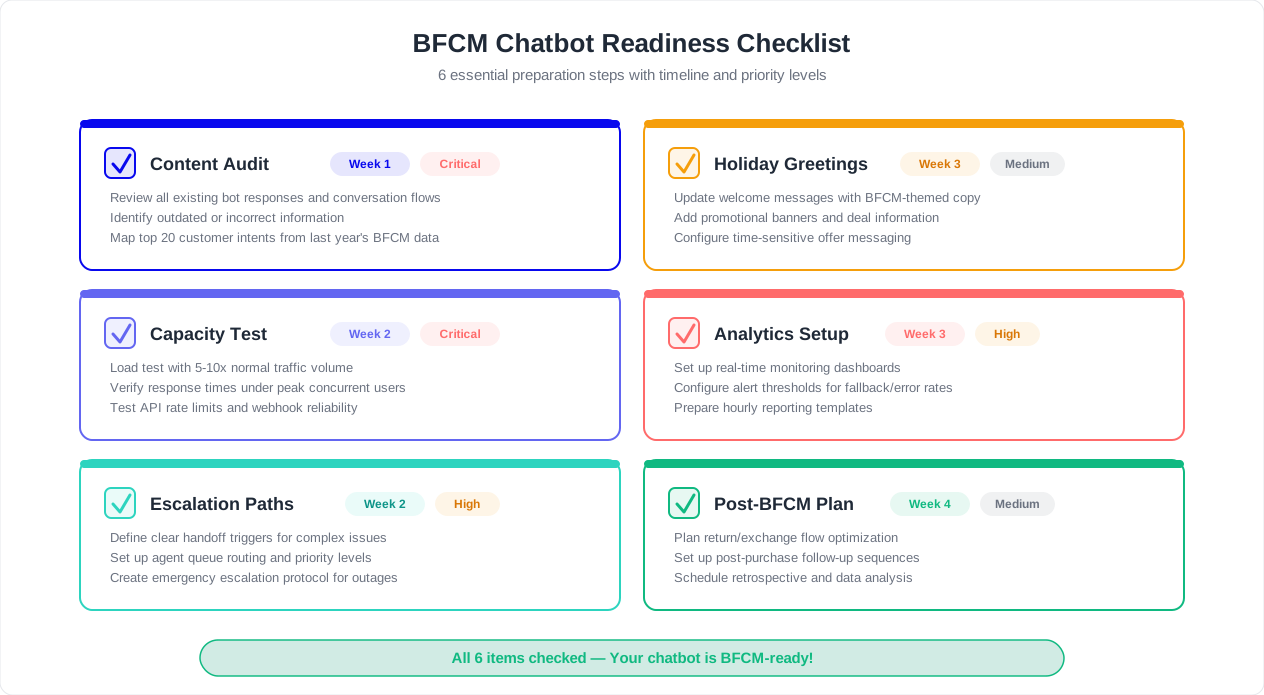
Complete Black Friday Chatbot Checklist
Use this comprehensive checklist to ensure your chatbot is fully prepared for Black Friday and the holiday season. Work through each section in order, starting 30 days before BFCM. Check off each item as you complete it.
Content and Knowledge Base (30 Days Before)
- Audit all product information for accuracy (prices, descriptions, availability)
- Update shipping policy with holiday cutoff dates for each shipping method
- Extend return policy language for holiday purchases (e.g., purchases made Nov 1 - Dec 31 returnable through Jan 31)
- Add gift-specific policies: gift wrapping, gift receipts, gift card options
- Pre-program responses for all 10 holiday-specific questions (see Section 3)
- Create a holiday FAQ section covering: holiday hours, shipping deadlines, promotional terms, and gift services
- Remove or archive outdated content from previous seasons
- Verify all knowledge base entries are current and accurate
Conversation Flows (21 Days Before)
- Build dedicated WISMO (Where Is My Order) flow with real-time order tracking integration
- Build holiday return and exchange initiation flow with gift recipient support
- Build discount code troubleshooting flow (validate, diagnose, escalate)
- Build gift finder recommendation flow (recipient, budget, interests, suggestions)
- Build shipping cutoff communication flow with dynamic date updates
- Update chatbot greeting to acknowledge the holiday season and surface top actions
- Update escalation paths with holiday-adjusted criteria and wait time messaging
- Create out-of-stock alternative suggestion flow
- Test every flow end-to-end with realistic BFCM scenarios
Integrations and Infrastructure (14 Days Before)
- Test order management system integration under simulated peak load
- Verify inventory sync frequency is sufficient for BFCM (recommend real-time or every 5 minutes minimum)
- Confirm discount code validation integration works with all BFCM promotional codes
- Test CRM integration for lead capture during high-traffic periods
- Check all webhook delivery reliability and implement retry logic
- Verify API rate limits for all third-party services and request temporary increases
- Test integration hub connections end-to-end
- Set up integration monitoring and alerting for BFCM period
Capacity and Performance (7 Days Before)
- Calculate expected peak concurrent conversations (use 3x multiplier for safety margin)
- Run load test at 3x expected peak concurrent conversations
- Pre-compute and cache responses for top 50 expected questions
- Verify response times remain under 2 seconds at peak load
- Test human handoff queue management at expected escalation volume
- Implement conversation priority routing (pre-sale queries get priority during BFCM)
- Confirm fallback plan if chatbot or integrations experience downtime
Team Coordination (3 Days Before)
- Brief support agents on chatbot capabilities and escalation triggers
- Distribute one-page reference: what the bot handles vs what agents handle
- Set up real-time monitoring dashboard for support leadership
- Define on-call schedule for chatbot management during BFCM weekend
- Create communication templates for known issues (site slowdowns, shipping delays, stock-outs)
- Schedule daily BFCM stand-ups to review chatbot performance and adjust in real time
Day-of Monitoring
- Monitor concurrent conversation count vs capacity in real time
- Track resolution rate -- target 65%+ automated resolution
- Watch escalation rate -- investigate if it exceeds 35%
- Monitor average response time -- alert if it exceeds 3 seconds
- Check integration health every 2 hours (order lookup, inventory, payments)
- Review customer satisfaction scores hourly and investigate any drops below 75%
- Be ready to adjust chatbot greeting, escalation thresholds, or flow routing in real time
Post-BFCM Review (Within 7 Days After)
- Pull complete analytics report for the BFCM period
- Document total conversations handled, automation rate, and average response time
- Identify top 10 questions the chatbot could not answer -- add to knowledge base
- Calculate cost savings: (automated conversations x average cost per human ticket) - chatbot cost
- Identify escalation patterns and redesign flows for the post-holiday return wave
- Transition chatbot to post-holiday mode: return support, satisfaction checks, re-engagement
- Begin planning improvements for next year's BFCM based on lessons learned
Save This Checklist
Bookmark this page or print this checklist. Start working through it in early October for best results. Brands that begin preparation 30+ days before BFCM see 40% higher chatbot automation rates and 50% fewer support escalations compared to those that scramble in the final week.
The Bottom Line: BFCM Is a Chatbot's Time to Shine
Black Friday and the holiday season represent the ultimate stress test for customer support -- and the ultimate proof of chatbot value. A well-prepared chatbot does not just survive the spike; it thrives during it. While your competitors' support teams drown in ticket backlogs, your chatbot handles thousands of simultaneous conversations with consistent quality, zero wait times, and 24/7 availability.
The math is compelling. A single chatbot on the Conferbot platform, properly configured with the strategies in this guide, replaces the need for 5-10 seasonal support hires during BFCM. At an average seasonal hire cost of $3,500-$5,000 (recruiting, training, wages, offboarding), that is $17,500-$50,000 in savings -- from a tool that costs a fraction of that and works year-round.
More importantly, your customers get a better experience. Instant answers to their order tracking questions. Seamless return initiation at 11 PM on Christmas night. Gift recommendations that actually match what they are looking for. And when they do need a human, they reach one faster because the chatbot has already handled the 60-70% of inquiries that did not require human judgment.
Start your preparation today. Follow the checklist. Audit your content, build your holiday flows, test under load, and coordinate with your team. When Black Friday arrives, your chatbot will be ready -- and your support team will thank you for it. For a complete guide to measuring your chatbot's performance during the peak period, see our chatbot analytics metrics guide.
Ready to build your BFCM-ready chatbot? Start with Conferbot's visual builder and have your holiday support system live in under a day. Or explore our ecommerce chatbot templates for a head start on the flows described in this guide.
Was this article helpful?
Build and deploy in 10 minutes. No coding needed.
Chatbot for Black Friday FAQ
Everything you need to know about chatbots for chatbot for black friday.
About the Author
The Conferbot team writes about building, deploying, and improving AI chatbots.
View all articles