
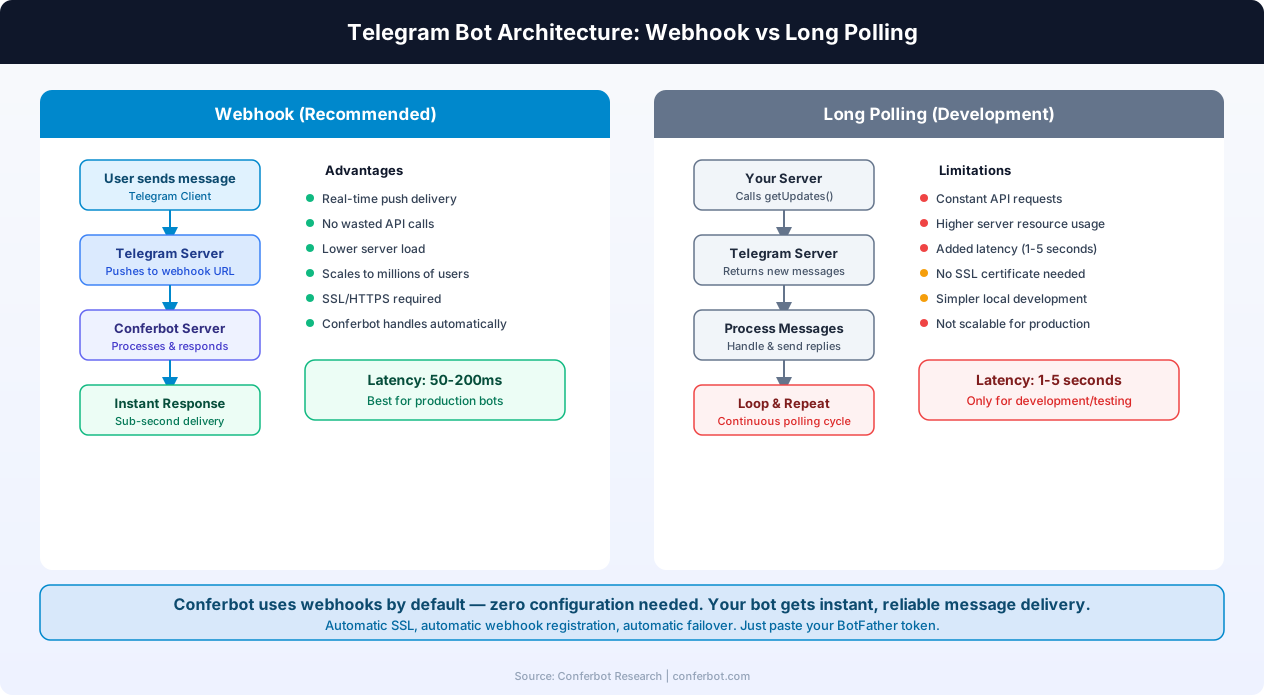
The short answer: one delivery method per token, never both
A Telegram bot gets updates either by long polling (getUpdates) or by a webhook (setWebhook), never both. Telegram returns 409 Conflict if you poll while a webhook is set, or if two processes poll one token. Pick one method, call deleteWebhook before switching to polling, and set secret_token to verify webhook calls.
Last verified: October 2026 against the Telegram Bot API reference, the Bots FAQ and the Marvin's Patent Pending Guide to All Things Webhook. Error strings are the literal descriptions the API returns.
The Bot API documentation opens its "Getting updates" section with the rule that drives everything else in this guide: "There are two mutually exclusive ways of receiving updates for your bot". Whichever one you choose, updates wait on Telegram's side until you collect them, and "they will not be kept longer than 24 hours".
Long polling (getUpdates) | Webhook (setWebhook) | |
|---|---|---|
| Direction | Your bot asks Telegram for new updates (pull) | Telegram sends each update to your URL (push) |
| Needs a public HTTPS URL | No | Yes - ports 443, 80, 88 or 8443 only |
| Works behind NAT, a firewall or on a laptop | Yes | No, unless you put a tunnel or proxy in front |
| Scales to several instances | No - two pollers on one token cause a 409 | Yes - put a load balancer in front of the URL |
| How you confirm an update | Send the next offset | Return a 2XX response |
| How you prove the caller is Telegram | Not needed - you made the request | secret_token, checked in the X-Telegram-Bot-Api-Secret-Token header |
| Typical failure | Conflict: terminated by other getUpdates request | last_error_message in getWebhookInfo, growing pending_update_count |
Neither mode is faster in a way you will notice for an ordinary bot, and Telegram itself is relaxed about the choice: its webhook guide says "There is nothing wrong with using getUpdates". The choice is about where the bot runs and how many copies of it run, not about performance.
Want to see which mode a token is in right now? The Telegram webhook checker reads getWebhookInfo for any token and shows the registered URL, the pending queue and the last delivery error. An empty url means the token is in polling mode.
How long polling works: getUpdates, offset and timeout
With long polling your code calls getUpdates in a loop. Four parameters control it, and two of them are where most polling bugs come from.
| Parameter | What the docs say | What it means in practice |
|---|---|---|
offset | "An update is considered confirmed as soon as getUpdates is called with an offset higher than its update_id." | After you process a batch, send the next request with offset = last update_id + 1. If you forget, Telegram hands you the same updates again. |
timeout | "Timeout in seconds for long polling. Defaults to 0, i.e. usual short polling." | With the default of 0 you are short polling: each call returns at once, usually empty, and you burn requests. Set a positive value (25-50 seconds is common) so Telegram holds the request open until an update arrives. |
limit | "Values between 1-100 are accepted. Defaults to 100." | The batch size. The default is fine for most bots. |
allowed_updates | "Specify an empty list to receive all update types except chat_member" and the reaction types | Which update types you want. The setting persists, so a value set once keeps applying to later calls that omit it. |
A minimal, correct polling loop looks like this:
let offset = 0;
while (true) {
  const res = await fetch(
    `https://api.telegram.org/bot${TOKEN}/getUpdates?timeout=30&offset=${offset}`
  ).then(r => r.json());
  if (!res.ok) { console.error(res.error_code, res.description); await sleep(5000); continue; }
  for (const update of res.result) {
    await handle(update);
    offset = update.update_id + 1;   // confirms this update
  }
}
Two details from the reference are worth remembering. First, the FAQ notes that getUpdates "returns the earliest 100 unconfirmed updates", so a bot that never advances offset keeps seeing the same first 100 forever. Second, update_id is not guaranteed to be continuous over long gaps: "If there are no new updates for at least a week, then identifier of the next update will be chosen randomly". Never use it as a database primary key that you expect to grow by one.
The reference also says plainly that getUpdates "will not work if an outgoing webhook is set up". That sentence is the first of the two 409 errors covered below.
How webhooks work: setWebhook, ports, certificates and max_connections
With a webhook you call setWebhook once with a URL, and from then on "Whenever there is an update for the bot, we will send an HTTPS POST request to the specified URL" containing a JSON-serialized Update. If your endpoint answers with anything other than a 2XX status, Telegram repeats the request and eventually gives up, which is how a webhook backlog builds up. Our guide to pending_update_count covers reading that backlog.
curl -X POST "https://api.telegram.org/bot<TOKEN>/setWebhook" \
  -d "url=https://bot.example.com/telegram" \
  -d "secret_token=7f3a9c_change_me-2026" \
  -d "max_connections=40" \
  -d "drop_pending_updates=true"
The parameters that matter, as the reference defines them:
| Parameter | Rule |
|---|---|
url | "HTTPS URL to send updates to. Use an empty string to remove webhook integration." |
certificate | Only for self-signed certificates: upload your public key so Telegram can check it. A certificate from a trusted CA needs nothing extra. |
ip_address | "The fixed IP address which will be used to send webhook requests instead of the IP address resolved through DNS". |
max_connections | "The maximum allowed number of simultaneous HTTPS connections to the webhook for update delivery, 1-100. Defaults to 40." |
allowed_updates | Same behaviour as in getUpdates. |
drop_pending_updates | "Pass True to drop all pending updates". |
secret_token | Sent back to you in the X-Telegram-Bot-Api-Secret-Token header on every request, 1-256 characters, only A-Z, a-z, 0-9, _ and -. |
The network rules your endpoint has to meet
- Ports. "Ports currently supported for webhooks: 443, 80, 88, 8443." An app listening on 3000 or 8080 needs a reverse proxy in front of it.
- HTTPS only. The hosted Bot API refuses
http://URLs. Telegram's documentation lists plain HTTP and any port as features of a self-hosted Local Bot API Server, not of api.telegram.org. - TLS 1.2 or newer, and IPv4. The webhook guide states that older SSL/TLS versions are not accepted and that "IPv6 is currently not supported for webhooks."
- Source addresses. The same guide says webhook requests come from the subnets
149.154.160.0/20and91.108.4.0/22, and warns the ranges may change. You can allow-list them at your firewall, but do not make that your only check: usesecret_tokenas well.
Replying inside the webhook response
A webhook has one shortcut polling does not. The reference allows you to answer with a Bot API method in the body of your HTTP response: "If you're using webhooks, you can perform a request to the Bot API while sending an answer to the webhook." The trade-off, as the FAQ notes, is that you cannot tell whether that call succeeded or read its result. Use it for fire-and-forget replies, and make a normal API call when you need the returned message.
Verify webhook calls with secret_token
Anyone who learns your webhook URL can POST a fake update to it. Without a check, your bot will treat a forged "message" as real: it might reply to a chat ID the attacker chose, or run a command on their behalf. Telegram's answer is the secret_token parameter: "A secret token to be sent in a header 'X-Telegram-Bot-Api-Secret-Token' in every webhook request". The FAQ's older advice, a hard-to-guess path in the URL, still works, but the header keeps the secret out of access logs and proxy logs that record paths.
Generate a random value of up to 256 characters from the allowed set (A-Z a-z 0-9 _ -), pass it in setWebhook, and reject any request whose header does not match. In Express:
import crypto from "node:crypto";

app.post("/telegram", express.json(), (req, res) => {
  const got = Buffer.from(req.get("X-Telegram-Bot-Api-Secret-Token") || "");
  const want = Buffer.from(process.env.TG_WEBHOOK_SECRET);
  if (got.length !== want.length || !crypto.timingSafeEqual(got, want)) {
    return res.sendStatus(401);
  }
  res.sendStatus(200);          // acknowledge first
  queue.push(req.body);         // then process the update
});
The same check in Python with FastAPI:
import hmac, os
from fastapi import FastAPI, Request, Response

app = FastAPI()
SECRET = os.environ["TG_WEBHOOK_SECRET"]

@app.post("/telegram")
async def telegram(request: Request):
    got = request.headers.get("X-Telegram-Bot-Api-Secret-Token", "")
    if not hmac.compare_digest(got, SECRET):
        return Response(status_code=401)
    update = await request.json()
    enqueue(update)
    return Response(status_code=200)
Three things go wrong with secret tokens in practice:
- A character outside the allowed set. Base64 output contains
+,/and=, which are not allowed. Use hex, or base64url without padding. - A deploy script that drifts. If one script calls
setWebhookwith the secret and another (a CI job, a library's startup helper) calls it without, the value Telegram sends and the value your code expects can stop matching. Your check then rejects real updates with 401, which shows up as a growingpending_update_countand alast_error_messagenaming your 401. Passsecret_tokenon everysetWebhookcall, from one place. - Rotating it in the wrong order. Deploy code that accepts both old and new values, call
setWebhookwith the new one, then remove the old value.
Which one should you use?
Pick by where the bot runs, not by habit. This table covers the cases that come up most often.
| Situation | Use | Why |
|---|---|---|
| Developing on a laptop | Polling | No public URL, no certificate, nothing to register. Just make sure production is not polling the same token at the same time. |
| One small always-on process (a VPS, a Raspberry Pi, a worker dyno) | Either | Polling is simpler and works behind NAT. A webhook saves idle requests but needs HTTPS on an allowed port. |
| Serverless (Lambda, Cloud Functions, Vercel, Cloudflare Workers) | Webhook | A function cannot hold a long poll open between invocations. Telegram calls the function when there is work. |
| More than one instance or autoscaling | Webhook | Only one getUpdates connection per token is allowed. Several instances can sit behind one webhook URL. |
| Behind a corporate firewall with no inbound traffic allowed | Polling | Polling makes only outbound HTTPS requests to api.telegram.org. |
| Bot built on a hosted platform | Whatever the platform does | Do not call setWebhook or getUpdates on a token a platform is already using. You will take its updates away from it. |
If you are unsure, start with polling while you develop, and move to a webhook when you deploy to more than one instance or to serverless. The move is the part that goes wrong, so it gets its own section.
Switching between polling and webhook without a 409
There are two different 409 errors, and they have different causes. Both come from the rule that one token has one consumer of updates.
409 while a webhook is set
{"ok":false,"error_code":409,"description":"Conflict: can't use getUpdates method while webhook is active; use deleteWebhook to delete the webhook first"}A webhook is registered and your code is calling getUpdates. The description tells you the fix. The reference page for this 409 lists the usual sources: an old deploy, a teammate, a framework default, or a hosting platform that registered its own webhook.
409 from two pollers
{"ok":false,"error_code":409,"description":"Conflict: terminated by other getUpdates request; make sure that only one bot instance is running"}Two processes are polling one token. Each new request ends the other one, and each process gets roughly half the messages. Look for a second replica, a laptop still running the production token, or a deploy whose old and new instances overlap. Details on the terminated by other getUpdates request page.
Webhook to polling, in order
- Stop or drain the service that receives the webhook.
- Call
deleteWebhook. Adddrop_pending_updates=trueonly if you are sure you do not want the queued updates:curl "https://api.telegram.org/bot<TOKEN>/deleteWebhook" - Call
getWebhookInfoand confirmurlis"". - Start exactly one polling process.
Polling to webhook, in order
- Deploy the webhook endpoint and check from outside your network that it answers a POST with 200 within a second or two.
- Stop every polling process. Check with
ps, your process manager and your replica count, not only your memory. - Call
setWebhookwithurlandsecret_token. There is no need to calldeleteWebhookfirst: the token is in polling mode, so there is no webhook to remove. - Call
getWebhookInfo. Over the next minutes,pending_update_countshould stay at or near 0 andlast_error_messageshould be absent.
Updates sent while you switch are not lost. Telegram keeps them for up to 24 hours and delivers them to whichever method is active next, unless you passed drop_pending_updates. The reverse risk is a bot that replays a long backlog when it comes back. Decide which one you want before you run the command.
Libraries often hide this. python-telegram-bot, aiogram, grammY and Telegraf all have helpers that start polling or set a webhook for you, and some call deleteWebhook automatically when polling starts. If your bot works locally but goes silent in production, check whether a startup routine is quietly moving the token between modes on every boot.
setWebhook errors and what each one means
When setWebhook fails, the description starts with bad webhook: and then names the rule that failed. These are the ones you will meet most often:
| Description | Cause | Fix |
|---|---|---|
Bad Request: bad webhook: HTTPS url must be provided for webhook | The URL starts with http:// or has no scheme. | Serve the endpoint over HTTPS and pass the full https:// URL. |
Bad Request: bad webhook: Webhook can be set up only on ports 80, 88, 443 or 8443 | An explicit port such as :3000 or :8080 in the URL. | Put a reverse proxy on 443 and drop the port from the URL. |
Bad Request: bad webhook: failed to resolve host | Telegram cannot resolve the hostname: a typo, an internal-only name, a brand-new DNS record or an expired tunnel. | Check the name from a public DNS resolver, wait for propagation, then retry. |
Unauthorized (401) | The token is wrong, revoked or has whitespace in it. | Copy the token again from @BotFather. The bot token checker confirms it with getMe. |
A successful setWebhook only means Telegram accepted the URL. It says nothing about whether delivery works. Delivery problems such as certificate chains, timeouts and 5XX responses from your app show up later in getWebhookInfo, in last_error_message, last_error_date and pending_update_count. The full list of documented fields is url, has_custom_certificate, pending_update_count, ip_address, last_error_date, last_error_message, last_synchronization_error_date, max_connections and allowed_updates.
For every other literal error string, the Telegram error code directory maps each description to its cause and fix. Webhook and polling limits are collected on the Telegram limits page.
A production checklist for either method
Whichever method you choose, these habits prevent most of the outages that end up as a "bot not responding" search.
- Acknowledge first, work second. With a webhook, return 200 at once and process the update on a queue. A handler that calls an AI model or a database before it responds is the most common cause of a growing backlog.
- Make handlers idempotent. Telegram retries webhook deliveries, and a polling bot that crashes before it advances
offsetgets the same batch again. Store processedupdate_idvalues for a short time and skip duplicates. - One token per environment. Create a separate bot in @BotFather for staging and local development. Most 409s come from a developer sharing the production token.
- Alert on getWebhookInfo. Check it every minute and alert when
last_error_datechanges orpending_update_countpasses a threshold you chose from your own traffic. - Log the full error body. The Bot API's
descriptionfield tells you what went wrong. Its documentation notes that the numericerror_codeis "subject to change in the future", so match on the description, not only the number. - Respect the 24-hour window. A dead webhook over a weekend loses messages for good. Updates older than 24 hours are gone, whichever method you use.
If the bot is silent and neither 409 applies, the cause is usually elsewhere: group privacy mode, a blocked user or a revoked token. Our Telegram bot not responding guide works through those in order, and the webhook debugging guide covers the same failures on other platforms.
Or let a builder own the connection
Everything above is plumbing: choosing a delivery mode, guarding the endpoint, keeping one consumer per token and watching the queue. That is worth doing when the bot is your product. When the bot is a support, booking or FAQ channel for a business, it is mostly overhead.
With Conferbot you create the bot in @BotFather, paste its token into Conferbot, design the conversation in the AI chatbot builder and publish. You do not run a server or choose between polling and a webhook. One rule from this guide still applies: once a platform is using a token, do not point your own code at the same token with getUpdates or setWebhook, or you will take its updates away from it. Use a second bot for experiments.
Conferbot is one builder for every major chat platform, so the same flow can also run on WhatsApp, Discord, Slack and your website. The Free plan costs $0, needs no credit card and covers 600 conversations a month for two bots. Details are on the Telegram chatbot page.
Was this article helpful?
Build and deploy in 10 minutes. No coding needed.
Telegram Bot Webhook vs Long Polling FAQ
Everything you need to know about chatbots for telegram bot webhook vs long polling.
About the Author
The Conferbot team writes about building, deploying, and improving AI chatbots.
View all articlesRelated Articles

From the reference shelf
Fact-checked reference pages and free tools for the platform this article covers.