
Why Start with a Chatbot Template Instead of Building from Scratch
According to Gartner, over 80% of businesses now use some form of automated chat, and templates are how most get started fast. Building a chatbot from scratch is like writing a resume from a blank page - technically possible, but a proven template gets you to a better result faster. Chatbot templates are pre-built conversation flows designed by experts who have tested thousands of conversations and know what works.
Templates vs From Scratch: The Numbers
| Factor | From Scratch | From Template |
|---|---|---|
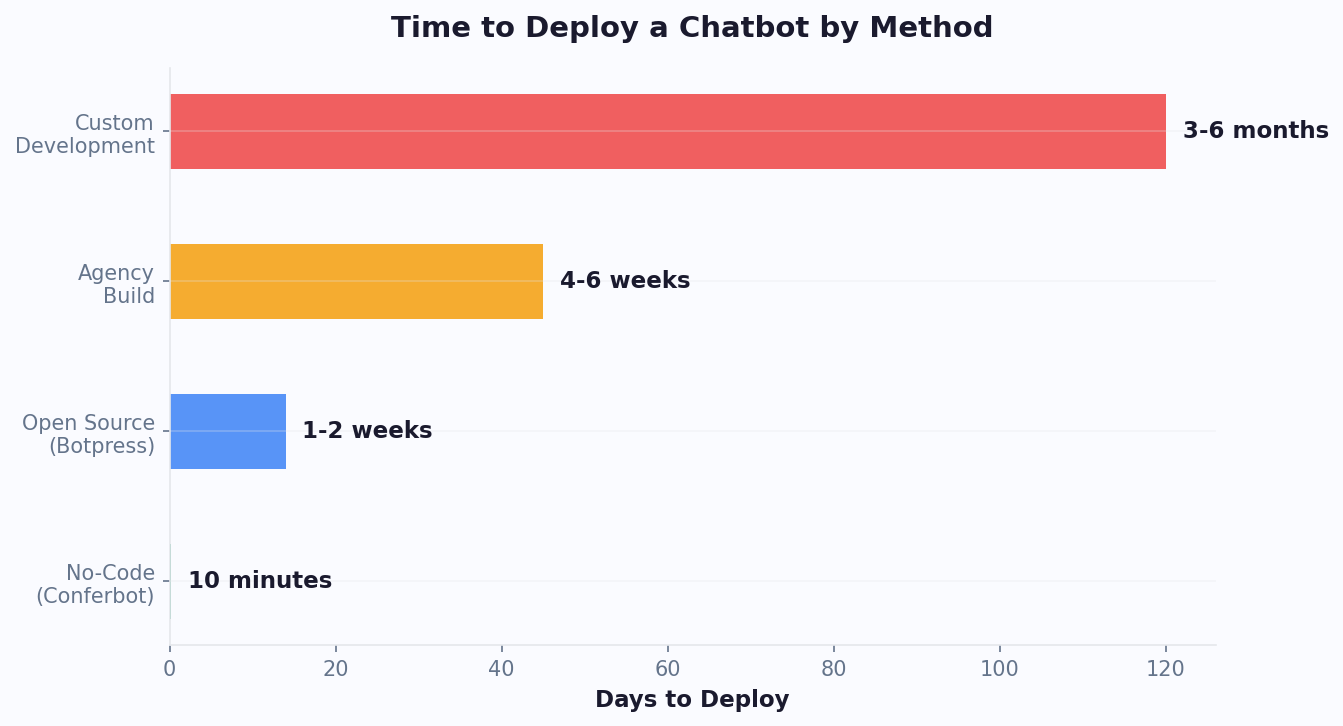
| Time to deploy | 2-8 hours | 10-30 minutes |
| First-attempt success rate | 40% (many iterations needed) | 80% (proven flow) |
| Common mistakes avoided | Learn by failing | Pre-eliminated |
| Best practices included | Only if you know them | Built-in |
| Customization flexibility | Unlimited | Unlimited (templates are starting points) |
What Makes a Good Template
A quality chatbot template includes:
- Optimized conversation flow: Questions in the right order, not too many, not too few
- Natural language: Messages that sound human, not robotic
- Proper branching: Different paths based on user responses
- Error handling: What happens when the user says something unexpected
- Integration points: Where to connect CRM, calendar, email
- Completion action: What the bot does after the conversation goal is achieved
Research from HubSpot's marketing benchmarks shows that businesses using pre-built conversational frameworks see 2.5x faster time-to-value compared to building from scratch. Templates are not restrictions - they are springboards. Start with a template, customize the language to match your brand, adjust the questions to your needs, and deploy. You will iterate from there based on real data. The best-performing chatbots in production today started as templates and were refined through weeks of A/B testing and conversation analysis to reach their optimal conversion rates.
Browse all available templates in our template gallery.
Lead Generation Chatbot Templates
Template 1: B2B Lead Qualification Bot
Best for: SaaS, agencies, consulting firms, B2B services
Conversation flow:
- Proactive greeting: "Hi! Looking for [service type]? I can help you find the right solution in 60 seconds."
- Company context: "What's your company size?" (buttons: 1-10, 11-50, 51-200, 200+)
- Need identification: "What's your primary challenge right now?" (buttons: relevant options)
- Timeline: "When are you looking to get started?" (This month, Next quarter, Just researching)
- Budget range: "Do you have a budget range in mind?" (ranges relevant to your pricing)
- Contact capture: "Great! Let me connect you with the right person. What's your best email?"
- Booking: "Want to schedule a quick call? Here are available times this week."
Why it works: Each question feels natural and adds value (the user gets "matched" to a solution). By the time you ask for email, they are invested in the conversation. Drift's conversational marketing data shows that this progressive approach converts 3-5x better than static forms. For a deeper comparison, see our guide on chatbot vs contact forms.
Template 2: Real Estate Lead Capture Bot
Best for: Real estate agents, property managers, mortgage brokers
Conversation flow:
- Greeting: "Welcome! Are you looking to buy, sell, or rent?"
- Property type: "What type of property interests you?" (House, Apartment, Commercial, Land)
- Location: "Which area or neighborhood are you considering?"
- Budget: "What's your budget range?" (preset ranges)
- Timeline: "How soon are you looking to move?" (ASAP, 1-3 months, 3-6 months, Just browsing)
- Contact: "I'll match you with available listings. What's the best way to reach you?"
- Qualification: If hot lead (high budget + ASAP timeline), offer immediate call with agent
Why it works: Mirrors the questions a good agent would ask in person. Pre-qualifies leads so agents only spend time on serious buyers.
Template 3: Newsletter/Lead Magnet Bot
Best for: Content creators, bloggers, course sellers, SaaS with content marketing
Conversation flow:
- Value hook: "Want our free [guide/template/checklist]? It covers [specific benefit]."
- Relevance check: "Which topic interests you most?" (segments the subscriber)
- Email capture: "Where should I send it?"
- Confirmation: "Sent! While you're here - would you like [related offer]?"
Why it works: Conversational lead magnet delivery converts 3-5x better than static popup forms because it feels personal and immediate. Our lead generation chatbot guide covers advanced strategies for maximizing lead capture across industries.
Customer Support Chatbot Templates
Template 4: General FAQ Support Bot
Best for: Any business with recurring customer questions
Conversation flow:
- Greeting: "Hi! I'm here to help. What can I assist you with today?"
- Quick categories (buttons): Pricing, Account, Technical, Shipping, Returns, Other
- Based on category → serve relevant FAQ answers from knowledge base
- After answering: "Did that help? 👍 / 👎"
- If not helpful: "Let me connect you with our support team. Can you describe your issue briefly?"
- Create support ticket with context and route to appropriate team
Template 5: E-commerce Order Support Bot
Best for: Online stores on Shopify, WooCommerce, or custom platforms
Conversation flow:
- Greeting: "Hi! Need help with an order? I can check status, process returns, or answer product questions."
- Category: Order tracking / Returns & exchanges / Product questions / Other
- For tracking: "What's your order number or email address?" → Pull status from system
- For returns: "What item do you want to return and why?" → Check return eligibility → Provide return label or explain policy
- For products: AI answers from product catalog and knowledge base
- Always offer: "Anything else I can help with?"
Template 6: SaaS Technical Support Bot
Best for: Software companies with technical support queries
Conversation flow:
- Greeting: "Hi! Having a technical issue? Let me help troubleshoot."
- Category: Login issues / Integration problems / Feature not working / Bug report / How-to question
- For each category → Guided diagnostic steps from documentation
- Login issues: Reset password flow, check status page, verify email
- Integration: Which integration? → Common fixes for that specific integration
- After 2 failed attempts: "Let me create a support ticket for our engineering team. Can you describe what you see?"
- Collect: screenshot request, browser/OS info, steps to reproduce → Create detailed ticket
Appointment Booking Chatbot Templates
Template 7: Medical/Dental Clinic Booking Bot
Best for: Clinics, dental offices, therapists, specialists
Conversation flow:
- Greeting: "Welcome to [Clinic Name]! I can help you book an appointment, answer questions, or check your upcoming visits."
- Action: Book new / Reschedule existing / Cancel / Ask a question
- For new booking: "Are you a new or existing patient?"
- New patient: Collect basic info (name, DOB, insurance, reason for visit)
- Show available slots: "Here are available times this week:" (buttons with day/time options)
- Confirm: "You're booked for [date/time] with [doctor]. I'll send a reminder 24 hours before."
- Pre-visit: "Please arrive 15 minutes early for paperwork. Bring your insurance card and photo ID."
Integration needed: Calendar integration with your practice management system
Template 8: Salon/Spa Booking Bot
Best for: Hair salons, spas, nail studios, beauty services
Conversation flow:
- Greeting: "Hey! Ready to book your next appointment? 💈"
- Service type: "What are you looking for?" (Haircut, Color, Styling, Facial, Massage, Nails, Other)
- Stylist preference: "Any preference for who you'd like to see?" (list stylists or "No preference")
- Date/time: Show available slots for selected service + stylist combo
- Confirm and upsell: "Booked! By the way, would you like to add [complementary service] for 20% off?"
Template 9: Consultant/Coach Booking Bot
Best for: Coaches, consultants, freelancers, advisors
Conversation flow:
- Greeting: "Hi! Want to book a consultation? Let me find the right time for us."
- Session type: "What type of session?" (Discovery call - Free / Strategy session / Ongoing coaching)
- Brief context: "In 1-2 sentences, what would you like help with?" (open text)
- Show calendar: Available 30-min or 60-min slots
- Confirm: Booking confirmation + calendar invite sent
- Pre-meeting: "Before our call, is there anything specific you'd like me to review or prepare?"
E-commerce Chatbot Templates
Template 10: Product Recommendation Bot
Best for: Stores with 50+ products where customers need guidance
Conversation flow:
- Greeting: "Hi! Looking for something specific, or want me to help you find the perfect [product type]?"
- Use case: "What's this for?" (Gift, Personal use, Work, Special occasion)
- Preferences: 2-3 quick questions specific to your product (size, color, budget, features)
- Recommendations: Show 3 products with images using carousel cards
- Compare: "Want to compare these? Here's a quick breakdown..."
- Purchase: Direct "Add to Cart" links or purchase buttons
- Post-selection: "Great choice! These items pair well with it: [cross-sell suggestions]"
Template 11: Abandoned Cart Recovery Bot
Best for: Any e-commerce store (deploy on WhatsApp or website)
Conversation flow (triggered 1-2 hours after abandonment):
- Gentle reminder: "Hi [Name]! You left [Product] in your cart. Still thinking about it?"
- Address objections: "Any questions I can answer? I can help with sizing, shipping, or returns."
- If hesitating: Answer their specific question from your FAQ
- If still hesitating: "Here's 10% off to help you decide: [CODE]. Valid for 24 hours."
- If purchasing: "Awesome! Here's your checkout link: [direct link with code applied]"
- If not interested: "No problem! Want me to let you know if this goes on sale?"
Expected recovery rate: 15-25% of abandoned carts with this flow (vs 5-10% with email-only recovery). See our abandoned cart recovery chatbot guide for the complete implementation strategy including follow-up sequences and discount timing.
Template 12: Order Status & Returns Bot
Best for: E-commerce stores handling 50+ daily shipments
Conversation flow:
- Identify: "Hi! I can help with your order. What's your order number or the email you used?"
- Lookup: Pull order from system, display status, tracking link, estimated delivery
- If issue: "Is everything okay with your order?" (Yes / Need to return / Item damaged / Wrong item)
- Return flow: Check eligibility → generate return label → provide instructions
- Damage/wrong item: Collect photo evidence → immediate replacement or refund offer
- Close: "Your return has been processed. Refund in 5-7 business days. Anything else?"
Industry-Specific Chatbot Templates
Template 13: Restaurant Reservation + Menu Bot
Best for: Restaurants, cafes, bars
Handles: Table reservations, menu browsing, dietary requirements, special event bookings, delivery orders
Key flow: "For how many people?" → "What date/time?" → Check availability → "Any dietary requirements?" → Confirm reservation → Send reminder day-of
Template 14: Insurance Quote Bot
Best for: Insurance agencies, brokers
Handles: Quote requests, policy questions, claims initiation, document collection
Key flow: "What type of insurance?" (Auto/Home/Life/Business) → Risk assessment questions → Ballpark quote range → "Want a detailed quote? Let me connect you with an advisor." → Book call + send pre-fill form
Template 15: Fitness/Gym Membership Bot
Best for: Gyms, yoga studios, personal trainers, fitness apps
Handles: Membership inquiries, class bookings, trial signups, schedule questions
Key flow: "Interested in joining?" → Goals assessment → Recommend membership type → Offer free trial/first class → Book trial session → Send location and what-to-bring info
Template 16: Hotel/Vacation Rental Bot
Best for: Hotels, Airbnb hosts, vacation rental managers
Handles: Booking inquiries, availability checks, amenity questions, check-in info, local recommendations
Key flow: "When are you visiting and how many guests?" → Show available rooms/units with photos → Price comparison → Direct booking → Pre-arrival info (check-in, parking, wifi)
Template 17: Education/Course Enrollment Bot
Best for: Online course platforms, tutoring services, schools, bootcamps
Handles: Course recommendations, enrollment, schedule questions, payment
Key flow: "What do you want to learn?" → Skill level assessment → Recommend courses → Answer format/schedule questions → Enrollment + payment → Send welcome materials
Template 18: HR/Internal Support Bot
Best for: Companies with 50+ employees (deploy on Slack or Teams)
Handles: Leave requests, policy questions, IT support, onboarding, benefits inquiries
Key flow: Employee asks "How many vacation days do I have?" → Bot checks HR system → "You have 12 days remaining. Want to request time off?" → Date selection → Submit request to manager for approval
Template Performance Benchmarks: Conversion Rates by Category
Not all chatbot templates perform equally. After analyzing over 500,000 chatbot conversations across different template categories, clear performance patterns emerge. Use this data to choose the right template for your goals and set realistic expectations for results.
Conversion Rate Benchmarks by Template Category
| Template Category | Engagement Rate | Completion Rate | Lead Capture Rate | Avg Time to Complete |
|---|---|---|---|---|
| B2B Lead Qualification | 18-25% | 55-65% | 12-16% | 2.5-3.5 min |
| Real Estate Lead Capture | 22-30% | 50-60% | 14-18% | 2-3 min |
| Newsletter / Lead Magnet | 15-20% | 70-80% | 12-16% | 45-90 sec |
| General FAQ Support | 25-35% | 75-85% | N/A | 1.5-3 min |
| E-commerce Order Support | 20-28% | 80-90% | N/A | 1-2 min |
| Appointment Booking | 15-22% | 60-70% | 10-15% | 2-4 min |
| Product Recommendation | 12-18% | 45-55% | 8-12% | 3-5 min |
| Abandoned Cart Recovery | 30-40% | 35-45% | 15-22% (recovered) | 1-2 min |
| Restaurant Reservation | 20-28% | 65-75% | 15-20% | 1.5-2.5 min |
| Insurance Quote | 10-15% | 40-50% | 6-9% | 4-6 min |
Key Insights from the Data
Shorter templates convert better. Templates that complete in under 2 minutes have 20-30% higher completion rates than those requiring 4+ minutes. The newsletter template has the highest completion rate (70-80%) precisely because it only asks 2-3 questions. When designing your flow, every additional question costs you 8-12% of remaining respondents.
Support templates have the highest engagement. FAQ and order support templates engage 25-35% of visitors because they offer immediate utility. Lead generation templates engage 15-25% because visitors must perceive enough value to share personal information.
Abandoned cart templates are the revenue kings. With a 30-40% engagement rate and 15-22% recovery rate, abandoned cart templates generate the highest direct revenue per conversation. A store with 500 abandoned carts per month recovering 15% at $85 average order value generates $6,375/month from a single template.
Insurance and complex qualification templates underperform if not optimized. Templates requiring detailed personal information (insurance, financial, healthcare) have the lowest completion rates. Counter this by: front-loading value ("Get a quote in 60 seconds"), using progressive disclosure (ask for details in stages), and saving progress so users can return later.
Benchmarks by Channel
| Channel | Avg Engagement Rate | Avg Completion Rate | Best Template Type |
|---|---|---|---|
| Website widget | 12-18% | 55-65% | FAQ support, lead capture |
| 45-60% | 70-80% | Appointment booking, cart recovery | |
| Messenger | 35-45% | 60-70% | Lead magnet, marketing |
| 40-55% | 55-65% | Product recommendation, booking |
WhatsApp consistently outperforms other channels because users are already in a messaging mindset, as confirmed by Statista's WhatsApp usage data showing over 2 billion monthly active users globally. If your primary goal is appointment booking or cart recovery, prioritize WhatsApp deployment. For FAQ support and lead capture on first-time visitors, the website widget is essential. Track these metrics in your analytics dashboard and compare your performance against these benchmarks to identify optimization opportunities.
How to A/B Test Your Chatbot Templates
A/B testing is how you turn a good chatbot template into a great one. Small changes to wording, flow order, and design can produce 20-50% improvements in conversion rate. Here is a structured approach to chatbot A/B testing that delivers actionable results without requiring a data science degree.
What to A/B Test (Ranked by Impact)
Not all elements have equal impact on performance. Focus your testing on the highest-leverage changes first:
- Welcome message (highest impact): The first message determines whether visitors engage or ignore the bot. Test: question-based openers vs. value-proposition openers vs. greeting-only openers. Example - Version A: "Hi! How can I help?" vs. Version B: "Want to see how much you can save? Takes 60 seconds." Typical impact: 15-40% difference in engagement rate.
- Number of questions (high impact): Test a 3-question flow against a 5-question flow against a 7-question flow. Fewer questions almost always win on completion rate, but more questions can improve lead quality. Find your sweet spot.
- Call-to-action wording (high impact): "Book a call" vs. "Get your free consultation" vs. "Talk to an expert" can produce 10-25% differences in click-through rate. Test the specific words that resonate with your audience.
- Quick-reply button labels (medium impact): The labels on response buttons affect both engagement and data quality. "$0-5K / $5K-25K / $25K+" vs. "Just starting out / Growing business / Established company" capture the same budget information with different psychology.
- Widget appearance and timing (medium impact): Test when the widget appears (immediate vs. 5 seconds vs. scroll-triggered), widget position (bottom-right vs. bottom-left), and whether to use a teaser message or just the icon.
How to Run a Valid A/B Test
Step 1: Define your success metric. Choose one primary metric per test. For lead generation templates, use lead capture rate. For support templates, use resolution rate. For booking templates, use booking completion rate. Measuring everything measures nothing.
Step 2: Create two variants. In your chatbot builder, duplicate your template and change exactly one element. Testing multiple changes simultaneously makes it impossible to know which change caused the result.
Step 3: Split traffic evenly. Route 50% of visitors to Version A and 50% to Version B. Most chatbot platforms support this natively. If yours does not, use URL-based targeting (different landing pages point to different bots).
Step 4: Wait for statistical significance. The most common A/B testing mistake is declaring a winner too early. You need at least 100 conversations per variant (200 total) before drawing conclusions. For low-traffic sites, this may take 2-4 weeks. Do not peek at results daily and make decisions based on 15 conversations.
Step 5: Implement the winner and test the next element. Once you have a clear winner (10%+ difference with 200+ conversations), make it the default and move on to testing the next highest-impact element.
A/B Testing Calendar: What to Test and When
| Week | Element to Test | Expected Impact | Min Sample Size |
|---|---|---|---|
| Week 1-2 | Welcome message | 15-40% engagement lift | 200 conversations |
| Week 3-4 | Number of questions | 10-30% completion lift | 200 conversations |
| Week 5-6 | CTA wording | 10-25% conversion lift | 200 conversations |
| Week 7-8 | Button labels | 5-15% engagement lift | 200 conversations |
| Week 9-10 | Widget timing/position | 5-20% engagement lift | 300 page views per variant |
Real A/B Test Results
Here are actual results from small business chatbot A/B tests:
- Dental clinic: Changed welcome from "How can we help?" to "Need to book an appointment? I can find a slot in 30 seconds" - booking rate increased 34%
- SaaS company: Reduced lead qualification from 7 questions to 4 questions - completion rate increased 28%, lead quality stayed the same (verified by sales team)
- E-commerce store: Changed cart recovery message from "You left items in your cart" to "Your [Product Name] is almost sold out - still want it?" - recovery rate increased 22%
- Law firm: Changed CTA from "Contact us" to "Get your free case evaluation" - consultation bookings increased 41%
According to Forrester's Total Economic Impact methodology, iterative optimization of conversational interfaces is one of the highest-ROI activities in digital customer experience. These results are not exceptional - they are typical. Most chatbot templates ship at 60-70% of their potential. Systematic A/B testing unlocks the remaining 30-40%. The key is consistency: test one thing at a time, wait for enough data, and compound your improvements. After 5 rounds of testing over 10 weeks, a chatbot that started at a 15% lead capture rate can realistically reach 25-30%. Explore our template gallery for proven starting points, then use A/B testing to tailor them to your specific audience.
How to Customize Any Template for Your Business (5-Step Process)
Step 1: Choose Based on Primary Goal, Not Industry
A real estate agent focused on lead capture should start with the B2B Lead Qualification template and customize it for real estate - not necessarily use the real estate template (which may focus on property browsing rather than lead qualification). Match your primary goal first.
Step 2: Rewrite the Welcome Message
The greeting sets the tone for the entire conversation. Customize it to:
- Mention your business name
- Reflect your brand voice (formal, friendly, professional)
- Set clear expectations about what the bot can help with
- Include a hook that makes visitors want to engage
Generic: "Hello! How can I help you today?"
Better: "Hey! I'm the [Company] assistant. I can answer questions, show you pricing, or book you a free consultation. What sounds good?"
Step 3: Adjust Questions to Your Qualification Criteria
Every template includes questions designed for a general use case. Replace them with questions YOUR sales team or support team actually needs answered. If your team always asks "What CRM do you use?" before recommending a plan, add that question.
Step 4: Connect Your Integrations
Templates include placeholder integration points. Connect them to your actual tools:
- Email notifications → your email address
- Calendar booking → your Google Calendar or Calendly
- CRM → your HubSpot, Salesforce, or Pipedrive via integrations
- Email marketing → your Mailchimp or ActiveCampaign list
Step 5: Test as a Customer
Before deploying, go through the entire flow pretending you are a real customer:
- Answer questions normally - does the flow feel natural?
- Try giving unexpected answers - does the bot handle it gracefully?
- Try breaking it - what happens if you skip a step or ask an off-topic question?
- Check the output - did the lead appear in your CRM? Did the email notification arrive?
Fix any issues found during testing. Then deploy and iterate based on real user behavior within the first week.
For a complete walkthrough of building your first chatbot from scratch using these principles, see our no-code chatbot building guide. If you want to understand the financial return these templates deliver, our chatbot ROI calculator guide provides the framework.
Ready to start? Browse our full template gallery or describe what you need and let AI build it for you.
Template Optimization After Launch
Templates are starting points, not final products. After deploying any template, review your chatbot analytics weekly to identify drop-off points where users abandon the conversation. The most common optimization is simplifying qualification flows by removing questions that do not meaningfully improve lead quality. A/B test greeting messages, button labels, and question ordering to incrementally improve conversion rates by 5-15% per iteration cycle.
Was this article helpful?
Build and deploy in 10 minutes. No coding needed.
50+ Free Chatbot Templates FAQ
Everything you need to know about chatbots for 50+ free chatbot templates.
About the Author
The Conferbot team writes about building, deploying, and improving AI chatbots.
View all articles

