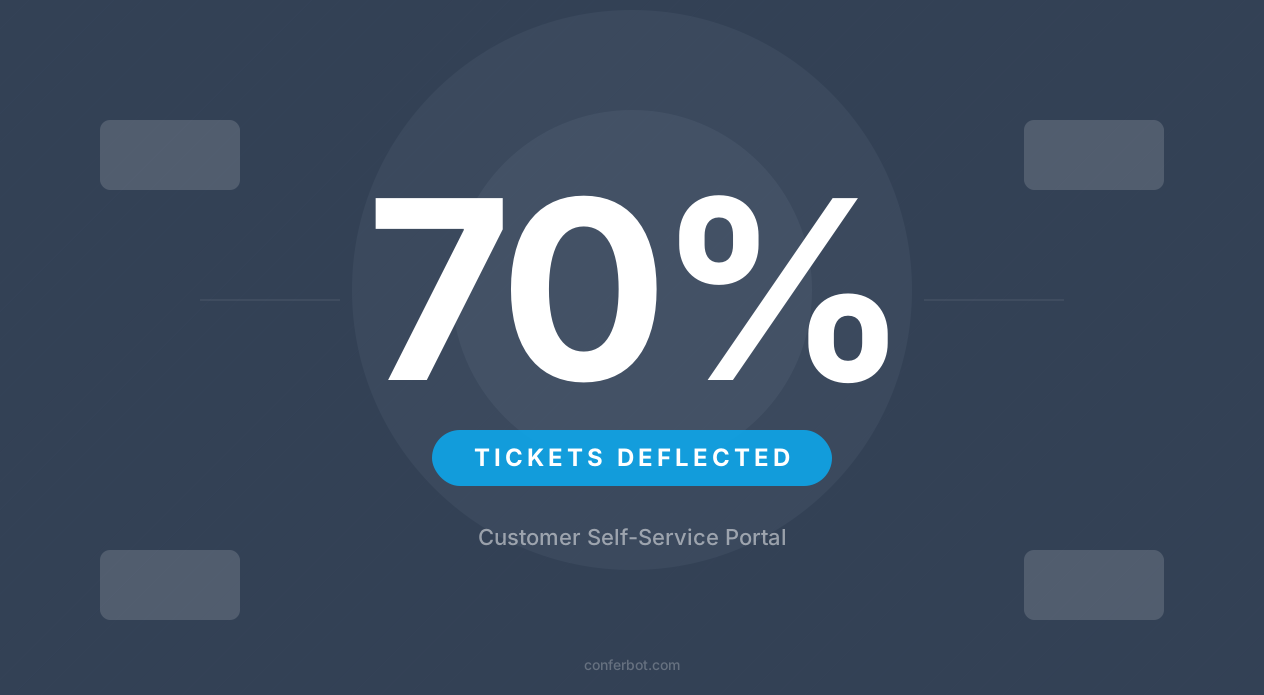
What Is Customer Self-Service and Why It Matters in 2026
Customer self-service is the practice of empowering customers to find answers, resolve issues, and complete tasks without contacting a human support agent. It encompasses knowledge bases, FAQ pages, community forums, help centers, and increasingly, AI-powered chatbots that act as intelligent self-service portals.
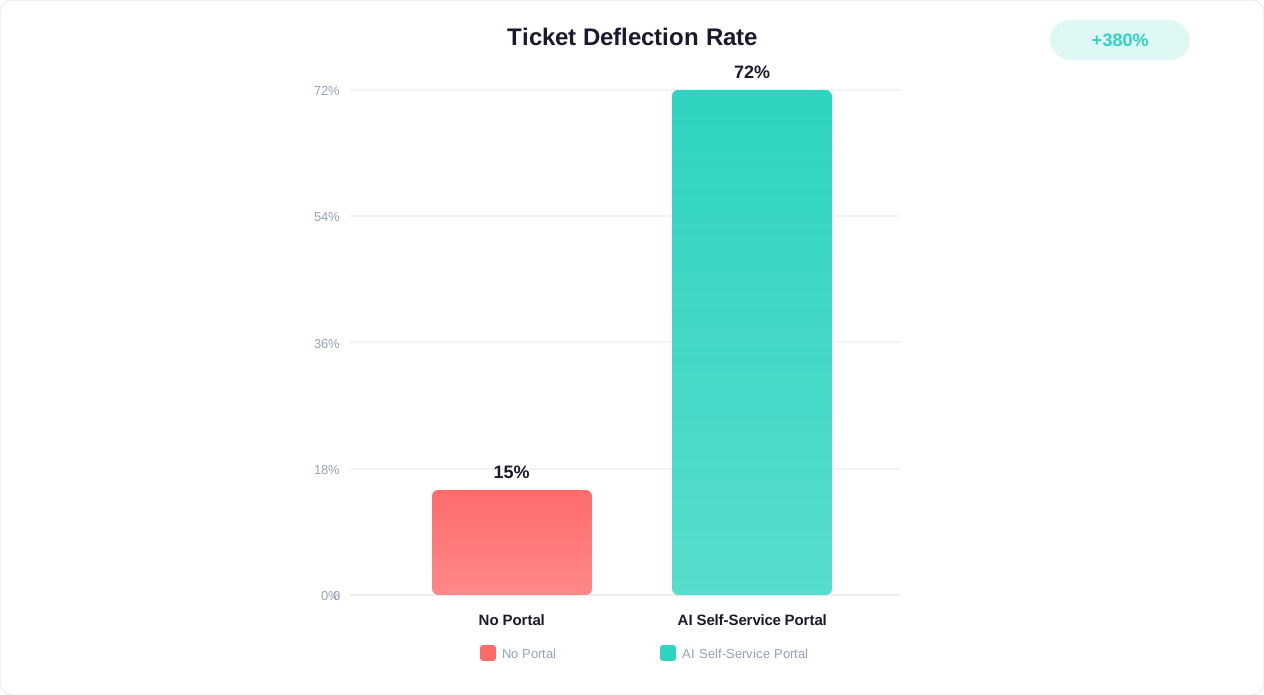
The shift toward self-service is not a trend - it is a structural change in how customers prefer to interact with businesses. Analysts covering customer service technology, including Gartner's research on self-service, have consistently pointed to a rising share of service interactions moving to self-service and AI-assisted channels as adoption matures. The reason is straightforward: customers do not want to wait in queues, repeat their issues to multiple agents, or work within business hours to get simple answers.
Here is the fundamental problem with traditional support models in 2026:
| Support Model | Typical Wait Time | Available Hours | Relative Cost Per Resolution | Customer Satisfaction |
|---|---|---|---|---|
| Phone support | Minutes on hold | 8-12 hrs/day | Highest | Good |
| Email support | Hours to a day | Business hours | High | Fair |
| Live chat (human) | A few minutes | 8-16 hrs/day | Medium | Good |
| Static FAQ page | Self-service | 24/7 | Lowest | Mixed |
| AI chatbot self-service | Instant | 24/7 | Low | Very good, for routine queries |
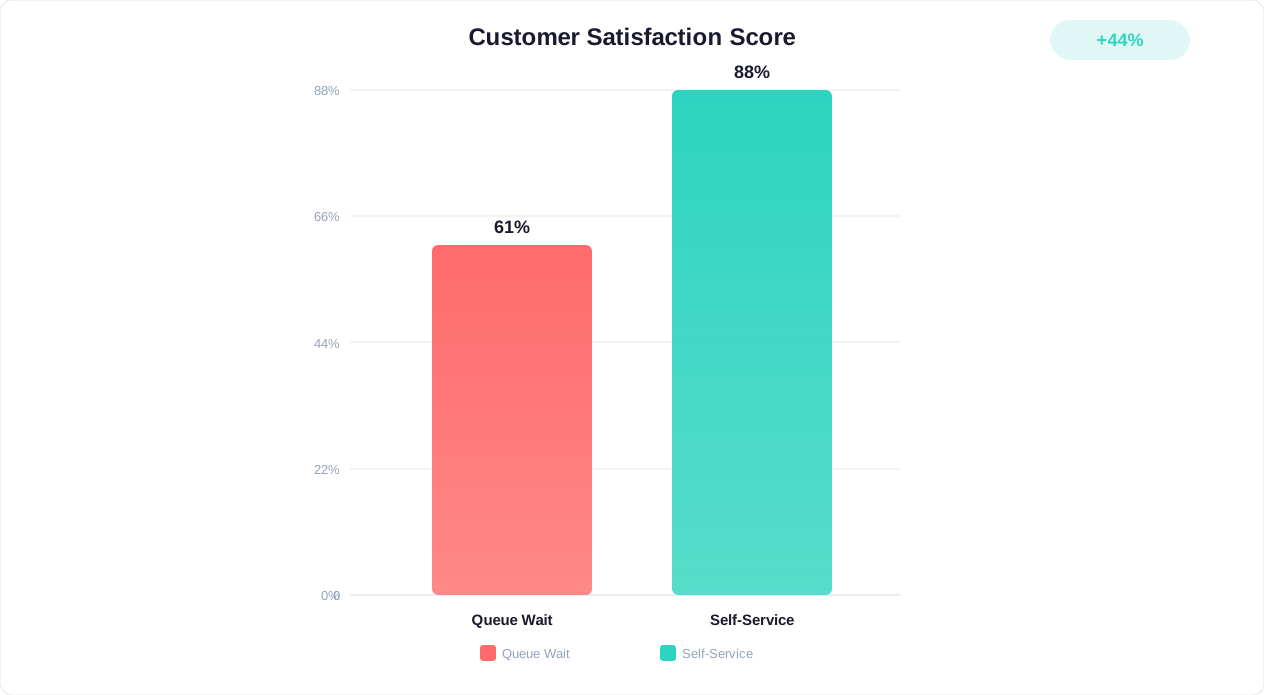
The AI chatbot self-service model combines the best of both worlds: instant availability at a fraction of the marginal cost of staffed channels, with satisfaction scores that can match or exceed live agent interactions for routine queries. This is because customers value speed and convenience above all else when their question is simple. Nobody wants to wait on hold to hear "Have you tried turning it off and on again?"
Customers increasingly reach for self-service before picking up the phone or writing an email, particularly younger consumers who default to digital-first problem solving. The business case follows the same logic: a well-designed self-service portal resolves the queries a human agent never needed to touch, which lowers the average cost of handling a support queue while improving how quickly customers get an answer.
But there is a critical distinction between offering self-service and effective self-service. A static FAQ page with 200 questions buried under collapsible headers is technically self-service - but it solves nothing when customers cannot find the answer they need. This is where AI chatbots fundamentally change the equation, transforming self-service from a passive document library into an active, conversational experience that guides customers to resolution.
Why AI Chatbots Beat Static FAQs: The Intelligence Gap
Static FAQ pages have been the backbone of self-service for two decades. They are cheap to build, easy to maintain, and technically available 24/7. But they fail at the one thing that matters most: actually helping customers find answers. McKinsey's research on AI-enabled customer service points to a large gap between how much value static self-service content actually delivers and how much AI-powered conversational self-service can resolve on its own, because a chatbot can interpret intent and hold a back-and-forth exchange in a way a page of static text never can.
Here is why chatbots fundamentally outperform static FAQs:
1. Natural Language Understanding vs. Keyword Matching
A customer searching a FAQ page for "my order hasn't arrived" will only find help if that exact phrase (or something close) exists as a question title. An AI chatbot understands intent regardless of phrasing. Whether the customer says "where's my package," "delivery is late," "order not received," or "I've been waiting a week" - the chatbot recognizes the same underlying intent and provides the relevant answer.
2. Conversational Clarification
Static FAQs assume every question has a single answer. Reality is different. "How do I cancel my subscription?" has different answers depending on whether you are on a monthly plan, an annual plan, within a free trial, or under a contract. A chatbot asks clarifying questions: "Are you on a monthly or annual plan?" and then provides the precise, relevant answer. This personalized approach dramatically increases resolution rates.
3. Guided Problem-Solving
Many support issues require multi-step troubleshooting. "My internet isn't working" could involve checking the router, verifying account status, testing connections, or scheduling a technician visit. A chatbot walks the customer through each step sequentially, adapting based on their responses. A FAQ page can only present all steps in a single document and hope the customer follows along.
4. Proactive Engagement
FAQ pages are entirely reactive - customers must know they exist, navigate to them, and search for their issue. AI chatbots can be proactive: detecting when a customer is struggling on a checkout page, offering help when they have been idle on a support page for 30 seconds, or surfacing relevant answers based on the page they are viewing.
5. Continuous Learning
FAQ pages only improve when someone manually updates them. AI chatbots learn from every interaction - identifying new question patterns, recognizing which answers resolve issues and which lead to escalation, and automatically surfacing gaps in knowledge coverage.
Comparison: Resolution Rates by Self-Service Method
| Self-Service Method | Relative Resolution Rate | Time to Answer | Customer Effort Score | Maintenance Effort |
|---|---|---|---|---|
| Static FAQ page | Lowest | Several minutes of searching | High | Manual updates monthly |
| Searchable help center | Low-Medium | A few minutes | Medium-High | Regular content updates |
| Interactive troubleshooter | Medium | A few minutes | Medium | Flow updates quarterly |
| AI chatbot (basic) | Medium-High | Under two minutes | Low | Weekly retraining |
| AI chatbot + knowledge base | Highest | Seconds | Very Low | Auto-learning + weekly review |
The pattern holds directionally across the industry: an AI chatbot connected to a comprehensive knowledge base resolves meaningfully more issues than a static FAQ page, in far less time, with lower customer effort, because it eliminates the searching and skimming that a FAQ page demands. This is not incremental improvement - it is a category shift in what self-service can accomplish. Platforms like Conferbot combine the AI knowledge base with conversational intelligence to raise resolution rates without requiring technical expertise to set up.
Building a Self-Service Strategy: Knowledge Base + Chatbot + Escalation
An effective self-service portal is not a single tool, as Gartner's customer service research emphasizes - it is a layered system where each component handles the queries it is best suited for. The three pillars of a modern self-service strategy are: a comprehensive knowledge base (the brain), an AI chatbot (the interface), and intelligent escalation (the safety net).
Pillar 1: The Knowledge Base - Your Chatbot's Brain
Your chatbot is only as good as the information it can access. Before deploying any AI chatbot, you need a structured knowledge base that covers:
- Product/service documentation: Features, specifications, how-tos, limitations
- Policy documents: Returns, refunds, warranties, SLAs, terms of service
- Troubleshooting guides: Common issues with step-by-step resolution paths
- Account management: Password resets, billing inquiries, plan changes, cancellations
- Onboarding content: Getting started guides, setup instructions, first-time user flows
- FAQ repository: Top 100 questions from actual support tickets (not assumed questions)
The critical mistake most companies make is building a knowledge base from assumptions rather than data. Pull your top 200 support tickets from the past 90 days, categorize them, and build your knowledge base around what customers actually ask - not what you think they will ask. This data-driven approach is the foundation of effective ticket deflection.
Pillar 2: The AI Chatbot - Your Conversational Interface
The chatbot sits between the customer and the knowledge base, translating natural language questions into precise answers. Its role is to:
- Understand what the customer is asking (intent recognition)
- Gather any additional context needed (clarifying questions)
- Retrieve the relevant information from the knowledge base
- Present it in a conversational, digestible format
- Confirm the issue is resolved or offer next steps
The chatbot should not try to answer everything - it should answer what it can with confidence and escalate what it cannot. Setting appropriate confidence thresholds (typically 80-85% minimum) ensures customers get accurate answers while preventing the bot from confidently delivering wrong information.
Pillar 3: Intelligent Escalation - The Safety Net
No self-service system handles 100% of queries. The measure of a great system is not whether it escalates - it is how it escalates. Intelligent escalation means:
- Detecting when the chatbot cannot resolve an issue (confidence too low, complex query, emotional customer)
- Passing full conversation context to the human agent (no repeat explanations)
- Routing to the right specialist based on issue type
- Setting expectations with the customer ("A billing specialist will respond within 2 hours")
The goal is a seamless handoff where the customer never feels abandoned and the agent never starts blind. Read our complete human handoff best practices guide for implementation details.
The Three-Pillar Architecture
| Layer | Component | Handles | Share of Volume | Customer Experience |
|---|---|---|---|---|
| 1 (Front) | AI Chatbot | Routine queries, FAQs, guided troubleshooting | Majority of contacts | Instant resolution, 24/7 |
| 2 (Middle) | Knowledge Base + Self-Service Actions | Complex lookups, account changes, order tracking | Small slice | Self-directed with AI guidance |
| 3 (Back) | Human Escalation | Complex issues, complaints, edge cases | Remainder | Warm handoff with full context |
When these three pillars work together, you push the large majority of routine contacts away from a human queue - this guide uses a 70%+ ticket deflection rate as its working target, a level that well-run self-service programs across several industries reach within a few months. The chatbot handles the volume, the knowledge base provides depth, and escalation ensures no customer falls through the cracks.
Ticket Deflection Benchmarks by Industry: What to Expect
Ticket deflection rate - the percentage of support inquiries resolved without human intervention - is the primary metric for self-service success. But expectations should be calibrated by industry, because the complexity and nature of support queries vary dramatically across sectors.
Deflection potential differs by industry mainly because the mix of query types differs: some sectors are dominated by repetitive, structured questions a bot can resolve outright, while others carry more regulatory or emotional complexity that pushes conversations toward a human. Directionally, here is how deflection potential tends to rank once a business moves from no chatbot, to a basic chatbot, to an AI chatbot paired with a real knowledge base:
Deflection Potential by Industry
| Industry | No Chatbot | Basic Chatbot | AI Chatbot + Knowledge Base | Primary Deflectable Topics |
|---|---|---|---|---|
| E-commerce / Retail | Low | Moderate | High | Order tracking, returns, sizing, availability |
| SaaS / Technology | Low | Moderate | High | Setup help, billing, feature questions, bugs |
| Financial Services | Low | Moderate | Medium-High | Balance inquiries, transactions, card issues |
| Telecommunications | Low | Moderate-High | High | Bill explanations, plan changes, troubleshooting |
| Healthcare | Low | Low-Moderate | Medium | Appointments, prescriptions, insurance questions |
| Travel / Hospitality | Low | Moderate | Medium-High | Booking changes, policies, amenity questions |
| Education | Low | Moderate | High | Enrollment, schedules, requirements, deadlines |
| Insurance | Low | Low-Moderate | Medium | Claims status, coverage questions, policy changes |
What Drives Deflection Differences
Industries with higher deflection rates share common characteristics:
- Repetitive, predictable queries: E-commerce ("Where's my order?") and telecom ("Why is my bill higher?") have highly repetitive query patterns
- Structured data access: When the chatbot can pull real-time data (order status, account balance), it resolves issues definitively
- Clear policies: Industries with well-documented, consistent policies (return windows, cancellation terms) enable confident bot answers
Industries with lower deflection rates face challenges like:
- Regulatory complexity: Healthcare and financial services have compliance constraints on automated advice
- Emotional sensitivity: Insurance claims and healthcare queries often carry emotional weight requiring human empathy
- High variability: Every situation is unique, making pattern matching less effective
Setting Your Target
Use the "AI Chatbot + Knowledge Base" column as your medium-term target rather than the industry average. If you are starting from scratch, expect to reach the "Basic Chatbot" level shortly after deployment, with the fuller AI-plus-knowledge-base level following a longer stretch of continuous optimization. The gap between basic and optimized is where most companies stall - bridging it requires the analytics-driven optimization practices covered later in this guide.
For a detailed methodology on calculating the financial impact of your specific deflection rate, see our chatbot ROI calculator guide which models cost savings per deflection point gained.
Implementation Roadmap: From Zero to Strong Deflection in 90 Days
Building a self-service portal that reaches a strong ticket deflection rate is not an overnight project, but it does not need to take a year either. Here is a structured 90-day implementation roadmap broken into four phases; the deflection figures below are an illustrative trajectory, not a guarantee, since actual results depend heavily on your industry and query mix (see the benchmarks above).
Phase 1: Foundation (Days 1-14)
Goal: Build your knowledge base and deploy a basic chatbot that handles the top 30% of queries.
| Day | Task | Output |
|---|---|---|
| 1-3 | Audit last 500 support tickets; categorize by topic | Top 50 question categories identified |
| 4-7 | Write/collect answers for top 50 questions | Knowledge base with 50 articles |
| 8-10 | Upload to AI knowledge base; configure chatbot | Chatbot trained on core content |
| 11-12 | Configure escalation triggers and human handoff | Seamless fallback to agents |
| 13-14 | Deploy on website with proactive triggers | Live chatbot handling queries |
Expected result: 30-40% deflection rate immediately. This handles the most common, repetitive queries that consume 40-50% of agent time.
Phase 2: Expansion (Days 15-45)
Goal: Expand knowledge coverage, add integrations, and reach high deflection.
| Week | Focus Area | Key Actions |
|---|---|---|
| Week 3 | Knowledge expansion | Add 50 more articles based on unanswered queries from Week 1-2 analytics |
| Week 4 | Integration setup | Connect to helpdesk (Zendesk/Freshdesk), CRM, and order management systems |
| Week 5 | Self-service actions | Enable account lookups, order tracking, password resets via chatbot |
| Week 6 | Multi-channel deployment | Deploy on WhatsApp, Messenger, and email auto-responder |
Expected result: 50-55% deflection rate. The addition of real-time data access (order status, account info) eliminates a huge category of queries that knowledge base content alone cannot address.
Phase 3: Optimization (Days 46-75)
Goal: Refine bot accuracy, reduce false positives, and reach high deflection.
- Review all escalated conversations - identify patterns where the bot should have resolved but failed
- Add decision trees for complex troubleshooting flows (network issues, billing disputes, product compatibility)
- Implement confidence-based routing: high confidence = auto-resolve, medium = suggest + verify, low = escalate
- A/B test chatbot messages for higher engagement and resolution rates
- Add proactive deflection: trigger bot on common support page visits before tickets are submitted
Expected result: 60-65% deflection rate. The refinement phase eliminates the "almost resolved" category - queries where the bot had the information but did not present it effectively.
Phase 4: Intelligence (Days 76-90)
Goal: Add predictive capabilities and reach high deflection.
- Implement predictive engagement: identify users likely to submit tickets based on behavior patterns and proactively offer help
- Add sentiment analysis to detect frustration early and adjust bot behavior
- Create personalized self-service paths based on customer segment, history, and account type
- Deploy in-app guidance (tooltips, walkthroughs) triggered by chatbot analytics showing common confusion points
- Automate knowledge base updates by converting resolved conversations into new articles
Expected result: 68-75% deflection rate. Predictive engagement catches issues before they become tickets, and personalization ensures returning customers get streamlined experiences.
90-Day Deflection Trajectory (Illustrative Example)
| Week | Deflection Rate | Tickets Deflected (per 1,000) | Agent Hours Saved (per week) | Cumulative Cost Savings |
|---|---|---|---|---|
| Week 2 | 32% | 320 | 40 hrs | $4,800 |
| Week 4 | 42% | 420 | 52 hrs | $11,000 |
| Week 6 | 52% | 520 | 65 hrs | $18,800 |
| Week 8 | 60% | 600 | 75 hrs | $27,800 |
| Week 10 | 66% | 660 | 82 hrs | $37,600 |
| Week 12 | 71% | 710 | 89 hrs | $48,200 |
Assumptions: 1,000 tickets/week, $12 average cost per ticket, 12 minutes average handle time.
This roadmap is aggressive but achievable. Companies that reach a strong deflection rate within 90 days tend to share one trait: they commit to the weekly optimization cadence in Phase 3 and 4 rather than deploying and forgetting. Use Conferbot's analytics dashboard to track your deflection trajectory week by week.
Measuring Success: CSAT, Deflection Rate, Resolution Time, and Beyond
Deploying a self-service chatbot without measurement is like running advertising without tracking conversions - you are spending money with no visibility into returns. Here are the six metrics that matter most, how to measure them, and what good looks like.
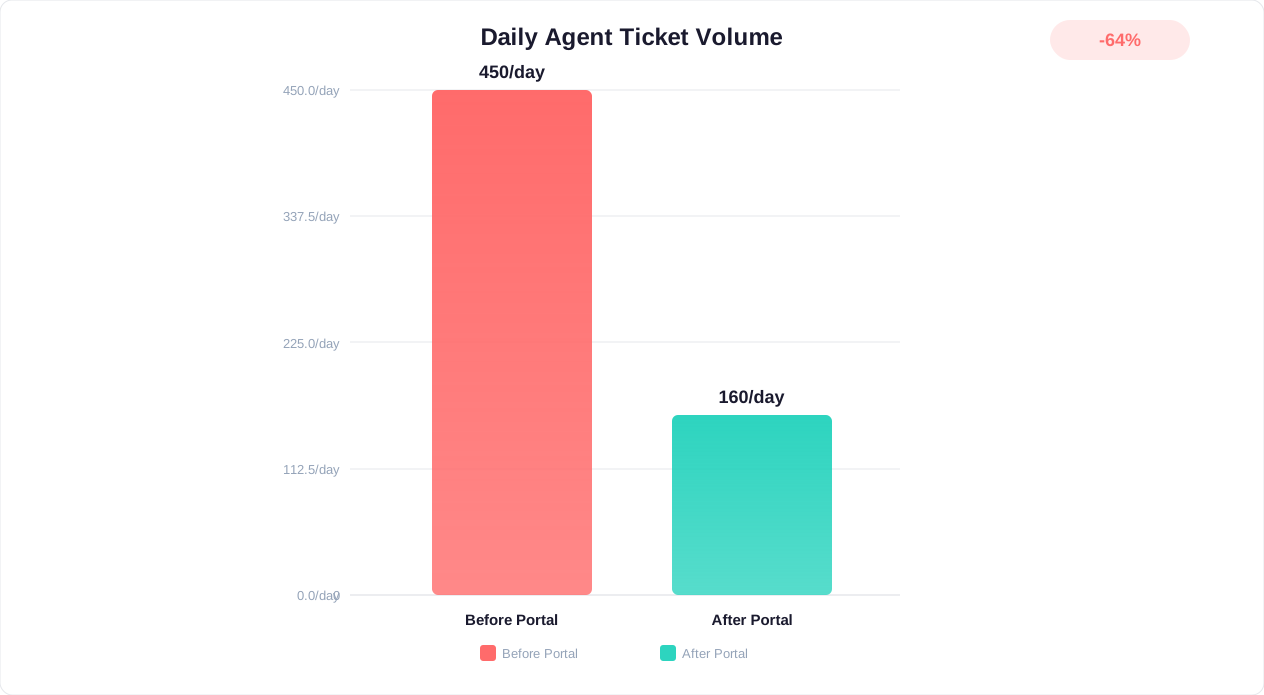
Metric 1: Ticket Deflection Rate
Formula: (Queries resolved by chatbot without escalation / Total queries) x 100
Good: 55-65% | Great: 65-75% | World-class: 75%+
Track this weekly. A declining deflection rate signals either new query types emerging (knowledge gap) or decreasing bot accuracy (retraining needed).
Metric 2: Customer Satisfaction Score (CSAT)
Formula: (Satisfied responses / Total responses) x 100 - measured via post-conversation survey
Good: 78-82% | Great: 82-88% | World-class: 88%+
Critical nuance: measure CSAT separately for bot-resolved conversations and escalated conversations. Bot CSAT below 75% means the bot is resolving issues but leaving customers unhappy - often because answers are correct but poorly delivered.
Metric 3: First Contact Resolution (FCR)
Formula: (Issues resolved in first interaction / Total issues) x 100
Good: 65-72% | Great: 72-80% | World-class: 80%+
FCR matters because a repeat contact costs you twice - once for the original interaction and again when the customer comes back unresolved - and it also erodes trust in the self-service channel. Track whether customers who interact with the chatbot come back within 24 hours with the same issue - that indicates a false resolution.
Metric 4: Average Resolution Time
Bot-resolved: Well under a couple of minutes (target under 60 seconds for simple queries)
Escalated: Under 15 minutes, since good bot pre-qualification means the agent starts with full context instead of re-asking the customer to explain the issue
Resolution time is one of the biggest drivers of customer satisfaction in self-service - the longer a routine query drags on, the more it feels like the self-service option failed and the customer should have just called.
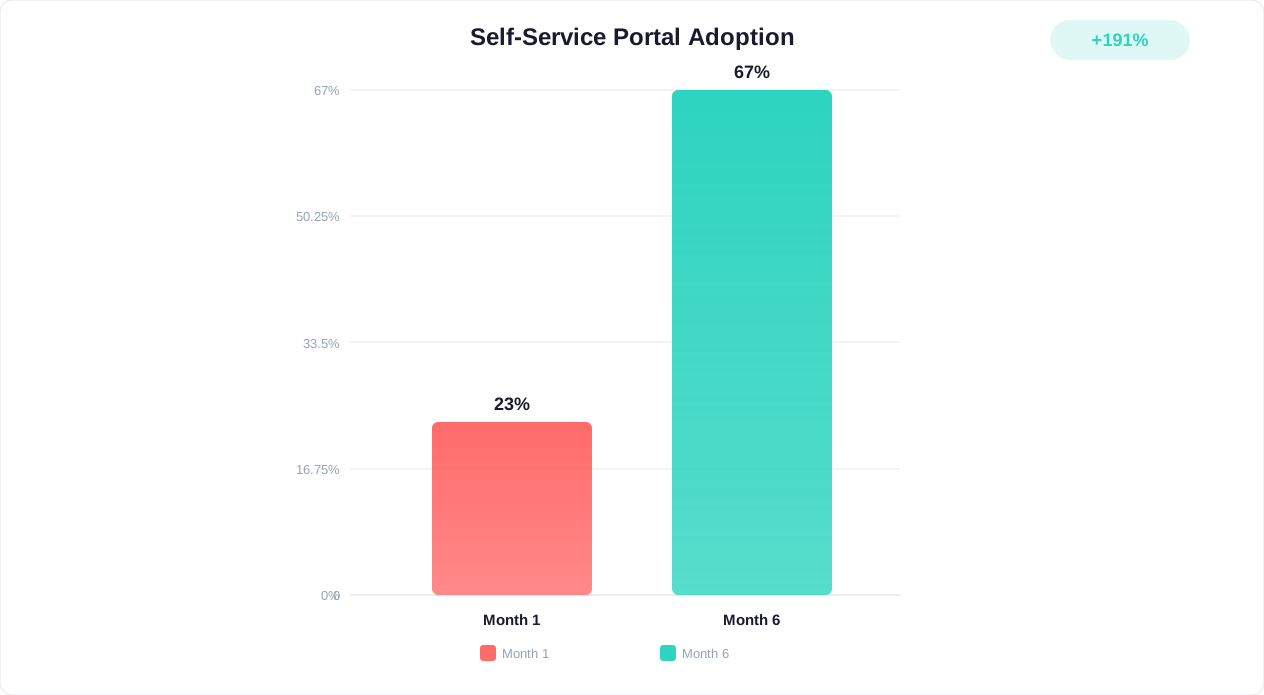
Metric 5: Self-Service Adoption Rate
Formula: (Customers who attempt self-service / Total customers with issues) x 100
Good: 60-70% | Great: 70-80% | World-class: 80%+
Low adoption despite available self-service indicates discoverability problems. The chatbot is there but customers are not using it - likely because it is not proactively engaging or is poorly positioned on the page.
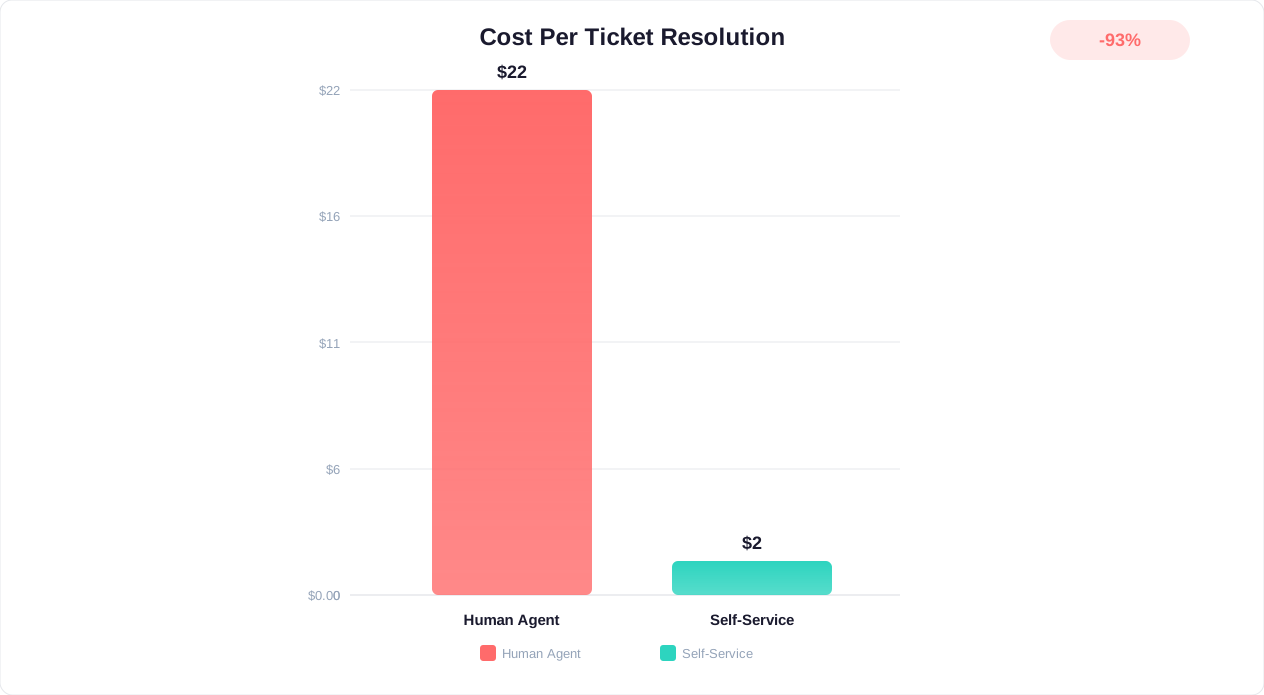
Metric 6: Cost Per Resolution
Formula: Total support cost / Number of resolutions
| Resolution Type | Relative Cost | Cost Once Deflected to Chatbot | Savings |
|---|---|---|---|
| Phone call | Highest | Lowest | Largest |
| Email ticket | High | Lowest | Large |
| Live chat (human) | Medium | Lowest | Large |
| Chatbot self-service | Lowest | - | Baseline |
Calculate your own numbers by plugging your actual cost-per-channel figures (pulled from your helpdesk or finance reporting) into the formula above rather than relying on industry averages, since staffing costs and ticket complexity vary widely between businesses.
Track all six metrics on a weekly dashboard. Conferbot's built-in analytics provides automated tracking for deflection rate, CSAT, resolution time, and cost per resolution - giving you real-time visibility into your self-service portal's performance without manual data assembly.
Building a Self-Service Scorecard
Create a monthly scorecard that combines these metrics into a single self-service health score. Weight the metrics based on your priorities:
| Metric | Suggested Weight | Your Target | Current Score | Status |
|---|---|---|---|---|
| Ticket deflection rate | 30% | 70% | - | - |
| CSAT (bot-resolved) | 25% | 85% | - | - |
| First contact resolution | 20% | 75% | - | - |
| Average resolution time | 10% | Under 60s | - | - |
| Self-service adoption | 10% | 75% | - | - |
| Cost per resolution | 5% | Under $2 | - | - |
Review this scorecard monthly with stakeholders. It transforms self-service from a vague initiative into a measurable program with clear success criteria and actionable levers for improvement.
The Cost Savings Model: Quantifying Self-Service ROI
Budget holders rarely approve projects on customer satisfaction improvements alone - they need financial justification, a pattern McKinsey's operations research covers extensively in the context of technology investment cases. Here is a detailed cost savings model that quantifies the ROI of a chatbot-powered self-service portal.
The Basic ROI Formula
Annual savings = (Monthly ticket volume x Deflection rate x Average cost per ticket x 12) - Annual platform cost
Let us work through three illustrative scenarios using that formula (adjust the inputs to match your own ticket volume and costs):
Scenario A: Small Business (500 tickets/month)
| Variable | Value |
|---|---|
| Monthly ticket volume | 500 |
| Deflection rate achieved | 60% |
| Tickets deflected/month | 300 |
| Average cost per ticket (human) | $12 |
| Monthly savings from deflection | $3,600 |
| Annual savings from deflection | $43,200 |
| Annual chatbot platform cost | $3,600 ($300/month) |
| Net annual savings | $39,600 |
| ROI | 1,100% |
Scenario B: Mid-Market (3,000 tickets/month)
| Variable | Value |
|---|---|
| Monthly ticket volume | 3,000 |
| Deflection rate achieved | 68% |
| Tickets deflected/month | 2,040 |
| Average cost per ticket (human) | $14 |
| Monthly savings from deflection | $28,560 |
| Annual savings from deflection | $342,720 |
| Annual chatbot platform cost | $12,000 ($1,000/month) |
| Implementation cost (one-time) | $15,000 |
| Net Year 1 savings | $315,720 |
| ROI | 1,169% |
Scenario C: Enterprise (15,000 tickets/month)
| Variable | Value |
|---|---|
| Monthly ticket volume | 15,000 |
| Deflection rate achieved | 72% |
| Tickets deflected/month | 10,800 |
| Average cost per ticket (human) | $18 |
| Monthly savings from deflection | $194,400 |
| Annual savings from deflection | $2,332,800 |
| Annual chatbot platform cost | $60,000 ($5,000/month) |
| Implementation cost (one-time) | $75,000 |
| Net Year 1 savings | $2,197,800 |
| ROI | 1,627% |
Hidden Savings Not Captured Above
The direct deflection savings above are conservative because they exclude several secondary benefits:
- Reduced hiring costs: A large enough block of deflected tickets each month means you can delay or avoid a full-time hire you would otherwise need to keep up with ticket volume, including the salary, benefits, training, and management overhead that come with that headcount
- After-hours coverage: Without a chatbot, after-hours queries queue until morning, creating backlogs. Self-service eliminates the morning queue entirely.
- Reduced agent burnout: Agents who spend their day on complex, interesting problems instead of answering the same routine question on repeat tend to report better job satisfaction and stick around longer
- Faster scaling: When traffic spikes (seasonal, viral, product launch), the chatbot absorbs volume that would otherwise require temporary or overtime staffing
- Data collection: Every chatbot interaction generates structured data about customer needs, product issues, and content gaps - the kind of insight that would otherwise require dedicated market research
For a personalized ROI calculation based on your specific ticket volume, cost structure, and industry, use our chatbot ROI calculation methodology or explore real-world examples in our cost savings case studies.
Integration With Helpdesks: Zendesk, Freshdesk, Intercom, and Beyond
A self-service chatbot that operates in isolation from your existing support infrastructure creates more problems than it solves. Customers end up repeating information, agents lose context, and reporting becomes fragmented. The power of a chatbot-driven self-service portal multiplies when it integrates deeply with your helpdesk platform.
Why Integration Matters
Without integration, your chatbot and helpdesk are separate systems with no shared context. A customer might spend 5 minutes troubleshooting with the chatbot, escalate, and then have an agent ask "What seems to be the problem?" - erasing all progress and destroying satisfaction. With integration, the agent sees the full chatbot transcript, the steps already tried, and the bot's assessment of the issue - enabling them to pick up exactly where the bot left off.
Zendesk Integration
Zendesk is one of the most widely used helpdesk platforms. Connect it with an API key and Conferbot can:
- Ticket creation: When the chatbot escalates, it can create a Zendesk ticket carrying the conversation context and customer data instead of leaving the agent to start from scratch
- Auditable actions: Every ticket action the bot takes is logged with a request ID, so you can trace exactly what the bot did and reverse it if needed
- Reporting continuity: Because chatbot escalations land in Zendesk as ordinary tickets, they show up in whatever Zendesk reporting your team already relies on
Freshdesk Integration
Freshdesk is another common helpdesk platform, and Conferbot connects to it the same way, via API key:
- Ticket creation and routing: Escalated conversations become Freshdesk tickets with the chatbot's context attached, so agents are not asking customers to repeat themselves
- Auditable actions: Ticket-related actions carry a request ID and audit trail, matching the same safety model used for Zendesk
- Customer context: The bot can reference a customer's existing Freshdesk ticket history when personalizing a response
Help Scout Integration
For teams running their helpdesk on Help Scout, Conferbot supports the same API-key based connection:
- Conversation creation: Escalations from the chatbot become Help Scout conversations with the relevant context attached
- Auditable actions: Mailbox history and request IDs let you inspect exactly what an escalated action did
Integration Comparison
| Capability | Zendesk | Freshdesk | Help Scout |
|---|---|---|---|
| Auto ticket/conversation creation | Yes | Yes | Yes |
| Context handed to agent | Conversation summary | Conversation summary | Conversation summary |
| Action audit trail | Yes | Yes | Yes |
| Setup | API key | API key | API key |
If your helpdesk is not one of these three, you can still route escalated conversations through Conferbot's integrations hub using Webhook or Zapier to reach most other platforms.
Integration Best Practices
- Keep your knowledge base current: When agents update your helpdesk's public articles, update the same content in your chatbot's knowledge base so the bot never contradicts what customers can find in your help center
- Include structured metadata: When creating tickets, include chatbot-determined category, priority, sentiment score, and customer effort score
- Map agent groups: Configure routing so escalated tickets go to the specialist team (billing, technical, sales) identified by the chatbot
- Unify reporting: Ensure your total support metrics include both chatbot-resolved and agent-resolved queries for an accurate picture
- Test the handoff experience monthly: Submit test queries, escalate them, and verify the agent experience includes full context
10 Common Self-Service Portal Mistakes That Kill Deflection Rates
After analyzing hundreds of self-service implementations, these are the mistakes that most commonly prevent organizations from reaching their deflection targets. Each mistake includes the fix and the expected impact of correcting it.
Mistake 1: Building Knowledge Base From Assumptions
The most damaging mistake is writing KB articles based on what internal teams think customers ask rather than what they actually ask. Fix: Audit your recent tickets, extract the exact language customers use, and build articles around real queries. This single change tends to move deflection rate more than almost any other fix, because it attacks the root cause of "the bot didn't understand me" complaints.
Mistake 2: No Proactive Engagement
Deploying a chatbot as a passive icon in the corner and expecting customers to find it undersells the whole investment - a widget that just sits there gets far less engagement than one that proactively offers help at the right moment. Fix: Configure page-specific triggers that offer help after a short delay on support pages. This alone can multiply how often visitors actually start a conversation with the bot.
Mistake 3: One-Size-Fits-All Responses
Providing the same generic answer regardless of customer context, plan level, or history. A basic plan user asking about a feature that only exists on premium should get a different response than a premium user asking the same question. Fix: Implement personalization rules based on customer attributes, so the answer a customer gets always matches what is actually true for their account.
Mistake 4: No Escalation Path
Chatbots that loop endlessly without offering a human option burn the goodwill self-service is supposed to build. Customers who hit a wall with a bot and cannot find a way to a person tend to leave angrier than if they had called in the first place - a dynamic Salesforce's research on connected customers touches on repeatedly when it comes to trust in automated service. Fix: Always display a visible "Talk to a person" option and auto-escalate after a couple of failed resolution attempts.
Mistake 5: Ignoring Mobile Users
Self-service portals designed for desktop that break on mobile shut out a large and growing share of support traffic, since a meaningful portion of customers now start a support interaction on a phone. Fix: Test every chatbot flow on mobile, keep messages short, and prioritize tap-friendly buttons over text input.
Mistake 6: Stale Knowledge Base
Launching with accurate content then never updating it as products, policies, and pricing change. Content quietly drifts out of date, and a bot confidently repeating an outdated policy does more damage to trust than not answering at all. Fix: Schedule a recurring short KB review session and auto-flag older articles for review.
Mistake 7: No Feedback Collection
Not asking customers whether the chatbot resolved their issue. Without this data, you cannot distinguish between true resolutions and customers who gave up silently. Fix: Add a simple "Did this solve your problem?" yes/no prompt after every chatbot interaction. Track resolution confirmation rate separately from deflection rate.
Mistake 8: Over-Engineering the First Version
Spending months building a perfect self-service portal before deploying anything means thousands of tickets go undeflected in the meantime. Fix: Deploy a basic chatbot covering your top questions in week one, then iterate weekly. You will learn more from a couple of weeks of live customer interactions than from months of planning in a vacuum.
Mistake 9: Treating Self-Service as Cost Reduction Only
Positioning self-service purely as a cost-cutting measure alienates support teams who feel threatened. Fix: Frame self-service as agent empowerment - it eliminates repetitive queries so agents can focus on complex, rewarding work instead of answering the same routine question dozens of times a day.
Mistake 10: No Cross-Channel Consistency
Different answers on the website chatbot versus WhatsApp versus email. Customers who get contradictory information across channels lose trust entirely. Fix: Use a single knowledge base that powers all channels, ensuring consistent answers regardless of where the customer asks. An omnichannel chatbot approach eliminates this problem.
Mistake Impact Matrix
| Mistake | Relative Deflection Impact | Fix Effort | Priority |
|---|---|---|---|
| Building from assumptions | Large | 1-2 days | Critical |
| No proactive engagement | Large | 2 hours | Critical |
| No escalation path | Moderate (+ brand damage) | 1 hour | Critical |
| Stale knowledge base | Moderate (compounds over time) | 30 min/week | High |
| Ignoring mobile | Moderate | 4 hours | High |
| One-size-fits-all | Small-Moderate | 1 day | Medium |
| No feedback collection | Unknown (blindspot) | 30 min | Medium |
| Over-engineering v1 | Delayed ROI by months | Mindset shift | Medium |
| Cost-reduction framing | Team resistance | Communication | Low |
| Cross-channel inconsistency | Small | 2-4 hours | Low |
Advanced Self-Service: AI Features That Push Deflection Further
Once you have a strong foundation in place (knowledge base, chatbot, escalation), pushing deflection higher still requires advanced AI capabilities that go beyond simple question-answering.
1. Predictive Self-Service
Instead of waiting for customers to ask, predict their needs based on behavior patterns and proactively surface answers. For example:
- Customer views billing page 3 times in a day → Chatbot proactively offers: "Looks like you have a billing question - I can help with invoice downloads, payment method changes, or plan upgrades"
- Customer's subscription renews in 3 days → Send proactive message: "Your plan renews on Friday. Want to review your usage or make any changes?"
- Customer just completed onboarding → Trigger guided setup assistance: "Welcome aboard! Here are the 3 things most customers set up first"
Predictive self-service adds incremental deflection on top of the fundamentals because it resolves issues before customers even articulate them.
2. Multi-Turn Diagnostic Flows
For complex troubleshooting (network issues, software bugs, configuration problems), build diagnostic decision trees that the chatbot navigates based on customer responses. These flows can be 8-15 turns deep and resolve issues that would otherwise require a specialized technician.
Example flow structure for "internet not working":
- Chatbot checks account status (automated) → Identifies if outage, overdue bill, or device issue
- If device issue → Asks about device type (router, modem, mesh)
- Based on device → Walks through power cycle, indicator light check
- Based on indicator lights → Identifies specific issue and solution
- If unresolved after 3 steps → Escalates with full diagnostic data
These flows resolve a substantial share of technical issues that would otherwise require a human agent to walk the customer through the same steps manually.
3. Authenticated Self-Service Actions
Move beyond just answering questions to actually performing actions on behalf of the customer:
- Password resets: Verify identity and trigger reset - on its own, a self-service password reset flow removes a whole category of tickets that never needed a human to touch them
- Order modifications: Cancel, change address, add items before shipping
- Plan changes: Upgrade, downgrade, or cancel subscriptions
- Refund processing: Process refunds for items that meet policy criteria
- Appointment scheduling: Book, reschedule, or cancel appointments via Calendly or Google Calendar
Each action-enabled capability adds incremental deflection because it eliminates an entire category of tickets that information alone cannot address - the customer needed something done, not just explained.
4. Contextual Knowledge Surfacing
Rather than waiting for queries, embed contextual help throughout your product or website:
- Error pages display chatbot with pre-loaded context about the error
- Complex form fields show tooltip chatbot that explains requirements
- Feature pages include embedded chatbot trained specifically on that feature
- Checkout pages have chatbot pre-loaded with shipping, payment, and return policy information
5. Community-Augmented Self-Service
Integrate community knowledge into your chatbot's responses. When the chatbot finds relevant community discussions about a question, it can cite peer solutions alongside official documentation. This works particularly well for:
- Workarounds for known issues
- Creative use cases and tips
- Integration-specific guidance
- Platform-specific troubleshooting
Feature Impact on Deflection
| Advanced Feature | Relative Deflection Lift | Implementation Effort | Maintenance Effort | Best For |
|---|---|---|---|---|
| Predictive self-service | Small | Medium | Low (auto-learning) | SaaS, subscription businesses |
| Multi-turn diagnostics | Moderate | High | Medium (flow updates) | Telecom, tech support, utilities |
| Authenticated actions | Largest | High | Low | Any business with account management |
| Contextual surfacing | Small | Low | Low | Product companies, SaaS |
| Community augmentation | Small | Medium | Auto (community driven) | Developer tools, platforms |
Implementing even a couple of these advanced features on top of a solid foundational self-service portal pushes most organizations meaningfully higher than the fundamentals alone. Conferbot's platform supports predictive engagement, multi-turn diagnostic flows, and authenticated actions through its AI chatbot builder and integrations hub - enabling these advanced capabilities without custom development.
Illustrative Results: What Self-Service Portal Rollouts Can Look Like
Theory is useful, but it helps to see how the pieces come together. The three scenarios below are illustrative composites built from the common patterns this guide describes - not disclosures from a specific named customer - designed to show how the fundamentals and advanced features translate into results in different business types.
Scenario 1: E-Commerce Retailer - From Overwhelmed Queue to Strong Deflection
Company profile: Mid-size online fashion retailer with a high-traffic storefront and a support team that swells past capacity every peak season.
Challenge: A small customer service team was overwhelmed during peak seasons (Black Friday, holiday). Response times stretched out badly, and the large majority of tickets were repetitive - order tracking, return policy, sizing questions.
Implementation:
- Deployed an AI chatbot trained on the company's own historical support conversations
- Integrated with Shopify for real-time order tracking within the chatbot
- Built an automated return initiation flow so the chatbot processes return requests end-to-end
- Added a sizing recommendation flow based on past purchase data
Directional results: Ticket deflection rate climbed from a low starting point to a strong majority of tickets handled by the bot. Response time dropped from many hours to effectively instant for bot-resolved queries, with escalated queries handled far faster too, since the agent no longer had to start from zero. Monthly human ticket volume, support cost, and return processing time all fell sharply, while CSAT rose.
Key insight: The biggest deflection driver was not FAQ answering - it was the order tracking integration. "Where is my order?" is one of the single most common tickets in e-commerce, and it is fully automatable once the chatbot can query the order system directly.
Scenario 2: SaaS Company - Turning Onboarding Support Into a Retention Lever
Company profile: B2B SaaS platform for project management with a large customer base and a support team stretched thin on onboarding questions.
Challenge: The support team spent a disproportionate share of its time on onboarding questions and feature discovery rather than genuine technical issues, and new customers were churning early due to a rough onboarding experience.
Implementation:
- Built a comprehensive onboarding chatbot flow with guided setup steps
- Created a feature discovery flow ("What are you trying to accomplish?" leading to tailored feature recommendations)
- Integrated with product analytics to detect confusion patterns and proactively offer help
- Deployed an in-app chatbot triggered by specific user behaviors, such as repeated visits to the settings page
Directional results: Deflection rate rose substantially, early churn dropped, onboarding completion improved, and time to first value shrank considerably. Bot-resolved interactions scored well on CSAT even though there was no earlier baseline to compare against, and the team needed fewer support hires to keep pace with a growing customer base.
Key insight: Self-service is not just about support cost reduction - it can directly affect revenue through reduced churn, since customers who get unstuck quickly during onboarding are more likely to stick around long enough to see the product's value.
Scenario 3: Telecom Provider - Deflecting Across Phone, Web, and Messaging
Company profile: Regional telecom provider fielding a high volume of tickets across phone, email, and chat.
Challenge: Average handle time per call was long, and the bulk of calls were for a narrow set of repeatable reasons - bill explanations, plan changes, and basic troubleshooting - which kept phone support costs high.
Implementation:
- Deployed an omnichannel chatbot across the website, WhatsApp, and the mobile app
- Integrated with the billing system for real-time balance, usage, and charge explanations
- Built an automated plan change flow (compare plans, select, confirm, process)
- Created a network diagnostic flow that checks tower status and guides router troubleshooting
Directional results: Overall deflection across channels rose sharply, phone call volume dropped, annual support cost fell, NPS improved, and average handle time on the calls that remained came down as well, since the chatbot had already gathered diagnostic information before handoff.
Key insight: WhatsApp became the highest-deflection channel because customers could troubleshoot asynchronously - starting a diagnostic at work, completing it at home - without needing to stay on a call. The omnichannel strategy was central to the overall result.
These scenarios illustrate that strong deflection is achievable across industries when the three pillars (knowledge base, AI chatbot, intelligent escalation) work together. For a deeper look at how to model your own numbers, see our chatbot cost savings guide.
Getting Started: Building Your Self-Service Portal With Conferbot
Conferbot is purpose-built for creating AI-powered self-service portals that put the strategy in this guide into practice quickly. Here is how to get started.
Step 1: Build Your Knowledge Base
Upload your existing support content to Conferbot's AI knowledge base:
- Paste your website URL - Conferbot crawls and indexes your pages automatically
- Upload documents (PDFs, Word docs, spreadsheets) with product information and policies
- Paste FAQ content directly into the knowledge base editor
Conferbot processes and indexes your content quickly, creating a queryable knowledge layer that powers your chatbot's responses.
Step 2: Configure Your Chatbot
Use the AI chatbot builder to configure behavior:
- Set your chatbot's personality and tone (professional, friendly, casual)
- Configure proactive engagement triggers (which pages, after how long)
- Define escalation rules (confidence threshold, topic-based routing, sentiment triggers)
- Set up greeting messages customized by page type
Step 3: Connect Your Helpdesk
Through the integrations hub, connect your existing tools:
- Zendesk or Freshdesk via API key, for automatic ticket creation with conversation context on escalation
- HubSpot, SalesForce, Mailchimp, Stripe, Google Sheets, Airtable, Calendly, Google Calendar, Slack, Zapier, or a generic Webhook for everything else
Step 4: Deploy Across Channels
Deploy your self-service chatbot wherever your customers are:
- Website widget (copy-paste one line of code, available on every plan)
- WhatsApp Business
- Facebook Messenger
- Instagram DMs
- Slack (for internal teams)
- Microsoft Teams
Channel availability depends on your plan - check the pricing comparison for details.
Step 5: Monitor and Optimize (Ongoing)
Use Conferbot's analytics dashboard to track deflection rate, CSAT, resolution time, and knowledge gaps - then optimize on a regular cadence using the roadmap in this guide.
Why Conferbot for Self-Service
| Capability | Why It Matters for Self-Service |
|---|---|
| AI knowledge base with auto-learning | Improves with every interaction, surfacing gaps instead of requiring a full manual retrain for new query patterns |
| Multi-channel deployment | One bot across website, WhatsApp, Messenger, Slack, and Teams, depending on plan |
| Helpdesk integrations | Zendesk and Freshdesk connect via API key, alongside Zapier and Webhook for the rest of your stack |
| No-code builder | Support teams can build and optimize without developers |
| Confidence-based routing | Auto-resolve high confidence, escalate low confidence - no customer frustration |
| Real-time analytics | Track deflection rate, CSAT, and knowledge gaps as they happen |
| Human handoff with context | Agents receive the conversation transcript and metadata on every escalation |
The combination of a powerful AI knowledge base, intelligent conversation management, and helpdesk integration makes Conferbot a strong foundation for a self-service portal that meaningfully reduces support volume. Start with a free trial and see how much of your ticket queue the bot can take off your team's plate in the first week.
Was this article helpful?
Build and deploy in 10 minutes. No coding needed.
Self-Service Portal With AI Chatbot FAQ
Everything you need to know about chatbots for self-service portal with ai chatbot.
About the Author
The Conferbot team writes about building, deploying, and improving AI chatbots.
View all articles