Why Real Estate Agents Are Losing Leads (And How Chatbots Fix It)
Real estate runs on speed. The National Association of Realtors reports that 78% of buyers choose the agent who responds first - not the best agent, not the cheapest, but the fastest. Yet the average agent response time to a web inquiry is 917 minutes (over 15 hours). By then, the buyer has contacted three competitors.
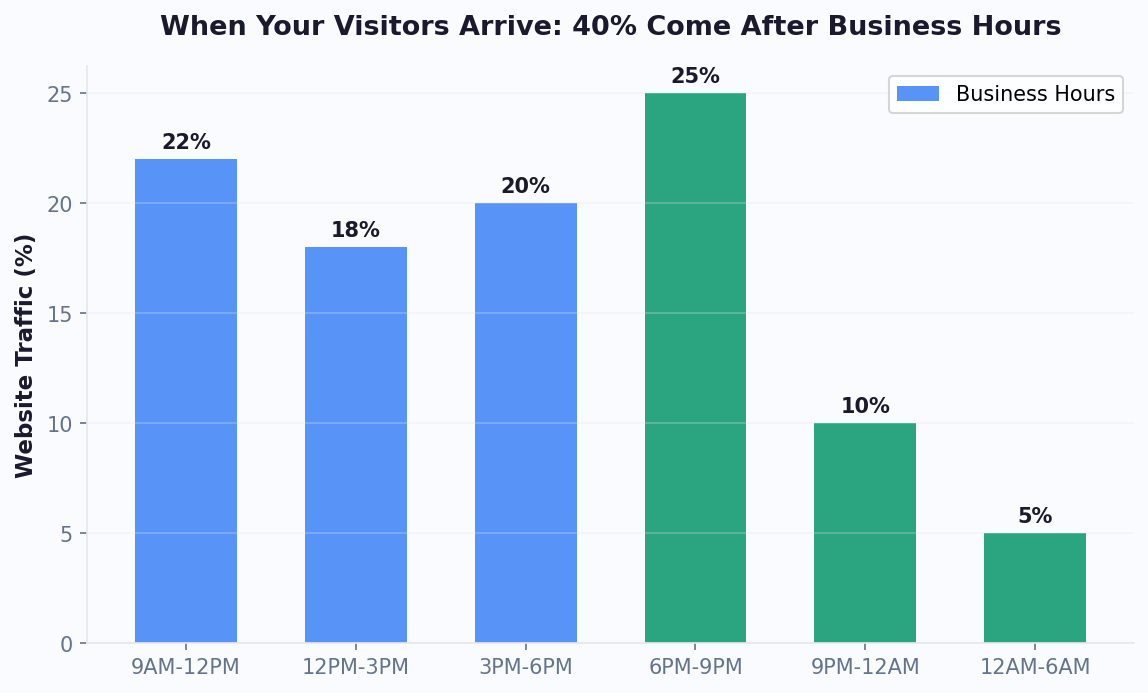
According to Zillow Research, the median time a buyer spends searching online before contacting an agent is just 3 days - meaning those first hours of responsiveness are critical to capturing the lead. The problem isn't laziness. Agents are driving between showings, writing offers, handling negotiations, and managing closings. They can't be glued to their inbox 24/7. Meanwhile, 44% of real estate website inquiries arrive outside business hours - evenings and weekends when buyers are actually browsing.
The Revenue Impact of Slow Response
| Response Time | Lead Conversion Rate | Revenue Impact (100 leads/mo) |
|---|---|---|
| Under 5 minutes | 21% | $630,000/year (at $30K avg commission) |
| 5-30 minutes | 10% | $300,000/year |
| 30 min - 1 hour | 5% | $150,000/year |
| 1+ hours | 1-2% | $30,000-60,000/year |
A real estate chatbot closes the response gap to zero seconds. Every inquiry - whether it arrives at 2 PM or 2 AM - gets an instant, intelligent response. The chatbot qualifies the buyer, matches them with relevant properties, and books a viewing or callback. By the time the agent wakes up, they have a calendar full of qualified appointments.
This isn't theoretical. Agencies using AI chatbots report 35-50% more qualified leads per month simply from capturing the after-hours and slow-response leads they were previously losing. The cost of not having a chatbot in real estate is measured in six figures annually.
The agents and brokerages that embrace chatbot technology today are building sustainable competitive advantages that will compound as the technology matures.
7 High-Impact Use Cases for Real Estate Chatbots
1. Instant Buyer Qualification
The most valuable chatbot function for any agent. Instead of spending 15-20 minutes on a phone call to determine if a lead is serious, the chatbot qualifies buyers in under 2 minutes:
- Budget range and pre-approval status
- Property type preference (house, apartment, condo, land)
- Location preferences and must-have features
- Timeline (buying now, 3 months, 6+ months)
- Financing situation (cash, mortgage, first-time buyer)
The chatbot scores each lead based on responses and routes hot leads (pre-approved, buying this month, budget matches listings) directly to the agent's calendar. Warm leads get nurtured with relevant listings. Cold leads (just browsing, 6+ months out) get added to a drip email sequence.
2. Automated Property Matching
After qualifying the buyer, the chatbot searches your listing database and presents matching properties with image carousels, pricing, and key details. The buyer can swipe through options, ask questions about specific properties, and express interest - all without an agent's involvement.
3. Viewing and Open House Booking
Once a buyer finds a property they like, the chatbot checks agent availability via calendar integration and books the viewing instantly. No phone tag. No email back-and-forth. The buyer picks a time slot, the agent gets a notification with the qualified lead's details, and both receive a confirmation.
4. After-Hours Lead Capture
A buyer finds your listing on Zillow at 10 PM, visits your website, and has questions. Without a chatbot, they fill out a form (maybe) and you respond tomorrow (if you remember). With a chatbot, they get instant answers, qualify themselves, and book a morning viewing - all while you sleep.
5. Listing Inquiry Handling
Every listing page generates the same questions: "Is this still available?", "What are the HOA fees?", "How old is the roof?", "Are pets allowed?". Train the chatbot's knowledge base on your listing details, and it handles these inquiries instantly with accurate information.
6. Neighborhood and Market Information
Buyers relocating from out of area ask about schools, commute times, crime rates, and local amenities. Platforms like Realtor.com have shown that neighborhood information is among the top 3 factors in buyer decision-making. An AI chatbot trained on neighborhood data provides detailed answers that would take an agent 15 minutes to type out - and it does so at 2 AM on a Sunday.
7. Seller Lead Generation
Not just for buyers - chatbots capture seller leads too. Deploy a "What's my home worth?" chatbot on your site that asks about property details and provides an estimated valuation range. This captures seller contact information and property details for your listing pipeline.
In a market where response speed determines who wins the client, a chatbot is not a luxury - it is the minimum viable infrastructure for any real estate professional serious about growth in 2026 and beyond.
ROI Breakdown: What a Real Estate Chatbot Is Actually Worth
Let's run the numbers for a typical real estate agency with 5 agents and a website that gets 3,000 monthly visitors.
Current State (Without Chatbot)
| Metric | Value |
|---|---|
| Monthly website visitors | 3,000 |
| Contact form submission rate | 2.5% |
| Monthly leads from website | 75 |
| Leads qualified (worth pursuing) | 30 (40%) |
| After-hours inquiries captured | 0 |
| Average response time | 4-8 hours |
| Lead-to-client conversion | 5% |
| Clients from website per month | 1.5 |
| Average commission per transaction | $12,000 |
| Monthly revenue from website leads | $18,000 |
With Chatbot
| Metric | Value | Change |
|---|---|---|
| Monthly website visitors | 3,000 | Same |
| Chatbot engagement rate | 12% | +380% vs form |
| Monthly leads from chatbot | 360 | +380% |
| Leads auto-qualified by bot | 144 (40%) | +380% |
| After-hours leads captured | 63 (44% of total) | From zero |
| Average response time | Instant | -100% |
| Lead-to-client conversion | 8% (faster response) | +60% |
| Clients from website per month | 11.5 | +667% |
| Monthly revenue from website leads | $138,000 | +$120,000 |
The Math
Additional monthly revenue: $120,000
Monthly chatbot cost: $50-200/month (depending on plan)
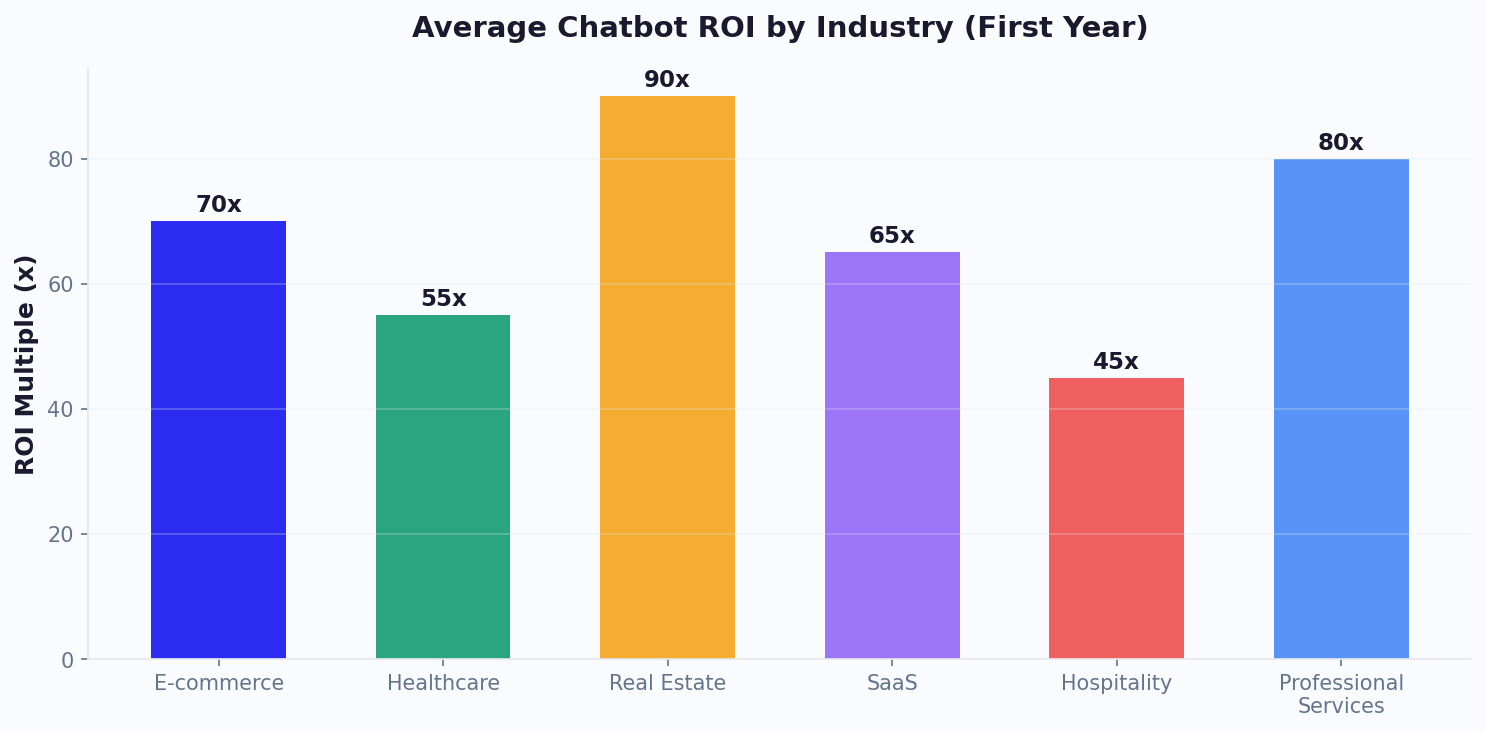
ROI: 600-2,400x return on investment
Even if we halve the optimistic numbers - say the chatbot only doubles your leads instead of quadrupling them - you're still looking at $60,000 in additional monthly revenue against a $200/month chatbot cost. The ROI math for real estate chatbots is among the strongest in any industry because of the high transaction values involved.
Use the chatbot ROI calculator with your own numbers to see the projected impact for your specific agency.
Time Savings
Beyond revenue, consider agent time. Each qualified phone conversation takes 15-20 minutes. The chatbot handles qualification in 2 minutes without agent involvement. For 144 qualified leads per month, that's 36 hours of agent time saved monthly - time redirected from phone screening to closing deals.
How to Build a Real Estate Chatbot: Step-by-Step Setup
You can have a fully functional real estate chatbot live on your website in under 30 minutes. Here's the complete setup process.
Step 1: Choose Your Platform and Template
Start with a real estate-specific chatbot template rather than building from scratch. A good template includes pre-built flows for buyer qualification, property search, viewing booking, and seller inquiry. Customize from there.
Use an AI chatbot builder that supports your channels. Most real estate leads come from three sources: your website, WhatsApp (especially for international buyers), and Facebook Messenger (from your listing ads).
Step 2: Configure the Buyer Qualification Flow
Build the core conversation flow that qualifies every incoming lead:
- Welcome message: "Hi! Looking to buy, sell, or rent? I can help you find exactly what you need."
- Intent detection: Route to buyer, seller, or renter flow based on response
- Buyer qualification:
- Property type preference
- Location / neighborhood
- Budget range
- Number of bedrooms/bathrooms
- Timeline (when looking to move)
- Pre-approval status
- Lead scoring: Assign points - pre-approved + buying this month + budget matches = hot lead
- Action: Hot leads → book viewing. Warm leads → send matching listings. Cool leads → collect email for nurture sequence.
Step 3: Train on Your Listings and Business
Upload your content to the AI knowledge base:
- Active listing details (address, price, features, photos, virtual tour links)
- Neighborhood guides and market reports
- FAQ content (commission rates, buying process, mortgage info)
- Agent bios and specializations
- Office hours, locations, and contact information
The AI ingests this content and uses it to answer visitor questions accurately. When a buyer asks "Do you have any 3-bedroom homes in Parkview under $500K?", the bot searches your knowledge base and presents matching listings.
Step 4: Integrate Your Tools
- Calendar: Connect Google Calendar or Calendly via calendar integration for instant viewing bookings
- CRM: Push qualified leads to your CRM (Follow Up Boss, kvCORE, LionDesk, HubSpot) via integrations
- Email: Trigger automated email sequences for different lead scores
- Notifications: Send instant alerts to the right agent when a hot lead books a viewing
Step 5: Deploy Across Channels
Install the chatbot on your website (see our website installation guide), connect WhatsApp Business for messaging inquiries, and link your Facebook page for Messenger inquiries from listing ads. One bot, three channels, zero missed leads.
WhatsApp Chatbot for Real Estate: The After-Hours Advantage
WhatsApp is transforming real estate communication, especially for agents working with international buyers, relocation clients, and younger demographics who prefer messaging over phone calls. A WhatsApp chatbot gives you an always-available virtual assistant on the platform your clients already use daily.
Why WhatsApp Specifically for Real Estate
- 98% message open rate (vs. 20% for email) - your listing updates actually get seen
- Persistent conversations: Unlike web chat, WhatsApp conversations persist across sessions. A buyer can ask about a listing today and follow up three days later without losing context.
- Media sharing: Send property photos, virtual tour links, floor plans, and location pins directly in the chat
- International buyers: WhatsApp is the primary communication channel in 100+ countries. If you serve international buyers, WhatsApp isn't optional - it's essential.
Real Estate WhatsApp Bot Flows
Inbound lead qualification: Buyer messages your WhatsApp Business number (from your website, listing ad, or business card). The chatbot qualifies them, matches properties, and books a viewing - all via WhatsApp.
Listing alerts: Buyers opt in to receive new listing notifications matching their criteria. When you add a new property, qualified buyers get a WhatsApp message with photos and details. Click-to-view rate: 85%+ (vs. 15% for email listing alerts).
Viewing reminders: Automated reminders 24 hours and 1 hour before scheduled viewings. Reduces no-shows by 30-40%. The buyer can reschedule directly in the chat if needed.
Post-viewing follow-up: After a viewing, the bot sends a follow-up message asking for feedback. "How did you like 123 Oak Street? Would you like to schedule a second viewing or see similar properties?" This keeps the conversation warm without the agent making manual follow-up calls.
Getting Started
You'll need a WhatsApp Business API account (Conferbot handles the setup through its platform). The same chatbot logic you build for your website automatically works on WhatsApp - no duplicate setup required. Learn more in our WhatsApp chatbot guide.
Advanced Strategies: Seller Bots, Market Reports & Open House Automation
Seller Lead Capture Bot
Most real estate chatbots focus on buyers, but seller leads are equally valuable (and often more profitable). Build a "What's my home worth?" chatbot that:
- Asks for property address, type, size, bedrooms/bathrooms, and condition
- Pulls recent comparable sales data (via API or pre-loaded market data)
- Provides an estimated value range
- Offers a free detailed market analysis from an agent
- Captures the homeowner's contact information
Promote this bot on Facebook ads targeting homeowners in your area. The ad says "Find out what your home is worth in 60 seconds" and links to your WhatsApp or website chatbot. This generates seller leads at $5-15 per lead - significantly cheaper than traditional methods.
Automated Market Reports
Position yourself as the local market expert - as industry publication Inman frequently emphasizes - by having your chatbot deliver neighborhood market reports on demand. A visitor asks "How's the market in Westlake?" and the bot provides:
- Median home price and year-over-year change
- Average days on market
- Inventory levels (buyer's market vs. seller's market)
- Recent notable sales
- Forecast for the next 6 months
This builds trust and authority. The visitor sees you as an expert, not just another agent. Follow up with an offer to discuss their specific situation, capturing the lead.
Open House Follow-Up Automation
After an open house, you have a sign-in sheet with 20-30 names and emails. Manually following up with each one takes hours. Instead:
- Import attendees into your chatbot's contact list
- Send an automated WhatsApp or email follow-up: "Thanks for visiting 456 Elm St today! Did you have any questions I can help with?"
- The chatbot handles responses - answering questions, sending additional listing details, and booking follow-up viewings
- Agents only step in for high-intent conversations
This converts 15-25% of open house visitors into active leads, compared to the 5-8% conversion rate from manual follow-up emails.
Multi-Language Support for Diverse Markets
In markets with diverse populations, a multilingual chatbot serves buyers in their preferred language. The AI detects the visitor's language automatically and responds accordingly - no separate bot builds for each language. This is especially valuable in metropolitan areas where 20-30% of buyers may prefer communicating in a language other than English.
Combined with analytics tracking, you can see which languages generate the most leads and adjust your marketing accordingly.
5 Mistakes Real Estate Agents Make With Chatbots (And How to Avoid Them)
Mistake 1: Asking Too Many Qualification Questions
The problem: Your chatbot asks 12 questions before letting the buyer see any listings. By question 6, they've left.
The fix: Ask the 4 essential questions first (buy/rent/sell, property type, location, budget). Show matching listings immediately. Then ask additional qualifying questions (timeline, pre-approval) after the buyer is engaged with specific properties. Front-load value, back-load qualification.
Mistake 2: No Human Handoff for Serious Buyers
The problem: A pre-approved buyer ready to make an offer is stuck talking to a bot that can only book a viewing for next Tuesday.
The fix: Set up instant live chat handoff triggers for high-intent signals. When a buyer says "I want to make an offer", "I'm pre-approved", or "I need to see this today", route them to a human agent immediately. Pass the full conversation context via the ticket system so the agent knows everything the buyer has already shared.
Mistake 3: Outdated Listing Information
The problem: The chatbot recommends a property that sold last week. The buyer gets excited, books a viewing, and discovers it's unavailable. Trust destroyed.
The fix: Sync your chatbot's knowledge base with your MLS feed or listing database. When a listing status changes to pending or sold, the bot should automatically stop recommending it. If real-time sync isn't possible, update the knowledge base weekly and add a disclaimer: "Listing availability subject to confirmation."
Mistake 4: Generic Greetings That Don't Match the Page
The problem: Every page shows the same "How can I help you?" greeting - whether the visitor is on a $200K condo listing or a $2M luxury estate page.
The fix: Use page-level targeting. On a specific listing page: "Interested in this property at 789 Pine Lane? I can answer questions or book a viewing." On the search page: "Looking for your next home? Tell me what you need and I'll find matching properties." On the blog: "Thinking about buying in [area]? I can help you get started." Context-aware greetings increase engagement by 25-35%.
Mistake 5: Not Following Up After the Bot Conversation
The problem: The chatbot captures a lead at 11 PM. The agent sees the notification at 9 AM and adds it to their "call later" list. By noon, the lead has booked a viewing with a competitor.
The fix: Automate the follow-up. The chatbot should immediately send a confirmation email, a text message with the agent's contact info, and trigger a CRM task for the agent to call within 2 hours. For hot leads (pre-approved, buying this month), send an urgent push notification to the agent's phone - not just an email. Speed wins in real estate.
Getting Started: Your First Real Estate Chatbot This Week
Here's your action plan to go from zero to a lead-generating real estate chatbot in one week.
Day 1: Setup (30 Minutes)
- Sign up for Conferbot (free tier works for testing)
- Select the real estate chatbot template
- Customize the qualification flow with your specific questions
- Add your branding (colors, logo, agent avatar)
Day 2: Training (30 Minutes)
- Upload your active listings to the AI knowledge base
- Add your FAQ content (buying process, commission, areas served)
- Upload neighborhood guides if you have them
- Test the bot by asking 20 common buyer questions
Day 3: Integration (20 Minutes)
- Connect your calendar for viewing bookings
- Link your CRM via integrations
- Set up email notifications for new leads
- Configure lead scoring rules
Day 4: Deployment (10 Minutes)
- Install on your website (one line of code)
- Connect WhatsApp Business number
- Link Facebook Messenger for your business page
- Test each channel end-to-end
Day 5-7: Optimize
- Review analytics - which questions are asked most?
- Add answers for questions the bot couldn't handle
- Adjust the qualification flow based on completion rates
- Share the WhatsApp bot link on your business cards and listing pages
Expected Results After 30 Days
Based on data from real estate agencies using Conferbot:
- 3-5x more leads captured from the same website traffic
- 35-40% of leads captured outside business hours
- 60% reduction in time spent on initial lead qualification
- 25% increase in viewing show-up rates (automated reminders)
Track your ROI using the chatbot ROI calculator and compare against your pre-chatbot lead numbers. For most agencies, the chatbot pays for itself with the first deal it generates - usually within the first 2-3 weeks. If you want to explore what's possible before building, read about how other industries use chatbots for appointment booking and reminders and lead qualification.
Integration with popular real estate CRMs (Follow Up Boss, kvCORE, BoomTown, Sierra Interactive) ensures that every chatbot interaction automatically updates the lead record with conversation notes, qualification data, and activity timestamps. This eliminates the manual CRM entry that agents typically neglect, ensuring that lead intelligence is always current and actionable for both individual agents and brokerage management reviewing pipeline health.
Real Estate Chatbot ROI: Industry Benchmarks and Performance Data
Understanding how your chatbot performance compares to industry benchmarks helps you identify optimization opportunities and set realistic goals. Here is comprehensive performance data from real estate chatbot deployments across agencies of different sizes. For mortgage brokers, the ROI dynamics are similar but with longer conversion cycles.
Industry Performance Benchmarks by Agency Size
| Metric | Solo Agent | Small Agency (3-10 agents) | Large Agency (10+ agents) |
|---|---|---|---|
| Monthly website visitors | 500-1,500 | 2,000-8,000 | 8,000-30,000 |
| Chatbot engagement rate | 8-12% | 10-15% | 12-18% |
| Lead capture rate (of engaged) | 35-45% | 40-50% | 45-55% |
| Qualification accuracy | 75-80% | 80-85% | 85-90% |
| After-hours leads captured | 30-40% | 35-44% | 38-48% |
| Viewing show-up rate (with reminders) | 80-85% | 82-88% | 85-92% |
| Monthly ROI | 15-50x | 40-100x | 80-200x |
Lead Quality Comparison: Chatbot vs. Traditional Sources
Not all leads are equal. Here's how chatbot-generated leads compare to other common real estate lead sources in terms of quality and conversion:
| Lead Source | Cost per Lead | Lead-to-Appointment Rate | Appointment-to-Close Rate | Effective Cost per Client |
|---|---|---|---|---|
| Chatbot (organic traffic) | $2-8 | 25-35% | 20-30% | $30-130 |
| Zillow Premier Agent | $20-80 | 5-12% | 15-20% | $800-5,300 |
| Facebook/Instagram ads | $10-30 | 8-15% | 10-18% | $370-3,750 |
| Google PPC | $30-100 | 10-20% | 15-25% | $600-6,700 |
| Referrals | $0 | 50-70% | 40-60% | $0 |
| Open house sign-ins | $5-15 | 15-25% | 10-15% | $130-1,000 |
Chatbot leads from organic website traffic have the lowest effective cost per client of any non-referral source. This is because the chatbot qualifies leads in real-time, pre-screens for readiness and budget, and only routes serious buyers to agents - eliminating the time wasted on unqualified leads that plagues other channels.
Seasonal Performance Patterns
Real estate chatbot performance varies by season. Understanding these patterns helps you optimize messaging and resource allocation throughout the year:
- Spring (March-May): Peak chatbot engagement. Buyer traffic surges 30-50% above average. Optimize for qualification speed - buyers are actively competing for properties.
- Summer (June-August): Strong buyer activity continues but shifts to families (school district questions increase 3x). Configure chatbot to proactively offer school and neighborhood information.
- Fall (September-November): Activity moderates. Increase seller-focused chatbot flows ("What's my home worth?") as homeowners consider listing before year-end.
- Winter (December-February): Lowest volume but highest intent. Visitors during winter are serious buyers. Reduce qualification friction - these leads convert at 2x the annual average rate.
Optimization Quick Wins
Based on aggregate data from real estate chatbot deployments, these changes consistently improve performance. For appointment-related optimization specifically, see our appointment reminder automation guide:
- Add property images to bot responses: +25% engagement rate
- Reduce qualification questions from 7 to 4: +35% completion rate
- Enable after-hours viewing booking: +40% more bookings captured
- Add viewing reminder (24h + 1h before): -35% no-show rate
- Page-specific greetings on listing pages: +30% engagement vs generic greeting
Long-Term Client Relationship Management
Real estate chatbots deliver value far beyond the initial transaction. After a sale closes, the chatbot transitions into a relationship management tool that keeps agents top-of-mind with past clients. Automated check-ins at key milestones - 6 months after purchase, on the home anniversary, or when market conditions change significantly - maintain the connection that drives referrals and repeat business.
The chatbot can send personalized market updates: "Hi Sarah, homes in your neighborhood have appreciated 8% since you purchased. Your estimated equity gain is $42,000. Want me to prepare a detailed market analysis?" These value-added touchpoints position the agent as a trusted advisor rather than someone who disappears after closing. Agents using automated post-sale nurturing report 35-50% higher referral rates and 2-3x more repeat transactions compared to those relying on manual follow-up alone.
For property management companies, the chatbot handles ongoing tenant communications: maintenance request triage, lease renewal conversations, community announcements, and rent payment reminders. This automation reduces property management overhead by 25-35% per unit while improving tenant satisfaction scores - a direct contributor to lower turnover rates and reduced vacancy costs across the portfolio.
Was this article helpful?
Build and deploy in 10 minutes. No coding needed.
Real Estate Chatbot FAQ
Everything you need to know about chatbots for real estate chatbot.
About the Author
The Conferbot team writes about building, deploying, and improving AI chatbots.
View all articles