
The short answer: 1 request a minute, 15 messages a call
Slack limits conversations.history and conversations.replies to 1 request a minute and 15 objects a call for commercially distributed apps that are not in the Slack Marketplace. New apps and new installs have had the limit since 29 May 2025. Internal customer-built apps and Marketplace apps keep the higher tier, and Slack's changelog now says existing installations are not affected.
Last verified: October 2026 against Slack's developer changelog, the conversations.history and conversations.replies method pages, and the Web API rate-limit guide.
The rule comes from one changelog entry, Rate limit changes for non-Marketplace apps (29 May 2025). It moves the two methods "from Tier 3 to Tier 1 for commercially distributed apps that are not approved for the Slack Marketplace", and it says the maximum and default for the limit parameter "has been reduced to 15 objects". Everything else in the Web API is untouched: chat.postMessage, users.info, conversations.list and the rest keep their normal tiers.
| Who is calling | conversations.history / .replies rate | Objects per call |
|---|---|---|
| Commercially distributed app not in the Marketplace, created on or after 29 May 2025 | Tier 1: 1 request per minute | 15 (default and maximum) |
| New installation (on or after 29 May 2025) of an older non-Marketplace distributed app | Tier 1: 1 request per minute | 15 (default and maximum) |
| Existing installation of a non-Marketplace distributed app | Not affected, per the current changelog | Unchanged |
| Internal customer-built app (a custom app used in your own workspace) | "50+ requests per minute" | Up to 1,000, per the changelog |
| App approved for the Slack Marketplace | Tier 3 (50+ per minute), unchanged | Unchanged |
For standard apps the method pages still read Tier 3: 50+ per minute, with a limit default of 100 and a maximum of 999 on conversations.history, and Slack recommends no more than 200 results a page. The reduced figures are documented only in the changelog, which is why so many developers meet them as a surprise. Our Slack API limits reference keeps both sets side by side.
The timeline, including the date that moved twice
The plan for existing installations changed more than once, and plenty of blog posts still quote an old version. Here is what the official changelog said, with archived copies so you can check each step yourself.
| Date | What Slack said | Source |
|---|---|---|
| 29 May 2025 | New non-Marketplace apps, and new installs of existing non-Marketplace apps, get 1 request per minute and 15 objects immediately. The updated API Terms of Service take effect at once for apps created from that day, and on 30 June 2025 for older apps. | Changelog entry |
| 3 June 2025 | Clarification: "Any internal customer-built apps will maintain their existing rate limits and will not be subject to the new posted limits." | Clarifying rate limit changes |
| August 2025 version | Existing installations of distributed non-Marketplace apps would move to the new limits on 2 September 2025. | Archived copy, Aug 2025 |
| October 2025 to February 2026 versions | The 2 September 2025 date is struck through and replaced with 3 March 2026. | Archived copy, Oct 2025 |
| By 10 March 2026, and still today | "The new rate limits will not be applied to existing installations of unlisted, distributed applications published outside the Marketplace." | Archived copy, Mar 2026 / live page |
So if you read that existing installs were moved on 3 March 2026, that was the plan for a while, but it is not what the live page says now. The current text covers three groups: new apps, new installs of existing apps, and everything that was already installed. Only the first two are on Tier 1. Slack also says that "developers who are affected by rate limit changes or enforcement will receive notice with more detailed information", so if you have not had a notice and your old installs still page at the normal speed, that matches the documentation.
Be careful with one consequence. An app that worked fine in your original customer workspaces can be throttled in every workspace that installs it from now on, because each new install counts as new. The same code behaves differently depending on install date, and that is hard to debug if you do not know the rule exists.
Which kind of app do you have?
Slack's distribution guide describes three states, and the rate limit follows them:
- Undistributed (single-workspace) apps. In Slack's words, "Undistributed apps exist on a single workspace and can use the full range of app capabilities." If you created an app at api.slack.com and installed it only in the workspace you built it in, this is you. The changelog calls these internal customer-built apps and says they "retain their current, higher rate limits".
- Unlisted distributed apps. You clicked "Activate Public Distribution", so other workspaces can install the app through OAuth, but it is not listed in the Marketplace. Slack says distributing an unlisted app "is perfect for when you want to test out your app by running a pilot for early customers". These are the apps the 1-request-a-minute limit targets.
- Marketplace apps. Reviewed and listed. "This change will not impact Marketplace apps."
One line in the same changelog FAQ deserves attention if you sell software. Slack's updated terms say the Marketplace is "the only appropriate channel for commercially distributing apps built with Slack APIs, whether those apps are 'unlisted' (published outside of the Marketplace) or provide a customer instructions for a templated custom app that connects to your product." In other words, handing customers a manifest and asking each of them to create their own app is treated as commercial distribution under the terms. The rate-limit text is about unlisted distributed apps, but if you are a vendor, read the FAQ in full rather than relying on a workaround.
Quick test: if your code has an OAuth redirect URL and you store a separate token per customer workspace, you are distributing. If you have one xoxb- token, copied from the OAuth & Permissions page of an app that lives in your own workspace, you almost certainly have an internal app.
What hitting the limit looks like
When you exceed any Slack Web API limit, the HTTP response is a 429 with a Retry-After header "containing the number of seconds until you can retry". Slack's rate-limit guide gives this example:
HTTP/1.1 429 Too Many Requests
Retry-After: 30

{"ok": false, "error": "ratelimited"}
The error string is ratelimited, documented on the method page as "The request has been ratelimited. Refer to the Retry-After header for when to retry the request." (Do not confuse it with rate_limited, with an underscore, which chat.postMessage returns when an app "has posted too many messages".) Both are covered on our ratelimited reference page.
On Tier 1 the symptoms are distinctive:
- The first call works and the second fails. Any loop that pages through history immediately hits the limit on page two.
- You only ever get 15 messages. Passing
limit=200does not help; 15 is now both the default and the maximum. - Threads look truncated.
conversations.repliesreturns the parent plus a handful of replies, and the rest need more calls, one a minute. - It only happens in some workspaces. Workspaces that installed before 29 May 2025 page normally; newer ones crawl.
The arithmetic is unforgiving. Slack paginates with a cursor: each response carries response_metadata.next_cursor, and an "empty, null, or non-existent next_cursor" means you are done (pagination docs). At 15 messages a call and one call a minute, reading 1,500 messages takes 100 calls, so at least 100 minutes for one channel. A backfill that took seconds on Tier 3 now takes hours.
Limits are counted "per API method per workspace/team per app", so a throttled conversations.history does not slow down your chat.postMessage calls, and one workspace being throttled does not affect another. It also means ten workers calling conversations.history for the same workspace share one budget of one call a minute.
Handle the 429 correctly first
Whatever you decide about the limit itself, your client must handle 429 correctly, because a bad retry loop makes things worse. The rule from Slack's guide is simple: wait the number of seconds in Retry-After, then retry the same request.
import time, requests

def slack_get(method, token, **params):
    while True:
        r = requests.get(f"https://slack.com/api/{method}",
                         headers={"Authorization": f"Bearer {token}"},
                         params=params, timeout=30)
        if r.status_code == 429:
            time.sleep(int(r.headers.get("Retry-After", "60")))
            continue
        data = r.json()
        if not data.get("ok"):
            raise RuntimeError(data.get("error"))
        return data
If you use Slack's Node SDK, this is built in. The @slack/web-api docs say the client will "wait the appropriate amount of time, and then retry the request without any changes in your code", and the default retry policy allows "up to 10 times, spaced out over about 30 minutes". Set rejectRateLimitedCalls: true if you would rather fail fast, and listen for WebClientEvent.RATE_LIMITED to tell users that a job will take a while. A rate-limit error from the SDK carries a retryAfter property in seconds.
Three mistakes to avoid:
- A fixed short sleep. Sleeping one second and retrying against a one-call-a-minute limit just generates more 429s.
- Treating it as fatal.
ratelimitedis retryable. If your job aborts, a long backfill never finishes. - Parallel workers. They share the per-method, per-workspace budget, so more workers give you no more throughput, only more 429s.
Correct retries keep the app polite. They do not make Tier 1 fast. For that you need a different design.
Five ways to live with (or avoid) the limit
1. If the app is only for your workspace, keep it internal
Internal customer-built apps are explicitly exempt. If you distributed an app only because it was convenient, for example to install it in a second workspace you also own, consider running a separate undistributed app in each workspace instead. Each one is internal to its own workspace.
2. Stop reading history; listen to events instead
Slack's FAQ is direct about this: "Most apps do not need the ability to read the full content of a channel", and it points to the Events API. Subscribe to message.channels (scope channels:history) and the matching message.groups, message.im and message.mpim events, and Slack pushes each message to you as it is posted. Store what you need when it arrives and you never have to backfill. Event deliveries have their own ceiling of 30,000 per workspace per app per 60 minutes, after which Slack sends an app_rate_limited event, which is far more room than one history call a minute.
3. Read less, more precisely
If you do need history, ask for exactly what you need. Use oldest and latest to fetch only the window since your last sync, use conversations.replies only for threads that changed, and cache everything. Fifteen messages a minute is enough for an incremental sync of a quiet channel, even though it is useless for a full export.
4. Get listed in the Marketplace
Marketplace approval restores the normal tier. It is a real review, not a form: Slack performs "a security review and analyze[s] the scopes that an application requests", and since July 2026 submissions need at least 10 installations on active workspaces, maintained for the whole review. Plan for that before you rely on it.
5. Ask whether you need channel contents at all
Slack introduced the limit to stop bulk exfiltration of conversation data, and it points vendors toward its Real-time Search API for targeted, permission-aware access instead of copying whole channels. If your feature is "summarise this channel" or "search past discussions", read the Real-time Search documentation before designing around Tier 1.
Diagnose it in five minutes
| Check | How | What it tells you |
|---|---|---|
| Is it really Tier 1? | Call conversations.history twice, a few seconds apart, with limit=100. | If the first call returns at most 15 messages and the second returns 429, you are on the reduced limit. |
| When was this workspace installed? | Compare the install date in your own records with 29 May 2025. | Installs from that day onward get the new limit; older installs should not. |
| Is the app distributed? | Open your app at api.slack.com/apps and check whether public distribution is active. | Undistributed internal apps keep 50+ requests per minute. |
| Is it listed? | Check whether the app has a Slack Marketplace listing. | Marketplace apps are not affected. |
| Are you honouring Retry-After? | Log the header value next to every 429. | Retrying early keeps you throttled for longer. |
| Do several workers share the token? | Count processes calling the same method for the same workspace. | They share one budget; centralise the calls. |
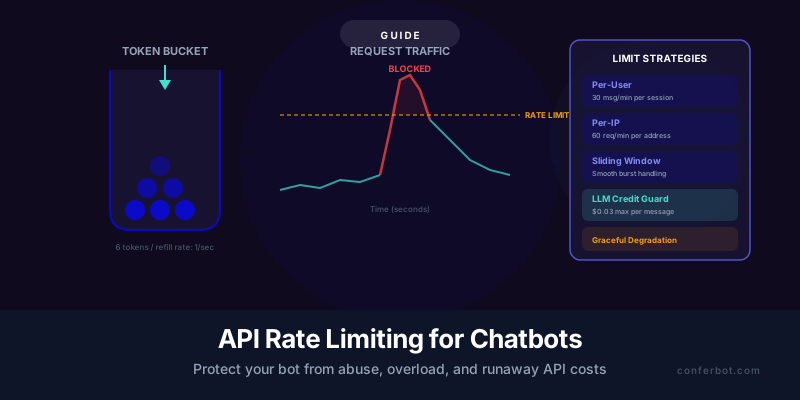
If the bot is not reading history at all and simply stops replying, rate limits are rarely the cause. Our guide to a Slack bot not responding covers Event Subscriptions, URL verification, scopes and membership. For other error strings, the Slack API error reference lists every common code with its fix, including not_in_channel and missing_scope, which often appear in the same debugging session. For pacing strategies across platforms, see API rate limiting for chatbots.
If you only need a bot that answers people in Slack
Many teams that run into this limit were only reading history so their bot could keep track of a conversation. A bot that replies to messages as they arrive does not need to read history at all, because each message reaches it as an event.
That is how a Slack bot built in Conferbot's no-code chatbot builder is connected: design the conversation in the visual builder, create a Slack app at api.slack.com, give it bot scopes such as chat:write and im:history, install it to your workspace and paste the xoxb- bot token into Conferbot. Then turn on Event Subscriptions with the URL Conferbot provides, and the bot answers in DMs. Setup details are on the Slack chatbot page.
Conferbot is one builder for every major chat platform: the same bot can run on Slack, Microsoft Teams, Discord, Telegram, WhatsApp, a website widget and more, and each channel has developer references like the ones linked above. The Free plan costs $0, needs no credit card and includes 600 conversations a month for two chatbots. Paid plans start at $19 a month.
Was this article helpful?
Build and deploy in 10 minutes. No coding needed.
Slack's 1-Request-per-Minute Rule FAQ
Everything you need to know about chatbots for slack's 1-request-per-minute rule.
About the Author
The Conferbot team writes about building, deploying, and improving AI chatbots.
View all articlesRelated Articles
From the reference shelf
Fact-checked reference pages and free tools for the platform this article covers.