
Why Telegram Is a Top Business Messaging Channel in 2026
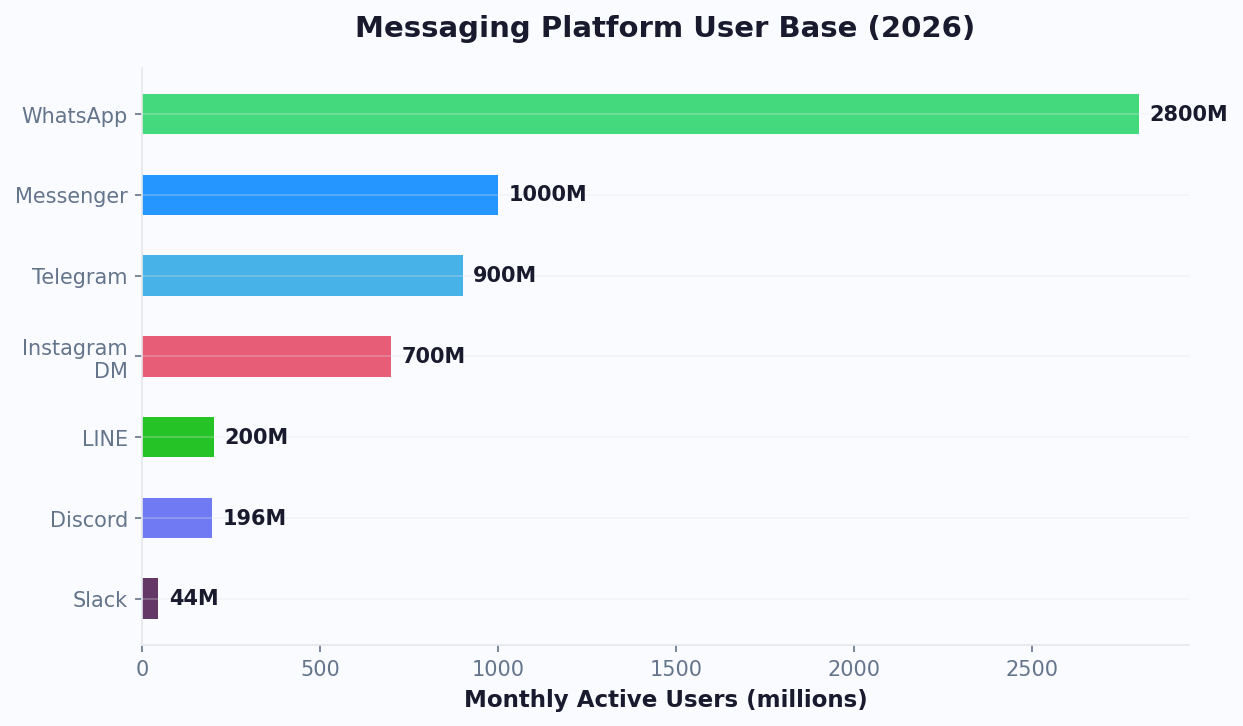
Telegram has evolved far beyond a privacy-focused messenger. With over 950 million monthly active users in 2026 according to Statista's messaging platform data, it is the fastest-growing messaging platform globally and one of the most business-friendly channels available. Unlike WhatsApp and Messenger, which restrict bot capabilities and charge per conversation, Telegram offers an open, free, and feature-rich bot ecosystem.
Telegram vs. Other Messaging Channels for Business
| Feature | Telegram | WhatsApp Business | Messenger | Slack |
|---|---|---|---|---|
| Bot API cost | Free | Per-conversation fees | Free (with limits) | Free (with limits) |
| Messaging windows | None | 24-hour window | 24-hour window | None |
| File sharing limit | 2 GB per file | 100 MB | 25 MB | 1 GB |
| Group size | 200,000 members | 1,024 members | 250 members | Varies by plan |
| Channel broadcasts | Unlimited subscribers | Status only | Not available | Not available |
| Payment API | Built-in | Limited regions | Limited regions | Not native |
| Web Apps | Full support | Not available | Webview only | App home |
| Bot approval required | No | Yes (BSP process) | Yes (app review) | Yes (for directory) |
Where Telegram Dominates
Telegram has the strongest user bases in:
- Eastern Europe and Central Asia: Russia, Ukraine, Kazakhstan, Uzbekistan (primary messaging app)
- Middle East: Iran, UAE, Saudi Arabia (significant market share)
- Southeast Asia: Indonesia, Malaysia, Philippines (growing rapidly)
- Latin America: Brazil, Argentina (secondary to WhatsApp but growing)
- Crypto and tech communities: Dominant platform worldwide for Web3, fintech, and developer communities
For businesses targeting these regions or tech-savvy audiences, Telegram is not optional. It is a primary customer engagement channel. The Telegram Bot API documentation provides comprehensive developer resources, though no-code platforms eliminate the need for direct API work.
Key Business Advantages
What makes Telegram uniquely powerful for business bots:
- Zero cost per message: No per-conversation charges from the platform, unlike WhatsApp where Meta charges per conversation
- No messaging restrictions: Bots can message users anytime without 24-hour windows or message template approvals
- Groups and channels: Bots operate in groups up to 200,000 members and channels with unlimited subscribers, enabling community-scale automation
- Inline Web Apps: Build full web experiences inside Telegram, from forms to dashboards to e-commerce storefronts
- Instant deployment: No approval process. Create a bot via BotFather and it is live in seconds
Setting Up Your Telegram Bot with BotFather (Step by Step)
Every Telegram bot starts with @BotFather, the official Telegram bot for creating and managing other bots. Here is the complete setup process.
Step 1: Create Your Bot
- Open Telegram on any device and search for @BotFather (verified with a blue checkmark)
- Start a conversation and send
/newbot - BotFather asks for a display name. Choose something professional and recognizable: "Acme Support" or "ShopBot by Acme"
- BotFather asks for a username. This must end in "bot" and be unique across Telegram: "AcmeSupportBot" or "acme_support_bot"
- BotFather returns your HTTP API token. This is a string like
6123456789:ABCDefGHIJKLMnopQRSTUvwxyz. Keep it secure, as anyone with this token can control your bot.
Step 2: Configure Bot Settings
Before connecting to a platform, configure essential settings via BotFather commands:
/setdescription— The text users see when they first open the bot (before clicking Start). Write a clear value proposition: "24/7 customer support, order tracking, and product recommendations for Acme customers."/setabouttext— Short bio that appears in the bot's profile. Max 120 characters./setuserpic— Upload your company logo or brand icon as the bot's profile picture./setcommands— Define the command menu that users see when they tap the "/" icon. Standard business bot commands:
start - Start a conversation
help - What can this bot do
order - Track your order
contact - Speak with a human
faq - Frequently asked questions
feedback - Leave feedback
Step 3: Connect to Conferbot
- Log into your Conferbot dashboard
- Navigate to Channels > Telegram
- Paste your Bot API token from BotFather
- Click Connect. Conferbot validates the token and sets up the webhook automatically
- Your bot is now connected. All messages sent to your Telegram bot will route through Conferbot's conversation engine
Step 4: Set Up Webhook vs. Polling
Telegram supports two methods for receiving updates:
| Method | How It Works | Best For |
|---|---|---|
| Webhook | Telegram sends updates to your server URL in real time | Production bots (Conferbot uses this) |
| Long Polling | Your server periodically asks Telegram for new updates | Local development and testing |
Conferbot handles webhook configuration automatically when you connect your bot token. No server setup or SSL certificate management required on your end.
Step 5: Test Your Connection
Open your bot in Telegram and send /start. If the connection is working correctly, you should see your Conferbot welcome flow trigger. If not, verify your token, check that the webhook is properly set (visible in Conferbot's channel settings), and ensure you have not accidentally set up polling on another server, which would conflict with the webhook.
Advanced BotFather Settings
/setjoingroups— Enable or disable whether your bot can be added to groups. Enable this if you plan to use group automation./setprivacy— Controls whether your bot receives all group messages or only commands/@mentions. For group moderation bots, disable privacy mode./setinline— Enable inline mode if you want users to summon your bot in any chat by typing @YourBotName./mybots— Manage all your bots, revoke tokens, transfer ownership, or delete bots.
10 High-Impact Telegram Bot Use Cases for Business
1. Customer Support Automation
The most common use case. A Telegram bot handles FAQs, troubleshooting, order inquiries, and ticket creation. Businesses using support bots on Telegram - similar to those described in our chatbot vs live chat comparison - report 50-65% ticket deflection and $3-8 saved per interaction compared to human-handled support.
2. Order Tracking and E-Commerce
Integrate with your order management system to let customers check order status, track shipments, initiate returns, and browse product catalogs, all within Telegram. Send proactive shipping updates via bot messages (no 24-hour window restrictions). E-commerce bots on Telegram see fewer "Where's my order?" support tickets.
3. Appointment Booking
Service businesses (salons, clinics, consultants) use Telegram bots for appointment scheduling. The bot shows available slots via inline keyboards, collects client details, sends confirmation messages, and delivers reminders 24 hours before the appointment. No-show rates drop with automated reminders.
4. Lead Qualification and Sales
B2B companies deploy Telegram bots to qualify inbound leads. The bot asks qualifying questions (company size, budget range, timeline), scores the lead, and either books a meeting with sales or delivers relevant content. Lead generation bots on Telegram convert at 15-25%, far above web form averages.
5. Community Management
For businesses running Telegram groups (common in crypto, gaming, education, and SaaS), bots handle moderation, onboarding new members, answering repetitive questions, and posting scheduled content. A community bot can manage groups of 10,000+ members that would otherwise require a dedicated community manager.
6. Content Distribution
Use a Telegram channel with a bot to distribute content to subscribers: blog posts, product updates, promotional offers, industry news. Channel bots achieve high open rates, making Telegram one of the highest-engagement content distribution channels available, far exceeding email and social media.
7. Surveys and Feedback Collection
Conversational surveys via Telegram bots achieve higher response rates than email surveys. The bot asks questions one at a time using inline keyboards and free-text responses, making it quick and natural for users. Feedback bots are particularly effective for post-purchase and post-support surveys.
8. Internal Team Automation
Telegram bots are not just for customers. Internal bots can handle IT help desk requests, HR queries (leave balance, policy lookups), project status updates, and daily standups. Teams using internal Telegram bots report 30% reduction in internal support tickets.
9. Payment Collection and Invoicing
Telegram's built-in Payments API supports in-chat transactions via Stripe, YooKassa, and other providers. Bots can generate invoices, process payments, and send receipts without the customer leaving Telegram. Especially powerful for freelancers, small businesses, and subscription services.
10. Educational Bots and Course Delivery
Educational institutions and course creators use Telegram bots to deliver lessons, quizzes, progress tracking, and certificates. The bot sends daily learning content, tests comprehension via inline quizzes, and tracks completion. Onboarding and training bots on Telegram see 80%+ completion rates compared to 15-30% for email-based courses.
Telegram Groups and Channels: Bot Automation Strategies
One of Telegram's unique advantages over other platforms is its powerful group and channel system. Bots can operate in groups with up to 200,000 members and channels with unlimited subscribers, enabling automation at a scale that other messaging platforms cannot match.
Groups vs. Channels: When to Use Each
| Feature | Telegram Group | Telegram Channel |
|---|---|---|
| Communication | Two-way (all members can chat) | One-way (only admins post) |
| Max members | 200,000 | Unlimited |
| Best for | Community, support, discussion | Announcements, content, updates |
| Bot role | Moderation, FAQ, ticketing | Scheduled posts, analytics |
| Member visibility | Members can see each other | Members are anonymous |
Group Bot Automation Playbook
Onboarding new members:
- Welcome message triggered when a new member joins, with rules summary and key links
- Anti-spam verification: require new members to tap a button or answer a question before they can post (blocks 95% of spam bots)
- Role assignment: tag members based on their onboarding responses for targeted communication
Moderation automation:
- Auto-delete messages containing banned words, links, or spam patterns
- Rate limiting: restrict members to X messages per minute to prevent flooding
- Report system: members can report violations by replying with a command, and the bot flags the message for admin review
- Auto-ban repeat offenders after X warnings
FAQ and support in groups:
- When members ask common questions, the bot detects the intent and replies with the answer (or a link to the detailed answer)
- The bot can respond to specific keywords or @mentions, keeping the group clean while providing instant help
- For complex questions, the bot creates a private conversation to handle the issue outside the group
Channel Bot Automation Playbook
Content scheduling:
- Schedule posts for optimal engagement times (typically 9-11 AM and 6-8 PM in your audience's timezone)
- Auto-format posts with consistent branding: header image, text, and call-to-action buttons
- Cross-post content from your blog, social media, or product updates automatically
Engagement features:
- Add reaction buttons to posts to gauge audience sentiment
- Create polls and quizzes that drive interaction
- Link channel posts to a discussion group for comments (Telegram's built-in feature)
Analytics and growth:
- Track post views, forwards, and reactions to identify what content resonates
- Monitor subscriber growth and churn
- A/B test post formats and timing
For businesses managing both channels and groups, Conferbot's multi-channel deployment lets you control all your Telegram bots from a single dashboard, with consistent conversation flows across private chats, groups, and channel-linked bots. This approach aligns with the omnichannel chatbot strategy that top-performing businesses follow for unified customer experiences.
Building Advanced Telegram Bot Flows with No Code
Telegram's rich feature set enables complex automation flows. Here is how to build advanced business workflows using Conferbot's visual builder without writing a single line of code.
Flow 1: Multi-Step Order Tracking
This flow connects your Telegram bot to your order management system:
- User sends
/orderor taps "Track Order" on the inline keyboard - Bot asks for order number (validates format with regex)
- Bot queries your API via Conferbot's webhook integration
- If order found: displays status, estimated delivery, and tracking link via a structured card
- If not found: offers to search by email, connect with support, or try again
- Follow-up: bot proactively sends a message when the order status changes (shipped, out for delivery, delivered)
Flow 2: Conversational Product Catalog
- User browses categories via inline keyboard buttons
- Bot displays products as carousel-style messages with image, name, price, and "Buy" button
- "Buy" button opens a Telegram Web App with your checkout page pre-filled with the product
- After purchase, bot sends order confirmation and adds the customer to the post-purchase follow-up sequence
Flow 3: Intelligent FAQ with AI Fallback
- User asks a question in free text
- Conferbot's AI knowledge base searches for the best matching answer
- If confidence is high: delivers the answer with inline keyboard options for related topics
- If confidence is low: offers the top 3 possible matches as buttons ("Did you mean...?")
- If no match: creates a support ticket and notifies the team via live chat
Flow 4: Appointment Booking with Calendar Sync
- User selects service type via inline keyboard
- Bot shows available dates (pulled from Conferbot calendar integration)
- User selects date, then time slot
- Bot collects name and phone number
- Confirmation message with appointment details and an "Add to Calendar" link
- Automated reminder 24 hours and 1 hour before the appointment
Flow 5: Lead Qualification Pipeline
- User starts conversation from an ad or referral link (
t.me/YourBot?start=campaign_spring2026) - Bot identifies the campaign from the deep link parameter
- Qualification sequence: company size, industry, current solution, budget range, timeline
- Lead scored based on responses (A/B/C/D classification)
- A-leads: instant meeting booking with sales rep
- B-leads: relevant case study + follow-up in 48 hours
- C/D-leads: educational content sequence + monthly check-in
- All leads synced to CRM via integration hub
Telegram-Specific UX Best Practices
- Use inline keyboards over custom keyboards: Inline keyboards attach to specific messages and keep the chat clean. Custom keyboards persist and can feel intrusive.
- Keep button labels short: Maximum 2-3 words per button. Long labels truncate on mobile.
- Include a "Back" button: Every menu should have a way to go back to the previous step or main menu.
- Use message editing: Instead of sending new messages for each step, edit the existing message to update the inline keyboard. This keeps conversations compact and navigable.
- Support both buttons and free text: Not all users tap buttons. Ensure your bot handles typed responses ("yes," "track order," "help") alongside button interactions.
Measuring Telegram Bot Performance: Key Metrics
Deploying a Telegram bot is just the beginning. Measuring and optimizing its performance determines whether it becomes a business asset or an abandoned experiment.
Essential Telegram Bot Metrics
| Metric | What It Measures | Benchmark |
|---|---|---|
| User acquisition rate | New users starting the bot per week | Varies (track trend) |
| Activation rate | Users who complete the first meaningful action | 60-80% |
| Retention rate (7-day) | Users who return within 7 days | 25-40% |
| Message response rate | Bot messages that receive a user reply | 50-70% |
| Flow completion rate | Users who complete a full conversation flow | 55-75% |
| Resolution rate | Support queries resolved without human handoff | 50-70% |
| Block rate | Users who block or stop the bot | Under 5% monthly |
| Conversion rate | Users who complete the desired action (purchase, booking, signup) | 10-25% |
Tracking with Conferbot Analytics
Conferbot's analytics dashboard provides all of these metrics out of the box for your Telegram bot:
- Conversation analytics: Volume trends, peak hours, average conversation length
- Flow analytics: Step-by-step drop-off rates for every conversation flow
- User analytics: New vs. returning users, retention cohorts, geographic distribution
- Resolution analytics: Self-service rate, escalation rate, and unresolved topics
Optimization Strategies Based on Metrics
Low activation rate (under 60%): Your welcome message is not compelling enough. A/B test different opening messages, value propositions, and menu structures. The first 3 messages determine whether a user continues or bounces.
Low retention rate (under 25%): Users see no reason to return. Add proactive value: order updates, scheduled tips, weekly summaries, or loyalty rewards. The best Telegram bots create habits through recurring value delivery.
High block rate: You are messaging too frequently or sending irrelevant content. Segment your users and personalize message frequency. Always provide an easy way to adjust notification preferences within the bot.
Low flow completion (under 55%): Your flows are too long or confusing. Analyze step-by-step drop-offs to identify where users abandon. Reduce steps, simplify choices, and add a "Skip" option for non-essential questions.
Telegram-Specific Analytics Tips
- Use deep links (
t.me/YourBot?start=source) to track which acquisition channels drive the most valuable users - Monitor group engagement separately from private chat metrics as they have fundamentally different benchmarks
- Track inline keyboard click rates to identify which options users prefer and which they ignore
- Compare weekend vs. weekday performance, as many Telegram audiences show dramatically different usage patterns
7 Common Mistakes When Launching a Telegram Business Bot
After analyzing hundreds of Telegram bot deployments, these are the mistakes that most frequently undermine results and how to avoid them.
Mistake 1: No Welcome Flow Strategy
Many businesses deploy a bot without a clear onboarding experience. When a user hits /start and receives only "How can I help you?" most users leave immediately. Create a structured welcome flow that explains what the bot does, shows quick-action buttons, and delivers immediate value within the first three messages.
Mistake 2: Ignoring Group Privacy Settings
Deploying a bot to groups without configuring BotFather's privacy mode correctly means the bot either misses messages it should respond to or spams responses to every message in the group. Test privacy settings in a small group before deploying to large communities.
Mistake 3: No Analytics from Day One
Launching without tracking means you cannot identify which flows work, where users drop off, or what questions remain unanswered. Connect your bot to Conferbot analytics immediately to capture data from the first conversation.
Mistake 4: Over-Messaging Subscribers
Telegram has no messaging frequency limits like WhatsApp, which tempts businesses into over-messaging. But users will block bots that send too frequently. Limit proactive messages to 2-4 per week and always provide a clear way to adjust notification preferences.
Mistake 5: No Fallback to Human Support
When the bot cannot help and there is no escalation path, users leave frustrated. Always include a human handoff option that routes complex queries to your support team with full context.
Mistake 6: Not Localizing for Target Markets
Telegram's strongest markets are in regions where English is not the primary language. If you target Russian, Arabic, or Indonesian audiences, bot responses must be in the local language. Use multilingual chatbot capabilities to serve each audience natively.
Mistake 7: Treating Telegram Like Other Channels
Telegram users expect faster, more informal interactions than email or website chat. Bot responses should be concise, use inline keyboards rather than long text menus, and leverage Telegram-specific features like message editing and callback queries.
Telegram Bot Security, Privacy, and Compliance
Running a business bot on Telegram comes with security and compliance responsibilities. Here is what you need to know to operate safely and legally.
Telegram's Security Architecture
Telegram provides several security features relevant to bot operators:
- MTProto encryption: All bot-to-Telegram communications are encrypted in transit. Note that bot conversations are not end-to-end encrypted (Telegram's E2E encryption only applies to Secret Chats between humans). Bot messages are stored on Telegram's servers.
- Token security: Your Bot API token grants full control over the bot. Store it securely (environment variables, secrets manager) and rotate it immediately if compromised (via BotFather's
/revokecommand). - Webhook security: Use HTTPS for your webhook URL and verify that incoming requests are genuinely from Telegram (check the secret token header). Conferbot handles this automatically.
GDPR and Privacy Compliance
If you serve European users, your Telegram bot must comply with GDPR. Key requirements:
- Consent: Users must actively opt in to data collection. The
/startcommand is considered implicit consent for the bot interaction, but you need explicit consent for marketing messages, data storage, and third-party sharing. - Data disclosure: When your bot collects personal data, inform users what data you collect, how you use it, and how long you store it. Include a link to your privacy policy in the bot's description.
- Right to deletion: Users must be able to request deletion of their data. Implement a
/deletedatacommand or direct users to a data deletion request process. - Data portability: On request, provide users with their conversation data in a machine-readable format.
For comprehensive GDPR guidance, see our chatbot GDPR compliance guide.
Industry-Specific Compliance
| Industry | Key Regulation | Bot Implications |
|---|---|---|
| Healthcare | HIPAA (US), GDPR (EU) | Never transmit PHI through bot messages. Use for scheduling and general inquiries only. |
| Finance | PCI-DSS, SOX, GDPR | Never collect credit card numbers in chat. Use Telegram's Payments API for transactions. |
| Education | FERPA (US), GDPR (EU) | Do not share student records via bot messages. Use for general communication only. |
| E-commerce | GDPR, CCPA, PCI-DSS | Ensure payment processing uses approved providers via Telegram's Payments API. |
Bot Security Best Practices
- Rotate your API token quarterly via BotFather. Update the token in Conferbot immediately after rotation.
- Validate all user input. Never pass user-provided data directly to databases or APIs without sanitization.
- Limit admin commands. If your bot has admin functions, restrict them to specific Telegram user IDs.
- Monitor for abuse. Watch for unusual patterns: mass message sending, automated scripting, or spam attacks against your bot.
- Implement rate limiting. Prevent individual users from overwhelming your bot with rapid-fire messages.
- Log conversations securely. Store conversation logs in encrypted databases with access controls. Conferbot's platform handles this with enterprise-grade security.
Taking security and compliance seriously from day one protects your business and builds trust with users who share personal information through your bot. For a broader look at privacy compliance across all messaging cchannels, consumer trust and messaging channel preferences vary widely by market.
Telegram Bot Security Checklist
Before launching your Telegram bot in production, complete this security checklist to protect both your business and your users:
- Token security: Store your Bot API token in environment variables or a secrets manager, never in client-side code or version control repositories. If a token is compromised, revoke it immediately via BotFather and generate a new one.
- Input validation: Sanitize all user inputs before processing. Malicious users may attempt to inject commands, URLs, or scripts through chat messages.
- Rate limiting: Implement rate limits to prevent spam and abuse. Telegram allows bots to send up to 30 messages per second to different users, but individual users should be limited to prevent flooding.
- Admin access controls: Restrict bot management commands to verified team members only. Use role-based access within your chatbot platform to separate bot editors from bot administrators.
- Data retention policy: Define how long conversation data is stored and implement automatic purging for data that exceeds your retention period. Document this in your privacy policy and make it accessible through the bot itself.
Was this article helpful?
Build and deploy in 10 minutes. No coding needed.
Telegram Bot for Business FAQ
Everything you need to know about chatbots for telegram bot for business.
About the Author
The Conferbot team writes about building, deploying, and improving AI chatbots.
View all articlesRelated Articles

From the reference shelf
Fact-checked reference pages and free tools for the platform this article covers.